radio controls HONDA ODYSSEY 1995 Owners Manual
[x] Cancel search | Manufacturer: HONDA, Model Year: 1995, Model line: ODYSSEY, Model: HONDA ODYSSEY 1995Pages: 240, PDF Size: 2.44 MB
Page 75 of 240
Comfort and Convenience Features
The heating and air conditioning
system in your car provides a com-
fortable driving environment in all
weather conditions.
The audio sound system is very
versatile. To get the most from this system, take the time to learn what
the controls do.
Some models have an anti-theft
audio system that requires a code
number to enable it. Heating and Cooling........................ 76
What Each Control Does............ 78
How to Use the System............... 79
Controlling Air Flow
Direction............................... 79
Ventilation................................ 79
To Cool with A/C.................... 80
To Heat..................................... 80
To Heat and Dehumidify with Air Conditioning.......... 81
To Defog and Defrost............. 82
To Turn Everything Off ............. 82
Rear A/C Unit.............................. 83
Audio System (US EX and
Canadian EX).......................... 84
AM/FM/Cassette Stereo Audio System...................................... 84
Operating the Radio.................... 85
Finding the Radio Station........... 85
Presetting..................................... 86
Adjusting the Sound.................... 87
Radio Frequencies....................... 88Operating the Cassette Player... 89
Cassette Search Functions......... 90
Caring for Cassettes.................... 91 Audio System (US EX).................... 92
AM/FM/Cassette Stereo Audio
System....................................... 92
Operating the Radio.................... 93
Finding the Radio Station........... 93
Presetting..................................... 94
Adjusting the Sound.................... 96 Radio Frequencies....................... 97Operating the Cassette Player... 98
Cassette Search Functions......... 99
Caring for Cassettes.................. 100
Operating the CD Player.......... 101
CD Error Indications................. 104
Caring for the Cassette Player..... 105
Theft Protection............................. 106
Comfort and Convenience FeaturesProCarManuals.comMain Menu s t
Page 87 of 240

Audio System
Adjusting the Sound Use the Balance and Fader controls
to adjust the sound "direction". The
Balance control moves it left-to-right.
The Fader control moves it front-to-
back.
To use either control, push on the knob to get it to pop out. Adjust the
front-to-back sound to your liking
with the outside ring.
Adjust side-to-side sound balance with the knob. Push the knob back in
when you are done. The illumination for the radio con-
trols comes on with the instrument
panel lights, even if the radio is off.
You can use the Balance control to turn off the radio panel illumination even with the radio on. Push the
control knob so it pops out, then pull
it out slightly further. Check this
control if the control panel lights do
not come on with the instrument
panel lights. Use the Bass and Treble controls to
adjust the tone quality to your liking.
Push on the knob to get the controls
to pop out. Adjust the bass level with
the outer ring and the treble level
with the knob. When finished, push the knobs back in so there is lesschance of accidentally changing your
settings.
Comfort and Convenience Features
BASS
CONTROL
TREBLE
CONTROL
FADER
CONTROL BALANCE
CONTROLProCarManuals.comMain Menu Table of Contents s t
Page 101 of 240
Audio System
Operating the CD Player
(Optional)
A Compact Disc changer is available for your car. It holds up to six discs,
providing several hours of continu-ous programming. You operate the
CD changer with the same controls
used for the radio and cassette
player.
Load the desired CD's in the
magazine and load the magazine in
the changer according to the
instructions that came with the unit.
Your dealer has Genuine Honda accessory in-dash CD players
available that are operated by the
radio controls. If you have one of
these units, use the directions in this section (except for multi-disc
selection) to operate it. To operate the CD changer, the
ignition key must be in ACCESSORY (I) or ON (II). If you are listening to
a cassette tape, eject it before
playing a CD.
Press the CD button until "CD" appears on the display. Once in the
CD mode, the system will start to
play the first track of the first disc in the magazine.
When that disc ends, the next disc in the magazine is loaded and played.
After disc 6 has completed, the system will return to disc 1. To make
your own disc selection, push one of the six preset buttons. Your selection
will appear in the display and start
playing.
U.S. EX model
You can use the TUNE/SEEK switch while a disc is playing to
select passages and change tracks.
To move rapidly forward within a track, push up and hold the TUNE/SEEK switch. Push down and hold
the switch to move rapidly backward
within a track. You will hear a beep a
half second after you push the switch up or down. Keep pushing the
switch until you think the track has
advanced or returned to the desired
position. The disc will start playing
when you release the switch.
If you push the TUNE/SEEK switch
up and release it before you hear a
beep, the system will skip forward to the beginning of the next track on
that CD.
It will skip backward to the begin-
ning of the current track if you push
the switch down and release it.
Comfort and Convenience Features
CONTINUEDProCarManuals.comMain Menu Table of Contents s t
Page 163 of 240
Battery
If you need to connect the battery to
a charger, disconnect both cables to
prevent damage to the car's electri-
cal system.
On the U.S. EX model
If your car's battery is disconnected
or goes dead, the audio system will
disable itself. The next time you turn
on the radio you will see "Code" in
the frequency display. Use the
Preset buttons to enter the five-digit
code (see page 106).
Charging the battery with the cables
connected can seriously damage your
car's electronic controls. Detach the
battery cables before connecting the
battery to a charger.
Maintenance
The battery gives off explosive
hydrogen gas during normal
operation.
A spark or flame can cause the battery to explode with enough
force to kill or seriously hurt you.
Wear protective clothing and a
face shield, or have a skilled mechanic do the battery
maintenance.
NOTICEProCarManuals.comMain Menu Table of Contents s t
Page 204 of 240
Charging System Indication
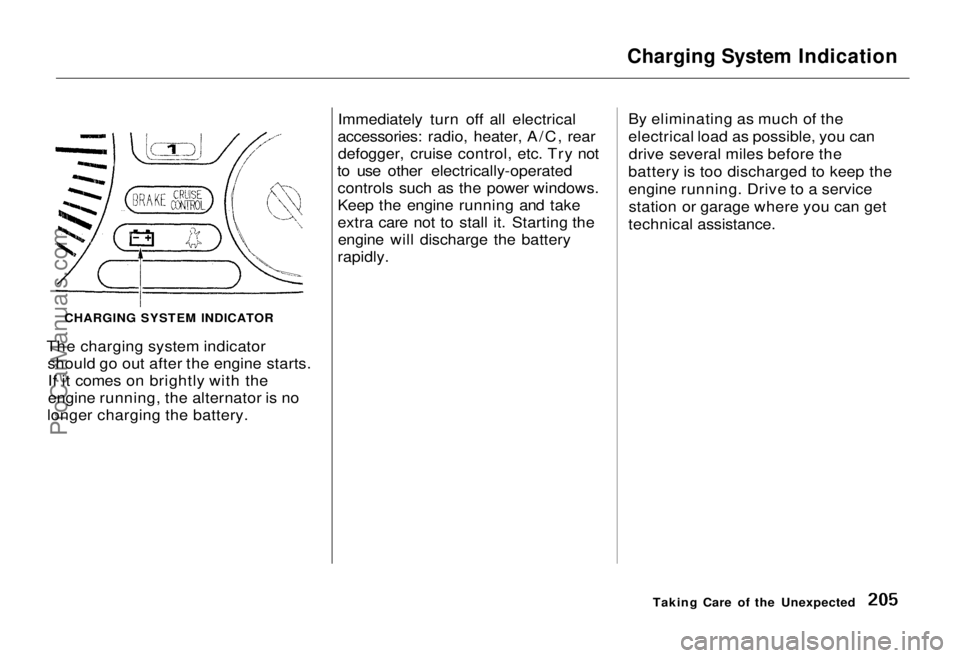
The charging system indicator should go out after the engine starts.If it comes on brightly with the
engine running, the alternator is no
longer charging the battery. Immediately turn off all electrical
accessories: radio, heater, A/C, rear defogger, cruise control, etc. Try not
to use other electrically-operated controls such as the power windows.
Keep the engine running and take
extra care not to stall it. Starting theengine will discharge the battery
rapidly. By eliminating as much of the
electrical load as possible, you can
drive several miles before the
battery is too discharged to keep the
engine running. Drive to a service station or garage where you can get
technical assistance.
Taking Care of the Unexpected
CHARGING SYSTEM INDICATORProCarManuals.comMain Menu Table of Contents s t