turn signal HONDA ODYSSEY 1995 Owners Manual
[x] Cancel search | Manufacturer: HONDA, Model Year: 1995, Model line: ODYSSEY, Model: HONDA ODYSSEY 1995Pages: 240, PDF Size: 2.44 MB
Page 33 of 240
Instruments and Controls
This section gives information about the controls and displays thatcontribute to the daily operation of
your Honda. All the essential controls are within easy reach.
Control Locations............................ 34
Indicator Lights................................ 35
Gauges............................................. 39
Speedometer............................... 39
Trip Meter................................... 39
Odometer..................................... 39
Temperature Gauge................... 40
Fuel Gauge.................................. 40
Maintenance Required
Indicator................................... 40
Controls Near the Steering Wheel...................................... 41
Headlights...................................
42
Daytime Running
Lights............ 42
Instrument Panel Brightness.... 43
Turn Signals................................. 43
Windshield Wipers...................... 44
Windshield Washers................... 44 Rear Window Wiper and Washer...................................... 45
Hazard Warning.......................... 45
Rear Window Defogger.............. 45
Steering Wheel Adjustment....... 46
Steering Wheel Controls ................ 48 Cruise Control.............................. 48
Horn............................................. 51
Keys and Locks................................ 51
Keys............................................... 51
Ignition Switch............................. 52
Power Door Locks....................... 53Remote Transmitter.................... 54
Childproof Door Locks............... 54
Tailgate......................................... 55 Glove Box..................................... 55
Seats................................................. 56
Passenger Seating...................... 56
Seat Adjustments........................ 56
Driver's Seat Power HeightAdjustment.............................. 57
Head Restraints.......................... 58
Third Seat Access....................... 58 Removing the Second Seats
in the Six-Passenger Model.... 59
Folding the Second Seats in the Seven-Passenger
Model................................... 60
Reclining the Second Seat.......... 61
Folding the Third Seat in All Models...........................
62
Power Windows.............................. .
64
Sunroof............................................. 65
Mirrors............................................. 66
Adjusting the Power Mirrors.....
67
Parking Brake.................................
68
Digital Clock..................................... 68
Beverage Holder.............................. 69 Dashboard Compartment............... 70
Center Poket.................................... 71
Coin Box........................................... 71
Vanity Mirror................................... 71
Cigarette Lighter............................. 72
Ashtrays........................................... 72
Interior Lights.................................. 73
Ceiling Lights.............................. 73
Spotlights..................................... 73
Tailgate Light............................... 74 Courtesy Lights........................... 74
Instruments and ControlsProCarManuals.comMain Menu s t
Page 38 of 240
Indicator Lights
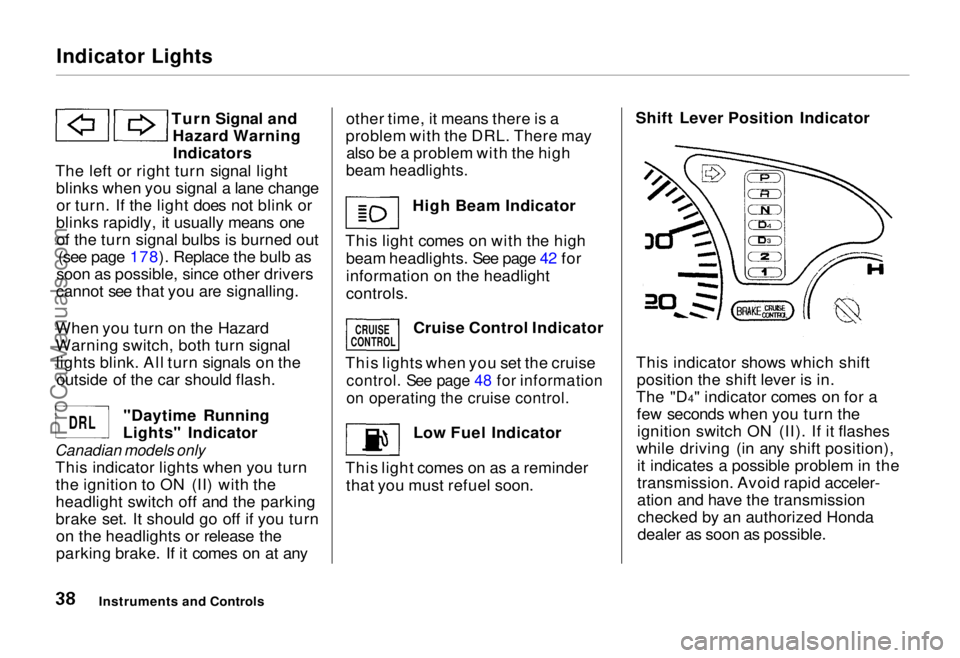
Turn Signal andHazard WarningIndicators
The left or right turn signal light blinks when you signal a lane changeor turn. If the light does not blink or
blinks rapidly, it usually means one of the turn signal bulbs is burned out (see page 178). Replace the bulb as
soon as possible, since other drivers
cannot see that you are signalling.
When you turn on the Hazard
Warning switch, both turn signal lights blink. All turn signals on theoutside of the car should flash.
"Daytime Running
Lights" Indicator
Canadian models only
This indicator lights when you turnthe ignition to ON (II) with the
headlight switch off and the parking
brake set. It should go off if you turnon the headlights or release the
parking brake. If it comes on at any other time, it means there is a
problem with the DRL. There may also be a problem with the high
beam headlights.
High Beam Indicator
This light comes on with the high beam headlights. See page 42 for
information on the headlight
controls.
Cruise Control Indicator
This lights when you set the cruise
control. See page 48 for information
on operating the cruise control.
Low Fuel Indicator
This light comes on as a reminder that you must refuel soon. Shift Lever Position Indicator
This indicator shows which shift position the shift lever is in.
The "D4" indicator comes on for a few seconds when you turn theignition switch ON (II). If it flashes
while driving (in any shift position), it indicates a possible problem in the
transmission. Avoid rapid acceler-
ation and have the transmissionchecked by an authorized Honda
dealer as soon as possible.
Instruments and Controls
CRUISE
CONTROL
DRL
ProCarManuals.comMain Menu Table of Contents s t
Page 41 of 240
Controls Near the Steering Wheel
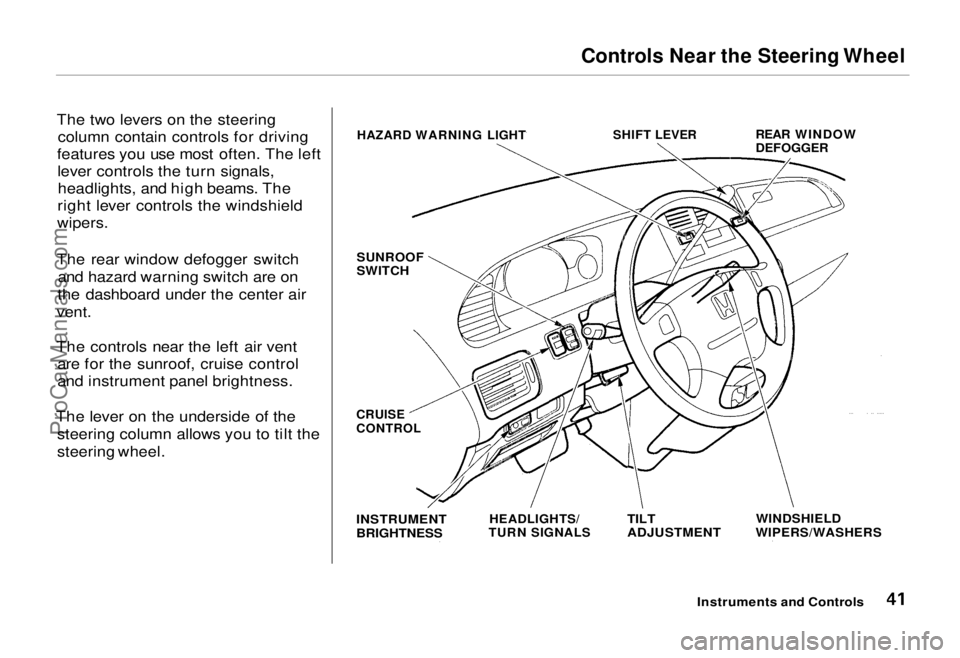
The two levers on the steering column contain controls for driving
features you use most often. The left lever controls the turn signals,headlights, and high beams. The
right lever controls the windshield
wipers.
The rear window defogger switch and hazard warning switch are on
the dashboard under the center air
vent.
The controls near the left air vent are for the sunroof, cruise control
and instrument panel brightness.
The lever on the underside of the steering column allows you to tilt the
steering wheel.
Instruments and Controls
HAZARD WARNING LIGHT
SHIFT LEVER
REAR WINDOW
DEFOGGER
SUNROOF
SWITCH
WINDSHIELD
WIPERS/WASHERS
TILT
ADJUSTMENT
HEADLIGHTS/
TURN SIGNALS
INSTRUMENT
BRIGHTNESS
CRUISE
CONTROLProCarManuals.comMain Menu Table of Contents s t
Page 42 of 240
Controls Near the Steering Wheel
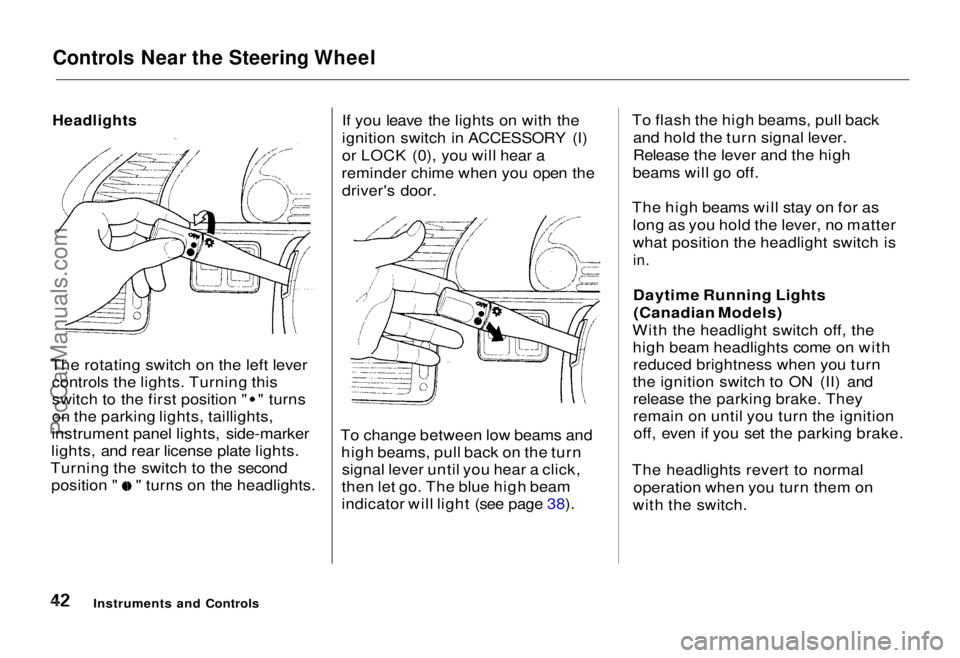
The rotating switch on the left lever controls the lights. Turning this switch to the first position " " turns
on the parking lights, taillights,
instrument panel lights, side-marker
lights, and rear license plate lights.
Turning the switch to the second position " " turns on the headlights. If you leave the lights on with the
ignition switch in ACCESSORY (I)
or LOCK (0), you will hear a
reminder chime when you open the driver's door.
To change between low beams and high beams, pull back on the turnsignal lever until you hear a click,
then let go. The blue high beam
indicator will light (see page 38). To flash the high beams, pull back
and hold the turn signal lever.
Release the lever and the high
beams will go off.
The high beams will stay on for as long as you hold the lever, no matter
what position the headlight switch is
in.
Daytime Running Lights(Canadian Models)
With the headlight switch off, the high beam headlights come on withreduced brightness when you turn
the ignition switch to ON (II) and release the parking brake. They
remain on until you turn the ignitionoff, even if you set the parking brake.
The headlights revert to normal operation when you turn them on
with the switch.
Instruments and Controls
HeadlightsProCarManuals.comMain Menu Table of Contents s t
Page 43 of 240
Controls Near the Steering Wheel
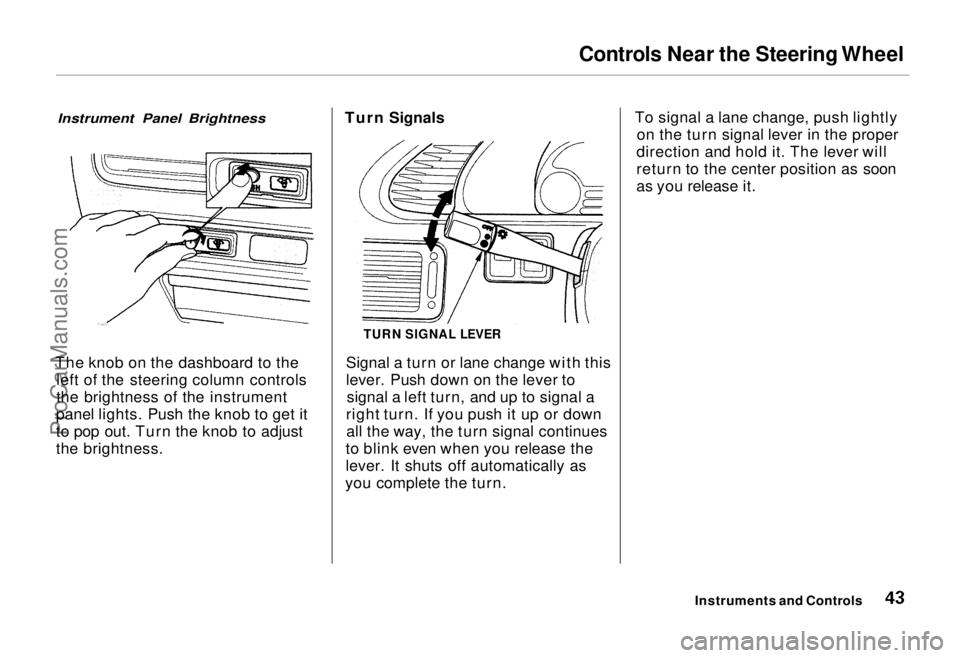
Instrument Panel Brightness
The knob on the dashboard to the left of the steering column controls
the brightness of the instrument
panel lights. Push the knob to get it
to pop out. Turn the knob to adjust
the brightness. Turn Signals
Signal a turn or lane change with this
lever. Push down on the lever tosignal a left turn, and up to signal a
right turn. If you push it up or down all the way, the turn signal continues
to blink even when you release the
lever. It shuts off automatically as
you complete the turn. To signal a lane change, push lightly
on the turn signal lever in the proper
direction and hold it. The lever will
return to the center position as soon
as you release it.
Instruments and Controls
TURN SIGNAL LEVERProCarManuals.comMain Menu Table of Contents s t
Page 45 of 240
Controls Near the Steering Wheel
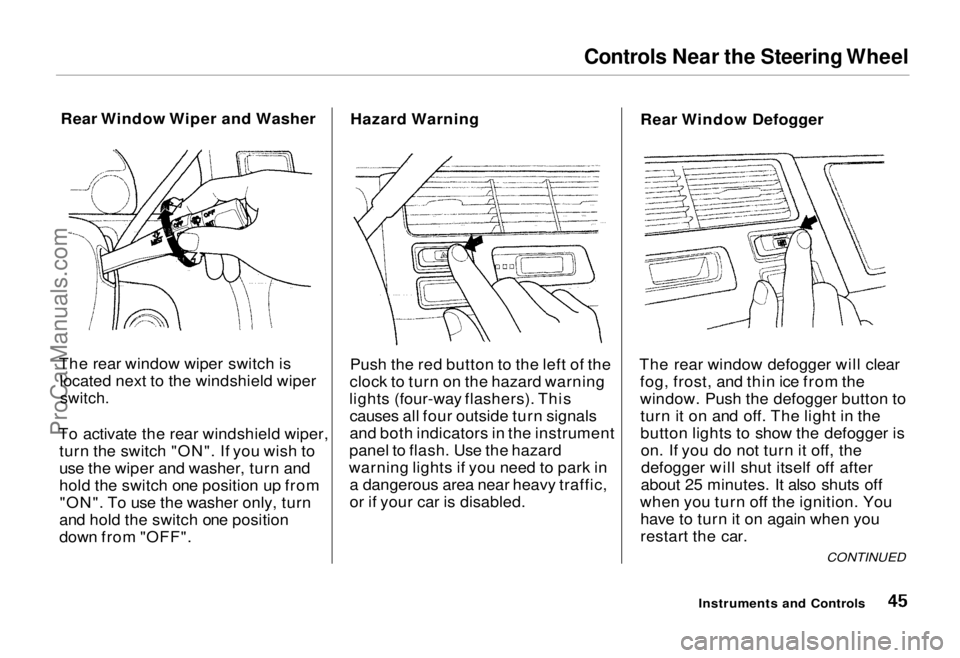
Rear Window Wiper and Washer
The rear window wiper switch is located next to the windshield wiper
switch.
To activate the rear windshield wiper, turn the switch "ON". If you wish to
use the wiper and washer, turn and
hold the switch one position up from"ON". To use the washer only, turn
and hold the switch one position
down from "OFF". Hazard Warning
Push the red button to the left of the
clock to turn on the hazard warning
lights (four-way flashers). This causes all four outside turn signals
and both indicators in the instrument
panel to flash. Use the hazard
warning lights if you need to park in a dangerous area near heavy traffic,
or if your car is disabled. Rear Window Defogger
The rear window defogger will clear fog, frost, and thin ice from the
window. Push the defogger button toturn it on and off. The light in the
button lights to show the defogger ison. If you do not turn it off, thedefogger will shut itself off after
about 25 minutes. It also shuts off
when you turn off the ignition. You have to turn it on again when you
restart the car.
Instruments and Controls
CONTINUEDProCarManuals.comMain Menu Table of Contents s t
Page 93 of 240
Audio System
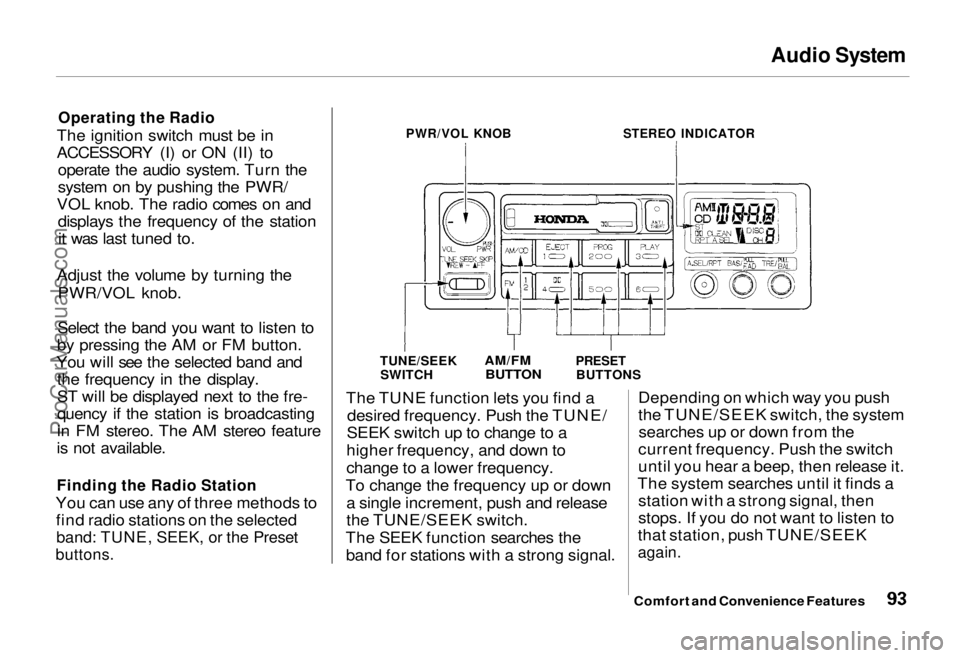
Operating the Radio
The ignition switch must be in
ACCESSORY (I) or ON (II) to operate the audio system. Turn the
system on by pushing the PWR/
VOL knob. The radio comes on and displays the frequency of the stationit was last tuned to.
Adjust the volume by turning the PWR/VOL knob.
Select the band you want to listen to
by pressing the AM or FM button.
You will see the selected band and the frequency in the display.
ST will be displayed next to the fre-
quency if the station is broadcasting
in FM stereo. The AM stereo feature
is not available.
Finding the Radio Station
You can use any of three methods to find radio stations on the selected
band: TUNE, SEEK, or the Preset
buttons.
PWR/VOL KNOB
STEREO INDICATOR
TUNE/SEEK SWITCH
AM/FM
BUTTON
PRESET
BUTTONS
The TUNE function lets you find a desired frequency. Push the TUNE/
SEEK switch up to change to a
higher frequency, and down to
change to a lower frequency.
To change the frequency up or down a single increment, push and release
the TUNE/SEEK switch.
The SEEK function searches the band for stations with a strong signal. Depending on which way you push
the TUNE/SEEK switch, the system
searches up or down from the
current frequency. Push the switch
until you hear a beep, then release it.
The system searches until it finds a station with a strong signal, then
stops. If you do not want to listen to
that station, push TUNE/SEEK
again.
Comfort and Convenience FeaturesProCarManuals.comMain Menu Table of Contents s t
Page 131 of 240
Towing a Trailer
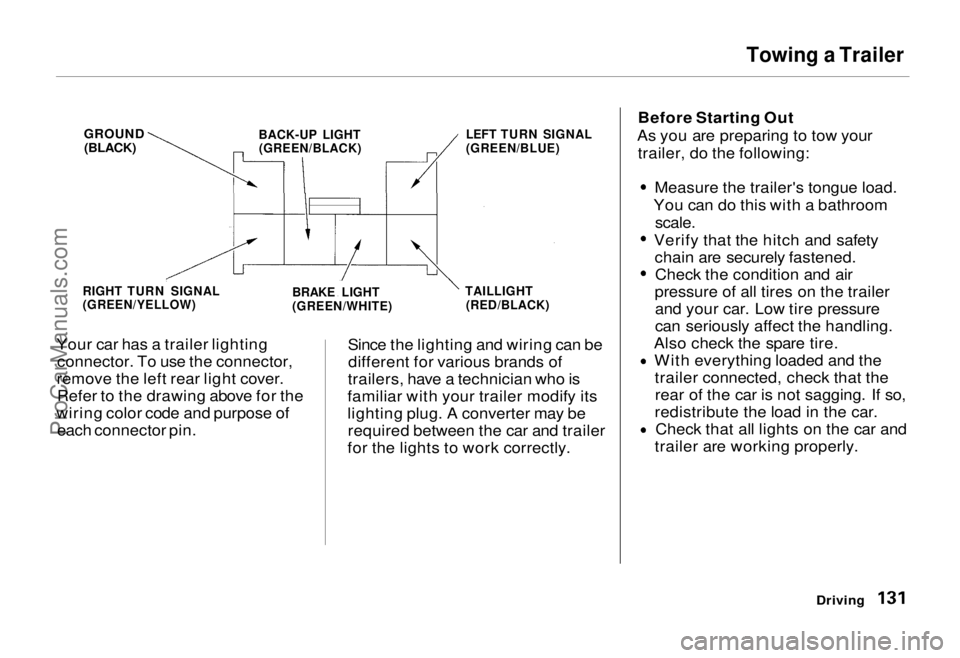
Your car has a trailer lighting connector. To use the connector,
remove the left rear light cover. Refer to the drawing above for the
wiring color code and purpose of each connector pin. Since the lighting and wiring can be
different for various brands of
trailers, have a technician who is
familiar with your trailer modify its
lighting plug. A converter may be required between the car and trailer
for the lights to work correctly. Before Starting Out
As you are preparing to tow your trailer, do the following:
Measure the trailer's tongue load.
You can do this with a bathroom
scale.
Verify that the hitch and safety chain are securely fastened.Check the condition and air
pressure of all tires on the trailer and your car. Low tire pressure
can seriously affect the handling.
Also check the spare tire. With everything loaded and thetrailer connected, check that therear of the car is not sagging. If so,
redistribute the load in the car. Check that all lights on the car and
trailer are working properly.
Driving
RIGHT TURN SIGNAL
(GREEN/YELLOW)
BRAKE LIGHT
(GREEN/WHITE)TAILLIGHT
(RED/BLACK) LEFT TURN SIGNAL
(GREEN/BLUE)
BACK-UP LIGHT
(GREEN/BLACK)
GROUND
(BLACK)ProCarManuals.comMain Menu Table of Contents s t
Page 143 of 240
Periodic Checks
You should check the following items at the specified intervals. If
you are unsure of how to perform any check, turn to the page given. Engine oil level — Check every
time you fill the fuel tank. See
page 112.
Engine coolant level — Check the
radiator reserve tank every time
you fill the fuel tank. See page 113.
Windshield washer fluid — Check the level in the reservoir monthly.If weather conditions cause you to
use the washers frequently, check
the reservoir each time you stop
for fuel. See page 154. Automatic transmission — Check
the fluid level monthly. See page
155.
Brakes and power steering —
Check the fluid level monthly. See
page 156.
Tires — Check the tire pressure
monthly. Examine the tread for
wear and foreign objects. See page
169.
Battery — Check its condition and
the terminals for corrosion monthly. See page 162. Air conditioning — Check its
operation weekly. See page 168. Lights — Check the operation of
the headlights, parking lights,
taillights, high-mount brake light,
turn signals, brake lights, and
license plate lights monthly. See
page 175.
Maintenance
ProCarManuals.comMain Menu Table of Contents s t
Page 174 of 240
Lights
Check the operation of your car's
exterior lights at least once a month.
A burned out bulb can create an unsafe condition by reducing your
car's visibility and the ability to
signal your intentions to other
drivers.
Check the following:
Headlights (low and high beam)
Parking lights
Taillights Brake lights
High-mount brake light
Turn signals Back-up lights
Hazard light function
License plate light
Side marker lights
Daytime running lights (Canadian cars)
If you find any bulbs are burned out,
replace them as soon as possible. Refer to the chart on page 219 to
determine what type of replacement
bulb is needed. Headlight Aiming
The headlights were properly aimed when your car was new. You shouldcheck their aim if you regularly carry
heavy items in the cargo area or pull a trailer. Each headlight assembly
has horizontal and vertical adjust-
ment indicators. These are set to
their "0" positions after the
headlights are aimed at the factory.
To check these settings: 1. Make sure the fuel tank is full. Park the car on level ground.
2. The driver or someone who weighs the same should be sittingin the driver's seat for all checksand adjustments.
Load your car with the items you
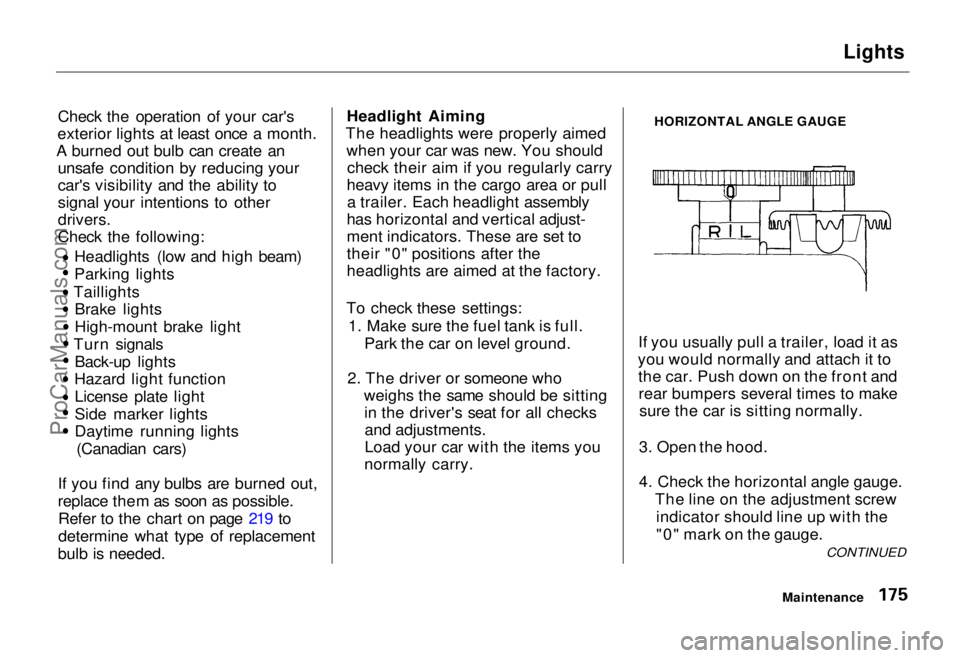
normally carry. HORIZONTAL ANGLE GAUGE
If you usually pull a trailer, load it as
you would normally and attach it to the car. Push down on the front andrear bumpers several times to make sure the car is sitting normally.
3. Open the hood.
4. Check the horizontal angle gauge. The line on the adjustment screwindicator should line up with the
"0" mark on the gauge.
Maintenance
CONTINUEDProCarManuals.comMain Menu Table of Contents s t