brake HONDA ODYSSEY 1996 User Guide
[x] Cancel search | Manufacturer: HONDA, Model Year: 1996, Model line: ODYSSEY, Model: HONDA ODYSSEY 1996Pages: 240, PDF Size: 2.64 MB
Page 111 of 240
Service Station Procedures
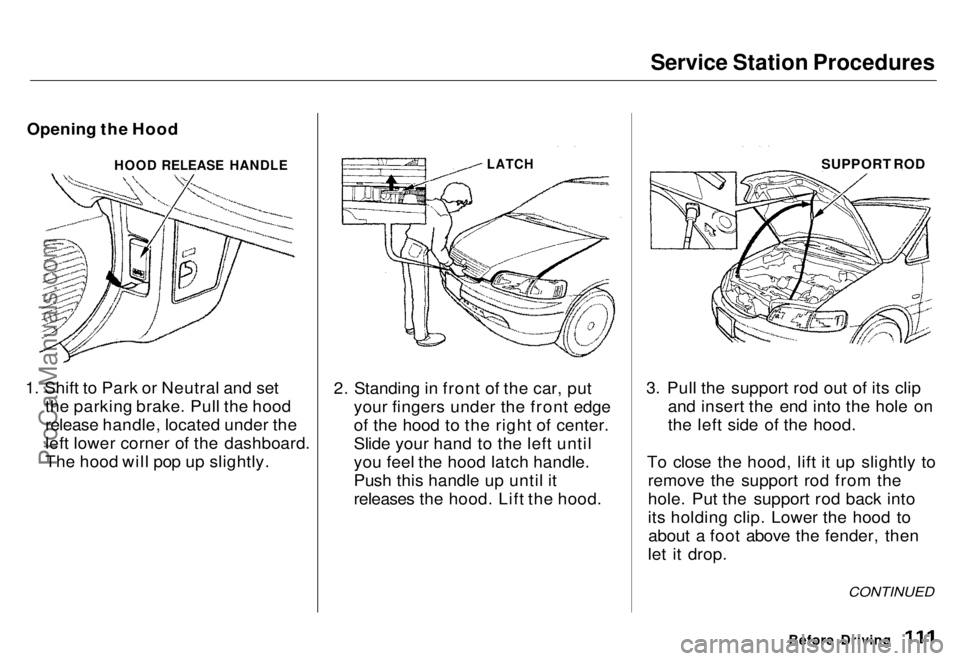
Opening the Hood
1. Shift to Park or Neutral and set the parking brake. Pull the hood
release handle, located under the
left lower corner of the dashboard.
The hood will pop up slightly. 2. Standing in front of the car, put
your fingers under the front edge
of the hood to the right of center.
Slide your hand to the left until
you feel the hood latch handle.
Push this handle up until it
releases the hood. Lift the hood. 3. Pull the support rod out of its clip
and insert the end into the hole on
the left side of the hood.
To close the hood, lift it up slightly to remove the support rod from the
hole. Put the support rod back into
its holding clip. Lower the hood toabout a foot above the fender, then
let it drop.
Before Driving
CONTINUED
HOOD RELEASE HANDLE
LATCH
SUPPORT RODProCarManuals.comMain Menu s t Table of Contents
Page 115 of 240
Accessories
Your Honda dealer has many Genuine Honda Accessories that
allow you to personalize your car.
These have all been approved for
ar
e
covered by warranty.
Some non-Honda accessories you
can buy in the "aftermarket" are designed for universal applications.
Although they may fit your Honda, they may not be within factoryspecifications. For example, after-
market wheels may not meet Honda'sspecifications for width and offset.
They could cause suspension problems that would not be covered
by your warranty. Improperly- designed accessories can adversely
affect your car's handling andstability. Your car has several computer-
controlled systems, including theSRS system, the engine's fuel
injection, and the Anti-lock brake
rerence Sarrarred
Electronic communications equip-
ment, such as cellular telephones and two-way radios are regulated by
the FCC (DOC in Canada) andshould not interfere with your car's
systems. Improper installation, or
using electrical equipment not in-
tended for mobile use may interfere
with your car's operation. If you want to install a cellular telephone, other
mobile communications equipmentor even add-on stereo amplifiers,
please discuss it first with your Honda dealer. In many cases, improper installation
is the real cause of problems with aftermarket accessories. Have these
accessories installed by qualified
technicians.who are familiar with Honda dealer inspect the final
installation.
Before Driving
ProCarManuals.comMain Menu s t Table of Contents
Page 117 of 240
Driving
This section gives you tips on starting the engine under various
conditions, and how to operate the automatic transmission. It also
includes important information on
your car's braking system and facts
you need if you are planning to tow a trailer.
Preparing to Drive......................... 118
Starting the Engine........................ 119
Starting in Cold Weather at High Altitude ..................... 119
Automatic Transmission............... 120 Shift Lever Positions................. 120
Maximum Speeds...................... 123
Shift Lock Release..................... 123
The Braking System...................... 124 Brake Wear Indicators.............. 124Brake System Design................ 124
Anti-lock Brakes........................ 125
Driving in Bad Weather................ 126
Towing a Trailer............................ 128
DrivingProCarManuals.comMain Menu s t
Page 119 of 240

Starting the Engine
1. Apply the parking brake.
2. In cold weather, turn off all electrical accessories to reduce
the drain on the battery.
3. Make sure the shift lever is in Park. Press on the brake pedal.
4. Without touching the accelerator pedal, turn the ignition key to the
START (III) position. If the engine
does not start right away, do not
hold the key in START (III) for
more than 15 seconds at a time.
Pause for at least 10 seconds
before trying again.
5. If the engine does not start within 15 seconds, or starts but stalls
right away, repeat step 4 with the
accelerator pedal pressed half-way
down. If the engine starts, release
pressure on the accelerator pedal
so the engine does not race.
6. If the engine still does not start,
press the accelerator pedal all the
way down and hold it there while
starting in order to clear flooding.
As before, keep the ignition key in
the START (III) position for no
more than 15 seconds. Return to
step 5 if the engine does not start.
If it starts, lift your foot off the
accelerator pedal so the engine
does not race.
Starting in Cold Weather at High
Altitude (Above 2,400 meters/ 8,000 feet)
An engine is harder to start in cold weather. The thinner air found at
high altitude above 2,400 meters (8,000 feet) adds to the problem.
Use the following procedure:
1. Turn off all electrical accessories to reduce the drain on the battery. 2. Push the accelerator pedal half-
way to the floor and hold it there
while starting the engine. Do not
hold the ignition key in START
(III) for more than 15 seconds.
When the engine starts, release
the accelerator pedal gradually as
the engine speeds up and smooths
out.
3. If the engine fails to start in step 2, push the accelerator pedal to the
floor and hold it there while you
try to start the engine for no more
than 15 seconds. If the engine
does not start, return to step 2.
DrivingProCarManuals.comMain Menu s t Table of Contents
Page 120 of 240
Automatic Transmission
Your Honda's transmission has fourforward speeds, and is electronicallycontrolled for smoother shifting. It
also has a "lock-up" torque converter
for better fuel economy. You may
feel what seems like another shift
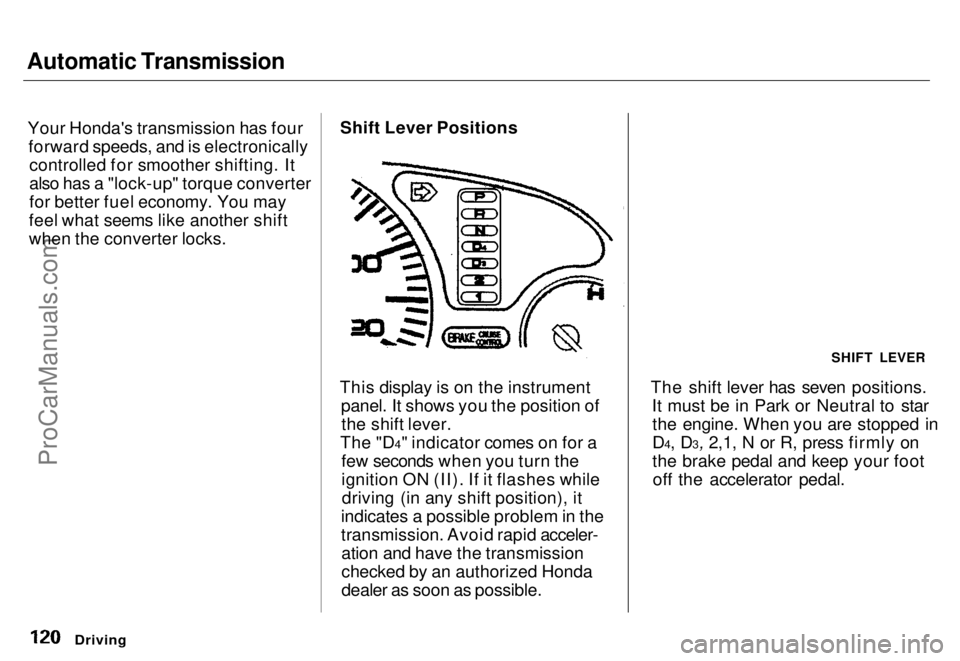
when the converter locks. Shift Lever Positions
This display is on the instrument panel. It shows you the position ofthe shift lever.
The "D4" indicator comes on for a few seconds when you turn the
ignition ON (II). If it flashes whiledriving (in any shift position), it
indicates a possible problem in the
transmission. Avoid rapid acceler- ation and have the transmission
checked by an authorized Honda
dealer as soon as possible. The shift lever has seven positions.
It must be in Park or Neutral to starthe engine. When you are stopped in
D4, D3, 2,1, N or R, press firmly on
the brake pedal and keep your footoff the accelerator pedal.
Driving
SHIFT LEVERProCarManuals.comMain Menu s t Table of Contents
Page 121 of 240
Automatic Transmission
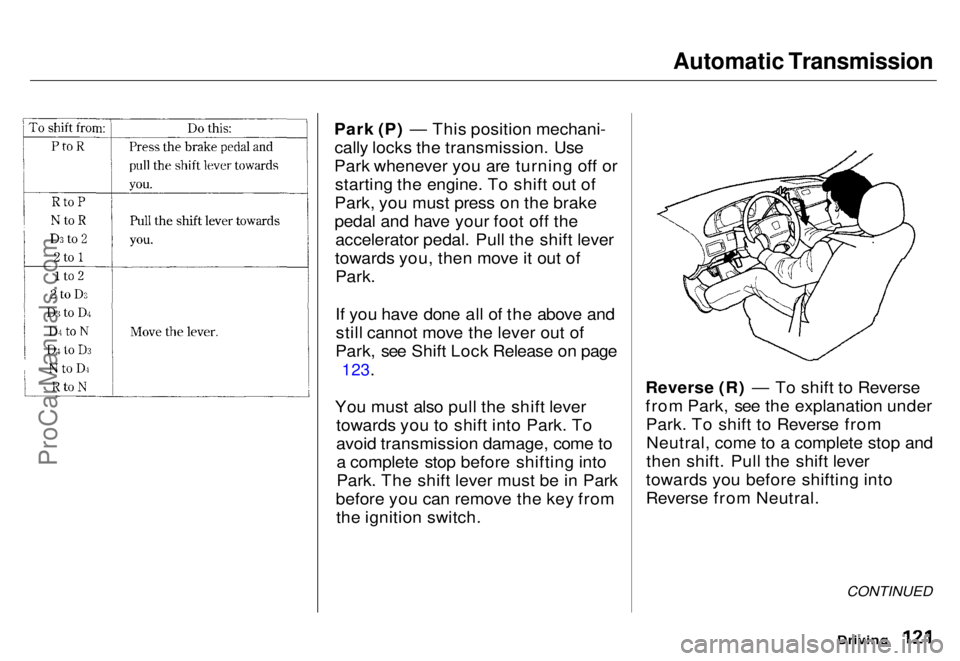
Park (P) — This position mechani- cally locks the transmission. Use
Park whenever you are turning off or starting the engine. To shift out of
Park, you must press on the brake
pedal and have your foot off the accelerator pedal. Pull the shift lever
towards you, then move it out of Park.
If you have done all of the above andstill cannot move the lever out of
Park, see Shift Lock Release on page
123.
You must also pull the shift lever towards you to shift into Park. To
avoid transmission damage, come toa complete stop before shifting into
Park. The shift lever must be in Park
before you can remove the key from the ignition switch. Reverse (R) — To shift to Reverse
from Park, see the explanation under
Park. To shift to Reverse fromNeutral, come to a complete stop and
then shift. Pull the shift lever
towards you before shifting into
Reverse from Neutral.
Driving
CONTINUEDProCarManuals.comMain Menu s t Table of Contents
Page 122 of 240
Automatic Transmission
Neutral (N) — Use Neutral if you
need to restart a stalled engine, or if
it is necessary to stop briefly with the engine idling. Shift to Park posi-
tion if you need to leave the car for
any reason. Press on the brake pedal
when you are moving the shift lever
from Neutral to another gear.
Drive (D4) — Use this position for
your normal driving. The transmis- sion automatically selects a suitable
gear for your speed and acceleration.
You may notice the transmission shifting up at higher speeds when
the engine is cold. This helps the engine warm up faster.
Drive (D3) — This position is similar
to D4, except only the first three
gears are selected. Use D3 when
towing a trailer in hilly terrain, or to provide engine braking when goingdown a steep hill. D3 can also keep
the transmission from cycling
between third and fourth gears in
stop-and-go driving.
For faster acceleration when in D3 or
D4, you can get the transmission to
automatically downshift by pushing
the accelerator pedal to the floor.
The transmission will shift down one or two gears, depending on your
speed.
Second (2) — To shift to Second,
pull the shift lever towards you, then shift to the lower gear. This position
locks the transmission in second
gear. It does not downshift to first
gear when you come to a stop.
Second gives you more power when
climbing, and increased engine
braking when going down steep hills.
Use second gear when starting out on a slippery surface or in deep snow.
It will help reduce wheelspin.
Whenever you move the shift lever to a lower gear, the transmissiondownshifts only if the engine's redline will not be exceeded in the
lower gear.
First (1) — To shift from Second toFirst, pull the shift lever towards you
then shift to the lower gear. With the lever in this position, the transmis-sion locks in First gear. By upshift-
ing and downshifting through 1,2,
D3 and D4, you can operate this
transmission much like a manual
transmission without a clutch pedal.
DrivingProCarManuals.comMain Menu s t Table of Contents
Page 123 of 240
Automatic Transmission
Maximum Speeds
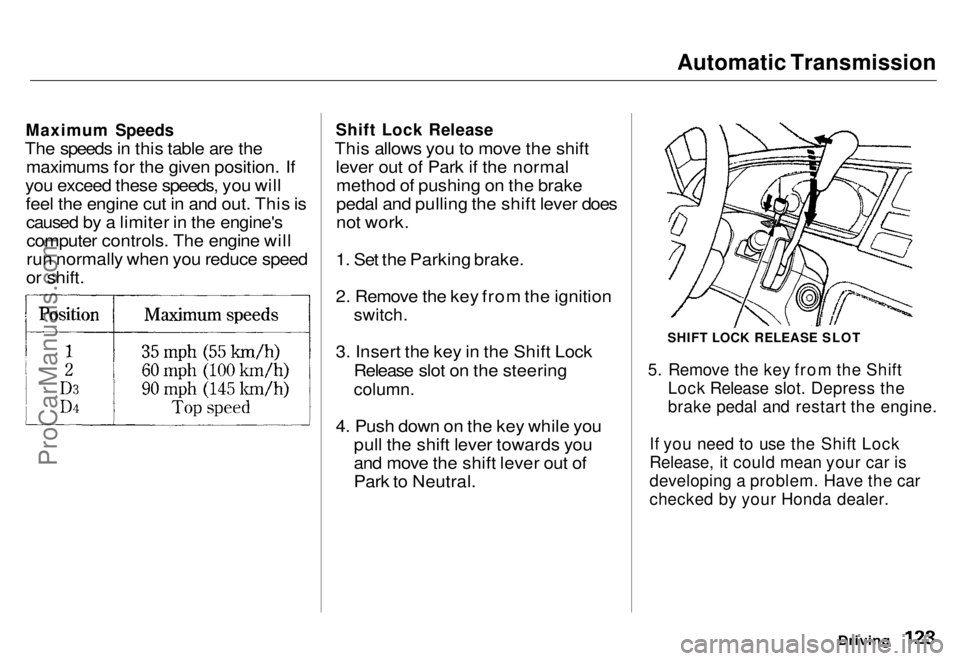
The speeds in this table are the maximums for the given position. If
you exceed these speeds, you will feel the engine cut in and out. This iscaused by a limiter in the engine'scomputer controls. The engine will
run normally when you reduce speed
or shift.
Shift Lock Release
This allows you to move the shift lever out of Park if the normalmethod of pushing on the brake
pedal and pulling the shift lever does
not work.
1. Set the Parking brake.
2. Remove the key from the ignition
switch.
3. Insert the key in the Shift Lock Release slot on the steering
column.
4. Push down on the key while you pull the shift lever towards you
and move the shift lever out of
Park to Neutral.
SHIFT LOCK RELEASE SLOT
5. Remove the key from the Shift Lock Release slot. Depress the
brake pedal and restart the engine.
If you need to use the Shift Lock
Release, it could mean your car is
developing a problem. Have the car
checked by your Honda dealer.
DrivingProCarManuals.comMain Menu s t Table of Contents
Page 124 of 240
The Braking System
Your Honda is equipped with discbrakes at all four wheels. The
braking system is power-assisted to
reduce the effort needed on the
brake pedal.
Put your foot on the brake pedal only
when you intend to brake. Resting
your foot on the pedal keeps the brakes applied lightly, causing them
to build up heat. Heat build-up can
reduce how well your brakes work. It also keeps your brake lights on all
the time, confusing drivers behind
you.
Constant application of the brakes
when going down a long hill builds up heat and reduces their effective-
ness. Use the engine to assist the
brakes by downshifting to a lower
gear and taking your foot off the accelerator pedal. Check your brakes after driving
through deep water. Apply the
brakes moderately to see if they feel normal. If not, apply them gently and
frequently until they do. Since a
longer distance is needed to stop with wet brakes, be extra cautious and alert in your driving.
Brake Wear Indicators
All four brakes have audible brake wear indicators.
When the brake pads need replacing,you will hear a distinctive metallic "screeching" sound when you apply
the brakes. If you do not have the
brake pads replaced, they will begin screeching all the time.
Your brakes may sometimes squeal or squeak when you apply them
lightly. Do not confuse this with the
brake wear indicators. They make a
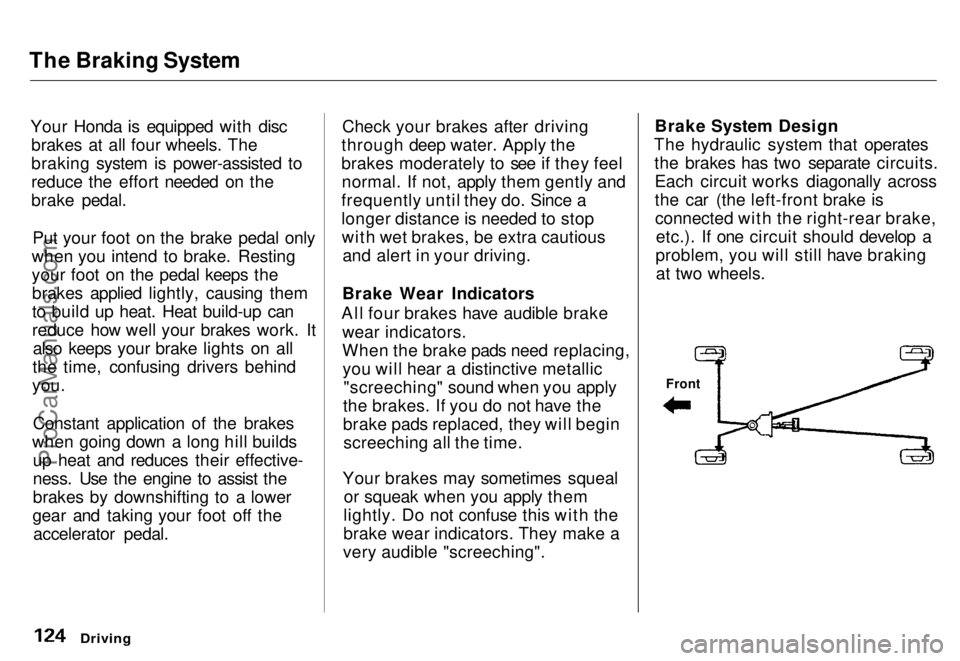
very audible "screeching". Brake System Design
The hydraulic system that operates the brakes has two separate circuits.Each circuit works diagonally across
the car (the left-front brake isconnected with the right-rear brake, etc.). If one circuit should develop a
problem, you will still have braking at two wheels.
Driving
FrontProCarManuals.comMain Menu s t Table of Contents
Page 125 of 240
The Braking System
If this happens, you will immediately notice that the brake pedal goes
down much farther and you need to
press on it much harder. A much
longer distance will be needed to stop the car.
Slow the car by downshifting to a
lower gear and removing your foot from the accelerator pedal. Pull to
the side of the road as soon as it issafe. Because of the longer stopping
distance needed, brake system
failure is very hazardous. It is best to have your car towed, but if you mustdrive the car in this condition, be
extremely cautious. Have your carrepaired as soon as possible.
Anti-lock Brakes
All U.S. models and the Canadian six- passenger model have an Anti-lock
Brake System (ABS) as standard
equipment. It is optional on the
Canadian seven-passenger model.
ABS helps you maintain steering control during braking. It does this
by helping you to prevent the wheels
from locking up and skidding.
The ABS is always "On". It requires no special effort or driving technique.
You will feel a pulsation in the brake pedal when the ABS activates.
Activation varies with the amount of traction your tires have. On dry
pavement, you will need to press on
the brake pedal very hard before you
feel the pedal pulsation that means the ABS has activated. However, you
may feel the ABS activate immedi- ately if you are trying to stop onsnow or ice. Under all conditions, the
ABS is helping to prevent the wheels from locking so you can retain steering control. You should con-
tinue to press on the brake pedal
with the same force.
You may feel a slight movement of
the brake pedal just after you start
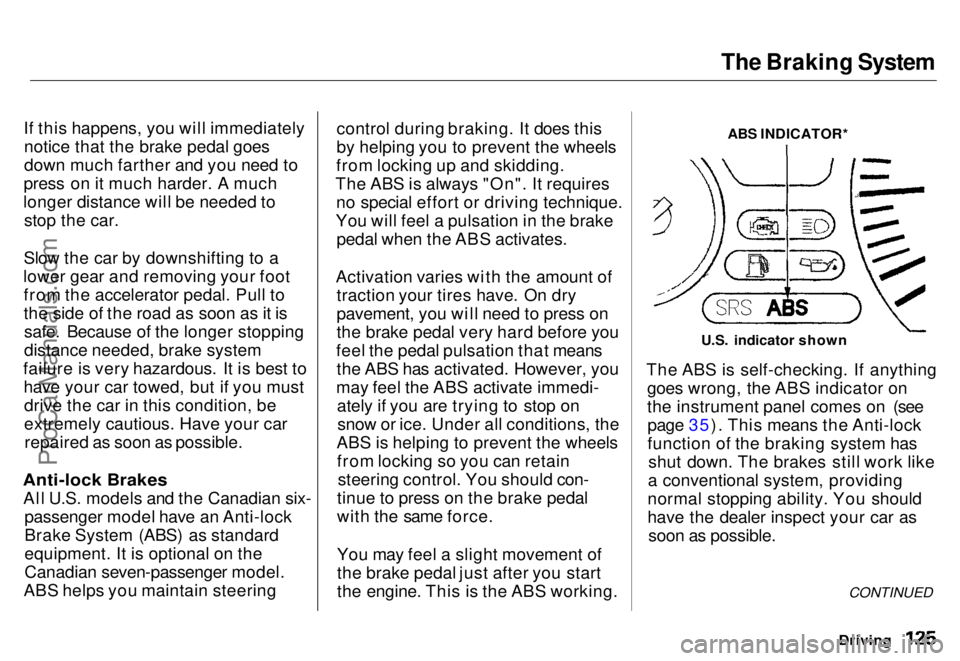
the engine. This is the ABS working. ABS INDICATOR*
U.S. indicator shown
The ABS is self-checking. If anything goes wrong, the ABS indicator on
the instrument panel comes on (seepage 35). This means the Anti-lock
function of the braking system has shut down. The brakes still work like
a conventional system, providing
normal stopping ability. You should
have the dealer inspect your car as soon as possible.
Driving
CONTINUEDProCarManuals.comMain Menu s t Table of Contents