lights HONDA ODYSSEY 1997 User Guide
[x] Cancel search | Manufacturer: HONDA, Model Year: 1997, Model line: ODYSSEY, Model: HONDA ODYSSEY 1997Pages: 241, PDF Size: 2.52 MB
Page 45 of 241
Controls Near the Steering Wheel
Rear Window Defogger
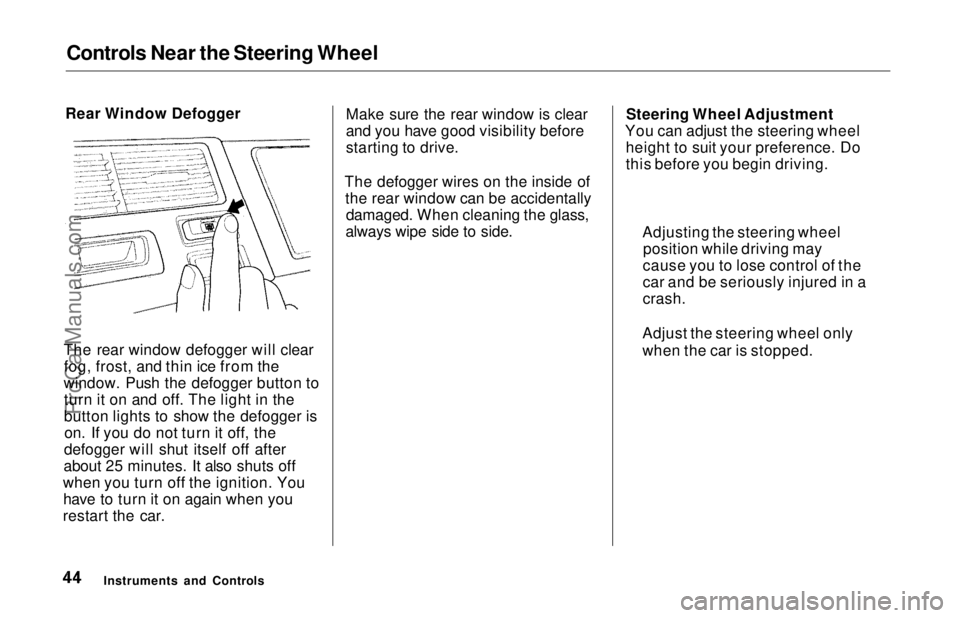
The rear window defogger will clear fog, frost, and thin ice from the
window. Push the defogger button to turn it on and off. The light in the
button lights to show the defogger ison. If you do not turn it off, the
defogger will shut itself off after
about 25 minutes. It also shuts off
when you turn off the ignition. You have to turn it on again when you
restart the car. Make sure the rear window is clear
and you have good visibility before
starting to drive.
The defogger wires on the inside of the rear window can be accidentallydamaged. When cleaning the glass,
always wipe side to side. Steering Wheel Adjustment
You can adjust the steering wheel height to suit your preference. Do
this before you begin driving.
Instruments and Controls Adjusting the steering wheel
position while driving may
cause you to lose control of the
car and be seriously injured in a
crash.
Adjust the steering wheel only
when the car is stopped.ProCarManuals.comMain Menu Table of Contents s t
Page 46 of 241
Controls Near the Steering Wheel
1. Adjust the seat so you are a comfortable distance from the
pedals and can operate them safely.
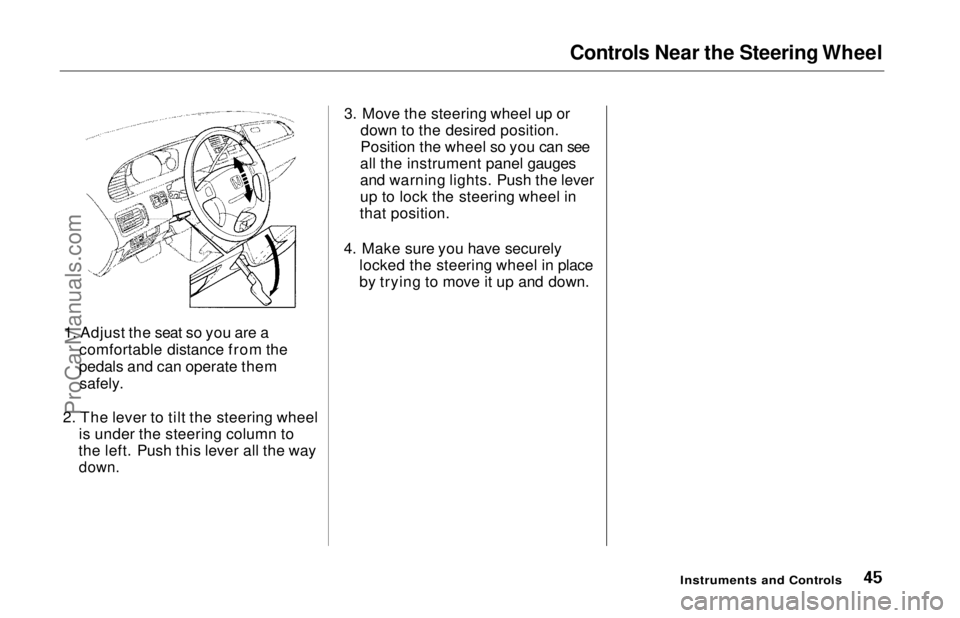
2. The lever to tilt the steering wheel is under the steering column to
the left. Push this lever all the way
down.
3. Move the steering wheel up or
down to the desired position.
Position the wheel so you can see
all the instrument panel gauges
and warning lights. Push the lever
up to lock the steering wheel in
that position.
4. Make sure you have securely locked the steering wheel in place
by trying to move it up and down.
Instruments and ControlsProCarManuals.comMain Menu Table of Contents s t
Page 51 of 241
Keys and Locks
LOCK (0) — You can insert or
remove the key only in this position.
When you turn the key from LOCK to ACCESSORY, you may have to
turn the steering wheel to release
the anti-theft lock. To switch from
ACCESSORY to LOCK, you must push the key in slightly as you turn it.
The shift lever must also be in Park.
The anti-theft lock will lock the steering column when you remove
the key.
ACCESSORY (I) — In this position, you can operate the audio systemand the cigarette lighter.
ON (II) — This is the normal key
position when driving. All features and accessories on the car are usable.
Several of the lights on the instru-
ment panel come on as a test when
you turn the ignition switch from
ACCESSORY to ON (see page 33). START (III) — Use this position
only to start the engine. The switch
returns to ON (II) when you let go of
the key.
You will hear a reminder beeper if you leave the key in the ignition switch in the LOCK (0) or
ACCESSORY (I) position and open the driver's door. Remove the key to
turn off the beeper. Power Door Locks
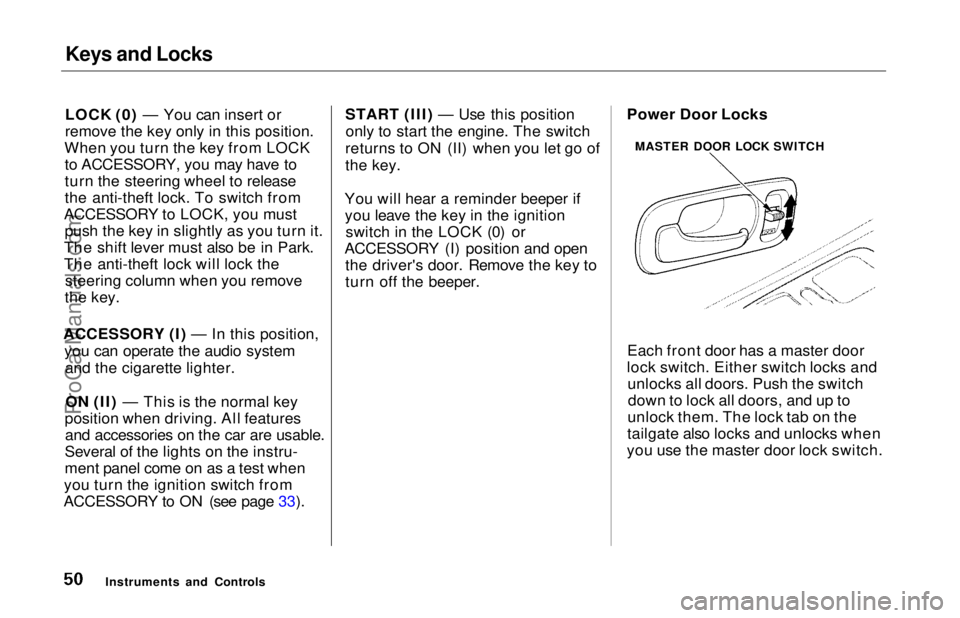
Each front door has a master door
lock switch. Either switch locks and unlocks all doors. Push the switchdown to lock all doors, and up to
unlock them. The lock tab on the
tailgate also locks and unlocks when
you use the master door lock switch.
Instruments and Controls MASTER DOOR LOCK SWITCHProCarManuals.comMain Menu Table of Contents s t
Page 65 of 241
Mirrors
TAB
Keep the inside and outside mirrors
clean and adjusted for best visibility.
Be sure to adjust the mirrors before
you start driving.
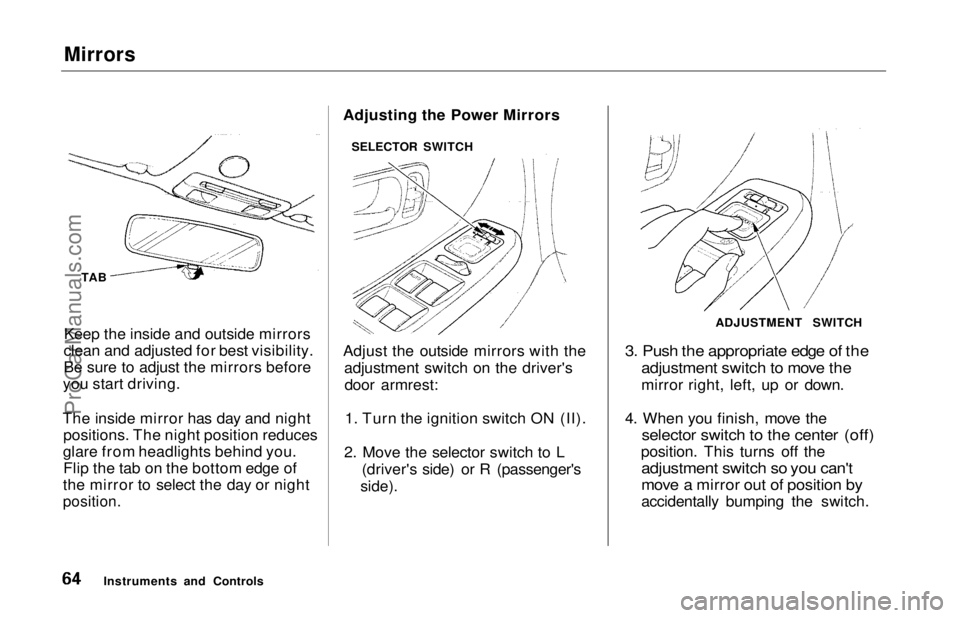
The inside mirror has day and night positions. The night position reduces
glare from headlights behind you. Flip the tab on the bottom edge of
the mirror to select the day or night
position.
Adjusting the Power Mirrors
Adjust the outside mirrors with the
adjustment switch on the driver'sdoor armrest:
1. Turn the ignition switch ON (II).
2. Move the selector switch to L (driver's side) or R (passenger's
side).
3. Push the appropriate edge of the
adjustment switch to move the
mirror right, left, up or down.
4. When you finish, move the
selector switch to the center (off)
position. This turns off the
adjustment switch so you can't
move a mirror out of position by
accidentally bumping the switch.
Instruments and Controls SELECTOR SWITCH
ADJUSTMENT SWITCHProCarManuals.comMain Menu Table of Contents s t
Page 69 of 241
Dashboard Compartment, Center Pocket, Vanity Mirror
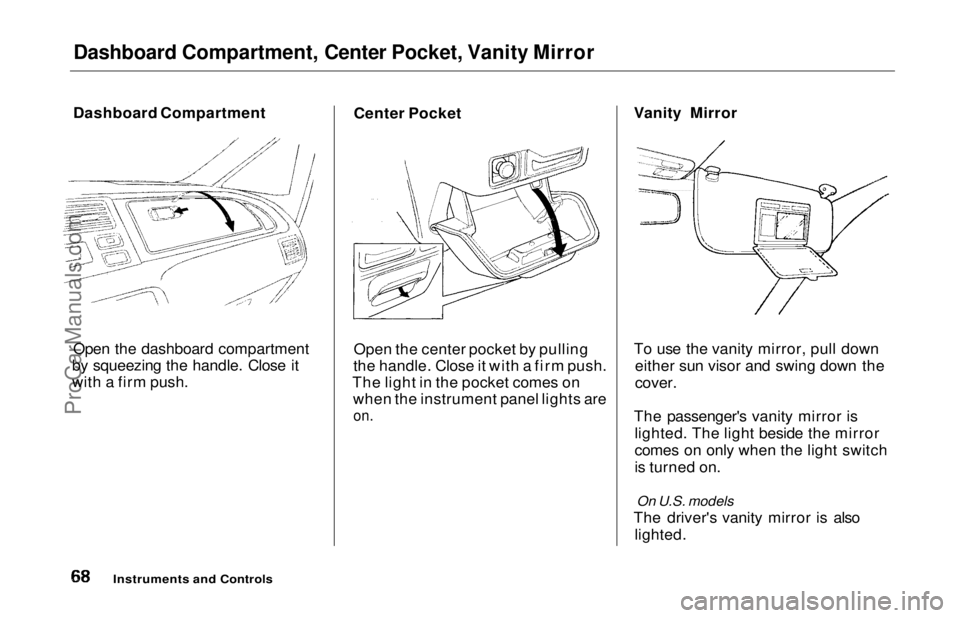
Dashboard Compartment
Open the dashboard compartment
by squeezing the handle. Close it
with a firm push. Center Pocket
Open the center pocket by pulling
the handle. Close it with a firm push.
The light in the pocket comes on when the instrument panel lights are
on.
Vanity Mirror
To use the vanity mirror, pull down
either sun visor and swing down the
cover.
The passenger's vanity mirror is lighted. The light beside the mirror
comes on only when the light switch
is turned on.
On U.S. models
The driver's vanity mirror is also lighted.
Instruments and ControlsProCarManuals.comMain Menu Table of Contents s t
Page 71 of 241
Ashtrays, Interior Lights
Use the ashtray only for cigarettes,
cigars, and other smoking materials. To prevent a possible fire and damage
to your car, don't put paper or other
things that can burn in the ashtray.
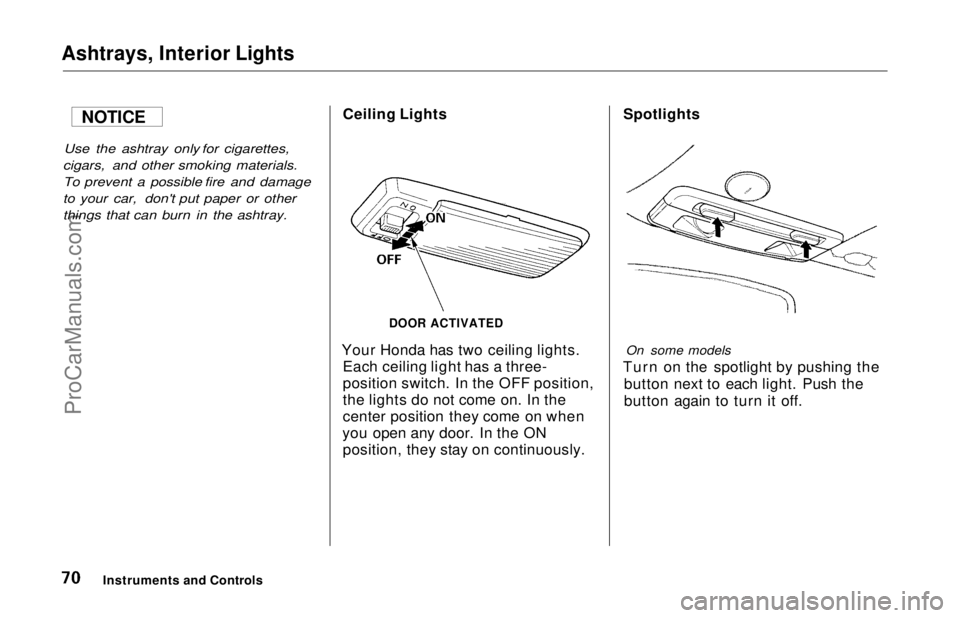
Ceiling Lights
Your Honda has two ceiling lights. Each ceiling light has a three-
position switch. In the OFF position,
the lights do not come on. In the
center position they come on when
you open any door. In the ON position, they stay on continuously.
Spotlights
On some models
Turn on the spotlight by pushing the button next to each light. Push the
button again to turn it off.
Instruments and Controls
DOOR ACTIVATED
NOTICEProCarManuals.comMain Menu Table of Contents s t
Page 72 of 241
Interior Lights
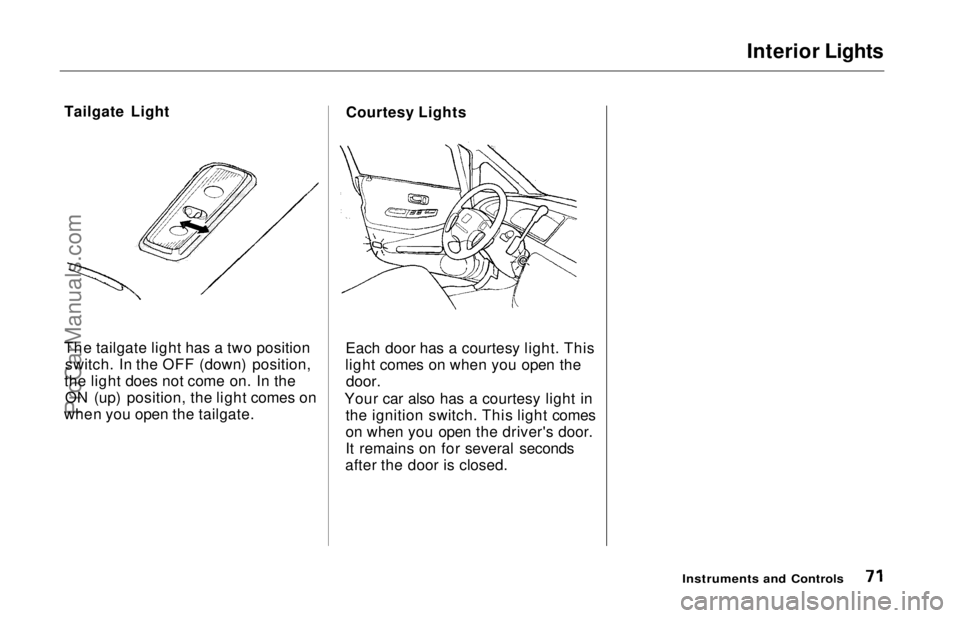
Tailgate Light
The tailgate light has a two position switch. In the OFF (down) position,
the light does not come on. In the ON (up) position, the light comes on
when you open the tailgate. Courtesy Lights
Each door has a courtesy light. This
light comes on when you open the
door.
Your car also has a courtesy light in the ignition switch. This light comes
on when you open the driver's door.
It remains on for several seconds
after the door is closed.
Instruments and ControlsProCarManuals.comMain Menu Table of Contents s t
Page 74 of 241
Heating and Cooling
Proper use of the Heating and
Cooling system can make the
interior dry and comfortable, and
keep the windows clear for best
visibility.
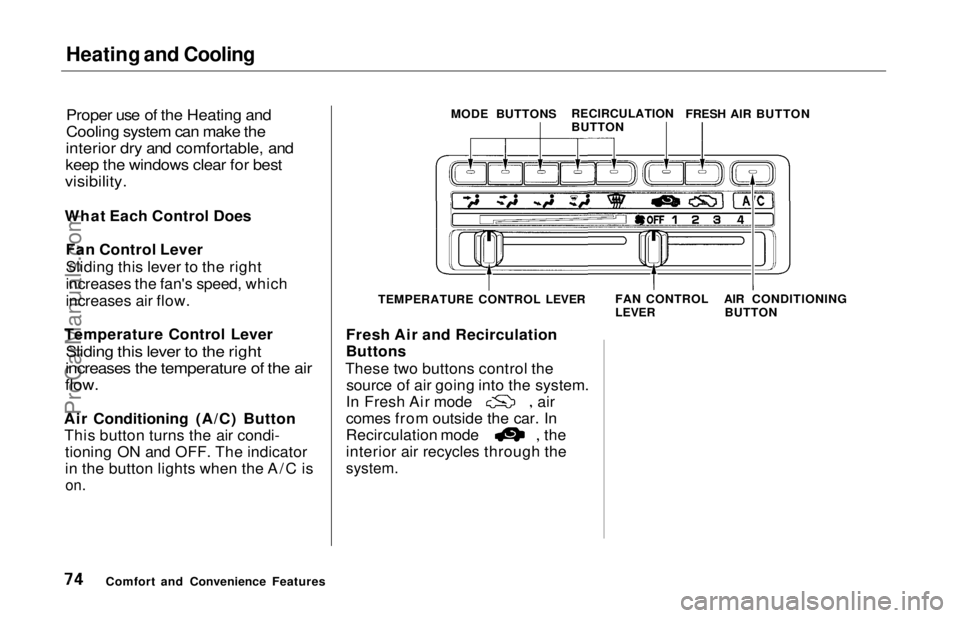
What Each Control Does Fan Control Lever
Sliding this lever to the right
increases the fan's speed, which
increases air flow.
Temperature Control Lever
Sliding this lever to the right
increases the temperature of the air
flow.
Air Conditioning (A/C) Button This button turns the air condi- tioning ON and OFF. The indicator
in the button lights when the A/C is
on.
Fresh Air and Recirculation
Buttons
These two buttons control the source of air going into the system. In Fresh Air mode air
comes from outside the car. In
Recirculation mode the
interior air recycles through the
system.
Comfort and Convenience Features MODE BUTTONS
RECIRCULATION
BUTTONFRESH AIR BUTTON
TEMPERATURE CONTROL LEVER FAN CONTROL
LEVER
AIR CONDITIONING
BUTTONProCarManuals.comMain Menu Table of Contents s t
Page 86 of 241
Audio System
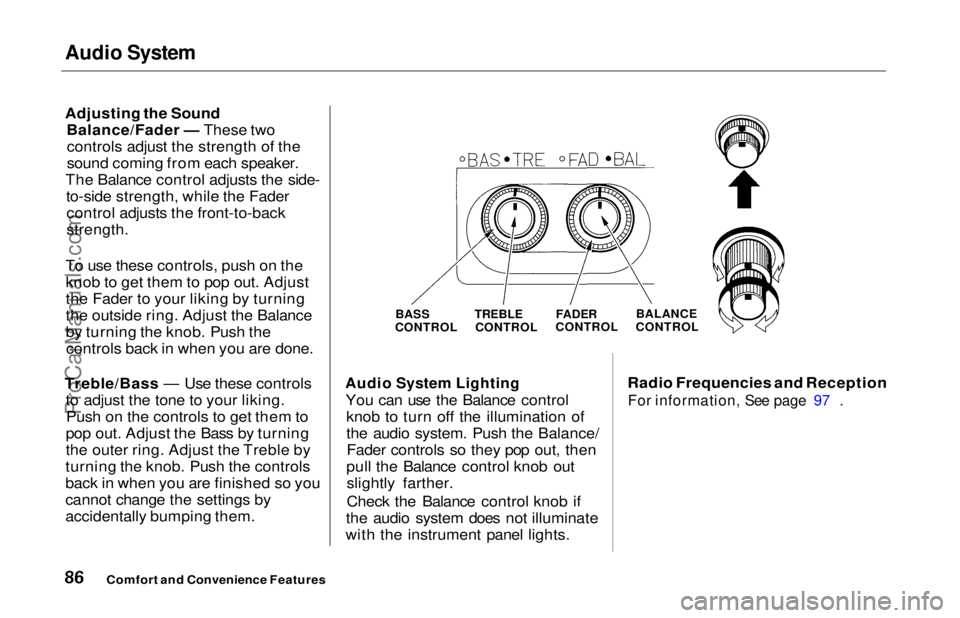
Adjusting the Sound
Balance/Fader — These twocontrols adjust the strength of the
sound coming from each speaker.
The Balance control adjusts the side- to-side strength, while the Fadercontrol adjusts the front-to-back
strength.
To use these controls, push on the knob to get them to pop out. Adjust
the Fader to your liking by turning
the outside ring. Adjust the Balance
by turning the knob. Push thecontrols back in when you are done.
Treble/Bass — Use these controls to adjust the tone to your liking.Push on the controls to get them to
pop out. Adjust the Bass by turning
the outer ring. Adjust the Treble by
turning the knob. Push the controls
back in when you are finished so you
cannot change the settings by
accidentally bumping them.
Audio System Lighting
You can use the Balance control knob to turn off the illumination of
the audio system. Push the Balance/Fader controls so they pop out, then
pull the Balance control knob out slightly farther.
Check the Balance control knob if
the audio system does not illuminate
with the instrument panel lights. Radio Frequencies and Reception
For information, See page 97 .
Comfort and Convenience Features
BASS
CONTROL TREBLE
CONTROL
FADER
CONTROL
BALANCE
CONTROLProCarManuals.comMain Menu Table of Contents s t
Page 118 of 241
Preparing to Drive
You should do the following checks and adjustments every day before
you drive your car.
1. Make sure all windows, mirrors, and outside lights are clean and
unobstructed. Remove frost, snow,or ice.
2. Check that the hood and tailgate are fully closed.
3. Visually check the tires. If a tire looks low, use a gauge to check its
pressure.
4. Check that any items you may be carrying with you inside are stored
properly or fastened down securely. 5. Check the adjustment of the seat
(see page 54).
6. Check the adjustment of the inside and outside mirrors (see
page 64).
7. Check the adjustment of the steering wheel (see page 44).
8. Make sure the doors are securely
closed and locked.
9. Fasten your seat belt. Check that your passengers have fastenedtheir seat belts (see page 7). 10.Turn the ignition ON (II). Check
the indicator lights in the instru-
ment panel.
11. Start the engine (see page 119).
12. Check the gauges and indicator lights in the instrument panel (seepage 33).
DrivingProCarManuals.comMain Menu Table of Contents s t