instrument panel HONDA ODYSSEY 1997 Owner's Manual
[x] Cancel search | Manufacturer: HONDA, Model Year: 1997, Model line: ODYSSEY, Model: HONDA ODYSSEY 1997Pages: 241, PDF Size: 2.52 MB
Page 86 of 241
Audio System
Adjusting the Sound
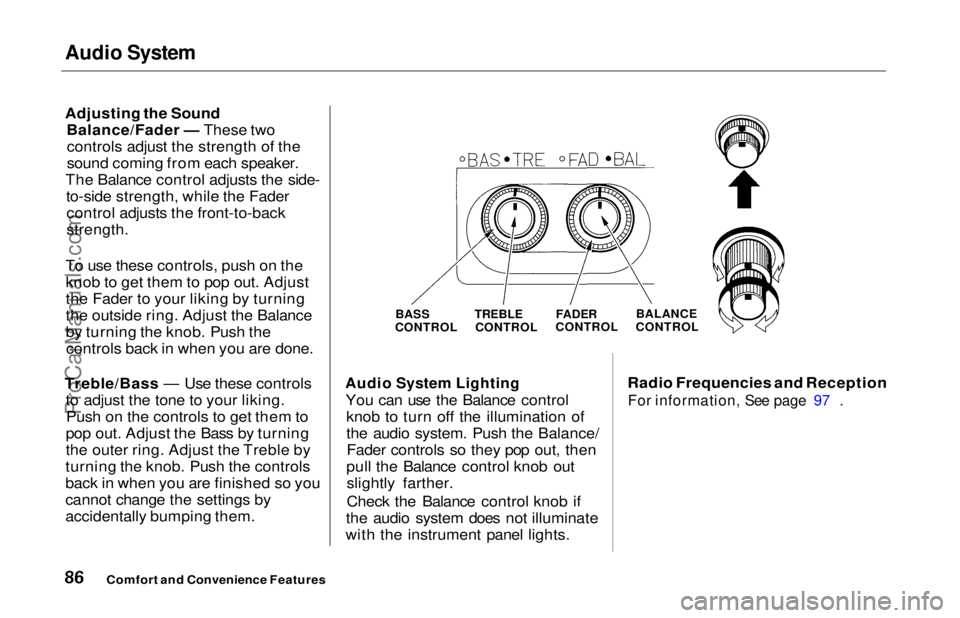
Balance/Fader — These twocontrols adjust the strength of the
sound coming from each speaker.
The Balance control adjusts the side- to-side strength, while the Fadercontrol adjusts the front-to-back
strength.
To use these controls, push on the knob to get them to pop out. Adjust
the Fader to your liking by turning
the outside ring. Adjust the Balance
by turning the knob. Push thecontrols back in when you are done.
Treble/Bass — Use these controls to adjust the tone to your liking.Push on the controls to get them to
pop out. Adjust the Bass by turning
the outer ring. Adjust the Treble by
turning the knob. Push the controls
back in when you are finished so you
cannot change the settings by
accidentally bumping them.
Audio System Lighting
You can use the Balance control knob to turn off the illumination of
the audio system. Push the Balance/Fader controls so they pop out, then
pull the Balance control knob out slightly farther.
Check the Balance control knob if
the audio system does not illuminate
with the instrument panel lights. Radio Frequencies and Reception
For information, See page 97 .
Comfort and Convenience Features
BASS
CONTROL TREBLE
CONTROL
FADER
CONTROL
BALANCE
CONTROLProCarManuals.comMain Menu Table of Contents s t
Page 108 of 241

Break-in Period, Gasoline
Break-in Period
Help assure your car's future
reliability and performance by paying
extra attention to how you drive
during the first 600 miles (1,000 km).
During this period:
Avoid full-throttle starts and rapidacceleration.
Avoid hard braking. New brakes need to be broken-in by moderate
use for the first 200 miles (300
km).
You should follow these same re-
commendations with an overhauled
or exchanged engine, or when the
brakes are relined.
Gasoline
Your Honda is designed to operate on unleaded gasoline with a pump
octane number of 86 or higher. Use
of a lower octane gasoline can cause
a persistent, heavy metallic rapping
noise in the engine that can lead to
mechanical damage.
We recommend gasolines containing detergent additives that help prevent
fuel system and engine deposits.
Using gasoline containing lead willdamage your car's emission controls.
This contributes to air pollution.
In Canada, some gasolines containan octane-enhancing additive called
MMT. If you use such gasolines,
your emission control system performance may deteriorate and
the Malfunction Indicator Lamp on
your instrument panel may turn on. If this happens, contact your
authorized Honda dealer for service. Oxygenated Fuels
Some conventional gasolines are
being blended with alcohol or an ether compound. These gasolines
are collectively referred to as oxygenated fuels. To meet clean air
standards, some areas of the United
States and Canada use oxygenated
fuels to help reduce emissions.
If you use an oxygenated fuel, besure it is unleaded and meets the
minimum octane rating requirement.
Before using an oxygenated fuel, try
to confirm the fuel's contents. Some
states/provinces require this
information to be posted on the
pump.
Before DrivingProCarManuals.comMain Menu Table of Contents s t
Page 118 of 241
Preparing to Drive
You should do the following checks and adjustments every day before
you drive your car.
1. Make sure all windows, mirrors, and outside lights are clean and
unobstructed. Remove frost, snow,or ice.
2. Check that the hood and tailgate are fully closed.
3. Visually check the tires. If a tire looks low, use a gauge to check its
pressure.
4. Check that any items you may be carrying with you inside are stored
properly or fastened down securely. 5. Check the adjustment of the seat
(see page 54).
6. Check the adjustment of the inside and outside mirrors (see
page 64).
7. Check the adjustment of the steering wheel (see page 44).
8. Make sure the doors are securely
closed and locked.
9. Fasten your seat belt. Check that your passengers have fastenedtheir seat belts (see page 7). 10.Turn the ignition ON (II). Check
the indicator lights in the instru-
ment panel.
11. Start the engine (see page 119).
12. Check the gauges and indicator lights in the instrument panel (seepage 33).
DrivingProCarManuals.comMain Menu Table of Contents s t
Page 120 of 241
Automatic Transmission
Your Honda's transmission has fourforward speeds, and is electronically controlled for smoother shifting. It
also has a "lock-up" torque converter
for better fuel economy. You may
feel what seems like another shift
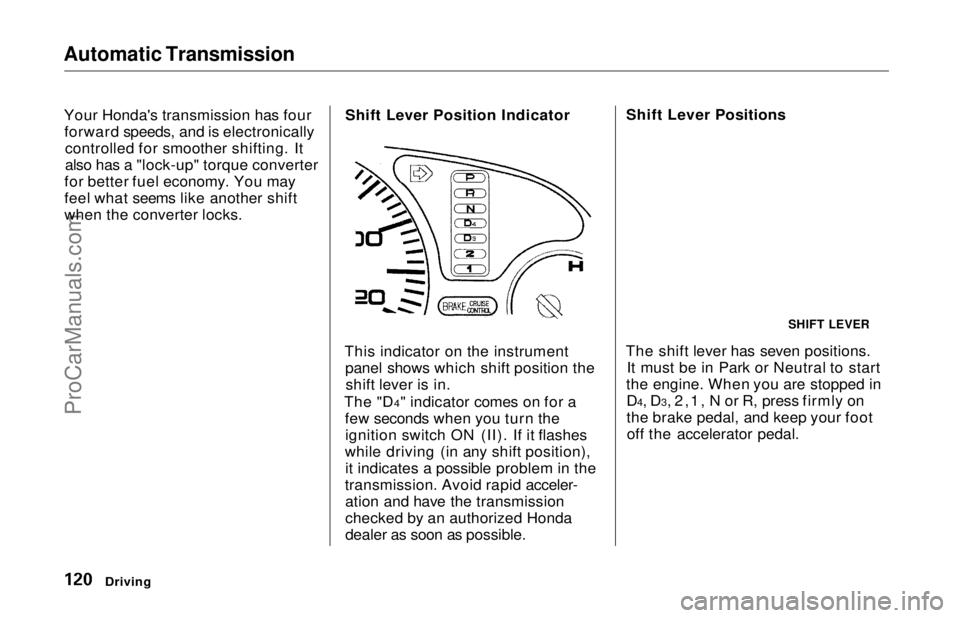
when the converter locks. Shift Lever Position Indicator
This indicator on the instrument panel shows which shift position theshift lever is in.
The "D4" indicator comes on for a few seconds when you turn theignition switch ON (II). If it flashes
while driving (in any shift position), it indicates a possible problem in the
transmission. Avoid rapid acceler- ation and have the transmission
checked by an authorized Honda
dealer as soon as possible. Shift Lever Positions
The shift lever has seven positions. It must be in Park or Neutral to start
the engine. When you are stopped in D4, D3, 2,1, N or R, press firmly on
the brake pedal, and keep your footoff the accelerator pedal.
Driving
SHIFT LEVERProCarManuals.comMain Menu Table of Contents s t
Page 124 of 241
Parking
Always use the parking brake when
you park your vehicle. The indicator on the instrument panel shows that
the parking brake is not fully released; it does not indicate that the
parking brake is firmly set. Make sure the parking brake is set firmly
or your vehicle may roll if it is
parked on an incline.
Set the parking brake before you put
the transmission in Park. This keeps
the vehicle from moving and putting
pressure on the parking mechanism
in the transmission — making it easier to move the shift lever out of
Park when you want to drive away. If the vehicle is facing uphill, turn
the front wheels away from the curb.
If the vehicle is facing downhill, turn
the front wheels toward the curb.
Make sure the parking brake is fully
released before driving away.
Driving with the parking brake
partially set can overheat or damage the rear brakes, and will cause the
ABS indicator to light. Parking Tips
Make sure the sunroof and the
windows are closed.
Turn off the lights. Place any packages, valuables, etc.,
in the cargo area or take them
with you.
Lock the doors with the key or the
remote transmitter.
Never park over dry leaves, tall
grass, or other flammable
materials. The three way catalytic
converter gets very hot, and could
cause these materials to catch on
fire.
DrivingProCarManuals.comMain Menu Table of Contents s t
Page 128 of 241
The Braking System, Driving in Bad Weather
If anything goes wrong, the ABS
indicator on the instrument panel
comes on (see page 35). This means
the anti-lock function of the braking
system has shut down. The brakes
still work like a conventional system
without anti-lock, providing normal stopping ability. You should have the
dealer inspect your vehicle as soon
as possible if this light stays on after
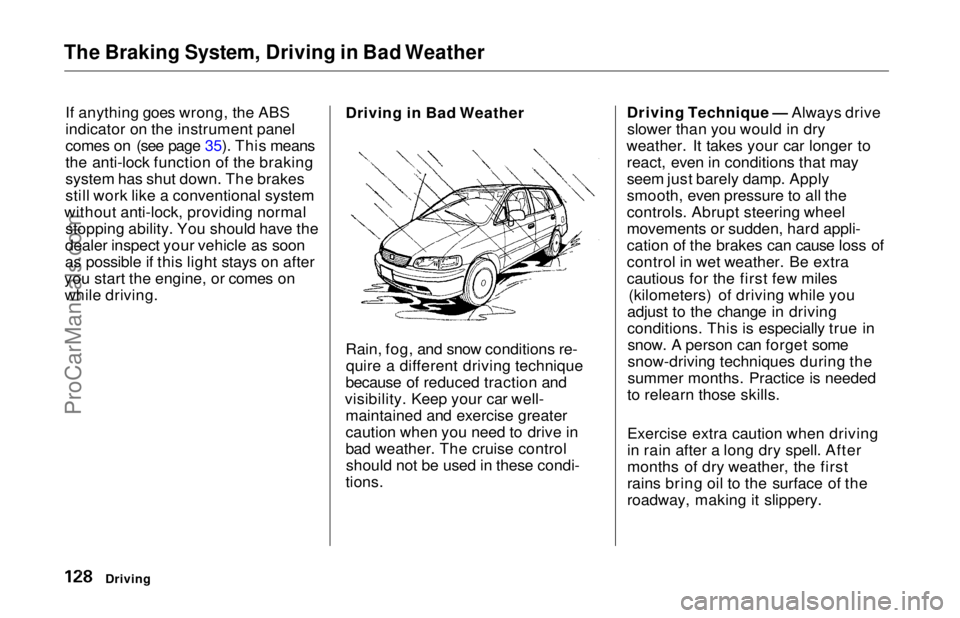
you start the engine, or comes on while driving. Driving in Bad Weather
Rain, fog, and snow conditions re-
quire a different driving technique
because of reduced traction and
visibility. Keep your car well- maintained and exercise greater
caution when you need to drive in
bad weather. The cruise controlshould not be used in these condi-
tions. Driving Technique — Always drive
slower than you would in dry
weather. It takes your car longer to react, even in conditions that may
seem just barely damp. Apply
smooth, even pressure to all the
controls. Abrupt steering wheel
movements or sudden, hard appli-
cation of the brakes can cause loss of
control in wet weather. Be extra
cautious for the first few miles (kilometers) of driving while you
adjust to the change in driving
conditions. This is especially true in snow. A person can forget some
snow-driving techniques during the
summer months. Practice is needed
to relearn those skills.
Exercise extra caution when driving
in rain after a long dry spell. After
months of dry weather, the first
rains bring oil to the surface of the
roadway, making it slippery.
DrivingProCarManuals.comMain Menu Table of Contents s t
Page 236 of 241
Index
Fluids Automatic Transmission........... 157
Brake........................................... 158
Power Steering........................... 159
Windshield Washer................... 156
FM Stereo Radio
Reception...................................... 97
Folding the Second Seats ............... 58
Folding the Third Seats.................. 60
Foreign Countries, Driving in...... 109
Four-way Flashers........................... 43
Front End, Towing by Emergency Wrecker...................................... 215
Fuel.................................................. 108
Fill Door and Cap....................... 110
Gauge............................................ 38
Octane Requirement................. 108
Oxygenated................................ 108
Tank, Filling the......................... 110
Fuses, Checking the...................... 211
Gas Mileage, Improving................ 114
Gasohol........................................... 108
Gasoline.......................................... 108
Gauge............................................ 38
Octane Requirement................. 108
Tank, Filling the......................... 110
Gas Station Procedures................. 110
Gauges Engine Coolant Temperature .... 38
Fuel................................................ 38
Gearshift Lever Positions............. 120
Glass Cleaning............................... 189
Glove Box......................................... 53
Halogen Headlight Bulbs.............. 179 Hazard Warning Flashers............... 43
Headlights......................................... 40 Aiming......................................... 177
Daytime Running Lights............. 40
High Beam Indicator................... 36
High Beams, Turning on............ 40Low Beams, Turning on............. 40
Reminder Chime.......................... 40
Replacing Halogen Bulbs ......... 179
Turning on....................................
40
Head Restraints...............................
56Heating and Cooling........................ 74
High Altitude, Starting at.............. 119
High-Low Beam Switch .................. 40
Hood, Opening the ........................ 111
Horn................................................... 39
Hot Coolant, Warning about........ 152
Hydroplaning.................................. 129
Identification Number, Vehicle.... 218
If Your Car Has to be Towed....... 215
Ignition
Keys............................................... 49
Switch............................................ 49
Timing Control System............. 226
Indicator Lights, Instrument
Panel..............................................33
Infant Restraint................................ 22
Inflation, Proper Tire .................... 171
Inside Mirror.................................... 64
Inspection, Tire.............................. 173
Instrument Panel............................. 33
Instrument Panel Brightness......... 41
Interior Cleaning............................ 188
Interior Lights.................................. 70ProCarManuals.comMain Menu s t