ESP HONDA ODYSSEY 1998 Owner's Manual
[x] Cancel search | Manufacturer: HONDA, Model Year: 1998, Model line: ODYSSEY, Model: HONDA ODYSSEY 1998Pages: 272, PDF Size: 2.67 MB
Page 120 of 272
Audio System
Tape Search Functions
With a cassette playing, you can usethe FF, REW, RPT, or SKIP function
to find a desired program.
FF/REW — Fast Forward and
Rewind move the tape rapidly. To
rewind the tape, push the FF/REW/
SKIP switch down, then release it.
You will see REW in the display. To fast forward the tape, push the switch up, then release it. You will
see FF displayed. Press the PLAY
button to take the system out of rewind or fast forward. If the systemreaches the end of the tape while in
fast forward or rewind, it auto-
matically stops that function,
reverses direction, and begins to play. SKIP — The SKIP function lets you
skip over a song or passage. You
activate SKIP with the FF/REW/
SKIP switch. To skip to the
beginning of a song or passage currently playing, push the switch
down and hold it until you hear a
beep. You will see REW flashing in
the display as the tape rewinds. To skip to the beginning of the next
song, push the switch up and hold it
until you hear a beep. You will see
FF flashing in the display as the tape
fast forwards. When the system
finds the beginning of a song or passage, it goes back to PLAY. REPEAT — The Repeat function
continuously replays the currentsong or passage. Press the RPT
button to activate it; you will see RPT displayed as a reminder. When the
system reaches the end of the song
or passage currently playing, it will
automatically go into rewind. When
it senses the beginning of the same song or passage, the system returns
to PLAY mode. It will continue to repeat this same program until youdeactivate REPEAT by pressing the
button again.
The SKIP and REPEAT functions use silent periods on the tape to find
the end of a song or passage. These
features may not work to your satisfaction if there is almost no gap
between selections, a high noise
level between selections, or a silent
period in the middle of selection.
Comfort and Convenience FeaturesProCarManuals.comMain Menu Table of Contents s t
Page 121 of 272
Audio System
Caring for the Cassette Player
The cassette player picks up dirt and oxides from the tape. This
contamination builds up over time
and causes the sound quality to
degrade. To prevent this, you should
clean the player after every 30 hours
of use.
If you do not clean the cassette
player regularly, it may eventually
become impossible to remove the contamination with a normal
cleaning kit.
Use 100-minute or shorter cassettes.
Cassettes longer than that use
thinner tape that may break or jam
the drive.
Look at the cassette before you
insert it. If the tape is loose, tighten
it by turning a hub with a pencil or
your finger.
If the label is peeling off, remove it
from the cassette or it could cause the cassette to jam in the player.
Never try to insert a warped or
damaged cassette in the player. The player automatically ejects
cassettes that do not play properly. If
it ejects a cassette before it begins to
play, it is probably defective and should not be inserted again. You
may have a cassette suddenly stop
playing, reverse directions once or
twice and then eject. This is normally an indication the tape is wound
unevenly. It should play after the
tape is manually rewound.
When they are not in use, store cassettes in their cases to protect
them from dust and moisture. Never place cassettes where they will be
exposed to direct sunlight, high heat,or high humidity. If a cassette is
exposed to extreme heat or cold, let
it reach a moderate temperature
before inserting it in the player.
Never try to insert foreign objects
into the cassette player.
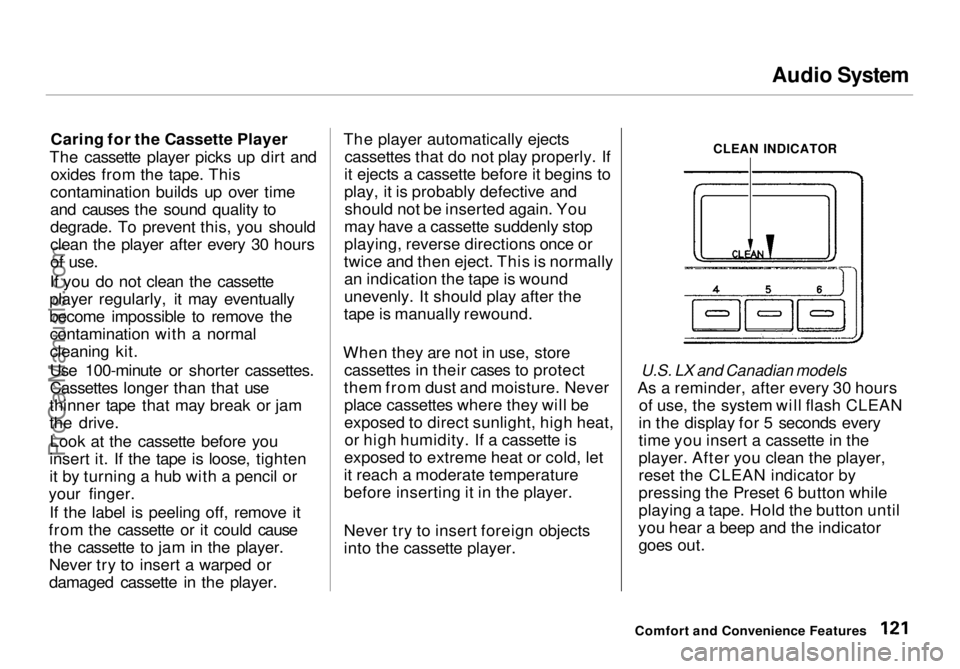
CLEAN INDICATOR
U.S. LX and Canadian models
As a reminder, after every 30 hours of use, the system will flash CLEAN
in the display for 5 seconds every
time you insert a cassette in the
player. After you clean the player,
reset the CLEAN indicator by
pressing the Preset 6 button while
playing a tape. Hold the button until
you hear a beep and the indicator goes out.
Comfort and Convenience FeaturesProCarManuals.comMain Menu Table of Contents s t
Page 123 of 272

Audio System
Press the CD button until "CD"
appears in the display. The system
will start to play the first track of the first disc in the magazine.
When that disc ends, the next disc in the magazine is loaded and played.
After the last disc finishes, the system returns to disc 1.
To select a different disc, press the appropriate preset button (1 — 6). If
you select an empty slot in the magazine, the changer will, after
finding that slot empty, try to load
the CD in the next slot. This continues until it finds a CD to load
and play.
You can use the TUNE/SEEK switch to select tracks within a disc.
If you push and release the TUNE/
SEEK switch, the system will move
to the beginning of a track. Push the switch up to move to the beginning
of the next track, and push the
switch down to move to the begin-
ning of the current track. If you push and hold the TUNE/
SEEK switch, you will hear a beep
and the system will continue to move
across tracks. Release the switch
when you think it has reached the desired place on the disc.
RPT — When you activate the Repeat feature by pressing the
A. SEL/RPT button, the system continuously replays the current
track. You will see RPT in the display as a reminder. Press the button
again to turn it off.
RANDOM PLAY — This feature,
when activated, plays the tracks on a CD in random order, rather than in
the order they are recorded on the CD. To activate Random Play, press
the A. SEL/RPT button until you see
A. SEL in the display. The system will then select and play tracksrandomly on the current disc. When
all tracks on that disc have been
played, the next disc is loaded and played randomly. This continues
until you deactivate Random Play by
pressing A. SEL/RPT again.
If the system is in Repeat mode, you
must turn it off by pressing A. SEL/RPT before you can select Random
Play. Then press the button again
until you see A. SEL displayed.
To take the system out of CD mode, press the AM or FM button, or inserta cassette in the player. When you
return to CD mode, play will contin-
ue at the same disc and track.
If you turn the system off while a CD
is playing, either with the PWR/VOL
knob or the ignition switch, play will
continue at the same point when you
turn it back on.
Comfort and Convenience FeaturesProCarManuals.comMain Menu Table of Contents s t
Page 124 of 272
Audio System
Protecting Compact Discs
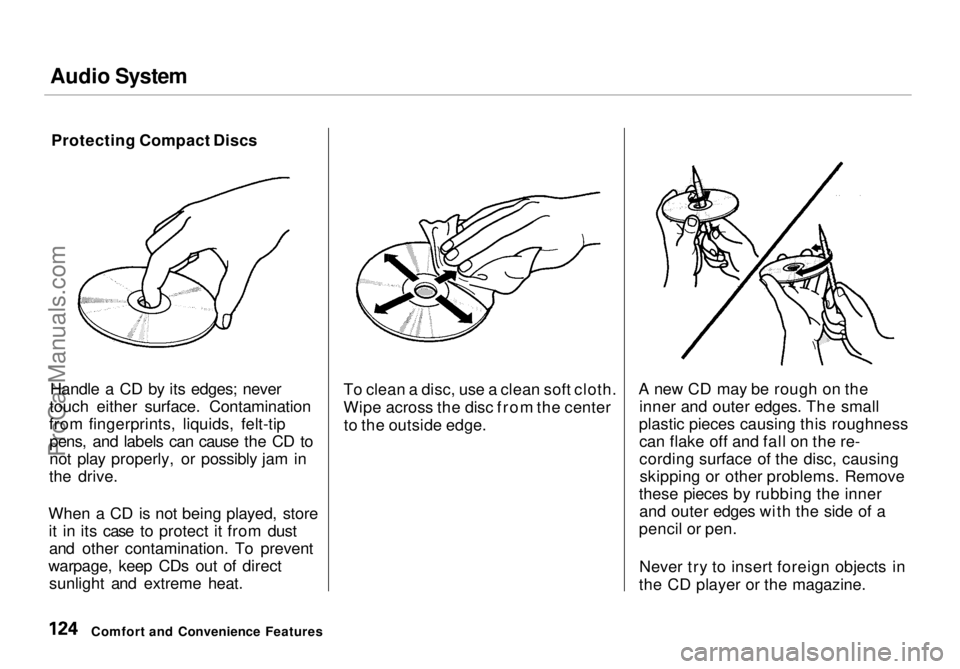
Handle a CD by its edges; never
touch either surface. Contamination
from fingerprints, liquids, felt-tip pens, and labels can cause the CD to
not play properly, or possibly jam in
the drive.
When a CD is not being played, store it in its case to protect it from dustand other contamination. To prevent
warpage, keep CDs out of direct sunlight and extreme heat. To clean a disc, use a clean soft cloth.
Wipe across the disc from the center
to the outside edge. A new CD may be rough on the
inner and outer edges. The small
plastic pieces causing this roughness can flake off and fall on the re-
cording surface of the disc, causingskipping or other problems. Remove
these pieces by rubbing the inner and outer edges with the side of a
pencil or pen.
Never try to insert foreign objects in
the CD player or the magazine.
Comfort and Convenience FeaturesProCarManuals.comMain Menu Table of Contents s t
Page 125 of 272
Audio System
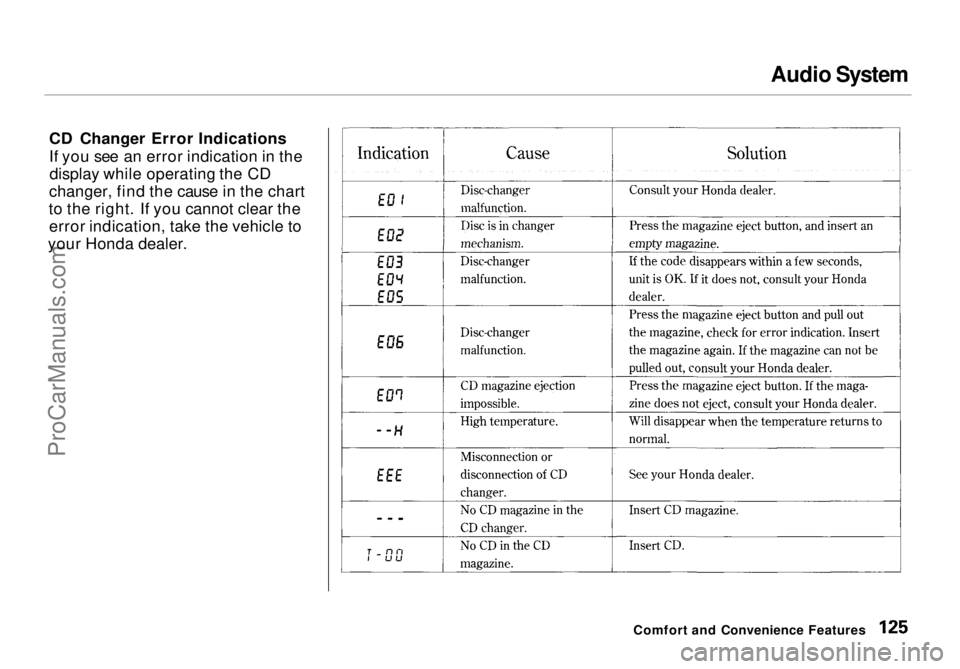
CD Changer Error Indications
If you see an error indication in the display while operating the CD
changer, find the cause in the chart
to the right. If you cannot clear the error indication, take the vehicle to
your Honda dealer.
Comfort and Convenience FeaturesProCarManuals.comMain Menu Table of Contents s t
Page 126 of 272
Audio System
Theft Protection
On U.S. EX model
Your vehicle's audio system will disable itself if it is disconnected
from electrical power for any reason.
To make it work again, the user must enter a specific five-digit code
in the Preset buttons. Because thereare hundreds of number
combinations possible from five digits, making the system work
without knowing the exact code is nearly impossible.
You should have received a card that lists your audio system's code
number and serial number. It is best
to store this card in a safe place at
home. In addition, you should write
the audio system's serial number in
this Owner's Manual. If you should
happen to lose the card, you must obtain the code number from your
Honda dealer. To do this, you will
need the system's serial number. If your vehicle's battery is discon-
nected or goes dead, the audio
system will disable itself. If this
happens, you will see "Code" in the
frequency display the next time you
turn on the system. Use the Preset
buttons to enter the five-digit code. If it is entered correctly, the radio willstart playing.
If you make a mistake entering the
code, do not start over or try to
correct your mistake. Complete the
five-digit sequence, then enter the correct code. You have three tries toenter the correct code. If you are
unsuccessful in three attempts, you
must then leave the system on for
one hour before trying again. You will have to store your favorite
stations in the Preset buttons after
the system begins working. Your original settings were lost when
power was disconnected.
Comfort and Convenience FeaturesProCarManuals.comMain Menu Table of Contents s t
Page 150 of 272
The Braking System, Driving in Bad Weather
If anything goes wrong, the ABS
indicator on the instrument panel
comes on (see page 53). This means
the anti-lock function of the braking system has shut down. The brakes
still work like a conventional system
without anti-lock, providing normal stopping ability. You should have the
dealer inspect your vehicle as soon
as possible if this light stays on after
you start the engine, or comes on
while driving. Driving in Bad Weather
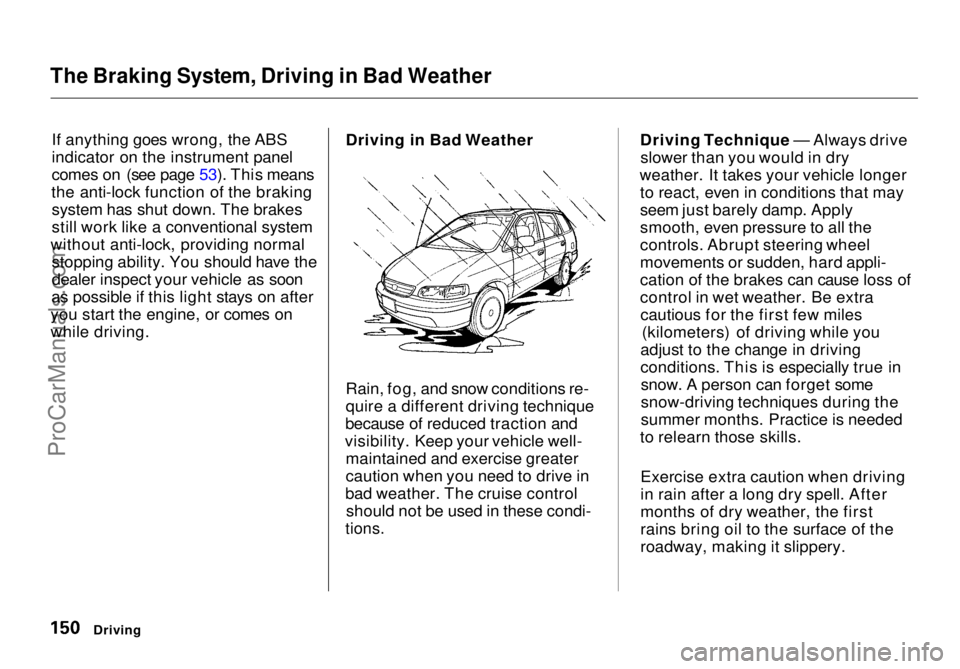
Rain, fog, and snow conditions re-
quire a different driving technique
because of reduced traction and
visibility. Keep your vehicle well- maintained and exercise greater
caution when you need to drive in
bad weather. The cruise control should not be used in these condi-
tions.
Driving Technique — Always drive
slower than you would in dry
weather. It takes your vehicle longer to react, even in conditions that may
seem just barely damp. Apply
smooth, even pressure to all the
controls. Abrupt steering wheel
movements or sudden, hard appli-
cation of the brakes can cause loss of
control in wet weather. Be extracautious for the first few miles (kilometers) of driving while you
adjust to the change in driving
conditions. This is especially true in snow. A person can forget some
snow-driving techniques during the
summer months. Practice is needed
to relearn those skills.
Exercise extra caution when driving
in rain after a long dry spell. After
months of dry weather, the first
rains bring oil to the surface of the
roadway, making it slippery.
DrivingProCarManuals.comMain Menu Table of Contents s t
Page 153 of 272
Towing a Trailer
The best way to confirm that your total towing package is within thesespecifications is to get it weighed.
Load the vehicle and trailer as you
normally would while towing, and
take them to a public scale. Have
them check the total weight and the
weight at each axle, then compare
the weights to the specifications.
Trailer Hitches
The trailer hitch must be the proper size and construction for your
vehicle and the trailer you intend to tow. Consult with an expert before
you purchase a trailer hitch, andhave it installed by a qualified
mechanic.
The hitch should bolt to the underbody of the vehicle, anddistribute the load over a wide area.
Never use a hitch that mounts only
to the rear bumper. The bumper is
not designed to handle that type of
load.
A trailer hitch that is not adequate for the size of the trailer, or a hitch that is
improperly installed, can cause damage
to the underside of your vehicle.
Driving
NOTICE
Improperly loading your vehicle
and trailer can seriously affect
its steering and braking
performance, causing a crash
in which you can be seriously
injured.
Check the loading of your
vehicle and trailer carefully before starting to drive.ProCarManuals.comMain Menu Table of Contents s t
Page 157 of 272

Towing a Trailer
If you have to stop while going uphill,
do not hold the vehicle in place by
pressing on the accelerator. This can cause the automatic transmission tooverheat. Use the parking brake or
footbrake.
When parking your vehicle and trailer, especially on a hill, be sure to
follow all the normal precautions.
Turn your front wheels into the curb, set the parking brake firmly, and put
the transmission in Park. In addition,
place wheel chocks at each of the
trailer's tires. Backing up with a trailer is difficult
and takes practice. Drive slowly,
make small movements with the steering wheel, and have someonestand outside to guide you. Grip the
steering wheel on the bottom (rather
than the usual position near the top). Move your hand to the left to get the
trailer to move to the left, and right
to move the trailer right.
DrivingProCarManuals.comMain Menu Table of Contents s t
Page 212 of 272
Exterior Care
Washing Frequent washing helps preserve
your vehicle's beauty. Dirt and grit can scratch the paint, while tree sap
and bird droppings can permanently
ruin the finish.
Wash your vehicle in a shady area, not in direct sunlight. If the vehicle is
parked in the sun, move it into the shade and let the exterior cool down
before you start.
Only use the solvents and cleaners
recommended in this Owner's
Manual.
Chemical solvents and strong cleaners
can damage the paint, metal, and
plastic on your vehicle.
Rinse the vehicle thoroughly with
cool water to remove loose dirt.
Fill a bucket with cool water. Mix
in a mild detergent, such as dishwashing liquid or a product
made especially for car washing.
Wash the vehicle using the water and detergent solution and a soft-
bristle brush, sponge, or soft cloth. Start at the top and work your waydown. Rinse frequently.
Check the body for road tar, tree
sap, etc. Remove these stains with
tar remover or turpentine. Rinse it off immediately so it does not
harm the finish. Remember to re-
wax these areas, even if the rest of the vehicle does not need waxing. When you have washed and rinsed
the whole exterior, dry it with achamois or soft towel. Letting it
air-dry will cause dulling and water
spots.
As you dry the vehicle, inspect it for chips and scratches that could allow
corrosion to start. Repair them with
touch-up paint (see page 215).
The radio antenna on your vehicle does
not need to be removed when you use a "drive-through'' car wash. However, if
you remove the antenna, make sure to
reinstall it and tighten it securely using
an appropriate tool.
Appearance Care
NOTICE
NOTICEProCarManuals.comMain Menu Table of Contents s t