check engine HONDA ODYSSEY 1998 Owner's Manual
[x] Cancel search | Manufacturer: HONDA, Model Year: 1998, Model line: ODYSSEY, Model: HONDA ODYSSEY 1998Pages: 272, PDF Size: 2.67 MB
Page 193 of 272
Air Conditioning System
Your vehicle's air conditioning is a sealed system. Any major mainte-
nance, such as recharging, should be done by a qualified mechanic. You
can do a couple of things to make sure the air conditioning works
efficiently.
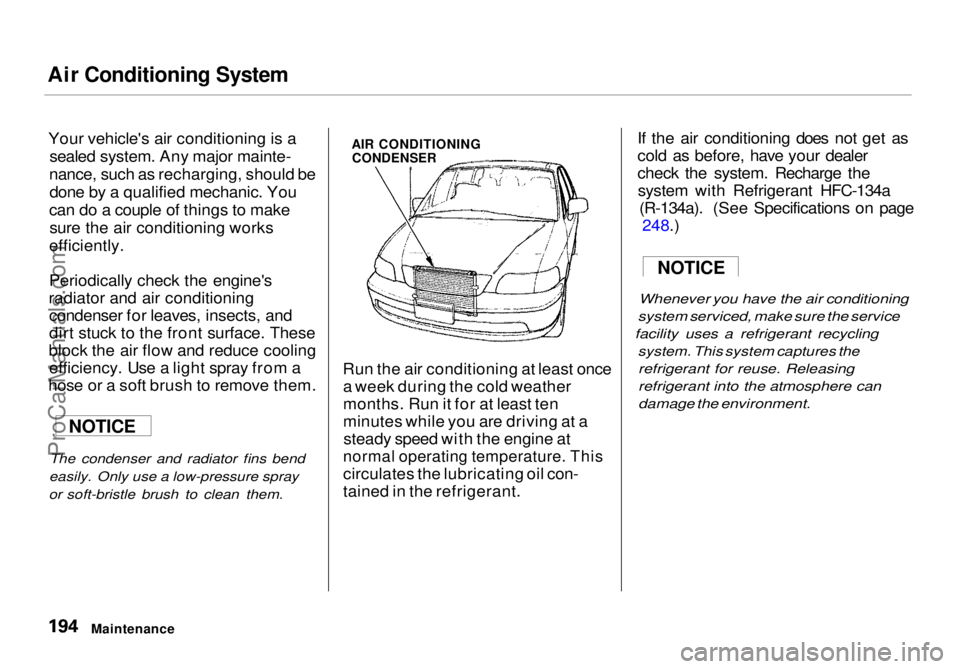
Periodically check the engine's
radiator and air conditioning condenser for leaves, insects, and
dirt stuck to the front surface. These
block the air flow and reduce cooling efficiency. Use a light spray from a
hose or a soft brush to remove them.
The condenser and radiator fins bend
easily. Only use a low-pressure spray
or soft-bristle brush to clean them.
AIR CONDITIONING
CONDENSER
Run the air conditioning at least once a week during the cold weather
months. Run it for at least ten
minutes while you are driving at asteady speed with the engine at
normal operating temperature. This
circulates the lubricating oil con-
tained in the refrigerant. If the air conditioning does not get as
cold as before, have your dealer
check the system. Recharge the
system with Refrigerant HFC-134a (R-134a). (See Specifications on page 248.
)
Whenever you
have the air conditioning
system serviced, make sure the service
facility uses a refrigerant recycling
system. This system captures the
refrigerant for reuse. Releasing
refrigerant into the atmosphere can
damage the environment.
Maintenance
NOTICE
NOTICEProCarManuals.comMain Menu Table of Contents s t
Page 218 of 272
Taking Care of the Unexpected
This section covers the more- common problems that motorists
experience with their vehicles. It
gives you information about how to safely evaluate the problem and what
to do to correct it. If the problem has stranded you on the side of the road,
you may be able to get going again. If not, you will also find instructionson getting your vehicle towed. Compact Spare Tire....................... 222
Changing a Flat Tire..................... 223
If Your Engine Won't Start........... 229 Nothing Happens or theStarter Motor OperatesVery Slowly......................... 229
The Starter Operates Normally................................. 230
Jump Starting................................. 230 If Your Engine Overheats............. 232
Low Oil Pressure Indicator .......... 234Charging System Indicator........... 235
Malfunction Indicator Lamp ........ 236
Brake System Indicator................ 237 Closing the Sunroof....................... 238
Fuses............................................... 239 Checking and Replacing........... 240
Towing............................................ 244
Taking Care of the UnexpectedProCarManuals.comMain Menu s t
Page 226 of 272
If Your Engine Won't Start
Diagnosing why your engine won't start falls into two areas, depending
on what you hear when you turn the
key to START (III):
You hear nothing, or almostnothing. The engine's starter
motor does not operate at all, or
operates very slowly.
You can hear the starter motor operating normally, or the starter
motor sounds like it is spinning
faster than normal, but the engine does not start up and run.
Nothing Happens or the Starter
Motor Operates Very Slowly
When you turn the ignition switch to START (III), you do not hear the
normal noise of the engine trying tostart. You may hear a clicking sound
or series of clicks, or nothing at all.
Check these things: Your vehicle has the Immobilizer
System. You should use a
properly-coded master or valet key
to start the engine (see page 67).
A key that is not properly coded will cause the immobilizer systemindicator in the dash panel to blink
rapidly.
Check the transmission interlock.
The transmission must be in Park or Neutral or the starter will not
operate.
Turn the ignition switch to ON (II).
Turn on the headlights and check their brightness. If the headlightsare very dim or don't light at all,
the battery is discharged. See
Jump Starting on page 230.
Turn the ignition switch to START
(III). If the headlights do not dim,
check the condition of the fuses. If
the fuses are OK, there is proba-
bly something wrong with the electrical circuit for the ignitionswitch or starter motor. You will
need a qualified technician to determine the problem. (See
Towing on page 244.)
If the headlights dim noticeably or
go out when you try to start theengine, either the battery is dis-
charged or the connections are
corroded. Check the condition of
the battery and terminal connec-
tions (see page 189). You can
then try jump starting the vehicle
from a booster battery (see page
231).
Taking Care of the UnexpectedProCarManuals.comMain Menu Table of Contents s t
Page 227 of 272
If Your Engine Won't Start, Jump Starting
The Starter
Operates Normally
In this case, the starter motor's
speed sounds normal, or even faster
than normal, when you turn the
ignition switch to START (III), but
the engine does not run. Are you using the proper startingprocedure? Refer to Starting the
Engine on page 141.
Do you have fuel? Turn the
ignition switch to ON (II) for a
minute and watch the fuel gauge.
The low fuel level warning light may not be working, so you were
not reminded to fill the tank.
There may be an electrical problem, such as no power to the
fuel pump. Check all the fuses (see page 242).
If you find nothing wrong, you will
need a qualified technician to find
the problem. See Towing on page
244.
Jump Starting
If your vehicle's battery has rundown, you may be able to start the
engine by using a booster battery.
Although this seems like a simple procedure, you should take several
precautions.
You cannot start a Honda by pushing or pulling it. To jump start your vehicle, follow
these directions closely:
1. Open the hood and check the physical condition of the battery(see page 189 ). In very cold
weather, check the condition of the electrolyte. If it seems slushyor like ice, do not try jump starting
until it thaws.
If a battery sits in extreme cold, the electrolyte inside can freeze.
Attempting to jump start with a frozen battery can cause it to rupture.
2. Turn off all the electrical acces- sories: heater, A/C, stereo system,
lights, etc.
Put the transmission in Neutral or
Park and set the parking brake.
Taking Care of the Unexpected
A battery can explode if you do
not follow the correct procedure,
seriously injuring anyone nearby.
Keep all sparks, open flames,
and smoking materials away
from the battery.
NOTICEProCarManuals.comMain Menu Table of Contents s t
Page 228 of 272
Jump Starting
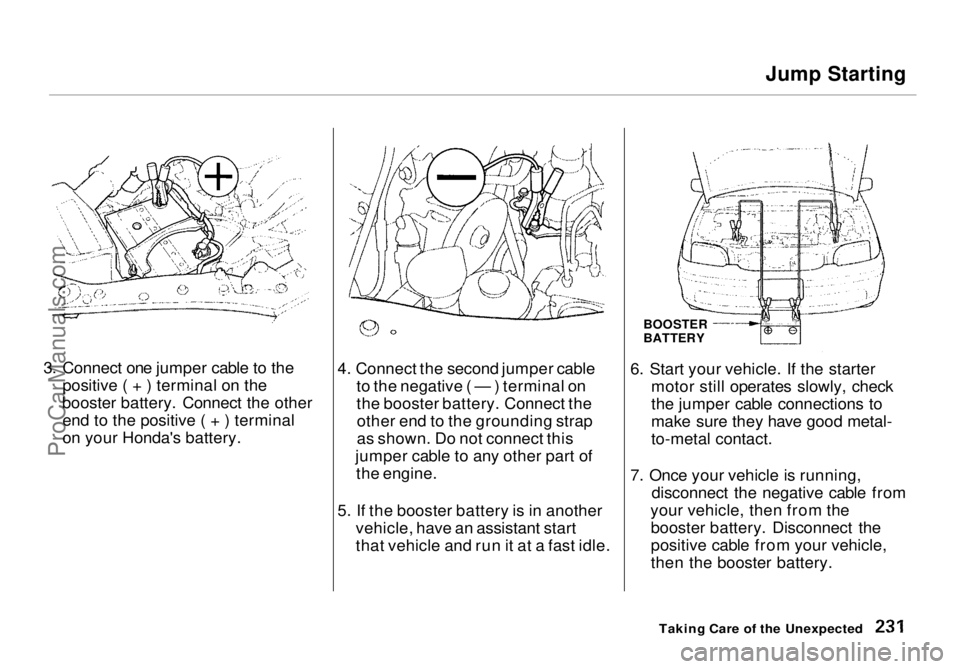
3. Connect one jumper cable to the positive ( + ) terminal on the
booster battery. Connect the other end to the positive ( + ) terminal
on your Honda's battery. 4. Connect the second jumper cable
to the negative ( — ) terminal on
the booster battery. Connect theother end to the grounding strap
as shown. Do not connect this
jumper cable to any other part of the engine.
5. If the booster battery is in another vehicle, have an assistant start
that vehicle and run it at a fast idle. 6. Start your vehicle. If the starter
motor still operates slowly, check
the jumper cable connections to
make sure they have good metal-
to-metal contact.
7. Once your vehicle is running, disconnect the negative cable from
your vehicle, then from the booster battery. Disconnect the
positive cable from your vehicle,
then the booster battery.
Taking Care of the Unexpected
BOOSTER
BATTERYProCarManuals.comMain Menu Table of Contents s t
Page 230 of 272
If Your Engine Overheats
4. If the temperature gauge stays at the red mark, turn off the engine.
5. Wait until you see no more signs of steam or spray, then open the
hood.
6. Look for any obvious coolant leaks, such as a split radiator hose.
Everything is still extremely hot,
so use caution. If you find a leak, it
must be repaired before you
continue driving (see Towing on
page 244).
7. If you don't find an obvious leak, check the coolant level in the
radiator reserve tank (see page 132). If the level is below the
MIN mark, add coolant to halfway
between the MIN and MAX marks.
8. If there was no coolant in the reserve tank, you may also have to
add coolant to the radiator. Let the
engine cool down until the pointer reaches the middle of the tempera-
ture gauge, or lower, before check- ing the radiator.
9. Using gloves or a large heavy cloth, turn the radiator cap
counterclockwise, without pushingdown, to the first stop. This
releases any remaining pressure in
the cooling system. After the
pressure releases, push down on
the cap and turn it until it comes
off.
10.Start the engine and set the
temperature control lever tomaximum. Add coolant to the
radiator up to the base of the filler
neck. If you do not have the
proper coolant mixture available,
you can add plain water. Remember to have the cooling
system drained and refilled with
the proper mixture as soon as you
can.
11. Put the radiator cap back on tightly. Run the engine and watch
the temperature gauge. If it goes
back to the red mark, the engine
needs repair. (See Towing on
page 244.)
12.If the temperature stays normal, check the coolant level in the
radiator reserve tank. If it has
gone down, add coolant to the MAX mark. Put the cap back on
tightly.
Taking Care of the Unexpected
Removing the radiator cap
while the engine is hot can
cause the coolant to spray out,
seriously scalding you.
Always let the engine and radiator cool down before
removing the radiator cap.ProCarManuals.comMain Menu Table of Contents s t
Page 231 of 272
Low Oil Pressure Indicator
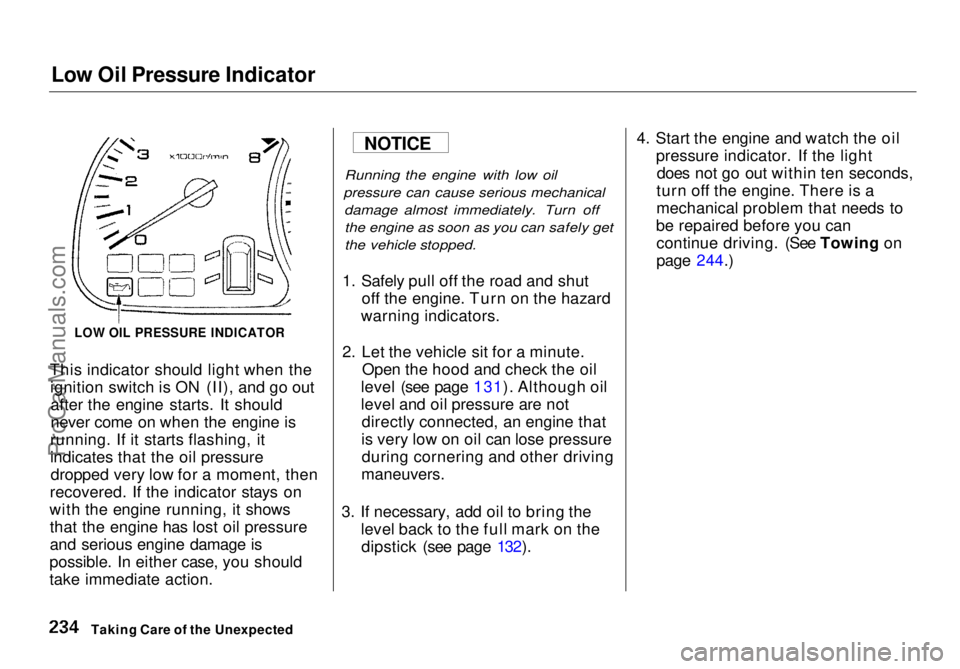
This indicator should light when the ignition switch is ON (II), and go outafter the engine starts. It should
never come on when the engine is
running. If it starts flashing, it
indicates that the oil pressure dropped very low for a moment, then
recovered. If the indicator stays on
with the engine running, it shows that the engine has lost oil pressure
and serious engine damage is
possible. In either case, you should
take immediate action.
Running the engine with low oil
pressure can cause serious mechanical damage almost immediately. Turn offthe engine as soon as you can safely get
the vehicle stopped.
1. Safely pull off the road and shut off the engine. Turn on the hazard
warning indicators.
2. Let the vehicle sit for a minute. Open the hood and check the oil
level (see page 131). Although oil
level and oil pressure are not directly connected, an engine that
is very low on oil can lose pressure during cornering and other driving
maneuvers.
3. If necessary, add oil to bring the level back to the full mark on thedipstick (see page 132). 4. Start the engine and watch the oil
pressure indicator. If the lightdoes not go out within ten seconds,
turn off the engine. There is a
mechanical problem that needs to
be repaired before you can continue driving. (See Towing on
page 244.)
Taking Care of the Unexpected
LOW OIL PRESSURE INDICATOR
NOTICEProCarManuals.comMain Menu Table of Contents s t
Page 233 of 272
Malfunction Indicator Lamp
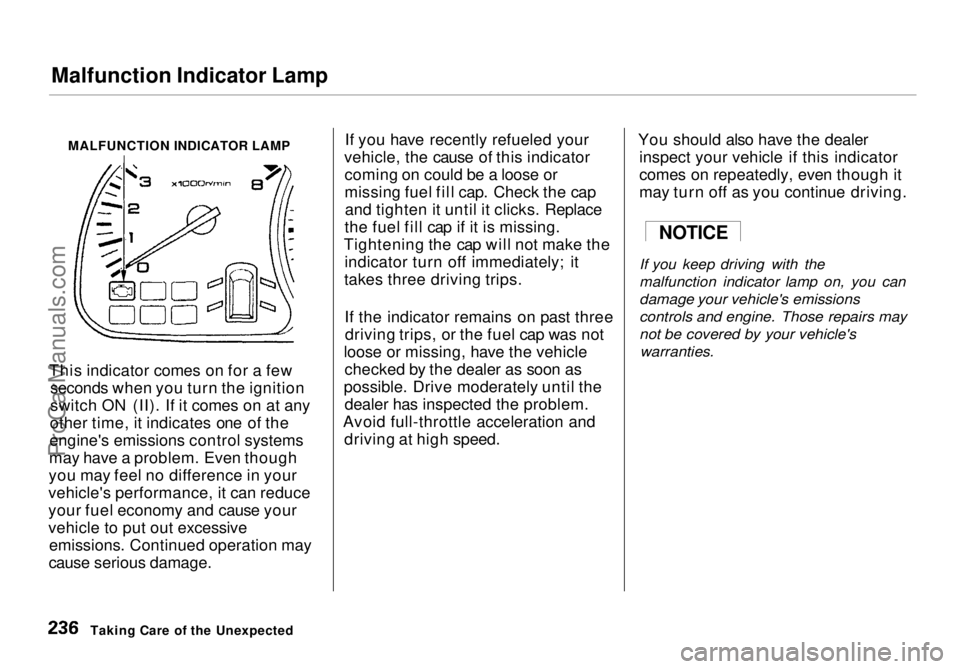
MALFUNCTION INDICATOR LAMP
This indicator comes on for a few seconds when you turn the ignition
switch ON (II). If it comes on at any
other time, it indicates one of the
engine's emissions control systems
may have a problem. Even though
you may feel no difference in your
vehicle's performance, it can reduce
your fuel economy and cause your
vehicle to put out excessive emissions. Continued operation may
cause serious damage. If you have recently refueled your
vehicle, the cause of this indicator coming on could be a loose or
missing fuel fill cap. Check the capand tighten it until it clicks. Replace
the fuel fill cap if it is missing.
Tightening the cap will not make the indicator turn off immediately; it
takes three driving trips.
If the indicator remains on past threedriving trips, or the fuel cap was not
loose or missing, have the vehicle checked by the dealer as soon as
possible. Drive moderately until the dealer has inspected the problem.
Avoid full-throttle acceleration and driving at high speed. You should also have the dealer
inspect your vehicle if this indicator
comes on repeatedly, even though it
may turn off as you continue driving.
If you keep driving with the
malfunction indicator lamp on, you can
damage your vehicle's emissions
controls and engine. Those repairs may
not be covered by your vehicle's
warranties.
Taking Care of the Unexpected
NOTICEProCarManuals.comMain Menu Table of Contents s t
Page 237 of 272
Fuses
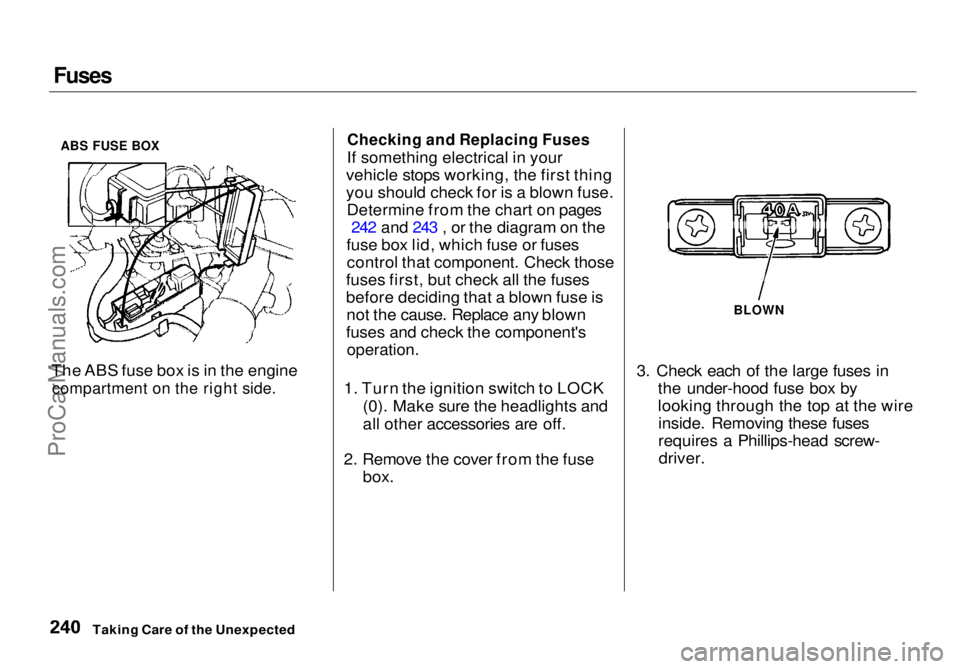
ABS FUSE BOX
The ABS fuse box is in the engine
compartment on the right side.
Checking and Replacing Fuses
If something electrical in your
vehicle stops working, the first thing
you should check for is a blown fuse. Determine from the chart on pages 242 and 243 , or the diagram on the
fuse box lid, which fuse or fuses control that component. Check those
fuses first, but check all the fuses
before deciding that a blown fuse is not the cause. Replace any blown
fuses and check the component's
operation.
1. Turn the ignition switch to LOCK (0). Make sure the headlights and
all other accessories are off.
2. Remove the cover from the fuse box. 3. Check each of the large fuses in
the under-hood fuse box by
looking through the top at the wireinside. Removing these fuses
requires a Phillips-head screw-driver.
Taking Care of the Unexpected
BLOWNProCarManuals.comMain Menu Table of Contents s t
Page 263 of 272
Index
Accessories and Modifications.... 134 Accessories................................. 134
Additional Safety Precaution.... 135Modifications............................. 135
ACCESSORY (Ignition Key
Position)........................................ 70
Adding Automatic Transmission
Fluid........................................ 177
Brake Fluid................................. 183
Engine Coolant........................... 177
Engine Oil................................... 173
Power Steering Fluid................. 184
Windshield Washer Fluid......... 181
Additional Information About
Your Seat Belts........................ 41
Lap Belt......................................... 42
Lap/Shoulder Belt....................... 41
Seat Belt Maintenance................ 42
Seat Belt System Components... 41
Additional Information About
Your SRS.................................. 42
Additional Safety Precautions.... 46 How Your Airbags Work............ 44
How Your SRS Indicator
Works........................................ 46
SRS Components......................... 44
Additives, Engine Oil..................... 175
Adjustments
Mirrors.......................................... 84
Head Restraints........................... 76
Seats.............................................. 74
Steering Wheel............................ 62
Airbag (SRS) ...................................... 7
Air Cleaner Element...................... 185
Air Conditioning............................... 94
Maintenance............................... 194
Usage............................................. 94
Air Outlets (Vents).......................... 96
Air Pressure, Tires........................ 196
Alcohol in Gasoline........................ 128
Antifreeze....................................... 177
Anti-lock Brakes (ABS) Indicator Light..................... 53, 149Operation.................................... 148
Anti-theft Steering Column Lock.. 70
Appearance Care........................... 213
Ashtray.............................................. 89
Audio System................................. 103
Automatic Speed Control................ 64
Automatic Transmission............... 142
Capacity, Fluid........................... 248
Checking Fluid Level................ 182
Shifting........................................ 142
Shift Lever Positions................. 142
Shift Position Indicator............. 142
Shift Lock Release..................... 145
Battery
Charging System
Indicator............................ 52, 235
Jump Starting............................. 230
Maintenance............................... 189
Specifications............................. 249
Before Driving............................... 127
Belts, Seat........................................... 6
Beverage Holder.............................. 86
Body Repair.................................... 219
CONTINUEDProCarManuals.comMain Menu s t