tow HONDA ODYSSEY 1998 Owner's Manual
[x] Cancel search | Manufacturer: HONDA, Model Year: 1998, Model line: ODYSSEY, Model: HONDA ODYSSEY 1998Pages: 272, PDF Size: 2.67 MB
Page 166 of 272
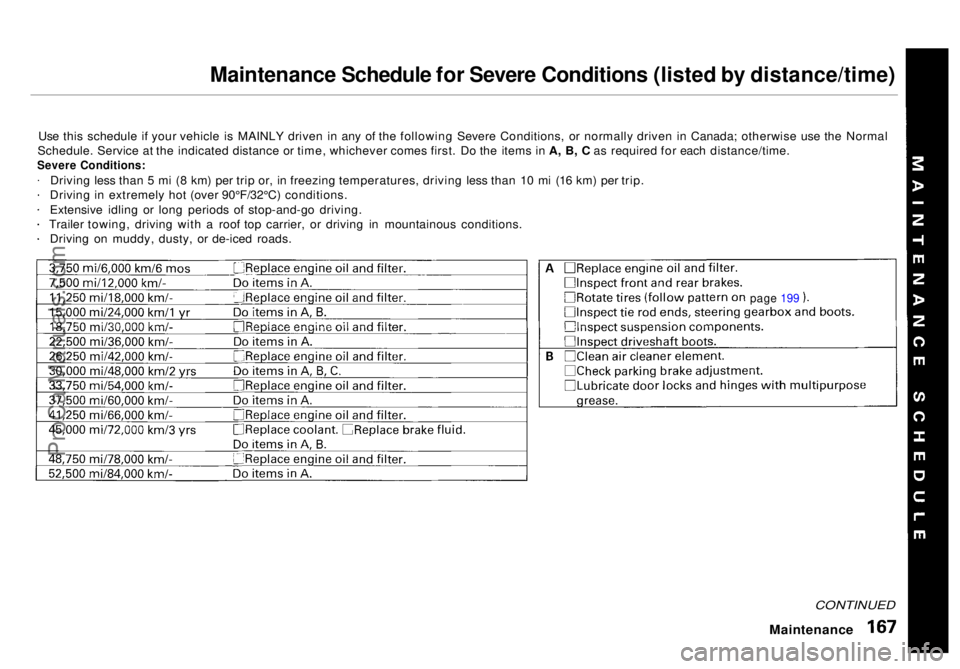
Maintenance Schedule for Severe Conditions (listed by distance/time)
Use this schedule if your vehicle is MAINLY driven in any of the following Severe Conditions, or normally driven in Canada; otherwise use the Normal
Schedule. Service at the indicated distance or time, whichever comes first. Do the items in A, B, C as required for each distance/time.
Severe Conditions:
Driving less than 5 mi (8 km) per trip or, in freezing temperatures, driving less than 10 mi (16 km) per trip.
Driving in extremely hot (over 90°F/32°C) conditions.
Extensive idling or long periods of stop-and-go driving.
Trailer towing, driving with a roof top carrier, or driving in mountainous conditions. Driving on muddy, dusty, or de-iced roads.
CONTINUED
Maintenance
page 199ProCarManuals.comMain Menu Table of Contents s t
Page 188 of 272
Battery
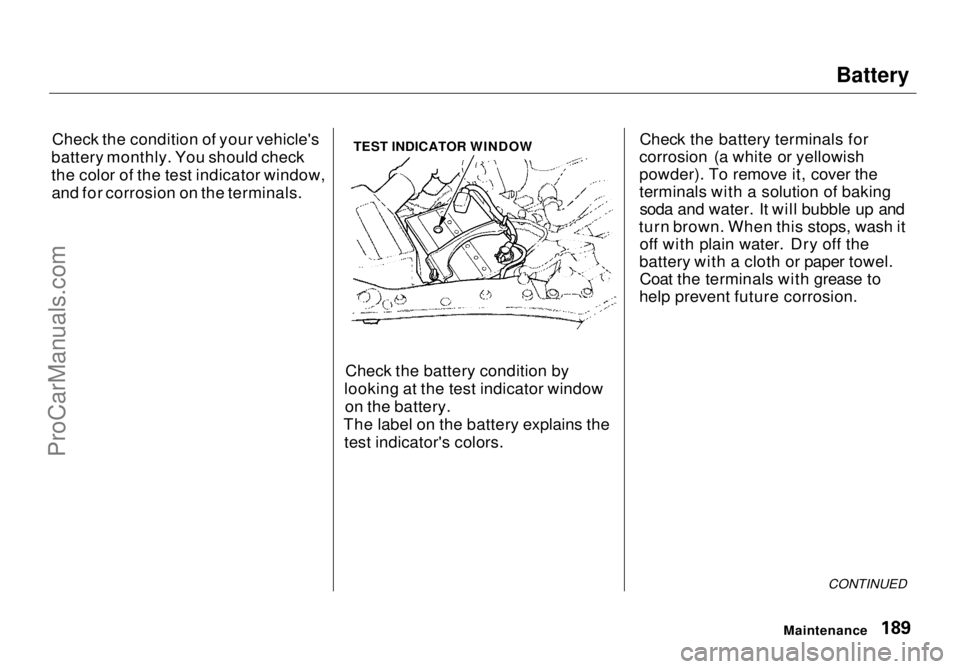
Check the condition of your vehicle's
battery monthly. You should check
the color of the test indicator window, and for corrosion on the terminals. TEST INDICATOR WINDOW
Check the battery condition by
looking at the test indicator window on the battery.
The label on the battery explains the test indicator's colors. Check the battery terminals for
corrosion (a white or yellowish
powder). To remove it, cover the
terminals with a solution of baking soda and water. It will bubble up and
turn brown. When this stops, wash it off with plain water. Dry off the
battery with a cloth or paper towel. Coat the terminals with grease to
help prevent future corrosion.
CONTINUED
MaintenanceProCarManuals.comMain Menu Table of Contents s t
Page 190 of 272
Wiper Blades
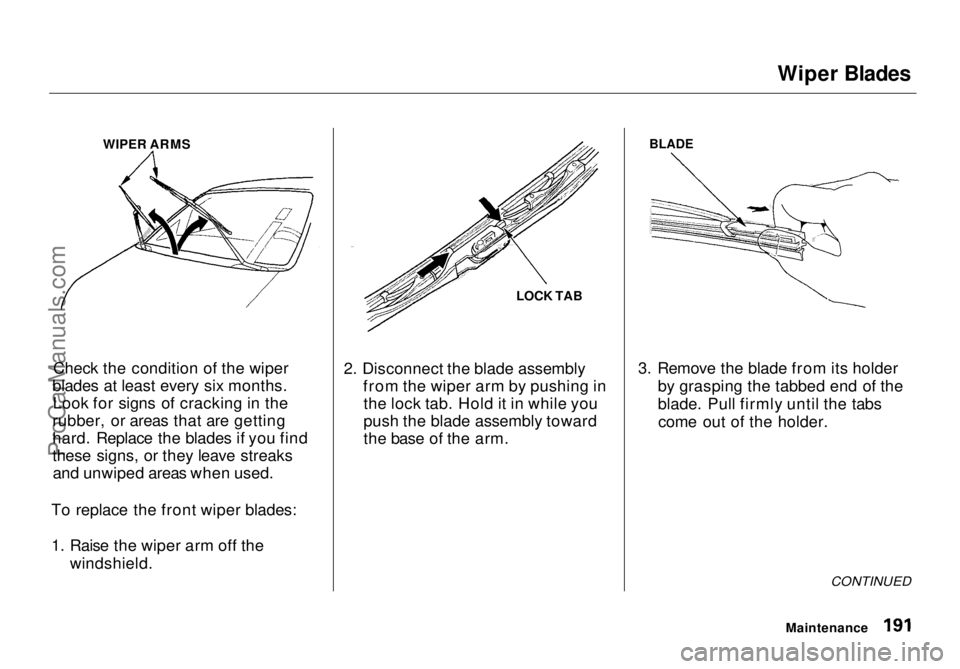
WIPER ARMS
Check the condition of the wiper
blades at least every six months. Look for signs of cracking in the
rubber, or areas that are getting
hard. Replace the blades if you find
these signs, or they leave streaks and unwiped areas when used.
To replace the front wiper blades:
1. Raise the wiper arm off the windshield. LOCK TAB
2. Disconnect the blade assembly from the wiper arm by pushing inthe lock tab. Hold it in while you
push the blade assembly toward
the base of the arm.
BLADE
3. Remove the blade from its holder by grasping the tabbed end of the
blade. Pull firmly until the tabscome out of the holder.
CONTINUED
MaintenanceProCarManuals.comMain Menu Table of Contents s t
Page 210 of 272
Storing Your Vehicle
If you need to park your vehicle for
an extended period (more than one
month), there are several things you
should do to prepare it for storage.
Proper preparation helps prevent
deterioration and makes it easier to
get your vehicle back on the road. If
possible, store your vehicle indoors.
Fill the fuel tank.
Change the engine oil and filter(see page 175 ). Wash and dry the exterior
completely.
Clean the interior. Make sure the
carpeting, floor mats, etc. are
completely dry. Leave the parking brake off. Put
the transmission in Park. Block the rear wheels. If the vehicle is to be stored for a
longer period, it should be supported on jackstands so the
tires are off the ground.
Leave one window open slightly (if
the vehicle is being stored
indoors).
Disconnect the battery.
Support the front and rear wiper
blade arms with a folded towel or rag so they do not touch the
windshield.
To minimize sticking, apply a
silicone spray lubricant to all door
and trunk seals. Also, apply a body
wax to the painted surfaces that mate with the door and trunk seals. Cover the vehicle with a
"breathable" vehicle cover, one
made from a porous material such as cotton. Nonporous materials,
such as plastic sheeting, trap
moisture, which can damage the
paint. If possible, run the engine for a
while periodically (preferably once a month).
If you store your vehicle for 12
months or longer, have your Honda dealer perform the inspections called
for in the 24 months/30,000 miles (48,000 km) maintenance schedule
(Normal Conditions) as soon as you
take it out of storage (see page 164 ).
The replacements called for in the maintenance schedule are not
needed unless the vehicle has
actually reached that time or mileage.
MaintenanceProCarManuals.comMain Menu Table of Contents s t
Page 212 of 272
Exterior Care
Washing Frequent washing helps preserve
your vehicle's beauty. Dirt and grit can scratch the paint, while tree sap
and bird droppings can permanently
ruin the finish.
Wash your vehicle in a shady area, not in direct sunlight. If the vehicle is
parked in the sun, move it into the shade and let the exterior cool down
before you start.
Only use the solvents and cleaners
recommended in this Owner's
Manual.
Chemical solvents and strong cleaners
can damage the paint, metal, and
plastic on your vehicle.
Rinse the vehicle thoroughly with
cool water to remove loose dirt.
Fill a bucket with cool water. Mix
in a mild detergent, such as dishwashing liquid or a product
made especially for car washing.
Wash the vehicle using the water and detergent solution and a soft-
bristle brush, sponge, or soft cloth. Start at the top and work your waydown. Rinse frequently.
Check the body for road tar, tree
sap, etc. Remove these stains with
tar remover or turpentine. Rinse it off immediately so it does not
harm the finish. Remember to re-
wax these areas, even if the rest of the vehicle does not need waxing. When you have washed and rinsed
the whole exterior, dry it with achamois or soft towel. Letting it
air-dry will cause dulling and water
spots.
As you dry the vehicle, inspect it for chips and scratches that could allow
corrosion to start. Repair them with
touch-up paint (see page 215).
The radio antenna on your vehicle does
not need to be removed when you use a "drive-through'' car wash. However, if
you remove the antenna, make sure to
reinstall it and tighten it securely using
an appropriate tool.
Appearance Care
NOTICE
NOTICEProCarManuals.comMain Menu Table of Contents s t
Page 215 of 272
Interior Care
Seat Belts
If your seat belts get dirty, you can
use a soft brush with a mixture of
mild soap and warm water to clean
them. Do not use bleach, dye, or cleaning solvents. They can weaken
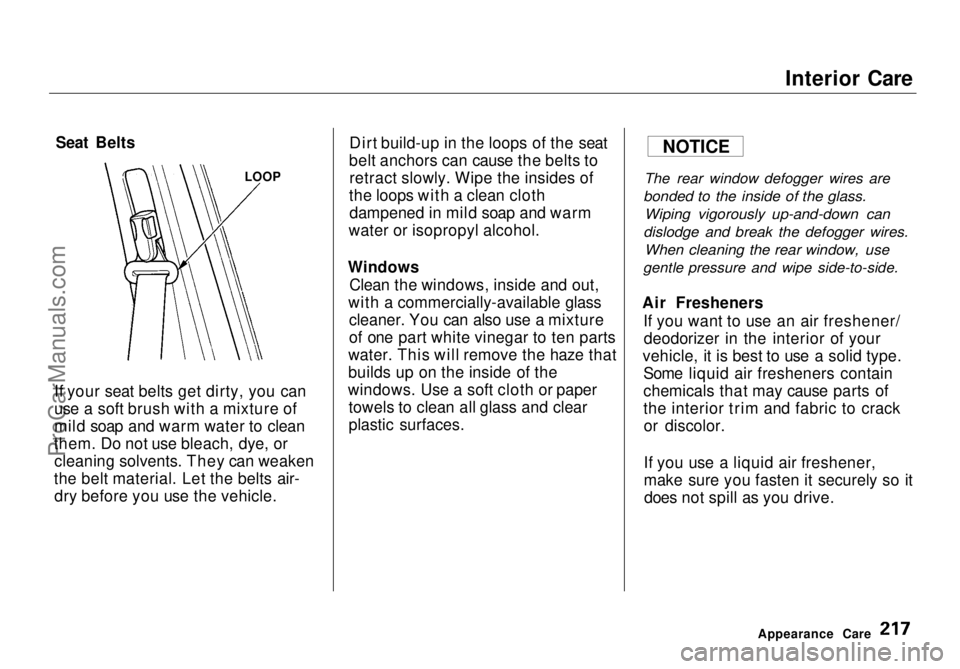
the belt material. Let the belts air- dry before you use the vehicle. Dirt build-up in the loops of the seat
belt anchors can cause the belts to retract slowly. Wipe the insides of
the loops with a clean cloth dampened in mild soap and warm
water or isopropyl alcohol.
Windows Clean the windows, inside and out,
with a commercially-available glass cleaner. You can also use a mixture
of one part white vinegar to ten parts
water. This will remove the haze that
builds up on the inside of the
windows. Use a soft cloth or paper towels to clean all glass and clear
plastic surfaces.
The rear window defogger wires are
bonded to the inside of the glass.
Wiping vigorously up-and-down can
dislodge and break the defogger wires.
When cleaning the rear window, use
gentle pressure and wipe side-to-side.
Air Fresheners If you want to use an air freshener/deodorizer in the interior of your
vehicle, it is best to use a solid type. Some liquid air fresheners contain
chemicals that may cause parts of
the interior trim and fabric to crackor discolor.
If you use a liquid air freshener,
make sure you fasten it securely so itdoes not spill as you drive.
Appearance Care
LOOP
NOTICEProCarManuals.comMain Menu Table of Contents s t
Page 218 of 272

Taking Care of the Unexpected
This section covers the more- common problems that motorists
experience with their vehicles. It
gives you information about how to safely evaluate the problem and what
to do to correct it. If the problem has stranded you on the side of the road,
you may be able to get going again. If not, you will also find instructionson getting your vehicle towed. Compact Spare Tire....................... 222
Changing a Flat Tire..................... 223
If Your Engine Won't Start........... 229 Nothing Happens or theStarter Motor OperatesVery Slowly......................... 229
The Starter Operates Normally................................. 230
Jump Starting................................. 230 If Your Engine Overheats............. 232
Low Oil Pressure Indicator .......... 234Charging System Indicator........... 235
Malfunction Indicator Lamp ........ 236
Brake System Indicator................ 237 Closing the Sunroof....................... 238
Fuses............................................... 239 Checking and Replacing........... 240
Towing............................................ 244
Taking Care of the UnexpectedProCarManuals.comMain Menu s t
Page 226 of 272
If Your Engine Won't Start
Diagnosing why your engine won't start falls into two areas, depending
on what you hear when you turn the
key to START (III):
You hear nothing, or almostnothing. The engine's starter
motor does not operate at all, or
operates very slowly.
You can hear the starter motor operating normally, or the starter
motor sounds like it is spinning
faster than normal, but the engine does not start up and run.
Nothing Happens or the Starter
Motor Operates Very Slowly
When you turn the ignition switch to START (III), you do not hear the
normal noise of the engine trying tostart. You may hear a clicking sound
or series of clicks, or nothing at all.
Check these things: Your vehicle has the Immobilizer
System. You should use a
properly-coded master or valet key
to start the engine (see page 67).
A key that is not properly coded will cause the immobilizer systemindicator in the dash panel to blink
rapidly.
Check the transmission interlock.
The transmission must be in Park or Neutral or the starter will not
operate.
Turn the ignition switch to ON (II).
Turn on the headlights and check their brightness. If the headlightsare very dim or don't light at all,
the battery is discharged. See
Jump Starting on page 230.
Turn the ignition switch to START
(III). If the headlights do not dim,
check the condition of the fuses. If
the fuses are OK, there is proba-
bly something wrong with the electrical circuit for the ignitionswitch or starter motor. You will
need a qualified technician to determine the problem. (See
Towing on page 244.)
If the headlights dim noticeably or
go out when you try to start theengine, either the battery is dis-
charged or the connections are
corroded. Check the condition of
the battery and terminal connec-
tions (see page 189). You can
then try jump starting the vehicle
from a booster battery (see page
231).
Taking Care of the UnexpectedProCarManuals.comMain Menu Table of Contents s t
Page 227 of 272
If Your Engine Won't Start, Jump Starting
The Starter
Operates Normally
In this case, the starter motor's
speed sounds normal, or even faster
than normal, when you turn the
ignition switch to START (III), but
the engine does not run. Are you using the proper startingprocedure? Refer to Starting the
Engine on page 141.
Do you have fuel? Turn the
ignition switch to ON (II) for a
minute and watch the fuel gauge.
The low fuel level warning light may not be working, so you were
not reminded to fill the tank.
There may be an electrical problem, such as no power to the
fuel pump. Check all the fuses (see page 242).
If you find nothing wrong, you will
need a qualified technician to find
the problem. See Towing on page
244.
Jump Starting
If your vehicle's battery has rundown, you may be able to start the
engine by using a booster battery.
Although this seems like a simple procedure, you should take several
precautions.
You cannot start a Honda by pushing or pulling it. To jump start your vehicle, follow
these directions closely:
1. Open the hood and check the physical condition of the battery(see page 189 ). In very cold
weather, check the condition of the electrolyte. If it seems slushyor like ice, do not try jump starting
until it thaws.
If a battery sits in extreme cold, the electrolyte inside can freeze.
Attempting to jump start with a frozen battery can cause it to rupture.
2. Turn off all the electrical acces- sories: heater, A/C, stereo system,
lights, etc.
Put the transmission in Neutral or
Park and set the parking brake.
Taking Care of the Unexpected
A battery can explode if you do
not follow the correct procedure,
seriously injuring anyone nearby.
Keep all sparks, open flames,
and smoking materials away
from the battery.
NOTICEProCarManuals.comMain Menu Table of Contents s t
Page 230 of 272
If Your Engine Overheats
4. If the temperature gauge stays at the red mark, turn off the engine.
5. Wait until you see no more signs of steam or spray, then open the
hood.
6. Look for any obvious coolant leaks, such as a split radiator hose.
Everything is still extremely hot,
so use caution. If you find a leak, it
must be repaired before you
continue driving (see Towing on
page 244).
7. If you don't find an obvious leak, check the coolant level in the
radiator reserve tank (see page 132). If the level is below the
MIN mark, add coolant to halfway
between the MIN and MAX marks.
8. If there was no coolant in the reserve tank, you may also have to
add coolant to the radiator. Let the
engine cool down until the pointer reaches the middle of the tempera-
ture gauge, or lower, before check- ing the radiator.
9. Using gloves or a large heavy cloth, turn the radiator cap
counterclockwise, without pushingdown, to the first stop. This
releases any remaining pressure in
the cooling system. After the
pressure releases, push down on
the cap and turn it until it comes
off.
10.Start the engine and set the
temperature control lever tomaximum. Add coolant to the
radiator up to the base of the filler
neck. If you do not have the
proper coolant mixture available,
you can add plain water. Remember to have the cooling
system drained and refilled with
the proper mixture as soon as you
can.
11. Put the radiator cap back on tightly. Run the engine and watch
the temperature gauge. If it goes
back to the red mark, the engine
needs repair. (See Towing on
page 244.)
12.If the temperature stays normal, check the coolant level in the
radiator reserve tank. If it has
gone down, add coolant to the MAX mark. Put the cap back on
tightly.
Taking Care of the Unexpected
Removing the radiator cap
while the engine is hot can
cause the coolant to spray out,
seriously scalding you.
Always let the engine and radiator cool down before
removing the radiator cap.ProCarManuals.comMain Menu Table of Contents s t