brake HONDA ODYSSEY 1999 User Guide
[x] Cancel search | Manufacturer: HONDA, Model Year: 1999, Model line: ODYSSEY, Model: HONDA ODYSSEY 1999Pages: 343, PDF Size: 3.73 MB
Page 112 of 343
Seats
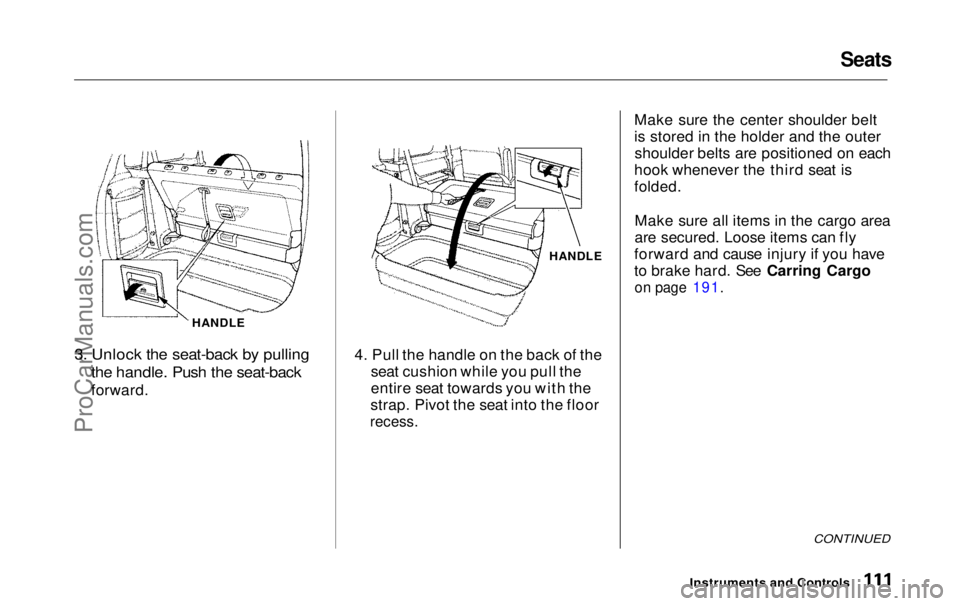
HANDLE
3. Unlock the seat-back by pulling
the handle. Push the seat-back
forward. HANDLE
4. Pull the handle on the back of the seat cushion while you pull the
entire seat towards you with the
strap. Pivot the seat into the floor
recess.
Make sure the center shoulder belt
is stored in the holder and the outer
shoulder belts are positioned on each
hook whenever the third seat is
folded.
Make sure all items in the cargo area
are secured. Loose items can fly
forward and cause injury if you have
to brake hard. See Carring Cargo
on page 191.
CONTINUED
Instruments and ControlsProCarManuals.comMain Menu Table of Contents s t
Page 117 of 343
Mirrors, Parking Brake
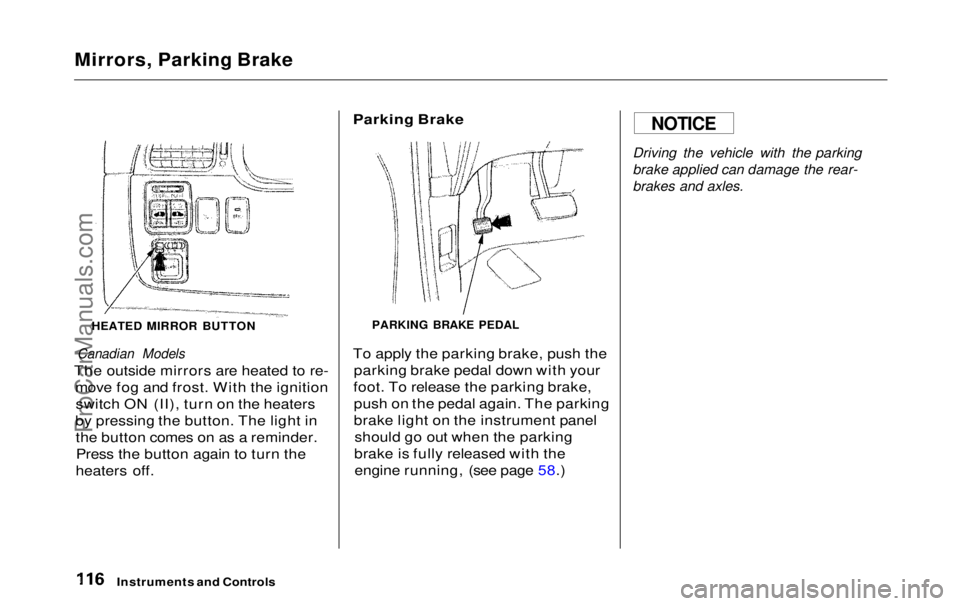
HEATED MIRROR BUTTON
Canadian Models
The outside mirrors are heated to re- move fog and frost. With the ignitionswitch ON (II), turn on the heaters
by pressing the button. The light in the button comes on as a reminder.Press the button again to turn the
heaters off.
Parking Brake
PARKING BRAKE PEDAL
To apply the parking brake, push the parking brake pedal down with your
foot. To release the parking brake, push on the pedal again. The parking
brake light on the instrument panel should go out when the parking
brake is fully released with the engine running, (see page 58.)
Driving the vehicle with the parking
brake applied can damage the rear-
brakes and axles.
Instruments and Controls
NOTICEProCarManuals.comMain Menu Table of Contents s t
Page 119 of 343
Center Table, Beverage Holder
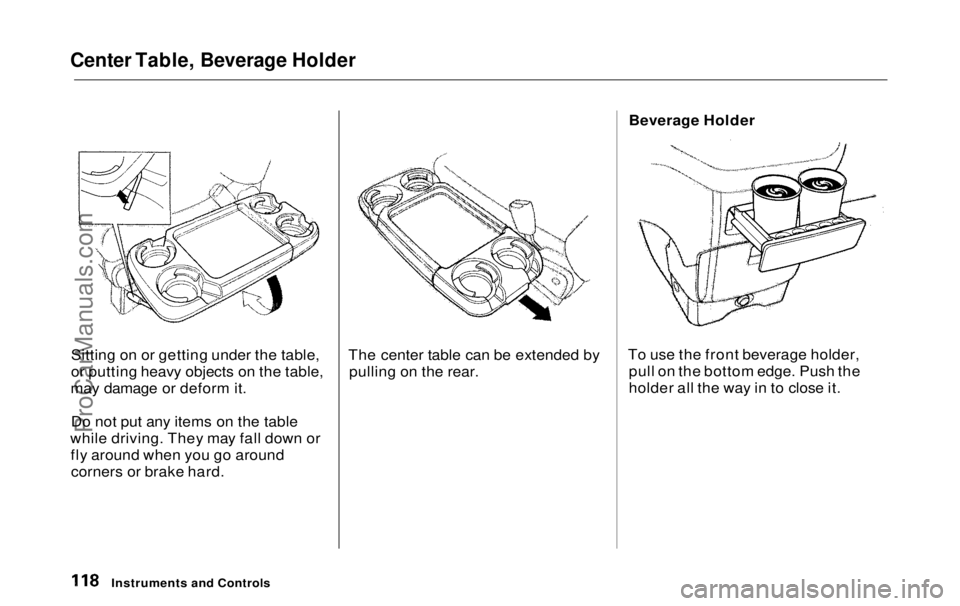
Sitting on or getting under the table,
or putting heavy objects on the table,
may damage or deform it.
Do not put any items on the table
while driving. They may fall down or fly around when you go aroundcorners or brake hard. The center table can be extended by
pulling on the rear. Beverage Holder
To use the front beverage holder, pull on the bottom edge. Push the
holder all the way in to close it.
Instruments and ControlsProCarManuals.comMain Menu Table of Contents s t
Page 183 of 343

Break-in Period, Gasoline
Break-in Period
Help assure your vehicle's future
reliability and performance by paying extra attention to how you driveduring the first 600 miles (1,000 km).
During this period:
Avoid full-throttle starts and rapid
acceleration.
Avoid hard braking. New brakes need to be broken-in by moderate
use for the first 200 miles (300
km). You should follow these same re-
commendations with an overhauled
or exchanged engine, or when the
brakes are replaced.
We also recommend that you should not tow a trailer during the first 500
miles (800 km).
Gasoline
Your Honda is designed to operate on unleaded gasoline with a pump
octane number of 86 or higher. Use
of a lower octane gasoline can cause
a persistent, heavy metallic rapping
noise in the engine that can lead to
mechanical damage.
We recommend gasolines containing detergent additives that help prevent
fuel system and engine deposits.
Using gasoline containing lead will
damage your vehicle's emissions
controls. This contributes to air
pollution.
Before DrivingProCarManuals.comMain Menu Table of Contents s t
Page 185 of 343
Service Station Procedures
3. Remove the fuel fill cap slowly.
You may hear a hissing sound aspressure inside the tank escapes.Place the cap in the holder on the
fuel fill door.
4. Stop filling the tank after the fuel pump automatically clicks off. Donot try to "top off" the tank, leavesome room for the fuel to expand
with temperature changes.
5. Screw the fuel fill cap back on, tighten it until it clicks at least
three times. If you do not properly
tighten the cap, the MalfunctionIndicator Lamp may come on (see
page 303 ).
6. Push the fuel fill door closed until it latches.
Opening the Hood
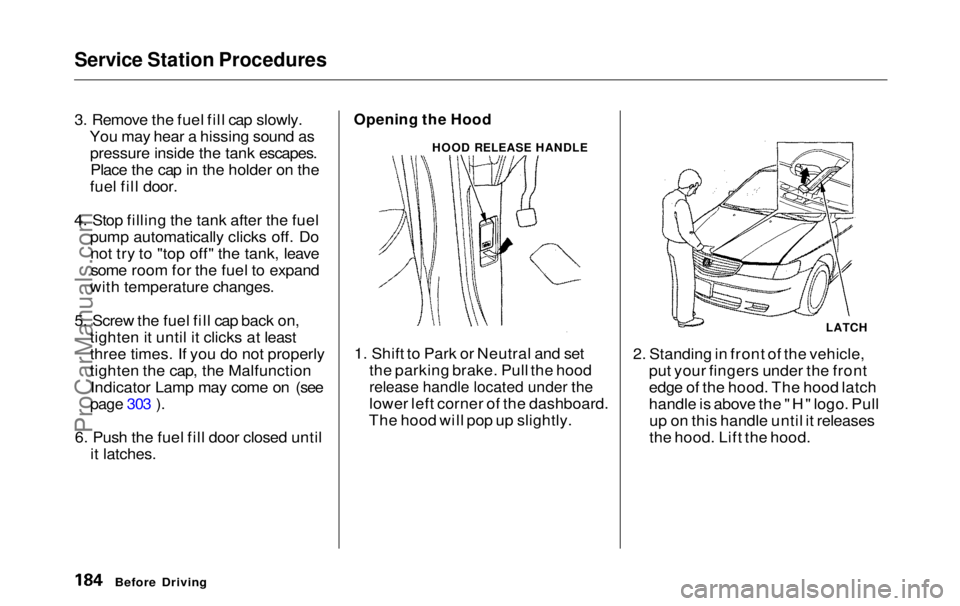
1. Shift to Park or Neutral and set the parking brake. Pull the hood
release handle located under the
lower left corner of the dashboard.
The hood will pop up slightly. 2. Standing in front of the vehicle,
put your fingers under the front
edge of the hood. The hood latch
handle is above the "H" logo. Pullup on this handle until it releases
the hood. Lift the hood.
Before Driving
HOOD RELEASE HANDLE
LATCHProCarManuals.comMain Menu Table of Contents s t
Page 190 of 343
Accessories and Modifications
Modifying your vehicle, or installing some non-Honda accessories, can
make your vehicle unsafe. Before
you make any modifications or add any accessories, be sure to read the
following information.
Accessories
Your dealer has Genuine Hondaaccessories that allow you to
personalize your vehicle. These accessories have been designed and
approved for your vehicle, and are
covered by warranty.
Non-Honda accessories are usually
designed for universal applications.
Although aftermarket accessories may fit on your vehicle, they may not
meet factory specifications, and
could adversely affect your vehicle's
handling and stability. (See "Modifications" on the page 190 for
additional information.) When properly installed, cellular
phones, alarms, two-way radios, and
low-powered audio systems should not interfere with your vehicle's
computer-controlled systems, such
as the SRS and anti-lock brake
system.
However, if electronic accessories
are improperly installed, or exceed
your vehicle's electrical system capacity, they can interfere with the operation of your vehicle, or even
cause the airbags to deploy.
Before installing any accessory: Make sure the accessory does not
obscure any lights, or interfere
with proper vehicle operation or performance.
Be sure electronic accessories donot overload electrical circuits (see page 305 ).
Have the installer contact your
Honda dealer for assistance before
installing any electronic accessory.
If possible, have your dealer inspect
the final installation.
Before Driving
Improper accessories or
modifications can affect your
vehicle's handling, stability and performance, and cause a
crash in which you can be hurt
or killed.
Follow all instructions in this
owner's manual regarding accessories and modifications.ProCarManuals.comMain Menu Table of Contents s t
Page 191 of 343

Accessories and Modifications
Modifications
Do not remove any original
equipment or modify your vehicle in any way that would alter its design or
operation. This could make your
vehicle unsafe and illegal to drive.
For example, do not make any
modifications that would change the
ride height of your vehicle, or install
wheels and tires with a different overall diameter.
Such modifications can adversely affect handling, and interfere with
the operation of the vehicle's anti-
lock brakes and other systems. In addition, any modifications that
decrease ground clearance increase
the chance of undercarriage parts striking a curb, speed bump, or other
raised object, which could cause
your airbags to deploy.
Do not modify your steering wheelor any other part of your
Supplemental Restraint System.
Modifications could make thesystem ineffective. Additional Safety Precaution
Do not attach or place objects on the
airbag covers. Any object attached to
or placed on the covers marked "SRS
AIRBAG," in the center of the steering wheel and on top of the
dashboard, could interfere with the
proper operation of the airbags. Or,
if the airbags inflate, the objects could be propelled inside the vehicle
and hurt someone.
Before DrivingProCarManuals.comMain Menu Table of Contents s t
Page 196 of 343
Driving
This section gives you tips on starting the engine under various
conditions, and how to operate the automatic transmission. It also
includes important information on
parking your vehicle, the braking system, the Traction Control System,
and facts you need if you are
planning to tow a trailer. Preparing to Drive......................... 196
Starting the Engine........................ 197
Starting in Cold Weather at High Altitude ..................... 197
Automatic Transmission............... 198 Shift Lever Position Indicator.. 198
Shift Lever Positions................. 199
Maximum Allowable Speeds.... 201
Shift Lock Release..................... 202
Parking............................................ 203
The Braking System...................... 204 Brake Wear Indicators.............. 204
Brake System Design................ 205
Anti-lock Brakes........................ 205
Important SafetyReminders.......................... 206
ABS Indicator......................... 206
Traction Control System............... 207 TCS ON/OFF Switch................ 209
TCS Indicator............................. 209
Driving in Bad Weather................ 210
Towing a Trailer............................ 212
DrivingProCarManuals.comMain Menu s t
Page 198 of 343

Starting the Engine
1. Apply the parking brake.
2. In cold weather, turn off all electrical accessories to reduce
the drain on the battery.
3. Make sure the shift lever is in Park. Press on the brake pedal.
4. Without touching the accelerator pedal, turn the ignition key to theSTART (III) position. If the enginedoes not start right away, do not
hold the key in START (III) for more than 15 seconds at a time.
Pause for at least 10 seconds
before trying again.
5. If the engine does not start within 15 seconds, or starts but stalls
right away, repeat step 4 with the accelerator pedal pressed half-way
down. If the engine starts, release
pressure on the accelerator pedal so the engine does not race. 6. If the engine still does not start,
press the accelerator pedal all the
way down and hold it there while starting in order to clear flooding.
As before, keep the ignition key in the START (III) position for nomore than 15 seconds. Return to
step 5 if the engine does not start.
If it starts, lift your foot off the
accelerator pedal so the engine
does not race.
Starting in Cold Weather at High
Altitude (Above 8,000 feet/
2,400 meters)
An engine is harder to start in cold weather. The thinner air found athigh altitude above 8,000 feet (2,400meters) adds to the problem.
Use the following procedure:
1. Turn off all electrical accessories to reduce the drain on the battery. 2. Push the accelerator pedal half-
way to the floor and hold it there
while starting the engine. Do nothold the ignition key in START (III) for more than 15 seconds.
When the engine starts, release the accelerator pedal gradually as
the engine speeds up and smoothsout.
3. If the engine fails to start in step 2, push the accelerator pedal to the
floor and hold it there while you try to start the engine for no more
than 15 seconds. If the enginedoes not start, return to step 2.
DrivingProCarManuals.comMain Menu Table of Contents s t
Page 200 of 343
Automatic Transmission
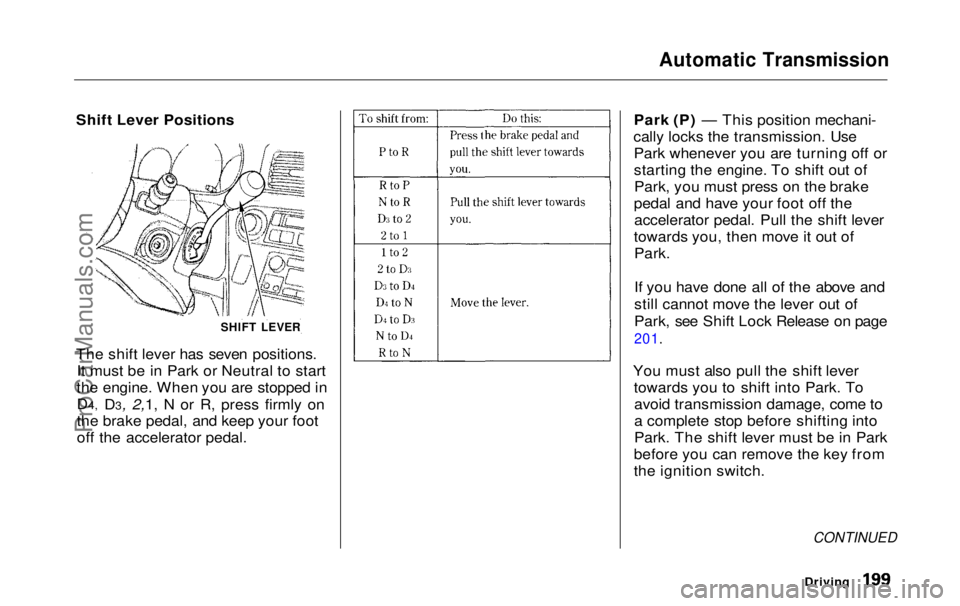
Shift Lever Positions
The shift lever has seven positions. It must be in Park or Neutral to start
the engine. When you are stopped in
D4, D3, 2,1, N or R, press firmly on
the brake pedal, and keep your foot
off
the accelerato
r pedal. Park (P) — This position mechani-
cally locks the transmission. Use Park whenever you are turning off or
starting the engine. To shift out ofPark, you must press on the brake
pedal and have your foot off the accelerator pedal. Pull the shift lever
towards you, then move it out of
Park.
If you have done all of the above and
still cannot move the lever out of
Park, see Shift Lock Release on page
201.
You must also pull the shift lever towards you to shift into Park. Toavoid transmission damage, come to
a complete stop before shifting into
Park. The shift lever must be in Park
before you can remove the key from
the ignition switch.
CONTINUED
Driving
SHIFT LEVERProCarManuals.comMain Menu Table of Contents s t