lock HONDA ODYSSEY 1999 Owner's Manual
[x] Cancel search | Manufacturer: HONDA, Model Year: 1999, Model line: ODYSSEY, Model: HONDA ODYSSEY 1999Pages: 343, PDF Size: 3.73 MB
Page 56 of 343
Instruments and Controls
This section gives information about
the controls and displays that
contribute to the daily operation of
your Honda. All the essential
controls are within easy reach.
Control Locations............................ 56
Indicator Lights................................ 57
Gauges.............................................. 62
Controls Near the Steering
Wheel........................................65
Headlights...................................
. 66
Automatic Lightin g
Off
Feature......................................67
Daytime Running Lights............. 67
Instrument Panel Brightness..... 67
Turn Signals................................. 68
Windshield Wipers.....................
. 68
Windshield Washers..................
. 70
Rear Windo w
Wiper and
Washer......................................70
Hazard Warning........................... 70
Rear Window Defogger.............. 71
Steering Wheel Adjustment....... 72
Steering Wheel Controls ................ 73
Cruise Control.............................. 73
Remote Audio Controls .............. 76
Keys and Locks................................ 76
Keys............................................... 76
Immobilizer System..................... 77
Ignition Switch............................. 78
Power Door Locks....................... 79
Remote Transmitter.................... 81Childproof Door Locks............... 85
Tailgate......................................... 85
Glove Box..................................... 87
Sliding Doors.................................... 88
Manual Sliding Doors.................. 88
Power Sliding Doors.................... 90
Important Safety Precautions.... 94
HomeLink Universal Transmitter.................................. 95
Seats.................................................. 99
Passenger Seating....................... 99
Seat Adjustments....................... 100
Driver's Seat Power
Adjustments........................... 102
Armrests..................................... 103
Head Restraints......................... 104
Third Seat Access...................... 105 Moving the Second Row Bucket Seat............................ 106
Removing the Bucket Seats in the Second Row................. 108
Removing the Bench Seat in the Second Row................. 109
Folding the Third Seat.............. 110
Power Windows............................. 113
Mirrors............................................ 115 Parking Brake................................ 116
Digital Clock................................... 117
Center Table................................... 117
Beverage Holder............................ 118
Sunglasses Holder......................... 120
Sun Visor......................................... 121
Vanity Mirror................................. 121 Rear Compartment........................ 122Center Pocket................................ 122
Coin Holder.................................... 122
Storage Box.................................... 123 Coat Hook....................................... 123
Accessory Power Sockets............. 124 Interior Lights................................ 125
Instruments and ControlsProCarManuals.comMain Menu s t
Page 57 of 343
Control Locations
Instruments and Controls
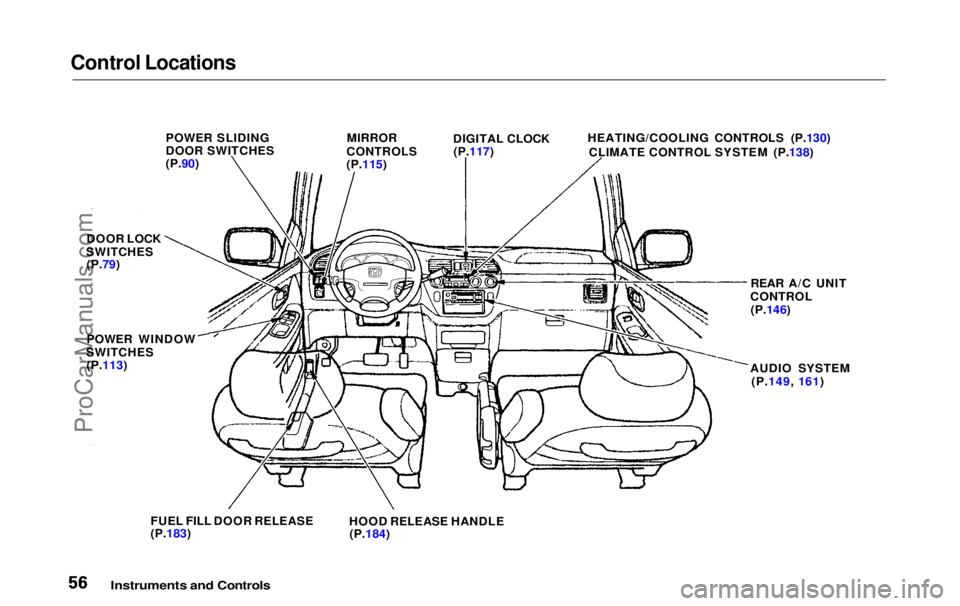
POWER SLIDING
DOOR SWITCHES
(P.90)
MIRROR
CONTROLS
(P.115) DIGITAL CLOCK
(P.117) HEATING/COOLING CONTROLS (P.130)
CLIMATE CONTROL SYSTEM (P.138)
REAR A/C UNIT
CONTROL (P.146)
AUDIO SYSTEM (P.149, 161)
FUEL FILL DOOR RELEASE
(P.183)
HOOD RELEASE HANDLE
(P.184)
POWER WINDOW
SWITCHES
(P.113)
DOOR LOCK
SWITCHES (P.79)ProCarManuals.comMain Menu Table of Contents s t
Page 58 of 343
Indicator Lights
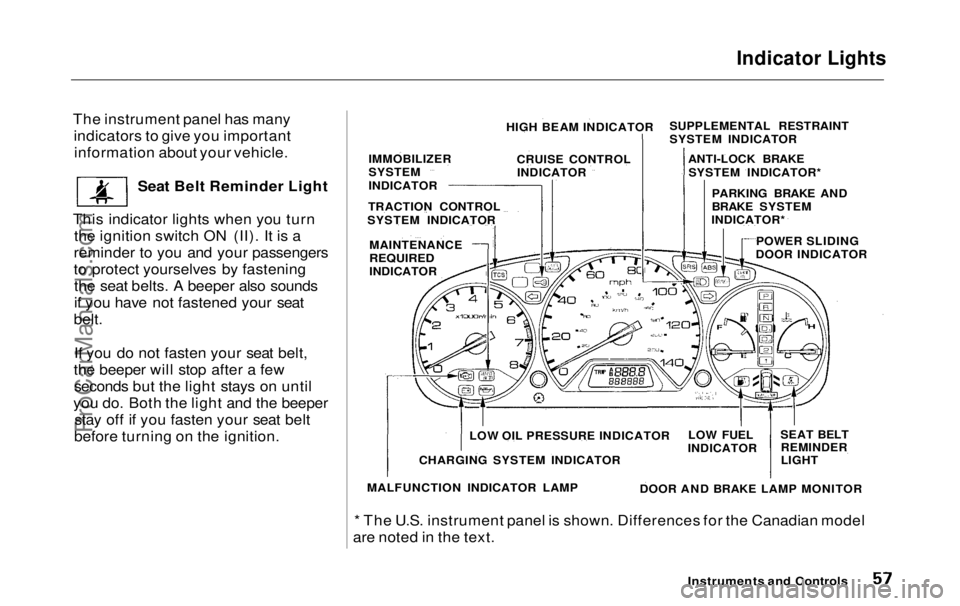
The instrument panel has many indicators to give you importantinformation about your vehicle.
Seat Belt Reminder Light
This indicator lights when you turn the ignition switch ON (II). It is a
reminder to you and your passengers
to protect yourselves by fastening the seat belts. A beeper also sounds
if you have not fastened your seat
belt.
If you do not fasten your seat belt,
the beeper will stop after a few seconds but the light stays on until
you do. Both the light and the beeper stay off if you fasten your seat belt
before turning on the ignition.
* The U.S. instrument panel is shown. Differences for the Canadian model
are noted in the text.
Instruments and Controls
HIGH BEAM INDICATOR
CRUISE CONTROLINDICATOR
IMMOBILIZER
SYSTEM
INDICATOR
TRACTION CONTROL
SYSTEM INDICATOR
MAINTENANCE
REQUIRED
INDICATOR SUPPLEMENTAL RESTRAINT
SYSTEM INDICATOR
ANTI-LOCK BRAKESYSTEM INDICATOR*
PARKING BRAKE AND
BRAKE SYSTEM
INDICATOR*
POWER SLIDING
DOOR INDICATOR
SEAT BELTREMINDER
LIGHT
LOW FUEL
INDICATOR
DOOR AND BRAKE LAMP MONITOR
LOW OIL PRESSURE INDICATOR
CHARGING SYSTEM INDICATOR
MALFUNCTION INDICATOR LAMPProCarManuals.comMain Menu Table of Contents s t
Page 60 of 343
Indicator Lights
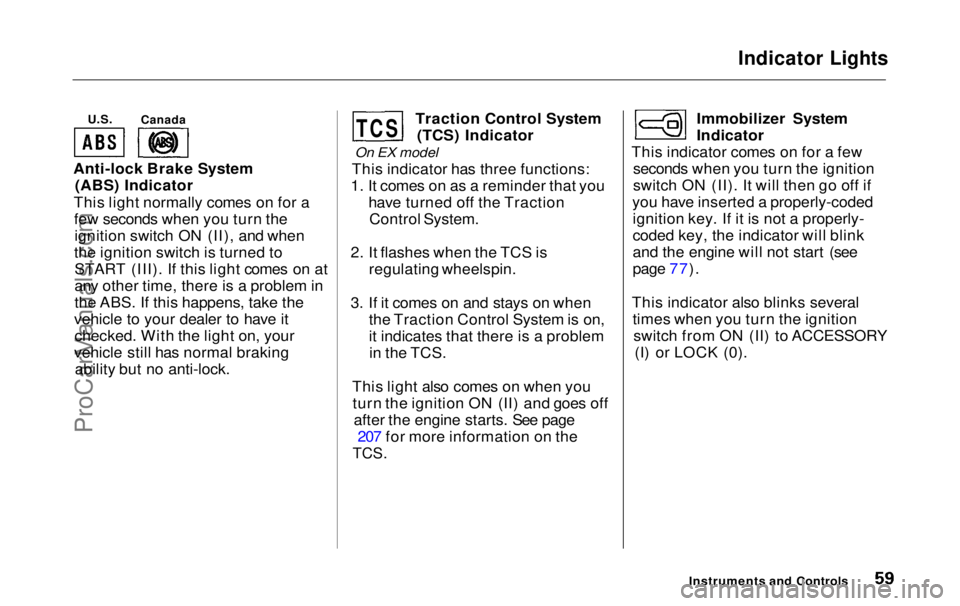
U.S.
Anti-lock Brake System (ABS) Indicator
This light normally comes on for a few seconds when you turn theignition switch ON (II), and when
the ignition switch is turned to START (III). If this light comes on at
any other time, there is a problem in
the ABS. If this happens, take the
vehicle to your dealer to have it checked. With the light on, your
vehicle still has normal braking ability but no anti-lock. Traction Control System
(TCS) Indicator
On EX model
This indicator has three functions:
1. It comes on as a reminder that you have turned off the TractionControl System.
2. It flashes when the TCS is regulating wheelspin.
3. If it comes on and stays on when the Traction Control System is on,
it indicates that there is a problemin the TCS.
This light also comes on when you turn the ignition ON (II) and goes off after the engine starts. See page 207 for more information on the
TCS.
Immobilizer System
Indicator
This indicator comes on for a few seconds when you turn the ignition
switch ON (II). It will then go off if
you have inserted a properly-coded ignition key. If it is not a properly-
coded key, the indicator will blink
and the engine will not start (see
page 77).
This indicator also blinks several times when you turn the ignitionswitch from ON (II) to ACCESSORY (I) or LOCK (0).
Instruments and Controls
Canada
TCSProCarManuals.comMain Menu Table of Contents s t
Page 67 of 343
Controls Near the Steering Wheel
Headlights
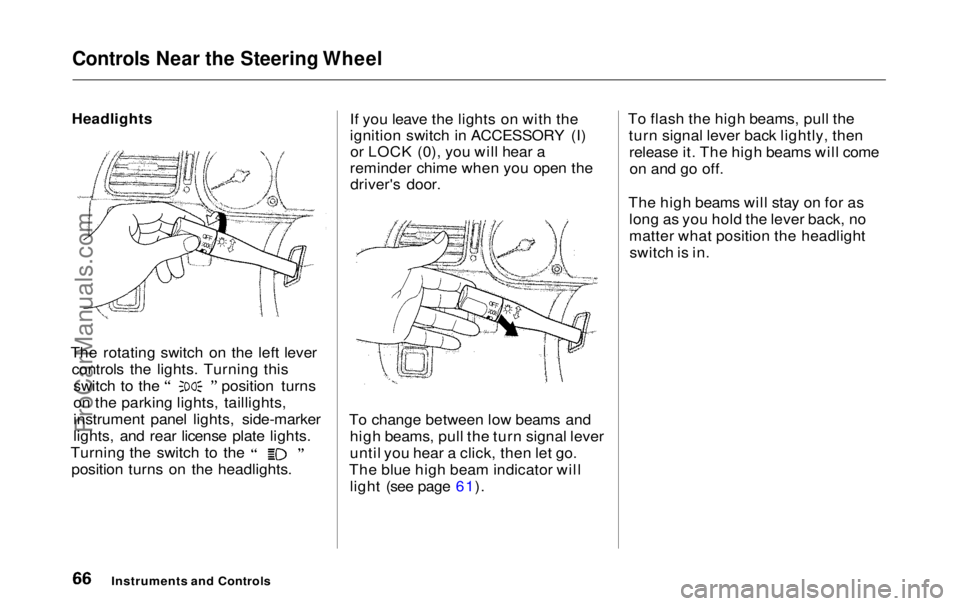
The rotating switch on the left lever controls the lights. Turning this switch to the position turns
on the parking lights, taillights,
instrument panel lights, side-marker
lights, and rear license plate lights.
Turning the switch to the
position turns on the headlights. If you leave the lights on with the
ignition switch in ACCESSORY (I)
or LOCK (0), you will hear a
reminder chime when you open the driver's door.
To change between low beams and high beams, pull the turn signal lever
until you hear a click, then let go.
The blue high beam indicator will light (see page 61). To flash the high beams, pull the
turn signal lever back lightly, thenrelease it. The high beams will comeon and go off.
The high beams will stay on for as long as you hold the lever back, no
matter what position the headlightswitch is in.
Instruments and ControlsProCarManuals.comMain Menu Table of Contents s t
Page 68 of 343
Controls Near the Steering Wheel
Automatic Lighting Off Feature
On EX model
The Automatic Lighting Off feature turns off the headlights, parking
lights, taillights, side marker lights,
license plate lights and instrumentpanel lights within 15 seconds ofremoving the key from the ignitionswitch and closing the driver's door.
This feature activates if you leave the headlight switch in the or
position, remove the key, and
open and close the driver's door.
If you remove the key from the
ignition switch with the headlight switch on, but do not open the door
and get out, the lights will turn off
after 10 minutes. The lights will turn on again when
you unlock or open the driver's door. If you unlock the door, but do not
open it within 15 seconds, the lights
will go off. With the driver's door open, you will hear a lights-on
reminder chime.
Daytime Running Lights(Canadian Models)
With the headlight switch off, the high beam headlights come on withreduced brightness when you turn
the ignition switch to ON (II) and release the parking brake. They
remain on until you turn the ignitionoff, even if you set the parking brake.
The headlights revert to normal operation when you turn them on
with the switch. Instrument Panel Brightness
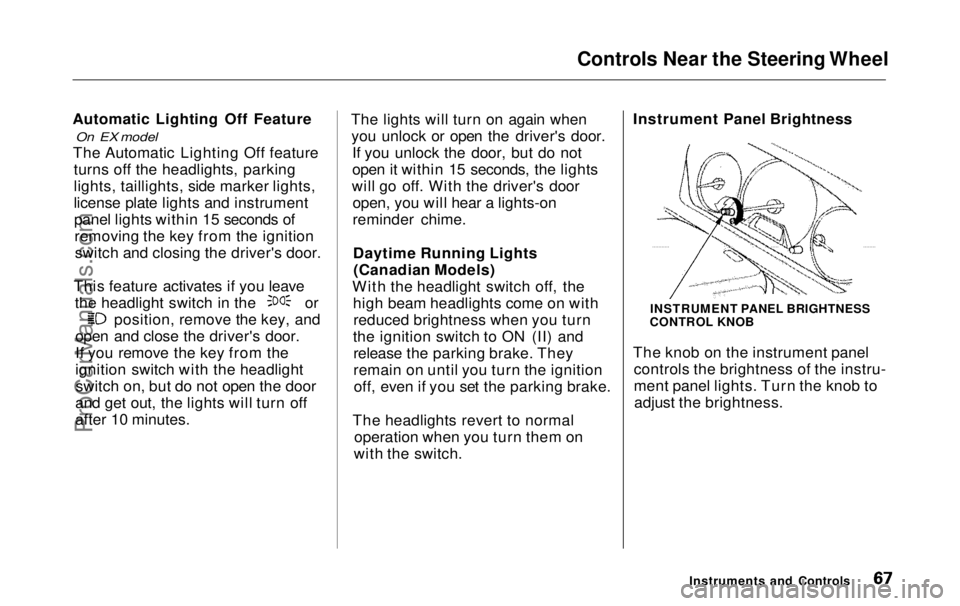
The knob on the instrument panel
controls the brightness of the instru-
ment panel lights. Turn the knob toadjust the brightness.
Instruments and Controls
INSTRUMENT PANEL BRIGHTNESS
CONTROL KNOBProCarManuals.comMain Menu Table of Contents s t
Page 71 of 343
Controls Near the Steering Wheel
Windshield Washers
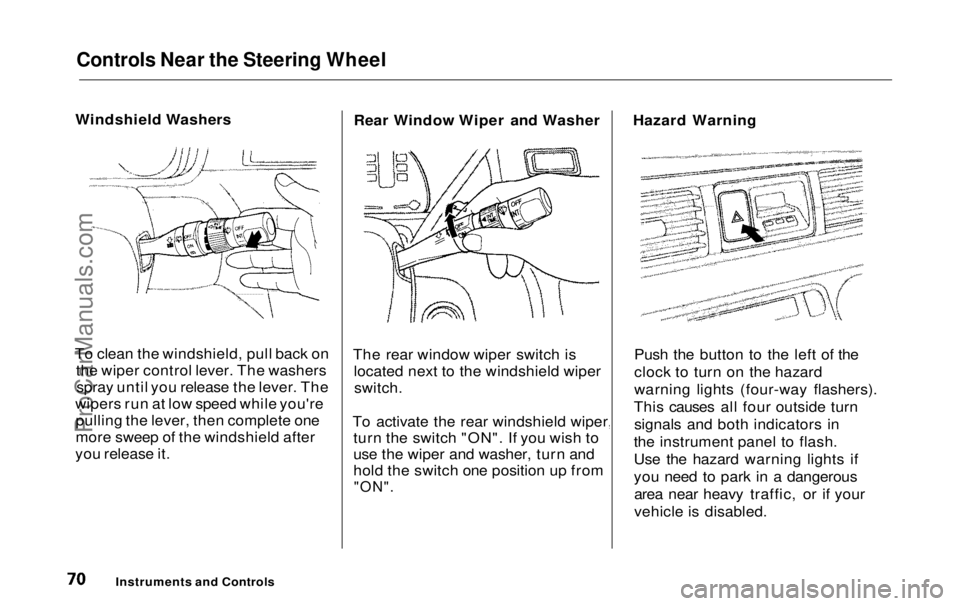
To clean the windshield, pull back on the wiper control lever. The washersspray until you release the lever. The
wipers run at low speed while you're pulling the lever, then complete one
more sweep of the windshield after
you release it. Rear Window Wiper and Washer
The rear window wiper switch is located next to the windshield wiperswitch.
To activate the rear windshield wiper, turn the switch "ON". If you wish to
use the wiper and washer, turn and
hold the switch one position up from
"ON".
Hazard Warning
Push the button to the left of the
clock to turn on the hazard
warning lights (four-way flashers).
This causes all four outside turn signals and both indicators in
the instrument panel to flash.
Use the hazard warning lights if
you need to park in a dangerous area near heavy traffic, or if your
vehicle is disabled.
Instruments and ControlsProCarManuals.comMain Menu Table of Contents s t
Page 73 of 343
Controls Near the Steering Wheel
Steering Wheel Adjustment
See page 19 for important safety
information about how to properly
position the steering wheel.
Make any steering wheel adjustment
before you start driving.
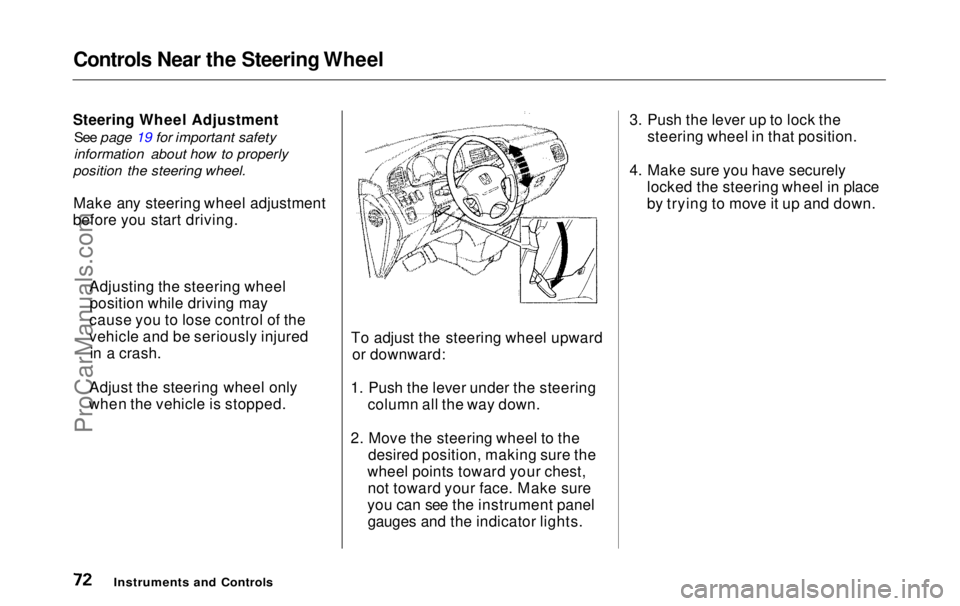
To adjust the steering wheel upwardor downward:
1. Push the lever under the steering column all the way down.
2. Move the steering wheel to the desired position, making sure the
wheel points toward your chest, not toward your face. Make sure
you can see the instrument panel gauges and the indicator lights. 3. Push the lever up to lock the
steering wheel in that position.
4. Make sure you have securely locked the steering wheel in place
by trying to move it up and down.
Instruments and Controls
Adjusting the steering wheel
position while driving may
cause you to lose control of the
vehicle and be seriously injured in a crash.
Adjust the steering wheel only
when the vehicle is stopped.ProCarManuals.comMain Menu Table of Contents s t
Page 77 of 343
Steering Wheel Controls, Keys and Locks
Remote Audio Controls
On EX model
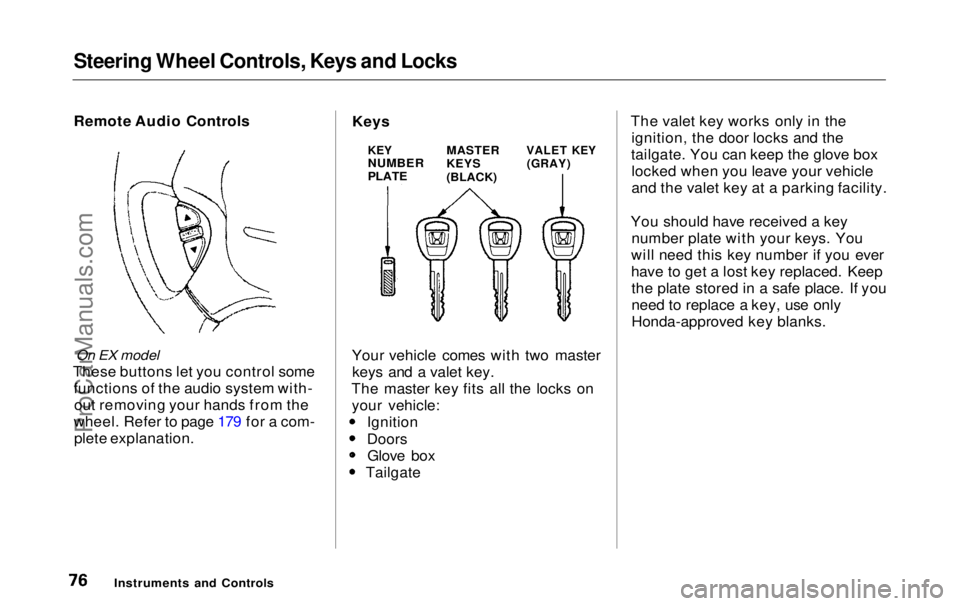
These buttons let you control some functions of the audio system with-out removing your hands from the
wheel. Refer to page 179 for a com- plete explanation. Your vehicle comes with two master
keys and a valet key.
The master key fits all the locks on your vehicle: Ignition
DoorsGlove box TailgateThe valet key works only in the
ignition, the door locks and the
tailgate. You can keep the glove box locked when you leave your vehicle
and the valet key at a parking facility.
You should have received a key number plate with your keys. You
will need this key number if you ever
have to get a lost key replaced. Keep the plate stored in a safe place. If you
need to replace a key, use only
Honda-approved key blanks.
Instruments and Controls
KEY
NUMBER
PLATE
MASTER
KEYS
(BLACK)
VALET KEY
(GRAY)
KeysProCarManuals.comMain Menu Table of Contents s t
Page 78 of 343
Keys and Locks
These keys contain electronic circuits that are activated by the
Immobilizer System. They will not
work to start the engine if the circuits are damaged. Protect the keys from direct
sunlight, high temperature, and
high humidity. Do not drop the keys or set heavy
objects on them.
Keep the keys away from liquids.
If they get wet, dry them immedi-
ately with a soft cloth.
The keys do not contain batteries. Do not try to take them apart.
Remote Transmitter
Some models also come with a
remote transmitter; see page 81 for
an explanation of its operation.
Immobilizer System
The Immobilizer System protects your vehicle from theft. A properly-coded master or valet key must be
used in the ignition switch for theengine to start. If an improperly-
coded key (or other device) is used,
the engine's fuel system is disabled.
When you turn the ignition switch to ON (II), the Immobilizer System
indicator should come on for a few seconds, then go out. If the indicator
starts to blink, it means the system does not recognize the coding of the
key. Turn the ignition switch to LOCK (0), remove the key, reinsert
it, and turn the switch to ON (II)
again.
The system may not recognize your
key's coding if any other immobilizer
key is near the ignition switch. To make sure the system recognizes the
key code, keep each immobilizer key on a separate ring.
If the system repeatedly does not
recognize the coding of your key, contact your Honda dealer.
This indicator will also blink several times when you turn the ignitionswitch from ON (II) to ACCESSORY (I) or LOCK (0).
Do not attempt to alter this system
or add other devices to it. Electrical
problems could result that may make
your vehicle undriveable.
If you have lost your key and you
cannot start the engine, contact your
Honda dealer.
Instruments and Controls CONTINUEDProCarManuals.comMain Menu Table of Contents s t