lock HONDA ODYSSEY 1999 Workshop Manual
[x] Cancel search | Manufacturer: HONDA, Model Year: 1999, Model line: ODYSSEY, Model: HONDA ODYSSEY 1999Pages: 343, PDF Size: 3.73 MB
Page 110 of 343
Seats
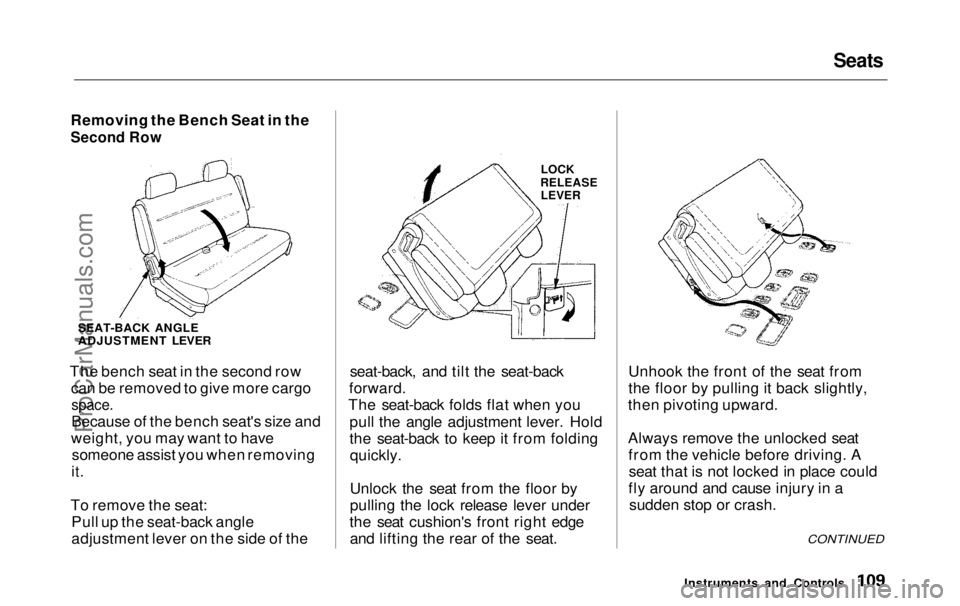
Removing the Bench Seat in the
Second Row
SEAT-BACK ANGLE
ADJUSTMENT LEVER
The bench seat in the second row can be removed to give more cargo
space.
Because of the bench seat's size and
weight, you may want to have someone assist you when removing
it.
To remove the seat: Pull up the seat-back angle
adjustment lever on the side of the
LOCK
RELEASE LEVER
seat-back, and tilt the seat-back
forward.
The seat-back folds flat when you
pull the angle adjustment lever. Hold
the seat-back to keep it from foldingquickly.
Unlock the seat from the floor by
pulling the lock release lever under
the seat cushion's front right edge and lifting the rear of the seat. Unhook the front of the seat from
the floor by pulling it back slightly,
then pivoting upward.
Always remove the unlocked seat from the vehicle before driving. Aseat that is not locked in place could
fly around and cause injury in a sudden stop or crash.
Instruments and Controls
CONTINUEDProCarManuals.comMain Menu Table of Contents s t
Page 111 of 343
Seats
To reinstall the seat, hook the front of the seat to the floor, then push the
back into the locks. Make sure both
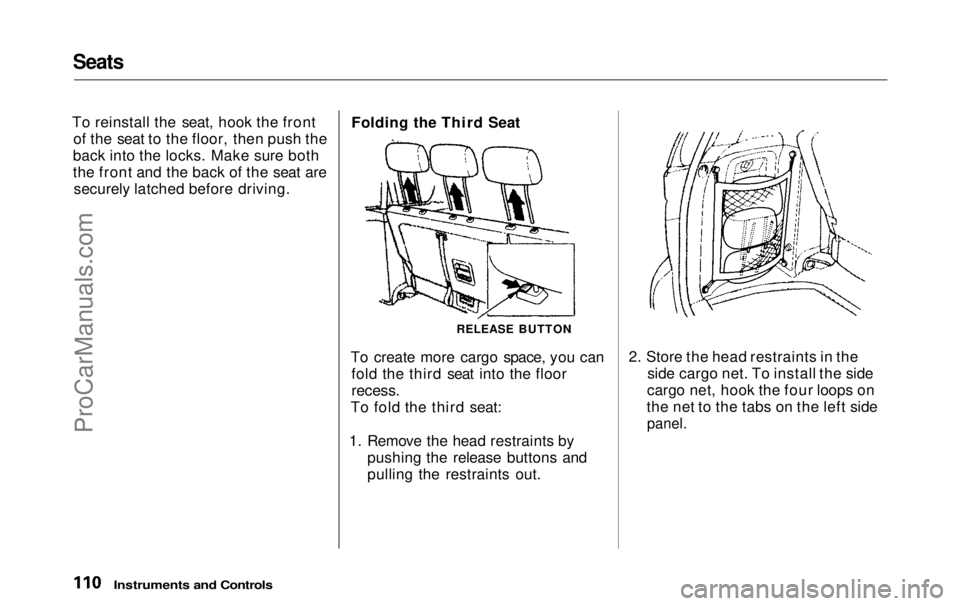
the front and the back of the seat are securely latched before driving. Folding the Third Seat
RELEASE BUTTON
To create more cargo space, you can fold the third seat into the floor
recess.
To fold the third seat:
1. Remove the head restraints by pushing the release buttons and
pulling the restraints out. 2. Store the head restraints in the
side cargo net. To install the side
cargo net, hook the four loops on
the net to the tabs on the left side
panel.
Instruments and ControlsProCarManuals.comMain Menu Table of Contents s t
Page 112 of 343
Seats
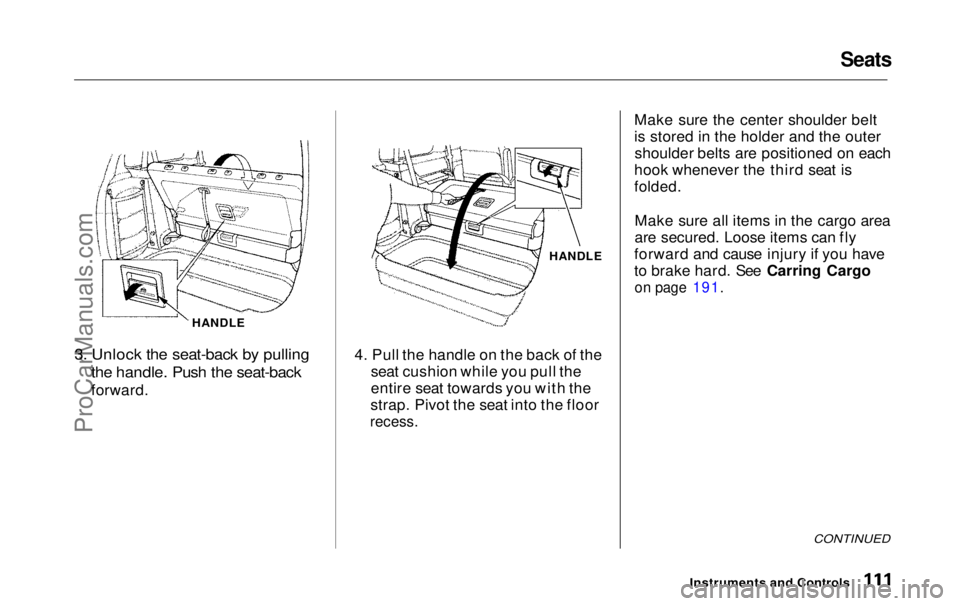
HANDLE
3. Unlock the seat-back by pulling
the handle. Push the seat-back
forward. HANDLE
4. Pull the handle on the back of the seat cushion while you pull the
entire seat towards you with the
strap. Pivot the seat into the floor
recess.
Make sure the center shoulder belt
is stored in the holder and the outer
shoulder belts are positioned on each
hook whenever the third seat is
folded.
Make sure all items in the cargo area
are secured. Loose items can fly
forward and cause injury if you have
to brake hard. See Carring Cargo
on page 191.
CONTINUED
Instruments and ControlsProCarManuals.comMain Menu Table of Contents s t
Page 113 of 343
Seats
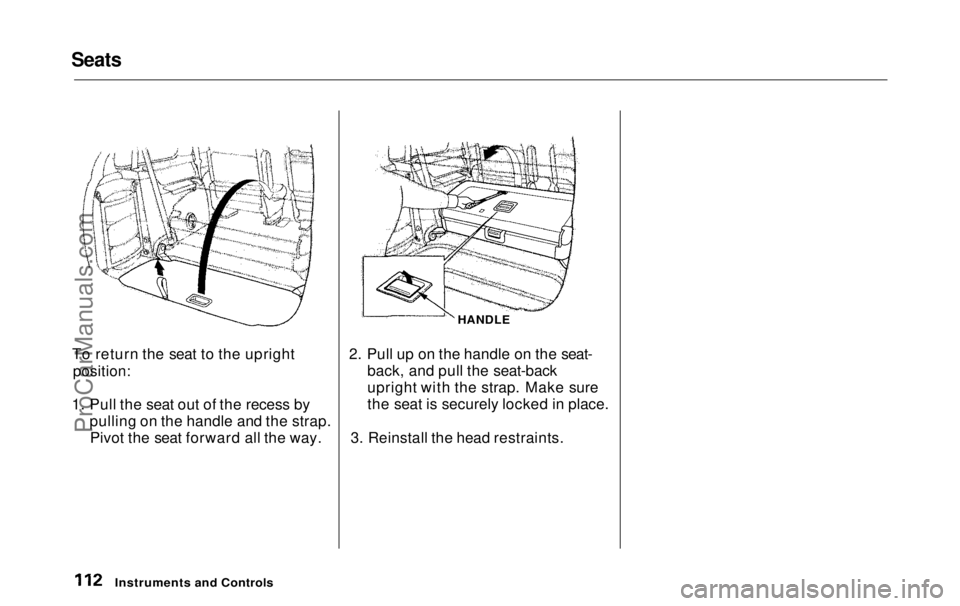
To return the seat to the upright
position:
1. Pull the seat out of the recess by pulling on the handle and the strap.Pivot the seat forward all the way. HANDLE
2. Pull up on the handle on the seat- back, and pull the seat-back
upright with the strap. Make sure
the seat is securely locked in place.
3. Reinstall the head restraints.
Instruments and ControlsProCarManuals.comMain Menu Table of Contents s t
Page 118 of 343
Digital Clock, Center Table
Digital Clock
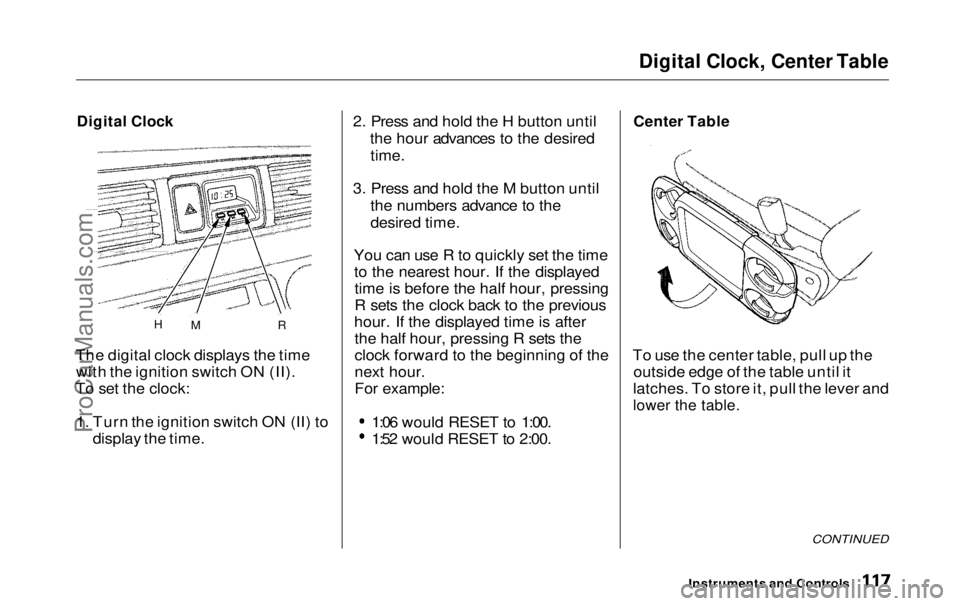
The digital clock displays the time with the ignition switch ON (II).
To set the clock:
1. Turn the ignition switch ON (II) to display the time. 2. Press and hold the H button until
the hour advances to the desired
time.
3. Press and hold the M button until the numbers advance to the
desired time.
You can use R to quickly set the time to the nearest hour. If the displayedtime is before the half hour, pressing
R sets the clock back to the previous
hour. If the displayed time is after the half hour, pressing R sets the
clock forward to the beginning of the
next hour.
For example: 1:06 would RESET to 1:00.
1:52 would RESET to 2:00.
Center Table
To use the center table, pull up the outside edge of the table until it
latches. To store it, pull the lever and
lower the table.
CONTINUED
Instruments and Controls
H
M RProCarManuals.comMain Menu Table of Contents s t
Page 124 of 343
Storage Box, Coat Hook
Storage Box
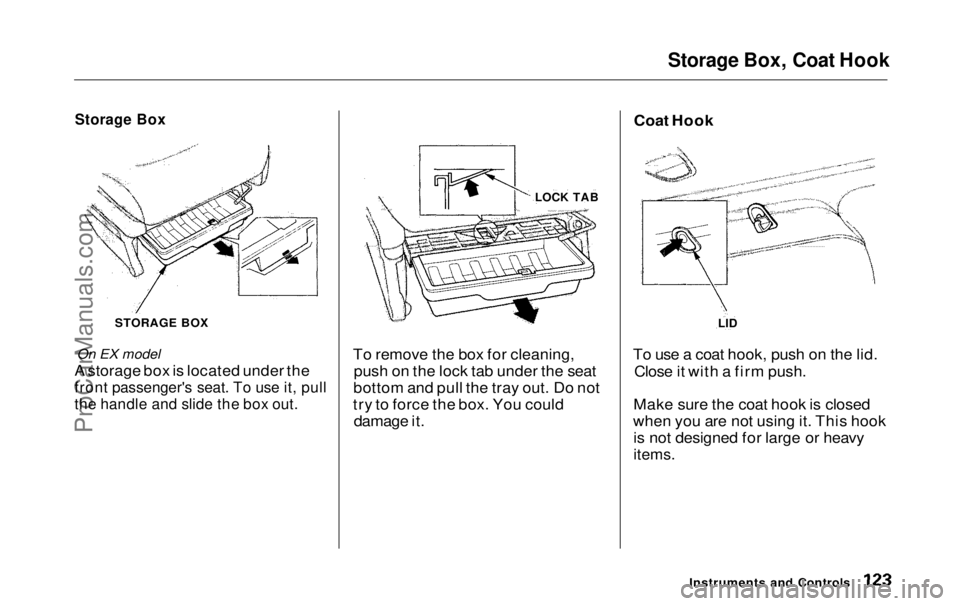
STORAGE BOX
On EX model
A storage box is located under the
front passenger's seat. To use it, pull
the handle and slide the box out.
To remove the box for cleaning,
push on the lock tab under the seat
bottom and pull the tray out. Do not
try to force the box. You could damage it. To use a coat hook, push on the lid.
Close it with a firm push.
Make sure the coat hook is closed
when you are not using it. This hook is not designed for large or heavy
items.
Instruments and Controls
LOCK TAB
LID
Coat HookProCarManuals.comMain Menu Table of Contents s t
Page 127 of 343
Interior Lights
The cargo area light comes onwhen any door or the tailgate isopened if the switch in the light is
in the door activated (center)
position. When the doors and the
tailgate are closed, it can be turned
on with the switch in the light. When the switch is in the ON
position:
All the individual map lights comeon and stay on as long as theswitch remains in the ON position.
The cargo area light comes on and stays on if the switch in the light is
in the door activated (center)
position.
On EX model
The lights go out about six seconds after all the doors and the tailgate
are closed.
With the light control switch in the Door Activated position, all the
individual map lights and the cargo
area light (with the switch in the
center position) come on when you
unlock the door with the remote
transmitter (see page 81 ).
With any door or the tailgate leftopen, the lights stay on about threeminutes, then go out.
Instruments and ControlsProCarManuals.comMain Menu Table of Contents s t
Page 131 of 343
Heating and Cooling
On LX model
Proper use of the Heating and Cooling system can make the
interior dry and comfortable, and
keep the windows clear for best
visibility.
What Each Control Does Fan Control Dial
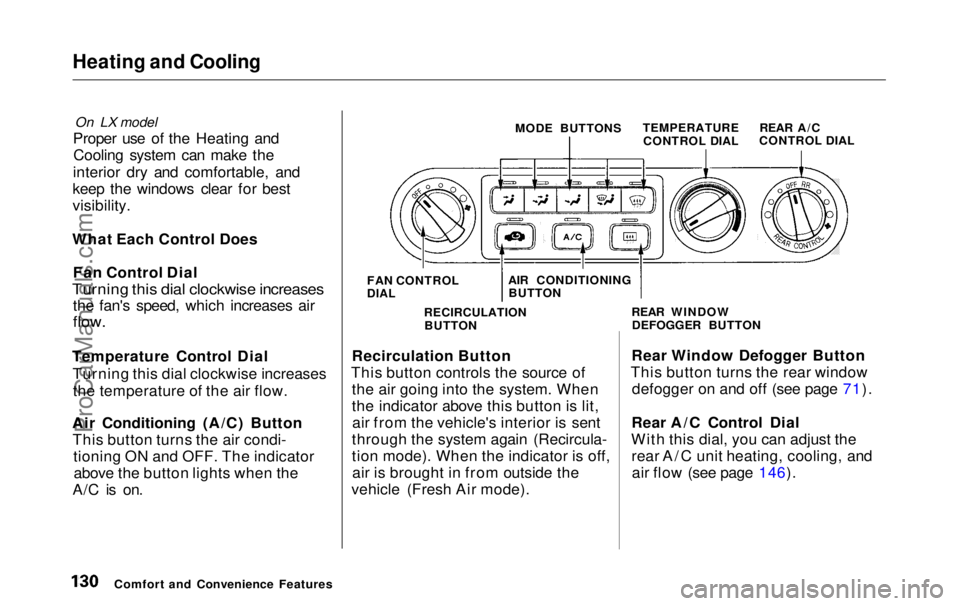
Turning this dial clockwise increases
the fan's speed, which increases air
flow.
Temperature Control Dial Turning this dial clockwise increasesthe temperature of the air flow.
Air Conditioning (A/C) Button This button turns the air condi- tioning ON and OFF. The indicatorabove the button lights when the
A/C is on. MODE BUTTONS
TEMPERATURE
CONTROL DIAL
Recirculation Button
This button controls the source of the air going into the system. When
the indicator above this button is lit,air from the vehicle's interior is sent
through the system again (Recircula-
tion mode). When the indicator is off, air is brought in from outside the
vehicle (Fresh Air mode). Rear Window Defogger Button
This button turns the rear window defogger on and off (see page 71).
Rear A/C Control Dial
With this dial, you can adjust the rear A/C unit heating, cooling, andair flow (see page 146).
Comfort and Convenience Features FAN CONTROL
DIAL
AIR CONDITIONING
BUTTON
RECIRCULATION BUTTON REAR WINDOW
DEFOGGER BUTTON REAR A/C
CONTROL DIALProCarManuals.comMain Menu Table of Contents s t
Page 143 of 343
Climate Control System
Fan Control Dial
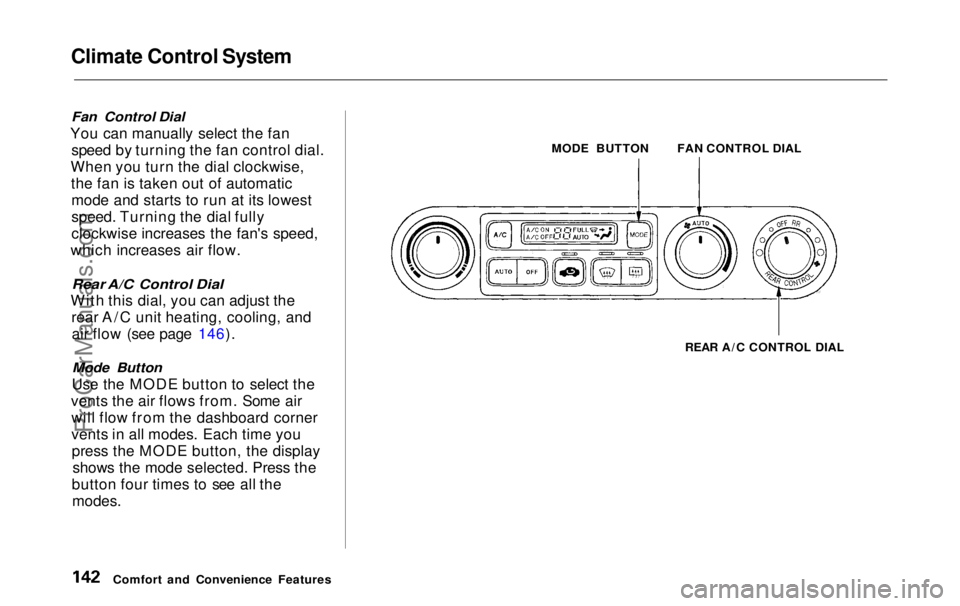
You can manually select the fan speed by turning the fan control dial.
When you turn the dial clockwise, the fan is taken out of automaticmode and starts to run at its lowest
speed. Turning the dial fully
clockwise increases the fan's speed,
which increases air flow.
Rear A/C Control Dial
With this dial, you can adjust the rear A/C unit heating, cooling, andair flow (see page 146).
Mode Button
Use the MODE button to select the
vents the air flows from. Some air will flow from the dashboard corner
vents in all modes. Each time youpress the MODE button, the display shows the mode selected. Press the
button four times to see all the
modes.
MODE BUTTON
REAR A/C CONTROL DIAL
Comfort and Convenience Features FAN CONTROL DIALProCarManuals.comMain Menu Table of Contents s t
Page 148 of 343
Climate Control System
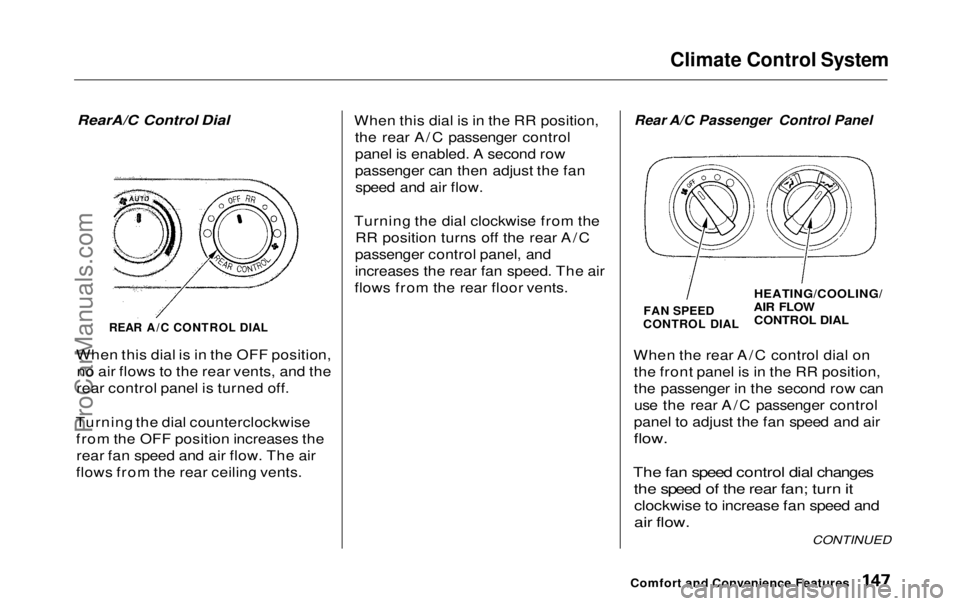
RearA/C Control Dial
REAR A/C CONTROL DIAL
When this dial is in the OFF position, no air flows to the rear vents, and the
rear control panel is turned off.
Turning the dial counterclockwise from the OFF position increases therear fan speed and air flow. The air
flows from the rear ceiling vents. When this dial is in the RR position,
the rear A/C passenger control
panel is enabled. A second row
passenger can then adjust the fanspeed and air flow.
Turning the dial clockwise from the RR position turns off the rear A/C
passenger control panel, and
increases the rear fan speed. The air
flows from the rear floor vents.
Rear A/C Passenger Control Panel
FAN SPEED
CONTROL DIAL
HEATING/COOLING/
AIR FLOW
CONTROL DIAL
When the rear A/C control dial on the front panel is in the RR position,
the passenger in the second row canuse the rear A/C passenger control
panel to adjust the fan speed and air
flow.
The fan speed control dial changes the speed of the rear fan; turn it
clockwise to increase fan speed and
air flow.
Comfort and Convenience Features
CONTINUEDProCarManuals.comMain Menu Table of Contents s t