steering HONDA ODYSSEY 1999 Owner's Manual
[x] Cancel search | Manufacturer: HONDA, Model Year: 1999, Model line: ODYSSEY, Model: HONDA ODYSSEY 1999Pages: 343, PDF Size: 3.73 MB
Page 72 of 343
Controls Near the Steering Wheel
Rear Window Defogger
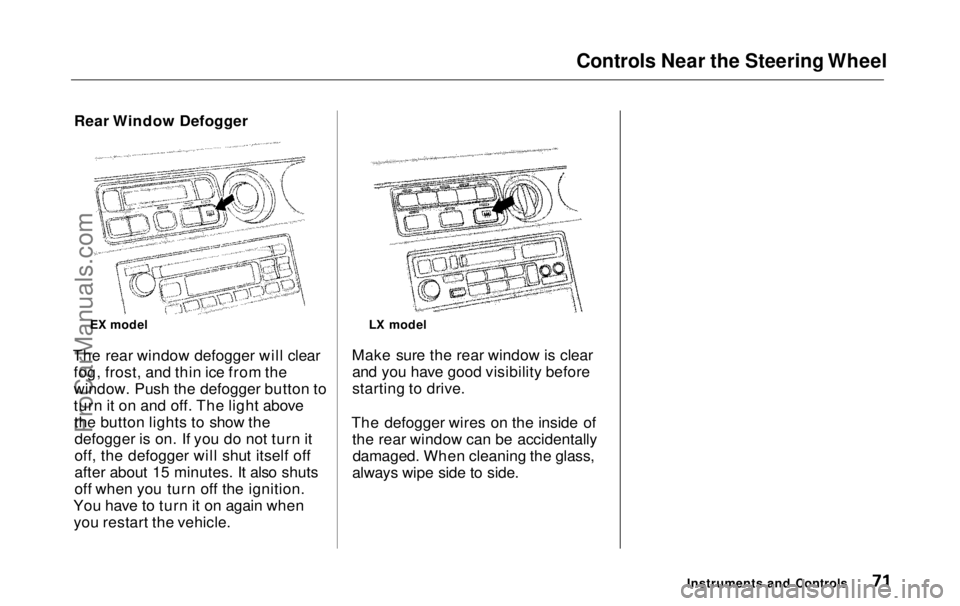
The rear window defogger will clear fog, frost, and thin ice from the
window. Push the defogger button to
turn it on and off. The light abovethe button lights to show thedefogger is on. If you do not turn it
off, the defogger will shut itself off
after about 15 minutes. It also shuts
off when you turn off the ignition.
You have to turn it on again when you restart the vehicle. Make sure the rear window is clear
and you have good visibility before
starting to drive.
The defogger wires on the inside of the rear window can be accidentallydamaged. When cleaning the glass,
always wipe side to side.
Instruments and Controls
EX model
LX modelProCarManuals.comMain Menu Table of Contents s t
Page 73 of 343
Controls Near the Steering Wheel
Steering Wheel Adjustment
See page 19 for important safety
information about how to properly
position the steering wheel.
Make any steering wheel adjustment
before you start driving.
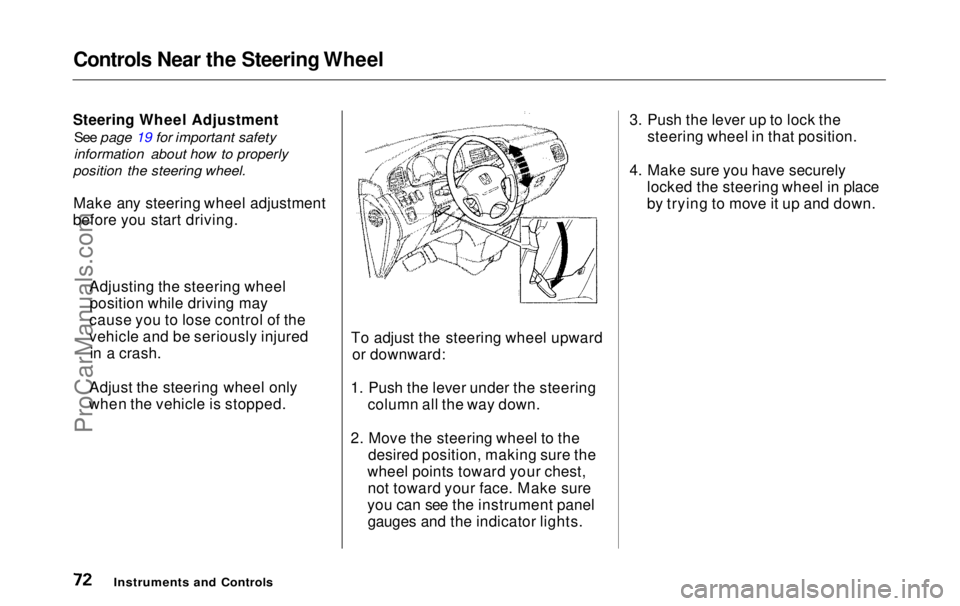
To adjust the steering wheel upwardor downward:
1. Push the lever under the steering column all the way down.
2. Move the steering wheel to the desired position, making sure the
wheel points toward your chest, not toward your face. Make sure
you can see the instrument panel gauges and the indicator lights. 3. Push the lever up to lock the
steering wheel in that position.
4. Make sure you have securely locked the steering wheel in place
by trying to move it up and down.
Instruments and Controls
Adjusting the steering wheel
position while driving may
cause you to lose control of the
vehicle and be seriously injured in a crash.
Adjust the steering wheel only
when the vehicle is stopped.ProCarManuals.comMain Menu Table of Contents s t
Page 74 of 343
Steering Wheel Controls
Cruise Control
Cruise control allows you to maintain
a set speed above 25 mph (40 km/h)
without keeping your foot on the accelerator pedal. It should be used
for cruising on straight, open highways. It is not recommended for
conditions such as city driving,
winding roads, slippery roads, heavy rain, or bad weather. You should
have full control of the vehicle under
those conditions.
Using the Cruise Control
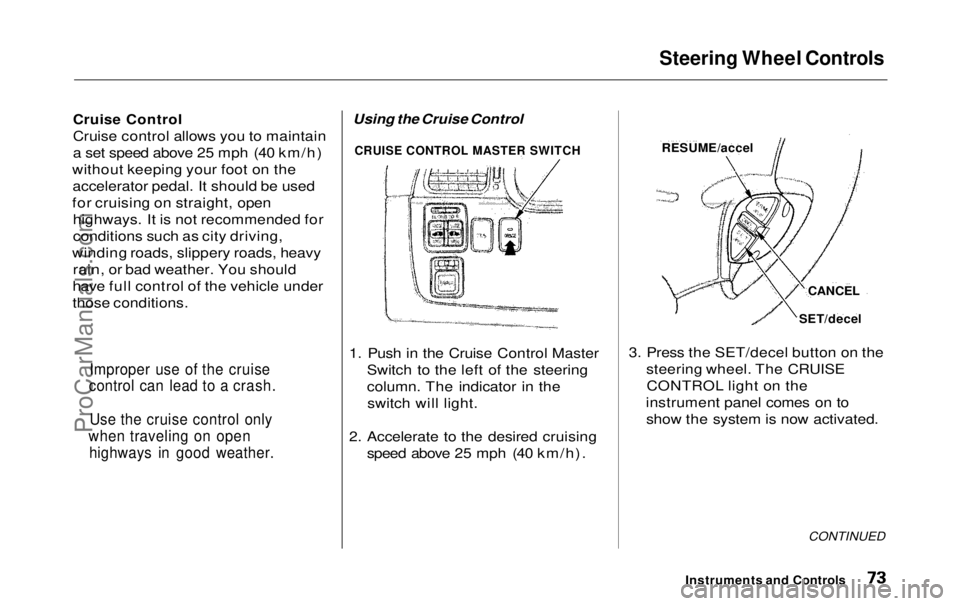
1. Push in the Cruise Control Master Switch to the left of the steering
column. The indicator in theswitch will light.
2. Accelerate to the desired cruising speed above 25 mph (40 km/h). 3. Press the SET/decel button on the
steering wheel. The CRUISECONTROL light on the
instrument panel comes on to show the system is now activated.
CONTINUED
Instruments and Controls
Improper use of the cruise
control can lead to a crash.
Use the cruise control only
when traveling on open highways in good weather.
RESUME/accel
CANCEL
SET/decel
CRUISE CONTROL MASTER SWITCHProCarManuals.comMain Menu Table of Contents s t
Page 75 of 343
Steering Wheel Controls
The cruise control may not hold the set speed when you are going up and
down hills. If your speed increases
going down a hill, use the brakes to slow down to the desired speed. This
will cancel the cruise control. To resume the set speed, press theRESUME/accel button. The
CRUISE CONTROL light on the
instrument panel comes on.
When climbing a steep hill, the automatic transmission maydownshift to hold the set speed. Changing the Set Speed
You can increase the set cruising speed in any of these ways: Press and hold the RESUME/
accel button. The vehicle will
accelerate. When you reach the
desired cruising speed, release the
button. Push on the accelerator pedal. Ac-
celerate to the desired cruising
speed and press the SET/decel
button. To increase your speed in very
small amounts, tap the RESUME/
accel button repeatedly. Each time
you do this, your vehicle will speed up about 1 mph (1.6 km/h). You can decrease the set cruising
speed in any of these ways: Press and hold the SET/decel
button. The vehicle will decelerate. Release the button when you
reach the desired speed. To slow down in very small
amounts, tap the SET/decel
button repeatedly. Each time you do this, your vehicle will slow
down about 1 mph (1.6 km/h). Tap the brake pedal lightly with
your foot. The CRUISE CONTROL light on the instru-
ment panel will go out. When the
vehicle slows to the desired speed,
press the SET/decel button. The
vehicle will then maintain the desired speed.
Instruments and ControlsProCarManuals.comMain Menu Table of Contents s t
Page 76 of 343
Steering Wheel Controls
Even with the cruise control turned
on, you can still use the accelerator
pedal to speed up for passing. After
completing the pass, take your foot off the accelerator pedal. The vehicle
will return to the set cruising speed.
Resting your foot on the brake pedal
will cause the cruise control to
cancel.
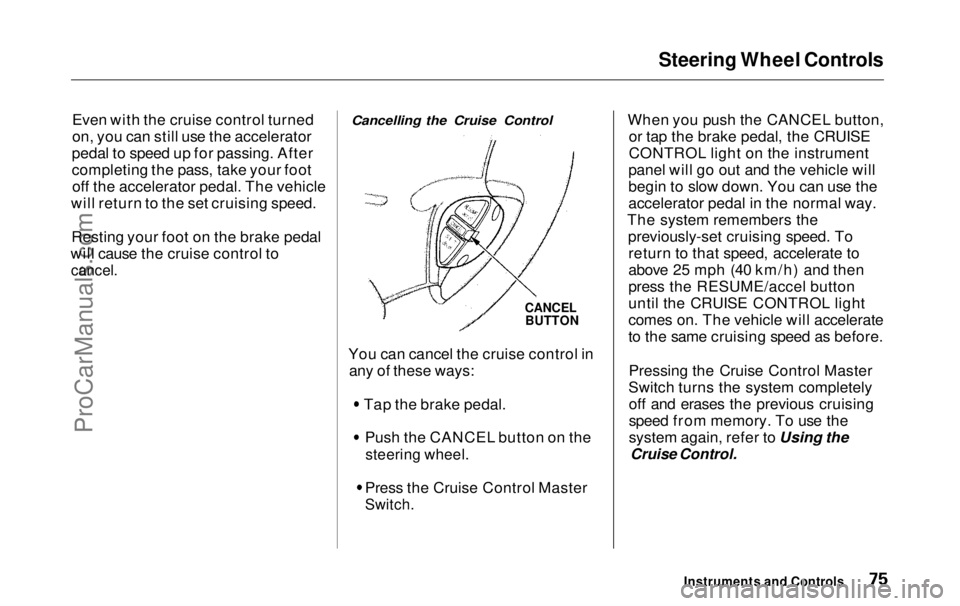
Cancelling the Cruise Control
CANCEL
BUTTON
You can cancel the cruise control in any of these ways: Tap the brake pedal.
Push the CANCEL button on the
steering wheel.
Press the Cruise Control Master
Switch.
When you push the CANCEL button,
or tap the brake pedal, the CRUISE
CONTROL light on the instrument
panel will go out and the vehicle will
begin to slow down. You can use the
accelerator pedal in the normal way.
The system remembers the previously-set cruising speed. Toreturn to that speed, accelerate to
above 25 mph (40 km/h) and then
press the RESUME/accel button
until the CRUISE CONTROL light
comes on. The vehicle will accelerate
to the same cruising speed as before.
Pressing the Cruise Control Master
Switch turns the system completely off and erases the previous cruising
speed from memory. To use the
system again, refer to Using the
Cruise Control.
Instruments and ControlsProCarManuals.comMain Menu Table of Contents s t
Page 77 of 343
Steering Wheel Controls, Keys and Locks
Remote Audio Controls
On EX model
These buttons let you control some functions of the audio system with-out removing your hands from the
wheel. Refer to page 179 for a com- plete explanation. Your vehicle comes with two master
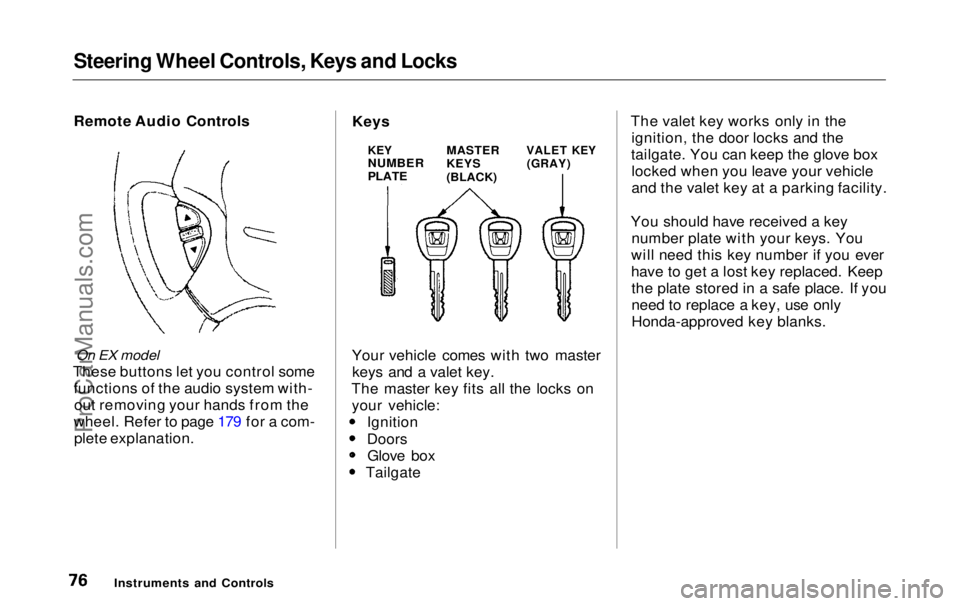
keys and a valet key.
The master key fits all the locks on your vehicle: Ignition
DoorsGlove box TailgateThe valet key works only in the
ignition, the door locks and the
tailgate. You can keep the glove box locked when you leave your vehicle
and the valet key at a parking facility.
You should have received a key number plate with your keys. You
will need this key number if you ever
have to get a lost key replaced. Keep the plate stored in a safe place. If you
need to replace a key, use only
Honda-approved key blanks.
Instruments and Controls
KEY
NUMBER
PLATE
MASTER
KEYS
(BLACK)
VALET KEY
(GRAY)
KeysProCarManuals.comMain Menu Table of Contents s t
Page 79 of 343
Keys and Locks
As required by the FCC:
This device complies with Part 15 of the
FCC rules. Operation is subject to the
following two conditions: (1) This device way not cause harmful interference, and (2) this device must accept any
interference received, including interference that may cause undesired
operation.
This device complies with DOC
regulations in Canada.
Changes or modifications not expressly
approved by the party responsible for
compliance could void the user's
authority to operate the equipment.
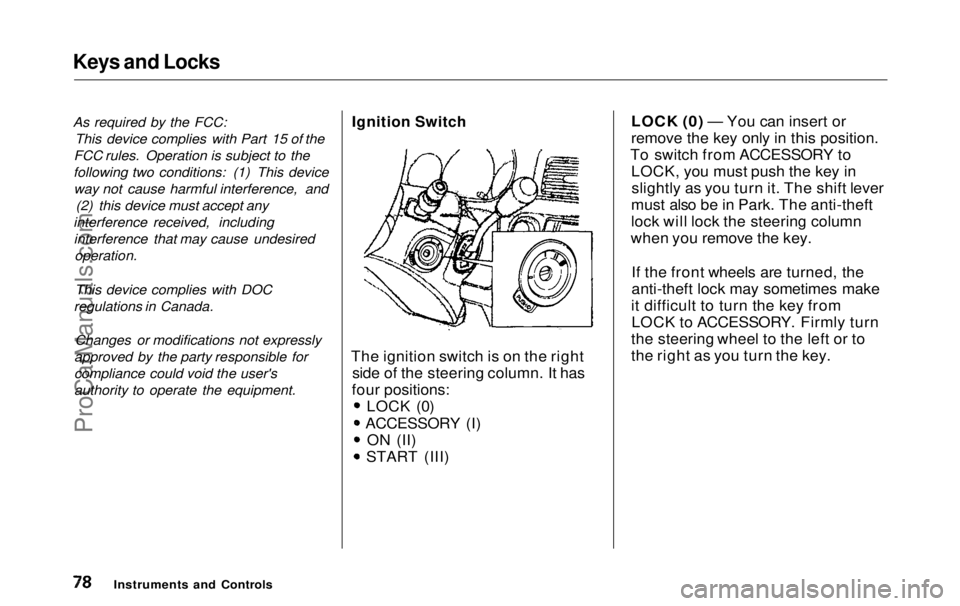
Ignition Switch
The ignition switch is on the right side of the steering column. It has
four positions: LOCK (0)
ACCESSORY (I)
ON (II)
START (III)LOCK (0) — You can insert or
remove the key only in this position.
To switch from ACCESSORY to LOCK, you must push the key inslightly as you turn it. The shift lever
must also be in Park. The anti-theft
lock will lock the steering column
when you remove the key.
If the front wheels are turned, the
anti-theft lock may sometimes make
it difficult to turn the key from LOCK to ACCESSORY. Firmly turn
the steering wheel to the left or to
the right as you turn the key.
Instruments and ControlsProCarManuals.comMain Menu Table of Contents s t
Page 91 of 343
Sliding Doors
Power Sliding Doors
On EX model
The sliding doors on your vehicle are electrically-powered. You can openor close each power sliding door with
the switches on the dashboard, with
the inside or outside door handles, or
with the remote transmitter. The power sliding doors operate
with the ignition switch in anyposition. In addition: The shift lever must be in Park.
The MAIN switch on the
dashboard must be in the ON
position.
The sliding door you want to
operate must be unlocked. To open the door with the inside
handle, the childproof door lockon the door you want to operate
must be unlocked (see page 85).
You should close each sliding door before you start driving.
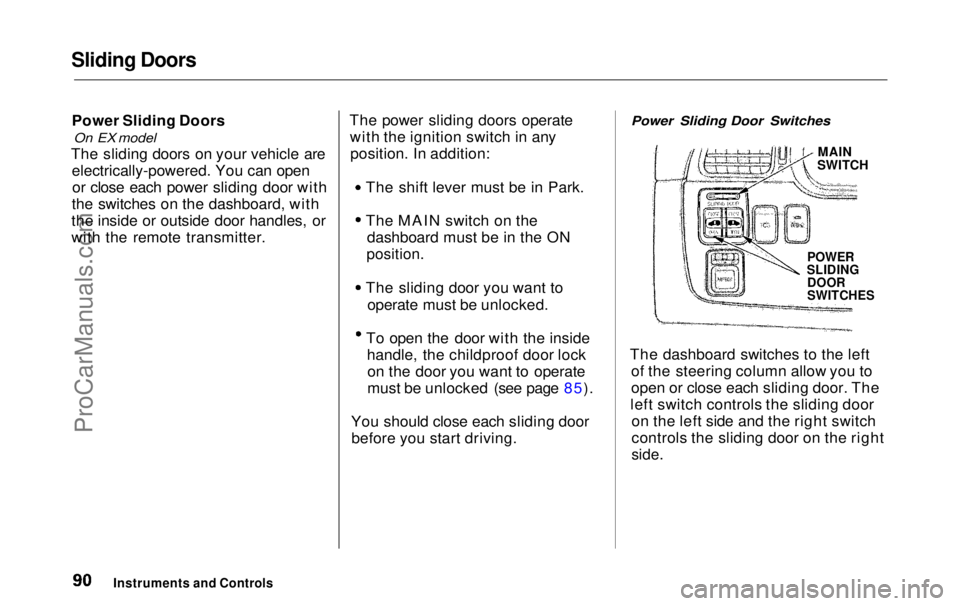
Power Sliding Door Switches
MAIN
SWITCH
POWER
SLIDING
DOOR
SWITCHES
The dashboard switches to the left of the steering column allow you to
open or close each sliding door. The
left switch controls the sliding door on the left side and the right switch
controls the sliding door on the right
side.
Instruments and ControlsProCarManuals.comMain Menu Table of Contents s t
Page 146 of 343
Climate Control System
Sunlight Sensor/Temperature
Sensor
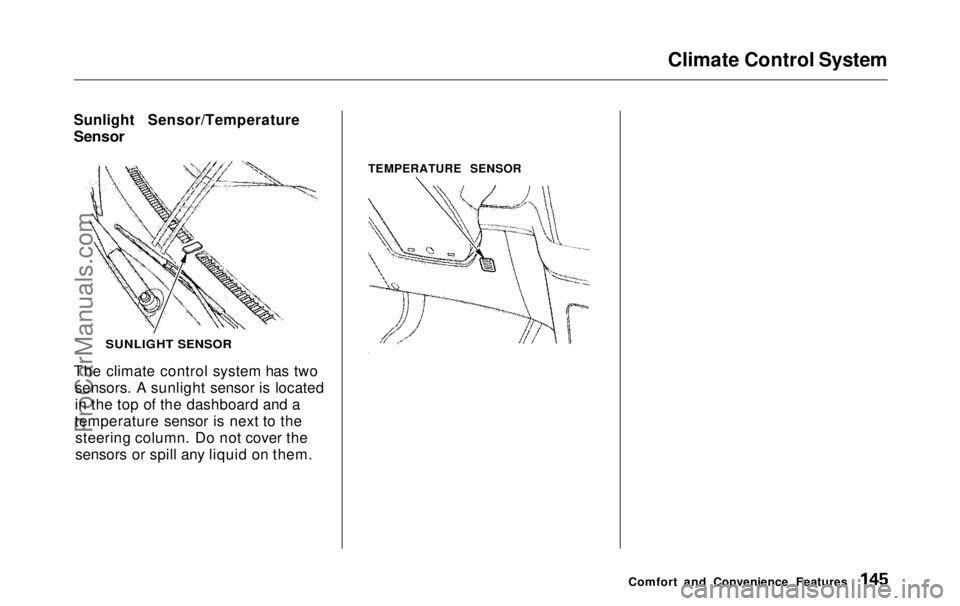
The climate control system has two sensors. A sunlight sensor is located
in the top of the dashboard and a
temperature sensor is next to the steering column. Do not cover the
sensors or spill any liquid on them. TEMPERATURE SENSOR
Comfort and Convenience Features
SUNLIGHT SENSORProCarManuals.comMain Menu Table of Contents s t
Page 180 of 343
Audio System
Remote Audio Controls
On EX model
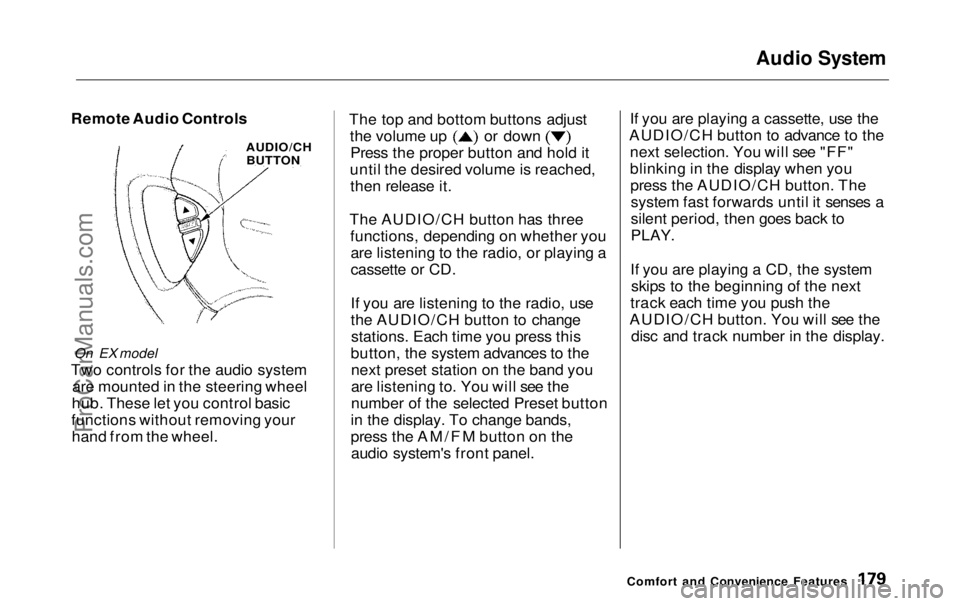
Two controls for the audio system are mounted in the steering wheel
hub. These let you control basic
functions without removing your hand from the wheel. The top and bottom buttons adjust the volume up or down
Press the proper button and hold it
until the desired volume is reached, then release it.
The AUDIO/CH button has three functions, depending on whether youare listening to the radio, or playing a
cassette or CD.
If you are listening to the radio, use
the AUDIO/CH button to changestations. Each time you press this
button, the system advances to the next preset station on the band you
are listening to. You will see the
number of the selected Preset button
in the display. To change bands,
press the AM/FM button on the audio system's front panel. If you are playing a cassette, use the
AUDIO/CH button to advance to the next selection. You will see "FF"
blinking in the display when youpress the AUDIO/CH button. Thesystem fast forwards until it senses a
silent period, then goes back to
PLAY.
If you are playing a CD, the system skips to the beginning of the next
track each time you push the
AUDIO/CH button. You will see the disc and track number in the display.
Comfort and Convenience Features
AUDIO/CH
BUTTONProCarManuals.comMain Menu Table of Contents s t