fuse HONDA ODYSSEY 1999 Owners Manual
[x] Cancel search | Manufacturer: HONDA, Model Year: 1999, Model line: ODYSSEY, Model: HONDA ODYSSEY 1999Pages: 343, PDF Size: 3.73 MB
Page 153 of 343
Audio System
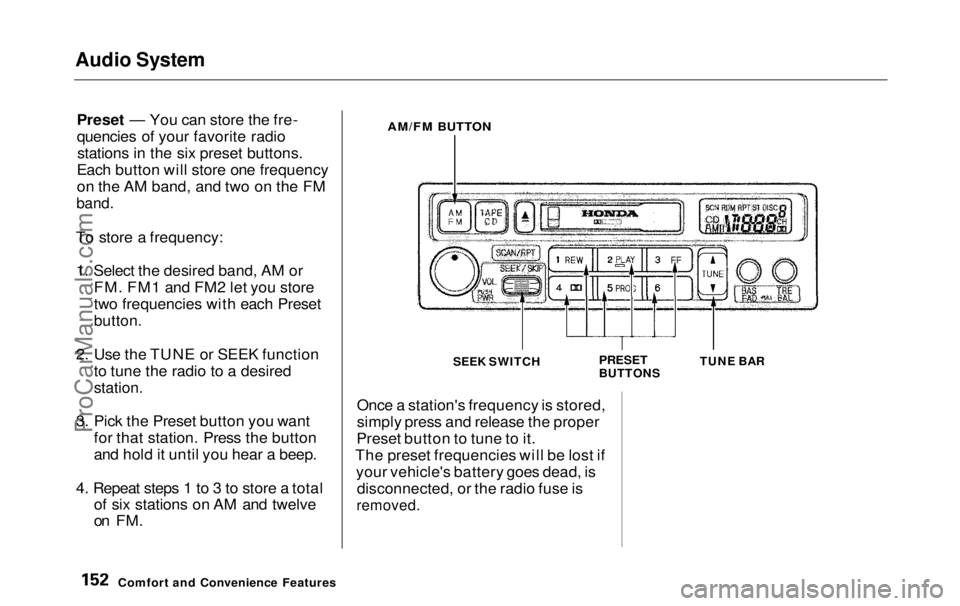
Preset — You can store the fre-
quencies of your favorite radiostations in the six preset buttons.
Each button will store one frequency
on the AM band, and two on the FM
band.
To store a frequency: 1. Select the desired band, AM or FM. FM1 and FM2 let you store
two frequencies with each Preset
button.
2. Use the TUNE or SEEK function to tune the radio to a desired
station.
3. Pick the Preset button you want for that station. Press the button
and hold it until you hear a beep.
4. Repeat steps 1 to 3 to store a total of six stations on AM and twelve
on FM.
AM/FM BUTTON
SEEK SWITCH
PRESET
BUTTONSTUNE BAR
Once a station's frequency is stored,
simply press and release the proper
Preset button to tune to it.
The preset frequencies will be lost if your vehicle's battery goes dead, isdisconnected, or the radio fuse is
removed.
Comfort and Convenience FeaturesProCarManuals.comMain Menu Table of Contents s t
Page 165 of 343
Audio System
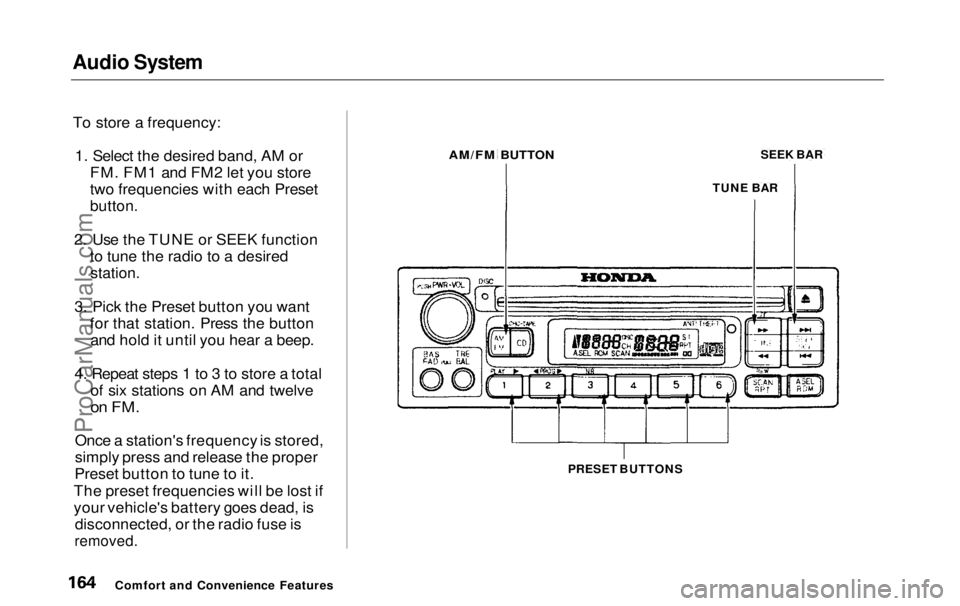
To store a frequency: 1. Select the desired band, AM or FM. FM1 and FM2 let you store
two frequencies with each Preset
button.
2. Use the TUNE or SEEK function to tune the radio to a desired
station.
3. Pick the Preset button you want for that station. Press the buttonand hold it until you hear a beep.
4. Repeat steps 1 to 3 to store a total of six stations on AM and twelve
on FM.
Once a station's frequency is stored,
simply press and release the proper
Preset button to tune to it.
The preset frequencies will be lost if
your vehicle's battery goes dead, is disconnected, or the radio fuse is
removed.
PRESET BUTTONS
Comfort and Convenience Features
AM/FM BUTTON
TUNE BARSEEK BARProCarManuals.comMain Menu Table of Contents s t
Page 181 of 343
Audio System
Theft Protection
On EX model
Your vehicle's audio system will disable itself if it is disconnected
from electrical power for any reason.
To make it work again, the user must enter a specific five-digit code
in the Preset buttons. Because there
are hundreds of number
combinations possible from five
digits, making the system work
without knowing the exact code is nearly impossible.
You should have received a card that lists your audio system's codenumber and serial number. It is best
to store this card in a safe place at
home. In addition, you should write
the audio system's serial number in
this Owner's Manual. If you should
happen to lose the card, you must obtain the code number from your
Honda dealer. To do this, you will
need the system's serial number. If your vehicle's battery is discon-
nected or goes dead, or the radio
fuse is removed, the audio system
will disable itself. If this happens, you will see in the
frequency display the next time youturn on the system. Use the Preset
buttons to enter the five-digit code. Ifit is entered correctly, the radio willstart playing.
If you make a mistake entering the
code, do not start over or try to
correct your mistake. Complete the
five-digit sequence, then enter the correct code. You have ten tries to
enter the correct code. If you are
unsuccessful in ten attempts, you
must then leave the system on forone hour before trying again. You will have to store your favorite
stations in the Preset buttons after
the system begins working. Your original settings were lost when
power was disconnected.
Comfort and Convenience FeaturesProCarManuals.comMain Menu Table of Contents s t
Page 205 of 343
The Braking System
Your Honda is equipped with front disc brakes. The brakes on the rear
wheels are drum. A power assist helps reduce the effort needed on
the brake pedal. The ABS helps you retain steering control when braking
very hard.
Put your foot on the brake pedal only
when you intend to brake. Resting
your foot on the pedal keeps the brakes applied lightly, causing themto build up heat. Heat build-up can
reduce how well your brakes work. Italso keeps your brake lights on all
the time, confusing drivers behind
you.
Constant application of the brakes
when going down a long hill builds up heat and reduces their effective-
ness. Use the engine to assist the
brakes by downshifting to a lower gear and taking your foot off the
accelerator pedal.
Check your brakes after driving
through deep water. Apply the
brakes moderately to see if they feel normal. If not, apply them gently and
frequently until they do. Since a
longer distance is needed to stop
with wet brakes, be extra cautious and alert in your driving. Brake Wear Indicators
The front disc brakes on all vehicles have audible brake wear indicators.
When the brake pads need replacing,
you will hear a distinctive metallic "screeching" sound when you apply
the brakes. If you do not have the
brake pads replaced, they will begin screeching all the time.
Your brakes may sometimes squeal or squeak when you apply them
lightly. Do not confuse this with the
brake wear indicators. They make a
very audible "screeching."
DrivingProCarManuals.comMain Menu Table of Contents s t
Page 284 of 343
Taking Care of the Unexpected
This section covers the more- common problems that motorists
experience with their vehicles. It
gives you information about how to safely evaluate the problem and what
to do to correct it. If the problem has stranded you on the side of the road,
you may be able to get going again. If not, you will also find instructions
on getting your vehicle towed. Compact Spare Tire....................... 286
Changing a Flat Tire..................... 287
If Your Engine Won't Start........... 296
Nothing Happens or the Starter Motor OperatesVery Slowly......................... 296
The Starter Operates
Normally.................................297
Jump Starting................................. 297 If Your Engine Overheats............. 299
Low Oil Pressure Indicator.......... 301
Charging System Indicator........... 302
Malfunction Indicator Lamp ........ 303
Brake System Indicator................ 304
Fuses............................................... 305
Checking and Replacing........... 306
Emergency Towing....................... 311
Taking Care of the UnexpectedProCarManuals.comMain Menu s t
Page 295 of 343
If Your Engine Won't Start
Diagnosing why your engine won't
start falls into two areas, depending
on what you hear when you turn the
key to START (III): You hear nothing, or almost
nothing. The engine's starter
motor does not operate at all, oroperates very slowly. You can hear the starter motor
operating normally, or the starter
motor sounds like it is spinning
faster than normal, but the engine does not start up and run.
Nothing Happens or the Starter
Motor Operates Very Slowly
When you turn the ignition switch to START (III), you do not hear the
normal noise of the engine trying tostart. You may hear a clicking sound
or series of clicks, or nothing at all. Check these things: Check the transmission interlock.
The transmission must be in Park or Neutral or the starter will not
operate.
Turn the ignition switch to ON (II).
Turn on the headlights and check
their brightness. If the headlightsare very dim or don't light at all,
the battery is discharged. See
Jump Starting on page 297.
Turn the ignition switch to START
(III). If the headlights do not dim,
check the condition of the fuses. If
the fuses are OK, there is proba-
bly something wrong with the electrical circuit for the ignitionswitch or starter motor. You will
need a qualified technician to determine the problem. (See
Emergency Towing on page 311.)
If the headlights dim noticeably or
go out when you try to start the
engine, either the battery is dis-
charged or the connections are
corroded. Check the condition of
the battery and terminal connec-
tions (see page 251). You can then try jump starting the vehicle
from a booster battery (see page 297).
The Starter Operates Normally In this case, the starter motor'sspeed sounds normal, or even faster
than normal, when you turn the
ignition switch to START (III), but
the engine does not run. Are you using the proper starting
procedure? Refer to Starting the
Engine on page 197.
Taking Care of the UnexpectedProCarManuals.comMain Menu Table of Contents s t
Page 296 of 343
If Your Engine Won't Start, Jump Starting
Your vehicle has the Immobilizer
System. You should use a
properly-coded master or valet key
to start the engine (see page 77).
A key that is not properly coded
will cause the immobilizer system indicator in the dash panel to blink
rapidly. Do you have fuel? Turn the
ignition switch to ON (II) for a
minute and watch the fuel gauge.
The low fuel level warning light may not be working, so you were
not reminded to fill the tank. There may be an electrical
problem, such as no power to the
fuel pump. Check all the fuses (see page 305).
If you find nothing wrong, you will
need a qualified technician to find
the problem. See Emergency
Towing on page 311. Jump Starting
If your vehicle's battery has run
down, you may be able to start the
engine by using a booster battery.
Although this seems like a simple procedure, you should take several
precautions.
You cannot start a Honda by pushing or pulling it. To jump start your vehicle, follow
these directions closely:
1. Open the hood and check the physical condition of the battery(see page 251). In very cold
weather, check the condition of the electrolyte. If it seems slushyor like ice, do not try jump starting
until it thaws.
If a battery sits in extreme cold, the
electrolyte inside can freeze.
Attempting to jump start with a frozen
battery can cause it to rupture.
2. Turn off all the electrical acces- sories: heater, A/C, climate
control, stereo system, lights, etc.
Put the transmission in Neutral or
Park and set the parking brake.
CONTINUED
Taking Care of the Unexpected
A battery can explode if you do
not follow the correct procedure,
seriously injuring anyone nearby.
Keep all sparks, open flames,
and smoking materials away
from the battery.
NOTICEProCarManuals.comMain Menu Table of Contents s t
Page 304 of 343
Fuses
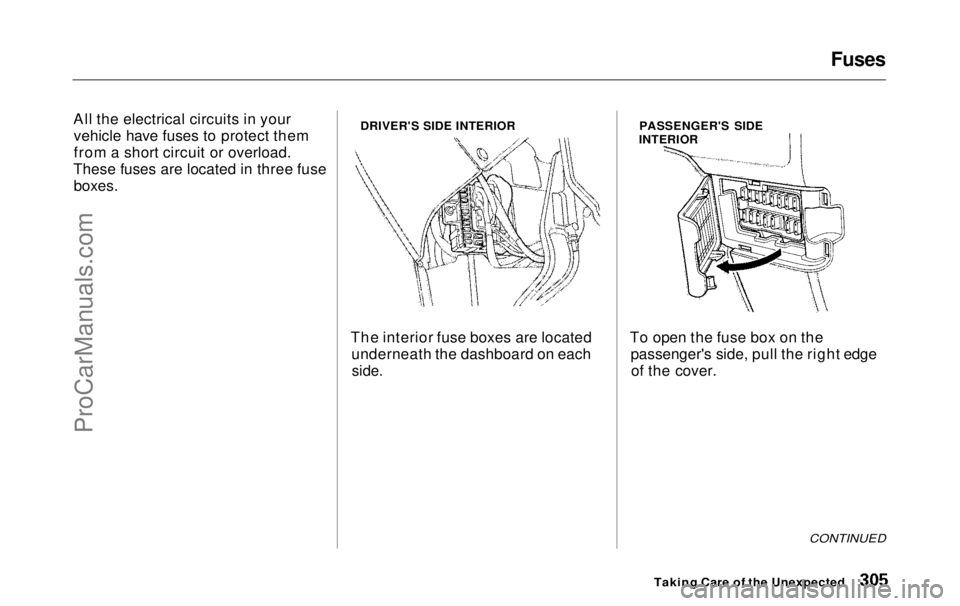
All the electrical circuits in your vehicle have fuses to protect them
from a short circuit or overload.
These fuses are located in three fuse
boxes.
DRIVER'S SIDE INTERIOR
The interior fuse boxes are located underneath the dashboard on each
side.
PASSENGER'S SIDE
INTERIOR
To open the fuse box on the passenger's side, pull the right edgeof the cover.
CONTINUED
Taking Care of the UnexpectedProCarManuals.comMain Menu Table of Contents s t
Page 305 of 343
Fuses
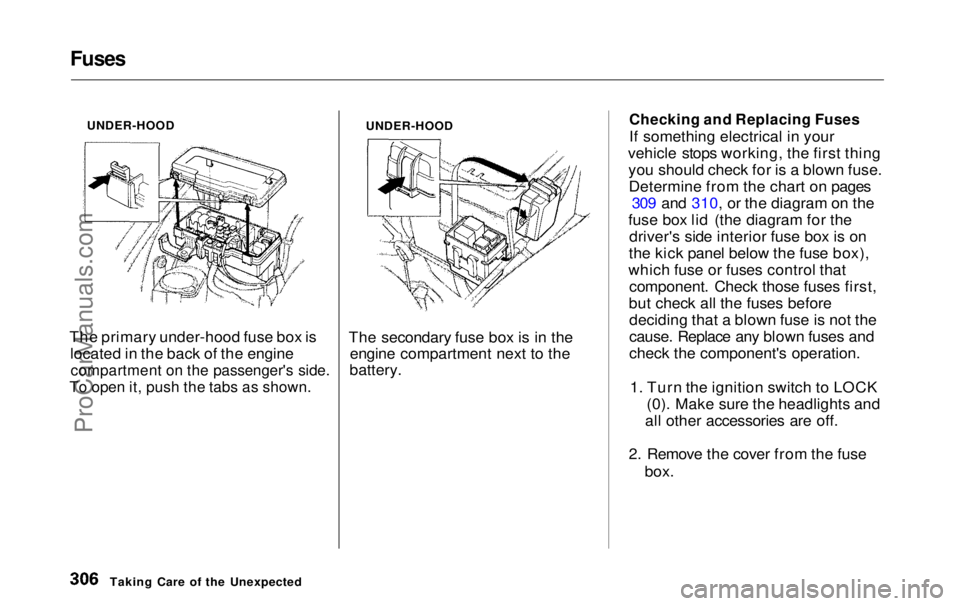
UNDER-HOOD
The primary under-hood fuse box is located in the back of the engine
compartment on the passenger's side.
To open it, push the tabs as shown.
UNDER-HOOD
The secondary fuse box is in the engine compartment next to the
battery.
Checking and Replacing Fuses
If something electrical in your
vehicle stops working, the first thing you should check for is a blown fuse.Determine from the chart on pages 309 and 310, or the diagram on the
fuse box lid (the diagram for the driver's side interior fuse box is on
the kick panel below the fuse box),
which fuse or fuses control that component. Check those fuses first,
but check all the fuses before deciding that a blown fuse is not the
cause. Replace any blown fuses and
check the component's operation.
1. Turn the ignition switch to LOCK (0). Make sure the headlights and
all other accessories are off.
2. Remove the cover from the fuse box.
Taking Care of the UnexpectedProCarManuals.comMain Menu Table of Contents s t
Page 306 of 343
Fuses
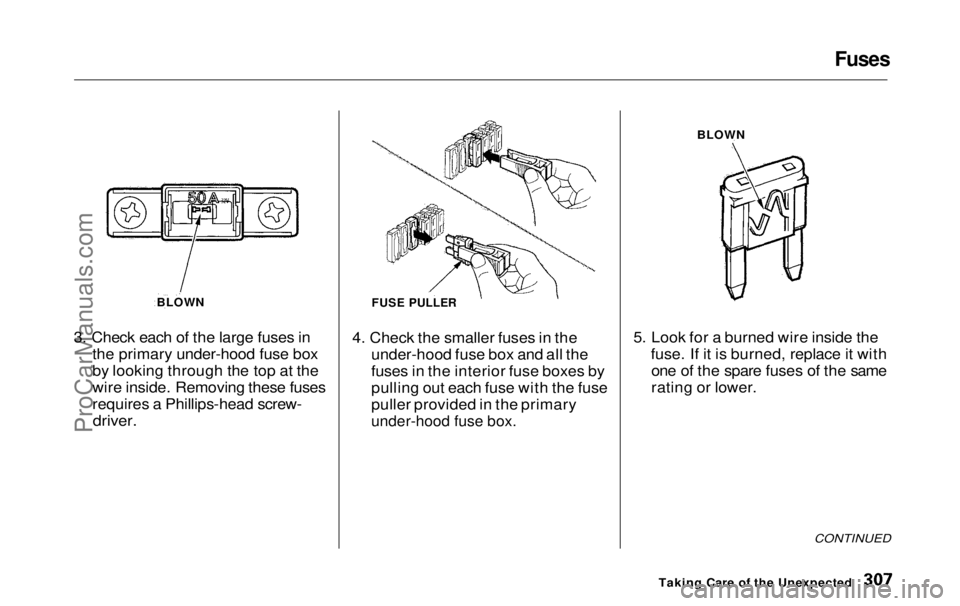
3. Check each of the large fuses in the primary under-hood fuse box
by looking through the top at the
wire inside. Removing these fuses
requires a Phillips-head screw-
driver.
4. Check the smaller fuses in the
under-hood fuse box and all the
fuses in the interior fuse boxes by
pulling out each fuse with the fuse
puller provided in the primary
under-hood fuse box.
5. Look for a burned wire inside the
fuse. If it is burned, replace it withone of the spare fuses of the same
rating or lower.
CONTINUED
Taking Care of the Unexpected
BLOWN
FUSE PULLER
BLOWNProCarManuals.comMain Menu Table of Contents s t