Driving HONDA ODYSSEY 2000 RA6-RA9 / 2.G User Guide
[x] Cancel search | Manufacturer: HONDA, Model Year: 2000, Model line: ODYSSEY, Model: HONDA ODYSSEY 2000 RA6-RA9 / 2.GPages: 352, PDF Size: 4.43 MB
Page 40 of 352
Protecting Childre n
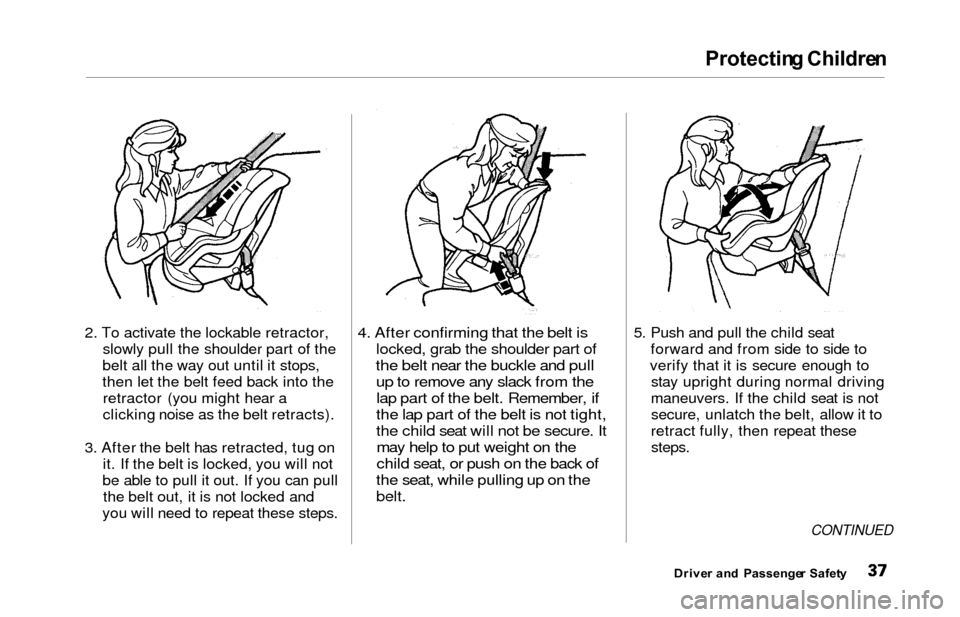
2. To activate the lockable retractor,
slowly pull the shoulder part of the
belt all the way out until it stops,
then let the belt feed back into the retractor (you might hear a
clicking noise as the belt retracts).
3. After the belt has retracted, tug on it. If the belt is locked, you will not
be able to pull it out. If you can pull the belt out, it is not locked and
you will need to repeat these steps.4. After confirming that the belt is
locked, grab the shoulder part of
the belt near the buckle and pull
up to remove any slack from the
lap part of the belt. Remember, if
the lap part of the belt is not tight,
the child seat will not be secure. It
may help to put weight on the
child seat, or push on the back of
the seat, while pulling up on the
belt.
5. Push and pull the child seat forward and from side to side to
verify that it is secure enough to stay upright during normal driving
maneuvers. If the child seat is not secure, unlatch the belt, allow it to
retract fully, then repeat these
steps.
CONTINUED
Drive r an d Passenge r Safet y
Page 48 of 352
Additional Informatio n Abou t You r Sea t Belt s
Seat Bel t Syste m Component s
Your seat belt system includes lap/
shoulder belts in all seven seating
positions.
The system also includes alight on the instrument
panel to remind you and your
passengers to fasten your belts. If
the driver's seat belt is not fastened
before the ignition is turned ON (II),
the light will come on and a beeper
will also sound. The beeper will stop after a few seconds, but the light will
stay on until the driver's seat belt is
fastened.
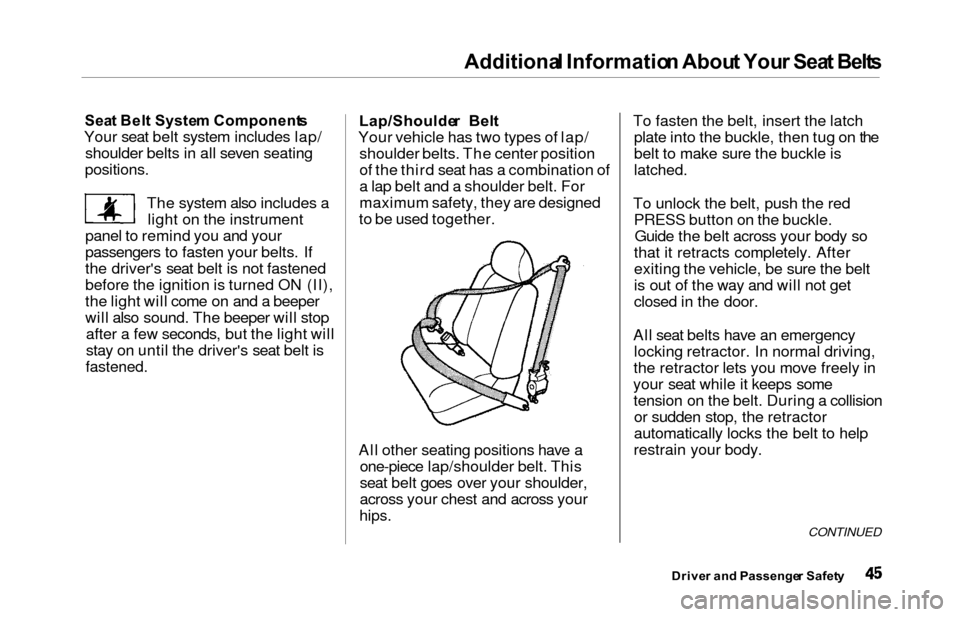
Lap/Shoulde r Bel t
Your vehicle has two types of lap/ shoulder belts. The center position
of the third seat has a combination of
a lap belt and a shoulder belt. For
maximum safety, they are designed
to be used together.
All other seating positions have a one-piece lap/shoulder belt. This
seat belt goes over your shoulder,
across your chest and across your
hips.
To fasten the belt, insert the latchplate into the buckle, then tug on the
belt to make sure the buckle is
latched.
To unlock the belt, push the redPRESS button on the buckle.Guide the belt across your body so
that it retracts completely. After
exiting the vehicle, be sure the belt
is out of the way and will not get
closed in the door.
All seat belts have an emergency locking retractor. In normal driving,
the retractor lets you move freely in
your seat while it keeps some tension on the belt. During a collisionor sudden stop, the retractor
automatically locks the belt to help
restrain your body.
CONTINUED
Drive r an d Passenge r Safet y
Page 56 of 352
Carbon Monoxid e Hazar d
Your vehicle's exhaust contains
carbon monoxide gas. You should
hav e no problem with carbon
monoxide entering the vehicle in
normal driving if you maintain your
vehicle properly.
Have the exhaust system inspected
for leaks whenever:
The vehicle is raised for an oil
change.
You notice a change in the soundof the exhaust.
The vehicle was in an accident that may have damaged the under-
side.
High levels of carbon monoxide can
collect rapidly in enclosed areas,such as a garage. Do not run the
engine with the garage door closed.
Even with the door open, run the engine only long enough to move the
vehicle out of the garage. With the tailgate open, air flow can
pull exhaust gas into your vehicle'sinterior and create a hazardous
condition. If you must drive with the
tailgate open, open all the windowsand set the heating and cooling
system/climate control system as
shown below.
If you must sit in your parked vehicle,
even in an unconfined area, with the
engine running, adjust the heating
and cooling system/climate controlsystem as follows:
1. Select the Fresh Air mode.
2. Select the mode.
3. Turn the fan on high speed.
4. Set the temperature control to a comfortable setting.
Drive r an d Passenge r Safet y
Carbon monoxide gas is toxic.
Breathing it can cause
unconsciousness and even kill
you.
Avoid any enclosed areas or activities that expose you to
carbon monoxide.
Page 61 of 352
Indicator Light s
Malfunctio n Indicato r
Lam p
See page 309.
Low Oi l Pressur e
Indicato r
The engine can be severely damaged
if this light flashes or stays on when
the engine is running. For complete
information, see page 307.
Charging Syste m
Indicato r
If this light comes on when the
engine is running, the battery is not
being charged. For complete
information, see page 308.
Supplementa l Restrain t
System Indicato r
This indicator lights when you turn the ignition switch ON (II). If itcomes on at any other time, it
indicates a problem in the
supplemental restraint system. For
complete information, see page 50. Parkin
g Brak e
an d Brak e
System
Indicato r
This light has two functions:
1. It comes on when you turn the ignition switch ON (II) as a
reminder to check the parking
brake. If the parking brake is notset, it goes off after the engine
starts. If the parking brake is set,
it goes off when you release the
parking brake with the engine
running. Driving with the parking
brake applied can damage the
brakes and tires.
2. If it remains lit after you release the parking brake while the engine
is running, or comes on whiledriving, it can indicate a problem
in the brake system. For complete
information, see page 310 .
Instrument s an d Control s
S R SBRAKE
U.S.Canad a
Page 66 of 352
Gauges
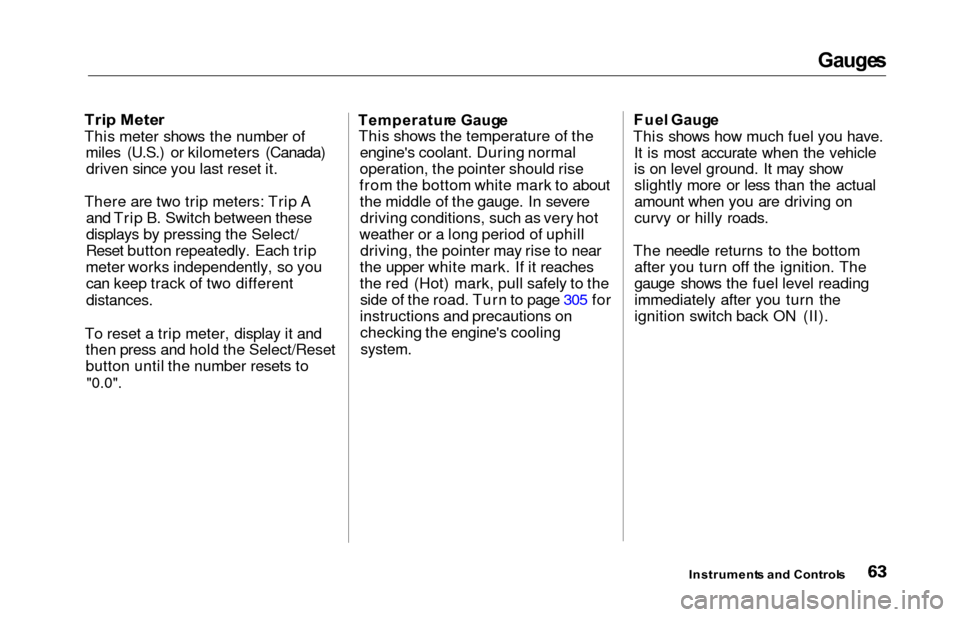
Trip Mete r
This meter shows the number of
miles (U.S.) or kilometers (Canada)driven since you last reset it.
There are two trip meters: Trip A and Trip B. Switch between these
displays by pressing the Select/
Reset button repeatedly. Each trip
meter works independently, so you can keep track of two different
distances.
To reset a trip meter, display it and then press and hold the Select/Reset
button until the number resets to
"0.0".
Temperatur e Gaug e
This shows the temperature of the engine's coolant. During normal
operation, the pointer should rise
from the bottom white mark to about the middle of the gauge. In severedriving conditions, such as very hot
weather or a long period of uphill driving, the pointer may rise to near
the upper white mark. If it reaches
the red (Hot) mark, pull safely to the side of the road. Turn to page 305 for
instructions and precautions on checking the engine's cooling
system.
Fue l Gaug e
This shows how much fuel you have. It is most accurate when the vehicle
is on level ground. It may showslightly more or less than the actual
amount when you are driving on
curvy or hilly roads.
The needle returns to the bottom after you turn off the ignition. The
gauge shows the fuel level reading
immediately after you turn the
ignition switch back ON (II).
Instrument s an d Control s
Page 67 of 352
Gauges
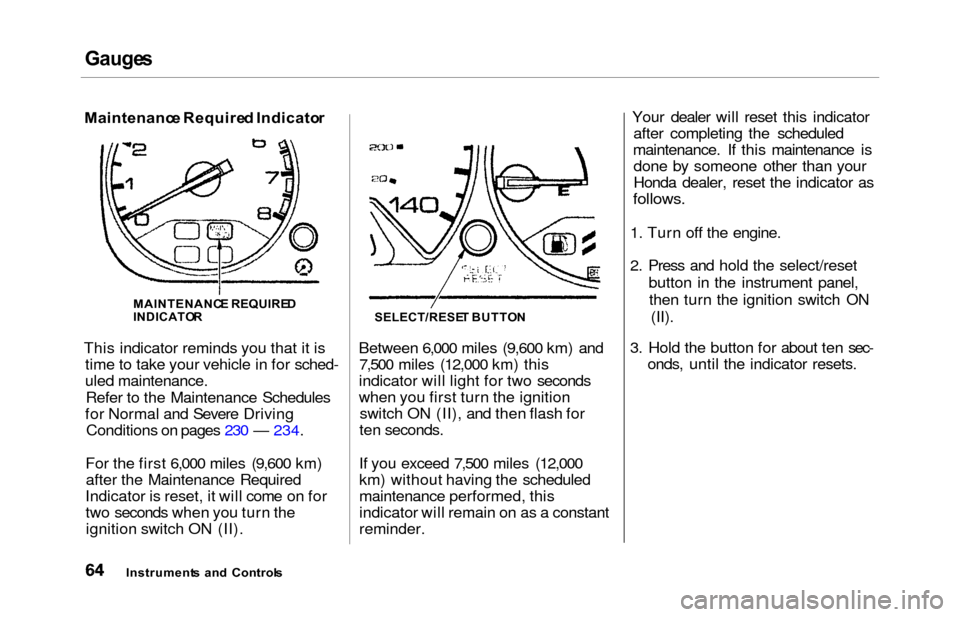
Maintenanc e Require d Indicato r
This indicator reminds you that it is time to take your vehicle in for sched-
uled maintenance.
Refer to the Maintenance Schedules
for Normal and Severe Driving Conditions on pages 230 — 234.
For the first 6,000 miles (9,600 km) after the Maintenance Required
Indicator is reset, it will come on for
two seconds when you turn the ignition switch ON (II). Between 6,000 miles (9,600 km) and
7,500 miles (12,000 km) this
indicator will light for two seconds
when you first turn the ignition switch ON (II), and then flash for
ten seconds.
If you exceed 7,500 miles (12,000
km) without having the scheduled
maintenance performed, this
indicator will remain on as a constant
reminder. Your dealer will reset this indicator
after completing the scheduled
maintenance. If this maintenance is done by someone other than your
Honda dealer, reset the indicator as
follows.
1. Turn off the engine.
2. Press and hold the select/reset
button in the instrument panel,then turn the ignition switch ON (II).
3. Hold the button for about ten sec- onds, until the indicator resets.
Instrument s an d Control s
MAINTENANC
E REQUIRE D
INDICATO RSELECT/RESE T BUTTO N
Page 68 of 352
Controls Nea r th e Steerin g Whee l
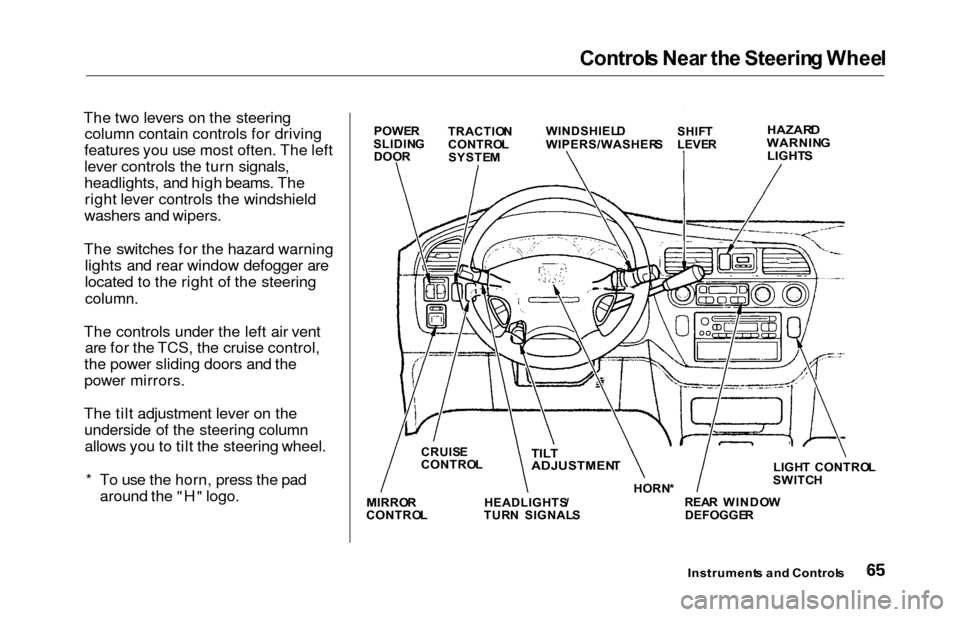
The two levers on the steering
column contain controls for driving
features you use most often. The left
lever controls the turn signals,
headlights, and high beams. The right lever controls the windshield
washers and wipers.
The switches for the hazard warning lights and rear window defogger are
located to the right of the steering
column.
The controls under the left air vent are for the TCS, the cruise control,
the power sliding doors and the
power mirrors.
The tilt adjustment lever on the underside of the steering columnallows you to tilt the steering wheel.
* To use the horn, press the pad around the "H" logo.
Instrument s an d Control s
POWER
SLIDIN G
DOO R TRACTIO
N
CONTRO L
SYSTE M WINDSHIEL
D
WIPERS/WASHER SSHIFT
LEVE RHAZAR DWARNIN G
LIGHT S
LIGHT CONTRO L
SWITC H
REA R WINDO W
DEFOGGE R
HORN
*TILT
ADJUSTMEN T
HEADLIGHTS /
TUR N SIGNAL S
CRUIS
E
CONTRO L
MIRRO R
CONTRO L
Page 75 of 352
Controls Nea r th e Steerin g Whee l
Steerin g Whee l Adjustmen t
See page 19 for important safety
information about how to properly
position the steering wheel.
Make any steering wheel adjustment
before you start driving.
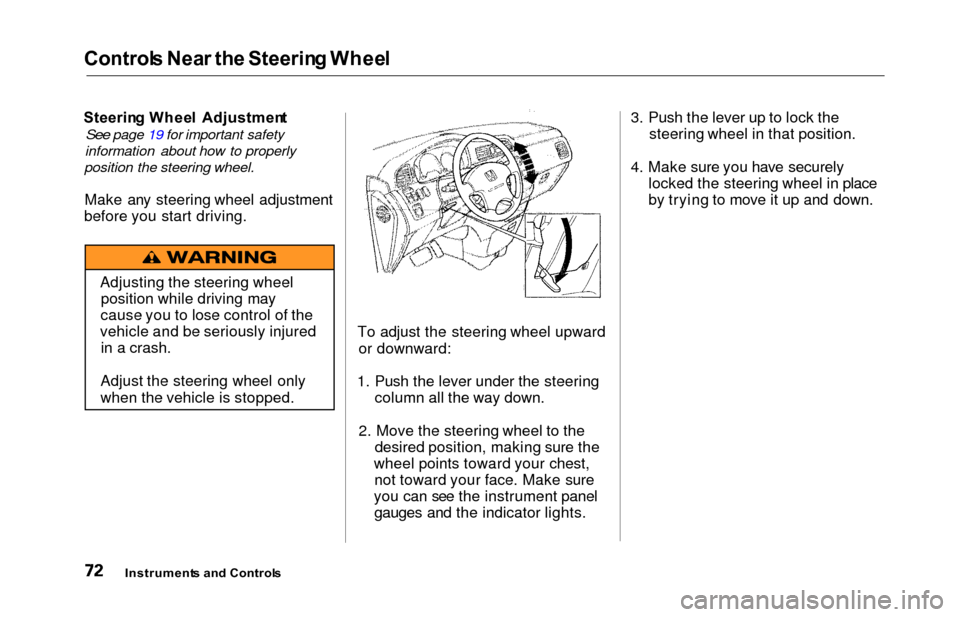
To adjust the steering wheel upwardor downward:
1. Push the lever under the steering column all the way down.
2. Move the steering wheel to the desired position, making sure the
wheel points toward your chest, not toward your face. Make sure
you can see the instrument panel gauges and the indicator lights. 3. Push the lever up to lock the
steering wheel in that position.
4. Make sure you have securely locked the steering wheel in place
by trying to move it up and down.
Instrument s an d Control s
Adjusting the steering wheel
position while driving may
cause you to lose control of the
vehicle and be seriously injured in a crash.
Adjust the steering wheel only
when the vehicle is stopped.
Page 76 of 352
Steering Whee l Control s
Cruise Contro l
Cruise control allows you to maintain
a set speed above 25 mph (40 km/h)
without keeping your foot on the accelerator pedal. It should be used for cruising on straight, open
highways. It is not recommended for conditions such as city driving,
winding roads, slippery roads, heavy rain, or bad weather. You should
have full control of the vehicle under
those conditions.Using the Cruise Control
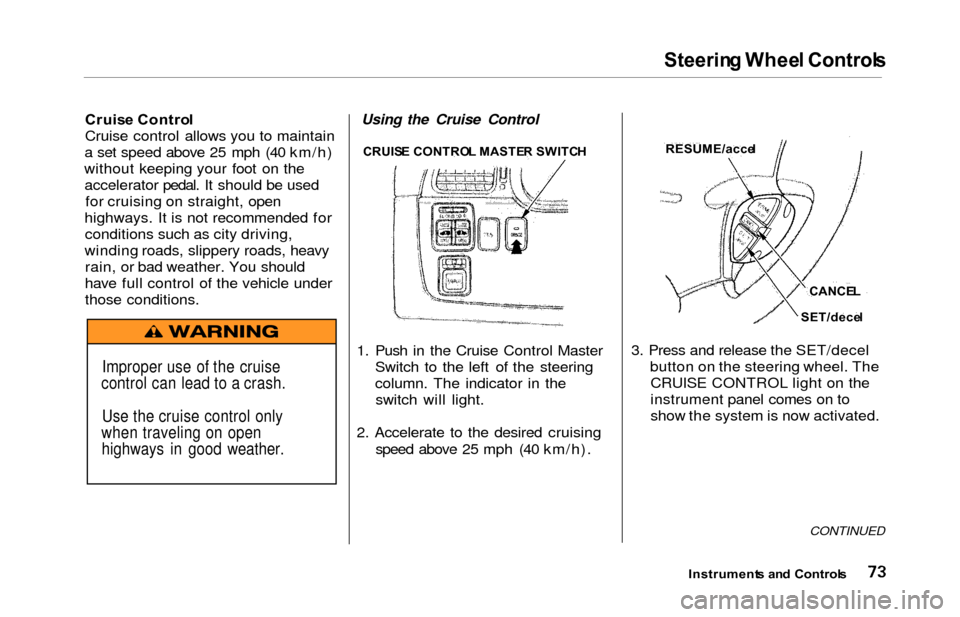
1. Push in the Cruise Control Master Switch to the left of the steering
column. The indicator in theswitch will light.
2. Accelerate to the desired cruising speed above 25 mph (40 km/h). 3. Press and release the SET/decel
button on the steering wheel. TheCRUISE CONTROL light on the
instrument panel comes on to
show the system is now activated.
CONTINUED
Instrument s an d Control s
Improper use of the cruise
control can lead to a crash.
Use the cruise control only
when traveling on open highways in good weather.
CRUIS E CONTRO L MASTE R SWITC HRESUME/acce l
CANCEL
SET/dece l
Page 82 of 352
Keys an d Lock s
ACCESSOR Y (I ) — In this position,
you can operate the audio system and the accessory power socket.
O N (II ) — This is the normal key
position when driving. All features and accessories on the vehicle are
usable. Several of the lights on the instrument panel come on as a test
when you turn the ignition switch from ACCESSORY to ON. STAR
T (III ) — Use this position
only to start the engine. The switch
returns to ON (II) when you let go of
the key.
The engine will not start if the Immobilizer System does not
recognize the key's coding (see page
77).
You will hear a reminder beeper if
you leave the key in the ignition
switch in the LOCK (0) or
ACCESSORY (I) position and open the driver's door. Remove the key toturn off the beeper. Powe
r Doo r Lock s
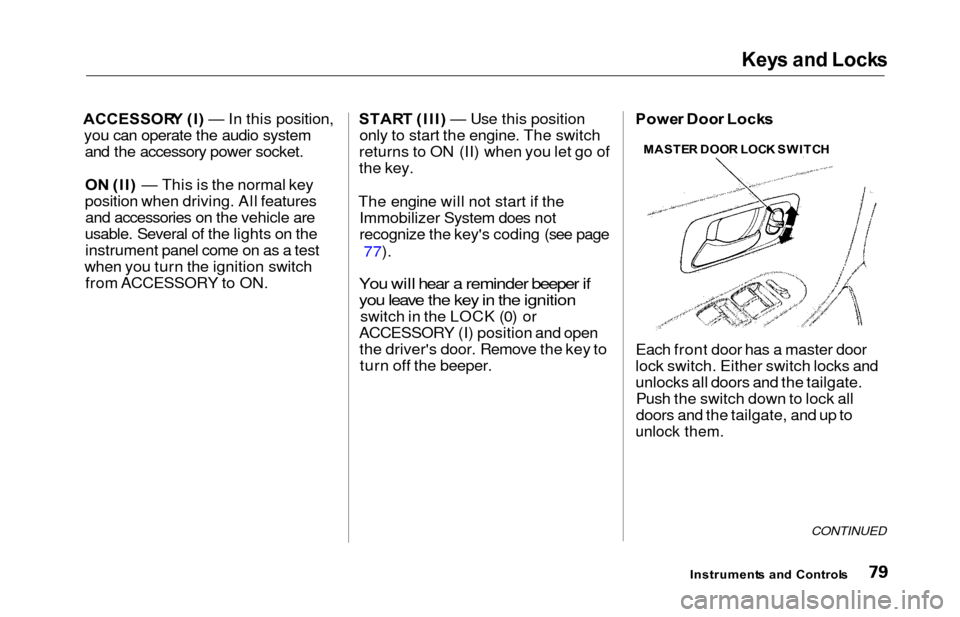
Each front door has a master door
lock switch. Either switch locks and
unlocks all doors and the tailgate. Push the switch down to lock all
doors and the tailgate, and up to
unlock them.
CONTINUED
Instrument s an d Control s
MASTE
R DOO R LOC K SWITC H