Key HONDA ODYSSEY 2000 RA6-RA9 / 2.G User Guide
[x] Cancel search | Manufacturer: HONDA, Model Year: 2000, Model line: ODYSSEY, Model: HONDA ODYSSEY 2000 RA6-RA9 / 2.GPages: 352, PDF Size: 4.43 MB
Page 85 of 352
Keys an d Lock s
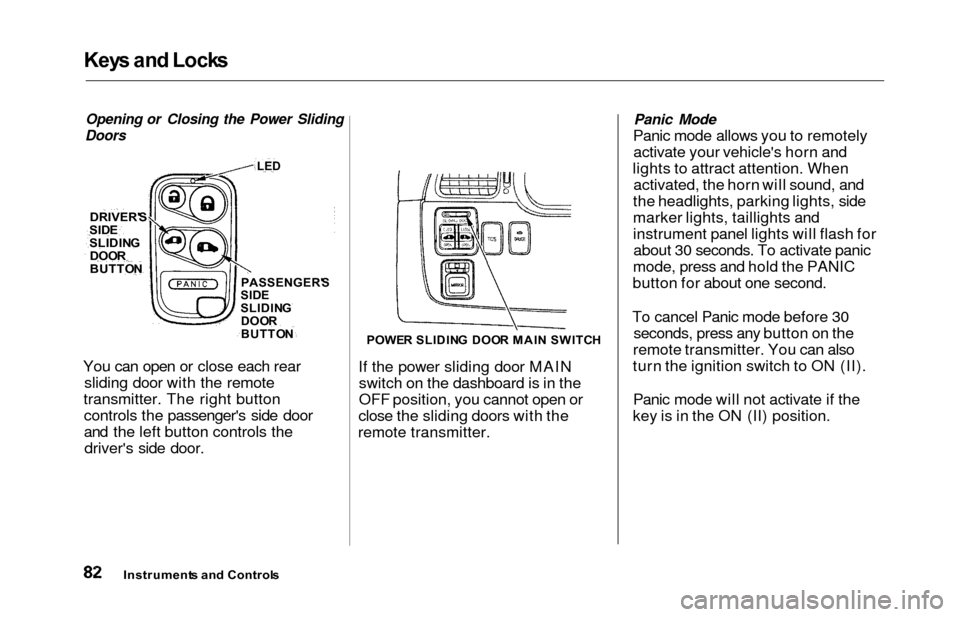
Opening or Closing the Power Sliding
Doors
You can open or close each rear sliding door with the remote
transmitter. The right button controls the passenger's side door
and the left button controls thedriver's side door.
POWE R SLIDIN G DOO R MAI N SWITC H
If the power sliding door MAIN
switch on the dashboard is in the
OFF position, you cannot open or
close the sliding doors with the
remote transmitter.
Panic Mode
Panic mode allows you to remotely activate your vehicle's horn and
lights to attract attention. When activated, the horn will sound, and
the headlights, parking lights, side
marker lights, taillights and
instrument panel lights will flash for about 30 seconds. To activate panic
mode, press and hold the PANIC
button for about one second.
To cancel Panic mode before 30 seconds, press any button on the
remote transmitter. You can also
turn the ignition switch to ON (II).
Panic mode will not activate if the
key is in the ON (II) position.
Instrument s an d Control s
DRIVER'
S
SIDESLIDIN G
DOO R
BUTTO NPASSENGER' S
SID E
SLIDIN G
DOO R
BUTTO N
LED
Page 86 of 352
Keys an d Lock s
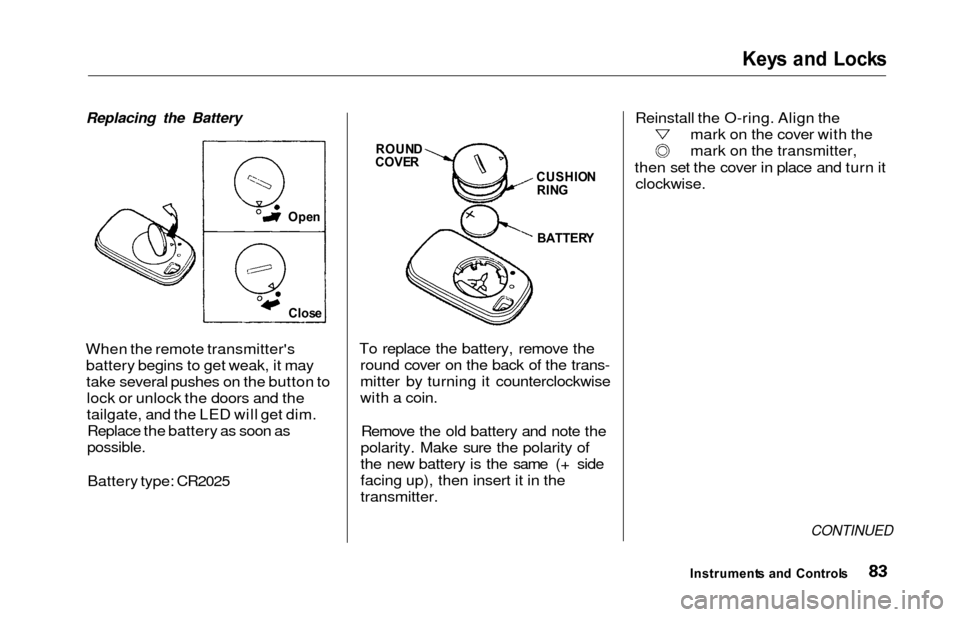
Replacing the Battery
When the remote transmitter's
battery begins to get weak, it maytake several pushes on the button tolock or unlock the doors and the
tailgate, and the LED will get dim.Replace the battery as soon as
possible.
Battery type: CR2025 To replace the battery, remove the
round cover on the back of the trans-
mitter by turning it counterclockwise
with a coin.
Remove the old battery and note the
polarity. Make sure the polarity of
the new battery is the same (+ side
facing up), then insert it in the
transmitter. Reinstall the O-ring. Align the
mark on the cover with the
mark on the transmitter,
then set the cover in place and turn it clockwise.
CONTINUED
Instrument s an d Control s
Ope
n
Clos e
ROUN DCOVERCUSHIO N
RIN G
BATTER Y
Page 87 of 352

Keys an d Lock s
Transmitter Care
Avoid severe shock to the trans-
mitter, such as dropping or throwing
it. Also, protect it from extreme hot or cold temperatures.
Clean the transmitter case with a
soft cloth. Do not use strong
cleaners or solvents that could harm
the case. Immersing the transmitter
in any liquid will harm the trans-
mitter and cause it to not function
properly.
If you lose a transmitter, you will
need to have the replacement
programmed to your vehicle's system by your Honda dealer. Any
other transmitters you have will also
need to be reprogrammed.
As required by the FCC:
This device complies with Part 15 of the
FCC rules. Operation is subject to the
following two conditions: (1) This device may not cause harmful interference, and (2) this device must accept any
interference received, including
interference that may cause undesired
operation.
Changes or modifications not expressly
approved by the party responsible for
compliance could void the user's
authority to operate the equipment.
This device complies with Industry
Canada Standard RSS-210.
Operation is subject to the following two
conditions: (1) this device may not cause
interference, and (2) this device must accept any interference that may cause undesired operation of the device.
Instrument s an d Control s
Page 88 of 352
Keys an d Lock s
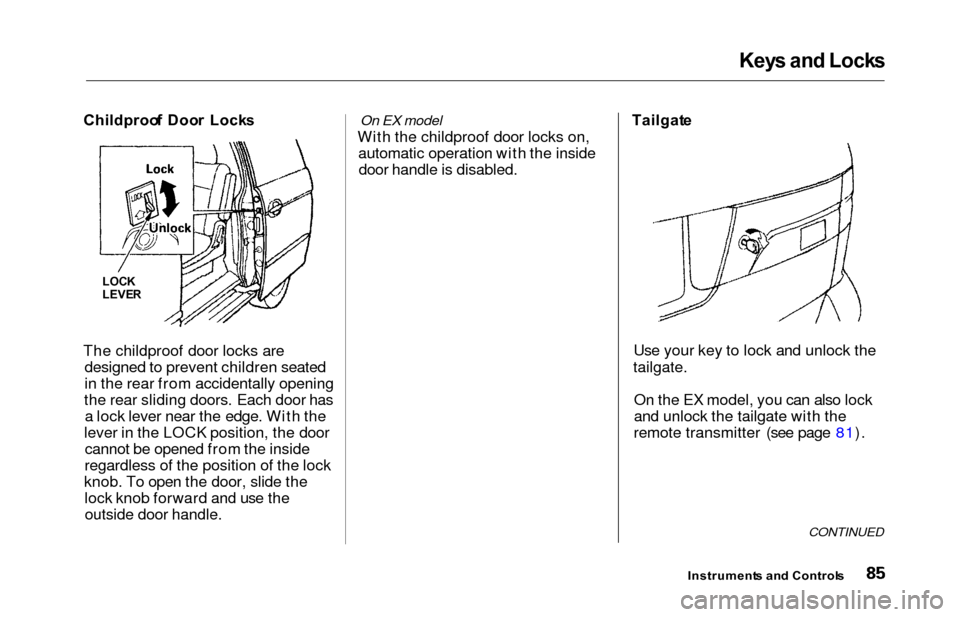
Childproo f Doo r Lock s
The childproof door locks are designed to prevent children seated
in the rear from accidentally opening
the rear sliding doors. Each door has a lock lever near the edge. With the
lever in the LOCK position, the door cannot be opened from the inside
regardless of the position of the lock
knob. To open the door, slide the lock knob forward and use theoutside door handle.On EX model
With the childproof door locks on, automatic operation with the insidedoor handle is disabled. Tailgat
e
Use your key to lock and unlock the
tailgate.
On the EX model, you can also lock
and unlock the tailgate with the
remote transmitter (see page 81).
CONTINUED
Instrument s an d Control s
LOCK
LEVE R
Page 89 of 352
Keys an d Lock s
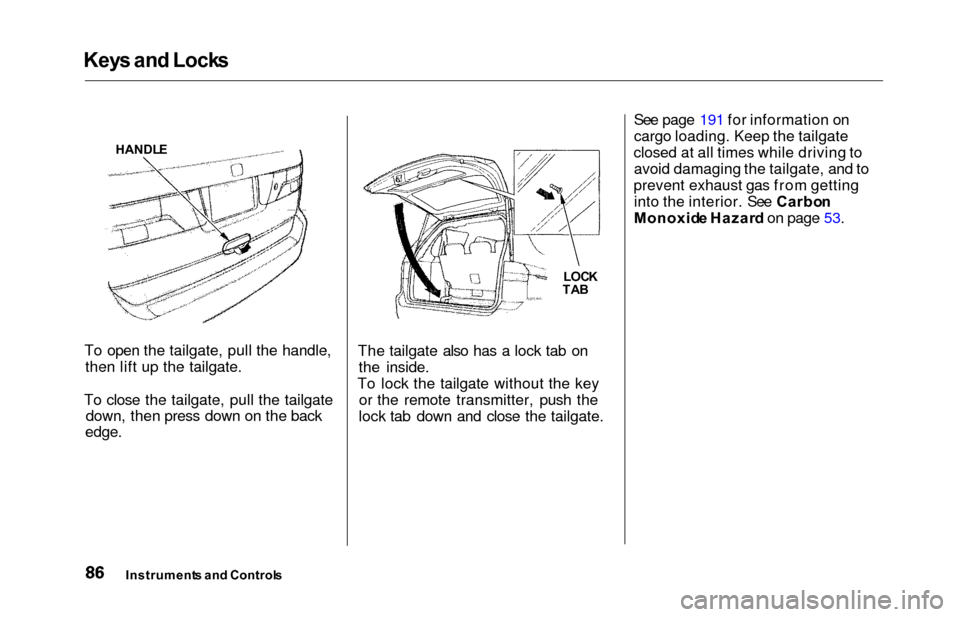
To open the tailgate, pull the handle,
then lift up the tailgate.
To close the tailgate, pull the tailgate down, then press down on the back
edge.
The tailgate also has a lock tab on
the inside.
To lock the tailgate without the key or the remote transmitter, push the
lock tab down and close the tailgate. See page 191 for information on
cargo loading. Keep the tailgate
closed at all times while driving to avoid damaging the tailgate, and to
prevent exhaust gas from getting into the interior. See Carbo n
Monoxid e Hazar d on page 53.
Instrument s an d Control s
LOCK
TA B
HANDL
E
Page 90 of 352
Keys an d Lock s
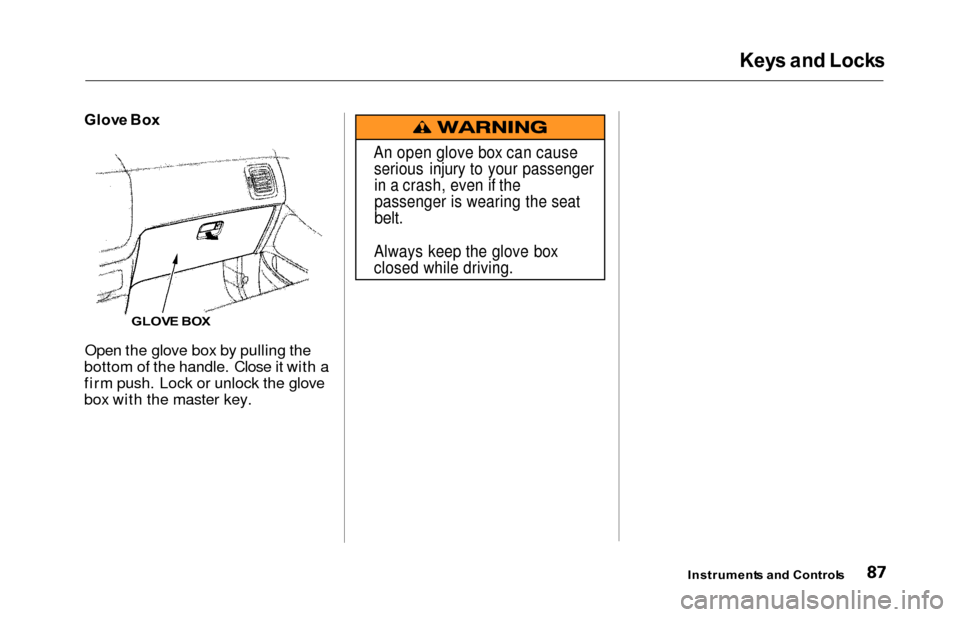
Glove Bo x
Open the glove box by pulling the
bottom of the handle. Close it with a
firm push. Lock or unlock the glove
box with the master key.
Instrument s an d Control s
GLOVE BO X
An open glove box can cause
serious injury to your passengerin a crash, even if the
passenger is wearing the seat
belt.
Always keep the glove box
closed while driving.
Page 117 of 352
Power Window s
The power window system has a key-
off delay function. The windows willstill operate for up to ten minutes
after you turn off the ignition.Opening either front door cancels
the delay function. You must turn
the ignition switch ON (II) again
before you can operate the windows.
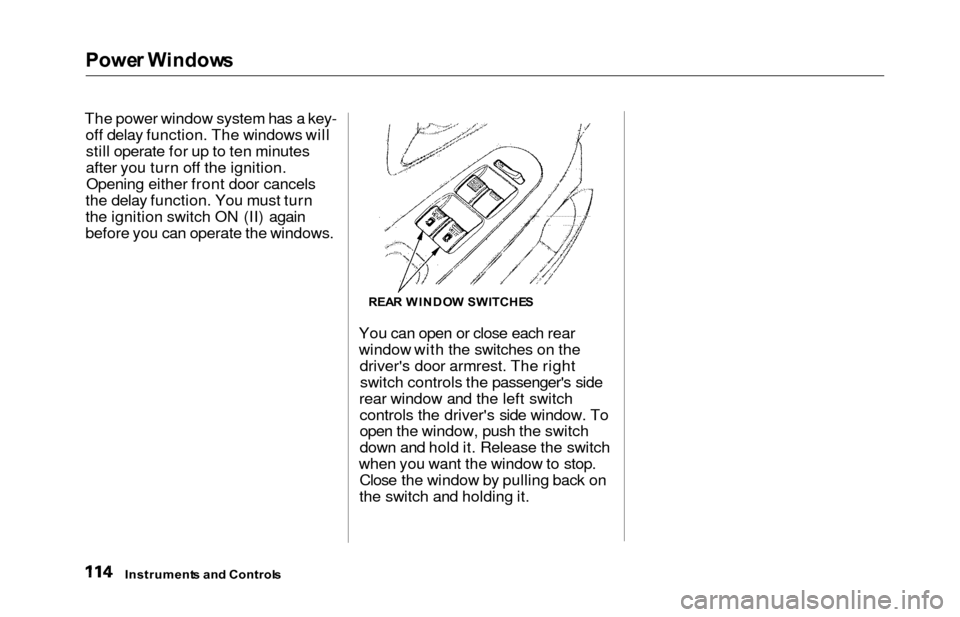
You can open or close each rear
window with the switches on thedriver's door armrest. The rightswitch controls the passenger's side
rear window and the left switch controls the driver's side window. To
open the window, push the switch
down and hold it. Release the switch
when you want the window to stop. Close the window by pulling back on
the switch and holding it.
Instrument s an d Control s
REAR WINDO W SWITCHE S
Page 206 of 352

Starting th e Engin e
1. Apply the parking brake.
2. In cold weather, turn off all electrical accessories to reduce
the drain on the battery.
3. Make sure the shift lever is in Park. Press on the brake pedal.
4. Without touching the accelerator pedal, turn the ignition key to the
START (III) position. If the engine does not start right away, do not
hold the key in START (III) for
more than 15 seconds at a time.
Pause for at least 10 seconds before trying again.
5. If the engine does not start within 15 seconds, or starts but stalls
right away, repeat step 4 with the
accelerator pedal pressed half-way
down. If the engine starts, release
pressure on the accelerator pedal so the engine does not race. 6. If the engine still does not start,
press the accelerator pedal all the
way down and hold it there while starting in order to clear flooding.
As before, keep the ignition key in the START (III) position for nomore than 15 seconds. Return tostep 5 if the engine does not start.
If it starts, lift your foot off the
accelerator pedal so the engine does not race.
Startin g in Col d Weathe r a t Hig h
Altitud e (Abov e 8,00 0 feet /
2,400 meters )
An engine is harder to start in cold
weather. The thinner air found athigh altitude above 8,000 feet (2,400
meters) adds to the problem.
Use the following procedure:
1. Turn off all electrical accessories to reduce the drain on the battery. 2. Push the accelerator pedal half-
way to the floor and hold it there
while starting the engine. Do nothold the ignition key in START(III) for more than 15 seconds.
When the engine starts, release the accelerator pedal gradually as
the engine speeds up and smoothsout.
3. If the engine fails to start in step 2, push the accelerator pedal to the
floor and hold it there while you
try to start the engine for no more
than 15 seconds. If the enginedoes not start, return to step 2.
Drivin g
Page 208 of 352
Automatic Transmissio n
Shift Leve r Position s
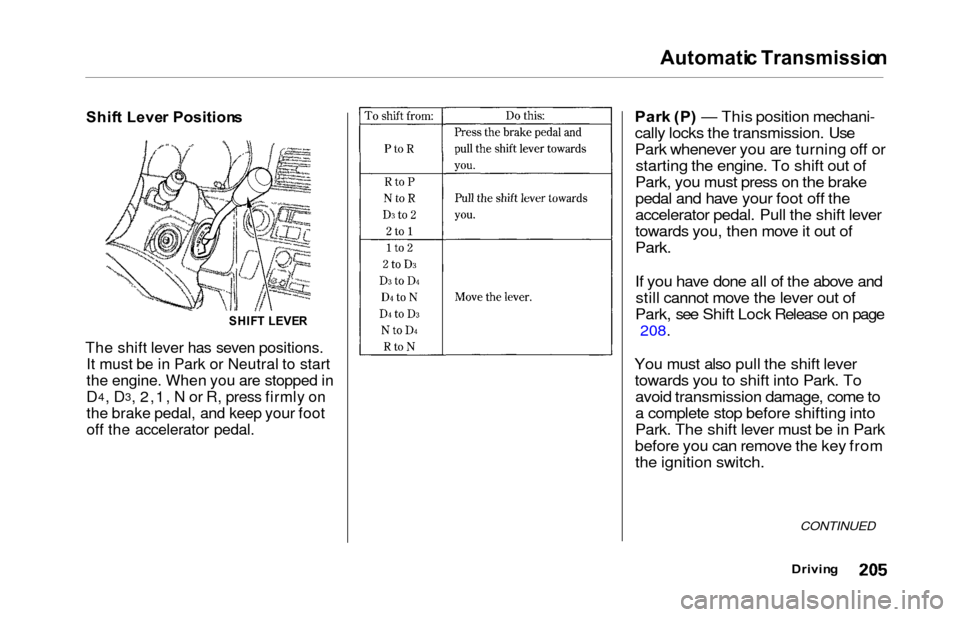
The shift lever has seven positions.
It must be in Park or Neutral to start
the engine. When you are stopped in
D4, D3, 2,1, N or R, press firmly on
the brake pedal, and keep your foot
off the accelerator pedal.
Park (P ) — This position mechani-
cally locks the transmission. Use
Park whenever you are turning off or starting the engine. To shift out of
Park, you must press on the brake
pedal and have your foot off the
accelerator pedal. Pull the shift lever
towards you, then move it out of
Park.
If you have done all of the above and still cannot move the lever out of
Park, see Shift Lock Release on page
208.
You must also pull the shift lever towards you to shift into Park. Toavoid transmission damage, come to
a complete stop before shifting into
Park. The shift lever must be in Park
before you can remove the key from the ignition switch.
CONTINUED
Drivin g
SHIFT LEVE R
Page 210 of 352

Automatic Transmissio n
Second (2 ) — To shift to Second,
pull the shift lever towards you, then shift to the lower gear. This position
locks the transmission in second
gear. It does not downshift to first
gear when you come to a stop. Second gives you more power when
climbing, and increased engine
braking when going down steep hills. Use second gear when starting outon a slippery surface or in deep snow.
It will help reduce wheelspin.
When driving down hill with a trailer, use the Second position.
Firs t (1 ) — To shift from Second to
First, pull the shift lever towards you,
then shift to the lower gear. With the
lever in this position, the transmis- sion locks in First gear. By upshift-
ing and downshifting through 1, 2,
D
3 and D4, you can operate this
transmission much like a manual
transmission without a clutch pedal. Engin
e Spee d Limite r
If you exceed the maximum speed
for the gear you are in, the engine speed will enter into the tachometer's
red zone. If this occurs, you may feel the engine cut in and out. This is
caused by a limiter in the engine's
computer controls. The engine will
run normally when you reduce the
RPM below the red zone. Shif
t Loc k Releas e
This allows you to move the shift lever out of Park if the normalmethod of pushing on the brake
pedal and pulling the shift lever does not work.
1. Set the Parking brake.
2. Remove the key from the ignition switch.
3. Place a cloth on the edge of the shift lock release slot cover on the
steering column. Remove the
cover by carefully prying on the
edge with a small flat-tipped screwdriver (not included in the
toolkit).
Drivin g
CONTINUED