Remote HONDA ODYSSEY 2000 RA6-RA9 / 2.G User Guide
[x] Cancel search | Manufacturer: HONDA, Model Year: 2000, Model line: ODYSSEY, Model: HONDA ODYSSEY 2000 RA6-RA9 / 2.GPages: 352, PDF Size: 4.43 MB
Page 95 of 352
Power Slidin g Door s (E X Model )
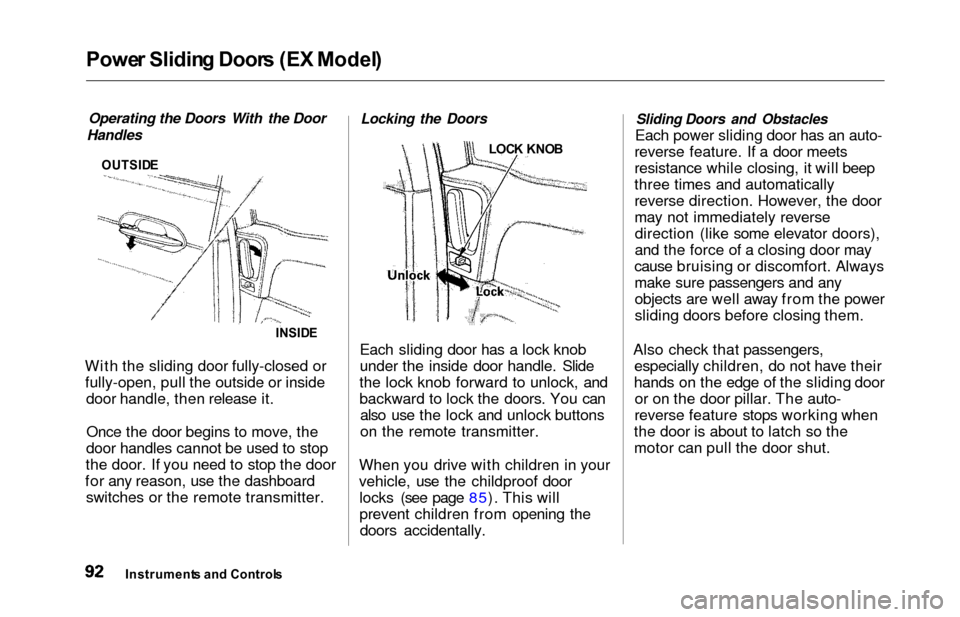
Operating the Doors With the Door
Handles
OUTSID E
INSIDE
With the sliding door fully-closed or
fully-open, pull the outside or inside door handle, then release it.
Once the door begins to move, the
door handles cannot be used to stop
the door. If you need to stop the door
for any reason, use the dashboard switches or the remote transmitter.
Locking the Doors
LOC K KNO B
Each sliding door has a lock knob
under the inside door handle. Slide
the lock knob forward to unlock, and
backward to lock the doors. You can also use the lock and unlock buttons
on the remote transmitter.
When you drive with children in your
vehicle, use the childproof door locks (see page 85). This will
prevent children from opening thedoors accidentally.
Sliding Doors and Obstacles
Each power sliding door has an auto-
reverse feature. If a door meets
resistance while closing, it will beep
three times and automatically
reverse direction. However, the door
may not immediately reverse direction (like some elevator doors),
and the force of a closing door may
cause bruising or discomfort. Always
make sure passengers and any objects are well away from the power
sliding doors before closing them.
Also check that passengers, especially children, do not have their
hands on the edge of the sliding door or on the door pillar. The auto-
reverse feature stops working when
the door is about to latch so the
motor can pull the door shut.
Instrument s an d Control s
Page 96 of 352
Power Slidin g Door s (E X Model )
If a person or object is in the way
after the door begins to close, the
door handles cannot be used to stop
the door. To stop the door, use the dashboard switches or the remote
transmitter.
A Note About Refueling
Before refueling, make sure the driver's side sliding door is fully
closed. When you release the fuel fill
door, the driver's side sliding door
automatically locks so it cannot open
and interfere with the fuel door. If a
passenger attempts to unlock the door by cycling the lock knob several
times, the door may unlock and can be opened.
If a passenger needs to get out of the
vehicle while you are refueling, instruct that person to exit on the
passenger's side, not the driver's
side.
After you close the fuel fill door, the sliding door does not automatically
unlock. You must unlock it manually.
Parking Facing Downhill
When parking facing downhill on a steep grade, the power sliding doors
may not open or close as they do
normally.
Make sure the MAIN switch is in
the ON position. This allows the
power assist to keep the doors
from slamming shut.
If the MAIN switch is off, the doorcan slam shut and possibly injure
someone.
Make sure the power sliding doors
are latched in the fully-open
position, then hold the door open
while allowing your passengers to enter or exit the vehicle. Do not
pull the inside or outside door
handle, or the latch will release
and the door will close.
How to Reset the Power Sliding
Doors
If your vehicle's battery is
disconnected or goes dead while asliding door is open, the power
sliding door system needs to be reset.
After reconnecting the battery:
Close each sliding door completely
by hand; or
Move the MAIN switch on the
dashboard to the ON position.
Push and hold the top of each door switch until each sliding door
closes completely.
If the power sliding doors are closed, the system will reset itselfautomatically once the battery has
been reconnected. If the power sliding doors do notoperate properly after resetting,
have your vehicle checked by a Honda dealer.
Instrument s an d Control s
CONTINUED
Page 98 of 352

HomeLink Universa l Transmitte r
On EX model
The HomeLink Universal
Transmitter built into your vehicle
can be programmed to operate
remotely controlled devices around
your home, such as garage doors, lighting, or home security systems.
It can replace up to three remote
transmitters.
Custome r Assistanc e
If you have problems with training
the HomeLink Universal Transmitter,
or would like information on home
products that can be operated by the
transmitter, call (800) 355-3515. On
the internet, go to
www.homelink.jci.com.
Importan t Safet y Precaution s
Always refer to the operating
instructions and safety information
that came with your garage door
opener or other equipment you
intend to operate with the HomeLink Universal Transmitter.
If you do not have this information,
you should contact the
manufacturer of the equipment.
While training or using the transmitter, make sure you have a
clear view of the garage door or
gate, and that no one will be injured
by its movement.
Genera l Informatio n
If you are training the transmitter to
operate a garage door or gate, it is
recommended that you unplug the
motor for that device during
training. Repeatedly pressing the
remote control button could burn
out the motor.
The HomeLink transmitter stores the code in a permanent memory.
There should be no need to retrain
the transmitter if your vehicle's
battery goes dead or is
disconnected.
If your garage door opener was manufactured before April 1982,
you may not be able to program the
HomeLink Universal Transmitter tooperate it. Garage door openers
manufactured before that date do
not have a safety feature that
causes them to stop and reverse ifan obstacle is detected during
closing, increasing the risk of injury. If you have questions, call(800) 355-3515.
Trainin g th e Transmitte r
Before you can use the HomeLink
Universal Transmitter to operate devices around your home, it must
"learn" the proper codes. For
example, to train the transmitter to
open and close the garage door:
CONTINUED
Instrument s an d Control s
Page 99 of 352
HomeLink Universa l Transmitte r
Before you begin — If you just took
delivery of your vehicle and have
not trained any of the buttons in the
HomeLink transmitter before, you should erase any previously learned
codes before training the first
button. To do this, press and hold the two outside buttons on the
HomeLink transmitter until the red light flashes. Release the buttons,
then proceed to Step 1.
If you are training the second or
third buttons, go directly to Step 1. 1. Unplug the garage door opener motor from the house current.
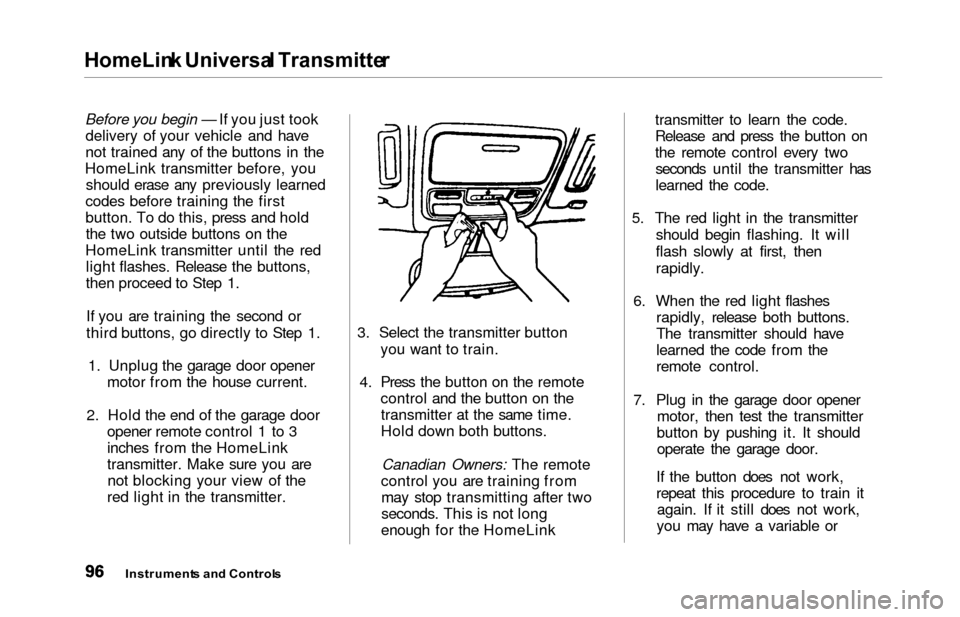
2. Hold the end of the garage door opener remote control 1 to 3
inches from the HomeLink
transmitter. Make sure you arenot blocking your view of the
red light in the transmitter. 3. Select the transmitter button
you want to train.
4. Press the button on the remote control and the button on thetransmitter at the same time.
Hold down both buttons.
Canadian Owners: The remote
control you are training from may stop transmitting after two
seconds. This is not long
enough for the HomeLink transmitter to learn the code.
Release and press the button on
the remote control every two
seconds until the transmitter has
learned the code.
5. The red light in the transmitter should begin flashing. It will
flash slowly at first, then
rapidly.
6. When the red light flashes rapidly, release both buttons.
The transmitter should have
learned the code from the
remote control.
7. Plug in the garage door opener motor, then test the transmitter
button by pushing it. It should operate the garage door.
If the button does not work,
repeat this procedure to train it again. If it still does not work,
you may have a variable or
Instrument s an d Control s
Page 100 of 352
HomeLink Universa l Transmitte r
rolling code garage door
opener. Test this by pressing
and holding the HomeLink
transmitter button you just
trained. If the red light blinks
for two seconds, then stays on,
you have a rolling code garage
door opener. You may be able
to verify this with the
manufacturer's documentation.
Go to "Training With a Rolling
Code System."
8. Repeat these steps to train the other two transmitter buttons tooperate any other remotely-
controlled devices around your
home (lighting, automatic gate, security system, etc.).
Trainin g Wit h a Rollin g Cod e
Syste m
For security purposes, newer
garage door opening systems use a
"rolling" or variable code.
Information from the remote control and the garage door opener
are needed before the HomeLink
transmitter can operate the garage
door opener. The "Training the
Transmitter" procedure trains the
HomeLink transmitter to the proper garage door opener code. The
following procedure synchronizes the HomeLink transmitter to the
garage door opener so they sendand receive the correct codes.
It may be helpful to have someone assist you with this procedure.
1. Make sure you have properly completed the "Training the
Transmitter" procedure.
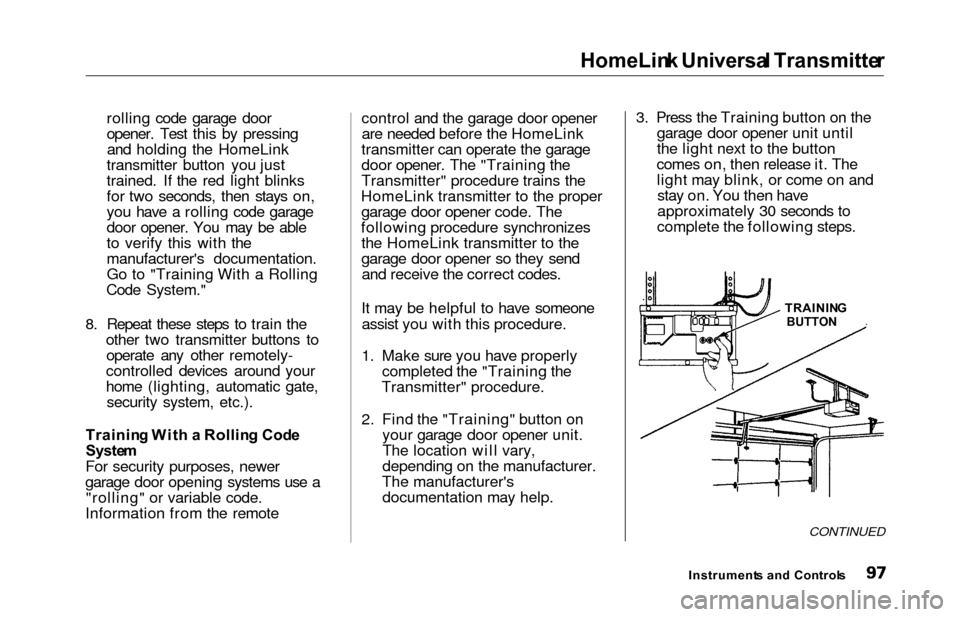
2. Find the "Training" button on your garage door opener unit.
The location will vary,
depending on the manufacturer.
The manufacturer's documentation may help. 3. Press the Training button on the
garage door opener unit until
the light next to the button
comes on, then release it. The light may blink, or come on andstay on. You then have
approximately 30 seconds to
complete the following steps.
CONTINUED
Instrument s an d Control s
TRAININ
G
BUTTON
Page 101 of 352
HomeLink Universa l Transmitte r
4. Press and release the button on
the HomeLink transmitter. (Thesame button you trained with
the "Training the Transmitter"
procedure.)
5. Press and release the HomeLink transmitter buttonagain. This should turn off the
training light on the garage door opener unit. (Somesystems may require you to
press and release the button up
to three times.)
6. Press the transmitter button again. It should operate the
garage door.
Retrainin g a Butto n
To train an already programmed
transmitter button to operate a new
device:
1. Select the transmitter button you want to train. 2. Press and hold the transmitter
button until the red light begins
to flash slowly (approximately
20 seconds).
3. While continuing to hold the transmitter button, place the
remote control for the device 1
to 3 inches from the HomeLink
transmitter.
4. Press and hold the button on the remote control. Hold both
buttons until the red light
begins to flash rapidly.
5. Release both buttons. The transmitter should now be
trained to operate the device.
Erasin g Code s
To erase the codes stored in all three buttons, press and hold the
two outside buttons until the redlight begins to flash, then release
the buttons. You should erase all three codes
before selling the vehicle.
As required by the FCC:
This device complies with Part 15
of the FCC rules. Operation is
subject to the following two
conditions: (1) This device may not
cause harmful interference, and (2)
this device must accept any
interference received, including
interference that may cause
undesired operation.
Changes or modifications not
expressly approved by the party
responsible for compliance could
void the user's authority to operate
the equipment.
This device complies with IndustryCanada Standard RSS-210.Operation is subject to the
following two conditions: (1) this
device may not cause interference,
and (2) this device must accept any
interference that may cause
undesired operation of the device.
Instrument s an d Control s
Page 129 of 352

Interio
r Light s
The cargo area light comes on when any door or the tailgate is opened if the switch in the light is
in the door activated (center)
position. When the doors and the
tailgate are closed, it can be turned on with the switch in the light. When the switch is in the ON
position:
All the individual map lights come
on and stay on as long as the
switch remains in the ON position. The cargo area light comes on and
stays on if the switch in the light is
in the door activated (center)
position.
On EX model
The lights go out about six seconds after all the doors and the tailgate
have closed.
With the light control switch in the Door Activated position, all the
individual map lights and the cargo
area light (with the switch in the
center position) come on when you
unlock the door with the remote
transmitter (see page 81).
With any door or the tailgate left open, the lights stay on about three
minutes, then go out.
Instrument s an d Control s
Page 132 of 352
Comfort an d Convenienc e Feature s
The heating and air conditioning
systems in your Honda provide a
comfortable driving environment in
all weather conditions.
The standard audio system has
many features. This section de-
scribes those features and how to
use them. (If you selected an
optional audio system, refer to the
operating instructions that came
with it.)
On EX model
Your Honda has an anti-theft audio
system that requires a code number
to enable it.
Heating and Cooling...................... 130
What Each Control Does.......... 130How to Use the System............. 133
To Turn Everything Off........... 137
Climate Control System................ 138 (EX model without Navigation
System)
Fully-automatic Operation........ 140
Semi-automatic Operation........ 142
(EX model with Navigation
System)
Fully-automatic Operation........ 146
Semi-automatic Operation........ 147
Sunlight Sensor/ Temperature Sensor............. 151
Rear A/C Unit............................ 152
Audio System (LX)........................ 155 AM/FM/Cassette StereoAudio System......................... 155
Operating the Radio.................. 156
Adjusting the Sound.................. 159
Audio System Lighting............. 160
Operating the Cassette Player...................................... 160
Tape Search Functions............. 160 Operating the Optional CD
Player/Changer..................... 163
CD Changer Error Indications.............................. 166
Audio System (EX)........................ 167 AM/FM/CD Audio System..... 167Operating the Radio.................. 168
Adjusting the Sound.................. 172
Audio System Lighting............. 173 Radio Frequencies.................... . 173
Radio Reception......................... 173 Operating the CD Player.......... 175
Operating the CD Changer...... 177
Protecting Compact Discs........ 178 CD Player Error Indications..... 179
CD Changer Error Indications.............................. 180
Operating the Cassette Player..................................... . 181
Tape Search Functions............. 182
Caring for the Cassette Player...................................... 184
Remote Audio Controls ............ 185
Theft Protection........................ 186
Comfor t an d Convenienc e Feature s
Page 174 of 352
Audio Syste m
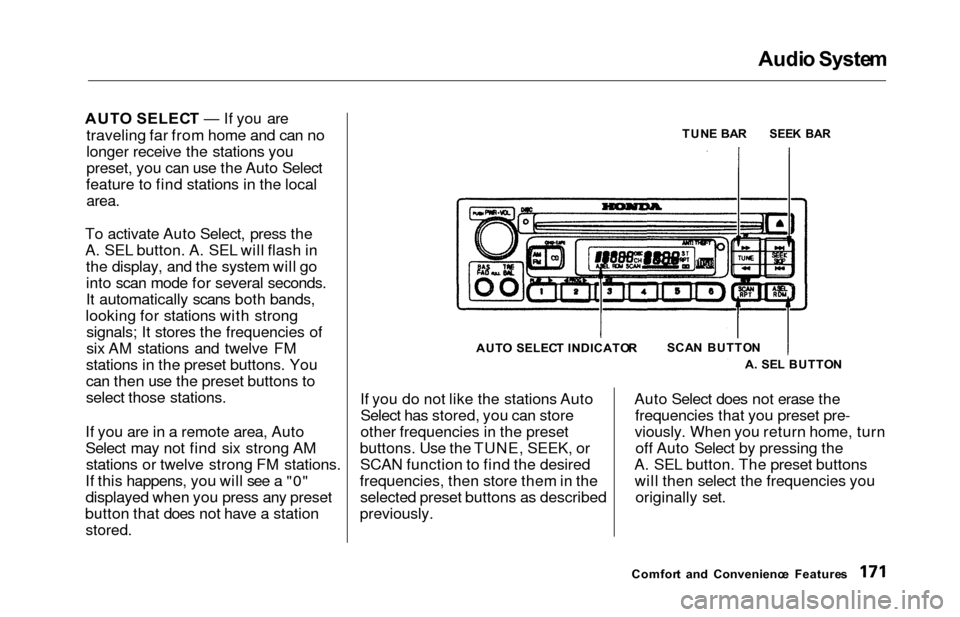
AUTO SELEC T — If you are
traveling far from home and can no
longer receive the stations you
preset, you can use the Auto Select
feature to find stations in the local
area.
To activate Auto Select, press the
A. SEL button. A. SEL will flash in the display, and the system will go
into scan mode for several seconds.
It automatically scans both bands,
looking for stations with strong signals; It stores the frequencies of
six AM stations and twelve FM
stations in the preset buttons. You
can then use the preset buttons to
select those stations.
If you are in a remote area, Auto
Select may not find six strong AM stations or twelve strong FM stations.
If this happens, you will see a "0"
displayed when you press any preset
button that does not have a station
stored.
If you do not like the stations Auto Select has stored, you can store
other frequencies in the preset
buttons. Use the TUNE, SEEK, or SCAN function to find the desired
frequencies, then store them in the selected preset buttons as described
previously. Auto Select does not erase the
frequencies that you preset pre-
viously. When you return home, turn off Auto Select by pressing the
A. SEL button. The preset buttons will then select the frequencies you originally set.
Comfor t an d Convenienc e Feature s
TUN
E BA R
SEE K BA R
SCA N BUTTO N
A . SE L BUTTO N
AUT
O SELEC T INDICATO R
Page 212 of 352
Parking
Always use the parking brake when
you park your vehicle. The indicator on the instrument panel shows that
the parking brake is not fully
released; it does not indicate that the
parking brake is firmly set. Makesure the parking brake is set firmly
or your vehicle may roll if it is
parked on an incline.
Set the parking brake before you put
the transmission in Park. This keeps
the vehicle from moving and putting
pressure on the parking mechanismin the transmission — making it
easier to move the shift lever out of
Park when you want to drive away. If the vehicle is facing uphill, turn
the front wheels away from the curb.
If the vehicle is facing downhill, turn
the front wheels toward the curb.Make sure the parking brake is fully
released before driving away. Driving with the parking brake
partially set can overheat or damage
the rear brakes. Parkin
g Tip s
Make sure the windows are closed.
Turn off the lights.
Place any packages, valuables, etc.,
in the cargo area or take them
with you.
Lock the doors with the key or the
remote transmitter.
Never park over dry leaves, tall
grass, or other flammable materials. The three way catalytic
converter gets very hot, and could
cause these materials to catch on
fire.
Drivin g