air cond HONDA ODYSSEY 2000 RA6-RA9 / 2.G User Guide
[x] Cancel search | Manufacturer: HONDA, Model Year: 2000, Model line: ODYSSEY, Model: HONDA ODYSSEY 2000 RA6-RA9 / 2.GPages: 352, PDF Size: 4.43 MB
Page 139 of 352
Heating an d Coolin g
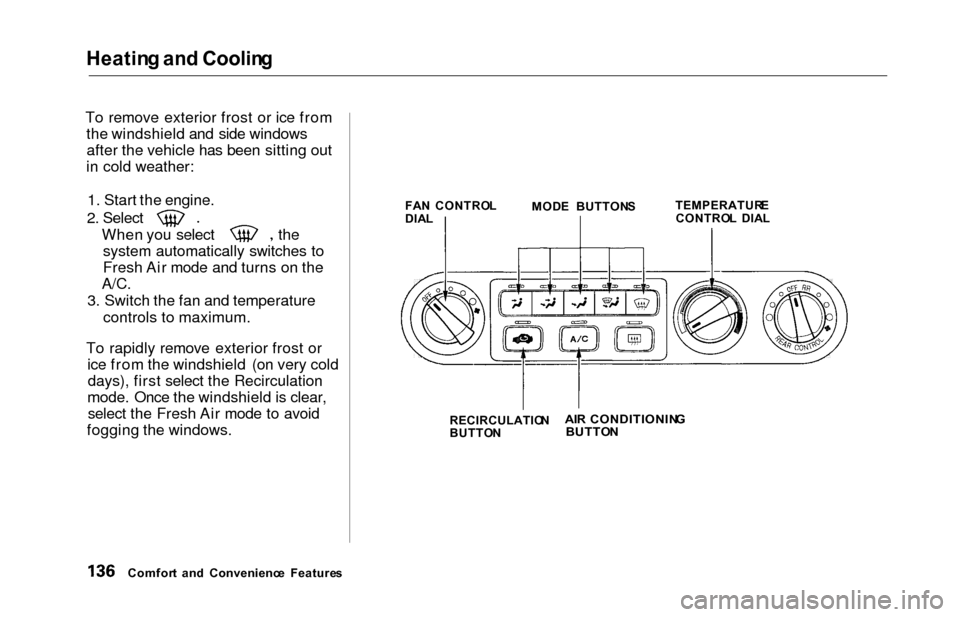
To remove exterior frost or ice from
the windshield and side windowsafter the vehicle has been sitting out
in cold weather:
1. Start the engine.
2. Select
When you select thesystem automatically switches to
Fresh Air mode and turns on the
A/C.
3. Switch the fan and temperature controls to maximum.
To rapidly remove exterior frost or ice from the windshield (on very colddays), first select the Recirculation
mode. Once the windshield is clear, select the Fresh Air mode to avoid
fogging the windows.
FA N CONTRO L
DIA L
RECIRCULATIO N
BUTTO N
Comfor t an d Convenienc e Feature s MOD
E BUTTON STEMPERATUR
E
CONTRO L DIA L
AIR CONDITIONIN G
BUTTO N
Page 141 of 352
Climate Contro l Syste m
On EX model
The automatic climate control
system in your Honda picks the
proper combination of air condi-
tioning, heating, and ventilation to maintain the interior temperature
you select. The system also adjusts the fan speed and air flow levels.
Your vehicle also has a rear A/C unit that allows the rear passengers to
adjust the heating, cooling, and air
flow (see page 152).
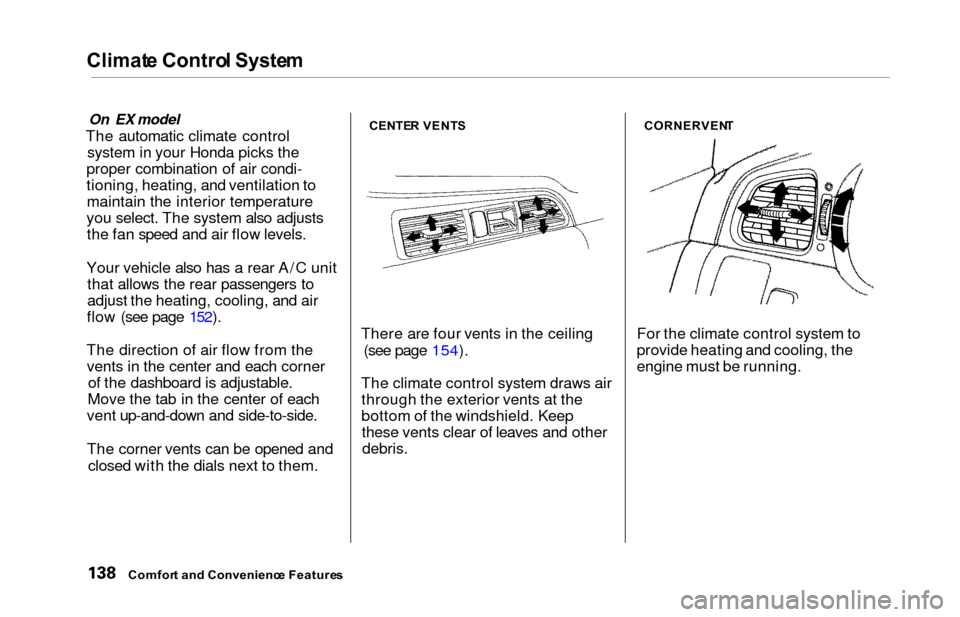
The direction of air flow from the vents in the center and each corner of the dashboard is adjustable.
Move the tab in the center of each
vent up-and-down and side-to-side.
The corner vents can be opened and
closed with the dials next to them.CENTE R VENT S
There are four vents in the ceiling
(see page 154).
The climate control system draws air through the exterior vents at the
bottom of the windshield. Keepthese vents clear of leaves and other
debris.
CORNERVEN T
For the climate control system to
provide heating and cooling, the
engine must be running.
Comfort an d Convenienc e Feature s
Page 143 of 352
Climate Contro l Syste m
EX model without Navigation System
Fully-automati c Operatio n
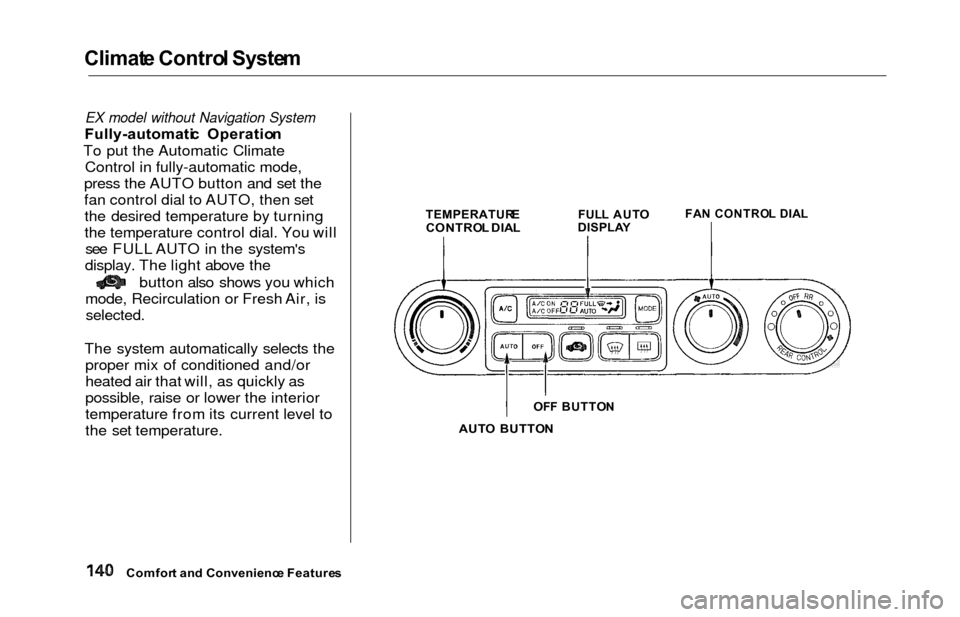
To put the Automatic Climate Control in fully-automatic mode,
press the AUTO button and set the
fan control dial to AUTO, then set the desired temperature by turning
the temperature control dial. You will see FULL AUTO in the system's
display. The light above the
button also shows you which
mode, Recirculation or Fresh Air, is
selected.
The system automatically selects the proper mix of conditioned and/or
heated air that will, as quickly as
possible, raise or lower the interior
temperature from its current level to
the set temperature.
TEMPERATUR ECONTROL DIA LFUL L AUT O
DISPLA YFAN CONTRO L DIA L
AUT O BUTTO N
Comfor t an d Convenienc e Feature s
OFF BUTTO N
Page 145 of 352
Climate Contro l Syste m
Semi-automati c Operatio n
You can manually select various
functions of the Climate Control system when it is in FULL AUTO.
All other features remain auto- matically controlled. Making any
manual selection causes the word
FULL to go out.
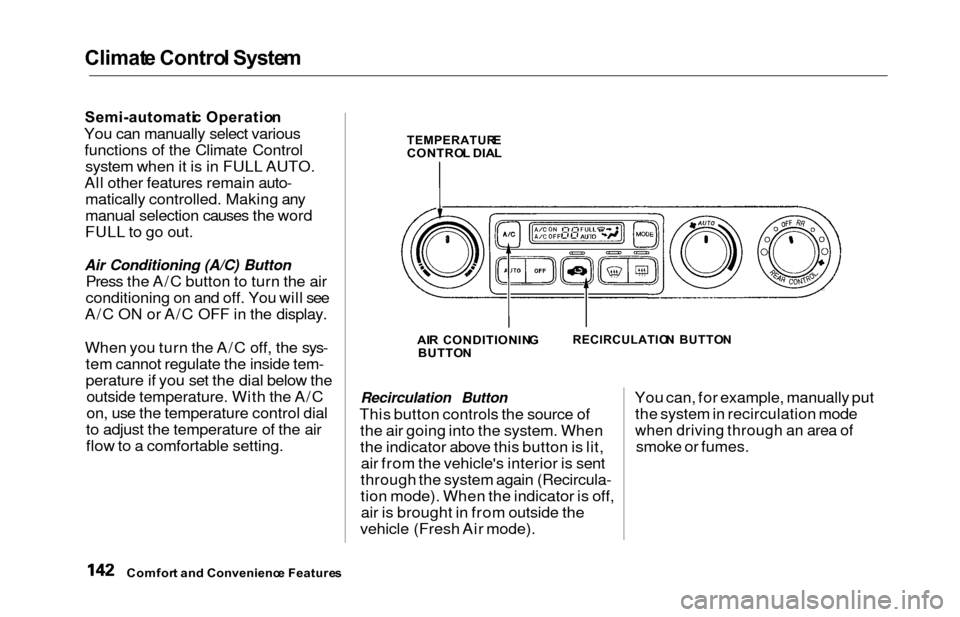
Air Conditioning (A/C) Button
Press the A/C button to turn the air
conditioning on and off. You will see
A/C ON or A/C OFF in the display.
When you turn the A/C off, the sys- tem cannot regulate the inside tem-
perature if you set the dial below theoutside temperature. With the A/C
on, use the temperature control dial
to adjust the temperature of the air
flow to a comfortable setting.
TEMPERATUR ECONTROL DIA L
AI R CONDITIONIN G
BUTTO N
RECIRCULATIO N BUTTO N
Recirculation Button
This button controls the source of
the air going into the system. When
the indicator above this button is lit,air from the vehicle's interior is sent
through the system again (Recircula-
tion mode). When the indicator is off, air is brought in from outside the
vehicle (Fresh Air mode). You can, for example, manually put
the system in recirculation mode
when driving through an area of
smoke or fumes.
Comfor t an d Convenienc e Feature s
Page 149 of 352
Climate Contro l Syste m
EX model with Navigation System
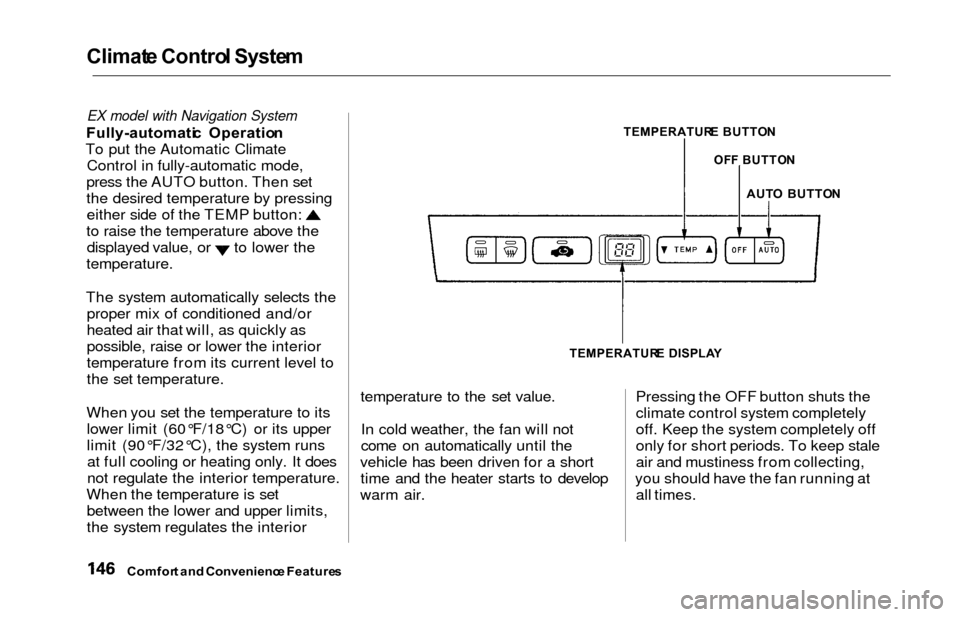
Fully-automati c Operatio n
To put the Automatic Climate Control in fully-automatic mode,
press the AUTO button. Then set
the desired temperature by pressing
either side of the TEMP button:
to raise the temperature above the
displayed value, or to lower the
temperature.
The system automatically selects the proper mix of conditioned and/or
heated air that will, as quickly as
possible, raise or lower the interior
temperature from its current level to
the set temperature.
When you set the temperature to its lower limit (60°F/18°C) or its upper
limit (90°F/32°C), the system runsat full cooling or heating only. It does
not regulate the interior temperature.
When the temperature is set between the lower and upper limits,
the system regulates the interior
TEMPERATUR E BUTTO N
AUTO BUTTO N
TEMPERATUR E DISPLA Y
temperature to the set value.
In cold weather, the fan will not
come on automatically until the
vehicle has been driven for a short time and the heater starts to develop
warm air. Pressing the OFF button shuts the
climate control system completely
off. Keep the system completely off
only for short periods. To keep stale
air and mustiness from collecting,
you should have the fan running at all times.
Comfor t an d Convenienc e Feature s
OFF BUTTO N
Page 150 of 352
Climate Contro l Syste m
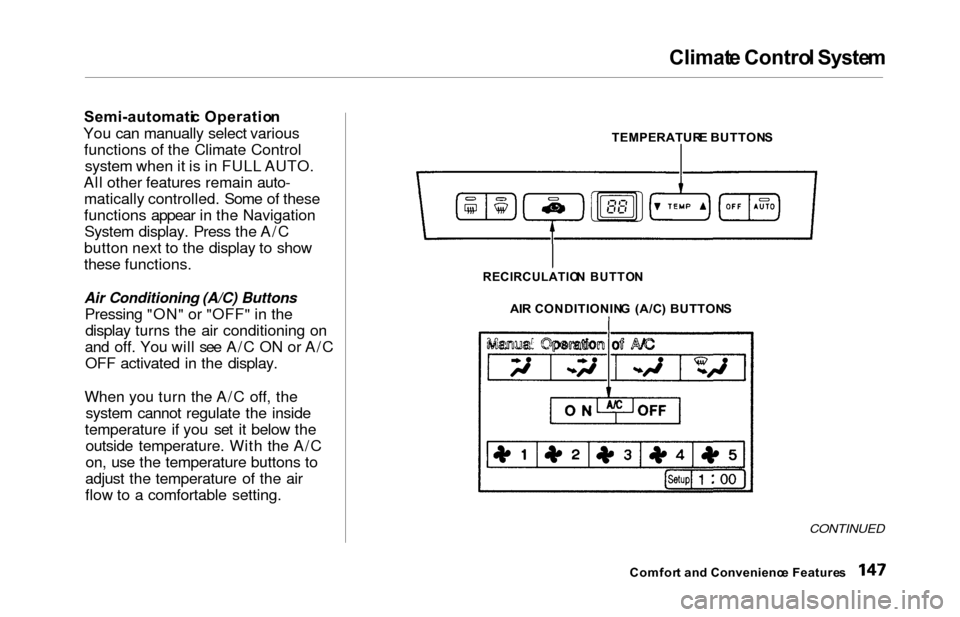
Semi-automati c Operatio n
You can manually select various functions of the Climate Controlsystem when it is in FULL AUTO.
All other features remain auto- matically controlled. Some of these
functions appear in the NavigationSystem display. Press the A/C
button next to the display to show
these functions.
Air Conditioning (A/C) Buttons
Pressing "ON" or "OFF" in the display turns the air conditioning on
and off. You will see A/C ON or A/C OFF activated in the display.
When you turn the A/C off, the system cannot regulate the inside
temperature if you set it below the outside temperature. With the A/C
on, use the temperature buttons to
adjust the temperature of the air
flow to a comfortable setting.
TEMPERATUR E BUTTON S
AI R CONDITIONIN G (A/C ) BUTTON S
CONTINUED
Comfort an d Convenienc e Feature s
RECIRCULATIO N BUTTO N
Page 156 of 352
Climat
e Contro l Syste m
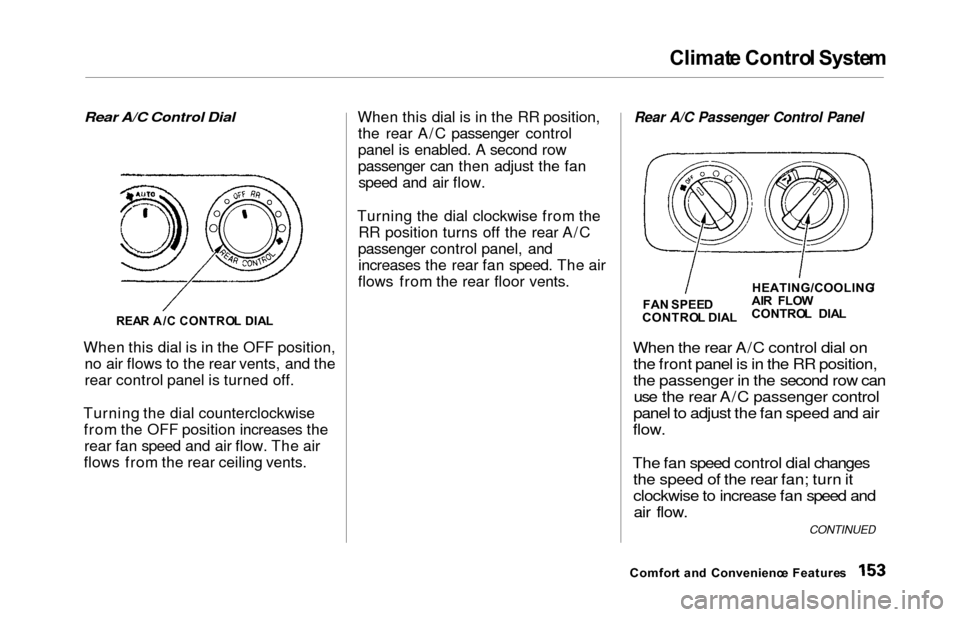
Rear A/C Control Dial
When this dial is in the OFF position, no air flows to the rear vents, and the
rear control panel is turned off.
Turning the dial counterclockwise from the OFF position increases therear fan speed and air flow. The air
flows from the rear ceiling vents. When this dial is in the RR position,
the rear A/C passenger control
panel is enabled. A second row
passenger can then adjust the fanspeed and air flow.
Turning the dial clockwise from the RR position turns off the rear A/C
passenger control panel, and increases the rear fan speed. The air
flows from the rear floor vents.
Rear A/C Passenger Control Panel
When the
rear A/C control dial on
the front panel is in the RR position,
the passenger in the second row can use the rear A/C passenger control
panel to adjust the fan speed and air
flow.
The fan speed control dial changes the speed of the rear fan; turn it
clockwise to increase fan speed andair flow.
Comfor t an d Convenienc e Feature s
REA
R A/ C CONTRO L DIA L
FA
N SPEE D
CONTRO L DIA LHEATING/COOLING
/
AI R FLO W
CONTRO L DIA L
CONTINUED
Page 176 of 352
Audio Syste m
Audio Syste m Lightin g
You can use the instrument panel brightness control knob to adjust the
illumination of the audio system (see
page 67). The audio systemilluminates when the parking lights
are on, even if the radio is turned off.
Radi o Frequencie s
Your Honda's radio can receive the
complete AM and FM bands.
Those bands cover these frequen-
cies:
AM band:
530 to 1,710 kilohertz
FM band:
87.7 to 107.9 megahertz
Radio stations on the AM band are
assigned frequencies at least ten
kilohertz apart (530, 540, 550).Stations on the FM band are
assigned frequencies at least 0.2
megahertz apart (87.9, 88.1, 88.3).
Stations must use these exact
frequencies. It is fairly common for stations to round-off the frequency in
their advertising, so your radio could display a frequency of 100.9 even
though the announcer may identify
the station as "FM101."
Radi o Receptio n
How well your Honda's radio
receives stations is dependent on many factors, such as the distance
from the station's transmitter,
nearby large objects, and atmos-
pheric conditions.
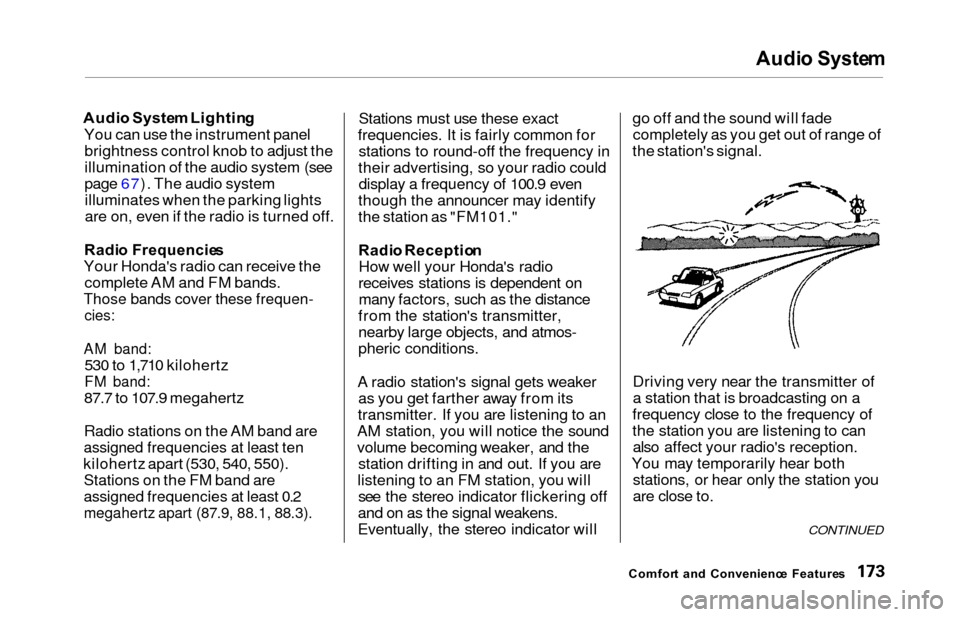
A radio station's signal gets weaker as you get farther away from its
transmitter. If you are listening to an
AM station, you will notice the sound
volume becoming weaker, and the station drifting in and out. If you are
listening to an FM station, you will see the stereo indicator flickering off
and on as the signal weakens.
Eventually, the stereo indicator will go off and the sound will fade
completely as you get out of range of
the station's signal.
Driving very near the transmitter of
a station that is broadcasting on a
frequency close to the frequency of
the station you are listening to can also affect your radio's reception.
You may temporarily hear both stations, or hear only the station you
are close to.
Comfor t an d Convenienc e Feature s
CONTINUED
Page 197 of 352
Fuel Econom y
The condition of your vehicle and
your driving habits are the two most important things that affect the fuelmileage you get.
Vehicl e Conditio n
Always maintain your vehicle accord- ing to the maintenance schedule.
This will keep it in top operating
condition.
An important part of that mainte- nance is the Owne r Maintenanc e
Check s (see page 237 ). For
example, an underinflated tire
causes more "rolling resistance,"
which uses fuel. It also wears out faster, so check the tire pressure atleast monthly.
In winter, the build-up of snow on
your vehicle's underside adds weight and rolling resistance. Frequent
cleaning helps your fuel mileage and
reduces the chance of corrosion. Drivin
g Habit s
You can improve fuel economy by driving moderately. Rapid acceler-ation, abrupt cornering, and hard
braking use more fuel.
Always drive in the highest gear that allows the engine to run and acceler-
ate smoothly.
Depending on traffic conditions, try
to maintain a constant speed. Every
time you slow down and speed up,
your vehicle uses extra fuel. Use the cruise control, when appropriate, toincrease fuel economy. A cold engine uses more fuel than a
warm engine. It is not necessary to"warm-up" a cold engine by letting itidle for a long time. You can drive
away in about a minute, no matter
how cold it is outside. The engine
will warm up faster, and you get better fuel economy. To cut down on
the number of "cold starts," try to
combine several short trips into one.
The air conditioning puts an extra load on the engine which makes ituse more fuel. Turn off the A/C to
cut down on air conditioning use. Use the flow-through ventilation
when the outside air temperature is
moderate.
Befor e Drivin g
Page 206 of 352

Starting th e Engin e
1. Apply the parking brake.
2. In cold weather, turn off all electrical accessories to reduce
the drain on the battery.
3. Make sure the shift lever is in Park. Press on the brake pedal.
4. Without touching the accelerator pedal, turn the ignition key to the
START (III) position. If the engine does not start right away, do not
hold the key in START (III) for
more than 15 seconds at a time.
Pause for at least 10 seconds before trying again.
5. If the engine does not start within 15 seconds, or starts but stalls
right away, repeat step 4 with the
accelerator pedal pressed half-way
down. If the engine starts, release
pressure on the accelerator pedal so the engine does not race. 6. If the engine still does not start,
press the accelerator pedal all the
way down and hold it there while starting in order to clear flooding.
As before, keep the ignition key in the START (III) position for nomore than 15 seconds. Return tostep 5 if the engine does not start.
If it starts, lift your foot off the
accelerator pedal so the engine does not race.
Startin g in Col d Weathe r a t Hig h
Altitud e (Abov e 8,00 0 feet /
2,400 meters )
An engine is harder to start in cold
weather. The thinner air found athigh altitude above 8,000 feet (2,400
meters) adds to the problem.
Use the following procedure:
1. Turn off all electrical accessories to reduce the drain on the battery. 2. Push the accelerator pedal half-
way to the floor and hold it there
while starting the engine. Do nothold the ignition key in START(III) for more than 15 seconds.
When the engine starts, release the accelerator pedal gradually as
the engine speeds up and smoothsout.
3. If the engine fails to start in step 2, push the accelerator pedal to the
floor and hold it there while you
try to start the engine for no more
than 15 seconds. If the enginedoes not start, return to step 2.
Drivin g