air cond HONDA ODYSSEY 2000 RA6-RA9 / 2.G Owners Manual
[x] Cancel search | Manufacturer: HONDA, Model Year: 2000, Model line: ODYSSEY, Model: HONDA ODYSSEY 2000 RA6-RA9 / 2.GPages: 352, PDF Size: 4.43 MB
Page 9 of 352
Important Safet y Precaution s
You'll find many safety
recommendations throughout this
section, and throughout this manual.
The recommendations on this page are the ones we consider to be themost important.
Alway s Wea r You r Sea t Bel t
A seat belt is your best protection in
all types of collisions. Airbagssupplement seat belts, but airbags
are designed to inflate only in a
moderate to severe frontal collision.
So even though your vehicle is
equipped with airbags, make sure
you and your passengers always
wear your seat belts, and wear them properly. (See page 15.)
Restrai n Al l Childre n
Children are safest when they are
properly restrained in a back seat,
not the front seat. A child who is too small for a seat belt must be properly
restrained in a child safety seat. (See
page 22.) B
e Awar e o f Airba g Hazard s
While airbags can save lives, they can cause serious or fatal injuries to
occupants who sit too close to them,
or are not properly restrained.
Infants, young children, and short adults are at the greatest risk. Be
sure to follow all instructions and
warnings in this manual. (See page 9.)
Don' t Drin k an d Driv e
Alcohol and driving don't mix. Even
one drink can reduce your ability to
respond to changing conditions, and
your reaction time gets worse with every additional drink. So don't drink
and drive, and don't let your friends
drink and drive, either. Contro
l You r Spee d
Excessive speed is a major factor in
crash injuries and deaths. Generally,
the higher the speed the greater the
risk, but serious accidents can also occur at lower speeds. Never drive
faster than is safe for current conditions, regardless of the
maximum speed posted.
Kee p You r Vehicl e i n Saf e
Conditio n
Having a tire blowout or a
mechanical failure can be extremely
hazardous. To reduce the possibility of such problems, check your tire
pressures and condition frequently, and perform all regularly scheduled
maintenance. (See page 230.)
Drive r an d Passenge r Safet y
Page 50 of 352
Additional Informatio n Abou t You r Sea t Belt s
Seat Bel t Maintenanc e
For safety, you should check the
condition of your seat belts regularly.
Pull each belt out fully and look for
frays, cuts, burns, and wear. Check that the latches work smoothly and
that the lap/shoulder belts retracteasily. Any belt not in good condition
or not working properly will not
provide good protection and should
be replaced as soon as possible.
U.S. Models
Honda provides a lifetime warranty on seat belts. Honda will repair or
replace any seat belt component that
fails to function properly during normal use. Please see your Honda
Warranty Information booklet for
details.
If a seat belt is worn during a crash,
you should have your dealer inspect the belt, and replace it if necessary.
A belt that has been worn during a crash may not provide the same level
of protection in a subsequent crash.
The dealer should also inspect the anchors for damage and replace
them if needed. For information on how to clean your
seat belts, see page 286.
Drive r an d Passenge r Safet y
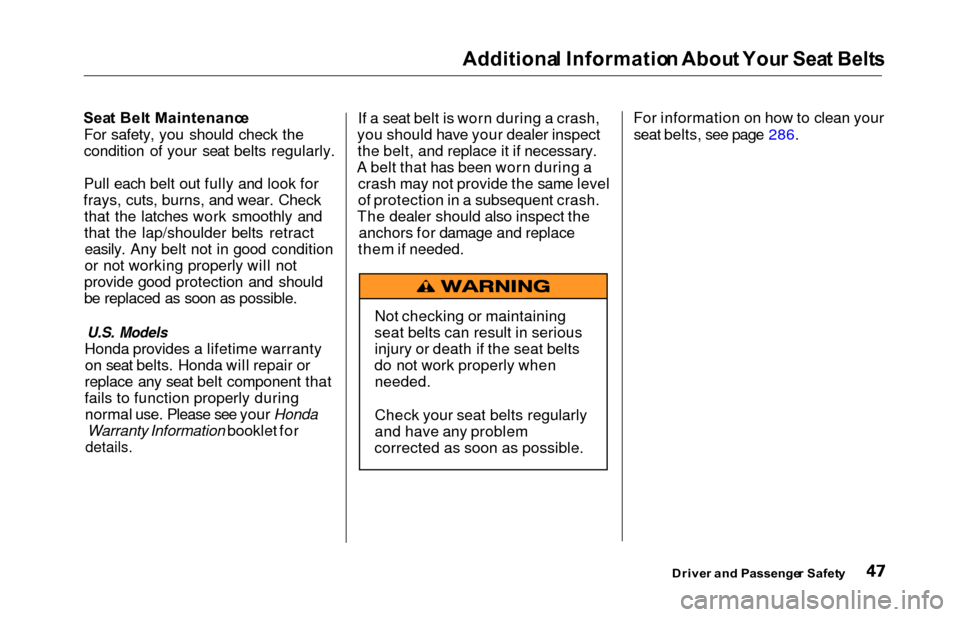
Not checking or maintaining
seat belts can result in serious injury or death if the seat belts
do not work properly when needed.
Check your seat belts regularly
and have any problem
corrected as soon as possible.
Page 52 of 352
Additional Informatio n Abou t You r SR S
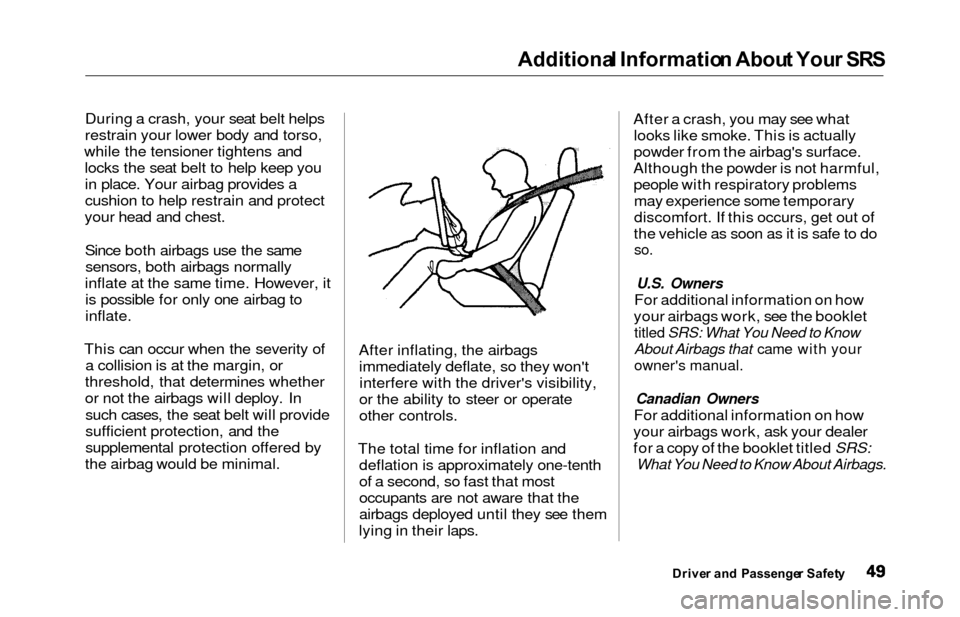
During a crash, your seat belt helps
restrain your lower body and torso,
while the tensioner tightens and locks the seat belt to help keep youin place. Your airbag provides a
cushion to help restrain and protect
your head and chest.
Since both airbags use the samesensors, both airbags normally
inflate at the same time. However, it is possible for only one airbag to
inflate.
This can occur when the severity of a collision is at the margin, or
threshold, that determines whether
or not the airbags will deploy. In such cases, the seat belt will provide
sufficient protection, and the
supplemental protection offered by
the airbag would be minimal. After inflating, the airbags
immediately deflate, so they won'tinterfere with the driver's visibility,
or the ability to steer or operate
other controls.
The total time for inflation and deflation is approximately one-tenth
of a second, so fast that most
occupants are not aware that the
airbags deployed until they see them
lying in their laps. After a crash, you may see what
looks like smoke. This is actually
powder from the airbag's surface.
Although the powder is not harmful, people with respiratory problemsmay experience some temporary
discomfort. If this occurs, get out of
the vehicle as soon as it is safe to do
so.
U.S. Owners
For additional information on how
your airbags work, see the booklet
titled SRS: What You Need to Know
About Airbags that came with your
owner's manual.
Canadian Owners
For additional information on how
your airbags work, ask your dealer
for a copy of the booklet titled SRS:
What You Need to Know About Airbags.
Drive r an d Passenge r Safet y
Page 56 of 352
Carbon Monoxid e Hazar d
Your vehicle's exhaust contains
carbon monoxide gas. You should
hav e no problem with carbon
monoxide entering the vehicle in
normal driving if you maintain your
vehicle properly.
Have the exhaust system inspected
for leaks whenever:
The vehicle is raised for an oil
change.
You notice a change in the soundof the exhaust.
The vehicle was in an accident that may have damaged the under-
side.
High levels of carbon monoxide can
collect rapidly in enclosed areas,such as a garage. Do not run the
engine with the garage door closed.
Even with the door open, run the engine only long enough to move the
vehicle out of the garage. With the tailgate open, air flow can
pull exhaust gas into your vehicle'sinterior and create a hazardous
condition. If you must drive with the
tailgate open, open all the windowsand set the heating and cooling
system/climate control system as
shown below.
If you must sit in your parked vehicle,
even in an unconfined area, with the
engine running, adjust the heating
and cooling system/climate controlsystem as follows:
1. Select the Fresh Air mode.
2. Select the mode.
3. Turn the fan on high speed.
4. Set the temperature control to a comfortable setting.
Drive r an d Passenge r Safet y
Carbon monoxide gas is toxic.
Breathing it can cause
unconsciousness and even kill
you.
Avoid any enclosed areas or activities that expose you to
carbon monoxide.
Page 63 of 352
Indicator Light s
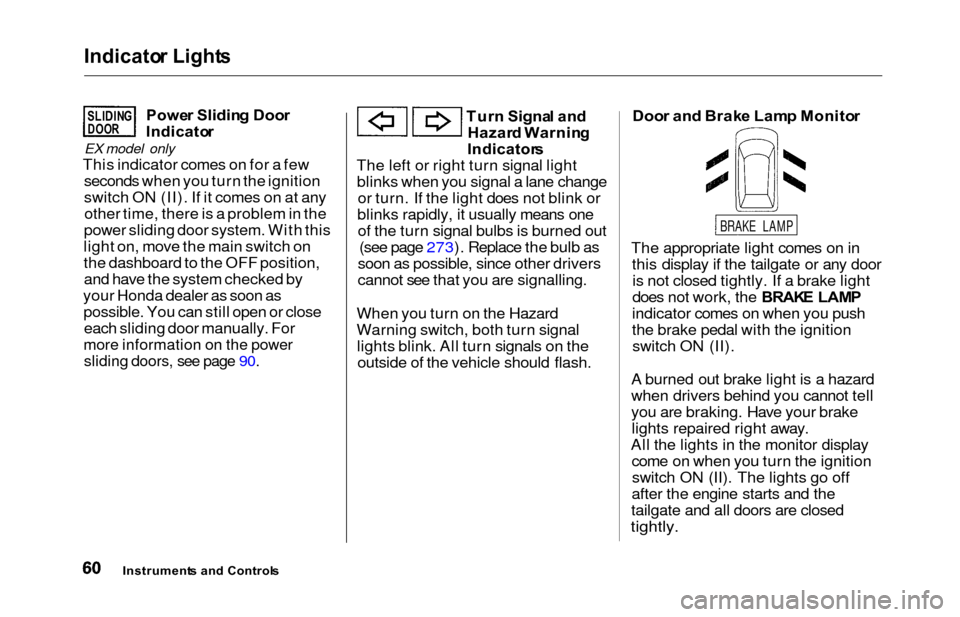
Power Slidin g Doo r
Indicato r
EX model only
This indicator comes on for a few
seconds when you turn the ignition
switch ON (II). If it comes on at anyother time, there is a problem in the
power sliding door system. With this
light on, move the main switch on
the dashboard to the OFF position, and have the system checked by
your Honda dealer as soon as possible. You can still open or closeeach sliding door manually. For
more information on the power
sliding doors, see page 90.
Tur n Signa l an d
Hazar d Warnin g
Indicator s
The left or right turn signal light blinks when you signal a lane change or turn. If the light does not blink or
blinks rapidly, it usually means one of the turn signal bulbs is burned out (see page 273). Replace the bulb as
soon as possible, since other drivers
cannot see that you are signalling.
When you turn on the Hazard
Warning switch, both turn signal lights blink. All turn signals on theoutside of the vehicle should flash. Doo
r an d Brak e Lam p Monito r
The appropriate light comes on in this display if the tailgate or any dooris not closed tightly. If a brake light
does not work, the BRAK E LAM P
indicator comes on when you push
the brake pedal with the ignition switch ON (II).
A burned out brake light is a hazard
when drivers behind you cannot tell
you are braking. Have your brake lights repaired right away.
All the lights in the monitor display come on when you turn the ignitionswitch ON (II). The lights go off
after the engine starts and the
tailgate and all doors are closed
tightly.
Instrument s an d Control s
SLIDINGDOOR
BRAKE LAMP
Page 132 of 352
Comfort an d Convenienc e Feature s
The heating and air conditioning
systems in your Honda provide a
comfortable driving environment in
all weather conditions.
The standard audio system has
many features. This section de-
scribes those features and how to
use them. (If you selected an
optional audio system, refer to the
operating instructions that came
with it.)
On EX model
Your Honda has an anti-theft audio
system that requires a code number
to enable it.
Heating and Cooling...................... 130
What Each Control Does.......... 130How to Use the System............. 133
To Turn Everything Off........... 137
Climate Control System................ 138 (EX model without Navigation
System)
Fully-automatic Operation........ 140
Semi-automatic Operation........ 142
(EX model with Navigation
System)
Fully-automatic Operation........ 146
Semi-automatic Operation........ 147
Sunlight Sensor/ Temperature Sensor............. 151
Rear A/C Unit............................ 152
Audio System (LX)........................ 155 AM/FM/Cassette StereoAudio System......................... 155
Operating the Radio.................. 156
Adjusting the Sound.................. 159
Audio System Lighting............. 160
Operating the Cassette Player...................................... 160
Tape Search Functions............. 160 Operating the Optional CD
Player/Changer..................... 163
CD Changer Error Indications.............................. 166
Audio System (EX)........................ 167 AM/FM/CD Audio System..... 167Operating the Radio.................. 168
Adjusting the Sound.................. 172
Audio System Lighting............. 173 Radio Frequencies.................... . 173
Radio Reception......................... 173 Operating the CD Player.......... 175
Operating the CD Changer...... 177
Protecting Compact Discs........ 178 CD Player Error Indications..... 179
CD Changer Error Indications.............................. 180
Operating the Cassette Player..................................... . 181
Tape Search Functions............. 182
Caring for the Cassette Player...................................... 184
Remote Audio Controls ............ 185
Theft Protection........................ 186
Comfor t an d Convenienc e Feature s
Page 133 of 352
Heating an d Coolin g
On LX model
Proper use of the Heating and
Cooling system can make the
interior dry and comfortable, and
keep the windows clear for best
visibility.
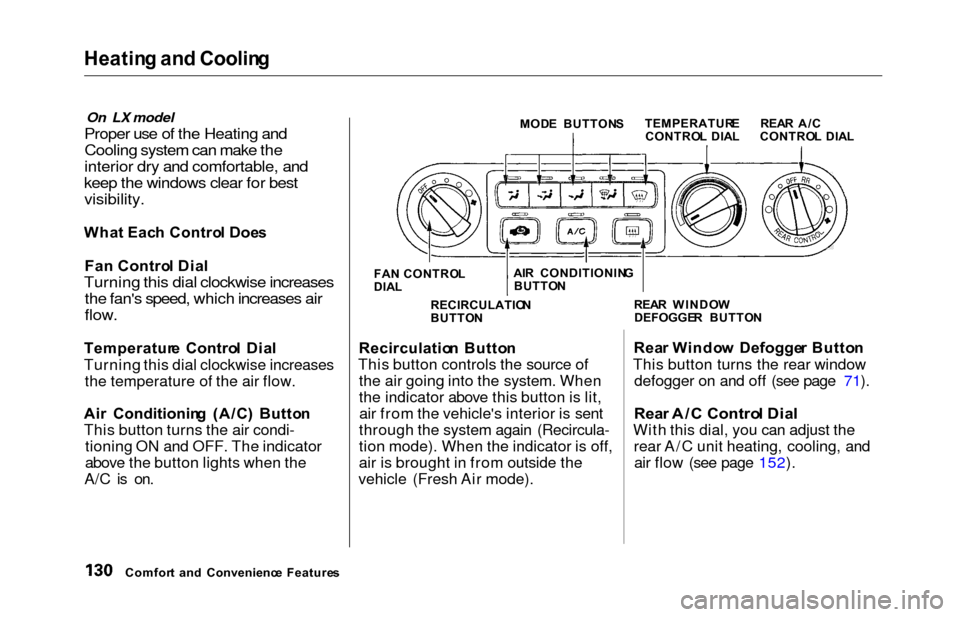
Wha t Eac h Contro l Doe s
Fa n Contro l Dia l
Turning this dial clockwise increases
the fan's speed, which increases air
flow.
Temperatur e Contro l Dia l
Turning this dial clockwise increases the temperature of the air flow.
Ai r Conditionin g (A/C ) Butto n
This button turns the air condi- tioning ON and OFF. The indicator
above the button lights when the
A/C is on.
MOD E BUTTON S
FA N CONTRO L
DIA L
Recirculatio n Butto n
This button controls the source of the air going into the system. When
the indicator above this button is lit,air from the vehicle's interior is sent
through the system again (Recircula-
tion mode). When the indicator is off,
air is brought in from outside the
vehicle (Fresh Air mode). Rea
r Windo w Defogge r Butto n
This button turns the rear window defogger on and off (see page 71).
Rea r A/ C Contro l Dia l
With this dial, you can adjust the
rear A/C unit heating, cooling, andair flow (see page 152).
Comfor t an d Convenienc e Feature s RECIRCULATIO
N
BUTTO N REA
R WINDO W
DEFOGGE R BUTTO N
TEMPERATUR
E
CONTRO L DIA L REA
R A/ C
CONTRO L DIA L
AI R CONDITIONIN G
BUTTO N
Page 136 of 352
Heating an d Coolin g
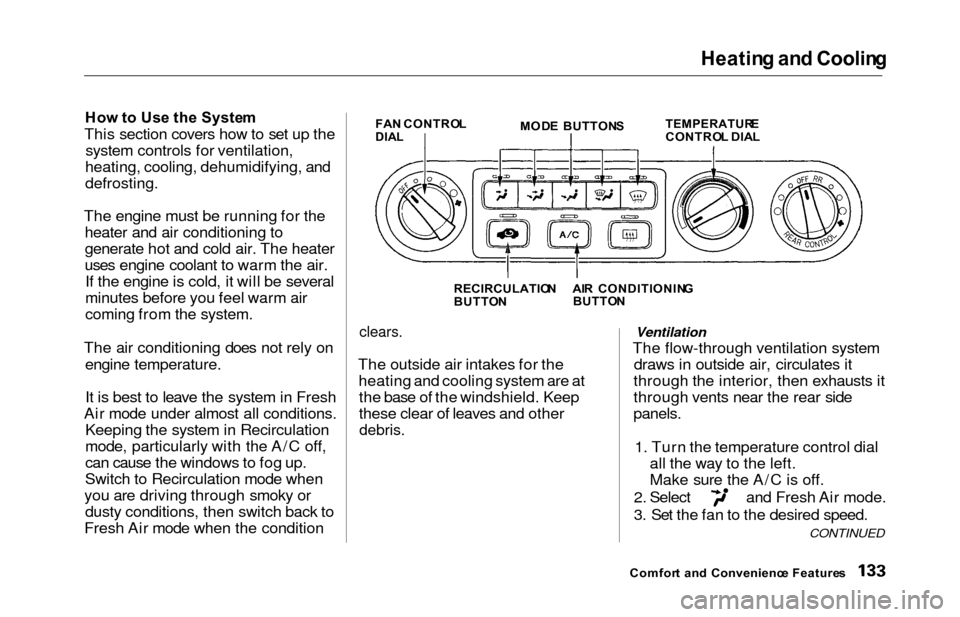
How to Us e th e Syste m
This section covers how to set up the
system controls for ventilation,
heating, cooling, dehumidifying, and
defrosting.
The engine must be running for the heater and air conditioning to
generate hot and cold air. The heater
uses engine coolant to warm the air.If the engine is cold, it will be several
minutes before you feel warm air
coming from the system.
The air conditioning does not rely on engine temperature.
It is best to leave the system in Fresh
Air mode under almost all conditions. Keeping the system in Recirculation
mode, particularly with the A/C off,
can cause the windows to fog up.
Switch to Recirculation mode when
you are driving through smoky or dusty conditions, then switch back to
Fresh Air mode when the conditionFA N CONTRO LDIALMOD E BUTTON STEMPERATUR ECONTROL DIA L
RECIRCULATIO N
BUTTO N
clears.
The outside air intakes for the
heating and cooling system are atthe base of the windshield. Keep
these clear of leaves and other
debris.
Ventilation
The flow-through ventilation system draws in outside air, circulates it
through the interior, then exhausts it
through vents near the rear side
panels.
1. Turn the temperature control dial all the way to the left.
Make sure the A/C is off.
2. Select and Fresh Air mode.
3. Set the fan to the desired speed.
Comfor t an d Convenienc e Feature s
CONTINUED
AIR CONDITIONIN G
BUTTO N
Page 137 of 352
Heating an d Coolin g
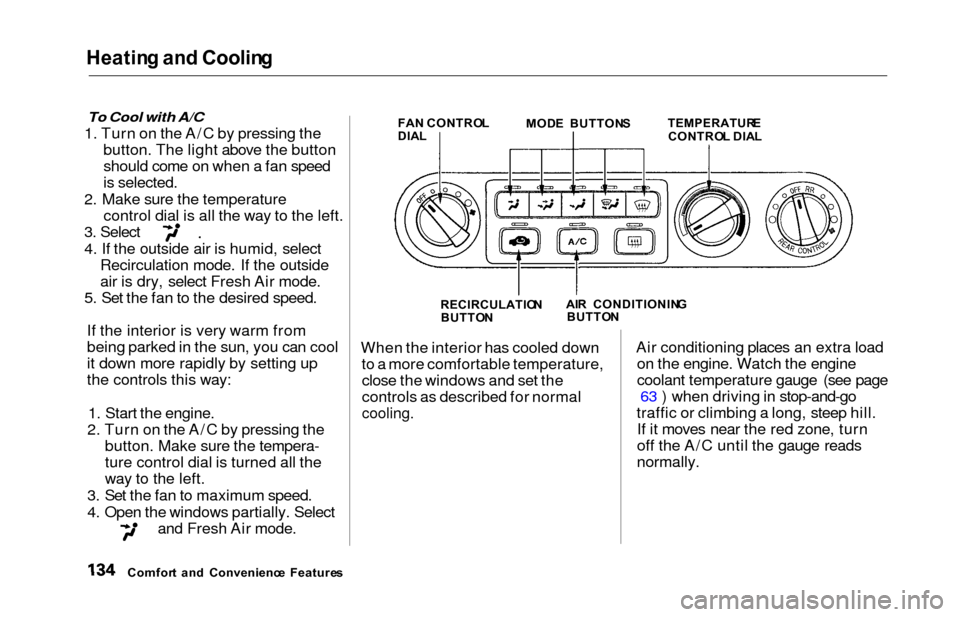
To Cool with A/C
1. Turn on the A/C by pressing the
button. The light above the button
should come on when a fan speed
is selected.
2. Make sure the temperature control dial is all the way to the left.
3. Select
4. If the outside air is humid, selectRecirculation mode. If the outside
air is dry, select Fresh Air mode.
5. Set the fan to the desired speed.
If the interior is very warm from
being parked in the sun, you can cool
it down more rapidly by setting up
the controls this way:
1. Start the engine.
2. Turn on the A/C by pressing the button. Make sure the tempera-
ture control dial is turned all the
way to the left.
3. Set the fan to maximum speed.
4. Open the windows partially. Select
and Fresh Air mode.
FA N CONTRO L
DIA L MOD
E BUTTON S TEMPERATUR ECONTROL DIA L
RECIRCULATIO N
BUTTO N AI
R CONDITIONIN G
BUTTO N
When the interior has cooled down
to a more comfortable temperature,close the windows and set the
controls as described for normal
cooling.
Air conditioning places an extra load on the engine. Watch the engine
coolant temperature gauge (see page 63 ) when driving in stop-and-go
traffic or climbing a long, steep hill. If it moves near the red zone, turn
off the A/C until the gauge reads
normally.
Comfor t an d Convenienc e Feature s
Page 138 of 352
Heating an d Coolin g
To Heat
To warm the interior:
1. Start the engine.
2. Select and Fresh Air mode.
3. Set the fan to the desired speed.
4. Adjust the warmth of the air with the temperature control dial.
To Heat and Dehumidify with Air
Conditioning
Air conditioning, as it cools, removesmoisture from the air. When used incombination with the heater, it
makes the interior warm and dry.
1. Switch the fan on.
2. Turn on the air conditioning.
3. Select and Fresh Air mode.
4. Adjust the temperature control dial so the mixture of heated and
cooled air feels comfortable.
This setting is suitable for all driving conditions whenever the outside
temperature is above 32°F (0°C).
To Defog and Defrost
To remove fog from the inside of the
windows:
1. Switch the fan on.
2. Select
When you select the
system automatically switches to
Fresh Air mode and turns on the
A/C.
3. Adjust the temperature control dial so the air flow from the
defroster vents feels warm.
4. Turn on the rear window defogger to help clear the rear window.
When you switch to another mode
from the A/C stays on.
Press the A/C button to turn it off.
CONTINUED
Comfor t an d Convenienc e Feature s