Automatic HONDA ODYSSEY 2012 RB3-RB4 / 4.G User Guide
[x] Cancel search | Manufacturer: HONDA, Model Year: 2012, Model line: ODYSSEY, Model: HONDA ODYSSEY 2012 RB3-RB4 / 4.GPages: 441, PDF Size: 14.07 MB
Page 58 of 441
Continued
57
uuChild SafetyuSafety of Infants and Small Children
Safe Driving
If a child is at least one year old and within the weight range indicated by the child
seat manufacturer, the child should be properly restrained in a firmly secured
forward-facing child seat.
■
Forward-facing child seat placement
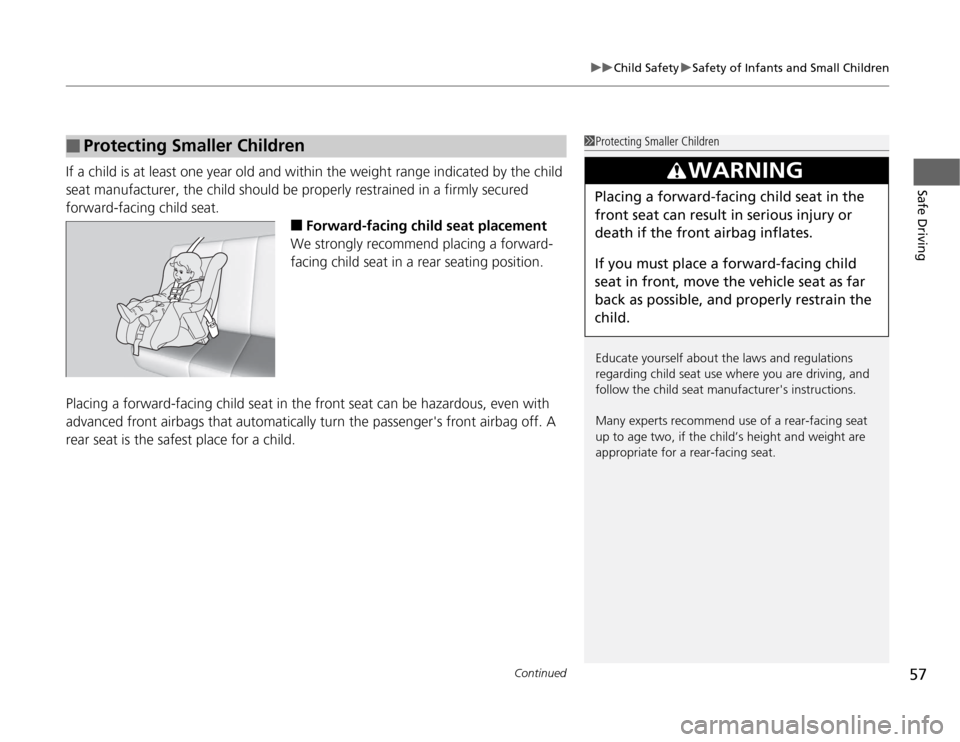
We strongly recommend placing a forward-
facing child seat in a rear seating position.
Placing a forward-facing child seat in the front seat can be hazardous, even with
advanced front airbags that automatically turn the passenger's front airbag off. A
rear seat is the safest place for a child.
■
Protecting Smaller Children
1Protecting Smaller Children
Educate yourself about the laws and regulations
regarding child seat use where you are driving, and
follow the child seat manufacturer's instructions.
Many experts recommend use of a rear-facing seat
up to age two, if the child’s height and weight are
appropriate for a rear-facing seat.
3
WARNING
Placing a forward-facing child seat in the
front seat can result in serious injury or
death if the front airbag inflates.
If you must place a forward-facing child
seat in front, move the vehicle seat as far
back as possible, and properly restrain the
child.
Page 81 of 441
80
uuIndicatorsu
Instrument Panel
Fog Light
Indicator
*
●
Comes on when the fog lights are
on.
—
—
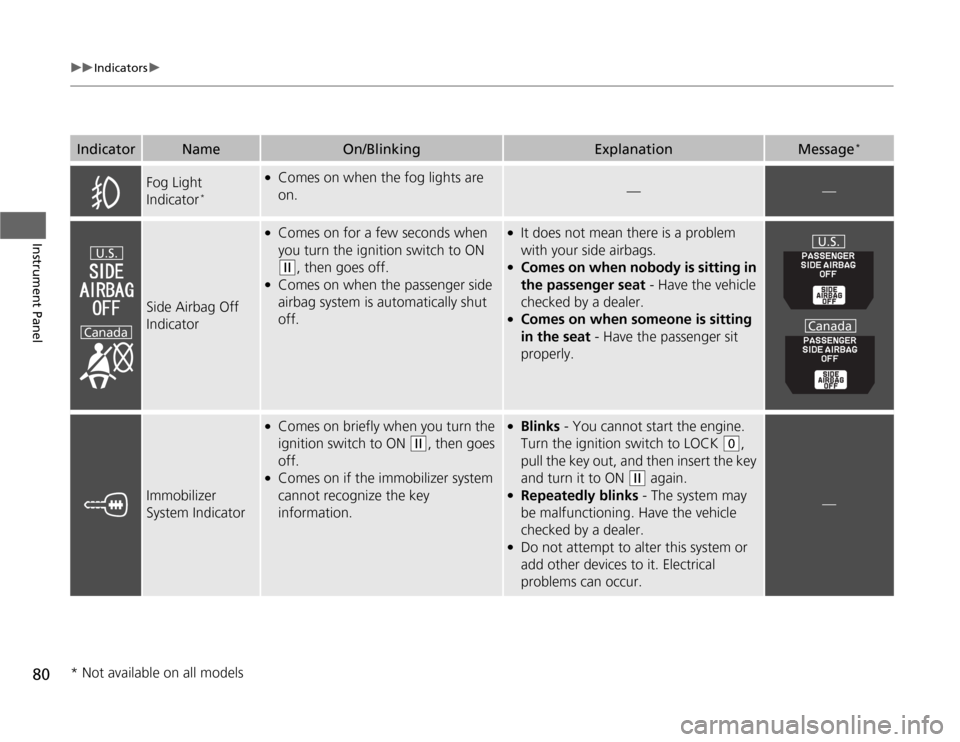
Side Airbag Off
Indicator
●
Comes on for a few seconds when
you turn the ignition switch to ON (w
, then goes off.
●
Comes on when the passenger side
airbag system is automatically shut
off.
●
It does not mean there is a problem
with your side airbags.
●
Comes on when nobody is sitting in
the passenger seat - Have the vehicle
checked by a dealer.
●
Comes on when someone is sitting
in the seat - Have the passenger sit
properly.
Immobilizer
System Indicator
●
Comes on briefly when you turn the
ignition switch to ON
(w
, then goes
off.
●
Comes on if the immobilizer system
cannot recognize the key
information.
●
Blinks - You cannot start the engine.
Turn the ignition switch to LOCK
(0
,
pull the key out, and then insert the key
and turn it to ON
(w
again.
●
Repeatedly blinks - The system may
be malfunctioning. Have the vehicle
checked by a dealer.
●
Do not attempt to alter this system or
add other devices to it. Electrical
problems can occur.
—
Indicator
Name
On/Blinking
Explanation
Message
*
U.S.
Canada
U.S.
Canada
* Not available on all models
Page 94 of 441
93
uuGauges and DisplaysuAudio/Information Screen
*
Continued
Instrument Panel
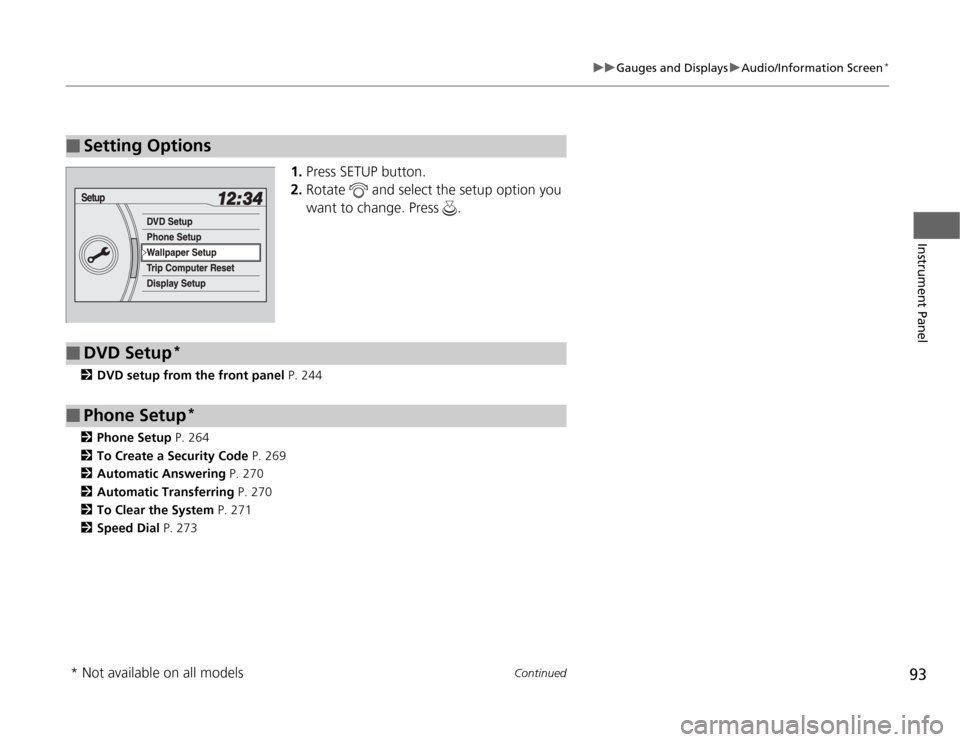
1.Press SETUP button.
2.Rotate and select the setup option you
want to change. Press .
2DVD setup from the front panel P. 244
2Phone Setup P. 264
2To Create a Security Code P. 269
2Automatic Answering P. 270
2Automatic Transferring P. 270
2To Clear the System P. 271
2Speed Dial P. 273
■
Setting Options
■
DVD Setup
*
■
Phone Setup
*
* Not available on all models
Page 105 of 441
104
uuGauges and DisplaysuMulti-Information Display
*
Instrument Panel
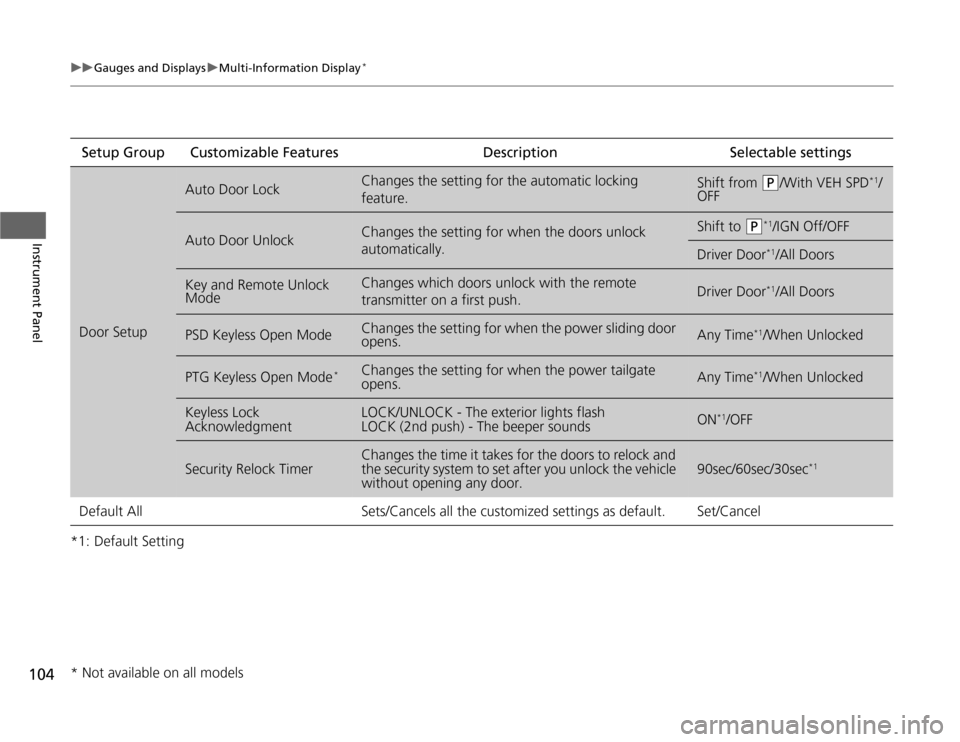
*1: Default SettingSetup Group Customizable Features Description Selectable settingsDoor Setup
Auto Door Lock
Changes the setting for the automatic locking
feature.
Shift from
(P
/With VEH SPD
*1/
OFF
Auto Door Unlock
Changes the setting for when the doors unlock
automatically.
Shift to
(P
*1/IGN Off/OFF
Driver Door
*1/All Doors
Key and Remote Unlock
Mode
Changes which doors unlock with the remote
transmitter on a first push.
Driver Door
*1/All Doors
PSD Keyless Open Mode
Changes the setting for when the power sliding door
opens.
Any Time
*1/When Unlocked
PTG Keyless Open Mode
*
Changes the setting for when the power tailgate
opens.
Any Time
*1/When Unlocked
Keyless Lock
Acknowledgment
LOCK/UNLOCK - The exterior lights flash
LOCK (2nd push) - The beeper sounds
ON
*1/OFF
Security Relock Timer
Changes the time it takes for the doors to relock and
the security system to set after you unlock the vehicle
without opening any door.
90sec/60sec/30sec
*1
Default All Sets/Cancels all the customized settings as default. Set/Cancel* Not available on all models
Page 108 of 441
107
Controls
This chapter explains how to operate the various controls necessary for driving.
Setting the Clock.............................. 108
Locking and Unlocking the Doors
Key Types and Functions .................. 110
Locking/Unlocking the Doors from the
Outside .......................................... 112
Locking/Unlocking the Doors from the
Inside ............................................. 114
Childproof Door Locks ..................... 115
Auto Door Locking/Unlocking .......... 116
Opening and Closing the Tailgate... 120Opening and Closing the Sliding Doors
...... 126
Security System................................ 134
Immobilizer System .......................... 134
Security System Alarm
*.................... 134
Opening and Closing the Windows.... 137Opening and Closing the Moonroof
*...... 140
Operating the Switches Around the
Steering Wheel
Ignition Switch ................................. 141
Turn Signals ..................................... 142
Light Switches.................................. 142
Fog Lights
*...................................... 144
Daytime Running Lights ................... 144
Wipers and Washers ........................ 145
Brightness Control ........................... 147
Rear Defogger/Heated Door Mirror
*
Button ........................................... 148
Driving Position Memory System
*.... 149
Adjusting the Steering Wheel........... 151Adjusting the Mirrors....................... 152
Interior Rearview Mirror ................... 152
Power Door Mirrors ......................... 153
Adjusting the Seats.......................... 154
Adjusting the Seat Positions ............. 154
Interior Lights/Interior Convenience
Items................................................ 169
Interior Lights .................................. 169
Interior Convenience Items .............. 171
Heating and Cooling
*....................... 183
Using Vents, Heating and A/C.......... 183
Climate Control System*.................. 187
Using Automatic Climate Control .... 187
Automatic Climate Control Sensors . 192
* Not available on all models
Page 109 of 441
108Controls
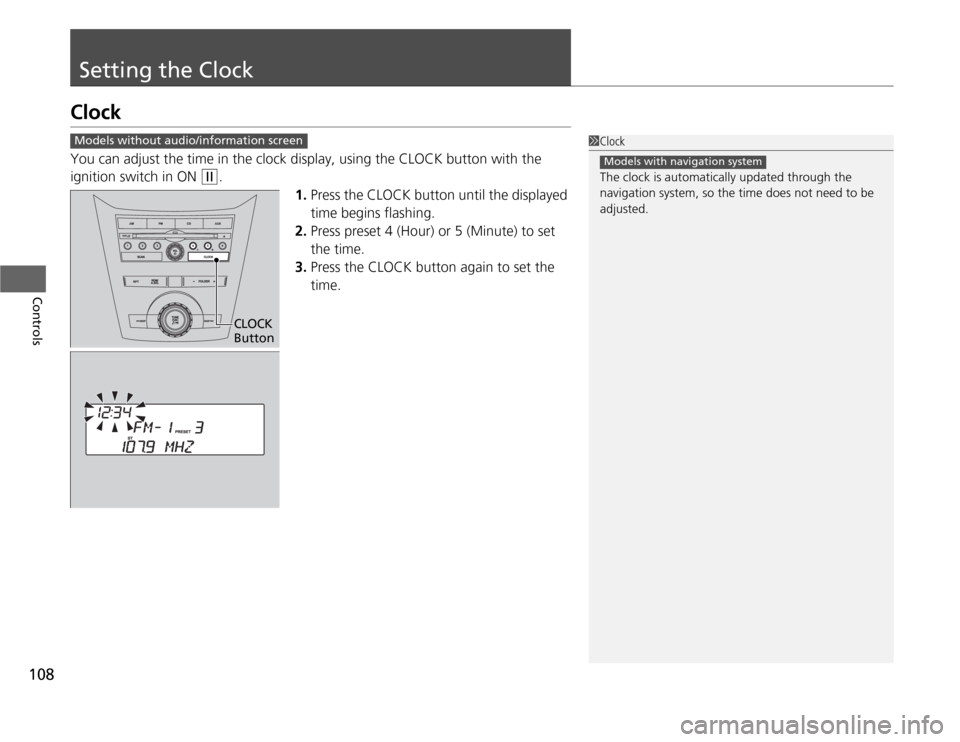
Setting the ClockClockYou can adjust the time in the clock display, using the CLOCK button with the
ignition switch in ON
(w
.
1.Press the CLOCK button until the displayed
time begins flashing.
2.Press preset 4 (Hour) or 5 (Minute) to set
the time.
3.Press the CLOCK button again to set the
time.
1Clock
The clock is automatically updated through the
navigation system, so the time does not need to be
adjusted.
Models with navigation system
Models without audio/information screen
CLOCK
Button
Page 113 of 441
112
uuLocking and Unlocking the DoorsuLocking/Unlocking the Doors from the Outside
Controls
Locking/Unlocking the Doors from the Outside
■
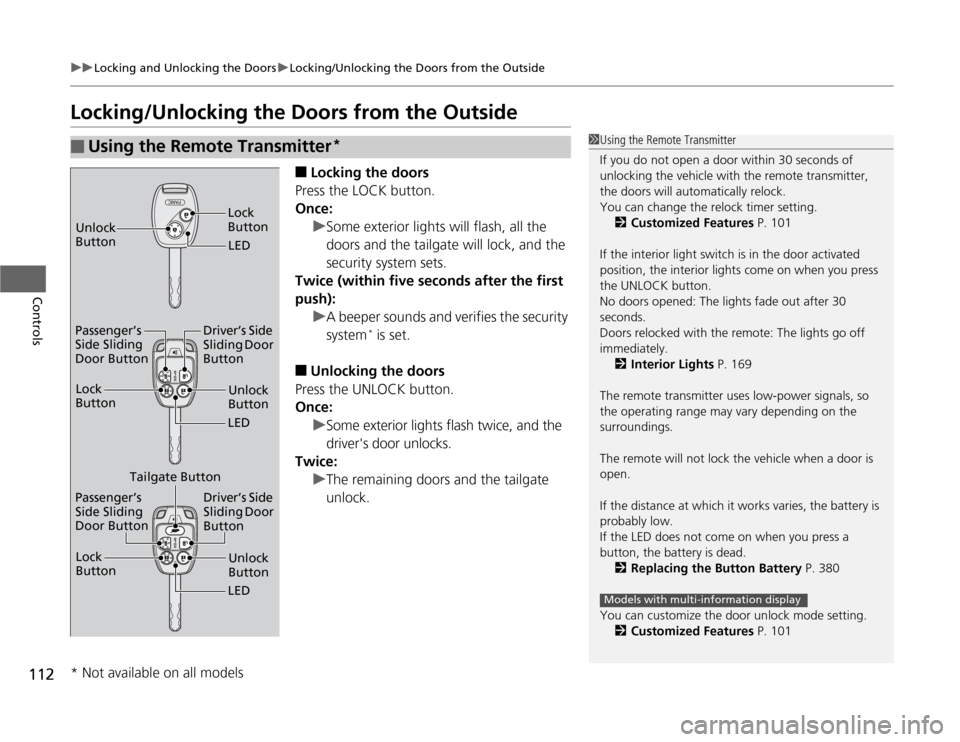
Locking the doors
Press the LOCK button.
Once:
uSome exterior lights will flash, all the
doors and the tailgate will lock, and the
security system sets.
Twice (within five seconds after the first
push):
uA beeper sounds and verifies the security
system
* is set.
■
Unlocking the doors
Press the UNLOCK button.
Once:
uSome exterior lights flash twice, and the
driver's door unlocks.
Twice:
uThe remaining doors and the tailgate
unlock.
■
Using the Remote Transmitter
*
1Using the Remote Transmitter
If you do not open a door within 30 seconds of
unlocking the vehicle with the remote transmitter,
the doors will automatically relock.
You can change the relock timer setting.
2Customized Features P. 101
If the interior light switch is in the door activated
position, the interior lights come on when you press
the UNLOCK button.
No doors opened: The lights fade out after 30
seconds.
Doors relocked with the remote: The lights go off
immediately.
2Interior Lights P. 169
The remote transmitter uses low-power signals, so
the operating range may vary depending on the
surroundings.
The remote will not lock the vehicle when a door is
open.
If the distance at which it works varies, the battery is
probably low.
If the LED does not come on when you press a
button, the battery is dead.
2Replacing the Button Battery P. 380
You can customize the door unlock mode setting.
2Customized Features P. 101
Models with multi-information display
LED Unlock
ButtonLock
ButtonUnlock
Button
LED Lock
Button
Passenger’s
Side Sliding
Door ButtonDriver’s Side
Sliding Door
Button
Unlock
Button
LED Lock
Button
Passenger’s
Side Sliding
Door ButtonDriver’s Side
Sliding Door
Button
Tailgate Button
* Not available on all models
Page 117 of 441
116
uuLocking and Unlocking the DoorsuAuto Door Locking/Unlocking
Controls
Auto Door Locking/UnlockingYour vehicle locks all doors and the tailgate and unlocks the driver’s door
automatically when a certain condition is met.■
Drive lock mode
All doors and the tailgate lock when the vehicle’s speed reaches about 10 mph (15
km/h).
■
Park unlock mode
The driver’s door unlocks when the shift lever is moved into
(P
with the brake pedal
depressed.
■
Auto Door Locking
■
Auto Door Unlocking
1Auto Door Locking/Unlocking
You can turn off or change to another auto door
locking/unlocking setting using the master door lock
switch.
2Customizing the Auto Door Locking/
Unlocking Setting P. 117
You can turn off or change to another auto door
locking/unlocking setting using the multi-information
display.
2Customized Features P. 101
Models without multi-information displayModels with multi-information display
Page 123 of 441
122
uuOpening and Closing the TailgateuOpening/Closing the Power Tailgate
*
Controls
Opening/Closing the Power Tailgate
*
The power tailgate can be operated by pressing the power tailgate button on the
remote transmitter, pressing the power tailgate switch on the dashboard, or
pressing the button on the tailgate.■
The power tailgate can be opened when:
•The tailgate is fully closed.
•The shift lever is in
(P
.
•Press and hold the tailgate button on the remote transmitter for about one
second.
uIf you have changed the PTG keyless open mode setting to When
Unlocked, you need to unlock the tailgate before you press the tailgate button
to open it.
2Customized Features P. 101
■
The power tailgate can be closed when:
•The tailgate is fully open.
•The shift lever is in
(P
.
•Press and hold the tailgate button on the remote transmitter for about one
second.
1Opening/Closing the Power Tailgate
The power tailgate may not open or close under the
following conditions:•The vehicle is parked on a steep hill.•The vehicle is swayed in a strong wind.•The tailgate or the roof is covered with snow or ice.
If you close the power tailgate when all the doors are
locked, the power tailgate locks automatically.
If you replace the battery or the power tailgate fuse
while the tailgate is open, the power tailgate may be
disabled. The power tailgate resumes once you
manually close the tailgate.
Installing aftermarket components other than
genuine Honda accessories on the power tailgate
may prevent it from fully opening or closing.
Make sure the power tailgate is fully open before you
get your luggage in and out.
Make sure the power tailgate is fully closed before
you start the vehicle.
* Not available on all models
Page 125 of 441
uuOpening and Closing the TailgateuOpening/Closing the Power Tailgate
*
124Controls
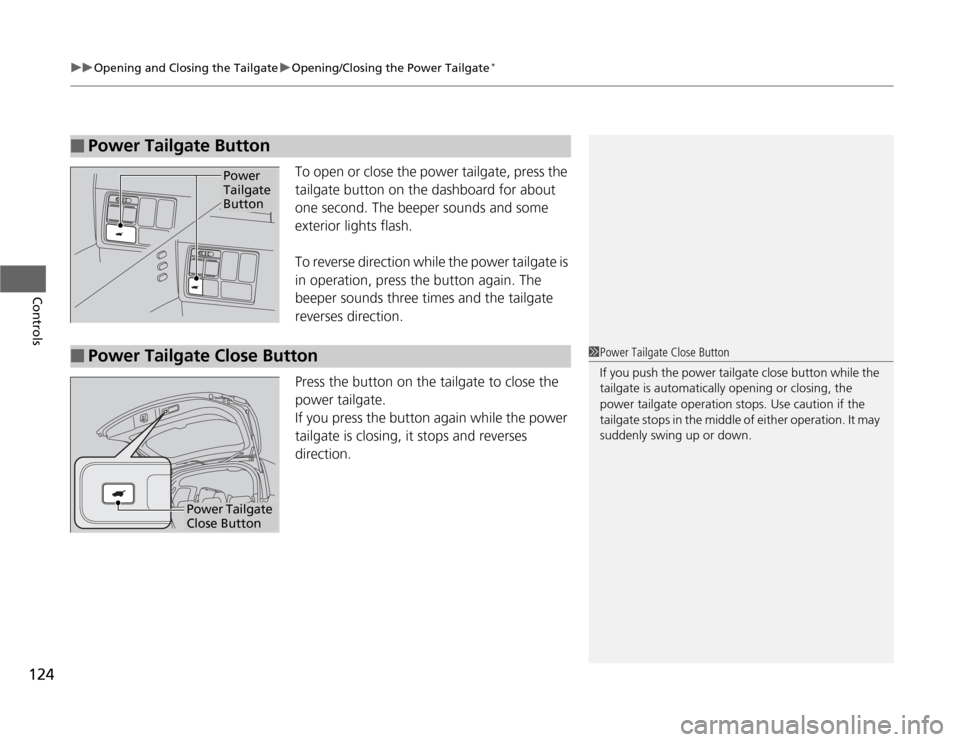
To open or close the power tailgate, press the
tailgate button on the dashboard for about
one second. The beeper sounds and some
exterior lights flash.
To reverse direction while the power tailgate is
in operation, press the button again. The
beeper sounds three times and the tailgate
reverses direction.
Press the button on the tailgate to close the
power tailgate.
If you press the button again while the power
tailgate is closing, it stops and reverses
direction.
■
Power Tailgate Button
Power
Tailgate
Button
■
Power Tailgate Close Button
1Power Tailgate Close Button
If you push the power tailgate close button while the
tailgate is automatically opening or closing, the
power tailgate operation stops. Use caution if the
tailgate stops in the middle of either operation. It may
suddenly swing up or down.
Power Tailgate
Close Button