power HONDA ODYSSEY 2012 RB3-RB4 / 4.G Owners Manual
[x] Cancel search | Manufacturer: HONDA, Model Year: 2012, Model line: ODYSSEY, Model: HONDA ODYSSEY 2012 RB3-RB4 / 4.GPages: 441, PDF Size: 14.07 MB
Page 3 of 441
2Quick Reference Guide
Quick Reference GuideVisual Index
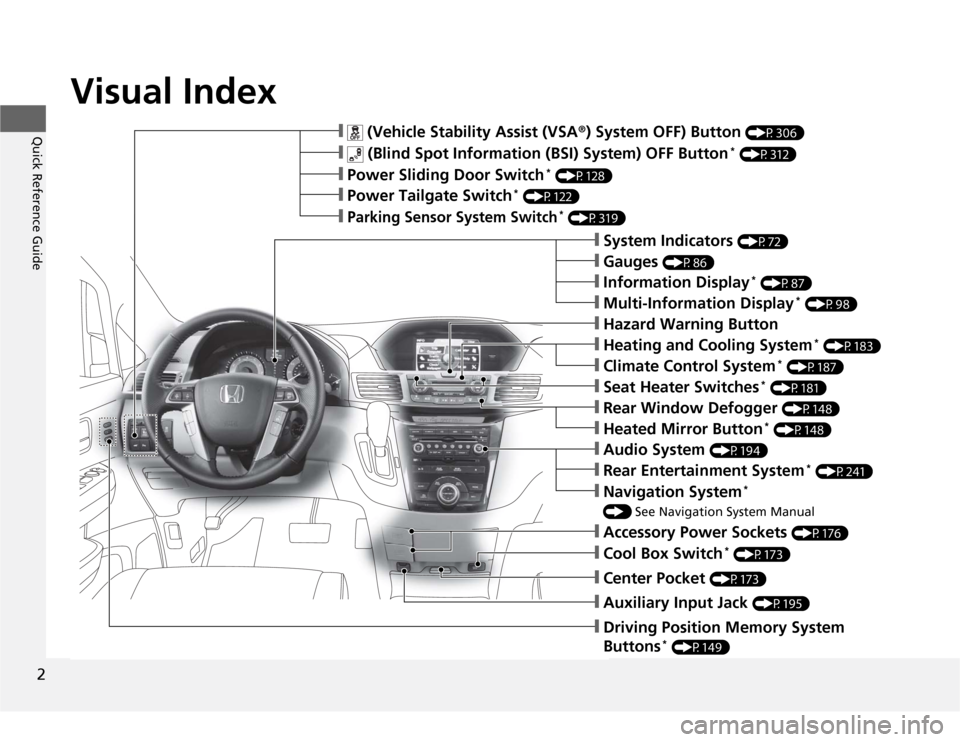
❙
(Vehicle Stability Assist (VSA
®) System OFF) Button
(P306)
❙
(Blind Spot Information (BSI) System) OFF Button
* (P312)
❙Power Sliding Door Switch
* (P128)
❙Power Tailgate Switch
* (P122)
❙Parking Sensor System Switch
* (P319)
❙System Indicators
(P72)
❙Gauges
(P86)
❙Information Display
* (P87)
❙Multi-Information Display
* (P98)
❙Rear Window Defogger
(P148)
❙Heated Mirror Button
* (P148)
❙Hazard Warning Button❙Heating and Cooling System
* (P183)
❙Climate Control System
* (P187)
❙Seat Heater Switches
* (P181)
❙Audio System
(P194)
❙Rear Entertainment System
* (P241)
❙Navigation System
*
() See Navigation System Manual❙Accessory Power Sockets
(P176)
❙Cool Box Switch
* (P173)
❙Center Pocket
(P173)
❙Driving Position Memory System
Buttons
* (P149)
❙Auxiliary Input Jack
(P195)
Page 5 of 441
Visual Index
4Quick Reference Guide
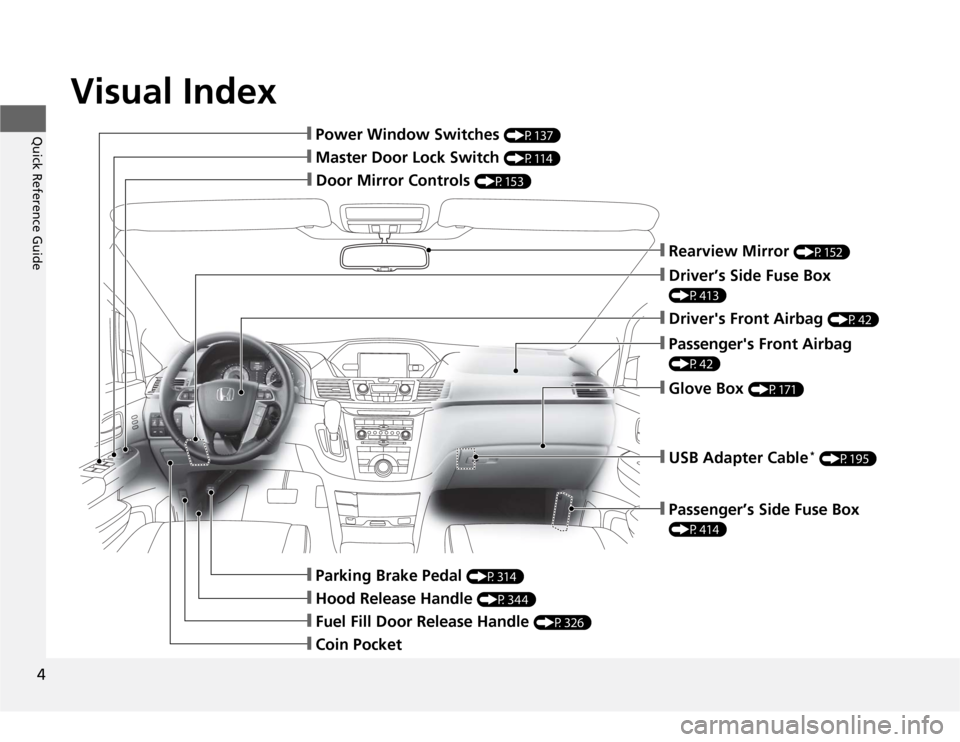
❙Door Mirror Controls
(P153)
❙Master Door Lock Switch
(P114)
❙Hood Release Handle
(P344)
❙Fuel Fill Door Release Handle
(P326)
❙Coin Pocket❙Parking Brake Pedal
(P314)
❙Power Window Switches
(P137)
❙Rearview Mirror
(P152)
❙Driver’s Side Fuse Box (P413)❙Passenger's Front Airbag (P42)❙Glove Box
(P171)
❙Driver's Front Airbag
(P42)
❙USB Adapter Cable
* (P195)
❙Passenger’s Side Fuse Box (P414)
Page 6 of 441
5Quick Reference Guide
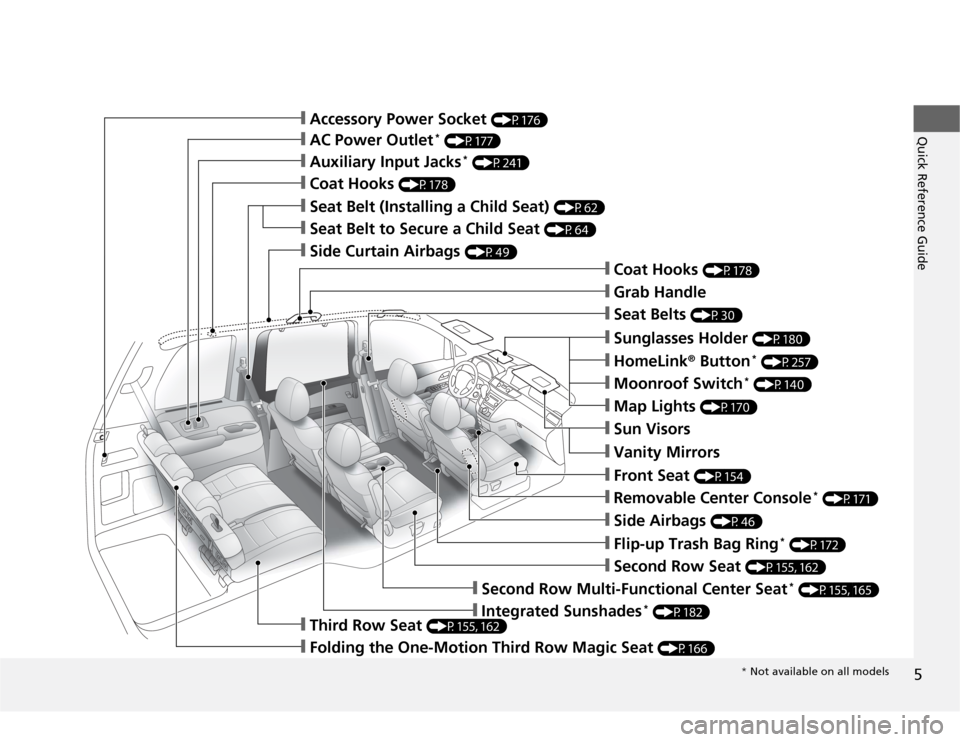
❙Sun Visors❙Vanity Mirrors❙Moonroof Switch
* (P140)
❙Map Lights
(P170)
❙HomeLink
® Button
* (P257)
❙Sunglasses Holder
(P180)
❙Seat Belts
(P30)
❙Grab Handle❙Coat Hooks
(P178)
❙Seat Belt to Secure a Child Seat
(P64)
❙Seat Belt (Installing a Child Seat)
(P62)
❙Accessory Power Socket
(P176)
❙Side Curtain Airbags
(P49)
❙Coat Hooks
(P178)
❙AC Power Outlet
* (P177)
❙Auxiliary Input Jacks
* (P241)
❙Side Airbags
(P46)
❙Second Row Seat
(P155, 162)
❙Front Seat
(P154)
❙Removable Center Console
* (P171)
❙Flip-up Trash Bag Ring
* (P172)
❙Third Row Seat
(P155, 162)
❙Folding the One-Motion Third Row Magic Seat
(P166)
❙Second Row Multi-Functional Center Seat
* (P155, 165)
❙Integrated Sunshades
* (P182)
* Not available on all models
Page 7 of 441
Visual Index
6Quick Reference Guide
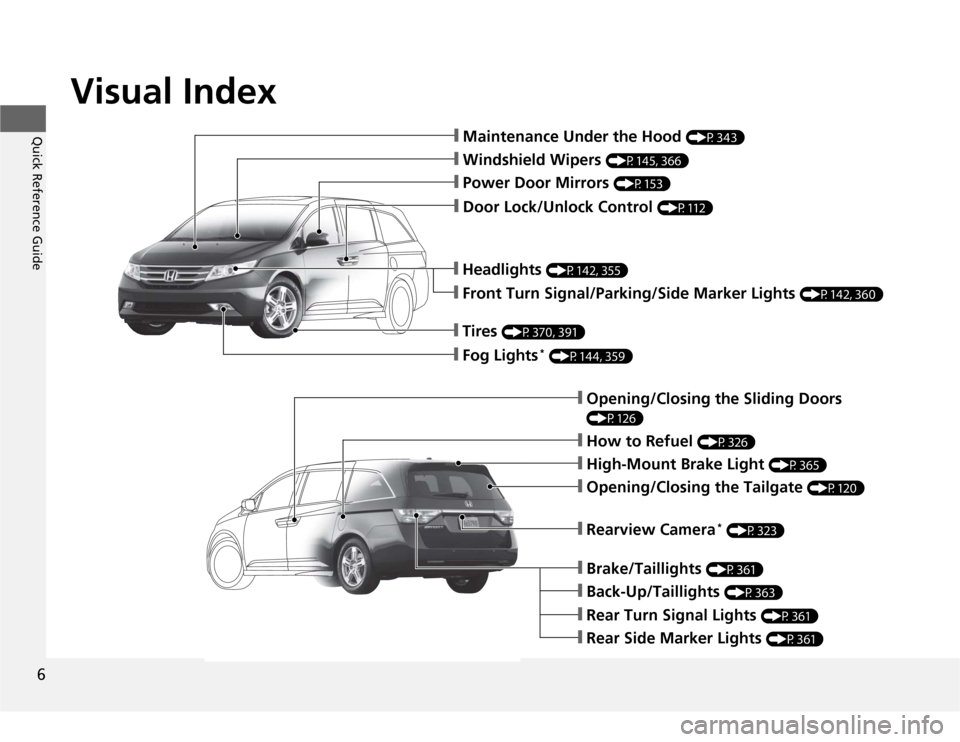
❙Maintenance Under the Hood
(P343)
❙Windshield Wipers
(P145, 366)
❙Door Lock/Unlock Control
(P112)
❙Power Door Mirrors
(P153)
❙Headlights
(P142, 355)
❙Front Turn Signal/Parking/Side Marker Lights
(P142, 360)
❙Tires
(P370, 391)
❙Fog Lights
* (P144, 359)
❙How to Refuel
(P326)
❙High-Mount Brake Light
(P365)
❙Rearview Camera
* (P323)
❙Opening/Closing the Tailgate
(P120)
❙Back-Up/Taillights
(P363)
❙Brake/Taillights
(P361)
❙Rear Turn Signal Lights
(P361)
❙Rear Side Marker Lights
(P361)
❙Opening/Closing the Sliding Doors (P126)
Page 9 of 441
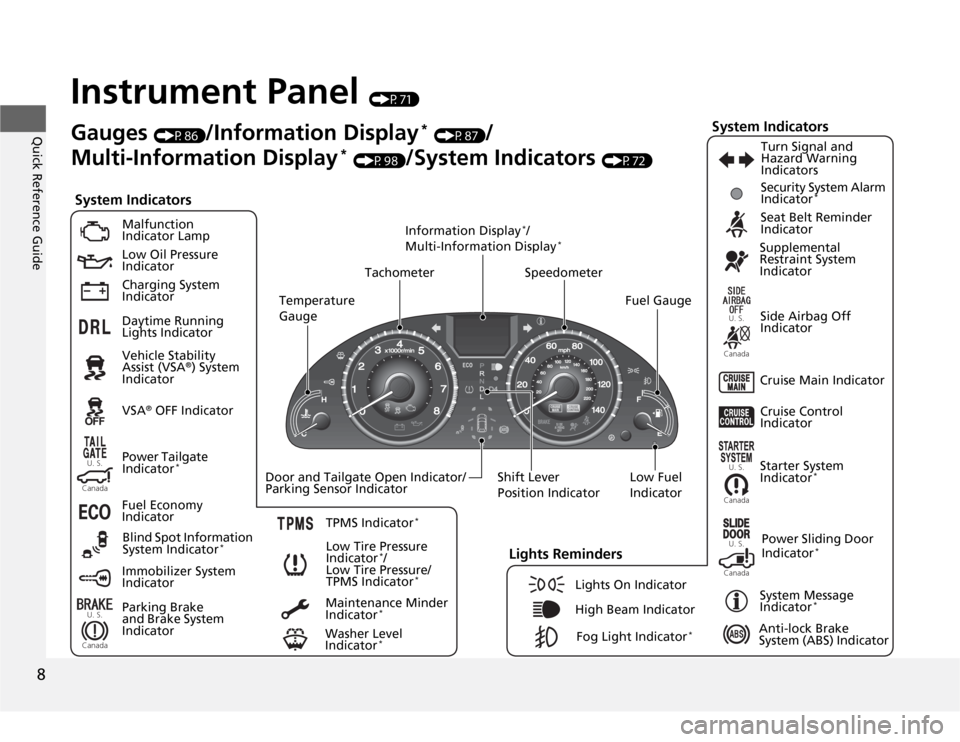
8Quick Reference Guide
Instrument Panel
(P71)
U. S.Canada
U. S.
Canada
U. S.
Canada
Canada
U. S.
U. S.
Canada
System Indicators
Malfunction
Indicator Lamp
Low Oil Pressure
Indicator
Charging System
Indicator
Anti-lock Brake
System (ABS) Indicator Vehicle Stability
Assist (VSA
®) System
Indicator
VSA
® OFF Indicator
Low Tire Pressure
Indicator
*/
Low Tire Pressure/
TPMS Indicator
*
Security System Alarm
Indicator
*
Lights Reminders
Lights On Indicator
High Beam Indicator
Fog Light Indicator
*
Immobilizer System
IndicatorSeat Belt Reminder
Indicator
System Indicators
Starter System
Indicator
*
System Message
Indicator
*
Parking Brake
and Brake System
IndicatorSupplemental
Restraint System
Indicator
Side Airbag Off
Indicator
Door and Tailgate Open Indicator/
Parking Sensor IndicatorCruise Main Indicator TachometerInformation Display
*/
Multi-Information Display
*
Speedometer
Fuel Gauge
Shift Lever
Position Indicator
Power Sliding Door
Indicator
*
Gauges
(P86)
/Information Display
* (P87)
/
Multi-Information Display
* (P98)
/System Indicators
(P72)
Power Tailgate
Indicator
*
Fuel Economy
Indicator
TPMS Indicator
*
Turn Signal and
Hazard Warning
Indicators
Maintenance Minder
Indicator
*
Daytime Running
Lights Indicator
Washer Level
Indicator
*
Blind Spot Information
System Indicator
*
Cruise Control
Indicator
Temperature
Gauge
Low Fuel
Indicator
Page 11 of 441
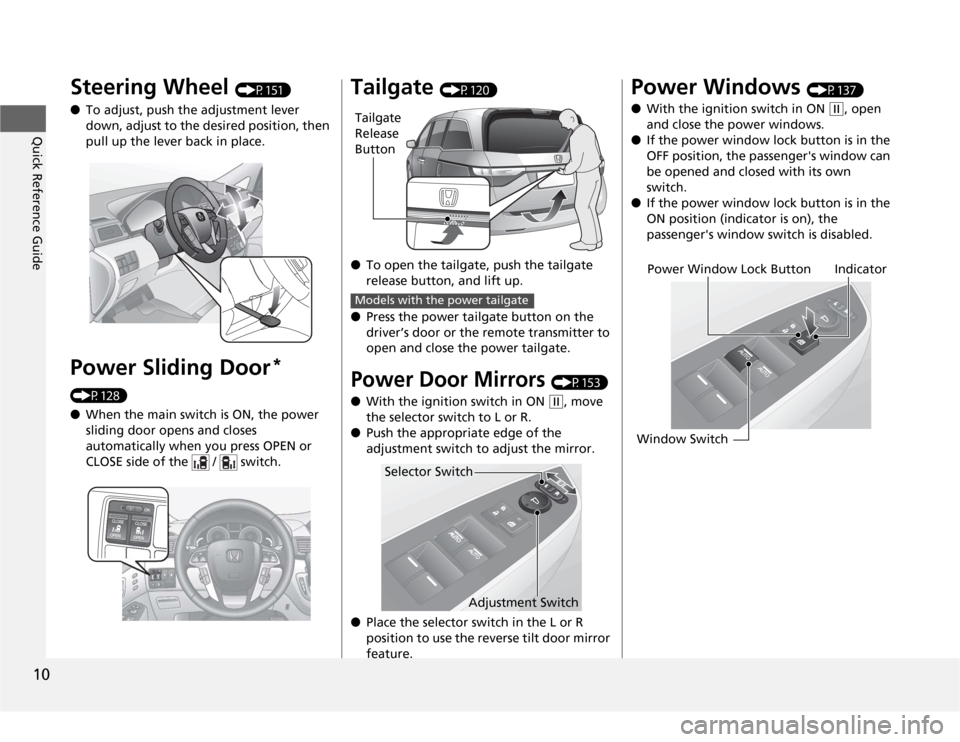
10Quick Reference Guide
Steering Wheel
(P151)
●To adjust, push the adjustment lever
down, adjust to the desired position, then
pull up the lever back in place.
Power Sliding Door
*
(P128)
●When the main switch is ON, the power
sliding door opens and closes
automatically when you press OPEN or
CLOSE side of the / switch.
Tailgate
(P120)
●To open the tailgate, push the tailgate
release button, and lift up.
●Press the power tailgate button on the
driver’s door or the remote transmitter to
open and close the power tailgate.
Power Door Mirrors
(P153)
●With the ignition switch in ON (w
, move
the selector switch to L or R.
●Push the appropriate edge of the
adjustment switch to adjust the mirror.
●Place the selector switch in the L or R
position to use the reverse tilt door mirror
feature.
Tailgate
Release
ButtonModels with the power tailgate
Selector Switch
Adjustment Switch
Power Windows
(P137)
●With the ignition switch in ON
(w
, open
and close the power windows.
●If the power window lock button is in the
OFF position, the passenger's window can
be opened and closed with its own
switch.
●If the power window lock button is in the
ON position (indicator is on), the
passenger's window switch is disabled.
Power Window Lock Button
Window SwitchIndicator
Page 15 of 441
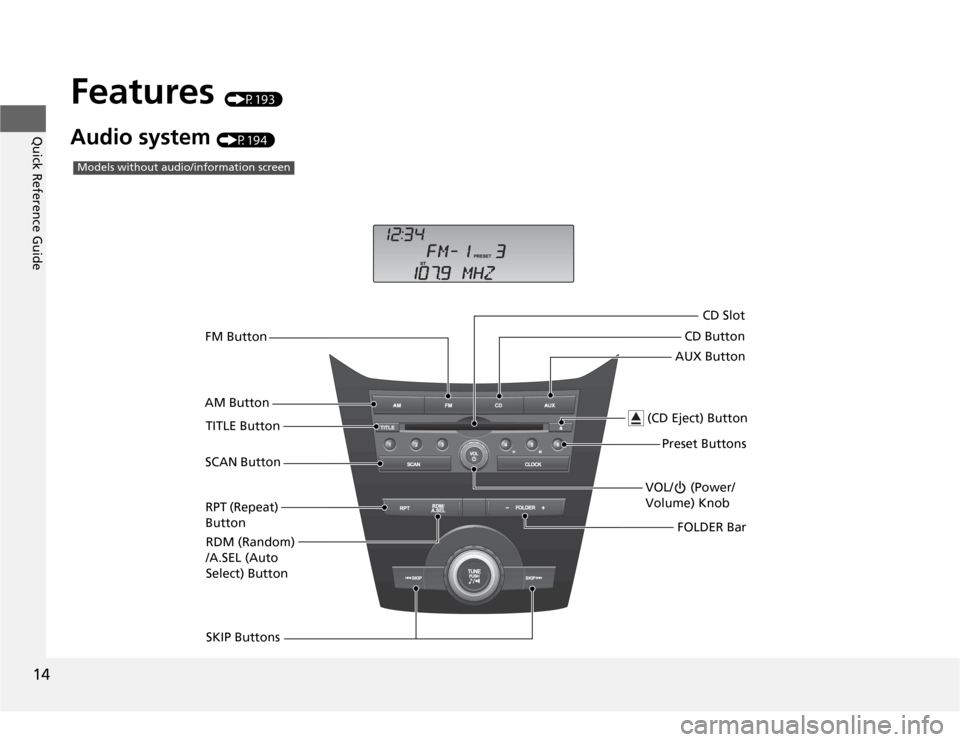
14Quick Reference Guide
Features
(P193)
Audio system
(P194)AM ButtonFM Button
VOL/ (Power/
Volume) Knob
(CD Eject) Button
TITLE Button
SKIP ButtonsPreset Buttons
Models without audio/information screen
AUX ButtonCD ButtonCD Slot
SCAN Button
RPT (Repeat)
Button
RDM (Random)
/A.SEL (Auto
Select) ButtonFOLDER Bar
Page 16 of 441
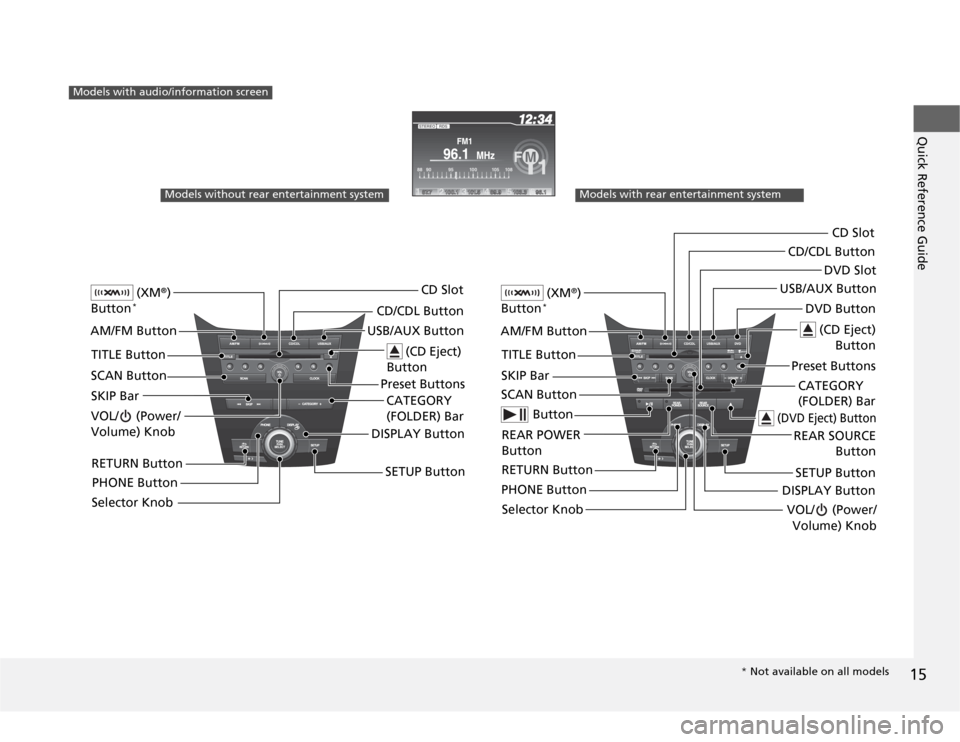
15Quick Reference Guide
Models with audio/information screen
Models without rear entertainment system
(XM
®)
Button
*
AM/FM Button
VOL/ (Power/
Volume) Knob
(CD Eject)
Button
TITLE Button
Selector KnobPreset Buttons USB/AUX ButtonCD/CDL ButtonCD Slot
SCAN Button
SKIP Bar
RETURN ButtonCATEGORY
(FOLDER) Bar
SETUP Button
(XM
®)
Button
*
AM/FM Button
VOL/ (Power/
Volume) Knob
(CD Eject)
Button
TITLE Button
Selector KnobPreset ButtonsDVD Button USB/AUX ButtonCD/CDL Button
SCAN ButtonSKIP Bar
REAR POWER
ButtonCATEGORY
(FOLDER) Bar
SETUP Button
Models with rear entertainment system
Button
RETURN ButtonPHONE Button
CD Slot
DISPLAY Button
REAR SOURCE
Button
(DVD Eject) Button
DVD Slot
DISPLAY Button
PHONE Button
* Not available on all models
Page 24 of 441
23Quick Reference Guide
California Proposition 65 WarningEvent Data RecordersThis vehicle is equipped with an event data recorder (EDR).
The main purpose of an EDR is to record, in certain crash or near
crash-like situations, such as an air bag deployment or hitting a
road obstacle, data that will assist in understanding how a vehicle’s
systems performed. The EDR is designed to record data related
to vehicle dynamics and safety systems for a short period of
time, typically 30 seconds or less. The EDR in this vehicle is
designed to record such data as:
•How various systems in your vehicle were operating;
•Whether or not the driver and passenger safety belts were
buckled/fastened;
•How far (if at all) the driver was depressing the accelerator
and/or brake pedal; and,
•How fast the vehicle was traveling.
These data can help provide a better understanding of the
circumstances in which crashes and injuries occur. NOTE: EDR data
are recorded by your vehicle only if a non-trivial crash situation
occurs; no data are recorded by the EDR under normal driving
conditions and no personal data (e.g., name, gender, age, and
crash location) are recorded. However, other parties, such as law
enforcement, could combine the EDR data with the type of
personally identifying data routinely acquired during a crash
investigation.WARNING: This product contains or emits
chemicals known to the state of California to cause
cancer and birth defects or other reproductive
harm.
To read data recorded by an EDR, special equipment is required,
and access to the vehicle or the EDR is needed. In addition to the
vehicle manufacturer, other parties, such as law enforcement, that
have the special equipment, can read the information if they have
access to the vehicle or the EDR.
The data belongs to the vehicle owner and may not be accessed by
anyone else except as legally required or with the permission of the
vehicle owner.Service Diagnostic RecordersThis vehicle is equipped with service-related devices that record
information about powertrain performance. The data can be used
to verify emissions law requirements and/or help technicians
diagnose and solve service problems. It may also be combined with
data from other sources for research purposes, but it remains
confidential.California Perchlorate Contamination Prevention ActThe airbags, seat belt tensioners, and CR type batteries in this
vehicle may contain perchlorate materials - special handling may
apply. See www.dtsc.ca.gov/hazardouswaste/perchlorate/
As you read this manual, you will find information that is preceded
by a symbol. This information is intended to help you avoid
damage to your vehicle, other property, or the environment.
NOTICE
Page 83 of 441
82
uuIndicatorsu
Instrument Panel
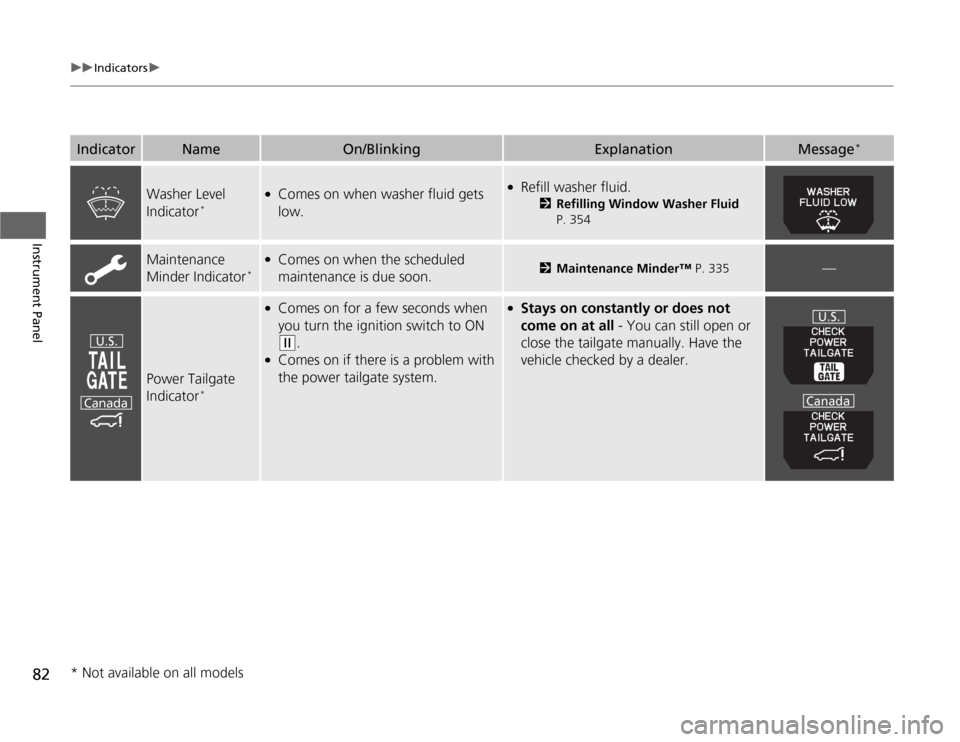
Washer Level
Indicator
*
●
Comes on when washer fluid gets
low.
●
Refill washer fluid.
2Refilling Window Washer Fluid
P. 354
Maintenance
Minder Indicator
*
●
Comes on when the scheduled
maintenance is due soon.
2Maintenance Minder™ P. 335
—
Power Tailgate
Indicator
*
●
Comes on for a few seconds when
you turn the ignition switch to ON (w
.
●
Comes on if there is a problem with
the power tailgate system.
●
Stays on constantly or does not
come on at all - You can still open or
close the tailgate manually. Have the
vehicle checked by a dealer.
Indicator
Name
On/Blinking
Explanation
Message
*
U.S.
Canada
U.S.
Canada
* Not available on all models