ESP HONDA ODYSSEY 2016 RC1-RC2 / 5.G User Guide
[x] Cancel search | Manufacturer: HONDA, Model Year: 2016, Model line: ODYSSEY, Model: HONDA ODYSSEY 2016 RC1-RC2 / 5.GPages: 565
Page 134 of 565
133
uuOpening and Closing the Sliding Doors uOpening/Closing the Power Sliding Doors*
Controls
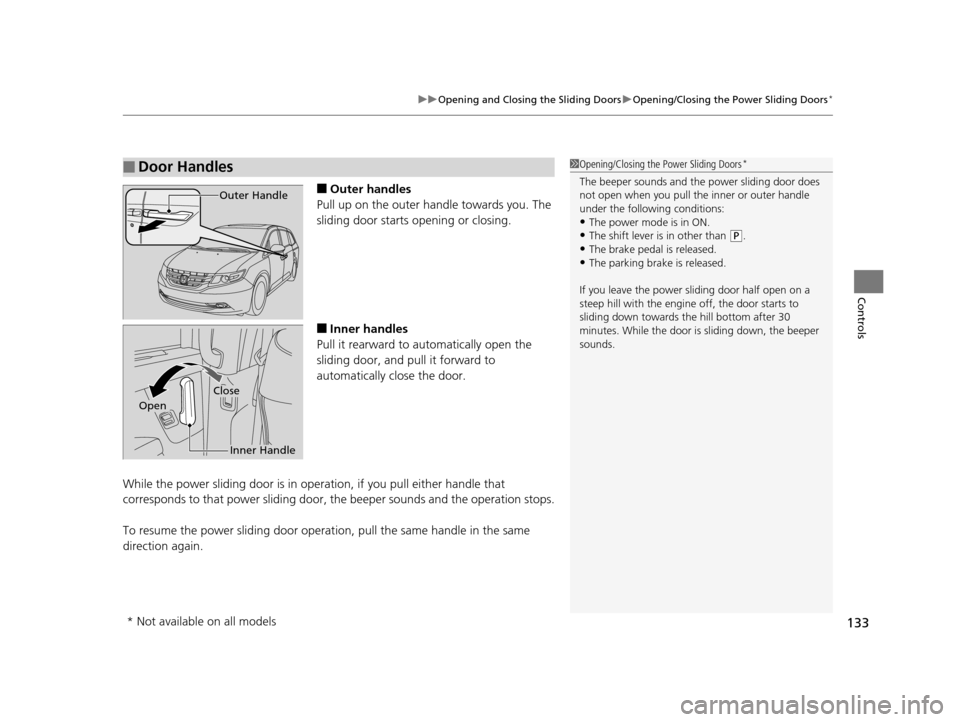
■Outer handles
Pull up on the outer handle towards you. The
sliding door starts opening or closing.
■Inner handles
Pull it rearward to automatically open the
sliding door, and pull it forward to
automatically close the door.
While the power sliding door is in operation, if you pull either handle that
corresponds to that power sl iding door, the beeper sounds and the operation stops.
To resume the power sliding door operat ion, pull the same handle in the same
direction again.
■Door Handles1 Opening/Closing the Power Sliding Doors*
The beeper sounds and the power sliding door does
not open when you pull the inner or outer handle
under the following conditions:
•The power mode is in ON.
•The shift lever is in other than ( P.
•The brake pedal is released.•The parking brake is released.
If you leave the power sliding door half open on a
steep hill with the engine off, the door starts to
sliding down towards th e hill bottom after 30
minutes. While the door is sliding down, the beeper
sounds.
Outer Handle
Inner Handle
Close
Open
* Not available on all models
16 US ODYSSEY-31TK86500.book 133 ページ 2015年6月24日 水曜日 午後3時0分
Page 239 of 565
238
uuAudio System Basic Operation uAudio/Information Screen
Features
Audio/Information Screen
Displays the audio status and wallpaper. From this screen, you can go to various
setup options.
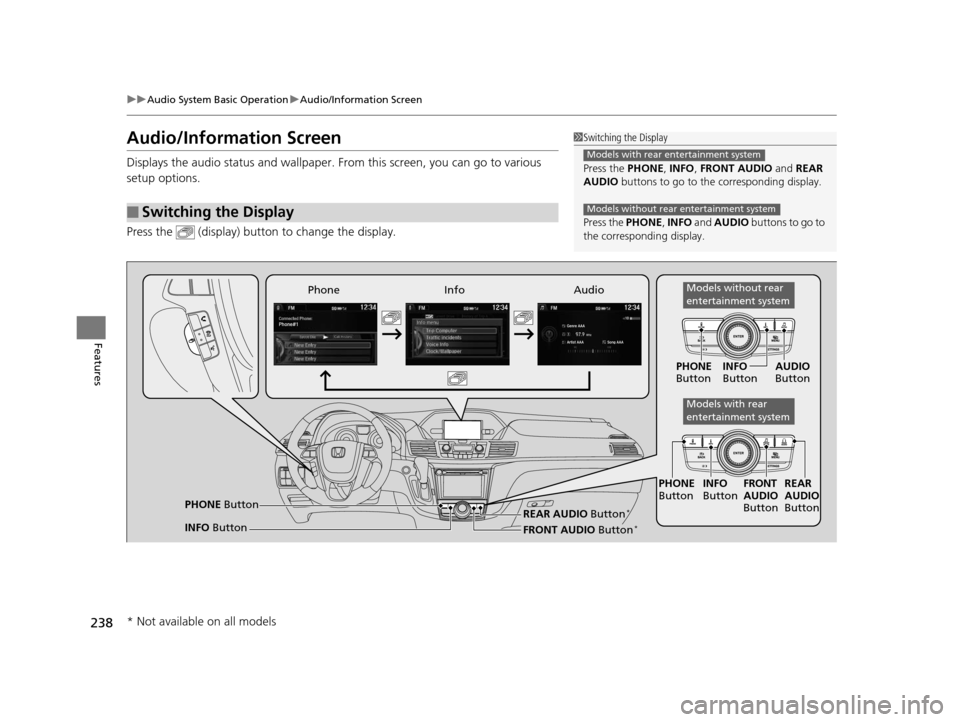
Press the (display) butto n to change the display.
■Switching the Display
1Switching the Display
Press the PHONE, INFO, FRONT AUDIO and REAR
AUDIO buttons to go to the corresponding display.
Press the PHONE, INFO and AUDIO buttons to go to
the corresponding display.
Models with rear entertainment system
Models without rear entertainment system
Audio
Info
Phone
FRONT AUDIO Button*
PHONE Button
INFO Button PHONE
Button INFO
Button FRONT
AUDIO
Button
PHONE
Button INFO
Button AUDIO
Button
REAR
AUDIO
ButtonREAR AUDIO Button*
Models without rear
entertainment system
Models with rear
entertainment system
* Not available on all models
16 US ODYSSEY-31TK86500.book 238 ページ 2015年6月24日 水曜日 午後3時0分
Page 329 of 565
uuBluetooth ® HandsFreeLink ®u Using HFL
328
Features
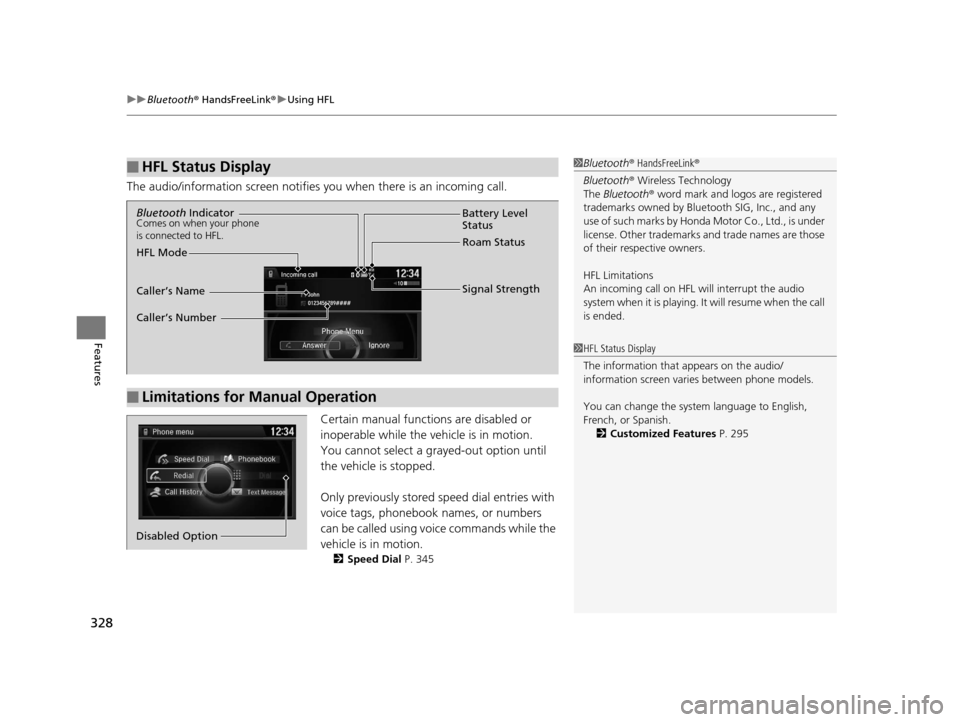
The audio/information screen notifies you when there is an incoming call.
Certain manual functions are disabled or
inoperable while the vehicle is in motion.
You cannot select a grayed-out option until
the vehicle is stopped.
Only previously stored speed dial entries with
voice tags, phonebook names, or numbers
can be called using voice commands while the
vehicle is in motion.
2 Speed Dial P. 345
■HFL Status Display1Bluetooth ® HandsFreeLink ®
Bluetooth ® Wireless Technology
The Bluetooth ® word mark and logos are registered
trademarks owned by Blue tooth SIG, Inc., and any
use of such marks by Honda Motor Co., Ltd., is under
license. Other trademarks and trade names are those
of their respective owners.
HFL Limitations
An incoming call on HFL will interrupt the audio
system when it is playing. It will resume when the call
is ended.
1 HFL Status Display
The information that appears on the audio/
information screen vari es between phone models.
You can change the system language to English,
French, or Spanish. 2 Customized Features P. 295
■Limitations for Manual Operation
Bluetooth IndicatorComes on when your phone
is connected to HFL.
Signal Strength
HFL Mode Battery Level
Status
Roam Status
Caller’s Name
Caller’s Number
Phone menu
Redial
Call History
Text Message
Dial
Phonebook
Speed Dial
Disabled Option
16 US ODYSSEY-31TK86500.book 328 ページ 2015年6月24日 水曜日 午後3時0分
Page 353 of 565
uuBluetooth ® HandsFreeLink ®u HFL Menus
352
Features
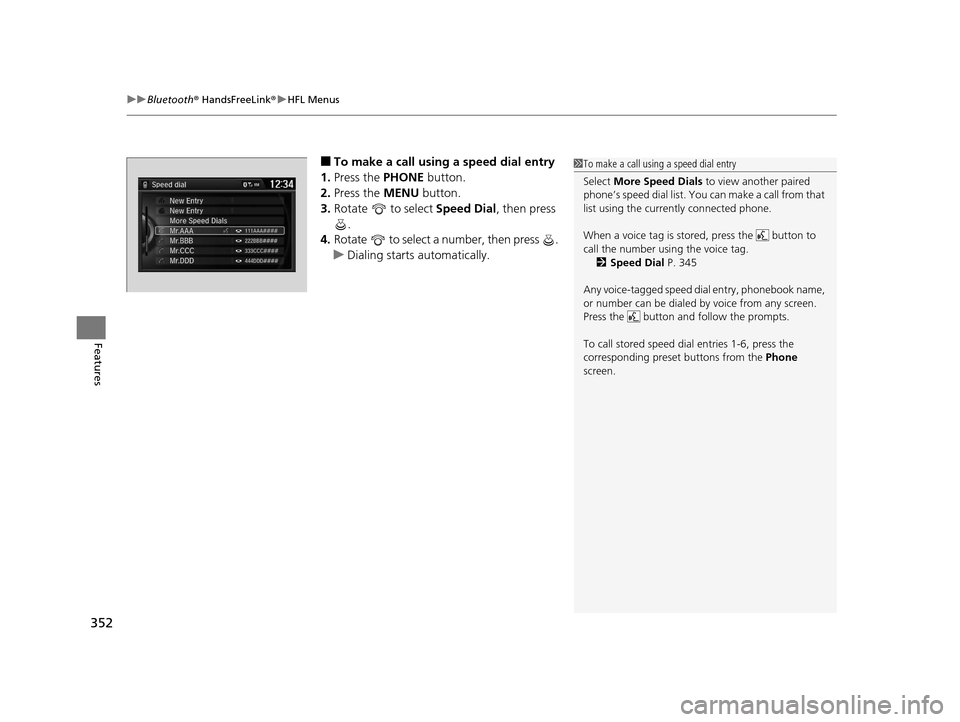
■To make a call using a speed dial entry
1. Press the PHONE button.
2. Press the MENU button.
3. Rotate to select Speed Dial, then press
.
4. Rotate to select a number, then press .
u Dialing starts automatically.1To make a call using a speed dial entry
Select More Speed Dials to view another paired
phone’s speed dial list. You ca n make a call from that
list using the currently connected phone.
When a voice tag is stored, press the button to
call the number using the voice tag.
2 Speed Dial P. 345
Any voice-tagged speed di al entry, phonebook name,
or number can be dialed by voice from any screen.
Press the button and follow the prompts.
To call stored speed dial entries 1-6, press the
corresponding preset buttons from the Phone
screen.
16 US ODYSSEY-31TK86500.book 352 ページ 2015年6月24日 水曜日 午後3時0分
Page 362 of 565
361
uuBluetooth ® HandsFreeLink ®u Using HFL
Features
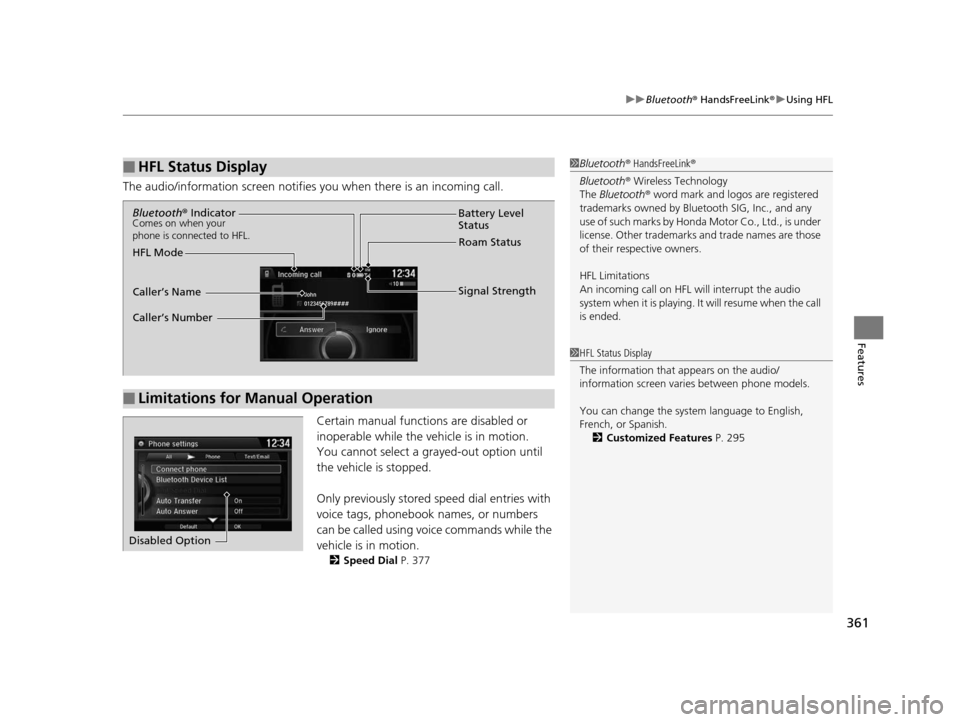
The audio/information scr een notifies you when there is an incoming call.
Certain manual functions are disabled or
inoperable while the vehicle is in motion.
You cannot select a grayed-out option until
the vehicle is stopped.
Only previously stored speed dial entries with
voice tags, phonebook names, or numbers
can be called using voice commands while the
vehicle is in motion.
2 Speed Dial P. 377
■HFL Status Display1Bluetooth ® HandsFreeLink ®
Bluetooth ® Wireless Technology
The Bluetooth ® word mark and logos are registered
trademarks owned by Blue tooth SIG, Inc., and any
use of such marks by Honda Motor Co., Ltd., is under
license. Other trademarks and trade names are those
of their respective owners.
HFL Limitations
An incoming call on HFL will interrupt the audio
system when it is playing. It will resume when the call
is ended.
1 HFL Status Display
The information that appears on the audio/
information screen vari es between phone models.
You can change the system language to English,
French, or Spanish. 2 Customized Features P. 295
■Limitations for Manual Operation
Bluetooth® IndicatorComes on when your
phone is connected to HFL.
Signal Strength
HFL Mode Battery Level
Status
Roam Status
Caller’s Name
Caller’s Number
Disabled Option
16 US ODYSSEY-31TK86500.book 361 ページ 2015年6月24日 水曜日 午後3時0分
Page 413 of 565
412
uuWhen Driving uAutomatic Transmission
Driving
Automatic Transmission
The engine runs at a higher id le speed and creeping increases.
Keep the brake pedal firmly depressed when stopped.
Quickly depressing the accelerator pedal while driving uphill may cause the
transmission to drop to a lower gear, unexpectedly increasing vehicle speed. Depress
the accelerator pedal carefully, especi ally on slippery roads and curves.
■Creeping
■Kickdown
16 US ODYSSEY-31TK86500.book 412 ページ 2015年6月24日 水曜日 午後3時0分
Page 419 of 565
418
uuWhen Driving uForward Collision Warning (FCW)*
Driving
Forward Collision Warning (FCW)*
Alerts you when it determines that there is a possibility that your vehicle may collide
with a vehicle detected in front of yours.
If the system determines a collision is possible, it gives both visual and audible alerts.
u Take appropriate action to prevent a col lision (apply the brakes, change lanes,
etc.).
■How the system works
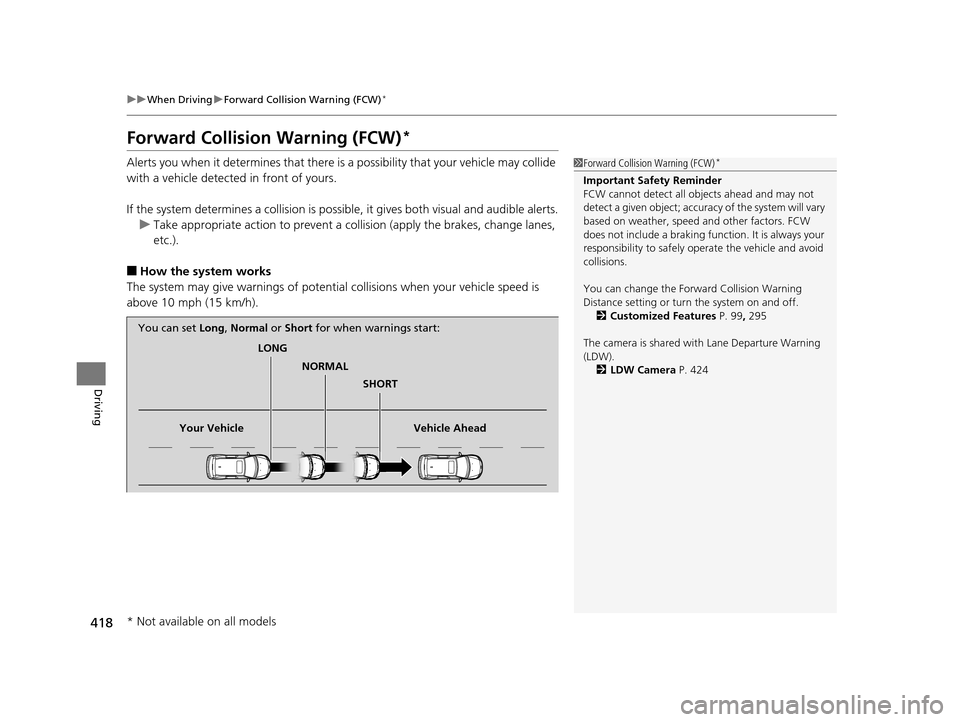
The system may give warnings of potential collisions when your vehicle speed is
above 10 mph (15 km/h).
1 Forward Collision Warning (FCW)*
Important Safety Reminder
FCW cannot detect all ob jects ahead and may not
detect a given object; accura cy of the system will vary
based on weather, speed and other factors. FCW
does not include a braking func tion. It is always your
responsibility to sa fely operate the vehicle and avoid
collisions.
You can change the Forward Collision Warning
Distance setting or turn the system on and off. 2 Customized Features P. 99, 295
The camera is shared with Lane Departure Warning
(LDW). 2 LDW Camera P. 424
LONG
NORMAL SHORT
Your Vehicle Vehicle Ahead
You can set
Long, Normal or Short for when warnings start:
* Not available on all models
16 US ODYSSEY-31TK86500.book 418 ページ 2015年6月24日 水曜日 午後3時0分
Page 423 of 565
422
uuWhen Driving uLane Departure Warning (LDW)*
Driving
Lane Departure Warning (LDW)*
Alerts you when the system detects a possibility of your vehicle unintentionally
crossing over detected side lane markings.
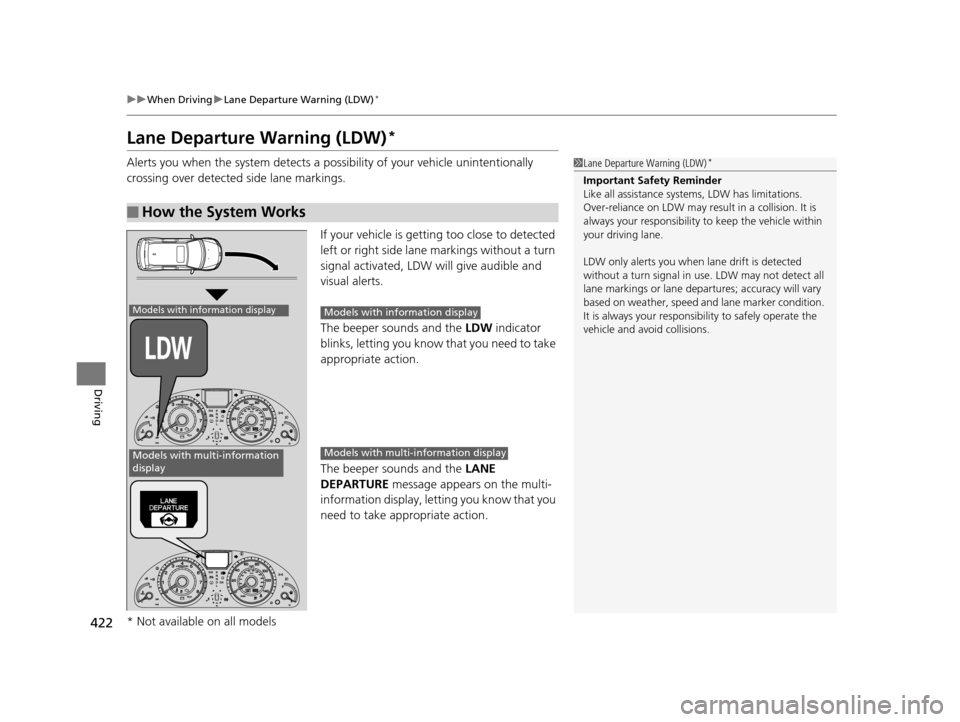
If your vehicle is getting too close to detected
left or right side lane markings without a turn
signal activated, LDW will give audible and
visual alerts.
The beeper sounds and the LDW indicator
blinks, letting you know that you need to take
appropriate action.
The beeper sounds and the LANE
DEPARTURE message appears on the multi-
information display, letting you know that you
need to take appropriate action.
■How the System Works
1 Lane Departure Warning (LDW)*
Important Safety Reminder
Like all assistance systems, LDW has limitations.
Over-reliance on LDW may result in a collision. It is
always your responsibility to keep th e vehicle within
your driving lane.
LDW only alerts you when lane drift is detected
without a turn signal in us e. LDW may not detect all
lane markings or lane departures; a ccuracy will vary
based on weather, speed and lane marker condition.
It is always your responsibility to safely operate the
vehicle and avoid collisions.
Models with information display
Models with multi-information
display
Models with info rmation display
Models with multi- information display
* Not available on all models
16 US ODYSSEY-31TK86500.book 422 ページ 2015年6月24日 水曜日 午後3時0分
Page 427 of 565
426
uuWhen Driving uVehicle Stability Assist (VSA® ), aka Electronic Stability Control (ESC), System
Driving
Vehicle Stability Assist (VSA®), aka Electronic
Stability Control (ESC), System
VSA ® helps to stabilize the vehicle during cornering if the vehicle turns more or less
than what was intended. It also assists in maintaining traction on slippery surfaces.
It does so by regulating engine output and select ively applying the brakes.
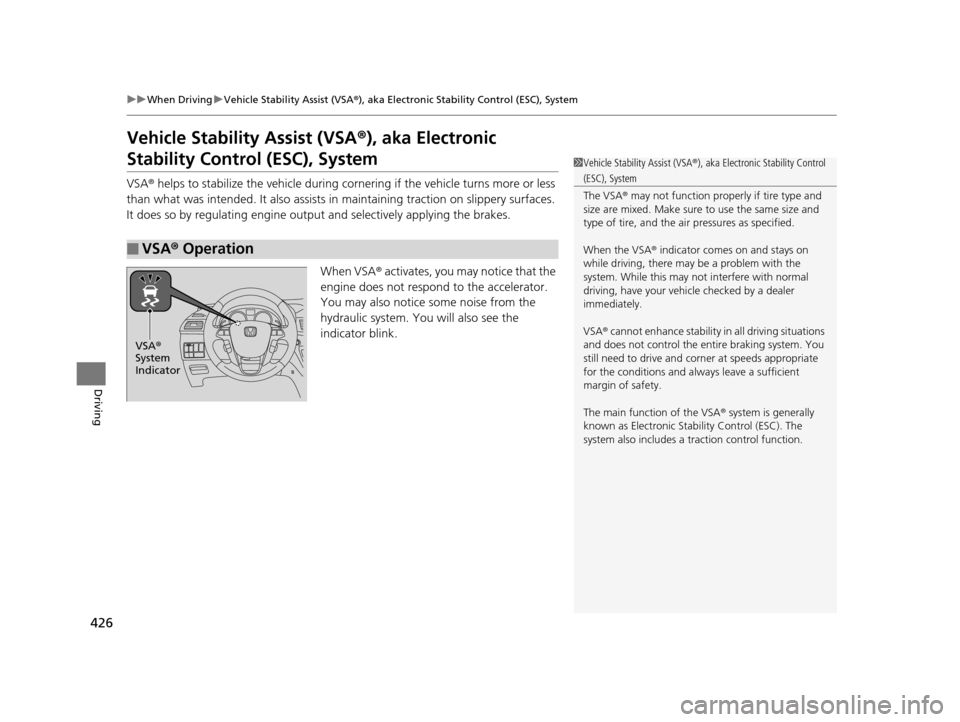
When VSA ® activates, you may notice that the
engine does not respond to the accelerator.
You may also notice some noise from the
hydraulic system. You will also see the
indicator blink.
■VSA ® Operation
1 Vehicle Stability Assist (VSA ®), aka Electronic Stability Control
(ESC), System
The VSA ® may not function properl y if tire type and
size are mixed. Make sure to use the same size and
type of tire, and the air pressures as specified.
When the VSA ® indicator comes on and stays on
while driving, there may be a problem with the
system. While this may not interfere with normal
driving, have your vehi cle checked by a dealer
immediately.
VSA ® cannot enhance stability in all driving situations
and does not control the entire braking system. You
still need to drive and corner at speeds appropriate
for the conditions and always leave a sufficient
margin of safety.
The main function of the VSA ® system is generally
known as Electronic Stability Control (ESC). The
system also includes a traction control function.
VSA®
System
Indicator
16 US ODYSSEY-31TK86500.book 426 ページ 2015年6月24日 水曜日 午後3時0分
Page 431 of 565
430
uuWhen Driving uTire Pressure Monitoring System (TPMS) - Required Federal Explanation
Driving
Please note that the TPMS is not a substitute for proper tire
maintenance, and it is the driver 's responsibility to maintain
correct tire pressure, even if un der-inflation has not reached the
level to trigger illumina tion of the TPMS low ti re pressure telltale.
Your vehicle has also been eq uipped with a TPMS malfunction
indicator to indicate when the sy stem is not operating properly.
The TPMS malfunction indicator is provided by a separate telltale,
which displays the symbol “TPMS” when illuminated.
When the malfunction indicator is illuminated,
the system may not be able to detect or signal low tire pressure as
intended.
TPMS malfunctions may occur for a variety of reasons, including
the installation of replacement or alternate tires or wheels on the
vehicle that prevent the TPMS from functioning properly.
Always check the TPMS malfunction telltale after replacing one or
more tires or wheels on your vehicle to ensure that the
replacement or alternate tires and wheels allow the TPMS to
continue to function properly.
Models with info rmation display
16 US ODYSSEY-31TK86500.book 430 ページ 2015年6月24日 水曜日 午後3時0分