ignition HONDA ODYSSEY 2016 RC1-RC2 / 5.G Owner's Manual
[x] Cancel search | Manufacturer: HONDA, Model Year: 2016, Model line: ODYSSEY, Model: HONDA ODYSSEY 2016 RC1-RC2 / 5.GPages: 565
Page 82 of 565
81
uuIndicators u
Continued
Instrument Panel
*1:Models with the smart entry system have an ENGINE START/STOP button instead of an ignition switch.
*2:On the left: Models wi th information display
On the right: Models with multi-information display
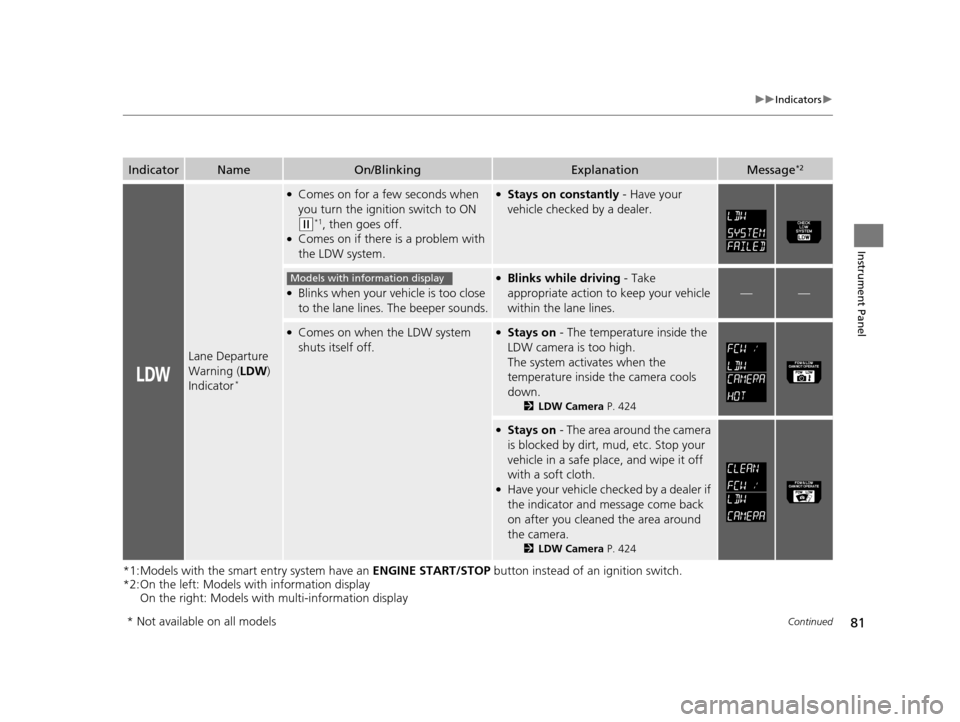
IndicatorNameOn/BlinkingExplanationMessage*2
Lane Departure
Warning (LDW)
Indicator
*
●Comes on for a few seconds when
you turn the ignition switch to ON
(w*1, then goes off.●Comes on if there is a problem with
the LDW system.
●Stays on constantly - Have your
vehicle checked by a dealer.
●Blinks when your ve hicle is too close
to the lane lines. The beeper sounds.
●Blinks while driving - Take
appropriate action to keep your vehicle
within the lane lines.
——
●Comes on when the LDW system
shuts itself off.●Stays on - The temperature inside the
LDW camera is too high.
The system acti vates when the
temperature inside the camera cools
down.
2 LDW Camera P. 424
●Stays on - The area around the camera
is blocked by dirt, mud, etc. Stop your
vehicle in a safe place, and wipe it off
with a soft cloth.
●Have your vehicle checked by a dealer if
the indicator and message come back
on after you cleaned the area around
the camera.
2 LDW Camera P. 424
Models with info rmation display
* Not available on all models
16 US ODYSSEY-31TK86500.book 81 ページ 2015年6月24日 水曜日 午後3時0分
Page 83 of 565
82
uuIndicators u
Instrument Panel
*1:Models with the smart entry system have an ENGINE START/STOP button instead of an ignition switch.
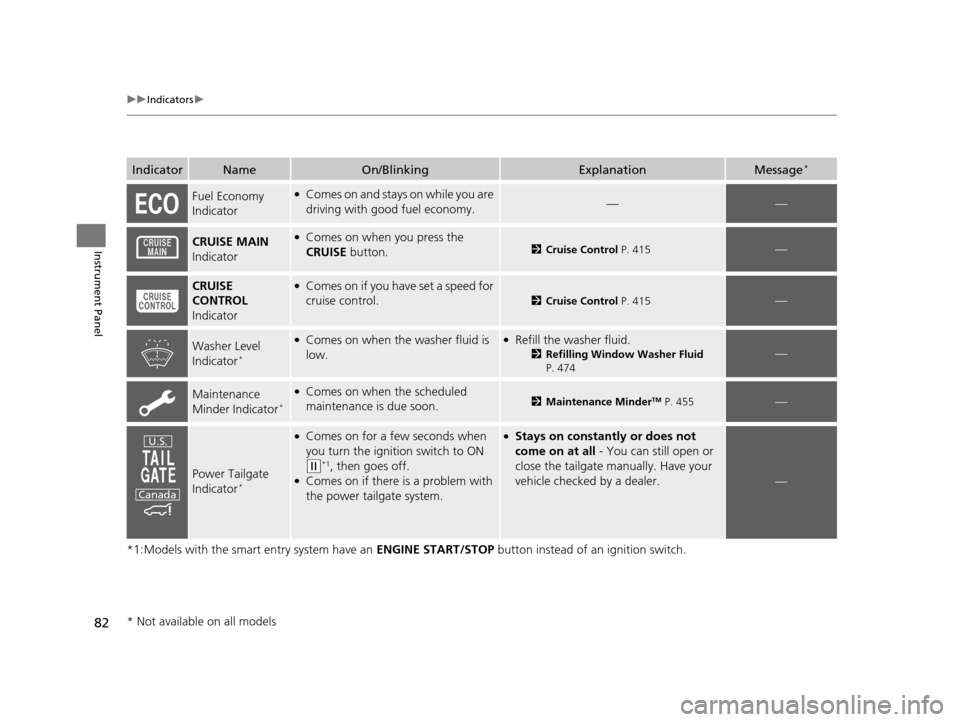
IndicatorNameOn/BlinkingExplanationMessage*
Fuel Economy
Indicator●Comes on and stays on while you are
driving with good fuel economy.——
CRUISE MAIN
Indicator●Comes on when you press the
CRUISE button.2Cruise Control P. 415—
CRUISE
CONTROL
Indicator●Comes on if you have set a speed for
cruise control.
2 Cruise Control P. 415—
Washer Level
Indicator*
●Comes on when the washer fluid is
low.●Refill the washer fluid.
2Refilling Window Washer Fluid
P. 474—
Maintenance
Minder Indicator*
●Comes on when the scheduled
maintenance is due soon.2 Maintenance MinderTM P. 455—
Power Tailgate
Indicator*
●Comes on for a few seconds when
you turn the ignition switch to ON
(w*1, then goes off.●Comes on if there is a problem with
the power tailgate system.
●Stays on constantly or does not
come on at all - You can still open or
close the tailgate manually. Have your
vehicle checked by a dealer.
—
U.S.
Canada
* Not available on all models
16 US ODYSSEY-31TK86500.book 82 ページ 2015年6月24日 水曜日 午後3時0分
Page 84 of 565
83
uuIndicators u
Instrument Panel
*1:Models with the smart entry system have an ENGINE START/STOP button instead of an ignition switch.
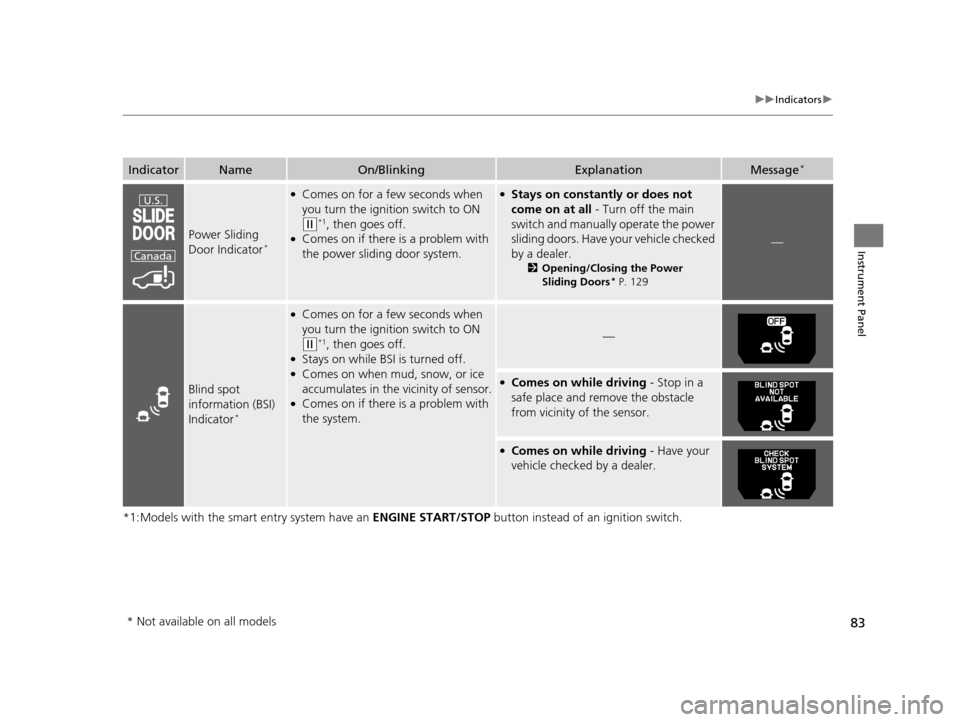
IndicatorNameOn/BlinkingExplanationMessage*
Power Sliding
Door Indicator*
●Comes on for a few seconds when
you turn the ignition switch to ON
(w*1, then goes off.●Comes on if there is a problem with
the power sliding door system.
●Stays on constantly or does not
come on at all - Turn off the main
switch and manually operate the power
sliding doors. Have your vehicle checked
by a dealer.
2 Opening/Closing the Power
Sliding Doors* P. 129
—
Blind spot
information (BSI)
Indicator
*
●Comes on for a few seconds when
you turn the igniti on switch to ON
(w*1, then goes off.●Stays on while BSI is turned off.●Comes on when mud, snow, or ice
accumulates in the vicinity of sensor.
●Comes on if there is a problem with
the system.
—
●Comes on while driving - Stop in a
safe place and remove the obstacle
from vicinity of the sensor.
●Comes on while driving - Have your
vehicle checked by a dealer.
U.S.
Canada
* Not available on all models
16 US ODYSSEY-31TK86500.book 83 ページ 2015年6月24日 水曜日 午後3時0分
Page 93 of 565
92
Instrument Panel
Gauges and Displays
Gauges
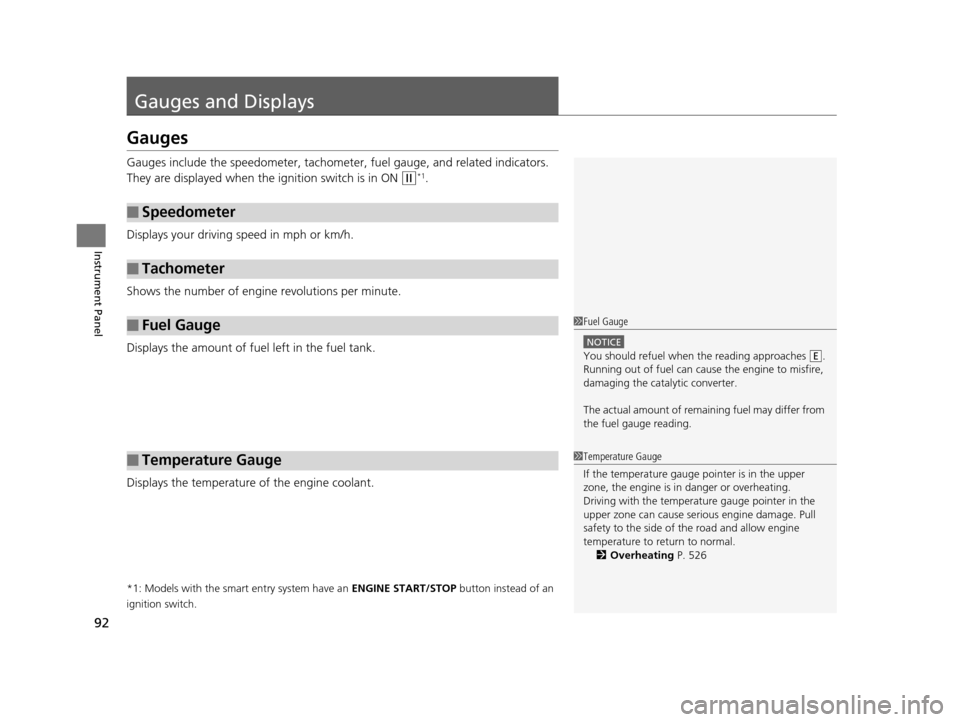
Gauges include the speedometer, tachometer, fuel gauge, and related indicators.
They are displayed when the ignition switch is in ON
(w*1.
Displays your driving speed in mph or km/h.
Shows the number of engine revolutions per minute.
Displays the amount of fuel left in the fuel tank.
Displays the temperature of the engine coolant.
*1: Models with the smart entry system have an ENGINE START/STOP button instead of an
ignition switch.
■Speedometer
■Tachometer
■Fuel Gauge
■Temperature Gauge
1 Fuel Gauge
NOTICE
You should refuel when the reading approaches .
Running out of fuel can cause the engine to misfire,
damaging the cata lytic converter.
The actual amount of remain ing fuel may differ from
the fuel gauge reading.E
1 Temperature Gauge
If the temperature gauge pointer is in the upper
zone, the engine is in danger or overheating.
Driving with the temperat ure gauge pointer in the
upper zone can cause serious engine damage. Pull
safety to the side of the road and allow engine
temperature to return to normal. 2 Overheating P. 526
16 US ODYSSEY-31TK86500.book 92 ページ 2015年6月24日 水曜日 午後3時0分
Page 96 of 565
95
uuGauges and Displays uInformation Display*
Instrument Panel
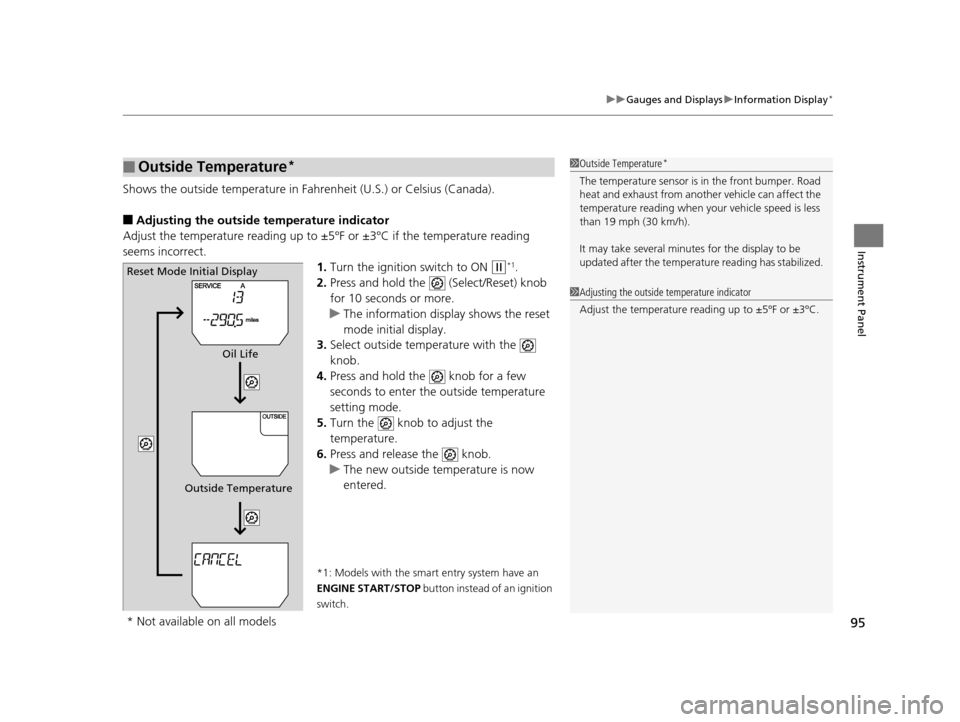
Shows the outside temperature in Fahr enheit (U.S.) or Celsius (Canada).
■Adjusting the outside temperature indicator
Adjust the temperature reading up to ±5ºF or ±3ºC if the temperature reading
seems incorrect.
1.Turn the ignition switch to ON
(w*1.
2. Press and hold the (Select/Reset) knob
for 10 seconds or more.
u The information disp lay shows the reset
mode initial display.
3. Select outside temperature with the
knob.
4. Press and hold the knob for a few
seconds to enter the outside temperature
setting mode.
5. Turn the knob to adjust the
temperature.
6. Press and release the knob.
u The new outside temperature is now
entered.
*1: Models with the smart entry system have an
ENGINE START/STOP button instead of an ignition
switch.
■Outside Temperature*1 Outside Temperature*
The temperature sensor is in the front bumper. Road
heat and exhaust from anothe r vehicle can affect the
temperature reading when your vehicle speed is less
than 19 mph (30 km/h).
It may take several minutes for the display to be
updated after the temperature reading has stabilized.
1 Adjusting the outside temperature indicator
Adjust the temperature reading up to ±5ºF or ±3ºC.
Reset Mode Initial Display
Oil Life
Outside Temperature
* Not available on all models
16 US ODYSSEY-31TK86500.book 95 ページ 2015年6月24日 水曜日 午後3時0分
Page 108 of 565
107
Controls
This chapter explains how to operate the various controls necessary for driving.
Clock.................................................. 108
Locking and Unlocking the Doors Key Types and Functions .................. 110
Low Smart Entry Remote Signal Strength*..... 112Locking/Unlocking the Doors from the Outside..... 113Locking/Unlocking the Doors from the Inside... 118Childproof Door Locks ..................... 119
Auto Door Locking/Unlocking .......... 120
Opening and Closing the Tailgate ... 121
Opening and Closing the Sliding Doors...... 127Security System
Immobilizer System .......................... 135
Security System Alarm
*.................... 135Opening and Closing the Windows ..... 138Opening and Closing the Moonroof*..... 141
Operating the Switches Around the
Steering Wheel Ignition Switch
*............................... 142
ENGINE START/STOP Button*........... 143
Ignition Switch and Power Mode Comparison ................................... 146
Turn Signals ..................................... 147
Light Switches.................................. 147
Fog Lights
*...................................... 150
Daytime Running Lights ................... 150
Wipers and Washers ........................ 151
Brightness Control ........................... 153
Rear Defogger/Heated Door Mirror* Button .. 154Driving Position Memory System*.... 155
Adjusting the Steering Wheel........... 157 Adjusting the Mirrors
....................... 158
Interior Rearview Mirror ................... 158
Power Door Mirrors ......................... 159
Adjusting the Seats Adjusting the Seat Positions ............. 161
Interior Lights/Interior Convenience Items ................................................ 176
Interior Lights .................................. 176
Interior Convenience Items .............. 178
Heating and Cooling
*
Using Vents, Heating and A/C.......... 194
Climate Control System*
Using Automatic Climate Control .... 198
Automatic Climate Control Sensors ... 203
* Not available on all models
16 US ODYSSEY-31TK86500.book 107 ページ 2015年6月24日 水曜日 午後3時0分
Page 109 of 565
108
Controls
Clock
Adjusting the Clock
You can adjust the time in the clock display with the ignition switch is in ON (w *1.
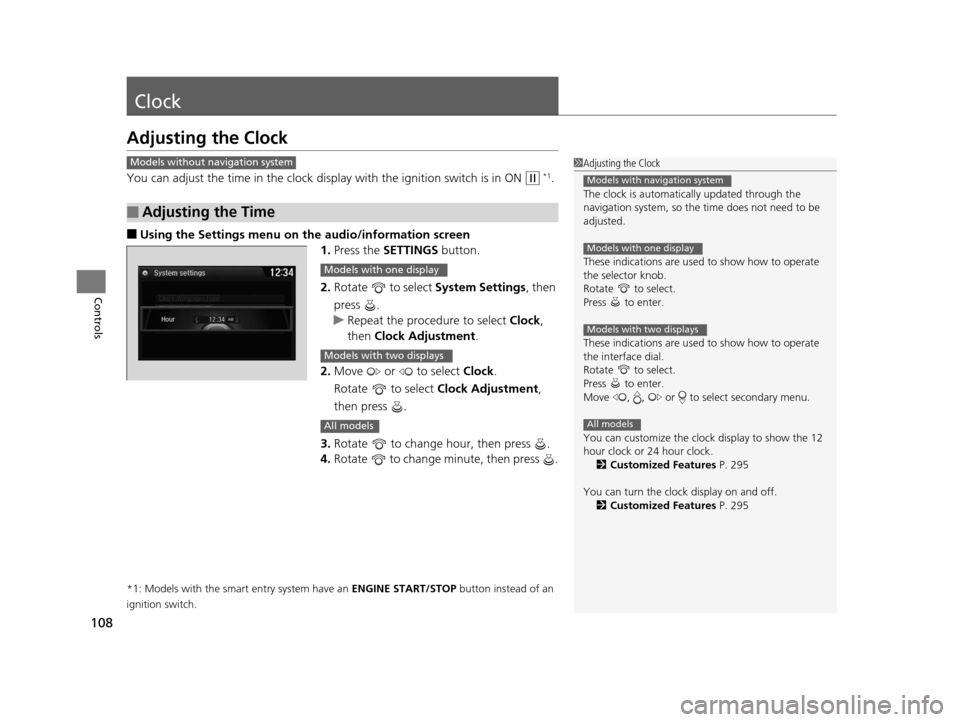
■Using the Settings menu on the audio/information screen1.Press the SETTINGS button.
2. Rotate to select System Settings, then
press .
u Repeat the procedure to select Clock,
then Clock Adjustment .
2. Move or to select Clock.
Rotate to select Clock Adjustment,
then press .
3. Rotate to change hour, then press .
4. Rotate to change minute, then press .
*1: Models with the smart entry system have an ENGINE START/STOP button instead of an
ignition switch.
■Adjusting the Time
1 Adjusting the Clock
The clock is automatica lly updated through the
navigation system, so the ti me does not need to be
adjusted.
These indications are used to show how to operate
the selector knob.
Rotate to select.
Press to enter.
These indications are used to show how to operate
the interface dial.
Rotate to select.
Press to enter.
Move , , or to select secondary menu.
You can customize the clock display to show the 12
hour clock or 24 hour clock.
2 Customized Features P. 295
You can turn the clock display on and off. 2 Customized Features P. 295
Models with navigation system
Models with one display
Models with two displays
All models
Models without navigation system
Models with one display
Models with two displays
All models
16 US ODYSSEY-31TK86500.book 108 ページ 2015年6月24日 水曜日 午後3時0分
Page 118 of 565
117
uuLocking and Unlocking the Doors uLocking/Unlocking the Doors from the Outside
Controls
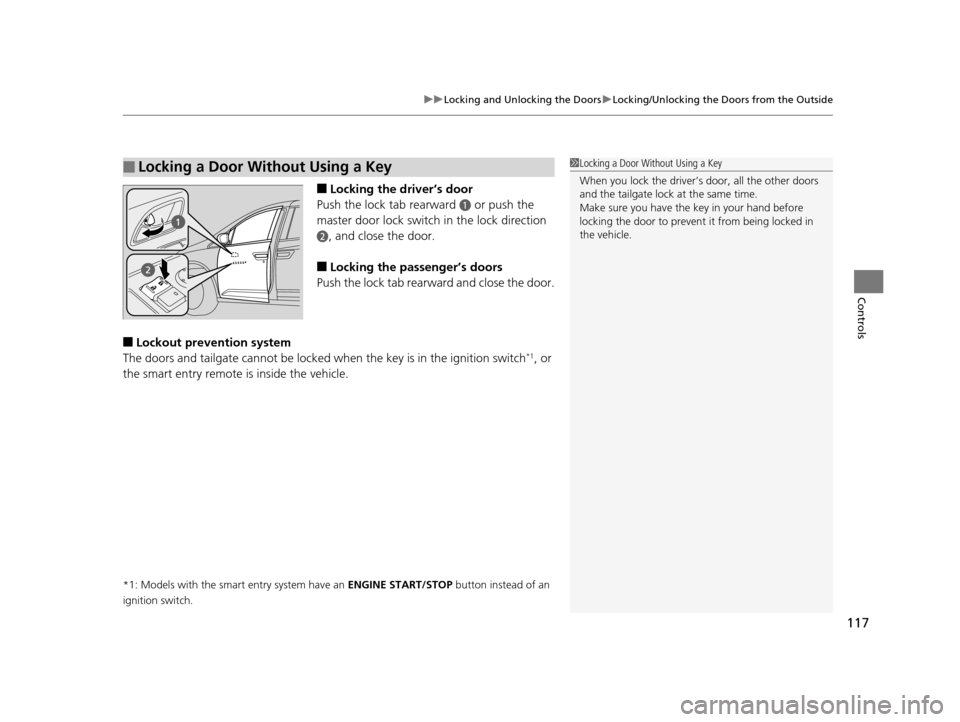
■Locking the driver’s door
Push the lock tab rearward
a or push the
master door lock switch in the lock direction
b, and close the door.
■Locking the passenger’s doors
Push the lock tab rearward and close the door.
■Lockout prevention system
The doors and tailgate cannot be locked when the key is in the ignition switch*1, or
the smart entry remote is inside the vehicle.
*1: Models with the smart entry system have an ENGINE START/STOP button instead of an
ignition switch.
■Locking a Door Without Using a Key1 Locking a Door Without Using a Key
When you lock the driver’s door, all the other doors
and the tailgate lock at the same time.
Make sure you have the key in your hand before
locking the door to prevent it from being locked in
the vehicle.
16 US ODYSSEY-31TK86500.book 117 ページ 2015年6月24日 水曜日 午後3時0分
Page 136 of 565
135Continued
Controls
Security System
Immobilizer System
The immobilizer system prevents a key that has not been pre-registered from
starting the engine. Each key contains electronic transmitters that use electronic
signals to verify the key.
Pay attention to the following when insert ing the key into the ignition switch or
pressing the ENGINE START/STOP button:
• Do not allow objects that emit strong ra dio waves near the ignition switch or the
ENGINE START/STOP button.
• Make sure the key is not covered by or touching a metal object.
• Do not bring a key from another vehicle's immobilizer system near the ignition
switch.
Security System Alarm*
The security system alarm activates when the tailgate, hood, or doors are opened
without the key, remote transmitter, or smart entry system*.
■When the security system alarm activates
The horn sounds intermittently, and all of the exterior lights flash.
■To deactivate the security system alarm
Unlock the vehicle using the key, remote transmitter, or smart entry system. The
system, along with the horn and flashing lights, is deactivated.
1 Immobilizer System
NOTICE
Leaving the ignition key in the vehicle can result in
theft or accidental move ment of the vehicle.
Always take the ignition key with you whenever you
leave the vehicle unattended.
Do not alter the system or add other devices to it.
Doing so may damage the system and make your
vehicle inoperable.
1 Security System Alarm*
The security alarm continues for a maximum of two
minutes until the security system deactivates.
* Not available on all models
16 US ODYSSEY-31TK86500.book 135 ページ 2015年6月24日 水曜日 午後3時0分
Page 137 of 565
uuSecurity System uSecurity System Alarm*
136
Controls
■Setting the security system alarm
The security system alarm automatically sets when the following conditions have
been met:
• The ignition switch is in LOCK
(0*1, and the key has been removed from the
ignition switch.
• The hood is closed.
• All doors and the tailgate are locked with the key, the remote transmitter or smart
entry system.
■When the security system alarm sets
The security system alarm indicator in the instrument panel blinks. When the
blinking interval changes after about 15 seconds, the security system alarm is set.
■To cancel the security system alarm
The security system alarm is canceled wh en the vehicle is unlocked using the key,
remote transmitter, or smart entry system, or the ignition switch is turned to ON
(w*1. The security system alarm indicator goes off at the same time.
*1: Models with the smart entry system have an ENGINE START/STOP button instead of an
ignition switch.
1 Security System Alarm*
Do not set the security system alarm when someone
is in the vehicle or a window is open. The system can
accidentally activate when:
•Unlocking the door with the lock tab.
•Opening the tailgate with the power tailgate
button on the dashboard.
If the battery goes dead after you have set the
security system alarm, the security alarm may go off
once the battery is re charged or replaced.
If this occurs, deactivate the security system alarm by
unlocking a door using the ke y or remote transmitter.
Do not attempt to alter th is system or add another
device to it.
Models with power tailgate
* Not available on all models
16 US ODYSSEY-31TK86500.book 136 ページ 2015年6月24日 水曜日 午後3時0分