warning light HONDA ODYSSEY 2016 RC1-RC2 / 5.G Quick Guide
[x] Cancel search | Manufacturer: HONDA, Model Year: 2016, Model line: ODYSSEY, Model: HONDA ODYSSEY 2016 RC1-RC2 / 5.GPages: 80, PDF Size: 16.28 MB
Page 51 of 80
94 || 95
DRIVING
DRIVING
INDEX
VOICE COMMAND
INDEX
CUSTOMER
INFORMATION
SPECIFICATIONS
MAINTENANCE
HANDLING THE UNEXPECTED
DRIVING
NAVIGATION
TABLE OF CONTENTS
VISUAL INDEX
SAFETY
INFORMATION
INSTRUMENT PANEL
VEHICLE
CONTROLS
AUDIO AND
CONNECTIVITY
BLUETOOTH®
HANDSFREELINK®
HONDALINK®
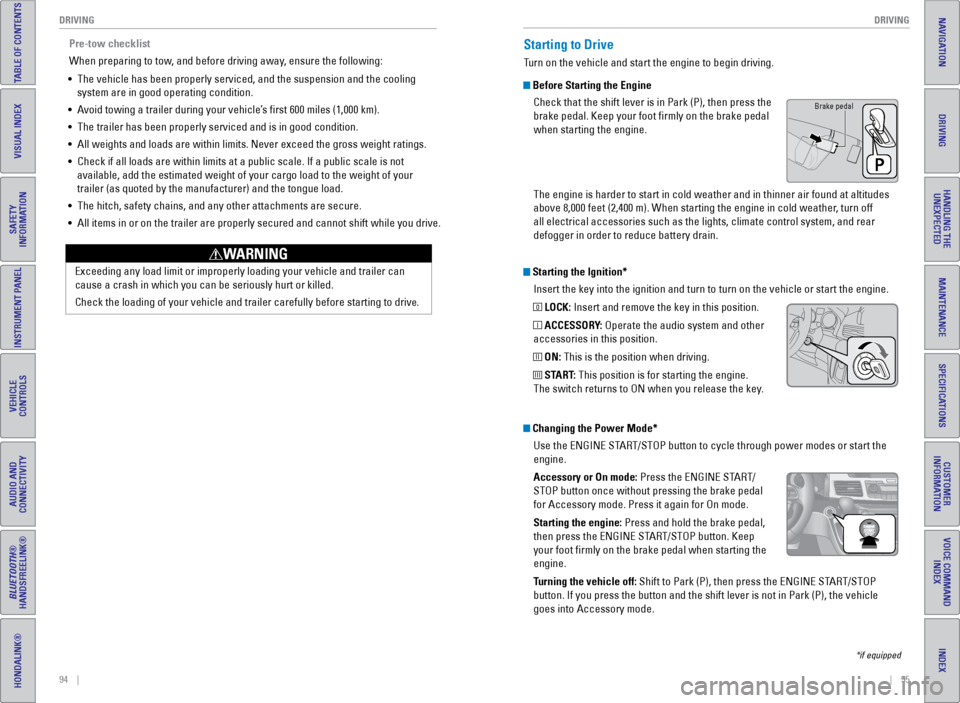
Starting the Ignition*
Insert the key into the ignition and turn to turn on the vehicle or star\
t the engine.
0 LOCK: Insert and remove the key in this position.
I ACCESSORY: Operate the audio system and other
accessories in this position.
II ON: This is the position when driving.
III START: This position is for starting the engine.
The switch returns to ON when you release the key.
Starting to Drive
Turn on the vehicle and start the engine to begin driving.
Before Starting the Engine
Check that the shift lever is in Park (P), then press the
brake pedal. Keep your foot firmly on the brake pedal
when starting the engine.
The engine is harder to start in cold weather and in thinner air found a\
t altitudes
above 8,000 feet (2,400 m). When starting the engine in cold weather, turn off
all electrical accessories such as the lights, climate control system, a\
nd rear
defogger in order to reduce battery drain.
*if equipped
Changing the Power Mode*Use the ENGINE START/STOP button to cycle through power modes or start the
engine.
Accessory or On mode: Press the ENGINE START/
STOP button once without pressing the brake pedal
for Accessory mode. Press it again for On mode.
Starting the engine: Press and hold the brake pedal,
then press the ENGINE START/STOP button. Keep
your foot firmly on the brake pedal when starting the
engine.
Turning the vehicle off: Shift to Park (P), then press the ENGINE START/STOP
button. If you press the button and the shift lever is not in Park (P)\
, the vehicle
goes into Accessory mode.
Brake pedal
Pre-tow checklist
When preparing to tow, and before driving away, ensure the following:
• The vehicle has been properly serviced, and the suspension and the cooli\
ng
system are in good operating condition.
• Avoid towing a trailer during your vehicle’s first 600 miles (1,000 km).
• The trailer has been properly serviced and is in good condition.
• All weights and loads are within limits. Never exceed the gross weight r\
atings.
• Check if all loads are within limits at a public scale. If a public scal\
e is not
available, add the estimated weight of your cargo load to the weight of \
your
trailer (as quoted by the manufacturer) and the tongue load.
• The hitch, safety chains, and any other attachments are secure.
• All items in or on the trailer are properly secured and cannot shift whi\
le you drive.
Exceeding any load limit or improperly loading your vehicle and trailer \
can
cause a crash in which you can be seriously hurt or killed.
Check the loading of your vehicle and trailer carefully before starting \
to driv
e.
WARNING
Page 54 of 80
100 || 101
DRIVING
DRIVING
INDEX
VOICE COMMAND
INDEX
CUSTOMER
INFORMATION
SPECIFICATIONS
MAINTENANCE
HANDLING THE UNEXPECTED
DRIVING
NAVIGATION
TABLE OF CONTENTS
VISUAL INDEX
SAFETY
INFORMATION
INSTRUMENT PANEL
VEHICLE
CONTROLS
AUDIO AND
CONNECTIVITY
BLUETOOTH®
HANDSFREELINK®
HONDALINK®
Forward Collision Warning (FCW)*
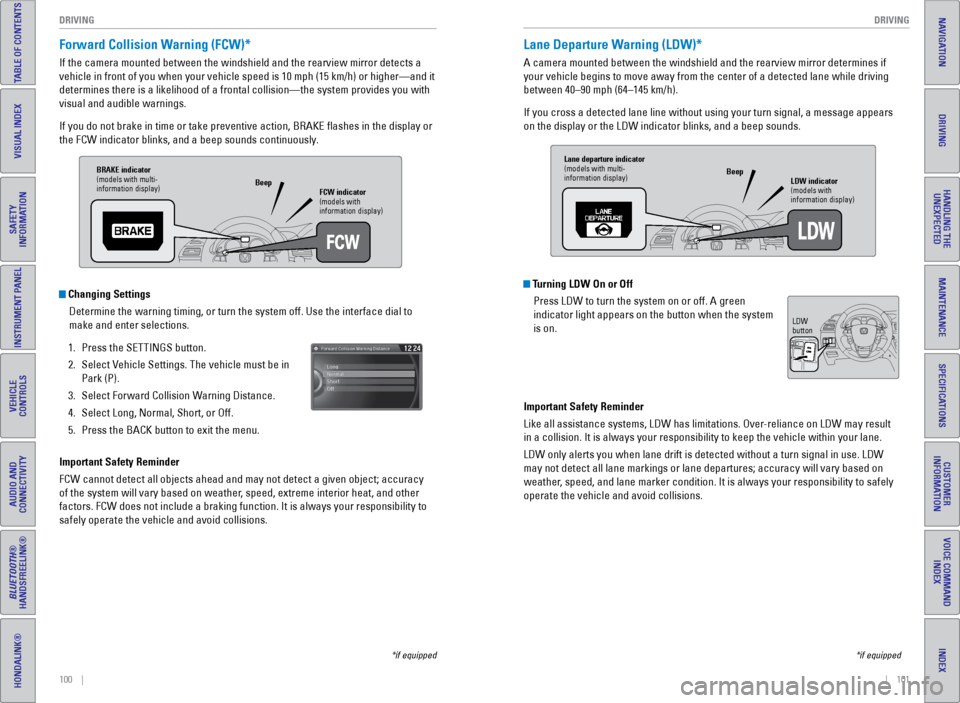
If the camera mounted between the windshield and the rearview mirror det\
ects a
vehicle in front of you when your vehicle speed is 10 mph (15 km/h) or\
higher—and it
determines there is a likelihood of a frontal collision—the system pr\
ovides you with
visual and audible warnings.
If you do not brake in time or take preventive action, BRAKE flashes i\
n the display or
the FCW indicator blinks, and a beep sounds continuously.
Changing Settings
Determine the warning timing, or turn the system off. Use the interface \
dial to
make and enter selections.
1. Press the SETTINGS button.
2. Select Vehicle Settings. The vehicle must be in
Park (P).
3. Select Forward Collision Warning Distance.
4. Select Long, Normal, Short, or Off.
5. Press the BACK button to exit the menu.
Important Safety Reminder
FCW cannot detect all objects ahead and may not detect a given object; a\
ccuracy
of the system will vary based on weather, speed, extreme interior heat, and other
factors. FCW does not include a braking function. It is always your resp\
onsibility to
safely operate the vehicle and avoid collisions.
*if equipped
BRAKE indicator
(models with multi-
information display) FCW indicator
(models with
information display)
Beep
Lane Departure Warning (LDW)*
A camera mounted between the windshield and the rearview mirror determin\
es if
your vehicle begins to move away from the center of a detected lane whil\
e driving
between 40–90 mph (64–145 km/h).
If you cross a detected lane line without using your turn signal, a mess\
age appears
on the display or the LDW indicator blinks, and a beep sounds.
Turning LDW On or Off
Press LDW to turn the system on or off. A green
indicator light appears on the button when the system
is on.
Important Safety Reminder
Like all assistance systems, LDW has limitations. Over-reliance on LDW may result
in a collision. It is always your responsibility to keep the vehicle wit\
hin your lane.
LDW only alerts you when lane drift is detected without a turn signal in\
use. LDW
may not detect all lane markings or lane departures; accuracy will vary \
based on
weather, speed, and lane marker condition. It is always your responsibility to safely
operate the vehicle and avoid collisions.
*if equipped
Lane departure indicator
(models with multi-
information display) LDW indicator
(models with
information display)
Beep
LDW
button
Page 55 of 80
102 || 103
DRIVING
DRIVING
INDEX
VOICE COMMAND
INDEX
CUSTOMER
INFORMATION
SPECIFICATIONS
MAINTENANCE
HANDLING THE UNEXPECTED
DRIVING
NAVIGATION
TABLE OF CONTENTS
VISUAL INDEX
SAFETY
INFORMATION
INSTRUMENT PANEL
VEHICLE
CONTROLS
AUDIO AND
CONNECTIVITY
BLUETOOTH®
HANDSFREELINK®
HONDALINK®
Blind Spot Information (BSI) System*
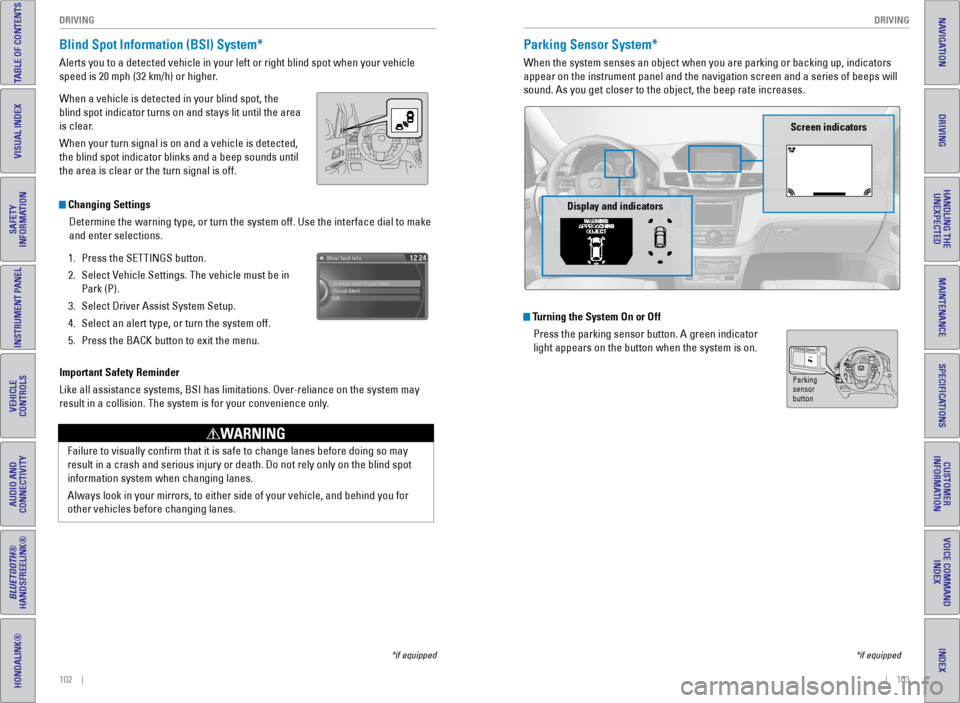
Alerts you to a detected vehicle in your left or right blind spot when y\
our vehicle
speed is 20 mph (32 km/h) or higher.
When a vehicle is detected in your blind spot, the
blind spot indicator turns on and stays lit until the area
is clear.
When your turn signal is on and a vehicle is detected,
the blind spot indicator blinks and a beep sounds until
the area is clear or the turn signal is off.
Important Safety Reminder
Like all assistance systems, BSI has limitations. Over-reliance on the system may
result in a collision. The system is for your convenience only.
Failure to visually confirm that it is safe to change lanes before doi\
ng so may
result in a crash and serious injury or death. Do not rely only on the b\
lind spot
information system when changing lanes.
Always look in your mirrors, to either side of your vehicle, and behind \
you for
other vehicles before changing lanes.
WARNING
Changing SettingsDetermine the warning type, or turn the system off. Use the interface di\
al to make
and enter selections.
1. Press the SETTINGS button.
2. Select Vehicle Settings. The vehicle must be in
Park (P).
3. Select Driver Assist System Setup.
4. Select an alert type, or turn the system off.
5. Press the BACK button to exit the menu.
*if equipped
Parking Sensor System*
When the system senses an object when you are parking or backing up, ind\
icators
appear on the instrument panel and the navigation screen and a series of\
beeps will
sound. As you get closer to the object, the beep rate increases.
Turning the System On or Off
Press the parking sensor button. A green indicator
light appears on the button when the system is on.
*if equipped
Parking
sensor
button
Screen indicators
Display and indicators
Page 58 of 80
108 || 109
HANDLING THE UNEXPECTED
HANDLING THE UNEXPECTED
INDEX
VOICE COMMAND
INDEX
CUSTOMER
INFORMATION
SPECIFICATIONS
MAINTENANCE
HANDLING THE UNEXPECTED
DRIVING
NAVIGATION
TABLE OF CONTENTS
VISUAL INDEX
SAFETY
INFORMATION
INSTRUMENT PANEL
VEHICLE
CONTROLS
AUDIO AND
CONNECTIVITY
BLUETOOTH®
HANDSFREELINK®
HONDALINK®
After the Engine Starts
Once your vehicle’s engine has started, remove the jumper cables in the following
order:
1. Disconnect the jumper cable from your engine hanger.
2. Disconnect the other end of the jumper cable from the assisting vehicle’\
s (-)
terminal.
3. Disconnect the jumper cable from your vehicle’s (+) terminal.
4. Disconnect the other end of the jumper cable from the assisting vehicle’\
s (+)
terminal.
5. Have your vehicle inspected by a nearby service station or a dealer.
Overheating
If the temperature gauge needle is at the H mark, the engine suddenly lo\
ses power,
or steam or spray comes out from under the hood, your engine is overheat\
ing.
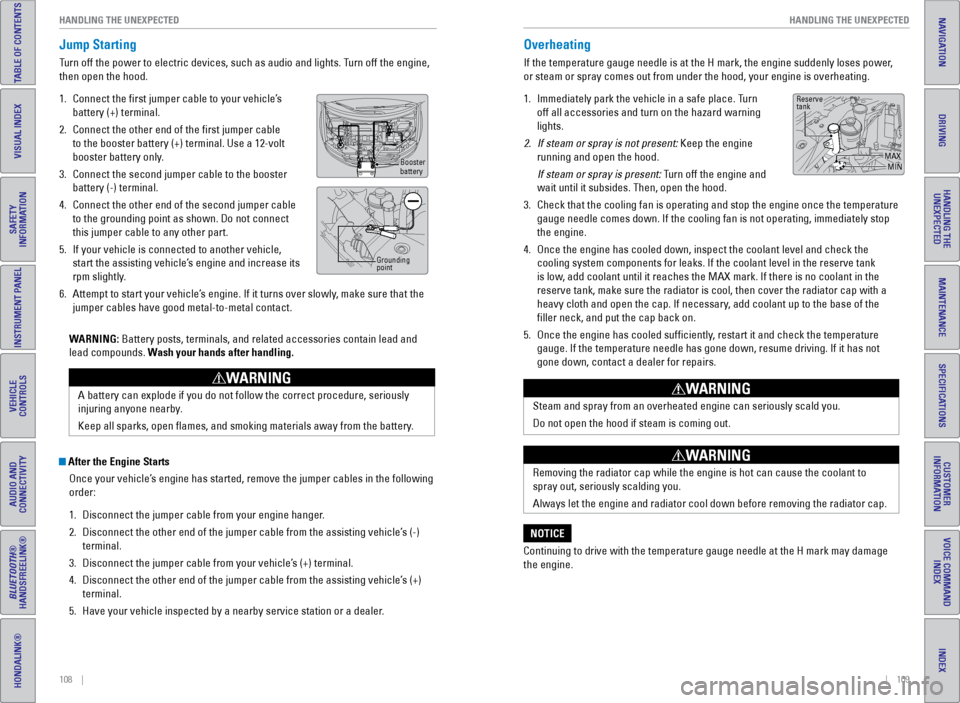
1. Immediately park the vehicle in a safe place. Turn
off all accessories and turn on the hazard warning
lights.
2. If steam or spray is not present: Keep the engine
running and open the hood.
If steam or spray is present: Turn off the engine and
wait until it subsides. Then, open the hood.
3. Check that the cooling fan is operating and stop the engine once the tem\
perature
gauge needle comes down. If the cooling fan is not operating, immediatel\
y stop
the engine.
4. Once the engine has cooled down, inspect the coolant level and check the\
cooling system components for leaks. If the coolant level in the reserve\
tank
is low, add coolant until it reaches the MAX mark. If there is no coolant in t\
he
reserve tank, make sure the radiator is cool, then cover the radiator ca\
p with a
heavy cloth and open the cap. If necessary, add coolant up to the base of the
filler neck, and put the cap back on.
5. Once the engine has cooled sufficiently, restart it and check the temperature
gauge. If the temperature needle has gone down, resume driving. If it ha\
s not
gone down, contact a dealer for repairs.
Steam and spray from an overheated engine can seriously scald you.
Do not open the hood if steam is coming out.
WARNING
Removing the radiator cap while the engine is hot can cause the coolant \
to
spray out, seriously scalding you.
Always let the engine and radiator cool down before removing the radiato\
r cap.
WARNING
Continuing to drive with the temperature gauge needle at the H mark may \
damage
the engine.
NOTICE
Reserve
tank
MAXMIN
Jump Starting
Turn off the power to electric devices, such as audio and lights. Turn off the engine,
then open the hood.
1. Connect the first jumper cable to your vehicle’s
battery (+) terminal.
2. Connect the other end of the first jumper cable
to the booster battery (+) terminal. Use a 12-volt
booster battery only.
3. Connect the second jumper cable to the booster
battery (-) terminal.
4. Connect the other end of the second jumper cable
to the grounding point as shown. Do not connect
this jumper cable to any other part.
5. If your vehicle is connected to another vehicle,
start the assisting vehicle’s engine and increase its
rpm slightly.
6. Attempt to start your vehicle’s engine. If it turns over slowly, make sure that the
jumper cables have good metal-to-metal contact.
WARNING: Battery posts, terminals, and related accessories contain lead and
lead compounds. Wash your hands after handling.
A battery can explode if you do not follow the correct procedure, seriou\
sly
injuring anyone nearby.
Keep all sparks, open flames, and smoking materials away from the batt\
ery.
WARNING
Booster
battery
Grounding
point
Page 59 of 80
110 || 111
HANDLING THE UNEXPECTED
HANDLING THE UNEXPECTED
INDEX
VOICE COMMAND
INDEX
CUSTOMER
INFORMATION
SPECIFICATIONS
MAINTENANCE
HANDLING THE UNEXPECTED
DRIVING
NAVIGATION
TABLE OF CONTENTS
VISUAL INDEX
SAFETY
INFORMATION
INSTRUMENT PANEL
VEHICLE
CONTROLS
AUDIO AND
CONNECTIVITY
BLUETOOTH®
HANDSFREELINK®
HONDALINK®
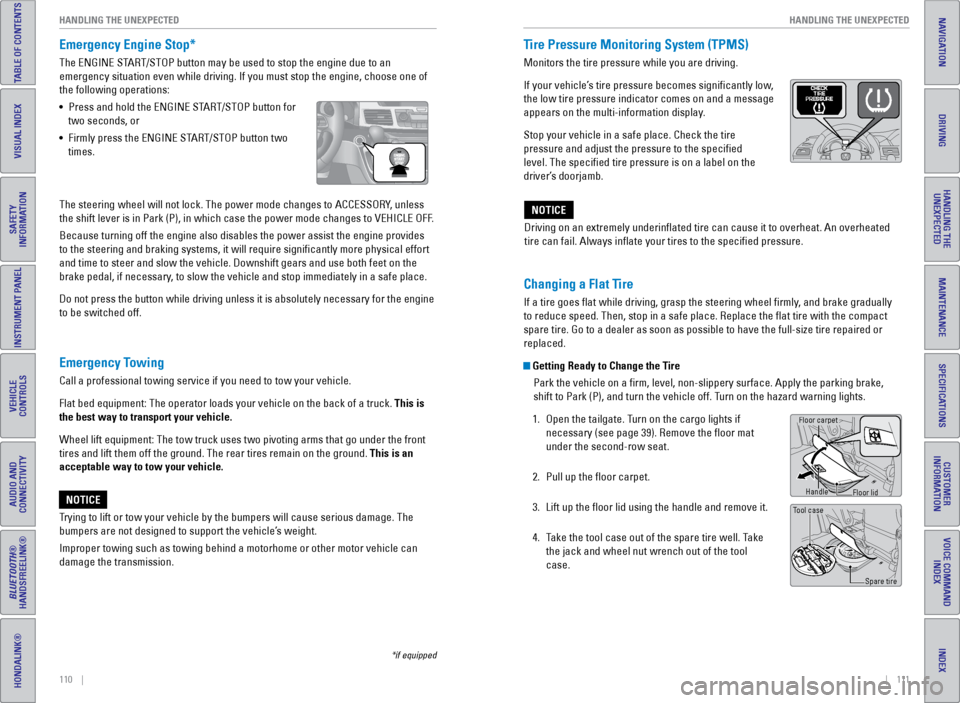
Emergency Engine Stop*
The ENGINE START/STOP button may be used to stop the engine due to an
emergency situation even while driving. If you must stop the engine, cho\
ose one of
the following operations:
• Press and hold the ENGINE START/STOP button for
two seconds, or
• Firmly press the ENGINE START/STOP button two
times.
Emergency Towing
Call a professional towing service if you need to tow your vehicle.
Flat bed equipment: The operator loads your vehicle on the back of a tru\
ck. This is
the best way to transport your vehicle.
Wheel lift equipment: The tow truck uses two pivoting arms that go under\
the front
tires and lift them off the ground. The rear tires remain on the ground.\
This is an
acceptable way to tow your vehicle.
Trying to lift or tow your vehicle by the bumpers will cause serious dama\
ge. The
bumpers are not designed to support the vehicle’s weight.
Improper towing such as towing behind a motorhome or other motor vehicle\
can
damage the transmission.
NOTICE
*if equipped
The steering wheel will not lock. The power mode changes to ACCESSORY, unless
the shift lever is in Park (P), in which case the power mode changes t\
o VEHICLE OFF.
Because turning off the engine also disables the power assist the engine\
provides
to the steering and braking systems, it will require significantly mor\
e physical effort
and time to steer and slow the vehicle. Downshift gears and use both fee\
t on the
brake pedal, if necessary, to slow the vehicle and stop immediately in a safe place.
Do not press the button while driving unless it is absolutely necessary \
for the engine
to be switched off. Driving on an extremely underinflated tire can cause it to overheat. A\
n overheated
tire can fail. Always inflate your tires to the specified pressure.NOTICE
Tire Pressure Monitoring System (TPMS)
Monitors the tire pressure while you are driving.
If your vehicle’s tire pressure becomes significantly low,
the low tire pressure indicator comes on and a message
appears on the multi-information display.
Stop your vehicle in a safe place. Check the tire
pressure and adjust the pressure to the specified
level. The specified tire pressure is on a label on the
driver’s doorjamb.
Changing a Flat Tire
If a tire goes flat while driving, grasp the steering wheel firmly, and brake gradually
to reduce speed. Then, stop in a safe place. Replace the flat tire wit\
h the compact
spare tire. Go to a dealer as soon as possible to have the full-size tir\
e repaired or
replaced.
Getting Ready to Change the Tire
Park the vehicle on a firm, level, non-slippery surface. Apply the par\
king brake,
shift to Park (P), and turn the vehicle off. Turn on the hazard warning lights.
1. Open the tailgate. Turn on the cargo lights if
necessary (see page 39). Remove the floor mat
under the second-row seat.
2. Pull up the floor carpet.
3. Lift up the floor lid using the handle and remove it.
4. Take the tool case out of the spare tire well. Take
the jack and wheel nut wrench out of the tool
case.
Tool case
Spare tire
Floor carpet
Handle
Floor lid
Page 60 of 80
112 || 113
HANDLING THE UNEXPECTED
HANDLING THE UNEXPECTED
INDEX
VOICE COMMAND
INDEX
CUSTOMER
INFORMATION
SPECIFICATIONS
MAINTENANCE
HANDLING THE UNEXPECTED
DRIVING
NAVIGATION
TABLE OF CONTENTS
VISUAL INDEX
SAFETY
INFORMATION
INSTRUMENT PANEL
VEHICLE
CONTROLS
AUDIO AND
CONNECTIVITY
BLUETOOTH®
HANDSFREELINK®
HONDALINK®
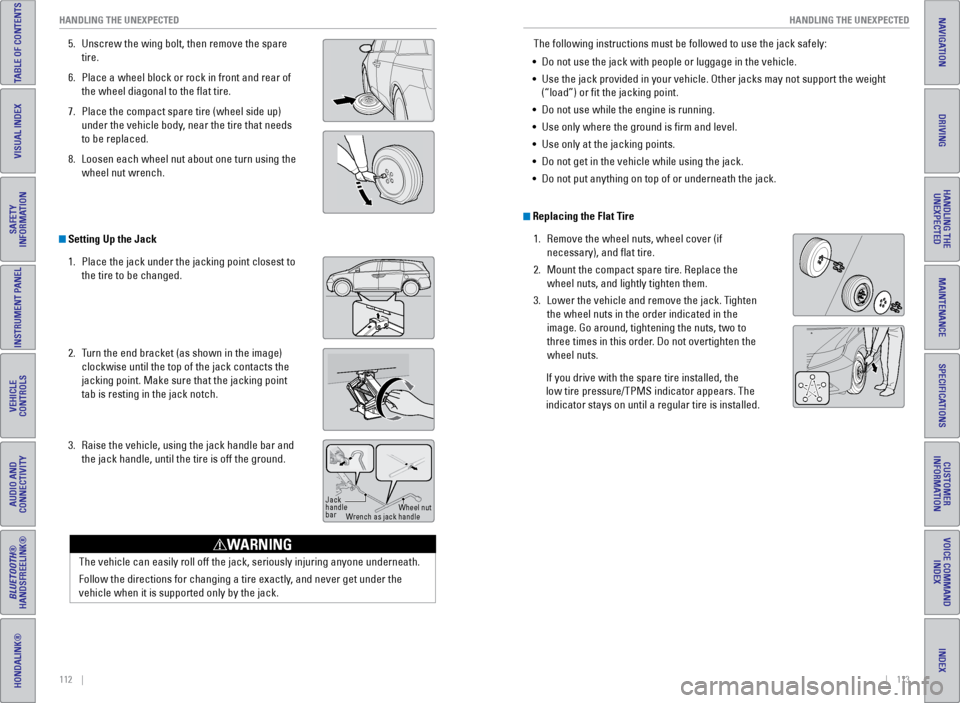
5. Unscrew the wing bolt, then remove the spare
tire.
6. Place a wheel block or rock in front and rear of
the wheel diagonal to the flat tire.
7. Place the compact spare tire (wheel side up)
under the vehicle body, near the tire that needs
to be replaced.
8. Loosen each wheel nut about one turn using the
wheel nut wrench.
Setting Up the Jack
1. Place the jack under the jacking point closest to
the tire to be changed.
2. Turn the end bracket (as shown in the image)
clockwise until the top of the jack contacts the
jacking point. Make sure that the jacking point
tab is resting in the jack notch.
3. Raise the vehicle, using the jack handle bar and
the jack handle, until the tire is off the ground.
Jack
handle
bar Wheel nut
Wrench as jack handle
The vehicle can easily roll off the jack, seriously injuring anyone unde\
rneath.
Follow the directions for changing a tire exactly, and never get under the
vehicle when it is supported only by the jack.
WARNING
The following instructions must be followed to use the jack safely:
• Do not use the jack with people or luggage in the vehicle.
• Use the jack provided in your vehicle. Other jacks may not support the w\
eight
(“load”) or fit the jacking point.
• Do not use while the engine is running.
• Use only where the ground is firm and level.
• Use only at the jacking points.
• Do not get in the vehicle while using the jack.
• Do not put anything on top of or underneath the jack.
Replacing the Flat Tire
1. Remove the wheel nuts, wheel cover (if
necessary), and flat tire.
2. Mount the compact spare tire. Replace the
wheel nuts, and lightly tighten them.
3. Lower the vehicle and remove the jack. Tighten
the wheel nuts in the order indicated in the
image. Go around, tightening the nuts, two to
three times in this order. Do not overtighten the
wheel nuts.
If you drive with the spare tire installed, the
low tire pressure/TPMS indicator appears. The
indicator stays on until a regular tire is installed.
Page 61 of 80
114 || 115
HANDLING THE UNEXPECTED
HANDLING THE UNEXPECTED
INDEX
VOICE COMMAND
INDEX
CUSTOMER
INFORMATION
SPECIFICATIONS
MAINTENANCE
HANDLING THE UNEXPECTED
DRIVING
NAVIGATION
TABLE OF CONTENTS
VISUAL INDEX
SAFETY
INFORMATION
INSTRUMENT PANEL
VEHICLE
CONTROLS
AUDIO AND
CONNECTIVITY
BLUETOOTH®
HANDSFREELINK®
HONDALINK®
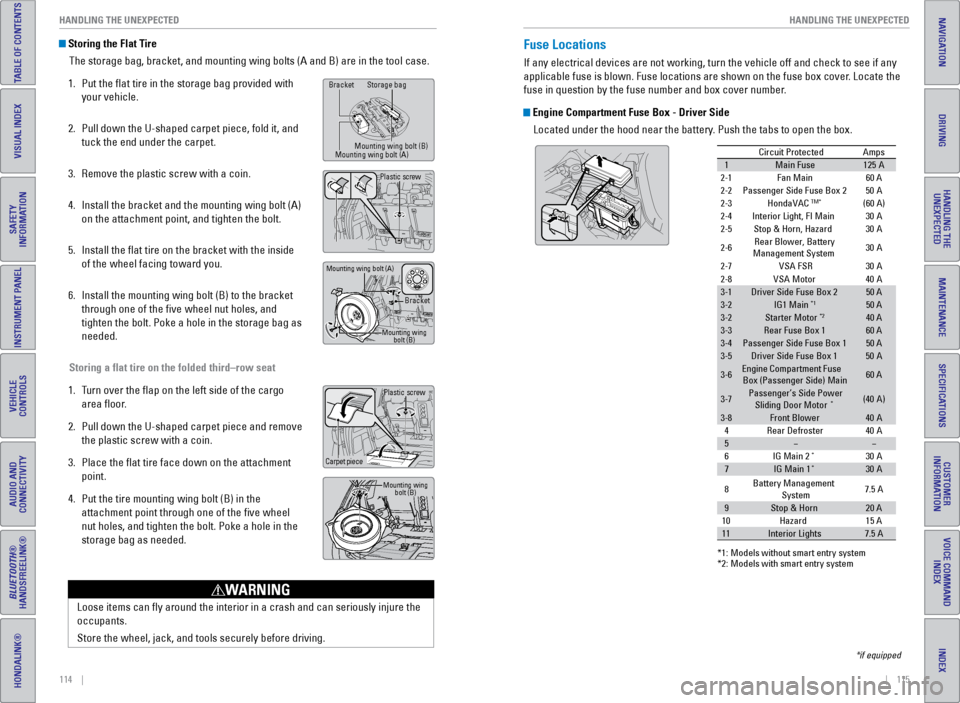
Storing the Flat Tire
The storage bag, bracket, and mounting wing bolts (A and B) are in the\
tool case.
1. Put the flat tire in the storage bag provided with
your vehicle.
2. Pull down the U-shaped carpet piece, fold it, and
tuck the end under the carpet.
3. Remove the plastic screw with a coin.
4. Install the bracket and the mounting wing bolt (A)
on the attachment point, and tighten the bolt.
5. Install the flat tire on the bracket with the inside
of the wheel facing toward you.
6. Install the mounting wing bolt (B) to the bracket
through one of the five wheel nut holes, and
tighten the bolt. Poke a hole in the storage bag as
needed.
Storing a flat tire on the folded third–row seat
1. Turn over the flap on the left side of the cargo
area floor.
2. Pull down the U-shaped carpet piece and remove
the plastic screw with a coin.
3. Place the flat tire face down on the attachment
point.
4. Put the tire mounting wing bolt (B) in the
attachment point through one of the five wheel
nut holes, and tighten the bolt. Poke a hole in the
storage bag as needed.
Loose items can fly around the interior in a crash and can seriously i\
njure the
occupants.
Store the wheel, jack, and tools securely before driving.
WARNING
Plastic screw
Carpet piece
Mounting wing bolt (B)
Bracket Storage bag
Mounting wing bolt (B)
Mounting wing bolt (A)
Bracket
Mounting wing bolt (B)
Mounting wing bolt (A)
Plastic screw
Fuse Locations
If any electrical devices are not working, turn the vehicle off and chec\
k to see if any
applicable fuse is blown. Fuse locations are shown on the fuse box cover\
. Locate the
fuse in question by the fuse number and box cover number.
Engine Compartment Fuse Box - Driver Side
Located under the hood near the battery. Push the tabs to open the box.
*if equipped
Circuit ProtectedAmps
1Main Fuse12 5A
2-1Fan Main 60 A
2-2Passenger Side Fuse Box 2
2-3HondaVACTM*(60 A)
2-4Interior Light, FI Main
2-5Stop & Horn, Hazard
2-6Rear Blower, Battery
Ma nagement System 30
A
30
A
30
A
2-7VSA FSR 30A
50
A
2-8VSA Moto r
3-1Driver Side Fuse Box 250 A
3-2IG1 Main*150 A
3-2Starter Moto r*240 A
3-3Rear Fuse Box 160 A
3-4Passenger Side Fuse Box 150 A
3-5Driver Side Fuse Box 150A
3-6Engine Compartment Fuse
Box (Passenger Side) Main60 A
3-7Passenger’s Side Power
Sliding Door Moto r*(40A )
3-8Front Blower40A
40 A
40
A
4Rear Defroster
5
6I G Main 2*30A
7IG Main 1*30A
*1: M odels without smart entry syste m*2: Models with smart entry system
8 Battery Management
System 7.5
A
9Stop & Hor n20 A
15 A
10 Hazard
11Interior Lights7.5 A
Page 64 of 80
120 || 121
MAINTENANCE
HANDLING THE UNEXPECTED
INDEX
VOICE COMMAND
INDEX
CUSTOMER
INFORMATION
SPECIFICATIONS
MAINTENANCE
HANDLING THE UNEXPECTED
DRIVING
NAVIGATION
TABLE OF CONTENTS
VISUAL INDEX
SAFETY
INFORMATION
INSTRUMENT PANEL
VEHICLE
CONTROLS
AUDIO AND
CONNECTIVITY
BLUETOOTH®
HANDSFREELINK®
HONDALINK®
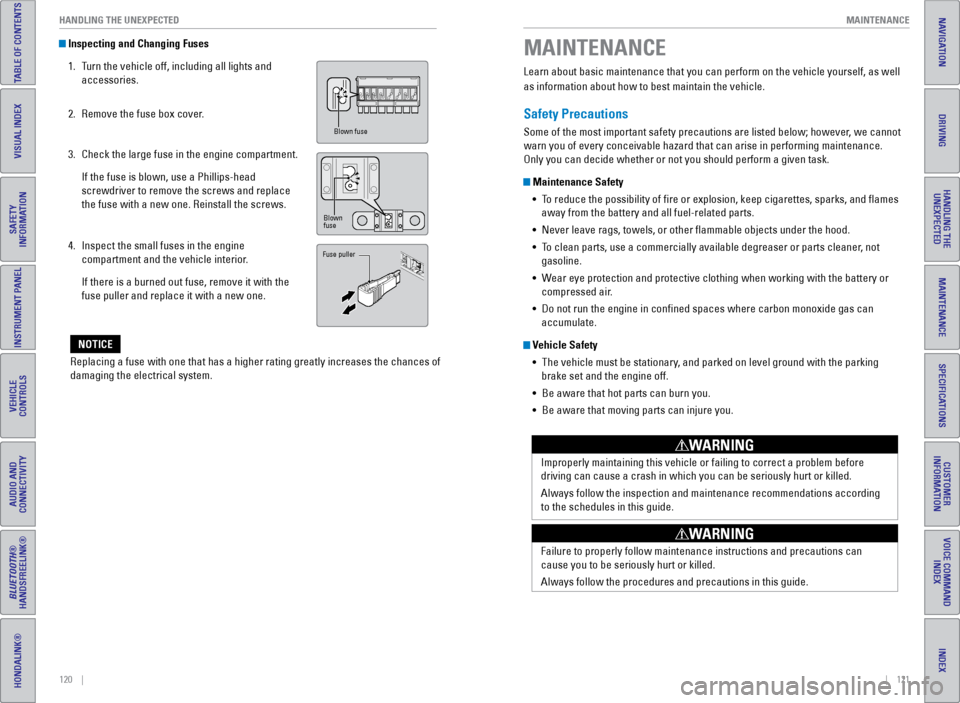
Inspecting and Changing Fuses
1. Turn the vehicle off, including all lights and
accessories.
2. Remove the fuse box cover.
3. Check the large fuse in the engine compartment.
If the fuse is blown, use a Phillips-head
screwdriver to remove the screws and replace
the fuse with a new one. Reinstall the screws.
4. Inspect the small fuses in the engine
compartment and the vehicle interior.
If there is a burned out fuse, remove it with the
fuse puller and replace it with a new one.
Replacing a fuse with one that has a higher rating greatly increases the\
chances of
damaging the electrical system.
NOTICE
Blown fuse
Blown
fuse
Fuse puller
Learn about basic maintenance that you can perform on the vehicle yourse\
lf, as well
as information about how to best maintain the vehicle.
Safety Precautions
Some of the most important safety precautions are listed below; however, we cannot
warn you of every conceivable hazard that can arise in performing mainte\
nance.
Only you can decide whether or not you should perform a given task.
Maintenance Safety • To reduce the possibility of fire or explosion, keep cigarettes, sparks\
, and flames
away from the battery and all fuel-related parts.
• Never leave rags, towels, or other flammable objects under the hood.
• To clean parts, use a commercially available degreaser or parts cleaner, not
gasoline.
• Wear eye protection and protective clothing when working with the battery\
or
compressed air.
• Do not run the engine in confined spaces where carbon monoxide gas can\
accumulate.
Vehicle Safety
• The vehicle must be stationary, and parked on level ground with the parking
brake set and the engine off.
• Be aware that hot parts can burn you.
• Be aware that moving parts can injure you.
Improperly maintaining this vehicle or failing to correct a problem befo\
re
driving can cause a crash in which you can be seriously hurt or killed. \
Always follow the inspection and maintenance recommendations according
to the schedules in this guide.
WARNING
Failure to properly follow maintenance instructions and precautions can \
cause you to be seriously hurt or killed.
Always follow the procedures and precautions in this guide.
WARNING
MAINTENANCE
Page 79 of 80
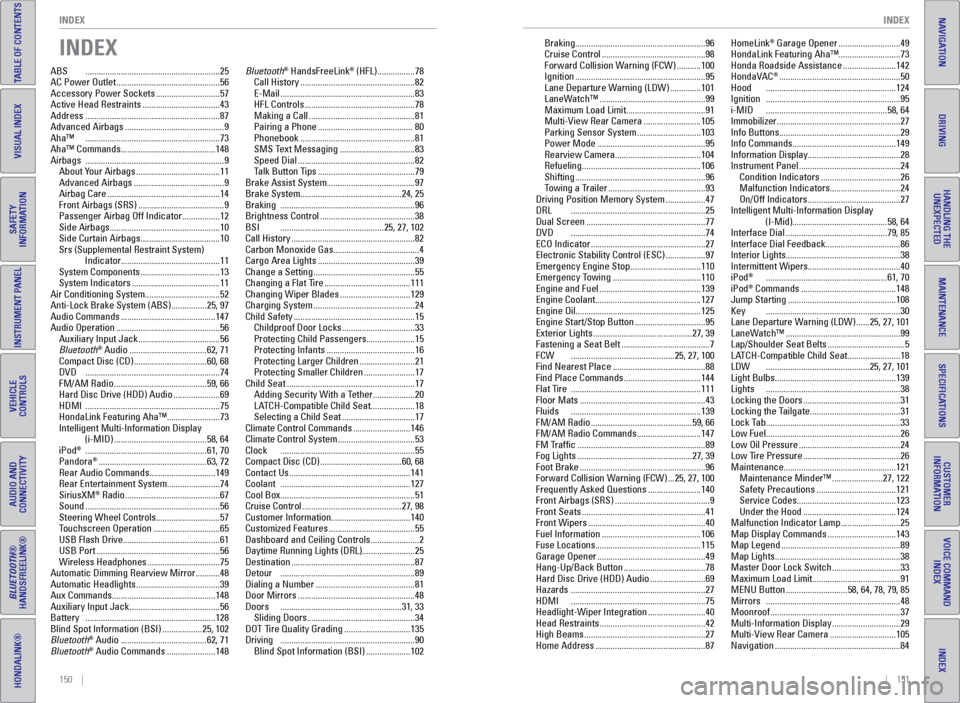
150 || 151
INDEX
INDEX
INDEX
VOICE COMMAND
INDEX
CUSTOMER
INFORMATION
SPECIFICATIONS
MAINTENANCE
HANDLING THE UNEXPECTED
DRIVING
NAVIGATION
TABLE OF CONTENTS
VISUAL INDEX
SAFETY
INFORMATION
INSTRUMENT PANEL
VEHICLE
CONTROLS
AUDIO AND
CONNECTIVITY
BLUETOOTH®
HANDSFREELINK®
HONDALINK®
INDEX
ABS ............................................................. 25
AC Power Outlet ............................................... 56
Accessory Power Sockets ............................. 57
Active Head Restraints ................................... 43
Address ............................................................. 87
Advanced Airbags ............................................. 9
Aha™ ............................................................. 73
Aha™ Commands ........................................... 148
Airbags ............................................................... 9
About Your Airbags ...................................... 11
Advanced Airbags ......................................... 9
Airbag Care ................................................... 14
Front Airbags (SRS) ....................................... 9
Passenger Airbag Off Indicator ................. 12
Side Airbags .................................................. 10
Side Curtain Airbags ....................................10
Srs (Supplemental Restraint System) Indicator ............................................. 11
System Components ....................................13
System Indicators ........................................ 11
Air Conditioning System ..................................52
Anti-Lock Brake System (ABS) ................ 25, 97
Audio Commands ........................................... 147
Audio Operation ............................................... 56
Auxiliary Input Jack ..................................... 56
Bluetooth
® Audio ................................... 62, 71
Compact Disc (CD) .................................60, 68
DVD ............................................................. 74
FM/AM Radio .......................................... 59, 66
Hard Disc Drive (HDD) Audio ..................... 69
HDMI ............................................................. 75
HondaLink Featuring Aha™ ........................ 73
Intelligent Multi-Information Display (i-MID) .......................................... 58, 64
iPod
® ....................................................... 61, 70
Pandora® ................................................. 63, 72
Rear Audio Commands ..............................149
Rear Entertainment System ........................ 74
SiriusXM
® Radio ........................................... 67
Sound ............................................................. 56
Steering Wheel Controls ............................. 57
Touchscreen Operation .............................. 65
USB Flash Drive ............................................ 61
USB Port ........................................................ 56
Wireless Headphones .................................75
Automatic Dimming Rearview Mirror ........... 48
Automatic Headlights ......................................39
Aux Commands ............................................... 148
Auxiliary Input Jack ......................................... 56
Battery ........................................................... 128
Blind Spot Information (BSI) .................. 25, 102
Bluetooth
® Audio ....................................... 62, 71
Bluetooth® Audio Commands ...................... 148Bluetooth
® HandsFreeLink® (HFL)
................. 78
Call History .................................................... 82
E-Mail ............................................................. 83
HFL Controls .................................................. 78
Making a Call ................................................ 81
Pairing a Phone ........................................... 80
Phonebook .................................................... 81
SMS Text Messaging ..................................83
Speed Dial ..................................................... 82
Talk Button Tips ............................................ 79
Brake Assist System ........................................ 97
Brake System .............................................. 24, 25
Braking ............................................................. 96
Brightness Control ........................................... 38
BSI ............................................... 25, 27, 102
Call History ........................................................ 82
Carbon Monoxide Gas .......................................4
Cargo Area Lights ............................................ 39
Change a Setting .............................................. 55
Changing a Flat Tire ....................................... 111
Changing Wiper Blades ................................129
Charging System .............................................. 24
Child Safety ....................................................... 15
Childproof Door Locks .................................33
Protecting Child Passengers ...................... 15
Protecting Infants ........................................ 16
Protecting Larger Children ......................... 21
Protecting Smaller Children ....................... 17
Child Seat .......................................................... 17
Adding Security With a Tether ................... 20
LATCH-Compatible Child Seat .................... 18
Selecting a Child Seat .................................17
Climate Control Commands .......................... 146
Climate Control System ...................................53
Clock ............................................................. 55
Compact Disc (CD) ..................................... 60, 68
Contact Us ....................................................... 141
Coolant ........................................................... 127
Cool Box ............................................................. 51
Cruise Control ............................................. 27, 98
Customer Information ....................................140
Customized Features ....................................... 55
Dashboard and Ceiling Controls ...................... 2
Daytime Running Lights (DRL) ........................25
Destination ........................................................ 87
Detour ............................................................. 89
Dialing a Number ............................................. 81
Door Mirrors ..................................................... 48
Doors ....................................................... 31, 33
Sliding Doors ................................................. 34
DOT Tire Quality Grading ..............................135
Driving ............................................................. 90
Blind Spot Information (BSI) .................... 102Braking ...........................................................
96
Cruise Control ............................................... 98
Forward Collision Warning (FCW) ........... 100
Ignition ........................................................... 95
Lane Departure Warning (LDW) .............. 101
LaneWatch™ ................................................ 99
Maximum Load Limit .................................... 91
Multi-View Rear Camera .......................... 105
Parking Sensor System .............................103
Power Mode ................................................. 95
Rearview Camera ....................................... 104
Refueling ...................................................... 106
Shifting ........................................................... 96
Towing a Trailer ............................................ 93
Driving Position Memory System .................. 47
DRL ............................................................. 25
Dual Screen ...................................................... 77
DVD ............................................................. 74
ECO Indicator .................................................... 27
Electronic Stability Control (ESC) .................. 97
Emergency Engine Stop ................................ 110
Emergency Towing ........................................ 110
Engine and Fuel .............................................. 139
Engine Coolant................................................ 127
Engine Oil ......................................................... 125
Engine Start/Stop Button ................................ 95
Exterior Lights ............................................. 27, 39
Fastening a Seat Belt ........................................ 7
FCW ............................................... 25, 27, 100
Find Nearest Place .......................................... 88
Find Place Commands ...................................144
Flat Tire ........................................................... 111
Floor Mats ......................................................... 43
Fluids ........................................................... 139
FM/AM Radio .............................................. 59, 66
FM/AM Radio Commands ............................. 147
FM Traffic .......................................................... 89
Fog Lights .................................................... 27, 39
Foot Brake ......................................................... 96
Forward Collision Warning (FCW) ... 25, 27, 100
Frequently Asked Questions ........................ 140
Front Airbags (SRS) ........................................... 9
Front Seats ........................................................ 41
Front Wipers ..................................................... 40
Fuel Information ............................................. 106
Fuse Locations ................................................ 115
Garage Opener ................................................. 49
Hang-Up/Back Button .....................................78
Hard Disc Drive (HDD) Audio ......................... 69
Hazards ............................................................. 27
HDMI ............................................................. 75
Headlight-Wiper Integration .......................... 40
Head Restraints ................................................ 42
High Beams ....................................................... 27
Home Address .................................................. 87HomeLink
® Garage Opener ............................
49
HondaLink Featuring Aha™ ............................73
Honda Roadside Assistance ........................ 142
HondaVAC
® ....................................................... 50
Hood ........................................................... 124
Ignition ............................................................. 95
i-MID ....................................................... 58, 64
Immobilizer ........................................................ 27
Info Buttons ....................................................... 29
Info Commands ............................................... 149
Information Display .......................................... 28
Instrument Panel .............................................. 24
Condition Indicators ....................................26
Malfunction Indicators ................................ 24
On/Off Indicators .......................................... 27
Intelligent Multi-Information Display (I-Mid)........................................... 58, 64
Interface Dial .............................................. 79, 85
Interface Dial Feedback ..................................86
Interior Lights .................................................... 38
Intermittent Wipers .......................................... 40
iPod
® ....................................................... 61, 70
iPod® Commands ........................................... 148
Jump Starting ................................................. 108
Key ............................................................. 30
Lane Departure Warning (LDW) ...... 25, 27, 101
LaneWatch™ .................................................... 99
Lap/Shoulder Seat Belts ...................................5
LATCH-Compatible Child Seat ........................ 18
LDW ............................................... 25, 27, 101
Light Bulbs ....................................................... 139
Lights ............................................................. 38
Locking the Doors ............................................ 31
Locking the Tailgate ......................................... 31
Lock Tab ............................................................. 33
Low Fuel ............................................................. 26
Low Oil Pressure .............................................. 24
Low Tire Pressure ............................................ 26
Maintenance ................................................... 121
Maintenance Minder™ ....................... 27, 122
Safety Precautions .................................... 121
Service Codes ............................................. 123
Under the Hood .......................................... 124
Malfunction Indicator Lamp ........................... 25
Map Display Commands ...............................143
Map Legend ...................................................... 89
Map Lights ......................................................... 38
Master Door Lock Switch ...............................33
Maximum Load Limit ........................................ 91
MENU Button ............................ 58, 64, 78, 79, 85
Mirrors ............................................................. 48
Moonroof ........................................................... 37
Multi-Information Display ...............................29
Multi-View Rear Camera ..............................105
Navigation ......................................................... 84