warning light HONDA ODYSSEY 2016 RC1-RC2 / 5.G Quick Guide
[x] Cancel search | Manufacturer: HONDA, Model Year: 2016, Model line: ODYSSEY, Model: HONDA ODYSSEY 2016 RC1-RC2 / 5.GPages: 80, PDF Size: 16.28 MB
Page 4 of 80
| 1
VISUAL INDEX
INDEX
VOICE COMMAND
INDEX
CUSTOMER
INFORMATION
SPECIFICATIONS
MAINTENANCE
HANDLING THE UNEXPECTED
DRIVING
NAVIGATION
TABLE OF CONTENTS
VISUAL INDEX
SAFETY
INFORMATION
INSTRUMENT PANEL
VEHICLE
CONTROLS
AUDIO AND
CONNECTIVITY
BLUETOOTH®
HANDSFREELINK®
HONDALINK®
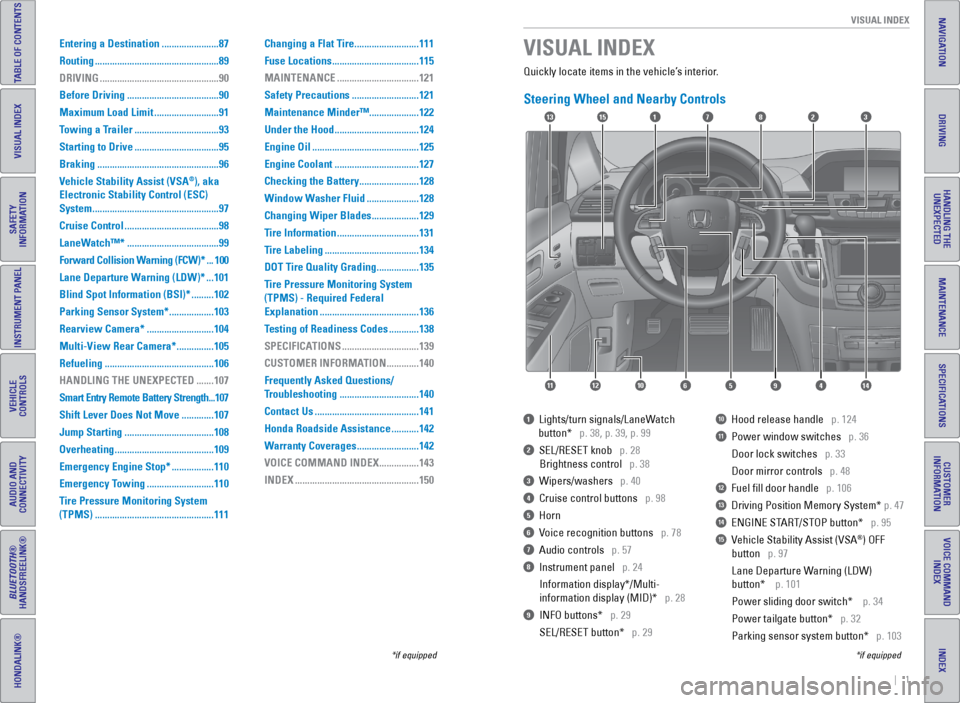
Quickly locate items in the vehicle’s interior.
Steering Wheel and Nearby Controls
1 Lights/turn signals/LaneWatch
button* p. 38, p. 39, p. 99
2 SEL/RESET knob p. 28
Brightness control p. 38
3 Wipers/washers p. 40
4 Cruise control buttons p. 98
5 Horn
6 Voice recognition buttons p. 78
7 Audio controls p. 57
8 Instrument panel p. 24
Information display*/Multi-
information display (MID)* p. 28
9 INFO buttons* p. 29
SEL/RESET button* p. 29
10 Hood release handle p. 124
11 Power window switches p. 36
Door lock switches p. 33
Door mirror controls p. 48
12 Fuel fill door handle p. 106
13 Driving Position Memory System* p. 47
14 ENGINE START/STOP button* p. 95
15 Vehicle Stability Assist (VSA®) OFF
button p. 97
Lane Departure Warning (LDW)
button* p. 101
Power sliding door switch* p. 34
Power tailgate button* p. 32
Parking sensor system button* p. 103
VISUAL INDEX
*if equipped
*if equipped
Entering a Destination ....................... 87
Routing .................................................. 89
DRIVING ................................................ 90
Before Driving ..................................... 90
Maximum Load Limit ..........................91
Towing a Trailer .................................. 93
Starting to Drive .................................. 95
Braking ................................................. 96
Vehicle Stability Assist (VSA
®), aka
Electronic Stability Control (ESC)
System ................................................... 97
Cruise Control ...................................... 98
LaneWatch™* ..................................... 99
Forward Collision Warning (FCW)* ... 100
Lane Departure Warning (LDW)* ... 101
Blind Spot Information (BSI)* ......... 102
Parking Sensor System* .................. 103
Rearview Camera* ...........................104
Multi-View Rear Camera* ............... 105
Refueling ............................................ 106
HANDLING THE UNEXPECTED ....... 107
Smart Entry Remote Battery Strength ... 107
Shift Lever Does Not Move ............. 107
Jump Starting .................................... 108
Overheating ........................................ 109
Emergency Engine Stop* ................. 110
Emergency Towing ...........................110
Tire Pressure Monitoring System
(TPMS) ................................................ 111Changing a Flat Tire
..........................111
Fuse Locations ................................... 115
MAINTENANCE ................................. 121
Safety Precautions ...........................121
Maintenance Minder™ ....................122
Under the Hood .................................. 124
Engine Oil ........................................... 125
Engine Coolant .................................. 127
Checking the Battery ........................ 128
Window Washer Fluid ..................... 128
Changing Wiper Blades ................... 129
Tire Information ................................. 131
Tire Labeling ...................................... 134
DOT Tire Quality Grading ................. 135
Tire Pressure Monitoring System
(TPMS) - Required Federal
Explanation ........................................ 136
Testing of Readiness Codes ............ 138
SPECIFICATIONS ...............................139
CUSTOMER INFORMATION ............. 140
Frequently Asked Questions/
Troubleshooting ................................ 140
Contact Us .......................................... 141
Honda Roadside Assistance ........... 142
Warranty Coverages .........................142
VOICE COMMAND INDEX ................ 143
INDEX .................................................. 150
17
4596111210
1513823
14
Page 5 of 80
2 || 3
SAFETY
VISUAL INDEX
INDEX
VOICE COMMAND
INDEX
CUSTOMER
INFORMATION
SPECIFICATIONS
MAINTENANCE
HANDLING THE UNEXPECTED
DRIVING
NAVIGATION
TABLE OF CONTENTS
VISUAL INDEX
SAFETY
INFORMATION
INSTRUMENT PANEL
VEHICLE
CONTROLS
AUDIO AND
CONNECTIVITY
BLUETOOTH®
HANDSFREELINK®
HONDALINK®
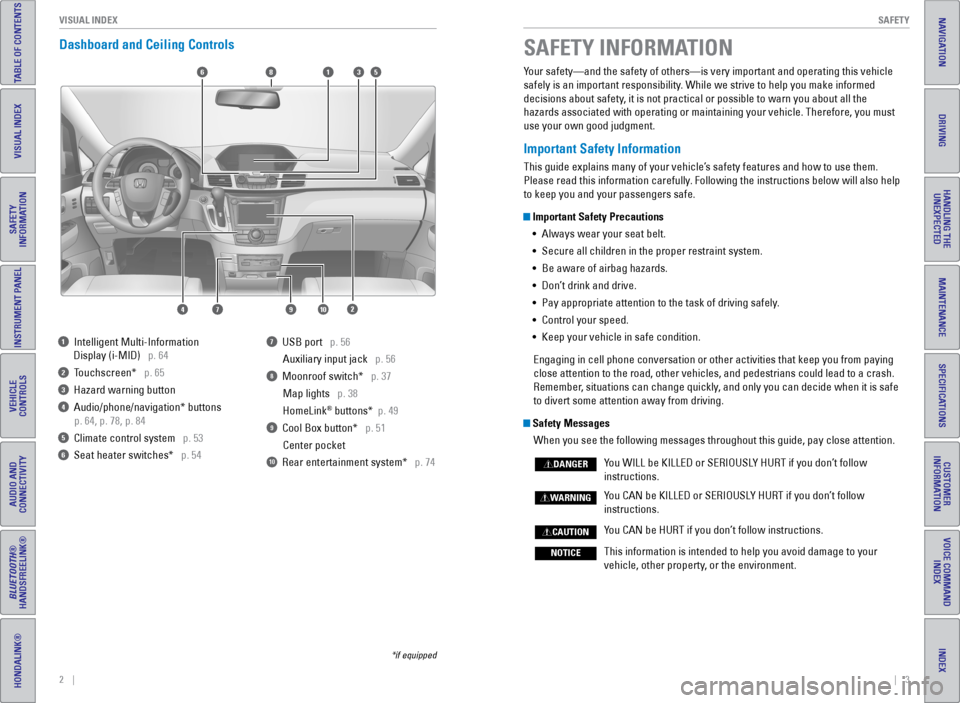
Dashboard and Ceiling Controls
*if equipped
Your safety—and the safety of others—is very important and operatin\
g this vehicle
safely is an important responsibility. While we strive to help you make informed
decisions about safety, it is not practical or possible to warn you about all the
hazards associated with operating or maintaining your vehicle. Therefore\
, you must
use your own good judgment.
Important Safety Information
This guide explains many of your vehicle’s safety features and how to use them.
Please read this information carefully. Following the instructions below will also help
to keep you and your passengers safe.
Important Safety Precautions
• Always wear your seat belt.
• Secure all children in the proper restraint system.
• Be aware of airbag hazards.
• Don’t drink and drive.
• Pay appropriate attention to the task of driving safely.
• Control your speed.
• Keep your vehicle in safe condition.
Engaging in cell phone conversation or other activities that keep you fr\
om paying
close attention to the road, other vehicles, and pedestrians could lead \
to a crash.
Remember, situations can change quickly, and only you can decide when it is safe
to divert some attention away from driving.
Safety Messages When you see the following messages throughout this guide, pay close att\
ention.
You WILL be KILLED or SERIOUSLY HURT if you don’t follow
instructions.
You CAN be KILLED or SERIOUSLY HURT if you don’t follow
instructions.
You CAN be HURT if you don’t follow instructions.
This information is intended to help you avoid damage to your
vehicle, other property, or the environment.
DANGER
WARNING
CAUTION
NOTICE
SAFETY INFORMATION
1 Intelligent Multi-Information
Display (i-MID) p. 64
2 Touchscreen* p. 65
3 Hazard warning button
4 Audio/phone/navigation* buttons
p. 64, p. 78, p. 84
5 Climate control system p. 53
6 Seat heater switches* p. 54
7 USB port p. 56
Auxiliary input jack p. 56
8 Moonroof switch* p. 37Map lights p. 38
HomeLink
® buttons* p. 49
9 Cool Box button* p. 51Center pocket
10 Rear entertainment system* p. 74
6
1097
351
2
8
4
Page 16 of 80
24 || 25
INSTRUMENT P
ANEL
INSTRUMENT P ANEL
INDEX
VOICE COMMAND
INDEX
CUSTOMER
INFORMATION
SPECIFICATIONS
MAINTENANCE
HANDLING THE UNEXPECTED
DRIVING
NAVIGATION
TABLE OF CONTENTS
VISUAL INDEX
SAFETY
INFORMATION
INSTRUMENT PANEL
VEHICLE
CONTROLS
AUDIO AND
CONNECTIVITY
BLUETOOTH®
HANDSFREELINK®
HONDALINK®
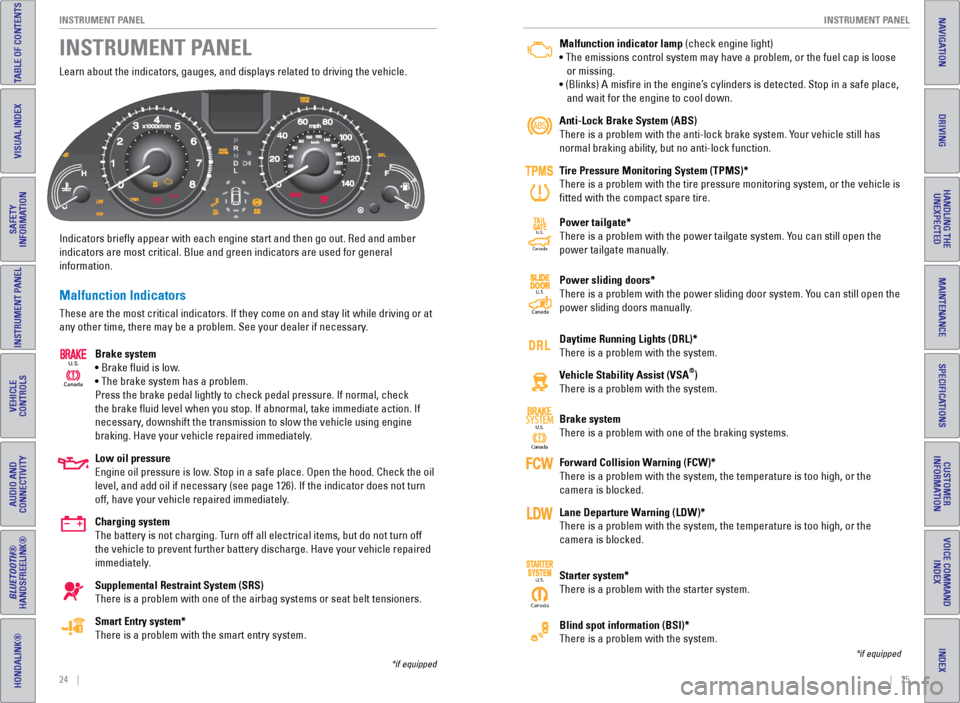
Learn about the indicators, gauges, and displays related to driving the \
vehicle.
Indicators briefly appear with each engine start and then go out. Red \
and amber
indicators are most critical. Blue and green indicators are used for gen\
eral
information.
Malfunction Indicators
These are the most critical indicators. If they come on and stay lit whi\
le driving or at
any other time, there may be a problem. See your dealer if necessary.
Brake system
• Brake fluid is low.
• The brake system has a problem.
Press the brake pedal lightly to check pedal pressure. If normal, check \
the brake fluid level when you stop. If abnormal, take immediate actio\
n. If
necessary, downshift the transmission to slow the vehicle using engine
braking. Have your vehicle repaired immediately.
Low oil pressure
Engine oil pressure is low. Stop in a safe place. Open the hood. Check the oil
level, and add oil if necessary (see page 126). If the indicator does \
not turn
off, have your vehicle repaired immediately.
Charging system
The battery is not charging. Turn off all electrical items, but do not turn off
the vehicle to prevent further battery discharge. Have your vehicle repa\
ired
immediately.
Supplemental Restraint System (SRS)
There is a problem with one of the airbag systems or seat belt tensioner\
s.
Smart Entry system*
There is a problem with the smart entry system.
INSTRUMENT PANEL
Canada
U.S.
*if equipped
Malfunction indicator lamp (check engine light)
• The emissions control system may have a problem, or the fuel cap is\
loose
or missing.
• (Blinks) A misfire in the engine’s cylinders is detected. Stop in a safe place,
and wait for the engine to cool down.
Anti-Lock Brake System (ABS)
There is a problem with the anti-lock brake system. Your vehicle still has
normal braking ability, but no anti-lock function.
Tire Pressure Monitoring System (TPMS)*
There is a problem with the tire pressure monitoring system, or the vehi\
cle is
fitted with the compact spare tire.
Power tailgate*
There is a problem with the power tailgate system. You can still open the
power tailgate manually.
Power sliding doors*
There is a problem with the power sliding door system. You can still open the
power sliding doors manually.
Daytime Running Lights (DRL)*
There is a problem with the system.
Vehicle Stability Assist (VSA
®)
There is a problem with the system.
Brake system
There is a problem with one of the braking systems.
Forward Collision Warning (FCW)*
There is a problem with the system, the temperature is too high, or the \
camera is blocked.
Lane Departure Warning (LDW)*
There is a problem with the system, the temperature is too high, or the \
camera is blocked.
Starter system*
There is a problem with the starter system.
Blind spot information (BSI)*
There is a problem with the system.
*if equipped
Ca nada
U.S.SYSTEM
CanadaU.S.
Canada
U.S.
CanadaU.S.
Page 17 of 80
26 || 27
INSTRUMENT P
ANEL
INSTRUMENT P ANEL
INDEX
VOICE COMMAND
INDEX
CUSTOMER
INFORMATION
SPECIFICATIONS
MAINTENANCE
HANDLING THE UNEXPECTED
DRIVING
NAVIGATION
TABLE OF CONTENTS
VISUAL INDEX
SAFETY
INFORMATION
INSTRUMENT PANEL
VEHICLE
CONTROLS
AUDIO AND
CONNECTIVITY
BLUETOOTH®
HANDSFREELINK®
HONDALINK®
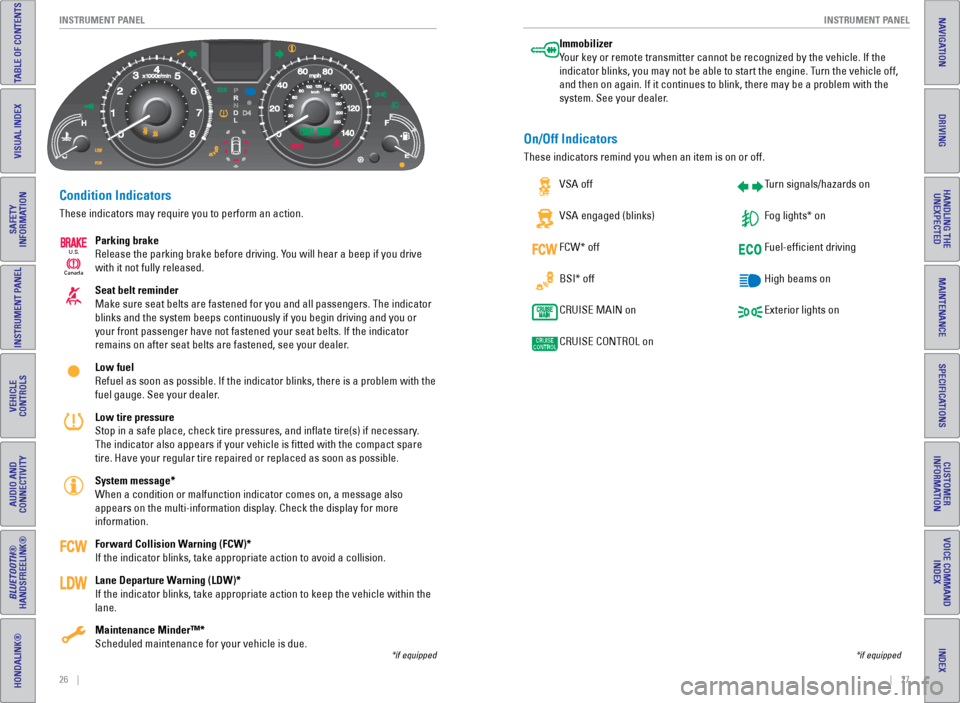
Condition Indicators
These indicators may require you to perform an action.
Parking brake
Release the parking brake before driving. You will hear a beep if you drive
with it not fully released.
Seat belt reminder
Make sure seat belts are fastened for you and all passengers. The indica\
tor
blinks and the system beeps continuously if you begin driving and you or\
your front passenger have not fastened your seat belts. If the indicator\
remains on after seat belts are fastened, see your dealer.
Low fuel
Refuel as soon as possible. If the indicator blinks, there is a problem \
with the
fuel gauge. See your dealer.
Low tire pressure
Stop in a safe place, check tire pressures, and inflate tire(s) if n\
ecessary.
The indicator also appears if your vehicle is fitted with the compact \
spare
tire. Have your regular tire repaired or replaced as soon as possible.
System message*
When a condition or malfunction indicator comes on, a message also
appears on the multi-information display. Check the display for more
information.
Forward Collision Warning (FCW)*
If the indicator blinks, take appropriate action to avoid a collision.
Lane Departure Warning (LDW)*
If the indicator blinks, take appropriate action to keep the vehicle wit\
hin the
lane.
Maintenance Minder™*
Scheduled maintenance for your vehicle is due.
*if equipped
Immobilizer
Your key or remote transmitter cannot be recognized by the vehicle. If th\
e
indicator blinks, you may not be able to start the engine. Turn the vehicle off,
and then on again. If it continues to blink, there may be a problem with\
the
system. See your dealer.
On/Off Indicators
These indicators remind you when an item is on or off. VSA off
VSA engaged (blinks)
FCW* off
BSI* off
CRUISE MAIN on
CRUISE CONTROL on Turn signals/hazards on
Fog lights* on
Fuel-efficient driving
High beams on
Exterior lights on
*if equipped
Ca
nada
U.S.
Page 22 of 80
36 || 37
VEHICLE CONTROLS
VEHICLE CONTROLS
INDEX
VOICE COMMAND
INDEX
CUSTOMER
INFORMATION
SPECIFICATIONS
MAINTENANCE
HANDLING THE UNEXPECTED
DRIVING
NAVIGATION
TABLE OF CONTENTS
VISUAL INDEX
SAFETY
INFORMATION
INSTRUMENT PANEL
VEHICLE
CONTROLS
AUDIO AND
CONNECTIVITY
BLUETOOTH®
HANDSFREELINK®
HONDALINK®
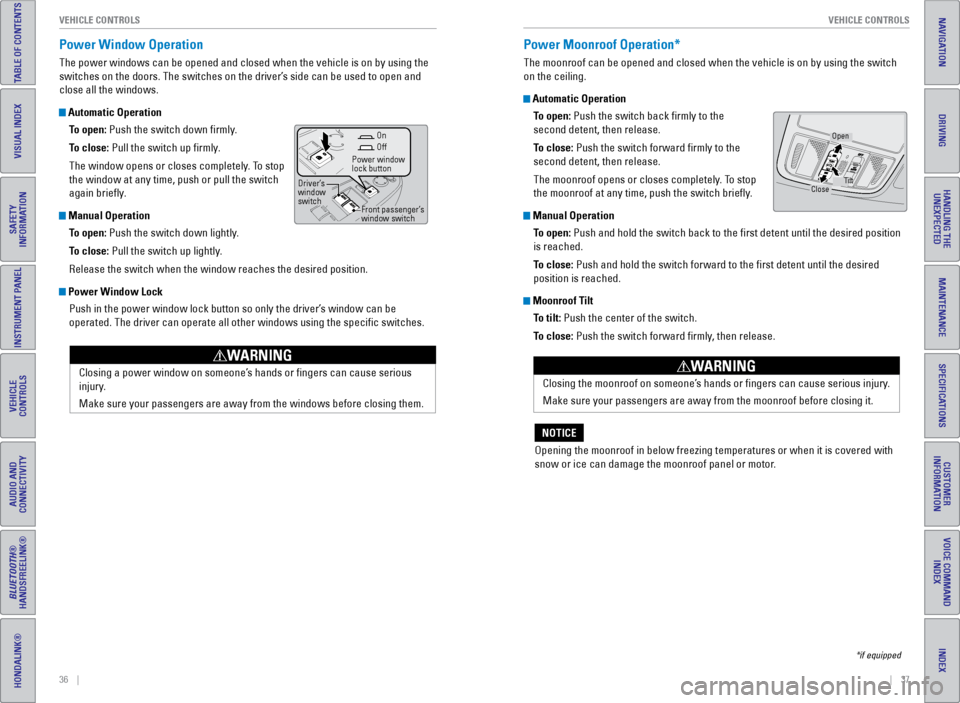
Power Window Operation
The power windows can be opened and closed when the vehicle is on by usi\
ng the
switches on the doors. The switches on the driver’s side can be used to open and
close all the windows.
Automatic Operation
To open: Push the switch down firmly.
To close: Pull the switch up firmly.
The window opens or closes completely. To stop
the window at any time, push or pull the switch
again briefly.
Manual OperationTo open: Push the switch down lightly.
To close: Pull the switch up lightly.
Release the switch when the window reaches the desired position.
Power Window LockPush in the power window lock button so only the driver’s window can be
operated. The driver can operate all other windows using the specific \
switches.
Closing a power window on someone’s hands or fingers can cause serious
injury.
Make sure your passengers are away from the windows before closing them.
WARNING
Power Moonroof Operation*
The moonroof can be opened and closed when the vehicle is on by using th\
e switch
on the ceiling.
Automatic OperationTo open: Push the switch back firmly to the
second detent, then release.
To close: Push the switch forward firmly to the
second detent, then release.
The moonroof opens or closes completely. To stop
the moonroof at any time, push the switch briefly.
Manual OperationTo open: Push and hold the switch back to the first detent until the desired p\
osition
is reached.
To close: Push and hold the switch forward to the first detent until the desire\
d
position is reached.
Moonroof TiltTo tilt: Push the center of the switch.
To close: Push the switch forward firmly, then release.
Closing the moonroof on someone’s hands or fingers can cause serious injury.
Make sure your passengers are away from the moonroof before closing it.
WARNING
Opening the moonroof in below freezing temperatures or when it is covere\
d with
snow or ice can damage the moonroof panel or motor.
NOTICE
Close Open
Tilt
Off
Power window
lock button
Driver’s
window
switch Front passenger’s
window switchOn
*if equipped
Page 24 of 80
40 || 41
VEHICLE CONTROLS
VEHICLE CONTROLS
INDEX
VOICE COMMAND
INDEX
CUSTOMER
INFORMATION
SPECIFICATIONS
MAINTENANCE
HANDLING THE UNEXPECTED
DRIVING
NAVIGATION
TABLE OF CONTENTS
VISUAL INDEX
SAFETY
INFORMATION
INSTRUMENT PANEL
VEHICLE
CONTROLS
AUDIO AND
CONNECTIVITY
BLUETOOTH®
HANDSFREELINK®
HONDALINK®
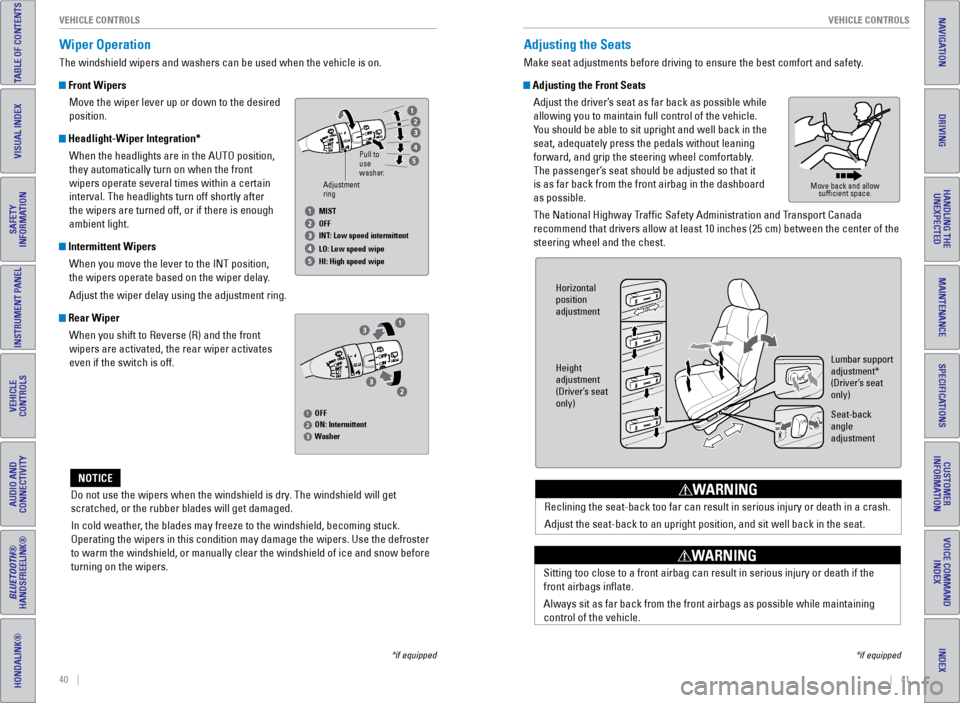
Wiper Operation
The windshield wipers and washers can be used when the vehicle is on.
Front Wipers
Move the wiper lever up or down to the desired
position.
Headlight-Wiper Integration*When the headlights are in the AUTO position,
they automatically turn on when the front
wipers operate several times within a certain
interval. The headlights turn off shortly after
the wipers are turned off, or if there is enough
ambient light.
Intermittent WipersWhen you move the lever to the INT position,
the wipers operate based on the wiper delay.
Adjust the wiper delay using the adjustment ring.
Rear WiperWhen you shift to Reverse (R) and the front
wipers are activated, the rear wiper activates
even if the switch is off.
Do not use the wipers when the windshield is dry. The windshield will get
scratched, or the rubber blades will get damaged.
In cold weather, the blades may freeze to the windshield, becoming stuck.
Operating the wipers in this condition may damage the wipers. Use the de\
froster
to warm the windshield, or manually clear the windshield of ice and snow before
turning on the wipers.
NOTICE
Adjusting the Seats
Make seat adjustments before driving to ensure the best comfort and safe\
ty.
Adjusting the Front Seats Adjust the driver’s seat as far back as possible while
allowing you to maintain full control of the vehicle.
You should be able to sit upright and well back in the
seat, adequately press the pedals without leaning
forward, and grip the steering wheel comfortably.
The passenger’s seat should be adjusted so that it
is as far back from the front airbag in the dashboard
as possible.
The National Highway Traffic Safety Administration and Transport Canada
recommend that drivers allow at least 10 inches (25 cm) between the ce\
nter of the
steering wheel and the chest.
Reclining the seat-back too far can result in serious injury or death in\
a crash.
Adjust the seat-back to an upright position, and sit well back in the se\
at.
WARNING
Move back and allow sufficient space.
Horizontal
position
adjustment
Height
adjustment
(Driver’s seat
only) Lumbar support
adjustment*
(Driver’s seat
only)
Seat-back
angle
adjustment
Sitting too close to a front airbag can result in serious injury or deat\
h if the
front airbags inflate.
Always sit as far back from the front airbags as possible while maintain\
ing
control of the vehicle.
WARNING
*if equipped
*if equipped
Adjustment
ringPull to
use
washer.
MIST
OFF
INT: Low speed intermittent
LO: Low speed wipe
HI: High speed wipe
OFF
ON: Intermittent
Washer
Page 27 of 80
46 || 47
VEHICLE CONTROLS
VEHICLE CONTROLS
INDEX
VOICE COMMAND
INDEX
CUSTOMER
INFORMATION
SPECIFICATIONS
MAINTENANCE
HANDLING THE UNEXPECTED
DRIVING
NAVIGATION
TABLE OF CONTENTS
VISUAL INDEX
SAFETY
INFORMATION
INSTRUMENT PANEL
VEHICLE
CONTROLS
AUDIO AND
CONNECTIVITY
BLUETOOTH®
HANDSFREELINK®
HONDALINK®
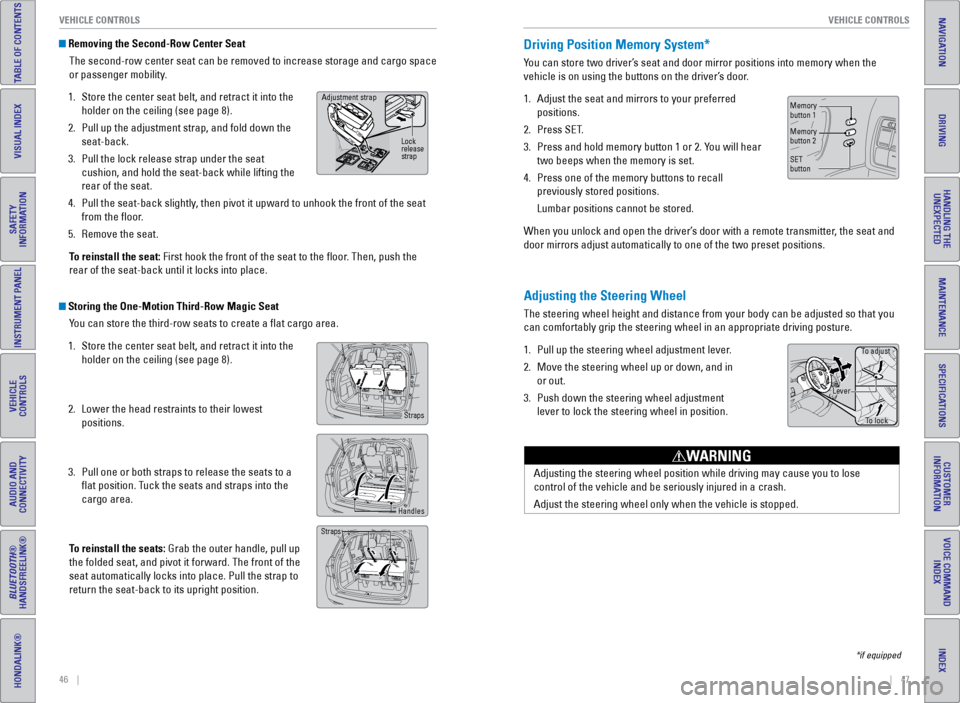
Removing the Second-Row Center Seat
The second-row center seat can be removed to increase storage and cargo space
or passenger mobility.
1. Store the center seat belt, and retract it into the
holder on the ceiling (see page 8).
2. Pull up the adjustment strap, and fold down the
seat-back.
3. Pull the lock release strap under the seat
cushion, and hold the seat-back while lifting the
rear of the seat.
4. Pull the seat-back slightly, then pivot it upward to unhook the front of the seat
from the floor.
5. Remove the seat.
To reinstall the seat: First hook the front of the seat to the floor. Then, push the
rear of the seat-back until it locks into place.
Storing the One-Motion Third-Row Magic Seat You can store the third-row seats to create a flat cargo area.
1. Store the center seat belt, and retract it into the
holder on the ceiling (see page 8).
2. Lower the head restraints to their lowest
positions.
3. Pull one or both straps to release the seats to a
flat position. Tuck the seats and straps into the
cargo area.
To reinstall the seats: Grab the outer handle, pull up
the folded seat, and pivot it forward. The front of the
seat automatically locks into place. Pull the strap to
return the seat-back to its upright position.
Adjustment strap
Lock
release
strap
Straps
Handles
Straps
Adjusting the Steering Wheel
The steering wheel height and distance from your body can be adjusted so\
that you
can comfortably grip the steering wheel in an appropriate driving postur\
e.
1. Pull up the steering wheel adjustment lever.
2. Move the steering wheel up or down, and in
or out.
3. Push down the steering wheel adjustment
lever to lock the steering wheel in position.
Adjusting the steering wheel position while driving may cause you to los\
e
control of the vehicle and be seriously injured in a crash.
Adjust the steering wheel only when the vehicle is stopped.
WARNING
Driving Position Memory System*
You can store two driver’s seat and door mirror positions into memory when the
vehicle is on using the buttons on the driver’s door.
1. Adjust the seat and mirrors to your preferred
positions.
2. Press SET.
3. Press and hold memory button 1 or 2. You will hear
two beeps when the memory is set.
4. Press one of the memory buttons to recall
previously stored positions.
Lumbar positions cannot be stored.
When you unlock and open the driver’s door with a remote transmitter, the seat and
door mirrors adjust automatically to one of the two preset positions.
To adjust
To lock
Lever
Memory
button 1
Memory
button 2
SET
button
*if equipped
Page 29 of 80
50 || 51
VEHICLE CONTROLS
VEHICLE CONTROLS
INDEX
VOICE COMMAND
INDEX
CUSTOMER
INFORMATION
SPECIFICATIONS
MAINTENANCE
HANDLING THE UNEXPECTED
DRIVING
NAVIGATION
TABLE OF CONTENTS
VISUAL INDEX
SAFETY
INFORMATION
INSTRUMENT PANEL
VEHICLE
CONTROLS
AUDIO AND
CONNECTIVITY
BLUETOOTH®
HANDSFREELINK®
HONDALINK®
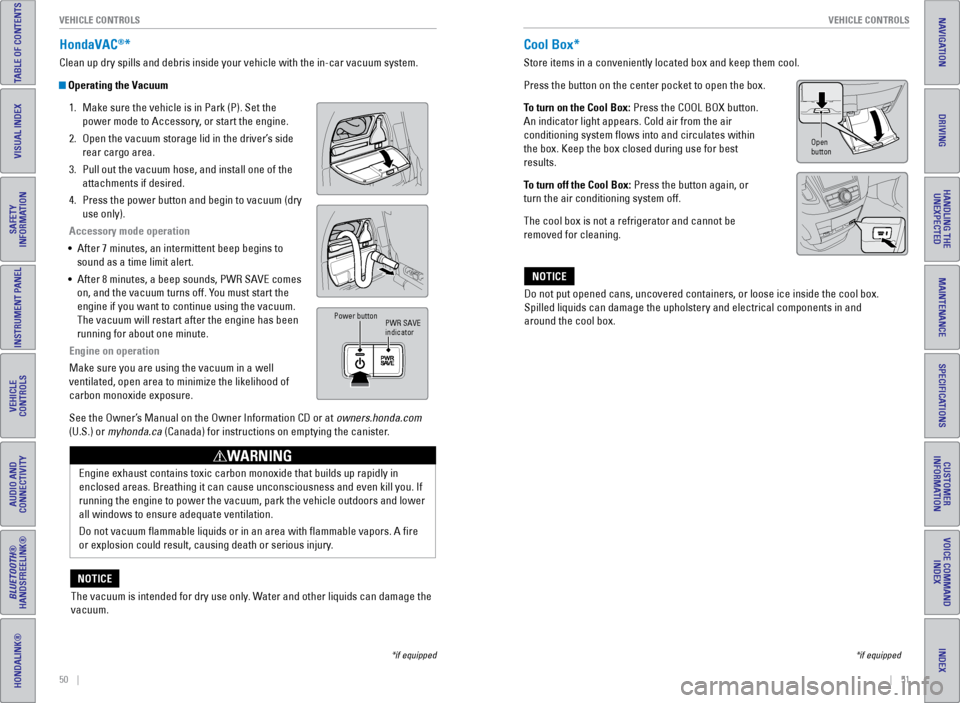
HondaVAC®*
Clean up dry spills and debris inside your vehicle with the in-car vacuu\
m system.
Operating the Vacuum
1. Make sure the vehicle is in Park (P). Set the
power mode to Accessory, or start the engine.
2. Open the vacuum storage lid in the driver’s side
rear cargo area.
3. Pull out the vacuum hose, and install one of the
attachments if desired.
4. Press the power button and begin to vacuum (dry
use only).
Accessory mode operation
• After 7 minutes, an intermittent beep begins to
sound as a time limit alert.
• After 8 minutes, a beep sounds, PWR SAVE comes
on, and the vacuum turns off. You must start the
engine if you want to continue using the vacuum.
The vacuum will restart after the engine has been
running for about one minute.
Engine on operation
Make sure you are using the vacuum in a well
ventilated, open area to minimize the likelihood of
carbon monoxide exposure.
See the Owner’s Manual on the Owner Information CD or at owners.honda.com
(U.S.) or myhonda.ca (Canada) for instructions on emptying the canister.
PWR SAVE
indicator
Power button
Engine exhaust contains toxic carbon monoxide that builds up rapidly in \
enclosed areas. Breathing it can cause unconsciousness and even kill you\
. If
running the engine to power the vacuum, park the vehicle outdoors and lo\
wer
all windows to ensure adequate ventilation.
Do not vacuum flammable liquids or in an area with flammable vapors.\
A fire
or explosion could result, causing death or serious injury.
WARNING
The vacuum is intended for dry use only. Water and other liquids can damage the
vacuum.
NOTICE
*if equipped
Cool Box*
Store items in a conveniently located box and keep them cool.
Press the button on the center pocket to open the box.
To turn on the Cool Box: Press the COOL BOX button.
An indicator light appears. Cold air from the air
conditioning system flows into and circulates within
the box. Keep the box closed during use for best
results.
To turn off the Cool Box: Press the button again, or
turn the air conditioning system off.
The cool box is not a refrigerator and cannot be
removed for cleaning.
Do not put opened cans, uncovered containers, or loose ice inside the co\
ol box.
Spilled liquids can damage the upholstery and electrical components in a\
nd
around the cool box.
NOTICE
*if equipped
Open
button
Page 46 of 80
84 || 85
NAVIGATION
NAVIGATION
INDEX
VOICE COMMAND
INDEX
CUSTOMER
INFORMATION
SPECIFICATIONS
MAINTENANCE
HANDLING THE UNEXPECTED
DRIVING
NAVIGATION
TABLE OF CONTENTS
VISUAL INDEX
SAFETY
INFORMATION
INSTRUMENT PANEL
VEHICLE
CONTROLS
AUDIO AND
CONNECTIVITY
BLUETOOTH®
HANDSFREELINK®
HONDALINK®
Learn how to enter a destination and operate the navigation system.
Basic Navigation Operation
A real-time navigation system uses GPS and a map database to show your current
location and help guide you to a desired destination. You can operate the system
using voice commands or the system controls.
To reduce the potential for driver distraction, certain manual functions \
may be
inoperable or grayed out while the vehicle is moving. Voice commands are always
available.
Steering Wheel Controls
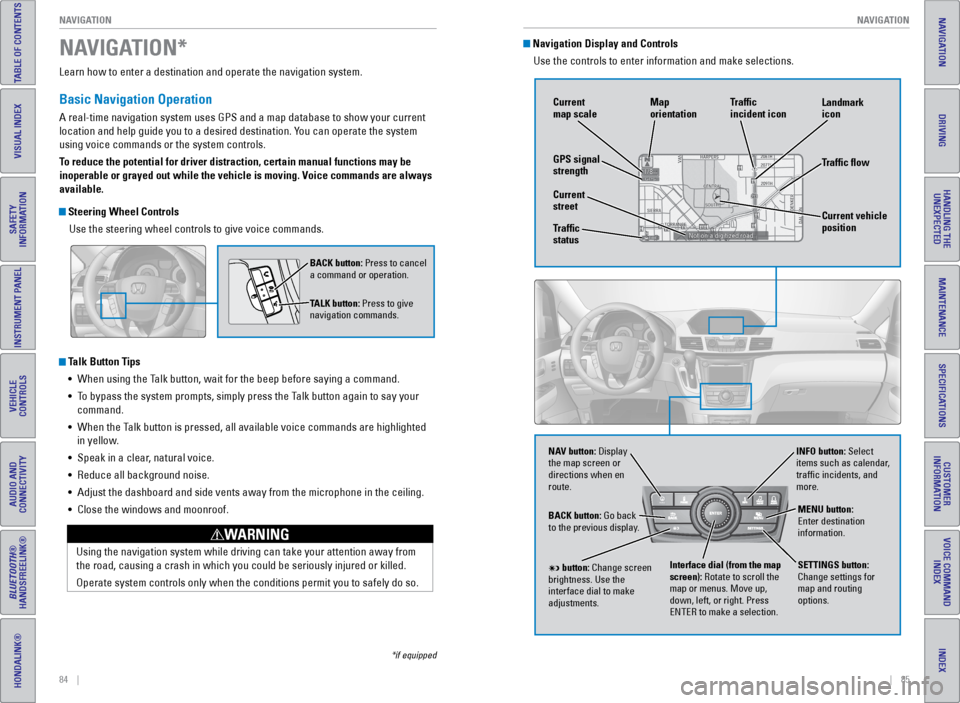
Use the steering wheel controls to give voice commands.
Talk Button Tips• When using the Talk button, wait for the beep before saying a command.
• To bypass the system prompts, simply press the Talk button again to say your
command.
• When the Talk button is pressed, all available voice commands are highlighted
in yellow.
• Speak in a clear, natural voice.
• Reduce all background noise.
• Adjust the dashboard and side vents away from the microphone in the ceil\
ing.
• Close the windows and moonroof.
Using the navigation system while driving can take your attention away f\
rom
the road, causing a crash in which you could be seriously injured or kil\
led.
Operate system controls only when the conditions permit you to safely do\
so.
WARNING
NAVIGATION*
BACK button: Press to cancel
a command or operation.
TALK button: Press to give
navigation commands.
*if equipped
Navigation Display and Controls Use the controls to enter information and make selections.
NAV
NAV button: Display
the map screen or
directions when en
route. INFO button: Select
items such as calendar,
traffic incidents, and
more.
BACK button: Go back
to the previous display.
SETTINGS button:
Change settings for
map and routing
options.
MENU button:
Enter destination
information.
button: Change screen
brightness. Use the
interface dial to make
adjustments. Interface dial (from the map
screen): Rotate to scroll the
map or menus. Move up,
down, left, or right. Press
ENTER to make a selection.
GPS signal
strength Traffic
incident icon
Traffic flow
Current
map scale
Current vehicle
position
Map
orientation
Current
street
Traffic
status Landmark
icon
Page 49 of 80
90 || 91
DRIVING
DRIVING
INDEX
VOICE COMMAND
INDEX
CUSTOMER
INFORMATION
SPECIFICATIONS
MAINTENANCE
HANDLING THE UNEXPECTED
DRIVING
NAVIGATION
TABLE OF CONTENTS
VISUAL INDEX
SAFETY
INFORMATION
INSTRUMENT PANEL
VEHICLE
CONTROLS
AUDIO AND
CONNECTIVITY
BLUETOOTH®
HANDSFREELINK®
HONDALINK®
Learn about preparation for driving, as well as other features.
Before Driving
Check the following items before you begin driving.
Exterior Checks
• Make sure there are no obstructions on the windows, door mirrors, exterior
lights, or other parts of the vehicle.
• Remove any frost, snow, or ice.
• Make sure the hood is securely closed.
• Heat from the engine and exhaust can ignite flammable materials left u\
nder
the hood, causing a fire. If you’ve parked your vehicle for an exte\
nded period,
inspect and remove any debris that may have collected, such as dried grass
and leaves that have fallen or have been carried in for use as a nest by\
a small
animal. Also check under the hood for leftover flammable materials aft\
er you or
someone else has performed maintenance on your vehicle.
• Make sure the tires are in good condition.
• Make sure there are no people or objects behind or around the vehicle.
Interior Checks
• Store or secure all items on board properly.
• Do not pile items higher than the seat height.
• Do not place anything in the front seat footwells. Make sure to secure t\
he floor
mats.
• If you have any animals on board, do not let them move freely around in \
the
vehicle.
• Securely close and lock all doors and the tailgate.
• Adjust your seating position, mirrors, and steering wheel properly.
• Make sure items placed on the floor behind the front seats cannot roll\
under the
seats.
• Everyone in the vehicle must fasten their seat belt.
• Make sure that the indicators in the instrument panel come on when you s\
tart
the vehicle, and go off soon after.
DRIVING
If the doors are frozen shut, use warm water around the door edges to me\
lt any
ice. Do not try to force them open, as this can damage the rubber trim a\
round the
doors. When done, wipe dry to avoid further freezing.
NOTICE
Maximum Load Limit
Carrying too much cargo or improperly storing it can affect your vehicle\
’s handling,
stability, stopping distance, and tires, and make it unsafe.
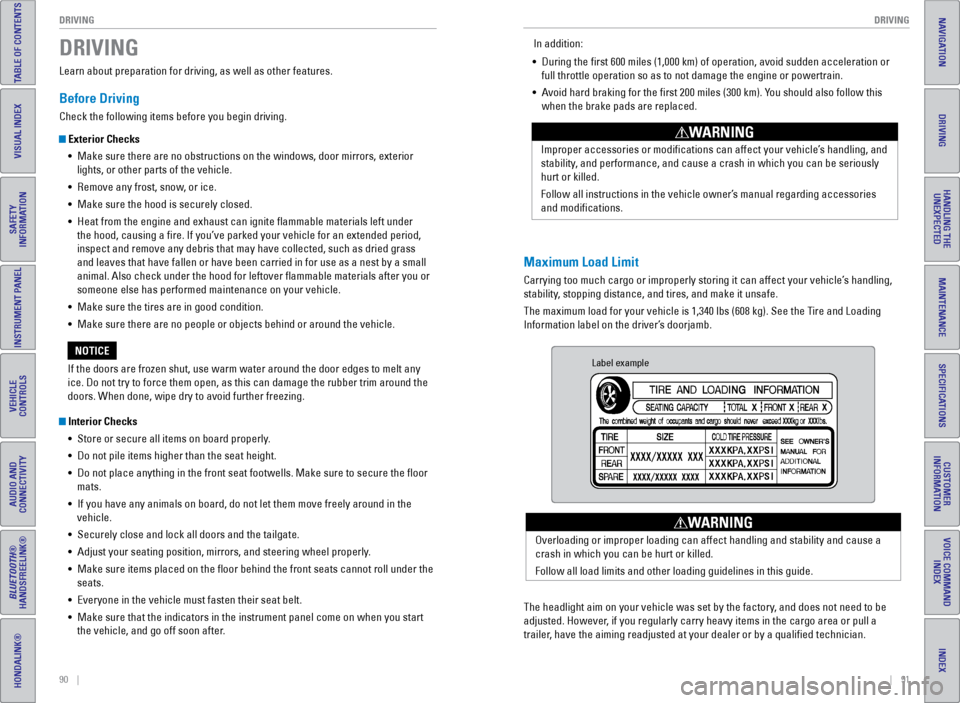
The maximum load for your vehicle is 1,340 lbs (608 kg). See the Tire and Loading
Information label on the driver’s doorjamb. Improper accessories or modifications can affect your vehicle’s handling, and
stability, and performance, and cause a crash in which you can be seriously
hurt or killed.
Follow all instructions in the vehicle owner’s manual regarding accessories
and modifications.
WARNING
In addition:
• During the first 600 miles (1,000 km) of operation, avoid sudden acc\
eleration or
full throttle operation so as to not damage the engine or powertrain.
• Avoid hard braking for the first 200 miles (300 km). You should also follow this
when the brake pads are replaced.
Label example
The headlight aim on your vehicle was set by the factory, and does not need to be
adjusted. However, if you regularly carry heavy items in the cargo area or pull a
trailer, have the aiming readjusted at your dealer or by a qualified technici\
an. Overloading or improper loading can affect handling and stability and ca\
use a
crash in which you can be hurt or killed.
Follow all load limits and other loading guidelines in this guide.
WARNING