reset HONDA ODYSSEY 2017 RC1-RC2 / 5.G User Guide
[x] Cancel search | Manufacturer: HONDA, Model Year: 2017, Model line: ODYSSEY, Model: HONDA ODYSSEY 2017 RC1-RC2 / 5.GPages: 565, PDF Size: 33.13 MB
Page 100 of 565
Continued99
uuGauges and Displays uMulti-Information Display*
Instrument Panel
Use the multi-information display to customize certain features.
■How to customize
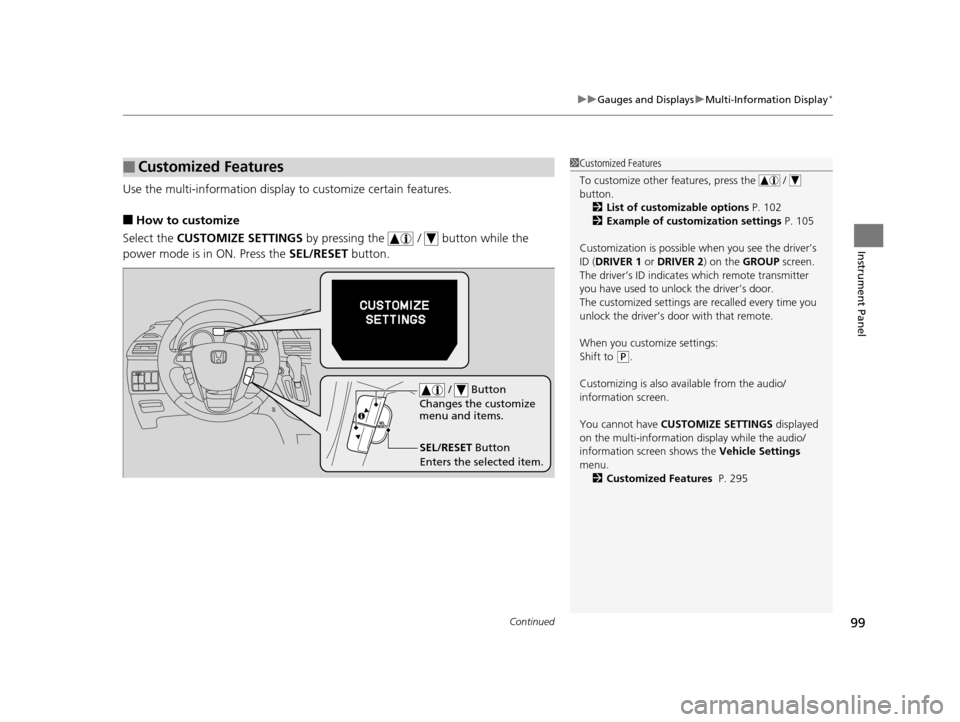
Select the CUSTOMIZE SETTINGS by pressing the / button while the
power mode is in ON. Press the SEL/RESET button.
■Customized Features1Customized Features
To customize other features, press the /
button.
2 List of customizable options P. 102
2 Example of customization settings P. 105
Customization is possible when you see the driver’s
ID ( DRIVER 1 or DRIVER 2) on the GROUP screen.
The driver’s ID indicates which remote transmitter
you have used to unlock the driver’s door.
The customized settings are recalled every time you
unlock the driver’s door with that remote.
When you customize settings:
Shift to
( P.
Customizing is also av ailable from the audio/
information screen.
You cannot have CUSTOMIZE SETTINGS displayed
on the multi-information display while the audio/
information screen shows the Vehicle Settings
menu. 2 Customized Features P. 295
SEL/RESET Button
Enters the selected item. / Button
Changes the customize
menu and items.
17 US ODYSSEY (KA KC)-31TK86600.book 99 ページ 2016年10月24日 月曜日 午後4時2分
Page 101 of 565
100
uuGauges and Displays uMulti-Information Display*
Instrument Panel
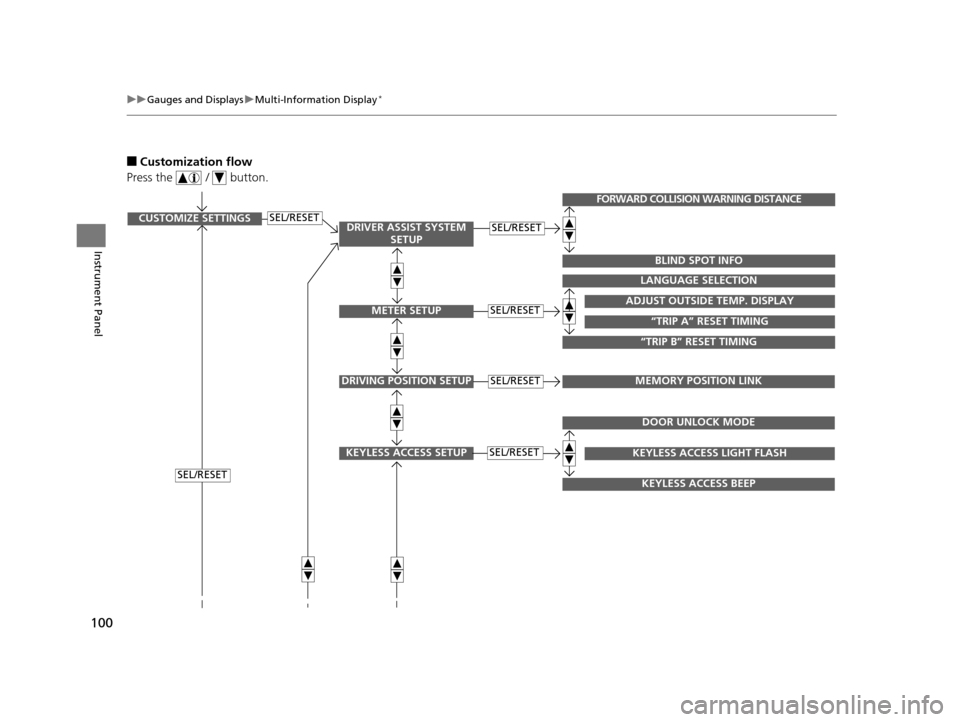
■Customization flow
Press the / button.
SEL/RESETCUSTOMIZE SETTINGSSEL/RESET
SEL/RESET
SEL/RESETADJUST OUTSIDE TEMP. DISPLAY
LANGUAGE SELECTION
“TRIP B” RESET TIMING
“TRIP A” RESET TIMING
FORWARD COLLISION WARNING DISTANCE
BLIND SPOT INFO
DRIVING POSITION SETUPMEMORY POSITION LINKSEL/RESET
KEYLESS ACCESS SETUPSEL/RESET
DOOR UNLOCK MODE
KEYLESS ACCESS BEEP
KEYLESS ACCESS LIGHT FLASH
DRIVER ASSIST SYSTEM SETUP
METER SETUP
17 US ODYSSEY (KA KC)-31TK86600.book 100 ページ 2016年10月24日 月曜日 午後4時2分
Page 102 of 565
101
uuGauges and Displays uMulti-Information Display*
Continued
Instrument Panel
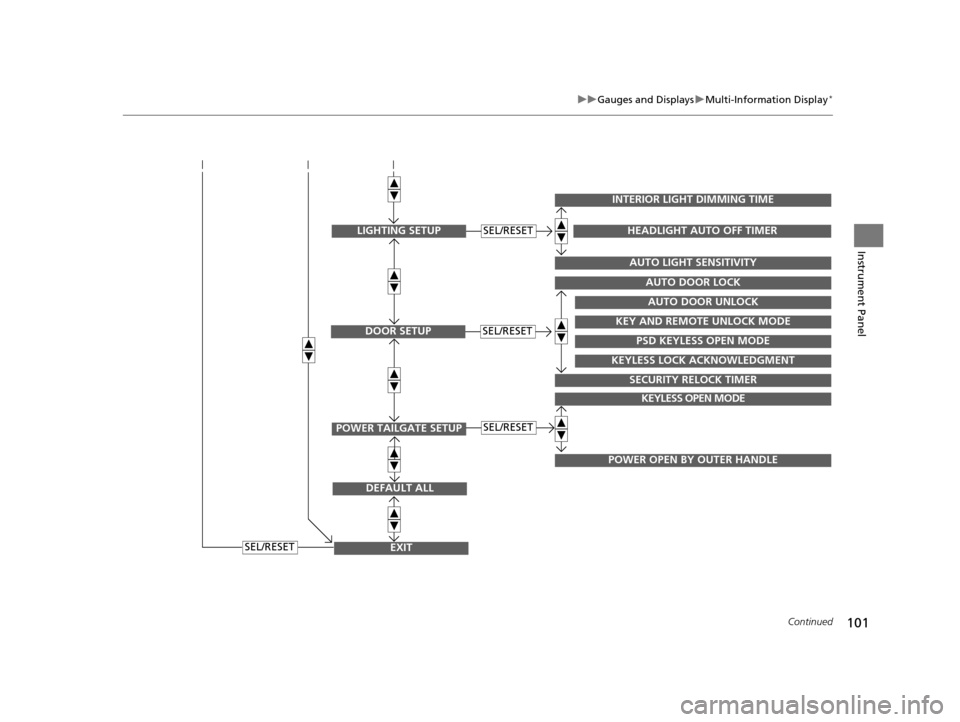
EXIT
DEFAULT ALL
SEL/RESET
POWER TAILGATE SETUP
KEYLESS OPEN MODE
POWER OPEN BY OUTER HANDLE
SEL/RESET
DOOR SETUPSEL/RESET
AUTO DOOR LOCK
SECURITY RELOCK TIMER
AUTO DOOR UNLOCK
KEY AND REMOTE UNLOCK MODE
PSD KEYLESS OPEN MODE
KEYLESS LOCK ACKNOWLEDGMENT
LIGHTING SETUP
INTERIOR LIGHT DIMMING TIME
AUTO LIGHT SENSITIVITY
HEADLIGHT AUTO OFF TIMERSEL/RESET
17 US ODYSSEY (KA KC)-31TK86600.book 101 ページ 2016年10月24日 月曜日 午後4時2分
Page 103 of 565
102
uuGauges and Displays uMulti-Information Display*
Instrument Panel
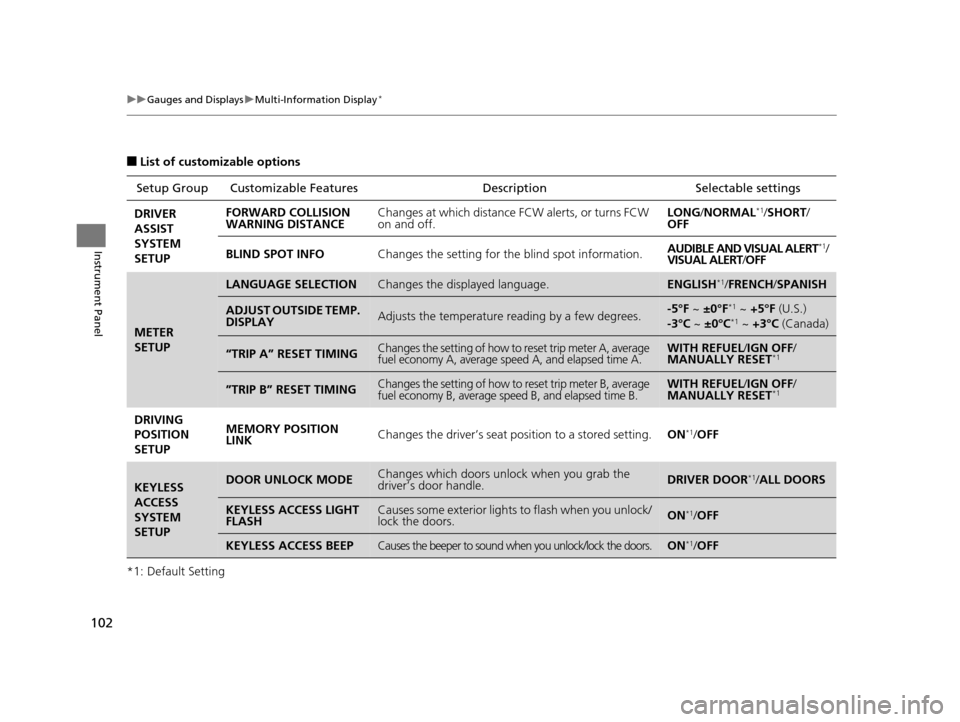
■List of customizable options
*1: Default Setting Setup Group Customizabl
e Features Description Selectable settings
DRIVER
ASSIST
SYSTEM
SETUP FORWARD COLLISION
WARNING DISTANCE
Changes at which distance FCW alerts, or turns FCW
on and off. LONG
/NORMAL
*1/SHORT /
OFF
BLIND SPOT INFO Changes the setting for the blind spot information. AUDIBLE AND VISUAL ALERT
*1/
VISUAL ALERT /OFF
METER
SETUP
LANGUAGE SELECTIONChanges the displayed language.ENGLISH*1/ FRENCH /SPANISH
ADJUST OUTSIDE TEMP.
DISPLAYAdjusts the temperature reading by a few degrees.-5°F ~ ±0°F*1 ~ +5°F (U.S.)
-3°C ~ ±0°C*1 ~ +3°C (Canada)
“TRIP A” RESET TIMINGChanges the setting of how to reset trip meter A, average
fuel economy A, average speed A, and elapsed time A.WITH REFUEL /IGN OFF /
MANUALLY RESET*1
”TRIP B” RESET TIMINGChanges the setting of how to reset trip meter B, average
fuel economy B, average speed B, and elapsed time B.WITH REFUEL /IGN OFF /
MANUALLY RESET*1
DRIVING
POSITION
SETUP MEMORY POSITION
LINK
Changes the driver’s seat po
sition to a stored setting.ON*1/OFF
KEYLESS
ACCESS
SYSTEM
SETUPDOOR UNLOCK MODEChanges which doors unlock when you grab the
driver’s door handle.DRIVER DOOR*1/ALL DOORS
KEYLESS ACCESS LIGHT
FLASHCauses some exterior lights to flash when you unlock/
lock the doors.ON*1/OFF
KEYLESS ACCESS BEEPCauses the beeper to sound when you unlock/lock the doors.ON*1/OFF
17 US ODYSSEY (KA KC)-31TK86600.book 102 ページ 2016年10月24日 月曜日 午後4時2分
Page 105 of 565
104
uuGauges and Displays uMulti-Information Display*
Instrument Panel
*1: Default SettingSetup Group Customizabl
e Features Description Selectable settings
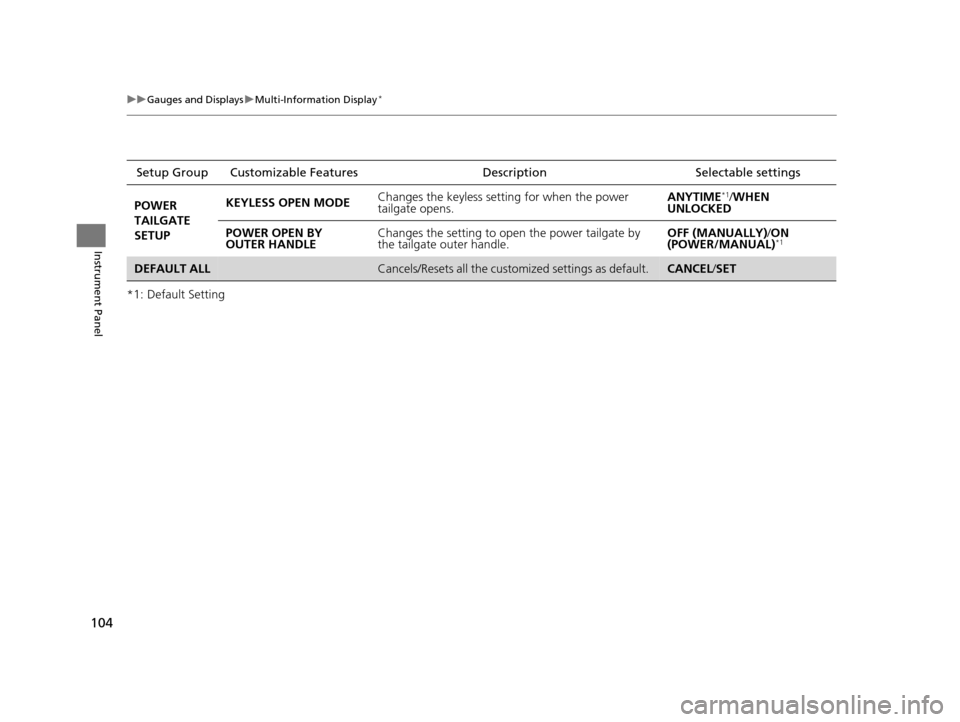
POWER
TAILGATE
SETUP KEYLESS OPEN MODE
Changes the keyless setti
ng for when the power
tailgate opens. ANYTIME
*1/
WHEN
UNLOCKED
POWER OPEN BY
OUTER HANDLE Changes the setting to open the power tailgate by
the tailgate outer handle. OFF (MANUALLY)
/ON
(POWER/MANUAL)
*1
DEFAULT ALLCancels/Resets all the custom ized settings as default. CANCEL/SET
17 US ODYSSEY (KA KC)-31TK86600.book 104 ページ 2016年10月24日 月曜日 午後4時2分
Page 106 of 565
105
uuGauges and Displays uMulti-Information Display*
Continued
Instrument Panel
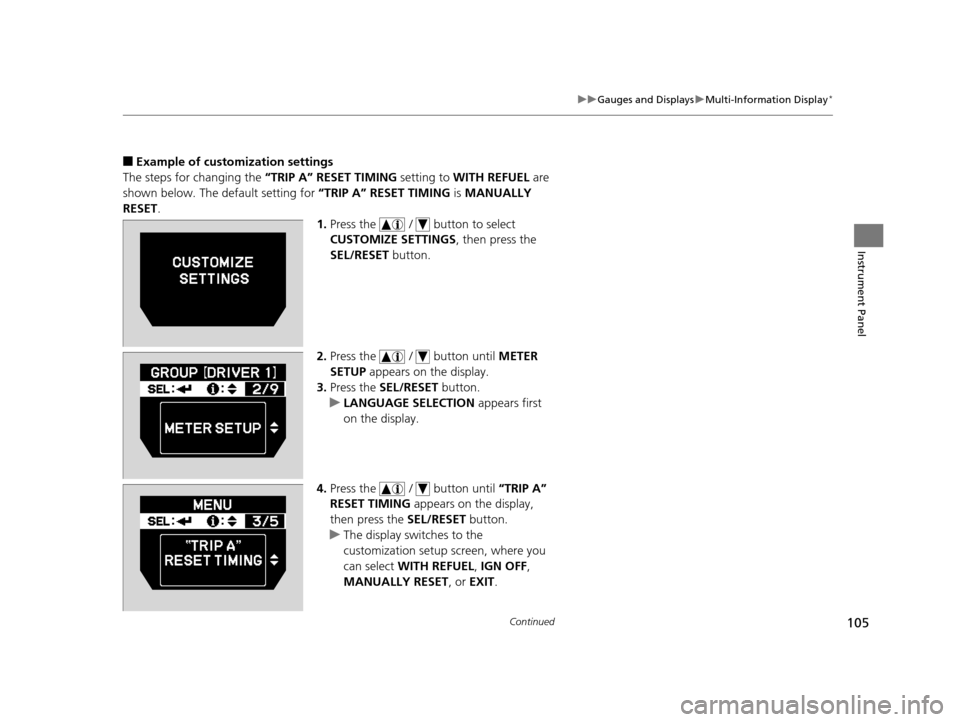
■Example of customization settings
The steps for changing the “TRIP A” RESET TIMING setting to WITH REFUEL are
shown below. The default setting for “TRIP A” RESET TIMING is MANUALLY
RESET .
1.Press the / button to select
CUSTOMIZE SETTINGS , then press the
SEL/RESET button.
2. Press the / button until METER
SETUP appears on the display.
3. Press the SEL/RESET button.
u LANGUAGE SELECTION appears first
on the display.
4. Press the / button until “TRIP A”
RESET TIMING appears on the display,
then press the SEL/RESET button.
u The display swit ches to the
customization setup screen, where you
can select WITH REFUEL , IGN OFF ,
MANUALLY RESET, or EXIT.
17 US ODYSSEY (KA KC)-31TK86600.book 105 ページ 2016年10月24日 月曜日 午後4時2分
Page 107 of 565
106
uuGauges and Displays uMulti-Information Display*
Instrument Panel
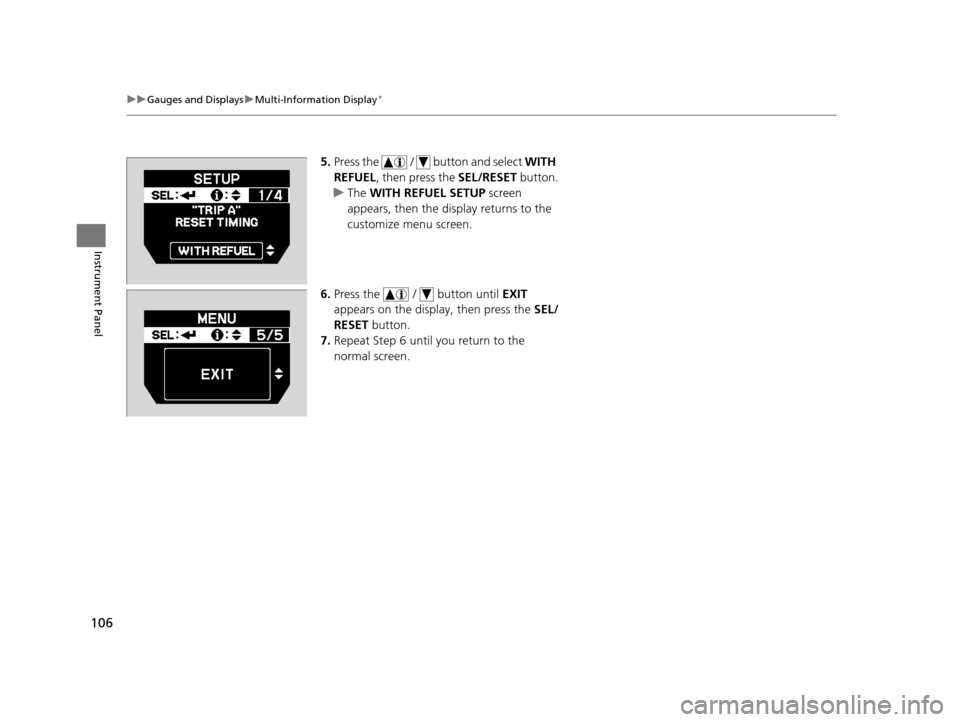
5. Press the / button and select WITH
REFUEL , then press the SEL/RESET button.
u The WITH REFUEL SETUP screen
appears, then the di splay returns to the
customize menu screen.
6. Press the / button until EXIT
appears on the display, then press the SEL/
RESET button.
7. Repeat Step 6 until you return to the
normal screen.
17 US ODYSSEY (KA KC)-31TK86600.book 106 ページ 2016年10月24日 月曜日 午後4時2分
Page 110 of 565
109
uuClock uAdjusting the Clock
Controls
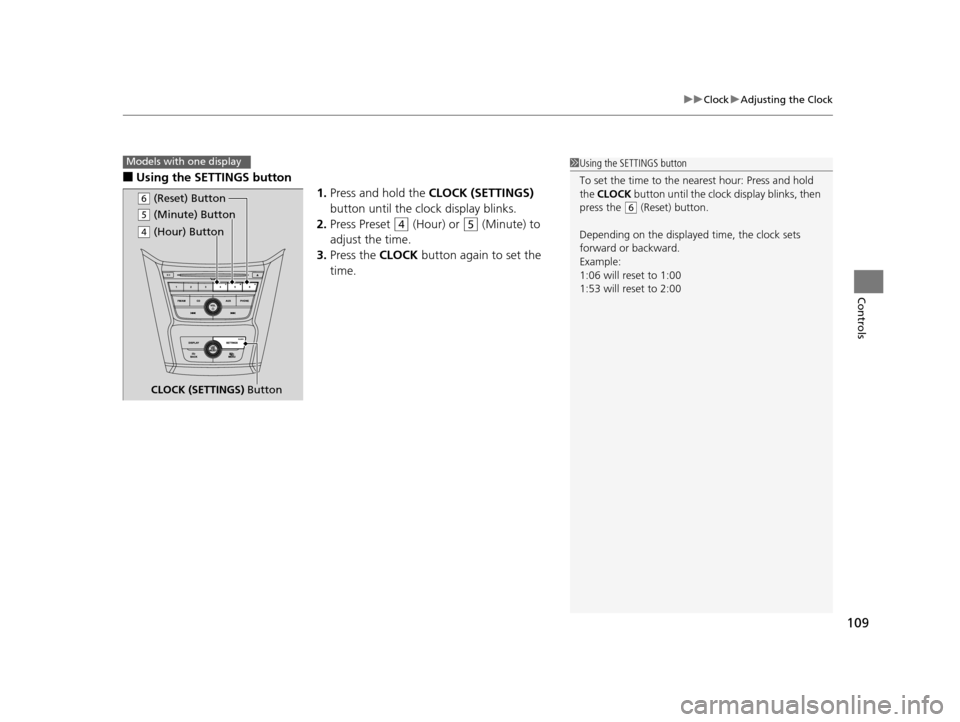
■Using the SETTINGS button
1.Press and hold the CLOCK (SETTINGS)
button until the clock display blinks.
2. Press Preset
(4 (Hour) or (5 (Minute) to
adjust the time.
3. Press the CLOCK button again to set the
time.
1 Using the SETTINGS button
To set the time to the nearest hour: Press and hold
the CLOCK button until the clock display blinks, then
press the
( 6 (Reset) button.
Depending on the displayed time, the clock sets
forward or backward.
Example:
1:06 will reset to 1:00
1:53 will reset to 2:00
Models with one display
( 5 (Minute) Button
CLOCK (SETTINGS) Button
(6 (Reset) Button
(4 (Hour) Button
17 US ODYSSEY (KA KC)-31TK86600.book 109 ページ 2016年10月24日 月曜日 午後4時2分
Page 154 of 565
153
uuOperating the Switches Around the Steering Wheel uBrightness Control
Controls
Brightness Control
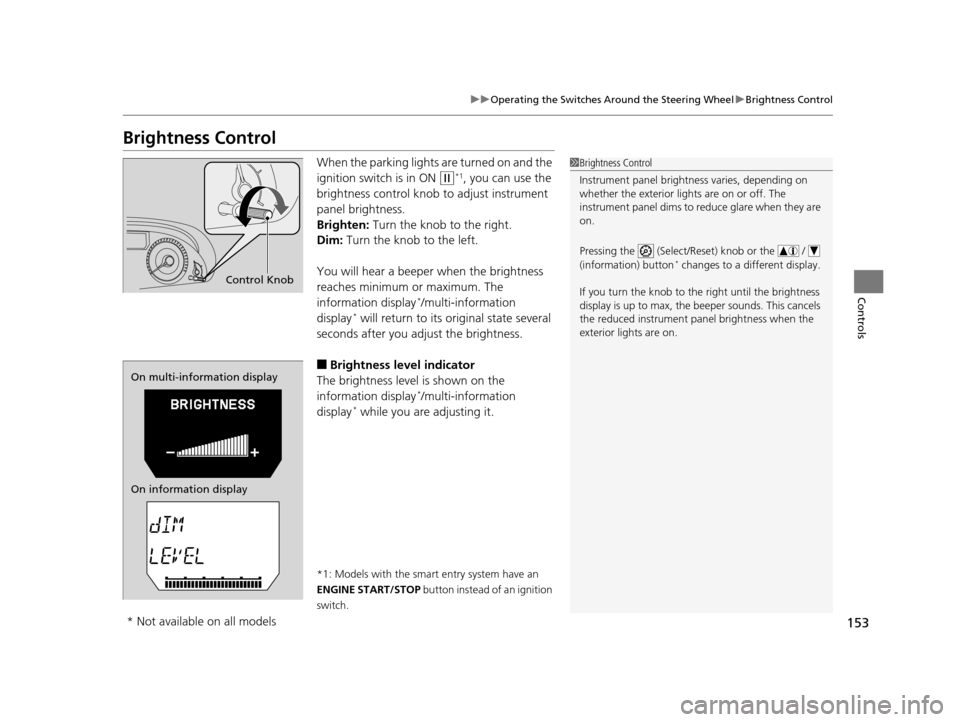
When the parking lights are turned on and the
ignition switch is in ON
(w*1, you can use the
brightness control knob to adjust instrument
panel brightness.
Brighten: Turn the knob to the right.
Dim: Turn the knob to the left.
You will hear a beeper when the brightness
reaches minimum or maximum. The
information display
*/multi-information
display* will return to its original state several
seconds after you adjust the brightness.
■Brightness level indicator
The brightness level is shown on the
information display
*/multi-information
display* while you are adjusting it.
*1: Models with the smart entry system have an
ENGINE START/STOP button instead of an ignition
switch.
1 Brightness Control
Instrument panel brightne ss varies, depending on
whether the exterior lights are on or off. The
instrument panel dims to reduce glare when they are
on.
Pressing the (Select/Reset) knob or the /
(information) button
* changes to a different display.
If you turn the knob to the right until the brightness
display is up to max, the beeper sounds. This cancels
the reduced instrument panel brightness when the
exterior lights are on.
Control Knob
On multi-information display
On information display
* Not available on all models
17 US ODYSSEY (KA KC)-31TK86600.book 153 ページ 2016年10月24日 月曜日 午後4時2分
Page 156 of 565
155
uuOperating the Switches Around the Steering Wheel uDriving Position Memory System*
Continued
Controls
Driving Position Memory System*
You can store two driver’s seat and outside mirrors position with the driving position
memory system.
When you unlock and open the driver’s door with a remote, the seat and outside
mirrors adjust automatically to on e of the two preset positions.
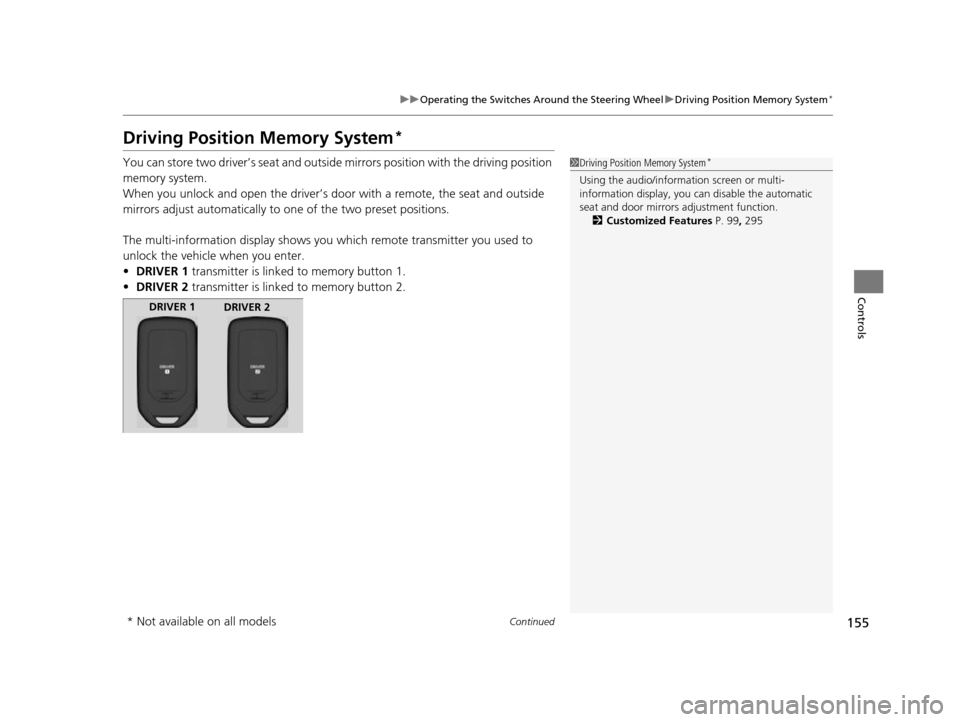
The multi-information display shows you which remote transmitter you used to
unlock the vehicle when you enter.
• DRIVER 1 transmitter is linked to memory button 1.
• DRIVER 2 transmitter is linked to memory button 2.1Driving Position Memory System*
Using the audio/information screen or multi-
information display, you can disable the automatic
seat and door mirrors adjustment function. 2 Customized Features P. 99, 295
DRIVER 1
DRIVER 2
* Not available on all models
17 US ODYSSEY (KA KC)-31TK86600.book 155 ページ 2016年10月24日 月曜日 午後4時2分