reset HONDA ODYSSEY 2017 RC1-RC2 / 5.G Owner's Manual
[x] Cancel search | Manufacturer: HONDA, Model Year: 2017, Model line: ODYSSEY, Model: HONDA ODYSSEY 2017 RC1-RC2 / 5.GPages: 565, PDF Size: 33.13 MB
Page 211 of 565
210
uuAudio System uAudio Remote Controls
Features
Audio Remote Controls
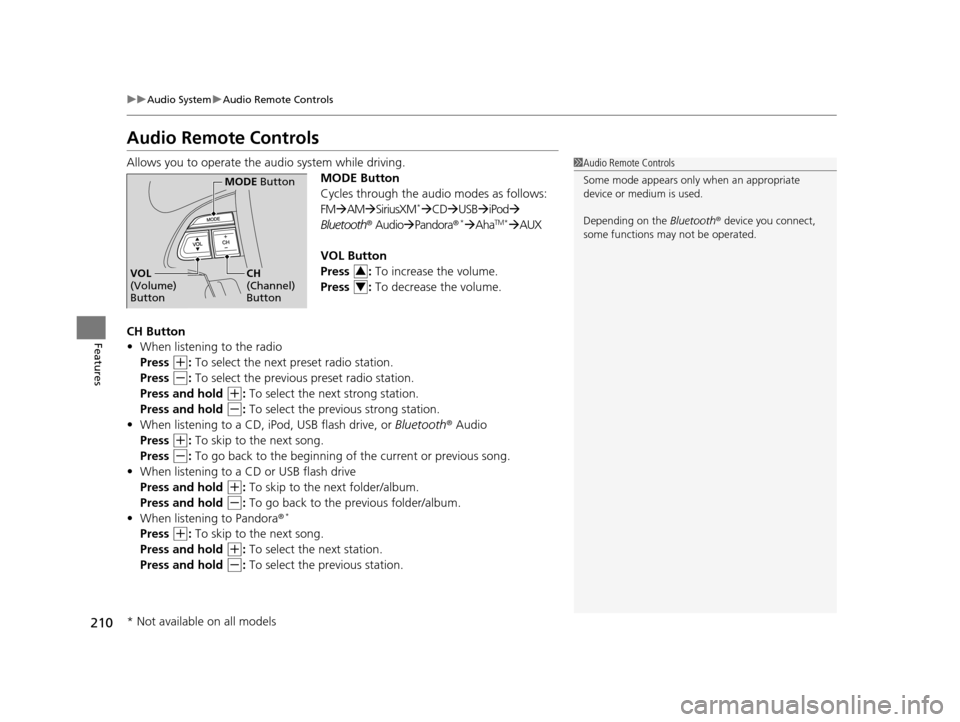
Allows you to operate the audio system while driving.
MODE Button
Cycles through the audio modes as follows:
FMAM SiriusXM
*CD USB iPod
Bluetooth ® AudioPandora ®*AhaTM*AUX
VOL Button
Press : To increase the volume.
Press : To decrease the volume.
CH Button
• When listening to the radio
Press
(+: To select the next preset radio station.
Press
(-: To select the previous preset radio station.
Press and hold
(+: To select the next strong station.
Press and hold
(-: To select the previous strong station.
• When listening to a CD, iPod, USB flash drive, or Bluetooth® Audio
Press
(+: To skip to the next song.
Press
(-: To go back to the beginning of the current or previous song.
• When listening to a CD or USB flash drive
Press and hold
(+: To skip to the next folder/album.
Press and hold
(-: To go back to the pr evious folder/album.
• When listening to Pandora ®*
Press (+: To skip to the next song.
Press and hold
(+: To select the next station.
Press and hold
(-: To select the previous station.
1 Audio Remote Controls
Some mode appears only when an appropriate
device or medium is used.
Depending on the Bluetooth® device you connect,
some functions ma y not be operated.
MODE Button
CH
(Channel)
ButtonVOL
(Volume)
Button3
4
* Not available on all models
17 US ODYSSEY (KA KC)-31TK86600.book 210 ページ 2016年10月24日 月曜日 午後4時2分
Page 212 of 565
211
Features
Audio System Basic Operation
To use the audio system function, the ignition swit ch must be in ACCESSORY (q or
ON
(w.
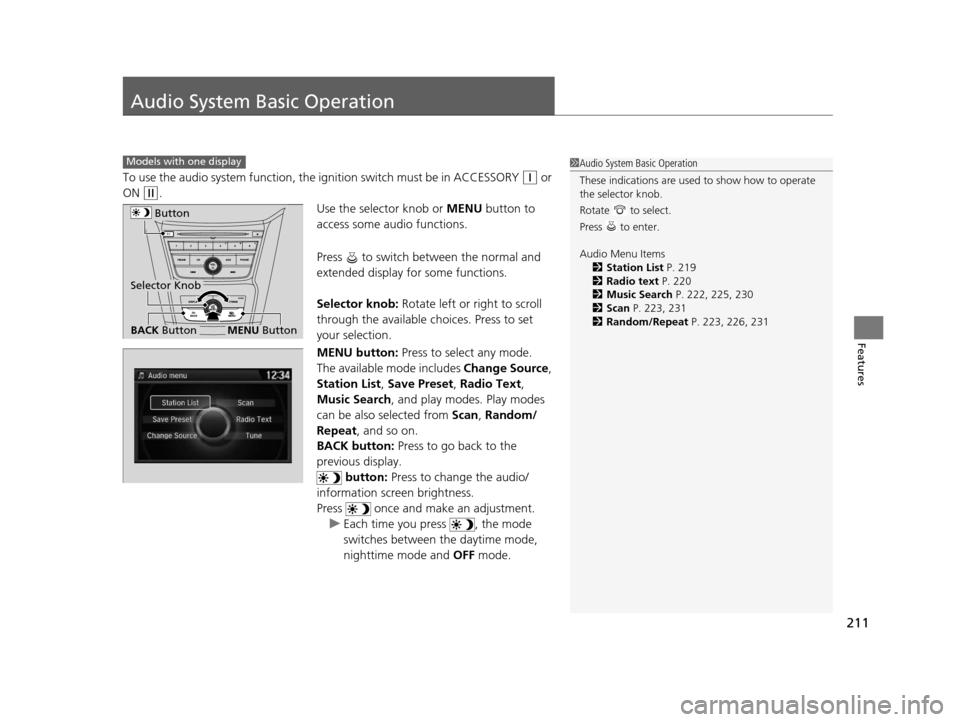
Use the selector knob or MENU button to
access some audio functions.
Press to switch between the normal and
extended display fo r some functions.
Selector knob: Rotate left or right to scroll
through the available ch oices. Press to set
your selection.
MENU button: Press to select any mode.
The available mode includes Change Source,
Station List , Save Preset , Radio Text,
Music Search , and play mode s. Play modes
can be also selected from Scan, Random/
Repeat , and so on.
BACK button: Press to go back to the
previous display. button: Press to change the audio/
information screen brightness.
Press once and make an adjustment. u Each time you press , the mode
switches between the daytime mode,
nighttime mode and OFF mode.
Models with one display1Audio System Basic Operation
These indications are used to show how to operate
the selector knob.
Rotate to select.
Press to enter.
Audio Menu Items
2 Station List P. 219
2 Radio text P. 220
2 Music Search P. 222, 225, 230
2 Scan P. 223, 231
2 Random/Repeat P. 223, 226, 231
Button
BACK ButtonMENU Button
Selector Knob
17 US ODYSSEY (KA KC)-31TK86600.book 211 ページ 2016年10月24日 月曜日 午後4時2分
Page 214 of 565
213
uuAudio System Basic Operation uAudio/Information Screen
Continued
Features
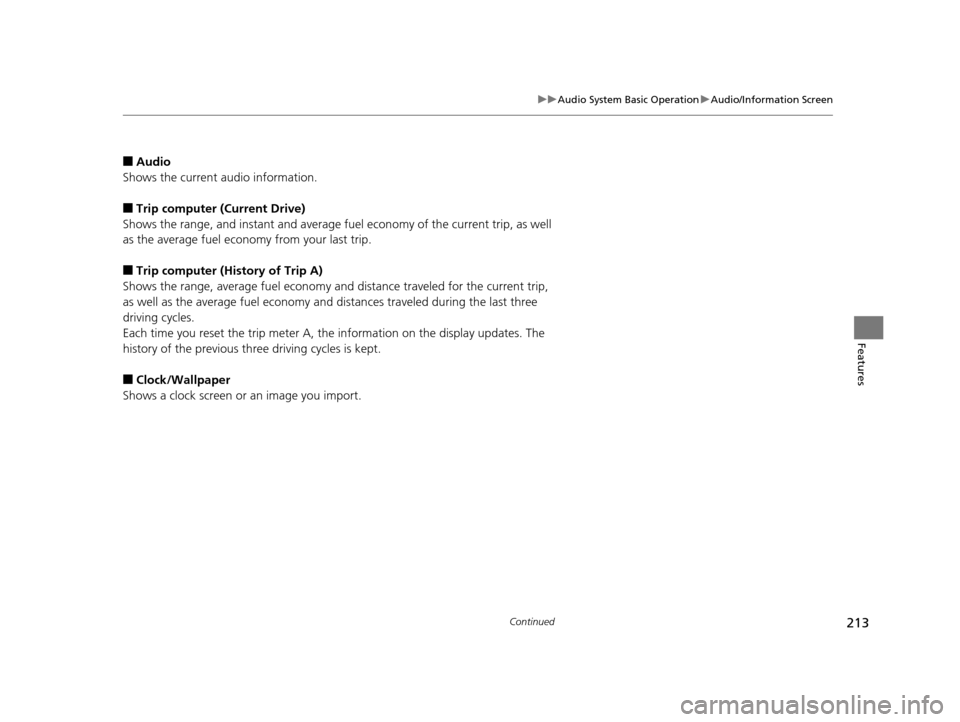
■Audio
Shows the current audio information.
■Trip computer (Current Drive)
Shows the range, and instant and average fuel economy of the current trip, as well
as the average fuel economy from your last trip.
■Trip computer (History of Trip A)
Shows the range, average fuel economy and distance traveled for the current trip,
as well as the average fuel economy and distances traveled during the last three
driving cycles.
Each time you reset the trip meter A, th e information on the display updates. The
history of the previous three driving cycles is kept.
■Clock/Wallpaper
Shows a clock screen or an image you import.
17 US ODYSSEY (KA KC)-31TK86600.book 213 ページ 2016年10月24日 月曜日 午後4時2分
Page 219 of 565
218
uuAudio System Basic Operation uPlaying AM/FM Radio
Features
Playing AM/FM Radio
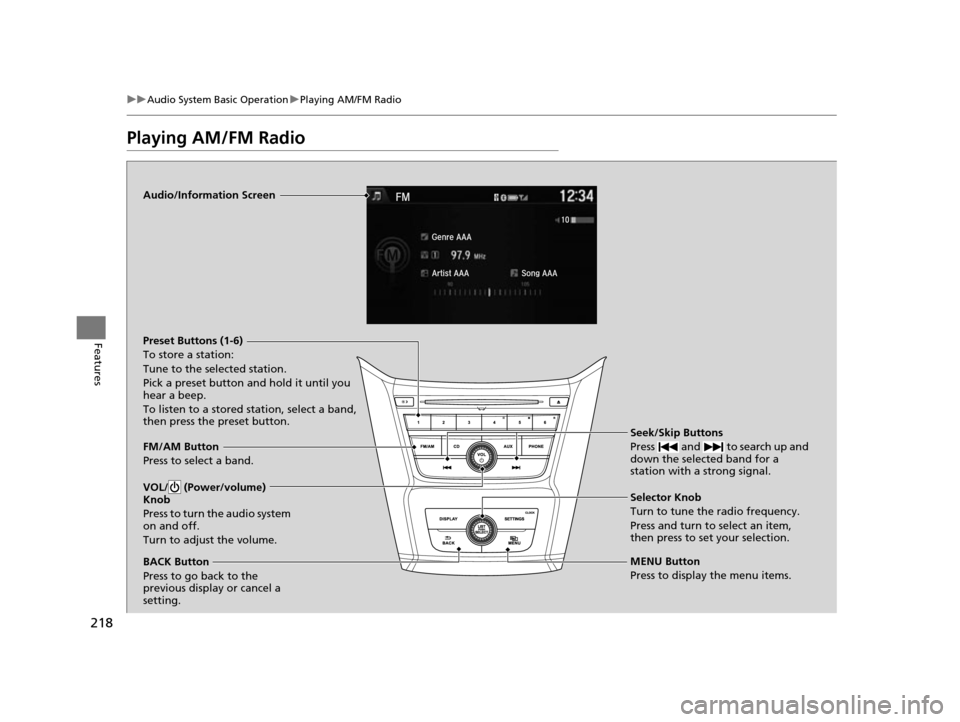
Audio/Information Screen
FM/AM Button
Press to select a band. Preset Buttons (1-6)
To store a station:
Tune to the selected station.
Pick a preset button and hold it until you
hear a beep.
To listen to a stored station, select a band,
then press the preset button.
Seek/Skip Buttons
Press and to search up and
down the selected band for a
station with a strong signal.
MENU Button
Press to display the menu items. Selector Knob
Turn to tune the radio frequency.
Press and turn to select an item,
then press to set your selection.
VOL/ (Power/volume)
Knob
Press to turn the audio system
on and off.
Turn to adjust the volume.
BACK Button
Press to go back to the
previous display or cancel a
setting.
17 US ODYSSEY (KA KC)-31TK86600.book 218 ページ 2016年10月24日 月曜日 午後4時2分
Page 220 of 565
Continued219
uuAudio System Basic Operation uPlaying AM/FM Radio
Features
Provides text data information related to your selected RDS-capable FM station.
■To find an RDS station from Station List
1. Press while listening to an FM station.
2. Rotate to select the station, then press .
■Manual update
Updates your available st ation list at any time.
1. Press while listening to an FM station.
2. Rotate to select Refresh, then press .
■Radio Data System (RDS)1Playing AM/FM Radio
The ST indicator appears on the display indicating
stereo FM broadcasts.
Stereo reproduction in AM is not available.
Switching the Audio Mode
Press the SOURCE button on the steering wheel.
2 Audio Remote Controls P. 210
You can also switch the mode by pressing the MENU
button and selecting Change Source on the MENU
screen.
You can store 6 AM stations and 12 FM stations into
the preset button memory. FM1 and FM2 let you
store 6 stations each.
1 Radio Data System (RDS)
When you select an RDS-capable FM station, the RDS
automatically turns on, and the frequency display
changes to the station name. However, when the
signals of that station become weak, the display
changes from the statio n name to the frequency.
17 US ODYSSEY (KA KC)-31TK86600.book 219 ページ 2016年10月24日 月曜日 午後4時2分
Page 228 of 565
227
uuAudio System Basic Operation uPlaying Internet Radio
Continued
Features
Playing Internet Radio
Connect a compatible phone through Bluetooth®.
You can also connect the phone using your dock connector to the USB port.
Press the AUX button to select Pandora mode.
U.S. models
Compatible phones only
1Playing Internet Radio
Pandora ®, the Pandora logo, and the Pandora trade
dress are trademarks or registered trademarks of
Pandora Media, Inc., used with permission. Pandora
is currently available exclusively in the United States.
iPhone
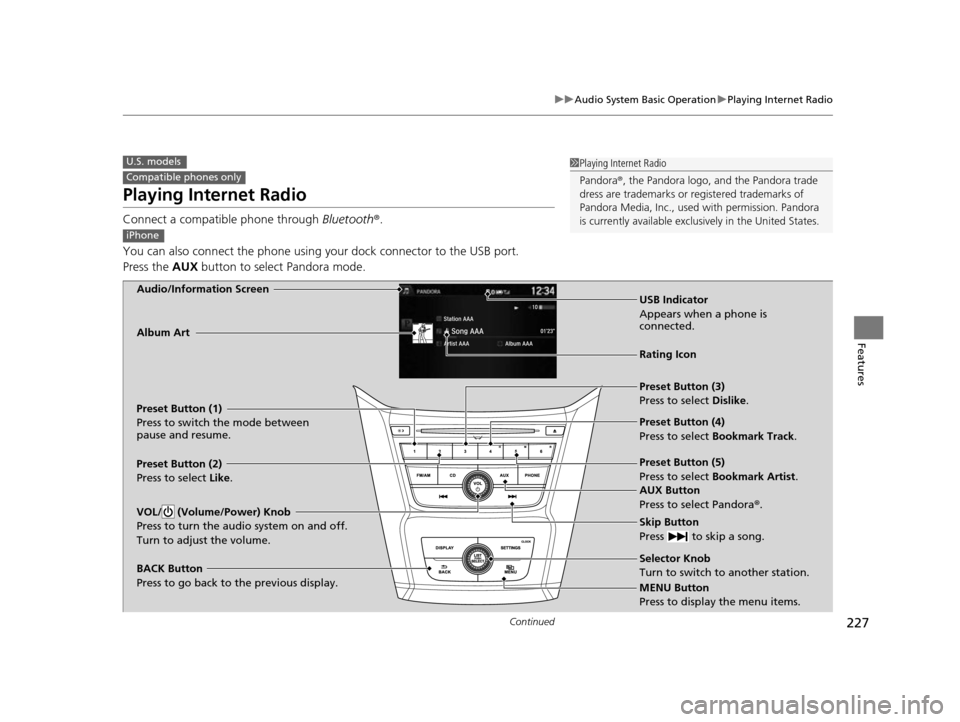
Audio/Information Screen
AUX Button
Press to select Pandora®.
Skip Button
Press to skip a song.
MENU Button
Press to display the menu items. Selector Knob
Turn to switch to another station.
VOL/ (Volume/Power) Knob
Press to turn the audio system on and off.
Turn to adjust the volume.
BACK Button
Press to go back to the previous display.
Album Art
USB Indicator
Appears when a phone is
connected.
Rating Icon
Preset Button (1)
Press to switch the mode between
pause and resume.
Preset Button (2)
Press to select Like.
Preset Button (3)
Press to select Dislike.
Preset Button (4)
Press to select Bookmark Track
.
Preset Button (5)
Press to select Bookmark Artist .
17 US ODYSSEY (KA KC)-31TK86600.book 227 ページ 2016年10月24日 月曜日 午後4時2分
Page 233 of 565
232
uuAudio System Basic Operation uPlaying Bluetooth ® Audio
Features
Playing Bluetooth® Audio
Your audio system allows you to listen to music from your Bluetooth-compatible
phone.
This function is available when the phone is paired and connected to the vehicle's
Bluetooth ® HandsFreeLink ® (HFL) system.
2 Phone Setup P. 334
1Playing Bluetooth ® Audio
Not all Bluetooth -enabled phones with streaming
audio capabilities are compatible with the system.
For a list of compatible phones:
•U.S.: Visit www.handsfreelink.honda.com , or call
1-888-528-7876.
•Canada: Visit www.handsfreelink.ca , or call 1-888-
528-7876.
In some states, it may be il legal to perform some data
device functions while driving.
If more than one phone is paired to the HFL system,
there will be a delay before the system begins to play.
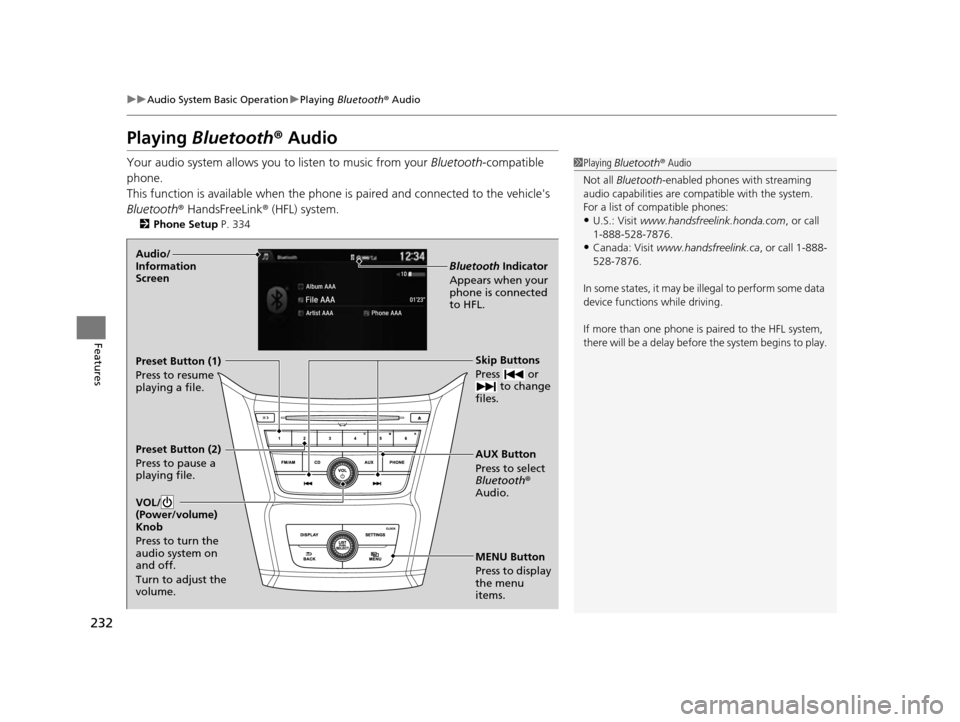
MENU Button
Press to display
the menu
items. AUX Button
Press to select
Bluetooth®
Audio. Skip Buttons
Press or to change
files.
Bluetooth Indicator
Appears when your
phone is connected
to HFL.
VOL/
(Power/volume)
Knob
Press to turn the
audio system on
and off.
Turn to adjust the
volume.Audio/
Information
Screen
Preset Button (1)
Press to resume
playing a file.
Preset Button (2)
Press to pause a
playing file.
17 US ODYSSEY (KA KC)-31TK86600.book 232 ページ 2016年10月24日 月曜日 午後4時2分
Page 235 of 565
234
Features
Audio System Basic Operation
To use the audio system function, the power mode must be in ACCESSORY or ON.
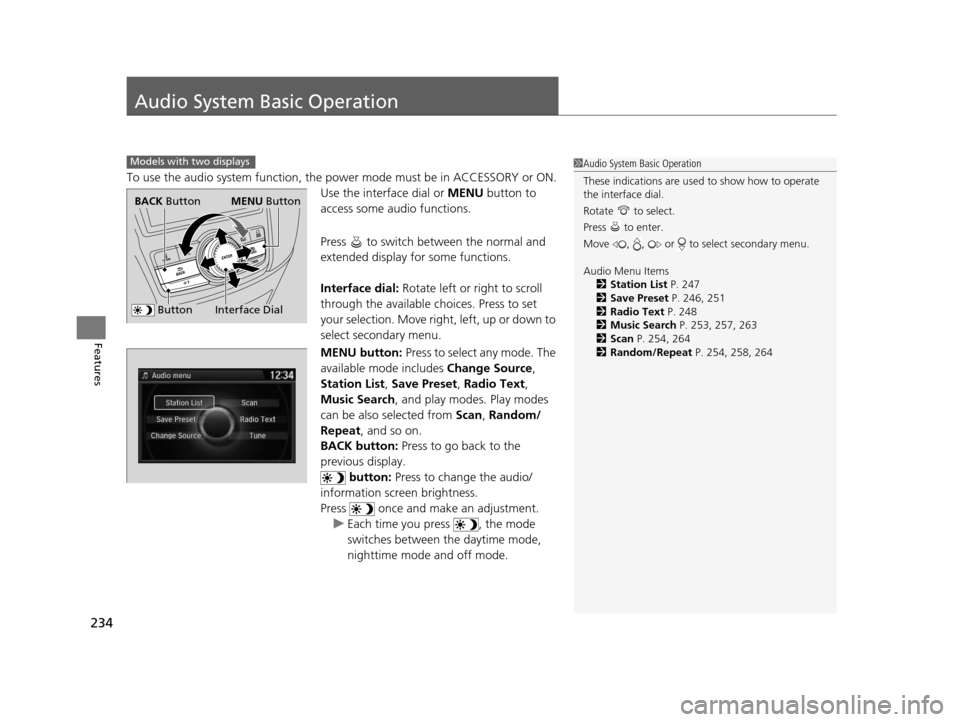
Use the interface dial or MENU button to
access some audio functions.
Press to switch between the normal and
extended display fo r some functions.
Interface dial: Rotate left or right to scroll
through the available choices. Press to set
your selection. Move right, left, up or down to
select secondary menu.
MENU button: Press to select any mode. The
available mode includes Change Source,
Station List , Save Preset , Radio Text ,
Music Search, and play modes. Play modes
can be also selected from Scan, Random/
Repeat , and so on.
BACK button: Press to go back to the
previous display. button: Press to change the audio/
information screen brightness.
Press once and make an adjustment. u Each time you press , the mode
switches between the daytime mode,
nighttime mode and off mode.
Models with two displays1Audio System Basic Operation
These indications are used to show how to operate
the interface dial.
Rotate to select.
Press to enter.
Move , , or to select secondary menu.
Audio Menu Items 2 Station List P. 247
2 Save Preset P. 246, 251
2 Radio Text P. 248
2 Music Search P. 253, 257, 263
2 Scan P. 254, 264
2 Random/Repeat P. 254, 258, 264
Interface Dial
BACK Button
Button
MENU Button
17 US ODYSSEY (KA KC)-31TK86600.book 234 ページ 2016年10月24日 月曜日 午後4時2分
Page 237 of 565
uuAudio System Basic Operation uAudio with Touch Screen
236
Features
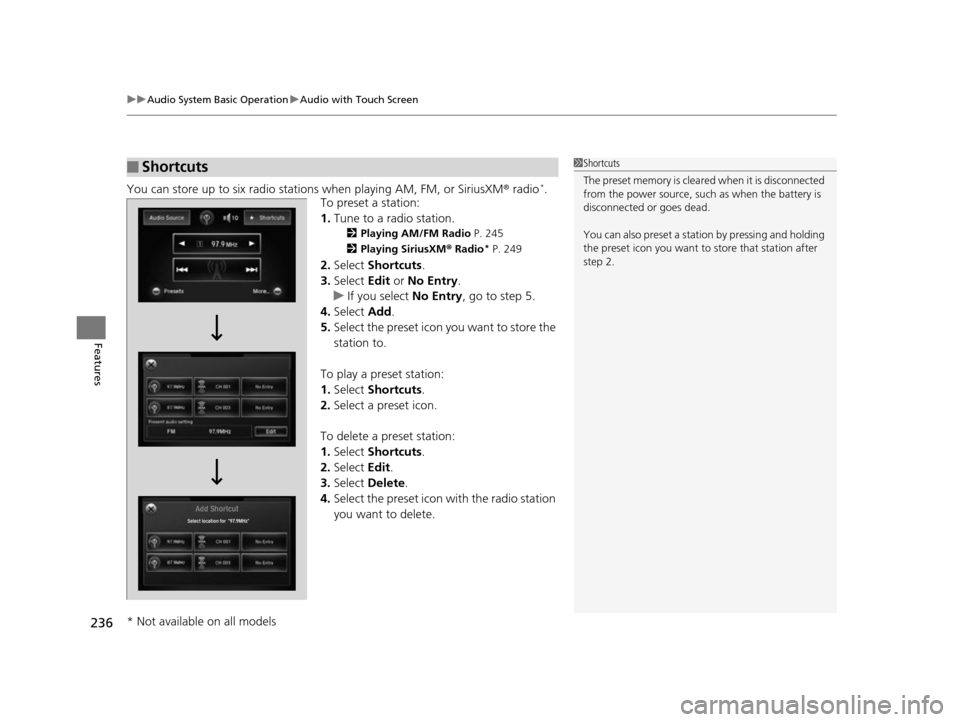
You can store up to six radio stations when playing AM, FM, or SiriusXM ® radio*.
To preset a station:
1. Tune to a radio station.
2 Playing AM/FM Radio P. 245
2 Playing SiriusXM ® Radio
* P. 249
2. Select Shortcuts .
3. Select Edit or No Entry .
u If you select No Entry, go to step 5.
4. Select Add.
5. Select the preset icon you want to store the
station to.
To play a preset station:
1. Select Shortcuts .
2. Select a preset icon.
To delete a preset station:
1. Select Shortcuts .
2. Select Edit.
3. Select Delete.
4. Select the preset icon with the radio station
you want to delete.
■Shortcuts1Shortcuts
The preset memory is cleare d when it is disconnected
from the power source, such as when the battery is
disconnected or goes dead.
You can also preset a stat ion by pressing and holding
the preset icon you want to store that station after
step 2.
* Not available on all models
17 US ODYSSEY (KA KC)-31TK86600.book 236 ページ 2016年10月24日 月曜日 午後4時2分
Page 241 of 565
240
uuAudio System Basic Operation uAudio/Information Screen
Features
■Info
Shows the Trip Computer or Clock/Wallpaper and other information. Rotate
to select an item, then press .
■Trip computer (Current Drive)
Shows the range, and instant and average fu el economy of the current trip, as well
as the average fuel economy from your last trip.
■Trip computer (History of Trip A)
Shows the range, average fuel economy an d distances traveled for the current trip,
as well as the average fuel economy and distances traveled during the last three
driving cycles.
Each time you reset the trip meter A, the information on the display updates. The
history of the previous th ree driving cycles is kept.
■Deleting the history manually
1. Move on the History of Trip A screen to select Delete History, then press .
2. You will receive a confirmation message on the screen. Rotate to select Yes,
then press .
■Clock/Wallpaper
Shows a clock screen or an image you import.
17 US ODYSSEY (KA KC)-31TK86600.book 240 ページ 2016年10月24日 月曜日 午後4時2分