change HONDA ODYSSEY 2017 RC1-RC2 / 5.G Owners Manual
[x] Cancel search | Manufacturer: HONDA, Model Year: 2017, Model line: ODYSSEY, Model: HONDA ODYSSEY 2017 RC1-RC2 / 5.GPages: 565, PDF Size: 33.13 MB
Page 3 of 565
Contents
This owner’s manual should be considered a permanent part of the
vehicle and should remain with the vehicle when it is sold.
This owner’s manual covers all models of your vehicle. You may find
descriptions of equipment and features that are not on your
particular model.
Images throughout this owner’s manu al (including the front cover)
represent features and equipment that are available on some, but
not all, models. Your particular mo del may not have some of these
features.
This owner’s manual is for vehicles sold in the United States and
Canada.
The information and specifications in cluded in this publication were
in effect at the time of approval for printing. Honda Motor Co., Ltd.
reserves the right, however, to discontinue or change specifications
or design at any time without notice and without incurring any
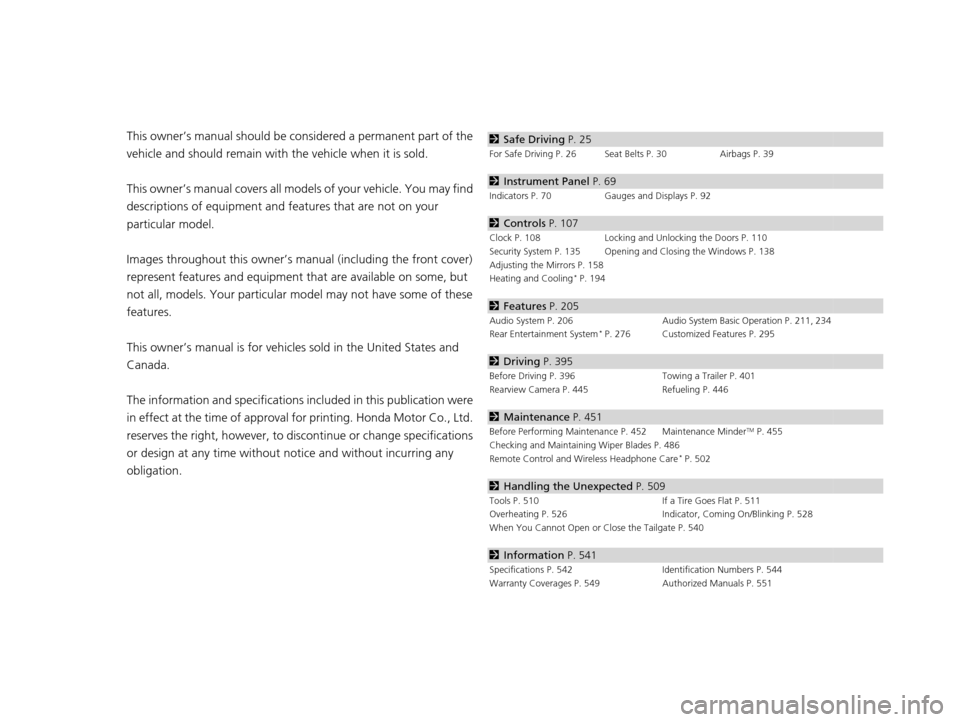
obligation.2 Safe Driving P. 25
For Safe Driving P. 26 Seat Belts P. 30 Airbags P. 39
2Instrument Panel P. 69
Indicators P. 70 Gauges and Displays P. 92
2Controls P. 107
Clock P. 108 Locking and Unlocking the Doors P. 110
Security System P. 135 Opening and Closing the Windows P. 138
Adjusting the Mirrors P. 158
Heating and Cooling
* P. 194
2 Features P. 205
Audio System P. 206 Audio System Basic Operation P. 211, 234
Rear Entertainment System* P. 276 Customized Features P. 295
2 Driving P. 395
Before Driving P. 396 Towing a Trailer P. 401
Rearview Camera P. 445 Refueling P. 446
2Maintenance P. 451
Before Performing Maintenance P. 452 Maintenance MinderTM P. 455
Checking and Maintaining Wiper Blades P. 486
Remote Control and Wireless Headphone Care
* P. 502
2 Handling the Unexpected P. 509
Tools P. 510 If a Tire Goes Flat P. 511
Overheating P. 526 Indicator, Coming On/Blinking P. 528
When You Cannot Open or Close the Tailgate P. 540
2 Information P. 541
Specifications P. 542 Identification Numbers P. 544
Warranty Coverages P. 549 Authorized Manuals P. 551
17 US ODYSSEY (KA KC)-31TK86600.book 2 ページ 2016年10月24日 月曜日 午後4時2分
Page 12 of 565
11
Quick Reference Guide
Controls (P107)
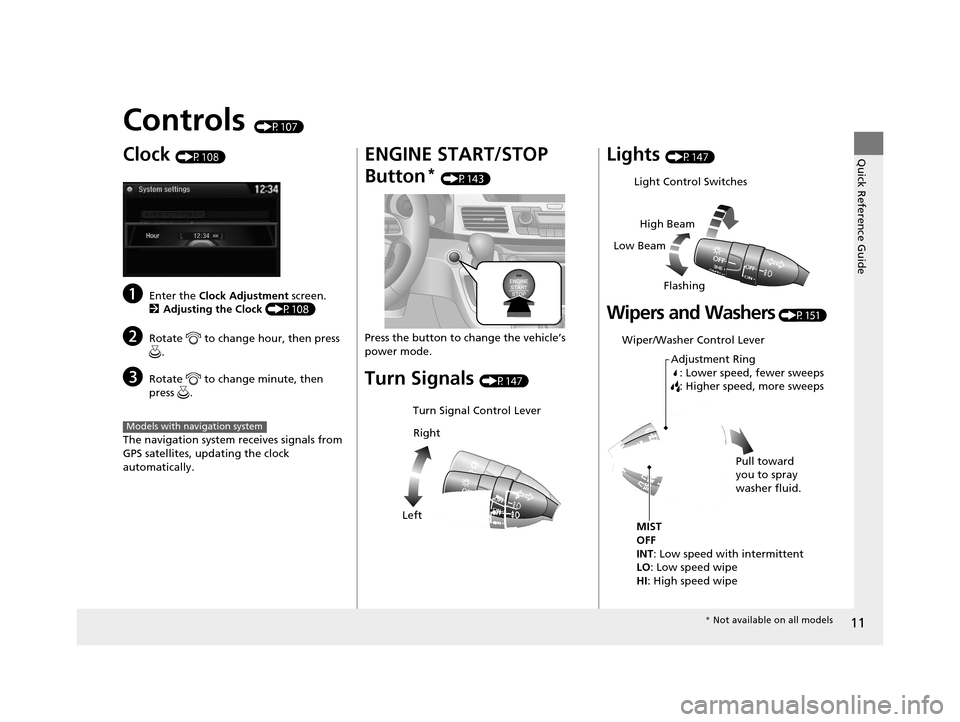
Clock (P108)
aEnter the Clock Adjustment screen.
2 Adjusting the Clock (P108)
bRotate to change hour, then press
.
cRotate to change minute, then
press .
The navigation system receives signals from
GPS satellites, updating the clock
automatically.
Models with navigation system
ENGINE START/STOP
Button
* (P143)
Press the button to ch ange the vehicle’s
power mode.
Turn Signals (P147)
Turn Signal Control Lever
Right
Left
Lights (P147)
Wipers and Washers (P151)
Light Control Switches
Low Beam High Beam
Flashing
Wiper/Washer Control Lever Adjustment Ring: Lower speed, fewer sweeps
: Higher speed, more sweeps
MIST
OFF
INT: Low speed with intermittent
LO: Low speed wipe
HI : High speed wipe Pull toward
you to spray
washer fluid.
*
Not available on all models
17 US ODYSSEY (KA KC)-31TK86600.book 11 ページ 2016年10月24日 月曜日 午後4時2分
Page 16 of 565
15
Quick Reference Guide
Features (P205)
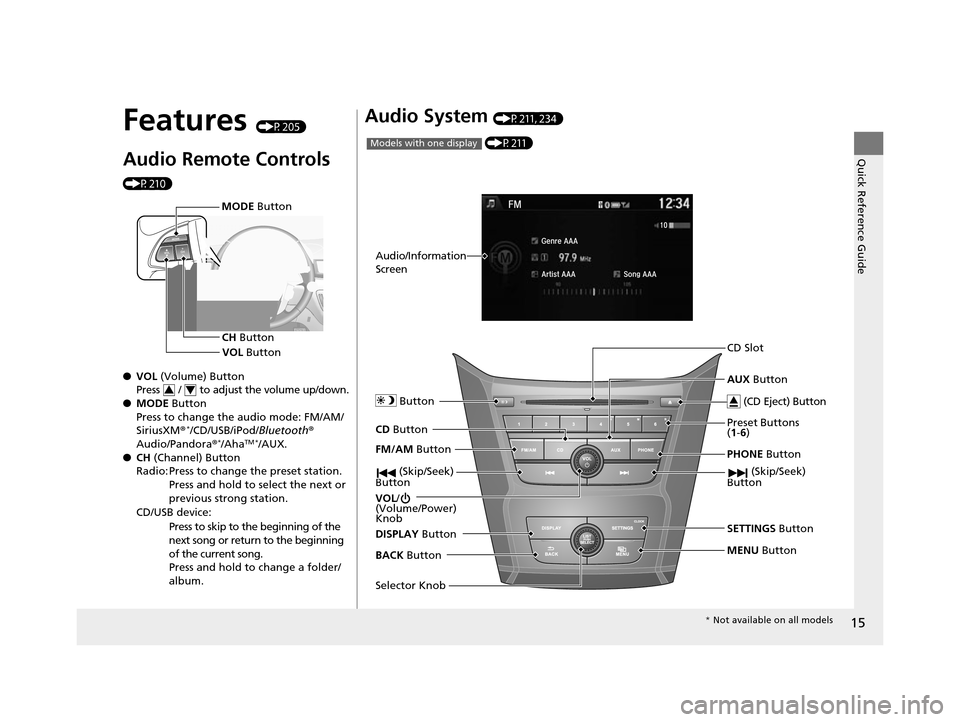
Audio Remote Controls
(P210)
●VOL (Volume) Button
Press / to adjust the volume up/down.
● MODE Button
Press to change the audio mode: FM/AM/
SiriusXM ®
*/CD/USB/iPod/ Bluetooth®
Audio/Pandora ®*/AhaTM */AUX.
● CH (Channel) Button
Radio: Press to change the preset station. Press and hold to select the next or
previous strong station.
CD/USB device: Press to skip to the beginning of the
next song or return to the beginning
of the current song.
Press and hold to change a folder/
album.
MODE Button
CH Button
VOL Button
34
Audio System (P211, 234)
FM/AM Button
VOL /
(Volume/Power)
Knob
(CD Eject) Button
Selector Knob Preset Buttons
(
1- 6)
AUX
Button
SETTINGS Button
(P211)
Models with one display
BACK
Button PHONE
Button
CD Slot
MENU
Button
Audio/Information
Screen
CD
Button Button
(Skip/Seek)
Button (Skip/Seek)
Button
DISPLAY Button
* Not available on all models
17 US ODYSSEY (KA KC)-31TK86600.book 15 ページ 2016年10月24日 月曜日 午後4時2分
Page 28 of 565
27
uuFor Safe Driving uImportant Safety Precautions
Safe Driving
■Pay appropriate attention to the task of driving safely
Engaging in cell phone conversation or other activities that keep you from paying
close attention to the road, other vehicles , and pedestrians could lead to a crash.
Remember, situations can change quickly, and only you can decide when it is safe to
divert some attention away from driving.
■Control your speed
Excessive speed is a major factor in crash injuries and deaths. Generally, the higher
the speed, the greater the risk, but serious injuries can also occur at lower speeds.
Never drive faster than is safe for current conditions, regardless of the maximum
speed posted.
■Keep your vehicle in safe condition
Having a tire blowout or a mechanical failure can be extremely hazardous.
To reduce the possibility of such problems, check your tire pressures and condition
frequently, and perform all re gularly scheduled maintenance.
17 US ODYSSEY (KA KC)-31TK86600.book 27 ページ 2016年10月24日 月曜日 午後4時2分
Page 67 of 565
66
Safe Driving
Exhaust Gas Hazard
Carbon Monoxide Gas
The engine exhaust from this vehicle contains carbon monoxide, a colorless,
odorless, and highly toxic gas. As long as you properly maintain your vehicle, carbon
monoxide gas will not get into the interior.
■Have the exhaust system in spected for leaks whenever
• The exhaust system is m aking an unusual noise.
• The exhaust system may have been damaged.
• The vehicle is raised for an oil change.
When you operate a vehicle with the tailgat e open, airflow can pull exhaust gas into
the interior and create a hazardous conditio n. If you must drive with the tailgate
open, open all the windows an d set the heating and cooling
*/climate control*
system as shown below.
1. Select the fresh air mode.
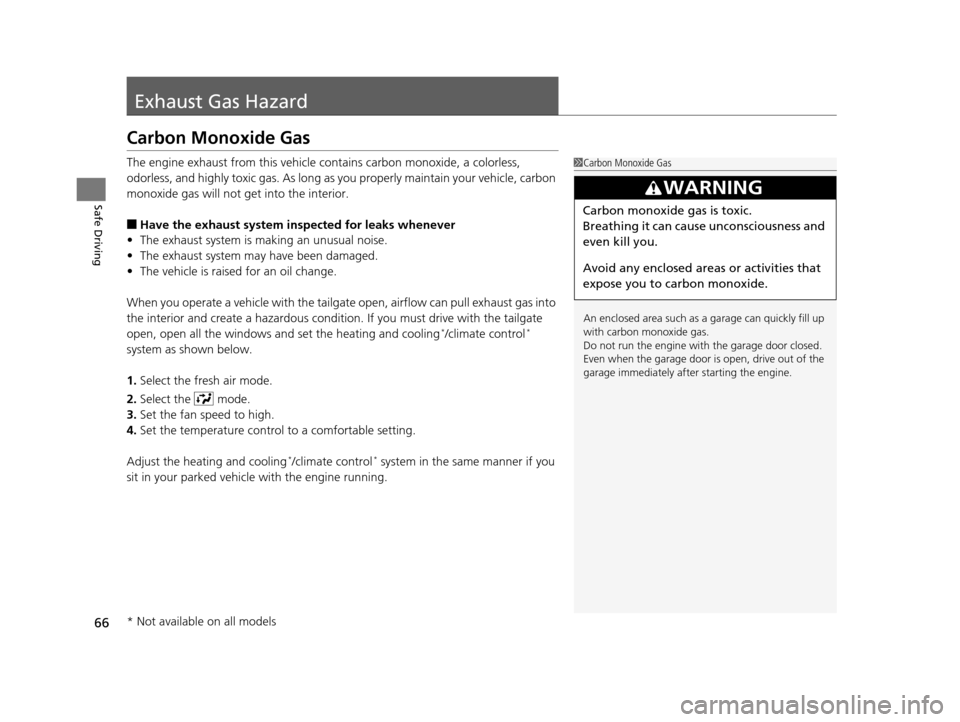
2. Select the mode.
3. Set the fan speed to high.
4. Set the temperature control to a comfortable setting.
Adjust the heating and cooling
*/climate control* system in the same manner if you
sit in your parked vehicle with the engine running.
1 Carbon Monoxide Gas
An enclosed area such as a garage can quickly fill up
with carbon monoxide gas.
Do not run the engine with the garage door closed.
Even when the garage door is open, drive out of the
garage immediately afte r starting the engine.
3WARNING
Carbon monoxide gas is toxic.
Breathing it can cause unconsciousness and
even kill you.
Avoid any enclosed areas or activities that
expose you to carbon monoxide.
* Not available on all models
17 US ODYSSEY (KA KC)-31TK86600.book 66 ページ 2016年10月24日 月曜日 午後4時2分
Page 78 of 565
77
uuIndicators u
Continued
Instrument Panel
*1:Models with the smart entry system have an ENGINE START/STOP button instead of an ignition switch.
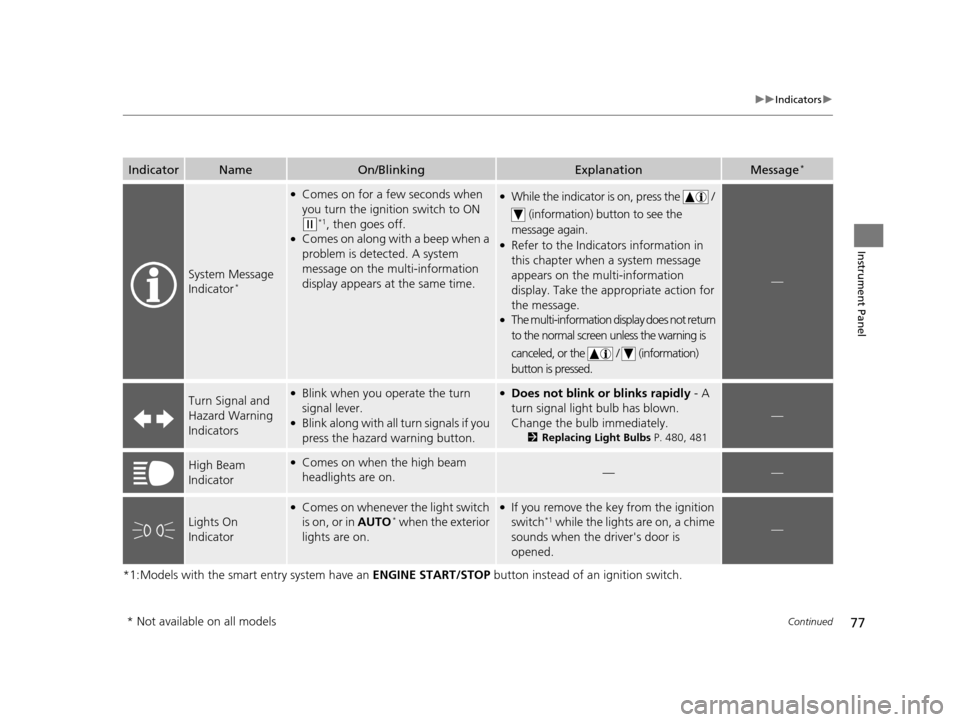
IndicatorNameOn/BlinkingExplanationMessage*
System Message
Indicator*
●Comes on for a few seconds when
you turn the ignition switch to ON
(w*1, then goes off.●Comes on along with a beep when a
problem is detected. A system
message on the multi-information
display appears at the same time.
●While the indicator is on, press the /
(information) button to see the
message again.
●Refer to the Indicators information in
this chapter when a system message
appears on the multi-information
display. Take the ap propriate action for
the message.
●The multi-information display does not return
to the normal screen unless the warning is
canceled, or the / (information)
button is pressed.
—
Turn Signal and
Hazard Warning
Indicators●Blink when you operate the turn
signal lever.
●Blink along with all turn signals if you
press the hazard warning button.
●Does not blink or blinks rapidly - A
turn signal light bulb has blown.
Change the bulb immediately.
2 Replacing Light Bulbs P. 480, 481
—
High Beam
Indicator●Comes on when the high beam
headlights are on.——
Lights On
Indicator
●Comes on whenever the light switch
is on, or in AUTO* when the exterior
lights are on.
●If you remove the key from the ignition
switch*1 while the lights are on, a chime
sounds when the driver's door is
opened.—
* Not available on all models
17 US ODYSSEY (KA KC)-31TK86600.book 77 ページ 2016年10月24日 月曜日 午後4時2分
Page 81 of 565
80
uuIndicators u
Instrument Panel
*1:Models with the smart entry system have an ENGINE START/STOP button instead of an ignition switch.
*2:On the left: Models with information display On the right: Models with multi-information display
IndicatorNameOn/BlinkingExplanationMessage*2
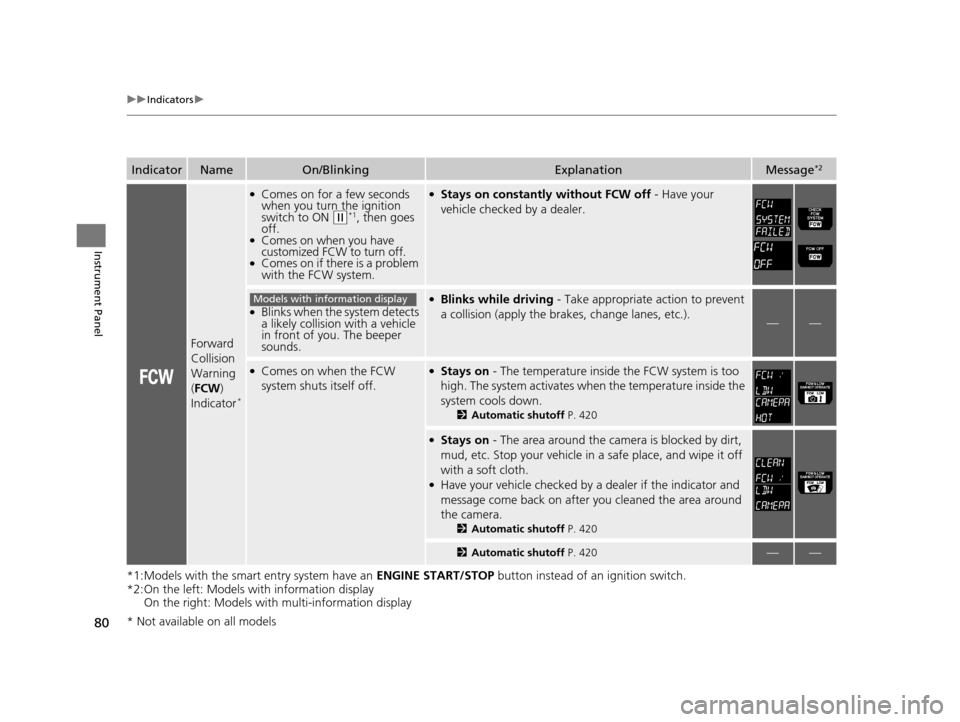
Forward
Collision
Warning
(FCW )
Indicator
*
●Comes on for a few seconds
when you turn the ignition
switch to ON
(w*1, then goes
off.
●Comes on when you have
customized FCW to turn off.
●Comes on if there is a problem
with the FCW system.
●Stays on constantly without FCW off - Have your
vehicle checked by a dealer.
●Blinks when the system detects
a likely collision with a vehicle
in front of you. The beeper
sounds.
●Blinks while driving - Take appropriate action to prevent
a collision (apply the br akes, change lanes, etc.).
——
●Comes on when the FCW
system shuts itself off.●Stays on - The temperature inside the FCW system is too
high. The system activates when the temperature inside the
system cools down.
2 Automatic shutoff P. 420
●Stays on - The area around the camera is blocked by dirt,
mud, etc. Stop your vehicle in a safe place, and wipe it off
with a soft cloth.
●Have your vehicle checked by a dealer if the indicator and
message come back on after you cleaned the area around
the camera.
2 Automatic shutoff P. 420
2Automatic shutoff P. 420——
Models with information display
* Not available on all models
17 US ODYSSEY (KA KC)-31TK86600.book 80 ページ 2016年10月24日 月曜日 午後4時2分
Page 90 of 565
89
uuIndicators uMulti-Information Display Warn ing and Information Messages*
Continued
Instrument Panel
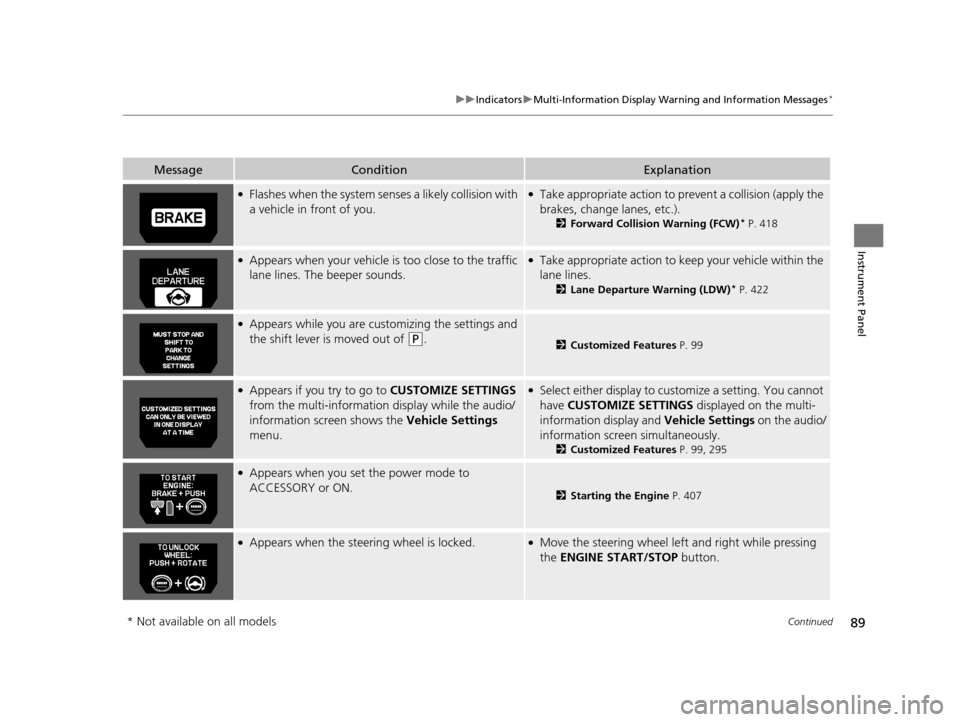
MessageConditionExplanation
●Flashes when the system senses a likely collision with
a vehicle in front of you.●Take appropriate action to prev ent a collision (apply the
brakes, change lanes, etc.).
2 Forward Collision Warning (FCW)* P. 418
●Appears when your vehicle is too close to the traffic
lane lines. The beeper sounds.●Take appropriate action to keep your vehicle within the
lane lines.
2 Lane Departure Warning (LDW)* P. 422
●Appears while you are customizing the settings and
the shift lever is moved out of
(P.2Customized Features P. 99
●Appears if you try to go to CUSTOMIZE SETTINGS
from the multi-information display while the audio/
information screen shows the Vehicle Settings
menu.●Select either display to customize a setting. You cannot
have CUSTOMIZE SETTINGS displayed on the multi-
information display and Vehicle Settings on the audio/
information screen simultaneously.
2 Customized Features P. 99, 295
●Appears when you set the power mode to
ACCESSORY or ON.
2Starting the Engine P. 407
●Appears when the steering wheel is locked.●Move the steering wheel left and right while pressing
the ENGINE START/STOP button.
* Not available on all models
17 US ODYSSEY (KA KC)-31TK86600.book 89 ページ 2016年10月24日 月曜日 午後4時2分
Page 91 of 565
90
uuIndicators uMulti-Information Display Warn ing and Information Messages*
Instrument Panel
MessageConditionExplanation
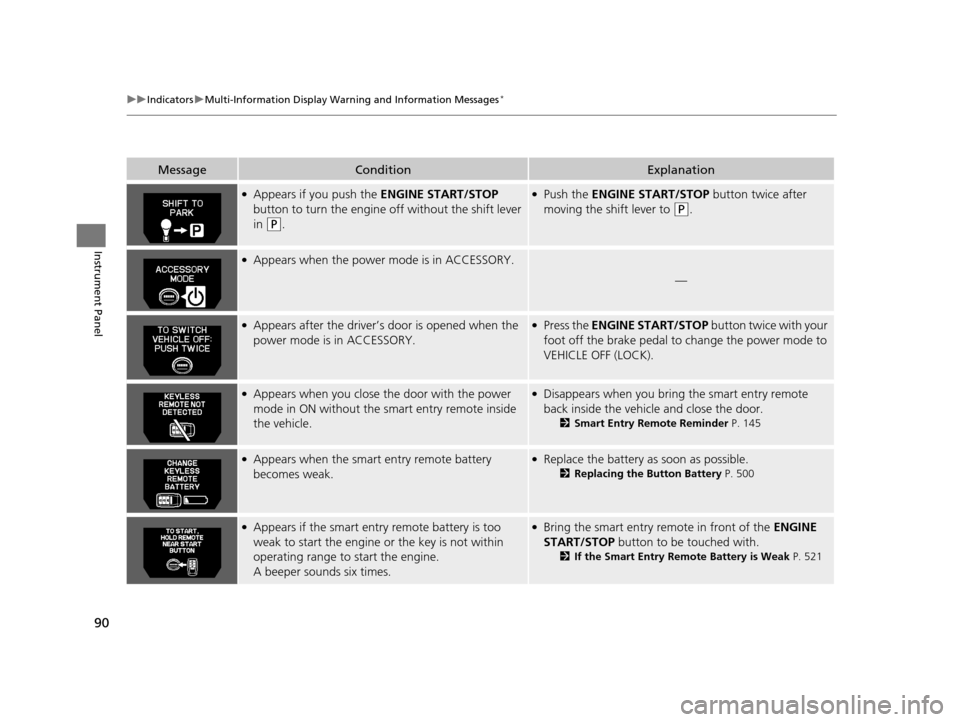
●Appears if you push the ENGINE START/STOP
button to turn the engine off without the shift lever
in
(P.
●Push the ENGINE START/STOP button twice after
moving the shift lever to
(P.
●Appears when the power mode is in ACCESSORY.
—
●Appears after the driver’s door is opened when the
power mode is in ACCESSORY.●Press the ENGINE START/STOP button twice with your
foot off the brake pedal to change the power mode to
VEHICLE OFF (LOCK).
●Appears when you close th e door with the power
mode in ON without the smart entry remote inside
the vehicle.●Disappears when you bring the smart entry remote
back inside the vehicle and close the door.
2 Smart Entry Remote Reminder P. 145
●Appears when the smart entry remote battery
becomes weak.●Replace the battery as soon as possible.
2Replacing the Button Battery P. 500
●Appears if the smart entry remote battery is too
weak to start the engine or the key is not within
operating range to start the engine.
A beeper sounds six times.●Bring the smart entry remote in front of the ENGINE
START/STOP button to be touched with.
2If the Smart Entry Remote Battery is Weak P. 521
17 US ODYSSEY (KA KC)-31TK86600.book 90 ページ 2016年10月24日 月曜日 午後4時2分
Page 94 of 565
93
uuGauges and Displays uInformation Display*
Continued
Instrument Panel
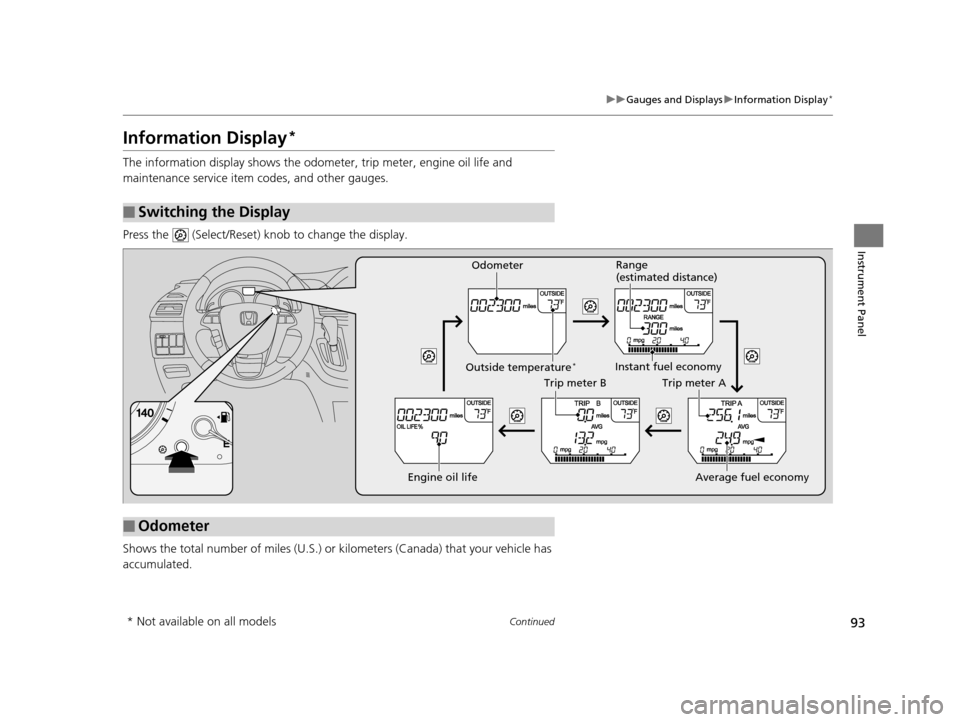
Information Display*
The information display shows the odom eter, trip meter, engine oil life and
maintenance service item codes, and other gauges.
Press the (Select/Reset) knob to change the display.
Shows the total number of miles (U.S.) or kilometers (Canada) that your vehicle has
accumulated.
■Switching the Display
■Odometer
Engine oil life
Trip meter B
Average fuel economy
Trip meter A
Instant fuel economy
Range
(estimated distance)
Outside temperature*
Odometer
* Not available on all models
17 US ODYSSEY (KA KC)-31TK86600.book 93 ページ 2016年10月24日 月曜日 午後4時2分