emergency HONDA ODYSSEY 2017 RC1-RC2 / 5.G Owners Manual
[x] Cancel search | Manufacturer: HONDA, Model Year: 2017, Model line: ODYSSEY, Model: HONDA ODYSSEY 2017 RC1-RC2 / 5.GPages: 565, PDF Size: 33.13 MB
Page 4 of 565
Contents
Child Safety P. 52Exhaust Gas Hazard P. 66Safety Labels P. 67
Opening and Closing the Tailgate P. 121 Opening and Closing the Sliding Doors P. 127
Opening and Closing the Moonroof* P. 141 Operating the Switches Around the Steering Wheel P. 142
Adjusting the Seats P. 161 Interior Lights/Interior Convenience Items P. 176
Climate Control System
* P. 198
Audio Error Messages P. 267 General Information on the Audio System P. 272
HomeLink ® Universal Transceiver* P. 325 Bluetooth ® HandsFreeLink ® P. 327, 360 Compass* P. 392
When Driving P. 407 Braking P. 436Parking Your Vehicle P. 440
Fuel Economy and CO
2 Emissions P. 449 Accessories and Modifications P. 450
Maintenance Under the Hood P. 463 Replacing Light Bulbs P. 475
Checking and Maintaining Tires P. 490 Battery P. 499 Remote Transmitter Care P. 500
Heating and Cooling System
*/Climate Control System* Maintenance P. 504 Cleaning P. 505
Engine Does Not Start P. 520 Jump Starting P. 523 Shift Lever Does Not Move P. 525
Fuses P. 533 Emergency Towing P. 539
Devices that Emit Radio Waves P. 545 Reporting Safety Defects P. 546 Emissions Testing P. 547
Customer Service Information P. 552
Quick Reference GuideP. 4
Safe DrivingP. 25
Instrument PanelP. 69
ControlsP. 107
FeaturesP. 205
DrivingP. 395
MaintenanceP. 451
Handling the UnexpectedP. 509
InformationP. 541
IndexP. 553
17 US ODYSSEY (KA KC)-31TK86600.book 3 ページ 2016年10月24日 月曜日 午後4時2分
Page 22 of 565
Quick Reference Guide
21
Handling the Unexpected (P509)
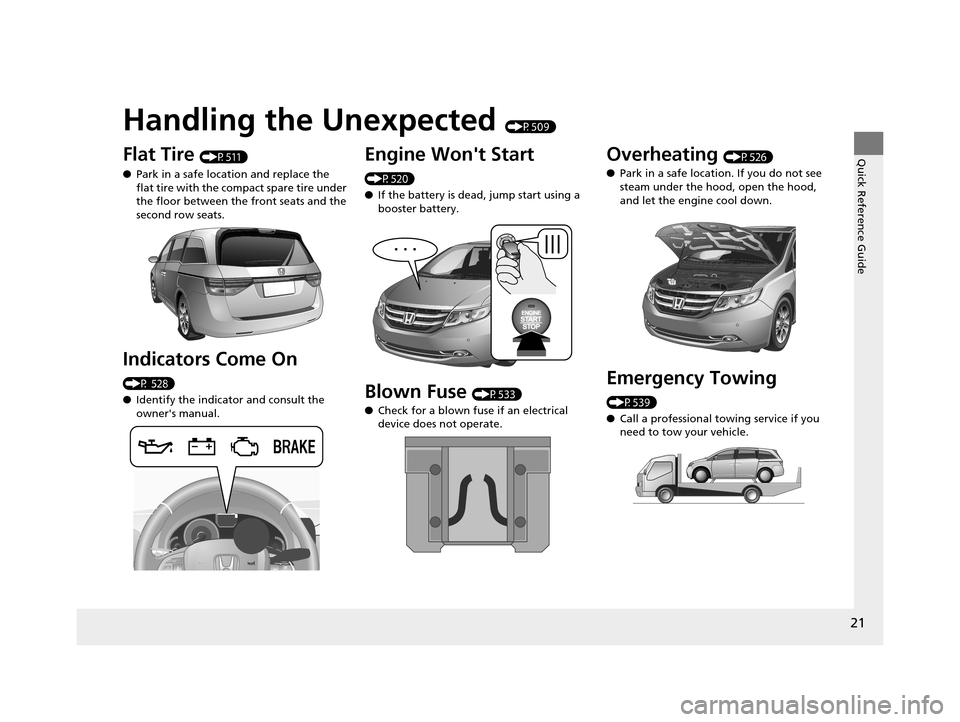
Flat Tire (P511)
● Park in a safe location and replace the
flat tire with the compact spare tire under
the floor between the front seats and the
second row seats.
Indicators Come On
(P 528)
●Identify the indica tor and consult the
owner's manual.
Engine Won't Start
(P520)
● If the battery is dead, jump start using a
booster battery.
Blown Fuse (P533)
● Check for a blown fuse if an electrical
device does not operate.
Overheating (P526)
● Park in a safe location. If you do not see
steam under the hood, open the hood,
and let the engine cool down.
Emergency Towing
(P539)
●Call a professional towing service if you
need to tow your vehicle.
17 US ODYSSEY (KA KC)-31TK86600.book 21 ページ 2016年10月24日 月曜日 午後4時2分
Page 31 of 565
30
Safe Driving
Seat Belts
About Your Seat Belts
Seat belts are the single most effective safety device because they keep you
connected to the vehicle so that you can take advantage of many built-in safety
features. They also help keep you from being thrown against the inside of the
vehicle, against other passengers, or out of the vehicle. When worn properly, seat
belts also keep your body properly positi oned in a crash so that you can take full
advantage of the additional prot ection provided by the airbags.
In addition, seat belts help protect you in almost every type of crash, including:
- frontal impacts
- side impacts
- rear impacts
- rollovers
■Lap/shoulder seat belts
All seven or eight seating positions are eq uipped with lap/shoulder seat belts with
emergency locking retractors. In normal dr iving the retractor lets you move freely
while keeping some tension on the belt. During a collision or sudden stop the
retractor locks to restrain your body. The second and third row passenger’s seat
belts also have a lockable retra ctor for use with child seats.
2Installing a Child Seat with a Lap/Shoulder Seat Belt P. 60
1About Your Seat Belts
Seat belts cannot complete ly protect you in every
crash. But in most cases, seat belts can reduce your
risk of serious injury.
Most states and all Canadian provinces and territories
require you to wear seat belts.
The emergency locking retrac tor may lock if you lean
forward too quickly. Slower movements will allow
the belt to extend fu lly without locking.
3WARNING
Not wearing a seat belt properly increases
the chance of serious injury or death in a
crash, even though your vehicle has
airbags.
Be sure you and your passengers always
wear seat belts and wear them properly.
17 US ODYSSEY (KA KC)-31TK86600.book 30 ページ 2016年10月24日 月曜日 午後4時2分
Page 132 of 565
Continued131
uuOpening and Closing the Sliding Doors uOpening/Closing the Power Sliding Doors*
Controls
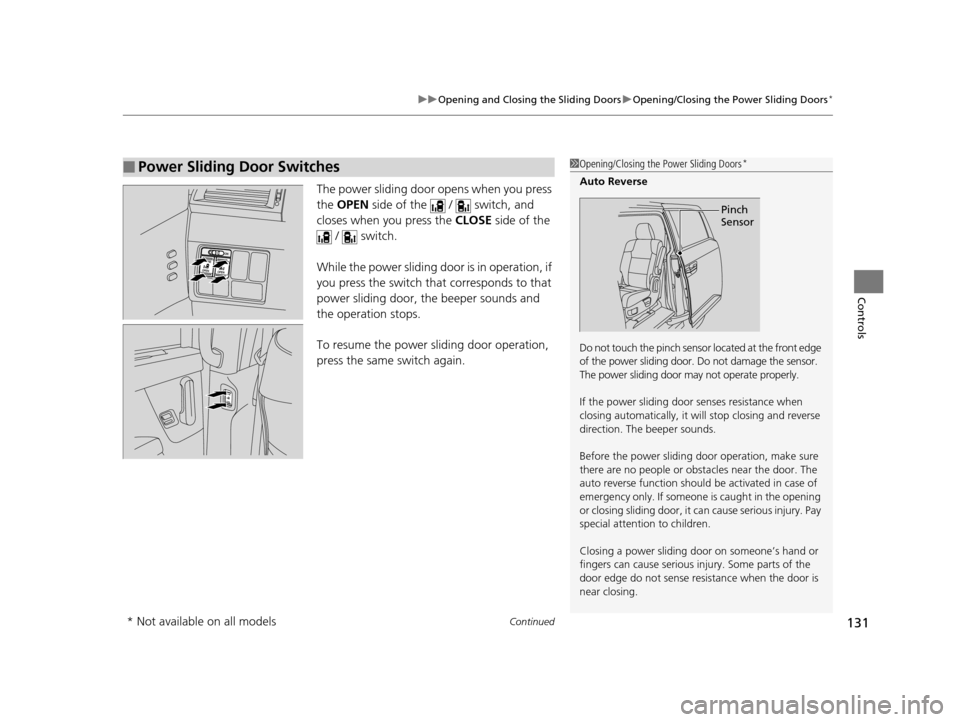
The power sliding door opens when you press
the OPEN side of the / switch, and
closes when you press the CLOSE side of the
/ switch.
While the power sliding door is in operation, if
you press the switch that corresponds to that
power sliding door, the beeper sounds and
the operation stops.
To resume the power sliding door operation,
press the same switch again.
■Power Sliding Door Switches1 Opening/Closing the Power Sliding Doors*
Auto Reverse
Do not touch the pinch sensor located at the front edge
of the power sliding door. Do not damage the sensor.
The power sliding door ma y not operate properly.
If the power sliding door senses resistance when
closing automatically, it wi ll stop closing and reverse
direction. The beeper sounds.
Before the power sliding door operation, make sure
there are no people or obsta cles near the door. The
auto reverse function should be activated in case of
emergency only. If someone is caught in the opening
or closing sliding door, it ca n cause serious injury. Pay
special attention to children.
Closing a power sliding door on someone’s hand or
fingers can cause serious injury. Some parts of the
door edge do not sense resi stance when the door is
near closing.
Pinch
Sensor
* Not available on all models
17 US ODYSSEY (KA KC)-31TK86600.book 131 ページ 2016年10月24日 月曜日 午後4時2分
Page 407 of 565
406
uuTowing a Trailer uTowing Your Vehicle
Driving
• Monitor your temperature gauge. If it nears the red (Hot) mark, turn off the
heating and cooling system*/climate control system* and reduce speed. Pull to the
side of the road safely to cool down the engine if necessary.
• Shift to the position if th e transmission shifts frequently.
Towing Your Vehicle
Your vehicle is not designed to be towed behind a motor home. If your vehicle needs
to be towed in an emergency, refe r to the emergency towing information.
2Emergency Towing P. 539
■Driving in Hilly Terrain
D4
* Not available on all models
17 US ODYSSEY (KA KC)-31TK86600.book 406 ページ 2016年10月24日 月曜日 午後4時2分
Page 438 of 565
437
uuBraking uBrake System
Driving
Your vehicle is equipped with disc brakes at all four wheels. A vacuum power assist
helps reduce the effort needed on the brake pedal. The brake assist system increases
the stopping force when you depress the brake pedal hard in an emergency
situation. The anti-lock brake system (ABS) helps you retain steering control when
braking very hard.
2 Brake Assist System P. 439
2 Anti-lock Brake System (ABS) P. 438
■Foot Brake1Foot Brake
Check the brakes after driving through deep water,
or if there is a buildup of road surface water. If
necessary, dry the brakes by lightly depressing the
pedal several times.
If you hear a continuous me tallic friction sound when
applying the brakes, the brake pads need to be
replaced. Have the vehicle checked by a dealer.
Constantly using the brak e pedal while going down a
long hill builds up heat, which reduces the brake
effectiveness. Apply engine braking by taking your
foot off the accelerator pe dal and downshifting to a
lower gear.
Do not rest your foot on the brake pedal while
driving, as it will lightly apply the brakes and cause
them to lose effectiveness over time and reduce pad
life. It will also conf use drivers behind you.
17 US ODYSSEY (KA KC)-31TK86600.book 437 ページ 2016年10月24日 月曜日 午後4時2分
Page 440 of 565
439
uuBraking uBrake Assist System
Driving
Brake Assist System
Designed to assist the driver by generati ng greater braking force when you depress
the brake pedal hard during emergency braking.
■Brake assist system operation
Press the brake pedal firmly for more powerful braking.
When brake assist operates, the pedal may wiggle slightly and an operating noise
may be heard. This is normal. Keep holding the brake pedal firmly down.
17 US ODYSSEY (KA KC)-31TK86600.book 439 ページ 2016年10月24日 月曜日 午後4時2分
Page 481 of 565
480
uuReplacing Light Bulbs uFront Turn Signal/Parking/Side Marker Light Bulbs
Maintenance
Front Turn Signal/Parking/Side Marker Light Bulbs
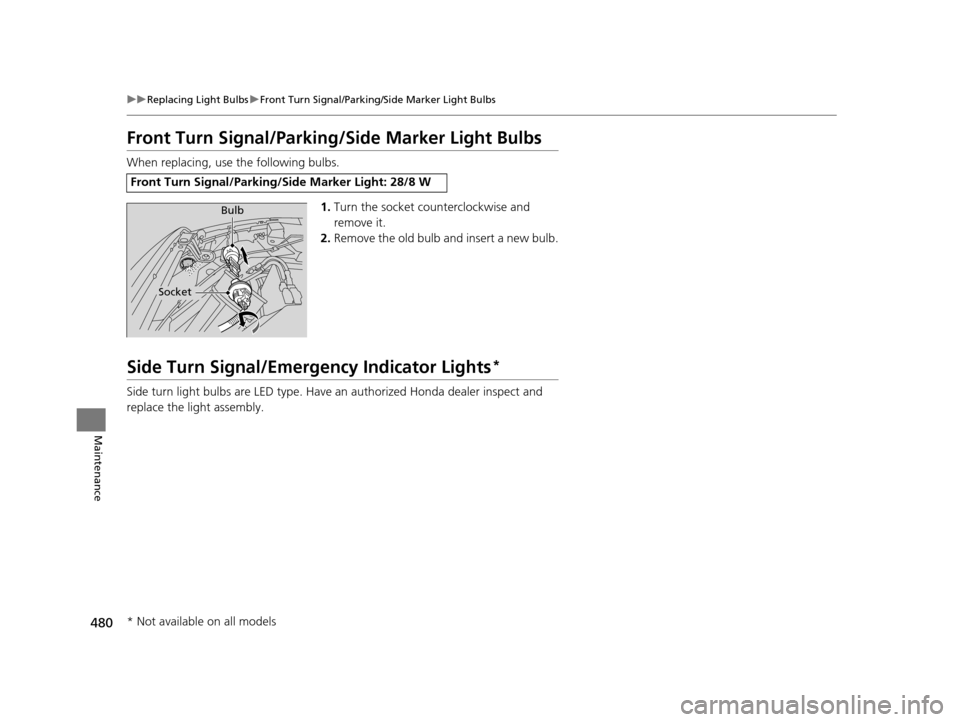
When replacing, use the following bulbs.
1.Turn the socket counterclockwise and
remove it.
2. Remove the old bulb and insert a new bulb.
Side Turn Signal/Emergency Indicator Lights*
Side turn light bulbs are LED type. Have an authorized Honda dealer inspect and
replace the light assembly.
Front Turn Signal/Parking/Side Marker Light: 28/8 W
Bulb
Socket
* Not available on all models
17 US ODYSSEY (KA KC)-31TK86600.book 480 ページ 2016年10月24日 月曜日 午後4時2分
Page 510 of 565
509
Handling the Unexpected
This chapter explains how to handle unexpected troubles.
ToolsTypes of Tools .................................. 510
If a Tire Goes Flat Changing a Flat Tire ......................... 511
Engine Does Not Start Checking the Engine ........................ 520
If the Smart Entry Remote Battery is Weak...521
Emergency Engine Stop ................... 522
Jump Starting .................................... 523
Shift Lever Does Not Move .............. 525
Overheating How to Handle Overheating ............. 526 Indicator, Coming On/Blinking
If the Low Oil Pressure Indicator Comes
On ............................................. 528
If the Charging System Indicator Comes
On ................................................. 528
If the Malfunction Indicator Lamp Comes On or Blinks ................................... 529
If the Brake System Indicator (Red) Comes On ................................................. 530
If the Low Tire Pressure Indicator Comes On ................................................. 531 If the TPMS Indicator Comes On ...... 531
If the Low Tire Pressure/TPMS Indicator
Comes On or Blinks ....................... 532
Fuses Fuse Locations ................................. 533
Inspecting and Changing Fuses ........ 538
Emergency Towing ........................... 539
When You Cannot Open or Close the Tailgate ............................................ 540
17 US ODYSSEY (KA KC)-31TK86600.book 509 ページ 2016年10月24日 月曜日 午後4時2分
Page 521 of 565
520
Handling the Unexpected
Engine Does Not Start
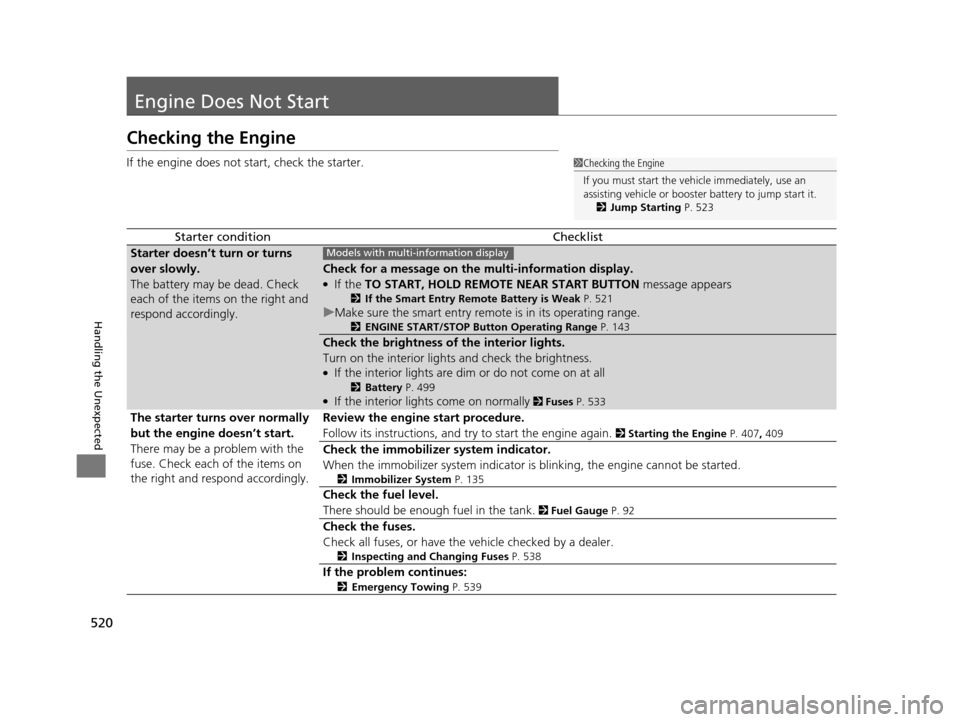
Checking the Engine
If the engine does not start, check the starter.
Starter conditionChecklist
Starter doesn’t turn or turns
over slowly.
The battery may be dead. Check
each of the items on the right and
respond accordingly.
Check for a message on the multi-information display.
●If the TO START, HOLD REMOTE NEAR START BUTTON message appears
2If the Smart Entry Remote Battery is Weak P. 521
uMake sure the smart entry remote is in its operating range.
2 ENGINE START/STOP Button Operating Range P. 143
Check the brightness of the interior lights.
Turn on the interior lights and check the brightness.
●If the interior lights are dim or do not come on at all
2Battery P. 499●If the interior lights come on normally 2 Fuses P. 533
The starter turns over normally
but the engine doesn’t start.
There may be a problem with the
fuse. Check each of the items on
the right and resp ond accordingly. Review the engine start procedure.
Follow its instructions, and try to start the engine again.
2
Starting the Engine P. 407, 409
Check the immobilizer system indicator.
When the immobilizer system indicator is blinking, the engine cannot be started.
2Immobilizer System P. 135
Check the fuel level.
There should be enough fuel in the tank.
2 Fuel Gauge P. 92
Check the fuses.
Check all fuses, or have the vehicle checked by a dealer.
2Inspecting and Changing Fuses P. 538
If the problem continues:
2Emergency Towing P. 539
1Checking the Engine
If you must start the vehi cle immediately, use an
assisting vehicle or booster battery to jump start it.
2 Jump Starting P. 523
Models with multi- information display
17 US ODYSSEY (KA KC)-31TK86600.book 520 ページ 2016年10月24日 月曜日 午後4時2分