lock HONDA ODYSSEY 2017 RC1-RC2 / 5.G Quick Guide
[x] Cancel search | Manufacturer: HONDA, Model Year: 2017, Model line: ODYSSEY, Model: HONDA ODYSSEY 2017 RC1-RC2 / 5.GPages: 81, PDF Size: 15.25 MB
Page 52 of 81
96 || 97
DRIVING
DRIVING
TABLE OF CONTENTS
INDEX
VISUAL INDEX
VOICE COMMAND
INDEX
SAFETY
INFORMATION
CUSTOMER
INFORMATION
INSTRUMENT PANEL
SPECIFICATIONS
VEHICLE
CONTROLS
MAINTENANCE
AUDIO AND
CONNECTIVITY
HANDLING THE UNEXPECTED
BLUETOOTH®
HANDSFREELINK®
DRIVING
HONDALINK®
NAVIGATION
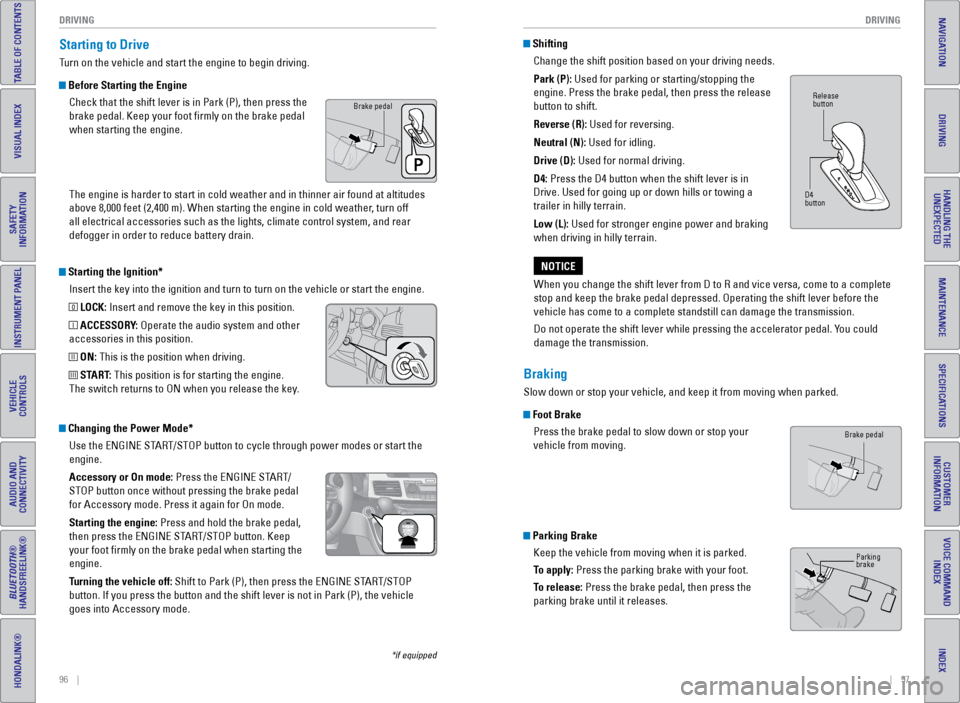
Starting the Ignition*
Insert the key into the ignition and turn to turn on the vehicle or star\
t the engine.
0 LOCK: Insert and remove the key in this position.
I ACCESSORY: Operate the audio system and other
accessories in this position.
II ON: This is the position when driving.
III START: This position is for starting the engine.
The switch returns to ON when you release the key.
Starting to Drive
Turn on the vehicle and start the engine to begin driving.
Before Starting the Engine
Check that the shift lever is in Park (P), then press the
brake pedal. Keep your foot firmly on the brake pedal
when starting the engine.
The engine is harder to start in cold weather and in thinner air found a\
t altitudes
above 8,000 feet (2,400 m). When starting the engine in cold weather, turn off
all electrical accessories such as the lights, climate control system, a\
nd rear
defogger in order to reduce battery drain.
*if equipped
Changing the Power Mode*Use the eNGINe START/STOP button to cycle through power modes or start the
engine.
Accessory or On mode: Press the eNGINe START/
STOP button once without pressing the brake pedal
for Accessory mode. Press it again for On mode.
Starting the engine: Press and hold the brake pedal,
then press the eNGINe START/STOP button. Keep
your foot firmly on the brake pedal when starting the
engine.
Turning the vehicle off: Shift to Park (P), then press the eNGINe START/STOP
button. If you press the button and the shift lever is not in Park (P)\
, the vehicle
goes into Accessory mode.
Brake pedal
ShiftingChange the shift position based on your driving needs.
Park (P): Used for parking or starting/stopping the
engine. Press the brake pedal, then press the release
button to shift.
Reverse (R): Used for reversing.
Neutral (N): Used for idling.
Drive (D): Used for normal driving.
D4: Press the D4 button when the shift lever is in
Drive. Used for going up or down hills or towing a
trailer in hilly terrain.
Low (L): Used for stronger engine power and braking
when driving in hilly terrain.
When you change the shift lever from D to R and vice versa, come to a co\
mplete
stop and keep the brake pedal depressed. Operating the shift lever befor\
e the
vehicle has come to a complete standstill can damage the transmission.
Do not operate the shift lever while pressing the accelerator pedal. You could
damage the transmission.
NOTICE
Braking
Slow down or stop your vehicle, and keep it from moving when parked.
Foot Brake Press the brake pedal to slow down or stop your
vehicle from moving.
Parking BrakeKeep the vehicle from moving when it is parked.
To apply: Press the parking brake with your foot.
To release: Press the brake pedal, then press the
parking brake until it releases.
Release
button
D4
button
Brake pedal
Parking
brake
Page 53 of 81
98 || 99
DRIVING
DRIVING
TABLE OF CONTENTS
INDEX
VISUAL INDEX
VOICE COMMAND
INDEX
SAFETY
INFORMATION
CUSTOMER
INFORMATION
INSTRUMENT PANEL
SPECIFICATIONS
VEHICLE
CONTROLS
MAINTENANCE
AUDIO AND
CONNECTIVITY
HANDLING THE UNEXPECTED
BLUETOOTH®
HANDSFREELINK®
DRIVING
HONDALINK®
NAVIGATION
The ABS may not function correctly if you use an incorrect tire type and\
size.
NOTICE
Brake Assist System
During hard or emergency braking, the system increases braking force. The brake
pedal may move slightly or make a noise; this is normal. Continue to hol\
d the brake
pedal firmly down.
Anti-Lock Brake System (ABS) During hard or emergency braking, the system rapidly pumps the brakes to
prevent wheel lockup and help you maintain steering control. Do not pump\
the
brake pedal, rather continue to hold it firmly down.
When ABS activates, you may notice vibrations through the brake pedal or\
the
vehicle body, the brake pedal depressing further than usual, or hear a noise from
the motor compartment. These are all normal.
In normal use, the ABS system will occasionally cause a sound from the motor
compartment, especially when the power system is first started or afte\
r repeated
use of the brakes.
Vehicle Stability Assist (VSA®)
Also known as electronic Stability Control (eSC), vSA helps to stabilize the vehicle
during cornering if the vehicle turns more or less than what was intende\
d. It
assists in maintaining traction on slippery surfaces by regulating engin\
e output and
selectively applying the brakes.
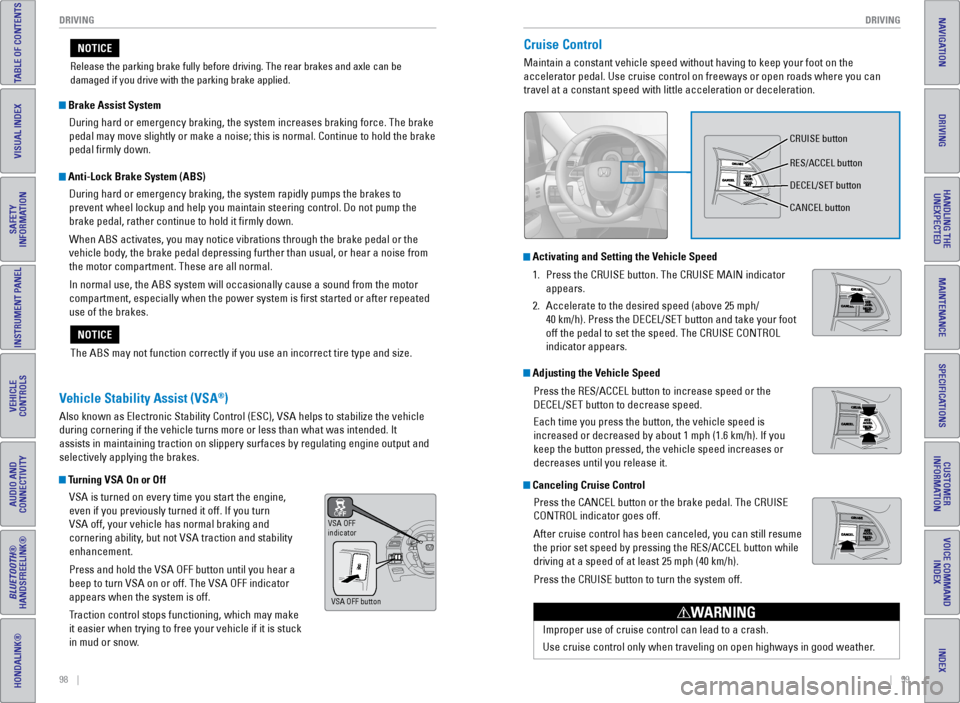
Turning VSA On or OffvSA is turned on every time you start the engine,
even if you previously turned it off. If you turn
vSA off, your vehicle has normal braking and
cornering ability, but not vSA traction and stability
enhancement.
Press and hold the vSA OFF button until you hear a
beep to turn vSA on or off. The vSA OFF indicator
appears when the system is off.
Traction control stops functioning, which may make
it easier when trying to free your vehicle if it is stuck
in mud or snow.
vSA OFF
indicator
vSA OFF button
Release the parking brake fully before driving. The rear brakes and axle\
can be
damaged if you drive with the parking brake applied.
NOTICECruise Control
Maintain a constant vehicle speed without having to keep your foot on th\
e
accelerator pedal. Use cruise control on freeways or open roads where yo\
u can
travel at a constant speed with little acceleration or deceleration.
Improper use of cruise control can lead to a crash.
Use cruise control only when traveling on open highways in good weather.
WARNING
Activating and Setting the Vehicle Speed1. Press the CRUISe button. The CRUISe MAIN indicator
appears.
2. Accelerate to the desired speed (above 25 mph/
40 km/h). Press the DeCeL/SeT button and take your foot
off the pedal to set the speed. The CRUISe CONTROL
indicator appears.
Adjusting the Vehicle Speed
Press the ReS/ACCeL button to increase speed or the
DeCeL/SeT button to decrease speed.
each time you press the button, the vehicle speed is
increased or decreased by about 1 mph (1.6 km/h). If you
keep the button pressed, the vehicle speed increases or
decreases until you release it.
Canceling Cruise ControlPress the CANCeL button or the brake pedal. The CRUISe
CONTROL indicator goes off.
After cruise control has been canceled, you can still resume
the prior set speed by pressing the ReS/ACCeL button while
driving at a speed of at least 25 mph (40 km/h).
Press the CRUISe button to turn the system off.
CRUISe button
ReS/ACCeL button
DeCeL/SeT button
CANCeL button
Page 58 of 81
108 || 109
HANDLING THE UNEXPECTED
HANDLING THE UNEXPECTED
TABLE OF CONTENTS
INDEX
VISUAL INDEX
VOICE COMMAND
INDEX
SAFETY
INFORMATION
CUSTOMER
INFORMATION
INSTRUMENT PANEL
SPECIFICATIONS
VEHICLE
CONTROLS
MAINTENANCE
AUDIO AND
CONNECTIVITY
HANDLING THE UNEXPECTED
BLUETOOTH®
HANDSFREELINK®
DRIVING
HONDALINK®
NAVIGATION
Learn about what to do in critical or emergency situations.
Smart Entry Remote Battery Strength
If the battery life in your remote transmitter is weak, a message appear\
s in the
display with information on how to start the engine.
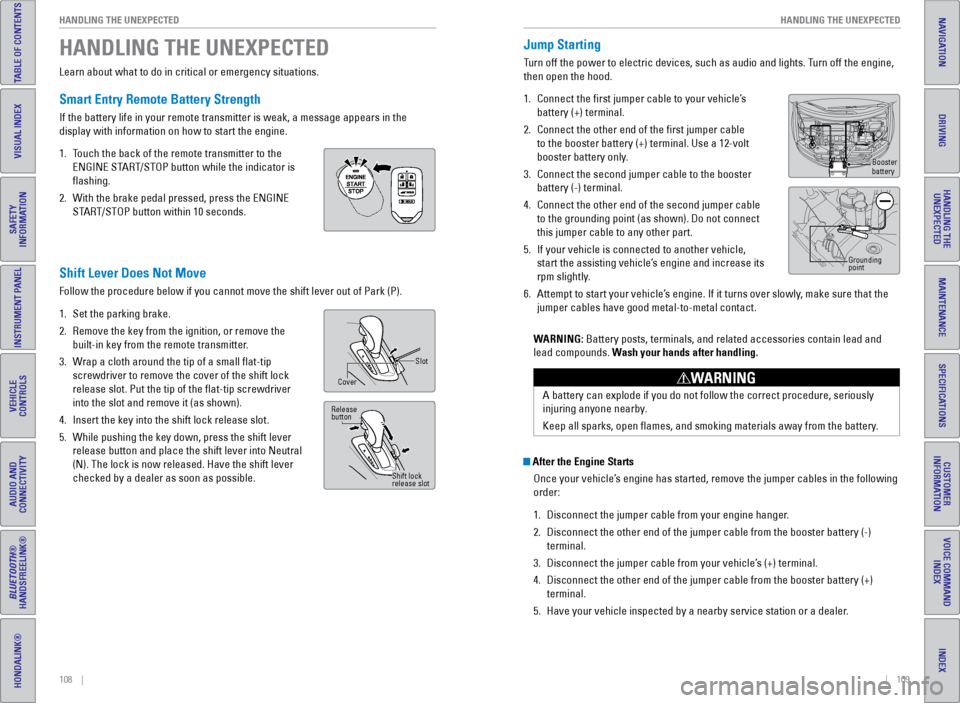
1. Touch the back of the remote transmitter to the
eNGINe START/STOP button while the indicator is
flashing.
2. With the brake pedal pressed, press the eNGINe
START/STOP button within 10 seconds.
HANDLING THE UNEXPECTED
Shift Lever Does Not Move
Follow the procedure below if you cannot move the shift lever out of Par\
k (P).
1. Set the parking brake.
2. Remove the key from the ignition, or remove the
built-in key from the remote transmitter.
3. Wrap a cloth around the tip of a small flat-tip
screwdriver to remove the cover of the shift lock
release slot. Put the tip of the flat-tip screwdriver
into the slot and remove it (as shown).
4. Insert the key into the shift lock release slot.
5. While pushing the key down, press the shift lever
release button and place the shift lever into Neutral
(N). The lock is now released. Have the shift lever
checked by a dealer as soon as possible.
Slot
Cover
Release
button
Shift lock
release slot
After the Engine StartsOnce your vehicle’s engine has started, remove the jumper cables in the following
order:
1. Disconnect the jumper cable from your engine hanger.
2. Disconnect the other end of the jumper cable from the booster battery (\
-)
terminal.
3. Disconnect the jumper cable from your vehicle’s (+) terminal.
4. Disconnect the other end of the jumper cable from the booster battery (\
+)
terminal.
5. Have your vehicle inspected by a nearby service station or a dealer.
Jump Starting
Turn off the power to electric devices, such as audio and lights. Turn off the engine,
then open the hood.
1. Connect the first jumper cable to your vehicle’s
battery (+) terminal.
2. Connect the other end of the first jumper cable
to the booster battery (+) terminal. Use a 12-volt
booster battery only.
3. Connect the second jumper cable to the booster
battery (-) terminal.
4. Connect the other end of the second jumper cable
to the grounding point (as shown). Do not connect
this jumper cable to any other part.
5. If your vehicle is connected to another vehicle,
start the assisting vehicle’s engine and increase its
rpm slightly.
6. Attempt to start your vehicle’s engine. If it turns over slowly, make sure that the
jumper cables have good metal-to-metal contact.
WARNING: Battery posts, terminals, and related accessories contain lead and
lead compounds. Wash your hands after handling.
A battery can explode if you do not follow the correct procedure, seriou\
sly
injuring anyone nearby.
Keep all sparks, open flames, and smoking materials away from the batt\
ery.
WARNING
Booster
battery
Grounding
point
Page 59 of 81
110 || 111
HANDLING THE UNEXPECTED
HANDLING THE UNEXPECTED
TABLE OF CONTENTS
INDEX
VISUAL INDEX
VOICE COMMAND
INDEX
SAFETY
INFORMATION
CUSTOMER
INFORMATION
INSTRUMENT PANEL
SPECIFICATIONS
VEHICLE
CONTROLS
MAINTENANCE
AUDIO AND
CONNECTIVITY
HANDLING THE UNEXPECTED
BLUETOOTH®
HANDSFREELINK®
DRIVING
HONDALINK®
NAVIGATION
Overheating
If the temperature gauge needle is at the H mark, the engine suddenly lo\
ses power,
or steam or spray comes out from under the hood, your engine is overheat\
ing.
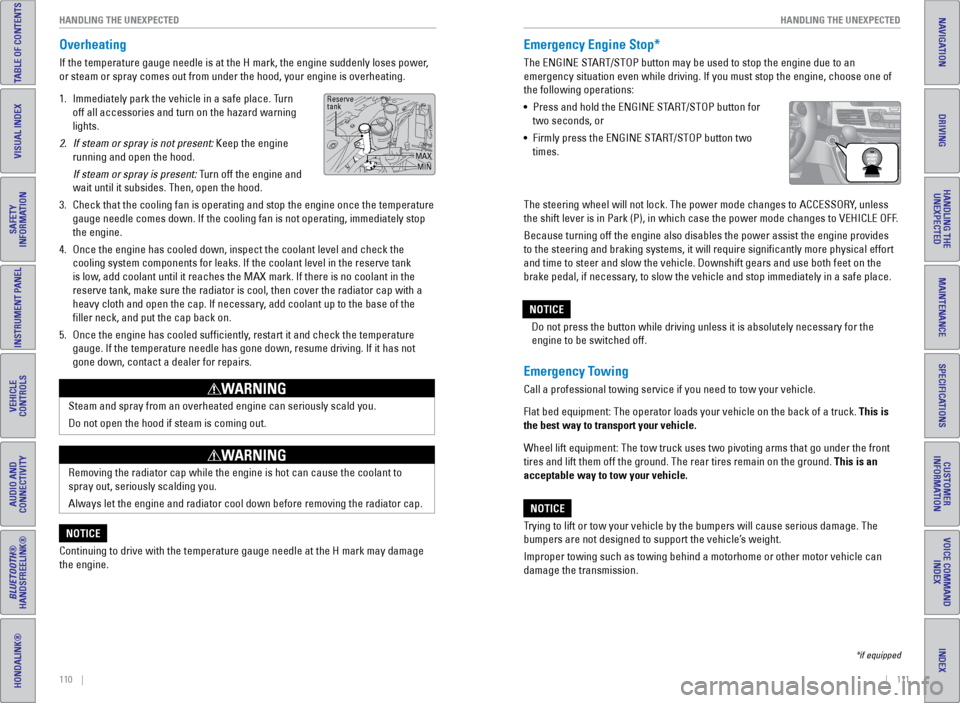
1. Immediately park the vehicle in a safe place. Turn
off all accessories and turn on the hazard warning
lights.
2. If steam or spray is not present: Keep the engine
running and open the hood.
If steam or spray is present: Turn off the engine and
wait until it subsides. Then, open the hood.
3. Check that the cooling fan is operating and stop the engine once the tem\
perature
gauge needle comes down. If the cooling fan is not operating, immediatel\
y stop
the engine.
4. Once the engine has cooled down, inspect the coolant level and check the\
cooling system components for leaks. If the coolant level in the reserve\
tank
is low, add coolant until it reaches the MAX mark. If there is no coolant in t\
he
reserve tank, make sure the radiator is cool, then cover the radiator ca\
p with a
heavy cloth and open the cap. If necessary, add coolant up to the base of the
filler neck, and put the cap back on.
5. Once the engine has cooled sufficiently, restart it and check the temperature
gauge. If the temperature needle has gone down, resume driving. If it ha\
s not
gone down, contact a dealer for repairs.
Steam and spray from an overheated engine can seriously scald you.
Do not open the hood if steam is coming out.
WARNING
Removing the radiator cap while the engine is hot can cause the coolant \
to
spray out, seriously scalding you.
Always let the engine and radiator cool down before removing the radiato\
r cap.
WARNING
Continuing to drive with the temperature gauge needle at the H mark may \
damage
the engine.
NOTICE
Reserve
tank
MAXMIN
Emergency Engine Stop*
The eNGINe START/STOP button may be used to stop the engine due to an
emergency situation even while driving. If you must stop the engine, cho\
ose one of
the following operations:
• Press and hold the eNGINe START/STOP button for
two seconds, or
• Firmly press the eNGINe START/STOP button two
times.
Emergency Towing
Call a professional towing service if you need to tow your vehicle.
Flat bed equipment: The operator loads your vehicle on the back of a tru\
ck. This is
the best way to transport your vehicle.
Wheel lift equipment: The tow truck uses two pivoting arms that go under\
the front
tires and lift them off the ground. The rear tires remain on the ground.\
This is an
acceptable way to tow your vehicle.
Trying to lift or tow your vehicle by the bumpers will cause serious dama\
ge. The
bumpers are not designed to support the vehicle’s weight.
Improper towing such as towing behind a motorhome or other motor vehicle\
can
damage the transmission.
NOTICE
*if equipped
The steering wheel will not lock. The power mode changes to ACCeSSORY, unless
the shift lever is in Park (P), in which case the power mode changes t\
o veHICLe OFF.
Because turning off the engine also disables the power assist the engine\
provides
to the steering and braking systems, it will require significantly mor\
e physical effort
and time to steer and slow the vehicle. Downshift gears and use both fee\
t on the
brake pedal, if necessary, to slow the vehicle and stop immediately in a safe place. Do not press the button while driving unless it is absolutely necessary \
for the
engine to be switched off.
NOTICE
Page 60 of 81
112 || 113
HANDLING THE UNEXPECTED
HANDLING THE UNEXPECTED
TABLE OF CONTENTS
INDEX
VISUAL INDEX
VOICE COMMAND
INDEX
SAFETY
INFORMATION
CUSTOMER
INFORMATION
INSTRUMENT PANEL
SPECIFICATIONS
VEHICLE
CONTROLS
MAINTENANCE
AUDIO AND
CONNECTIVITY
HANDLING THE UNEXPECTED
BLUETOOTH®
HANDSFREELINK®
DRIVING
HONDALINK®
NAVIGATION
Driving on an extremely underinflated tire can cause it to overheat. A\
n overheated
tire can fail. Always inflate your tires to the specified pressure.
NOTICE
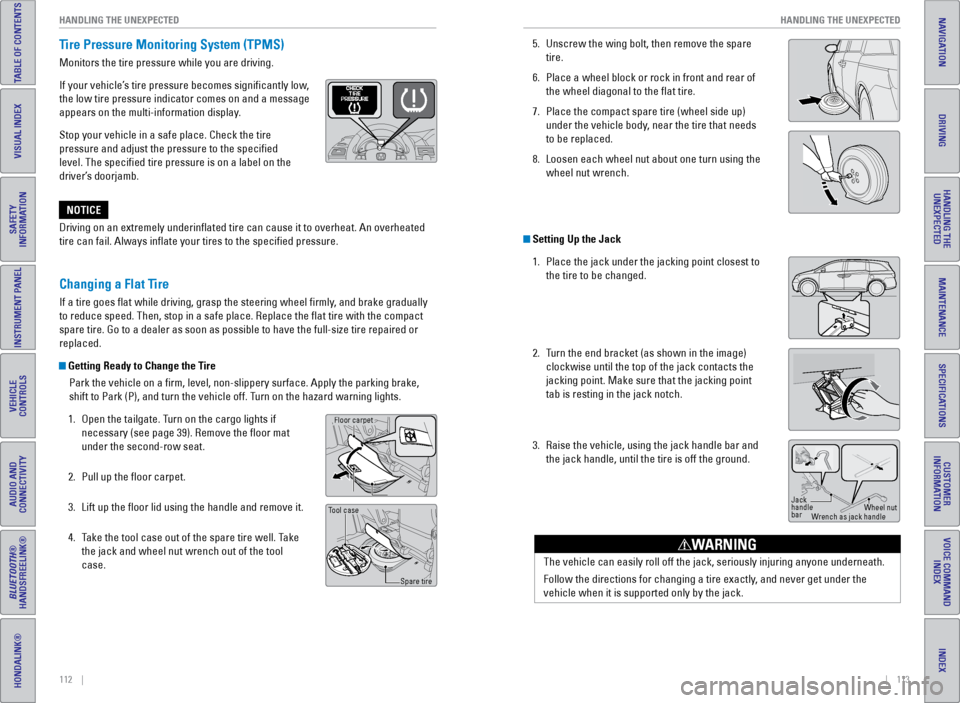
Tire Pressure Monitoring System (TPMS)
Monitors the tire pressure while you are driving.
If your vehicle’s tire pressure becomes significantly low,
the low tire pressure indicator comes on and a message
appears on the multi-information display.
Stop your vehicle in a safe place. Check the tire
pressure and adjust the pressure to the specified
level. The specified tire pressure is on a label on the
driver’s doorjamb.
Changing a Flat Tire
If a tire goes flat while driving, grasp the steering wheel firmly, and brake gradually
to reduce speed. Then, stop in a safe place. Replace the flat tire wit\
h the compact
spare tire. Go to a dealer as soon as possible to have the full-size tir\
e repaired or
replaced.
Getting Ready to Change the Tire
Park the vehicle on a firm, level, non-slippery surface. Apply the par\
king brake,
shift to Park (P), and turn the vehicle off. Turn on the hazard warning lights.
1. Open the tailgate. Turn on the cargo lights if
necessary (see page 39). Remove the floor mat
under the second-row seat.
2. Pull up the floor carpet.
3. Lift up the floor lid using the handle and remove it.
4. Take the tool case out of the spare tire well. Take
the jack and wheel nut wrench out of the tool
case.
Handle
Floor lid
Floor carpet
Tool case
Spare tire
5. Unscrew the wing bolt, then remove the spare
tire.
6. Place a wheel block or rock in front and rear of
the wheel diagonal to the flat tire.
7. Place the compact spare tire (wheel side up)
under the vehicle body, near the tire that needs
to be replaced.
8. Loosen each wheel nut about one turn using the
wheel nut wrench.
Setting Up the Jack
1. Place the jack under the jacking point closest to
the tire to be changed.
2. Turn the end bracket (as shown in the image)
clockwise until the top of the jack contacts the
jacking point. Make sure that the jacking point
tab is resting in the jack notch.
3. Raise the vehicle, using the jack handle bar and
the jack handle, until the tire is off the ground.
Jack
handle
bar Wheel nut
Wrench as jack handle
The vehicle can easily roll off the jack, seriously injuring anyone unde\
rneath.
Follow the directions for changing a tire exactly, and never get under the
vehicle when it is supported only by the jack.
WARNING
Page 63 of 81
118 || 119
HANDLING THE UNEXPECTED
HANDLING THE UNEXPECTED
TABLE OF CONTENTS
INDEX
VISUAL INDEX
VOICE COMMAND
INDEX
SAFETY
INFORMATION
CUSTOMER
INFORMATION
INSTRUMENT PANEL
SPECIFICATIONS
VEHICLE
CONTROLS
MAINTENANCE
AUDIO AND
CONNECTIVITY
HANDLING THE UNEXPECTED
BLUETOOTH®
HANDSFREELINK®
DRIVING
HONDALINK®
NAVIGATION
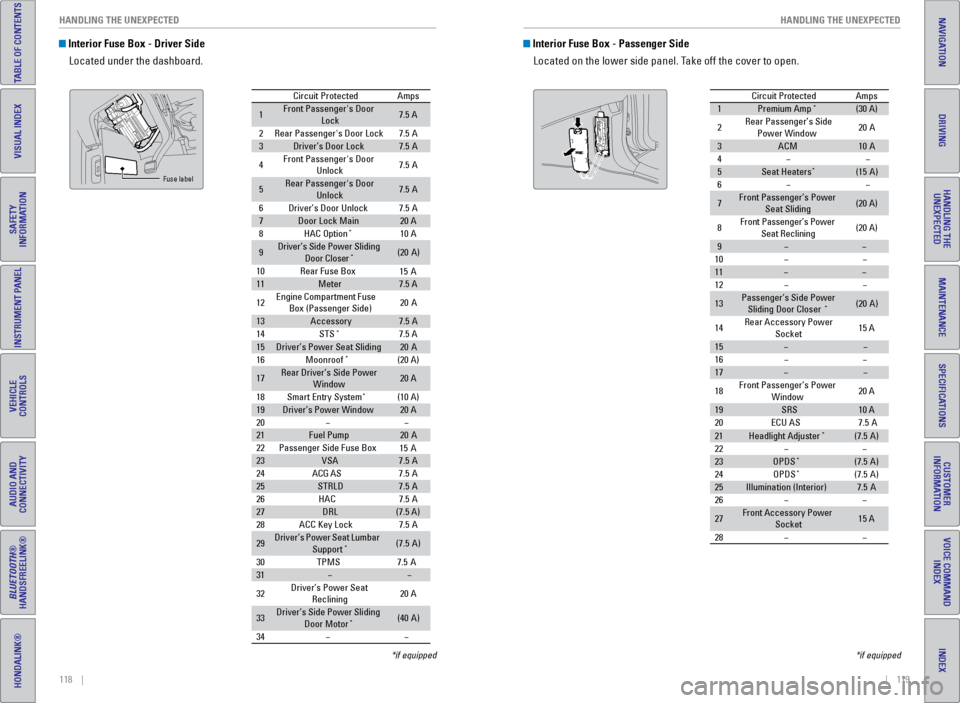
Interior Fuse Box - Driver Side
Located under the dashboard.
Circuit Protecte dAmps
1Front Passenger's Door
Lock7.5 A
2Rear Passenger's Door Lock7.5A
3Driver’s Door Lock7.5A
4Front Passenger's Door
Unlock7. 5A
5Rear Passenger's Door
Unlock7. 5A
6Driver’s Door Unlock7.5A
7Door Lock Main20 A
8HAC Option*10 A
9Driver’s Side Power Sliding
Door Closer*(20A )
10 Rear Fuse Bo x
11Meter7.5 A
12 Engine
Compartment Fuse
Box (Passenger Side) 20
A
13Accessor y7.5A
14 STS*7.5 A
15Driver’s Power Seat Sliding20A
16 Moonroof*(20 A)
17Rear Driver’s Side Power
Window20 A
18 Smart Entry Syste m
*(10 A)
19Driver’s Power Windo w20 A
20
21Fuel Pump20 A
22 Passenger Side Fuse Bo x
23VSA7.5A
24 ACG AS
25STRLD7.5A
26 HAC
27DRL(7.5 A)
28 ACC Key Lock
29Driver’s Power Seat Lumbar
Suppor t*(7.5A)
30 TPM
S7.5A
31
32 Driver’s Power Seat
Reclining 20
A
33Driver’s Side Power Sliding
Door Moto r*(40A )
34
15 A
15 A
7. 5A
7. 5A
7. 5A
Fuse label
*if equipped
Interior Fuse Box - Passenger Side
Located on the lower side panel. Take off the cover to open.
Circuit ProtectedAmps
1Premium Amp*(30 A)
2Rear Passenger’s Side Power Windo w20A
3ACM10A
4
5Seat Heaters*(15A )
6
7Front Passenger’s Power
Seat Slidin g(20 A)
8Front Passenger’s Power
Seat Reclining(20 A)
9
10
11
12
13Passenger’s Side Power
Sliding Door Closer*(2 0A )
14 Rear Accessory Power
Socket 15
A
15
16
17
18 Front Passenger’s Power
Window 20
A
19SRS10 A
20 ECU AS
21Headlight Adjuster*(7.5A)
22
23OPDS*(7.5 A)
24 OPDS*(7.5A)
25Illumination (Interior)7.5A
26
27Front Accessory Power
Socket15 A
28
7. 5A
*if equipped
Page 64 of 81
120 || 121
HANDLING THE UNEXPECTED
HANDLING THE UNEXPECTED
TABLE OF CONTENTS
INDEX
VISUAL INDEX
VOICE COMMAND
INDEX
SAFETY
INFORMATION
CUSTOMER
INFORMATION
INSTRUMENT PANEL
SPECIFICATIONS
VEHICLE
CONTROLS
MAINTENANCE
AUDIO AND
CONNECTIVITY
HANDLING THE UNEXPECTED
BLUETOOTH®
HANDSFREELINK®
DRIVING
HONDALINK®
NAVIGATION
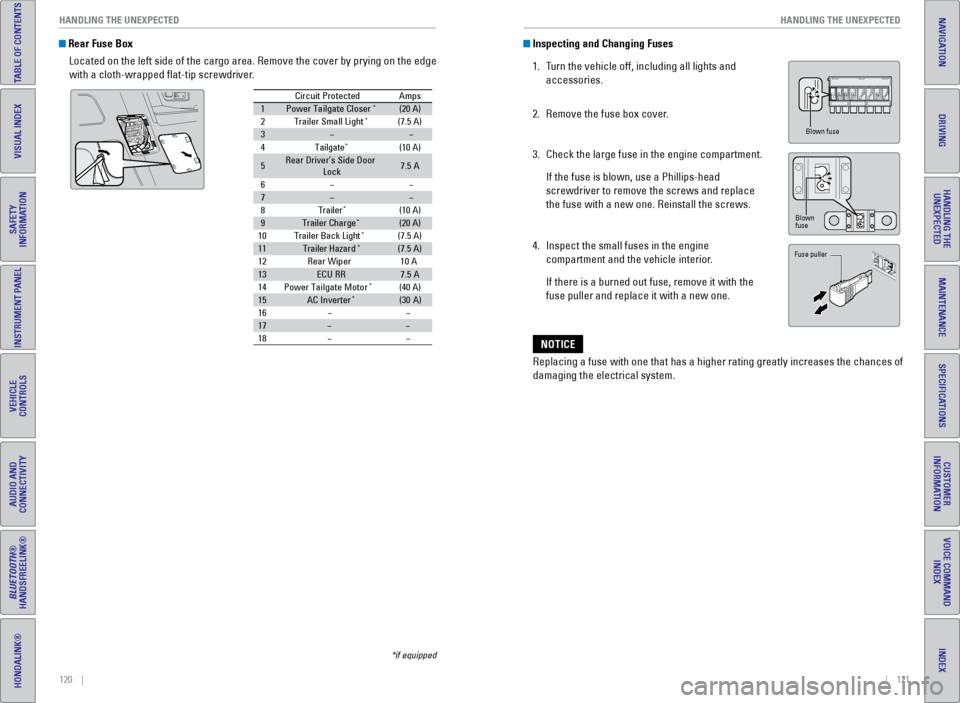
Rear Fuse Box
Located on the left side of the cargo area. Remove the cover by prying o\
n the edge
with a cloth-wrapped flat-tip screwdriver.
Circuit Protecte dAmps
1Power Tailgate Closer*(20 A)
2Trailer Small Light*(7.5 A)
3
4Tailgate*(10 A)
5Rear Driver’s Side Door
Lock7. 5A
6
7
8Traile r*(10 A)
9Trailer Charg e*(20 A)
10 Trailer Back Ligh t*(7.5 A)
11Trailer Hazard*(7.5 A)
12 Rear Wiper
13ECU RR7.5A
14 Power Tailgate Motor*(40 A)
15AC Inverte r*(30A )
16
17
18
10 A
*if equipped
Inspecting and Changing Fuses
1. Turn the vehicle off, including all lights and
accessories.
2. Remove the fuse box cover.
3. Check the large fuse in the engine compartment.
If the fuse is blown, use a Phillips-head
screwdriver to remove the screws and replace
the fuse with a new one. Reinstall the screws.
4. Inspect the small fuses in the engine
compartment and the vehicle interior.
If there is a burned out fuse, remove it with the
fuse puller and replace it with a new one.
Replacing a fuse with one that has a higher rating greatly increases the\
chances of
damaging the electrical system.
NOTICE
Blown fuse
Blown
fuse
Fuse puller
Page 66 of 81
124 || 125
MAINTENANCE
MAINTENANCE
TABLE OF CONTENTS
INDEX
VISUAL INDEX
VOICE COMMAND
INDEX
SAFETY
INFORMATION
CUSTOMER
INFORMATION
INSTRUMENT PANEL
SPECIFICATIONS
VEHICLE
CONTROLS
MAINTENANCE
AUDIO AND
CONNECTIVITY
HANDLING THE UNEXPECTED
BLUETOOTH®
HANDSFREELINK®
DRIVING
HONDALINK®
NAVIGATION
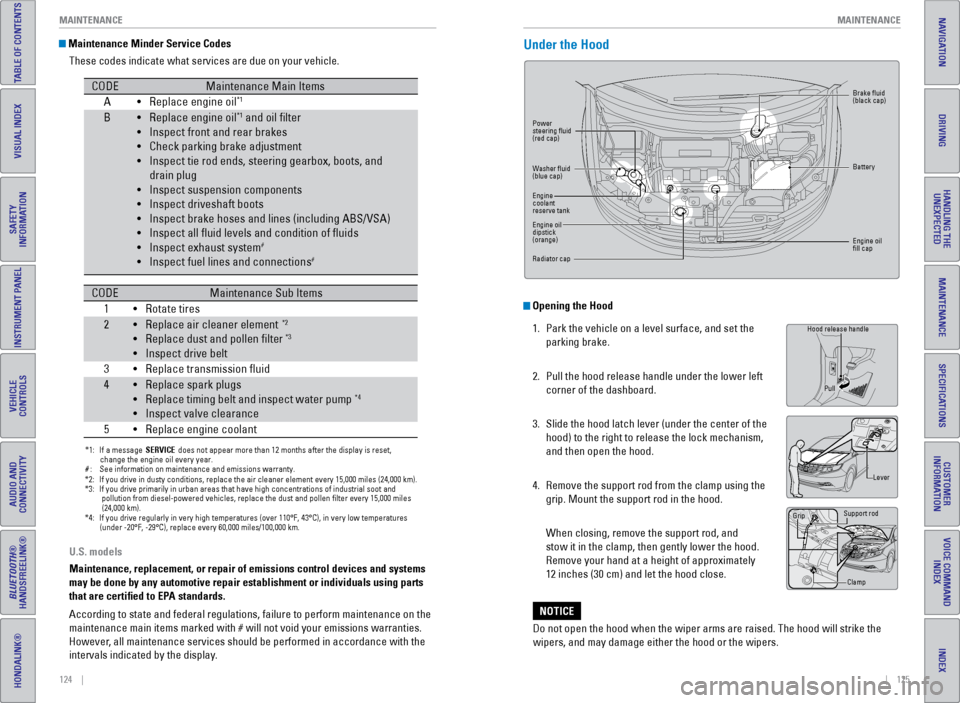
Opening the Hood
1. Park the vehicle on a level surface, and set the
parking brake.
2. Pull the hood release handle under the lower left
corner of the dashboard.
3. Slide the hood latch lever (under the center of the
hood) to the right to release the lock mechanism,
and then open the hood.
4. Remove the support rod from the clamp using the
grip. Mount the support rod in the hood.
When closing, remove the support rod, and
stow it in the clamp, then gently lower the hood.
Remove your hand at a height of approximately
12 inches (30 cm) and let the hood close.
U.S. models
Maintenance, replacement, or repair of emissions control devices and sys\
tems
may be done by any automotive repair establishment or individuals using \
parts
that are certified to EPA standards.
According to state and federal regulations, failure to perform maintenan\
ce on the
maintenance main items marked with # will not void your emissions warranties.
However, all maintenance services should be performed in accordance with the
intervals indicated by the display.
Maintenance Minder Service Codes
These codes indicate what services are due on your vehicle.
*1: If a message SERVICE does not appear more than 12 months after the display is reset,
change the engine oil every year.
#: See information on maintenance and emissions warranty.
CODEMaintenance Main Items
A Replace engine oi l*1
BReplace engine oil*1 and oil lter
Inspect front and rear brakes
Check parking brake adjustment
Inspect tie rod ends, steering gearbox, boots, and
drain plug
Inspect suspension components
Inspect driveshaft boots
Inspect brake hoses and lines (including ABS/VSA)
Inspect all uid levels and condition of uid s
Inspect exhaust system
#
Inspect fuel lines and connection s#
*2:If you drive in dusty conditions, replace the air cleaner element every \
15,000 miles (24,000 km).*3:If you drive primarily in urban areas that have high concentrations of i\
ndustrial soot an d
pollution from die sel-powered vehicles, replace the dust and pollen lter every 15,000 \
mile s
(24,000 km ).
*4: If you drive regularly in very high temperatures (over 110°F, 43°\
C), in very low temperatures
(under -20°F, -29°C), replace every 60,000 miles/100,000 km .
CODEMaintenance Sub Items
1 Rotate tires
• •
•
•
•
•
•
•
•
•
•
•
2Replace air cleaner element*2
Replace dust and pollen lter*3
Inspect drive belt
3 Replace transmission uid
4Replace spark plugs
Replace timing belt and inspect water pump*4
Inspect valve clearance
5 Replace engine coolan t
•
•
•
•
•
•
•
•
Under the Hood
Lever
Support rod
Grip
Clamp
Hood release handlePull
Power
steering fluid
(red cap) Brake fluid
(black cap)
Battery
engine oil
fill cap
Washer fluid
(blue cap)
engine
coolant
reserve tank
engine oil
dipstick
(orange)
Radiator cap
Do not open the hood when the wiper arms are raised. The hood will strik\
e the
wipers, and may damage either the hood or the wipers.
NOTICE
Page 68 of 81
128 || 129
MAINTENANCE
MAINTENANCE
TABLE OF CONTENTS
INDEX
VISUAL INDEX
VOICE COMMAND
INDEX
SAFETY
INFORMATION
CUSTOMER
INFORMATION
INSTRUMENT PANEL
SPECIFICATIONS
VEHICLE
CONTROLS
MAINTENANCE
AUDIO AND
CONNECTIVITY
HANDLING THE UNEXPECTED
BLUETOOTH®
HANDSFREELINK®
DRIVING
HONDALINK®
NAVIGATION
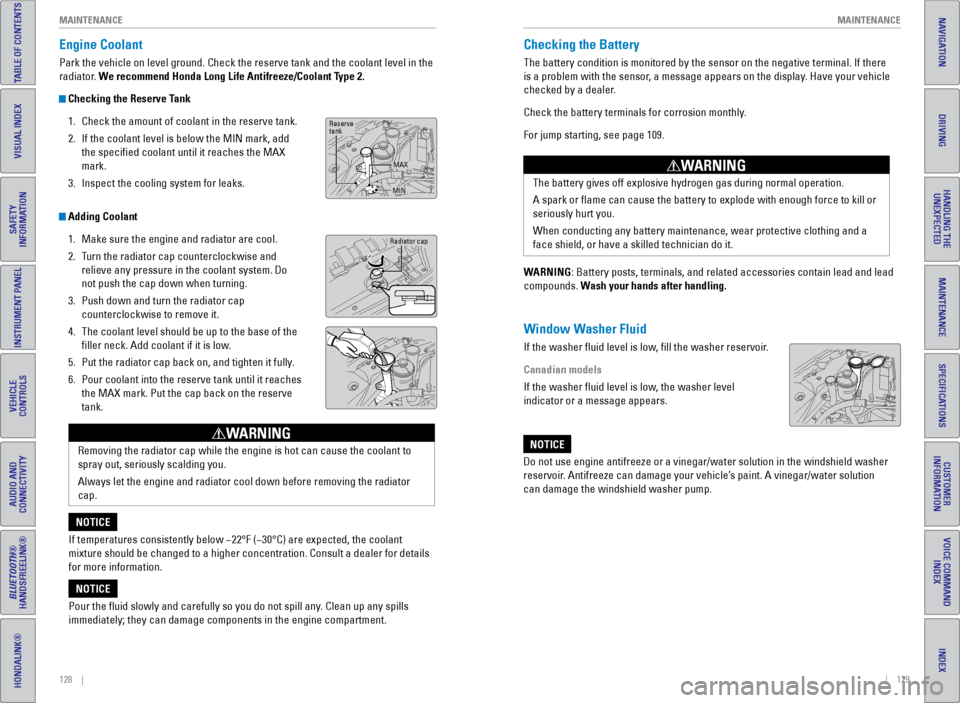
Engine Coolant
Park the vehicle on level ground. Check the reserve tank and the coolant\
level in the
radiator. We recommend Honda Long Life Antifreeze/Coolant Type 2.
Checking the Reserve Tank
1. Check the amount of coolant in the reserve tank.
2. If the coolant level is below the MIN mark, add
the specified coolant until it reaches the MAX
mark.
3. Inspect the cooling system for leaks.
Adding Coolant
1. Make sure the engine and radiator are cool.
2. Turn the radiator cap counterclockwise and
relieve any pressure in the coolant system. Do
not push the cap down when turning.
3. Push down and turn the radiator cap
counterclockwise to remove it.
4. The coolant level should be up to the base of the
filler neck. Add coolant if it is low.
5. Put the radiator cap back on, and tighten it fully.
6. Pour coolant into the reserve tank until it reaches
the MAX mark. Put the cap back on the reserve
tank.
Removing the radiator cap while the engine is hot can cause the coolant \
to
spray out, seriously scalding you.
Always let the engine and radiator cool down before removing the radiato\
r
cap.
WARNING
If temperatures consistently below −22°F (−30°C) are expec\
ted, the coolant
mixture should be changed to a higher concentration. Consult a dealer fo\
r details
for more information.
NOTICE
Pour the fluid slowly and carefully so you do not spill any. Clean up any spills
immediately; they can damage components in the engine compartment.
NOTICE
Radiator cap
Reserve
tank MAX
MIN
Checking the Battery
The battery condition is monitored by the sensor on the negative termina\
l. If there
is a problem with the sensor, a message appears on the display. Have your vehicle
checked by a dealer.
Check the battery terminals for corrosion monthly.
For jump starting, see page 109.
WARNING: Battery posts, terminals, and related accessories contain lead and lea\
d
compounds. Wash your hands after handling.
Window Washer Fluid
If the washer fluid level is low, fill the washer reservoir.
Canadian models
If the washer fluid level is low, the washer level
indicator or a message appears. The battery gives off explosive hydrogen gas during normal operation.
A spark or flame can cause the battery to explode with enough force to\
kill or
seriously hurt you.
When conducting any battery maintenance, wear protective clothing and a \
face shield, or have a skilled technician do it.
WARNING
Do not use engine antifreeze or a vinegar/water solution in the windshie\
ld washer
reservoir. Antifreeze can damage your vehicle’s paint. A vinegar/water solution
can damage the windshield washer pump.
NOTICE
Page 69 of 81
130 || 131
MAINTENANCE
MAINTENANCE
TABLE OF CONTENTS
INDEX
VISUAL INDEX
VOICE COMMAND
INDEX
SAFETY
INFORMATION
CUSTOMER
INFORMATION
INSTRUMENT PANEL
SPECIFICATIONS
VEHICLE
CONTROLS
MAINTENANCE
AUDIO AND
CONNECTIVITY
HANDLING THE UNEXPECTED
BLUETOOTH®
HANDSFREELINK®
DRIVING
HONDALINK®
NAVIGATION
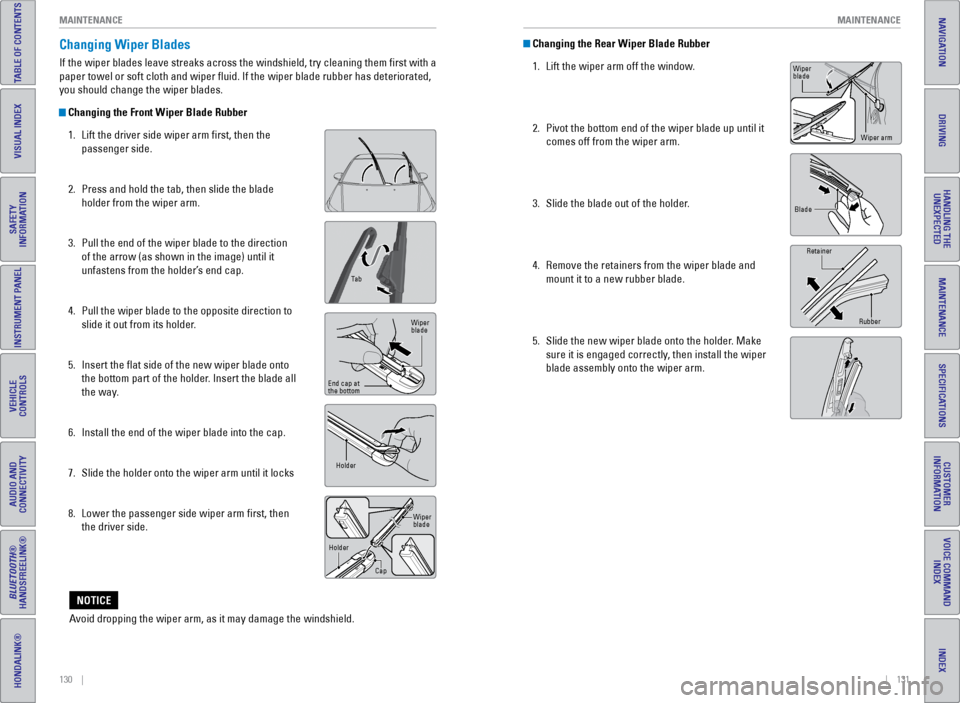
Changing the Rear Wiper Blade Rubber
1. Lift the wiper arm off the window.
2. Pivot the bottom end of the wiper blade up until it
comes off from the wiper arm.
3. Slide the blade out of the holder.
4. Remove the retainers from the wiper blade and
mount it to a new rubber blade.
5. Slide the new wiper blade onto the holder. Make
sure it is engaged correctly, then install the wiper
blade assembly onto the wiper arm.Changing Wiper Blades
If the wiper blades leave streaks across the windshield, try cleaning th\
em first with a
paper towel or soft cloth and wiper fluid. If the wiper blade rubber h\
as deteriorated,
you should change the wiper blades.
Changing the Front Wiper Blade Rubber
1. Lift the driver side wiper arm first, then the
passenger side.
2. Press and hold the tab, then slide the blade
holder from the wiper arm.
3. Pull the end of the wiper blade to the direction
of the arrow (as shown in the image) until it
unfastens from the holder’s end cap.
4. Pull the wiper blade to the opposite direction to
slide it out from its holder.
5. Insert the flat side of the new wiper blade onto
the bottom part of the holder. Insert the blade all
the way.
6. Install the end of the wiper blade into the cap.
7. Slide the holder onto the wiper arm until it locks
8. Lower the passenger side wiper arm first, then
the driver side.
Ta b
Wiper
blade
end cap at
the bottom
Holder
Holder CapWiper
blade
Avoid dropping the wiper arm, as it may damage the windshield.
NOTICE
Blade
Wiper
blade
Wiper arm
Retainer
Rubber