lights HONDA ODYSSEY 2018 (in English) User Guide
[x] Cancel search | Manufacturer: HONDA, Model Year: 2018, Model line: ODYSSEY, Model: HONDA ODYSSEY 2018Pages: 763, PDF Size: 47.02 MB
Page 95 of 763
93
uuIndicators u
Continued
Instrument Panel
*1:Canadian models only: Apply and hold th e brake pedal before selecting the ON mode.
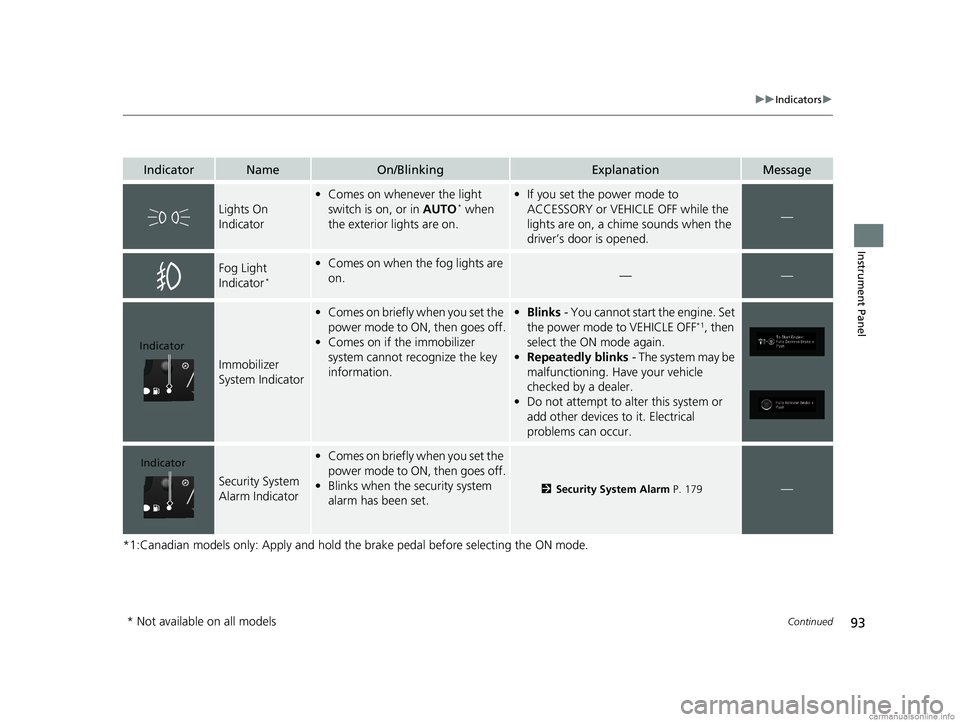
IndicatorNameOn/BlinkingExplanationMessage
Lights On
Indicator
•Comes on whenever the light
switch is on, or in AUTO* when
the exterior lights are on.
• If you set the power mode to
ACCESSORY or VEHICLE OFF while the
lights are on, a chime sounds when the
driver’s door is opened.
—
Fog Light
Indicator*
•Comes on when the fog lights are
on.——
Immobilizer
System Indicator
•Comes on briefly when you set the
power mode to ON, then goes off.
• Comes on if the immobilizer
system cannot recognize the key
information.•Blinks - You cannot start the engine. Set
the power mode to VEHICLE OFF*1, then
select the ON mode again.
• Repeatedly blinks - The system may be
malfunctioning. Have your vehicle
checked by a dealer.
• Do not attempt to alter this system or
add other devices to it. Electrical
problems can occur.
Security System
Alarm Indicator
•Comes on briefly when you set the
power mode to ON, then goes off.
• Blinks when the security system
alarm has been set.
2 Security System Alarm P. 179—
Indicator
Indicator
* Not available on all models
18 US ODYSSEY-31THR6010.book 93 ページ 2018年12月6日 木曜日 午後4時18分
Page 112 of 763
110
uuIndicators uDriver Information Interface Wa rning and Information Messages
Instrument Panel
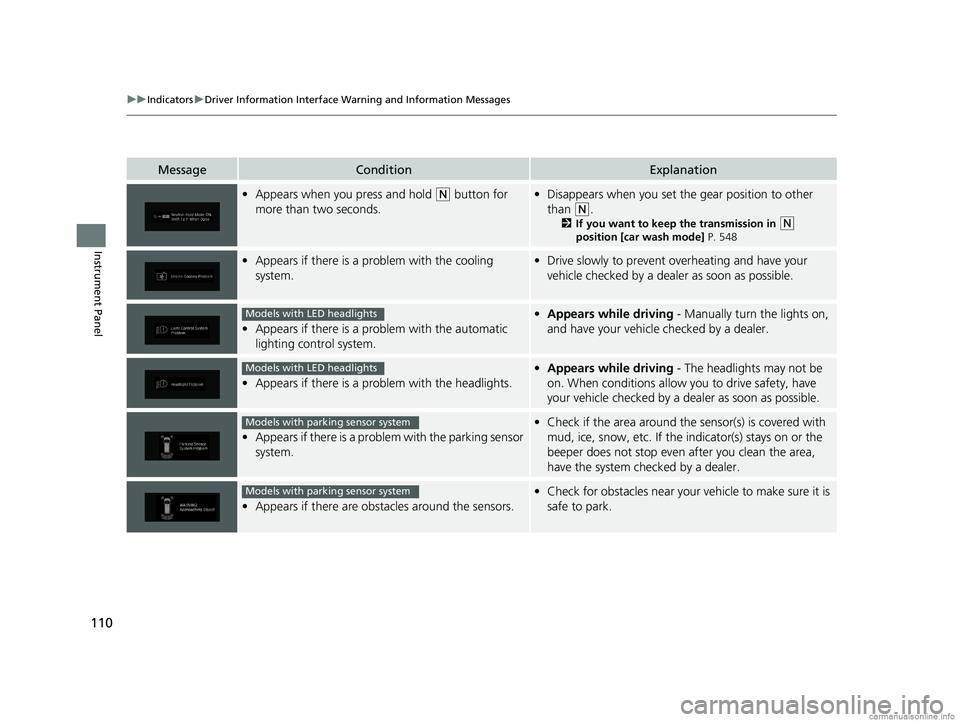
MessageConditionExplanation
•Appears when you press and hold (N button for
more than two seconds.• Disappears when you set the gear position to other
than
(N.
2 If you want to keep the transmission in (N
position [car wash mode] P. 548
•Appears if there is a problem with the cooling
system.•Drive slowly to prevent ov erheating and have your
vehicle checked by a deal er as soon as possible.
•Appears if there is a problem with the automatic
lighting control system.
•Appears while driving - Manually turn the lights on,
and have your vehicle checked by a dealer.
• Appears if there is a problem with the headlights.
•Appears while driving - The headlights may not be
on. When conditions allow you to drive safety, have
your vehicle checked by a d ealer as soon as possible.
•Appears if there is a proble m with the parking sensor
system.
• Check if the area around the sensor(s) is covered with
mud, ice, snow, etc. If the indicator(s) stays on or the
beeper does not stop even after you clean the area,
have the system checked by a dealer.
• Appears if there are obstacles around the sensors.
•Check for obstacles near your vehicle to make sure it is
safe to park.
Models with LED headlights
Models with LED headlights
Models with parking sensor system
Models with parking sensor system
18 US ODYSSEY-31THR6010.book 110 ページ 2018年12月6日 木曜日 午後4時18分
Page 114 of 763
112
uuIndicators uDriver Information Interface Wa rning and Information Messages
Instrument Panel
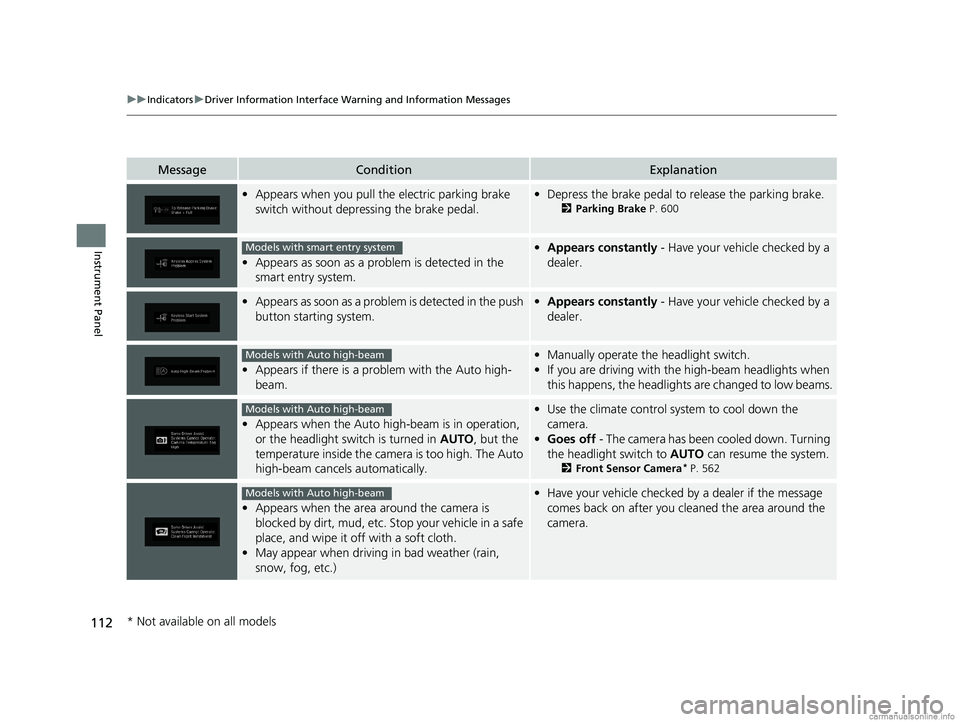
MessageConditionExplanation
•Appears when you pull the electric parking brake
switch without depressing the brake pedal.•Depress the brake pedal to release the parking brake.
2 Parking Brake P. 600
•Appears as soon as a prob lem is detected in the
smart entry system.
• Appears constantly - Have your vehicle checked by a
dealer.
• Appears as soon as a proble m is detected in the push
button starting system.• Appears constantly - Have your vehicle checked by a
dealer.
• Appears if there is a prob lem with the Auto high-
beam.
• Manually operate the headlight switch.
• If you are driving with th e high-beam headlights when
this happens, the headlights are changed to low beams.
• Appears when the Auto high -beam is in operation,
or the headlight switch is turned in AUTO, but the
temperature inside the came ra is too high. The Auto
high-beam cancels automatically.
• Use the climate control sy stem to cool down the
camera.
• Goes off - The camera has been cooled down. Turning
the headlight switch to AUTO can resume the system.
2Front Sensor Camera* P. 562
•Appears when the area around the camera is
blocked by dirt, mud, etc. Stop your vehicle in a safe
place, and wipe it off with a soft cloth.
• May appear when driving in bad weather (rain,
snow, fog, etc.)
•Have your vehicle checked by a dealer if the message
comes back on after you cl eaned the area around the
camera.
Models with smart entry system
Models with Auto high-beam
Models with Auto high-beam
Models with Auto high-beam
* Not available on all models
18 US ODYSSEY-31THR6010.book 112 ページ 2018年12月6日 木曜日 午後4時18分
Page 138 of 763
136
uuGauges and Displays uDriver Information Interface
Instrument Panel
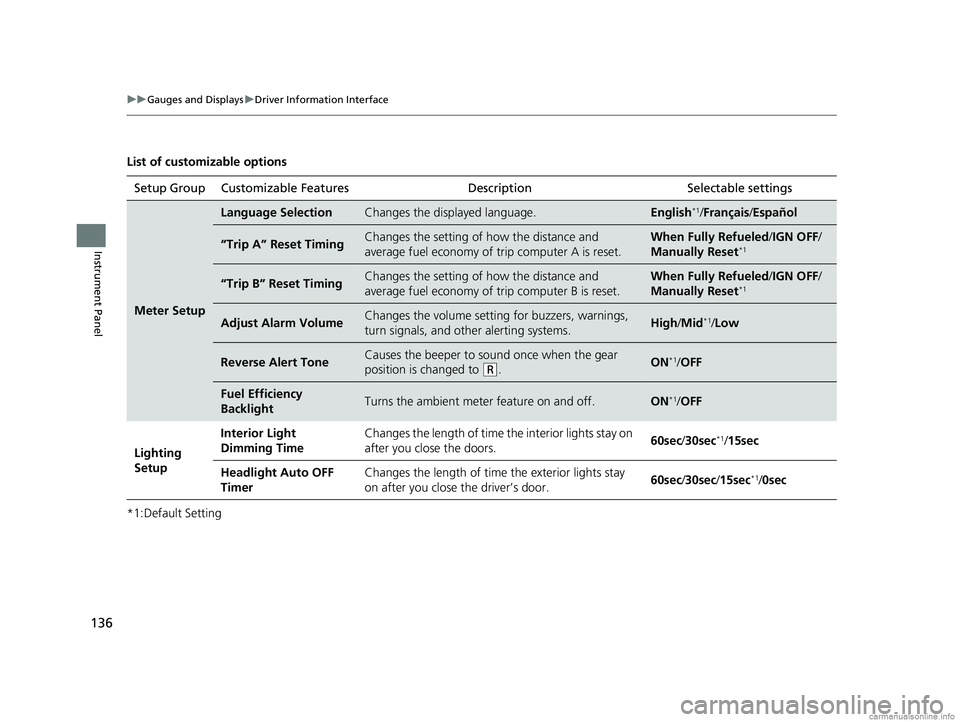
List of customizable options
*1:Default SettingSetup Group Customizable Features
Description Selectable settings
Meter Setup
Language SelectionChanges the displayed language.English*1/Français /Español
“Trip A” Reset TimingChanges the setting of how the distance and
average fuel economy of trip computer A is reset.When Fully Refueled /IGN OFF /
Manually Reset*1
“Trip B” Reset TimingChanges the setting of how the distance and
average fuel economy of trip computer B is reset.When Fully Refueled/IGN OFF /
Manually Reset*1
Adjust Alarm VolumeChanges the volume setting for buzzers, warnings,
turn signals, and other alerting systems.High /Mid*1/Low
Reverse Alert ToneCauses the beeper to s ound once when the gear
position is changed to
( R.ON*1/ OFF
Fuel Efficiency
BacklightTurns the ambient meter feature on and off.ON*1/OFF
Lighting
Setup Interior Light
Dimming Time
Changes the length of time the interior lights stay on
after you close the doors.
60sec
/30sec
*1/15sec
Headlight Auto OFF
Timer Changes the length of time the exterior lights stay
on after you close the driver’s door.
60sec
/30sec/ 15sec
*1/0sec
18 US ODYSSEY-31THR6010.book 136 ページ 2018年12月6日 木曜日 午後4時18分
Page 139 of 763
137
uuGauges and Displays uDriver Information Interface
Continued
Instrument Panel
*1:Default SettingSetup Group Customizable Features
Description Selectable settings
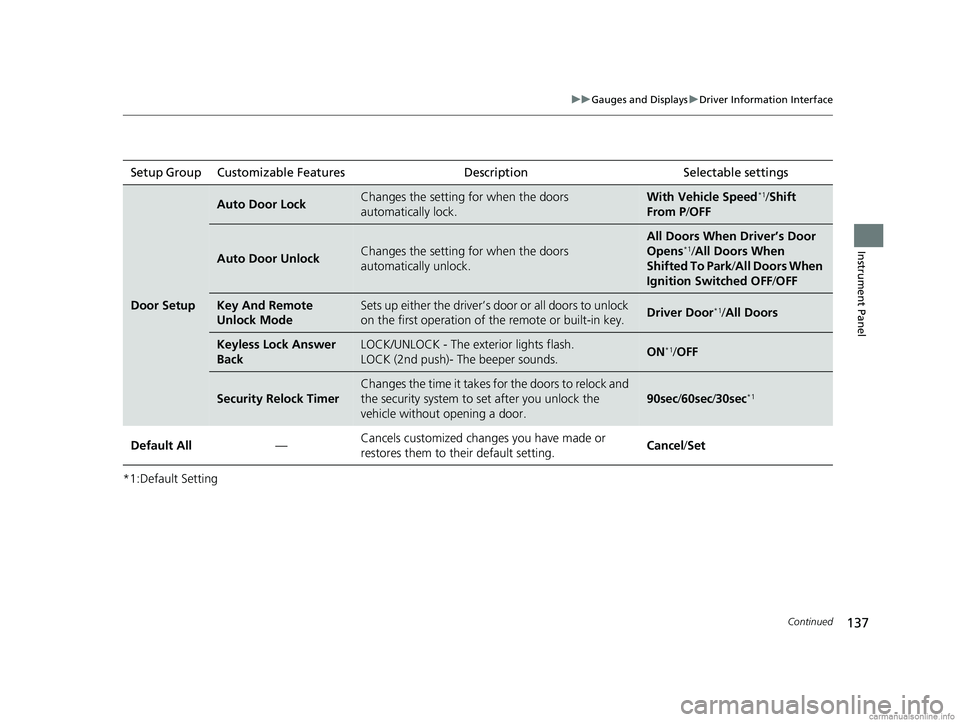
Door Setup
Auto Door LockChanges the setting for when the doors
automatically lock.With Vehicle Speed*1/Shift
From P /OFF
Auto Door UnlockChanges the setting for when the doors
automatically unlock.
All Doors When Driver’s Door
Opens*1/All Doors When
Shifted To Park /All Doors When
Ignition Switched OFF /OFF
Key And Remote
Unlock ModeSets up either the driver’s do or or all doors to unlock
on the first operation of th e remote or built-in key.Driver Door*1/All Doors
Keyless Lock Answer
BackLOCK/UNLOCK - The exterior lights flash.
LOCK (2nd push)- The beeper sounds.ON*1/OFF
Security Relock Timer
Changes the time it takes fo r the doors to relock and
the security system to set after you unlock the
vehicle without opening a door.
90sec /60sec /30sec*1
Default All —Cancels customized changes you have made or
restores them to their default setting.
Cancel
/Set
18 US ODYSSEY-31THR6010.book 137 ページ 2018年12月6日 木曜日 午後4時18分
Page 143 of 763
141
Controls
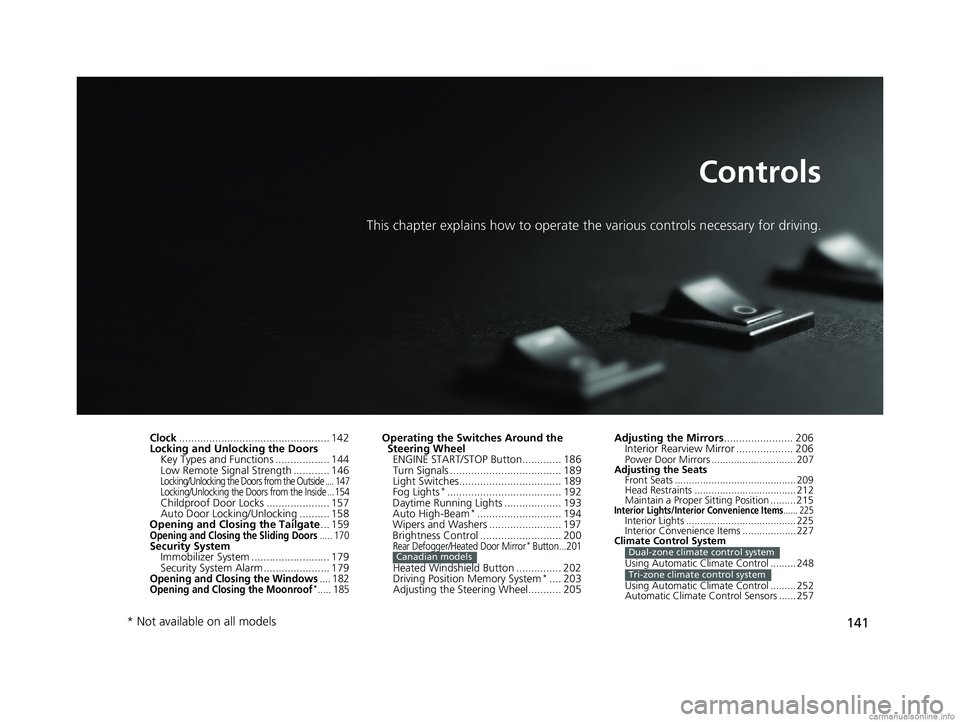
This chapter explains how to operate the various controls necessary for driving.
Clock.................................................. 142
Locking and Unlocking the Doors Key Types and Functions .................. 144
Low Remote Signal Strength ............ 146
Locking/Unlocking the Doors from the Outside .... 147
Locking/Unlocking the Doors from the Inside ...154
Childproof Door Locks ..................... 157
Auto Door Locking/Unlocking .......... 158
Opening and Closing the Tailgate ... 159
Opening and Closing the Sliding Doors..... 170Security System
Immobilizer System .......................... 179
Security System Alarm ...................... 179
Opening and Closing the Windows.... 182Opening and Closing the Moonroof*..... 185
Operating the Switches Around the Steering Wheel ENGINE START/STOP Button............. 186
Turn Signals ..................................... 189
Light Switches.................................. 189
Fog Lights
*...................................... 192
Daytime Running Lights ................... 193
Auto High-Beam
*............................ 194
Wipers and Washers ........................ 197
Brightness Control ........................... 200
Rear Defogger/Heated Door Mirror* Button...201
Heated Windshield Button ............... 202
Driving Position Memory System*.... 203
Adjusting the Steering Wheel........... 205
Canadian models
Adjusting the Mirrors ....................... 206
Interior Rearview Mirror ................... 206
Power Door Mirrors .............................. 207
Adjusting the Seats Front Seats ........................................... 209
Head Restraints .................................... 212
Maintain a Proper Sitting Position ......... 215
Interior Lights/Interior Convenience Items...... 225Interior Lights ....................................... 225
Interior Convenience Items ................... 227
Climate Control System
Using Automatic Climate Control ......... 248
Using Automatic Climate Control ......... 252
Automatic Climate Control Sensors ...... 257
Dual-zone climate control system
Tri-zone climate control system
* Not available on all models
18 US ODYSSEY-31THR6010.book 141 ページ 2018年12月6日 木曜日 午後4時18分
Page 149 of 763
147
uuLocking and Unlocking the Doors uLocking/Unlocking the Doors from the Outside
Continued
Controls
Locking/Unlocking the Doors from the Outside
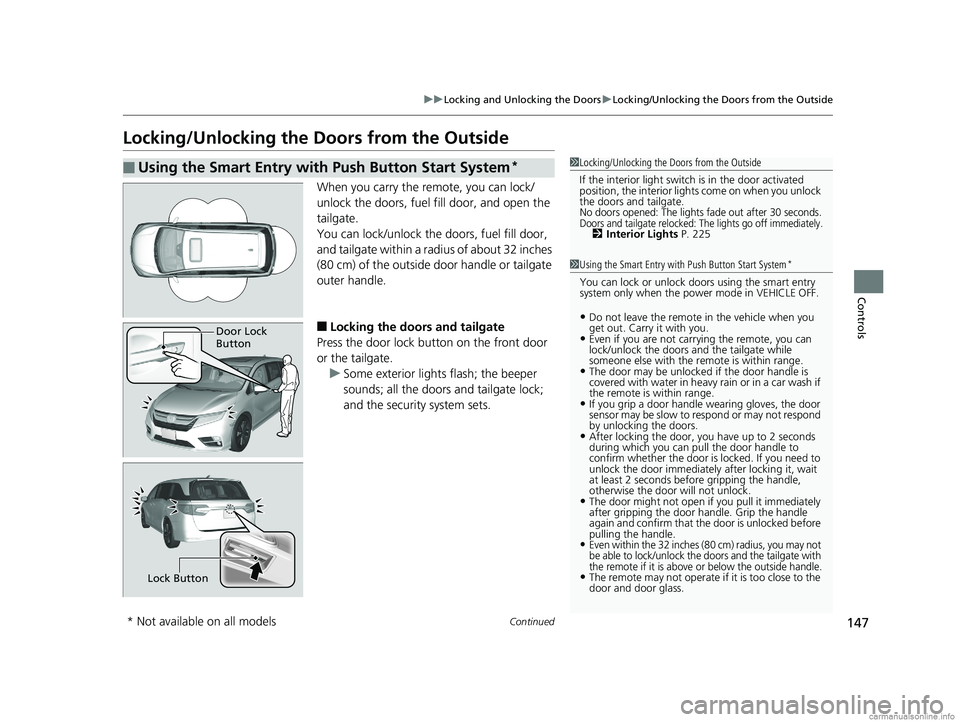
When you carry the re mote, you can lock/
unlock the doors, fuel fill door, and open the
tailgate.
You can lock/unlock the doors, fuel fill door,
and tailgate within a radi us of about 32 inches
(80 cm) of the outside door handle or tailgate
outer handle.
■Locking the doors and tailgate
Press the door lock button on the front door
or the tailgate. u Some exterior lights flash; the beeper
sounds; all the doors and tailgate lock;
and the security system sets.
■Using the Smart Entry with Push Button Start System*1Locking/Unlocking the Doors from the Outside
If the interior light switch is in the door activated
position, the interior lights come on when you unlock
the doors and tailgate.
No doors opened: The lights fade out after 30 seconds.Doors and tailgate relocked: The lights go off immediately.2 Interior Lights P. 225
1Using the Smart Entry with Push Button Start System*
You can lock or unlock doors using the smart entry
system only when the power mode in VEHICLE OFF.
•Do not leave the remote in the vehicle when you
get out. Carry it with you.
•Even if you are not carr ying the remote, you can
lock/unlock the doors and the tailgate while
someone else with the remote is within range.
•The door may be unlocked if the door handle is
covered with water in heavy rain or in a car wash if
the remote is within range.
•If you grip a door handle wearing gloves, the door
sensor may be slow to respond or may not respond
by unlocking the doors.
•After locking the door, you have up to 2 seconds
during which you can pull the door handle to
confirm whether the door is locked. If you need to
unlock the door immediately after locking it, wait
at least 2 seconds befo re gripping the handle,
otherwise the door will not unlock.
•The door might not open if you pull it immediately
after gripping the door handle. Grip the handle
again and confirm that th e door is unlocked before
pulling the handle.
•Even within the 32 inches (80 cm) radius, you may not
be able to lock/unlock the doors and the tailgate with
the remote if it is above or below the outside handle.
•The remote may not operate if it is too close to the
door and door glass.
Door Lock
Button
Lock Button
* Not available on all models
18 US ODYSSEY-31THR6010.book 147 ページ 2018年12月6日 木曜日 午後4時18分
Page 150 of 763
uuLocking and Unlocking the Doors uLocking/Unlocking the Doors from the Outside
148
Controls
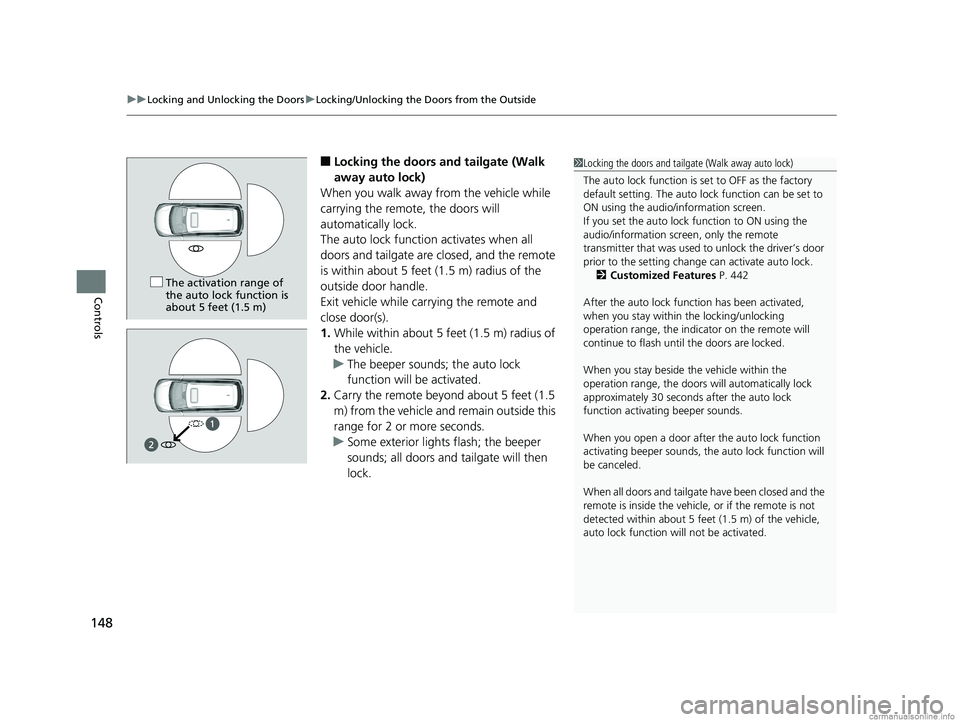
■Locking the doors and tailgate (Walk
away auto lock)
When you walk away from the vehicle while
carrying the remote, the doors will
automatically lock.
The auto lock function activates when all
doors and tailgate are closed, and the remote
is within about 5 feet (1.5 m) radius of the
outside door handle.
Exit vehicle while carrying the remote and
close door(s).
1. While within about 5 feet (1.5 m) radius of
the vehicle.
u The beeper sounds; the auto lock
function will be activated.
2. Carry the remote beyond about 5 feet (1.5
m) from the vehicle and remain outside this
range for 2 or more seconds.
u Some exterior lights flash; the beeper
sounds; all doors and tailgate will then
lock.1Locking the doors and tailgate (Walk away auto lock)
The auto lock function is set to OFF as the factory
default setting. The auto lo ck function can be set to
ON using the audio/information screen.
If you set the auto lock function to ON using the
audio/information screen, only the remote
transmitter that was used to unlock the driver’s door
prior to the setting change can activate auto lock. 2 Customized Features P. 442
After the auto lock function has been activated,
when you stay within the locking/unlocking
operation range, the indica tor on the remote will
continue to fl ash until the door s are locked.
When you stay beside the vehicle within the
operation range, the doors wi ll automatically lock
approximately 30 seconds after the auto lock
function activating beeper sounds.
When you open a door after the auto lock function
activating beeper sounds, the auto lock function will
be canceled.
When all doors and tailgate have been closed and the
remote is inside the vehicle, or if the remote is not
detected within about 5 feet (1.5 m) of the vehicle,
auto lock function wi ll not be activated.
The activation range of
the auto lock function is
about 5 feet (1.5 m)
18 US ODYSSEY-31THR6010.book 148 ページ 2018年12月6日 木曜日 午後4時18分
Page 152 of 763
uuLocking and Unlocking the Doors uLocking/Unlocking the Doors from the Outside
150
Controls
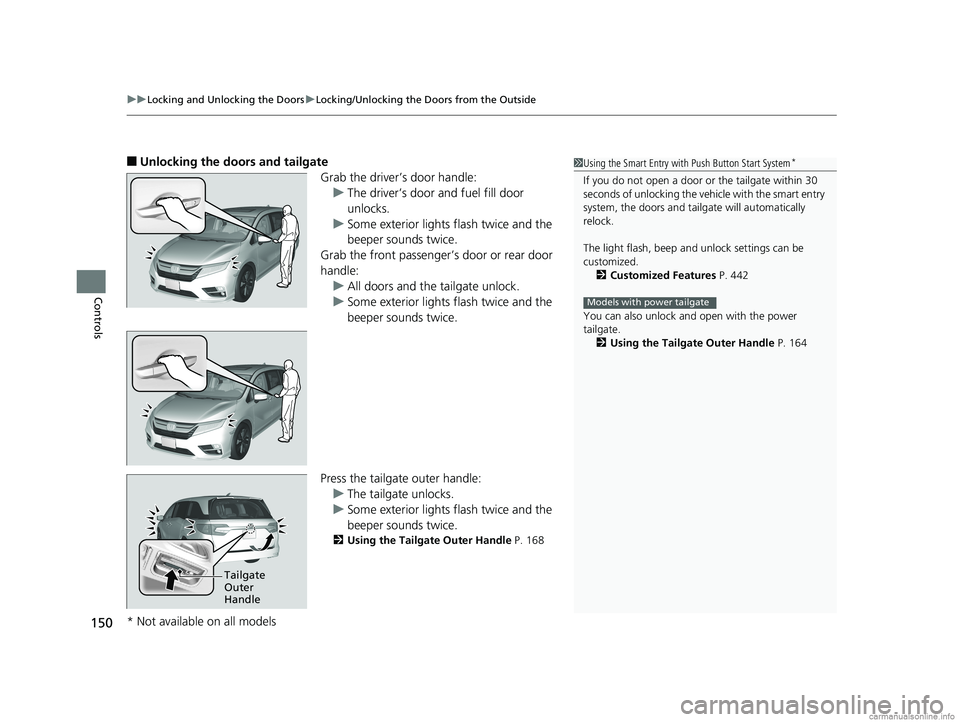
■Unlocking the doors and tailgate
Grab the driver’s door handle:u The driver’s door and fuel fill door
unlocks.
u Some exterior lights flash twice and the
beeper sounds twice.
Grab the front passenger’s door or rear door
handle: u All doors and the tailgate unlock.
u Some exterior lights flash twice and the
beeper sounds twice.
Press the tailgate outer handle: u The tailgate unlocks.
u Some exterior lights flash twice and the
beeper sounds twice.
2 Using the Tailgate Outer Handle P. 168
1Using the Smart Entry with Push Button Start System*
If you do not open a door or the tailgate within 30
seconds of unlocking the vehicle with the smart entry
system, the doors and tailg ate will automatically
relock.
The light flash, beep a nd unlock settings can be
customized. 2 Customized Features P. 442
You can also unlock and open with the power
tailgate. 2 Using the Tailgate Outer Handle P. 164
Models with power tailgate
Tailgate
Outer
Handle
* Not available on all models
18 US ODYSSEY-31THR6010.book 150 ページ 2018年12月6日 木曜日 午後4時18分
Page 153 of 763
Continued151
uuLocking and Unlocking the Doors uLocking/Unlocking the Doors from the Outside
Controls
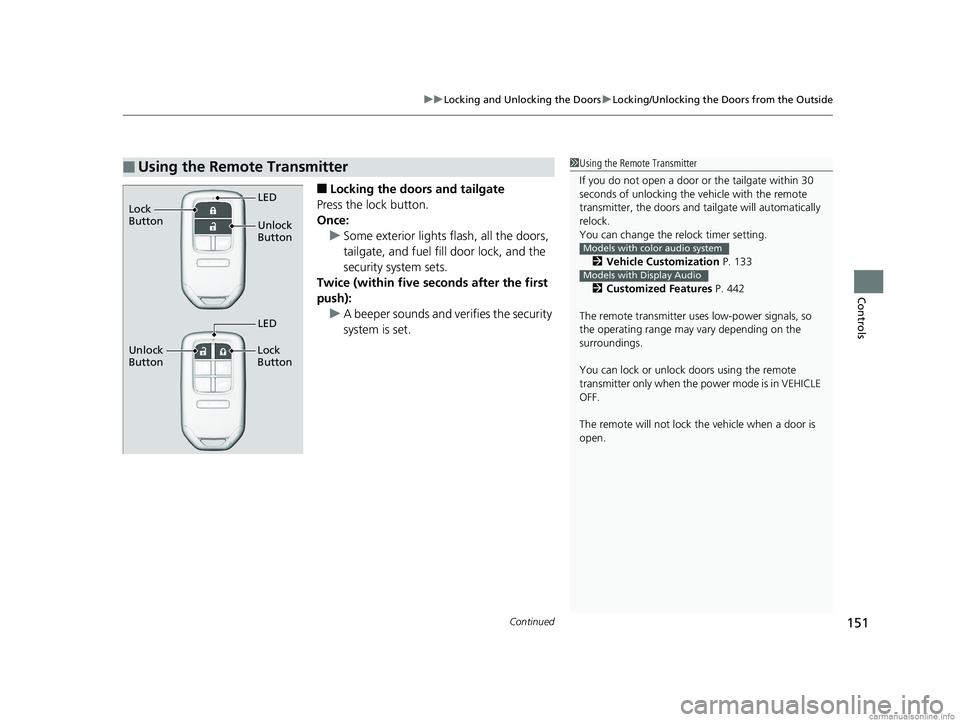
■Locking the doors and tailgate
Press the lock button.
Once: u Some exterior lights flash, all the doors,
tailgate, and fuel fill door lock, and the
security system sets.
Twice (within five se conds after the first
push):
u A beeper sounds and verifies the security
system is set.
■Using the Remote Transmitter1Using the Remote Transmitter
If you do not open a door or the tailgate within 30
seconds of unlocking the vehicle with the remote
transmitter, the doors and ta ilgate will automatically
relock.
You can change the relock timer setting.
2 Vehicle Customization P. 133
2 Customized Features P. 442
The remote transmitter us es low-power signals, so
the operating range may vary depending on the
surroundings.
You can lock or unlock doors using the remote
transmitter only when the power mode is in VEHICLE
OFF.
The remote will not lock th e vehicle when a door is
open.
Models with color audio system
Models with Display Audio
Unlock
Button LED
Lock
Button
Unlock
Button Lock
Button
LED
18 US ODYSSEY-31THR6010.book 151 ページ 2018年12月6日 木曜日 午後4時18分