lane assist HONDA ODYSSEY 2019 Owner's Manual (in English)
[x] Cancel search | Manufacturer: HONDA, Model Year: 2019, Model line: ODYSSEY, Model: HONDA ODYSSEY 2019Pages: 767, PDF Size: 47.46 MB
Page 7 of 767
5
Quick Reference Guide
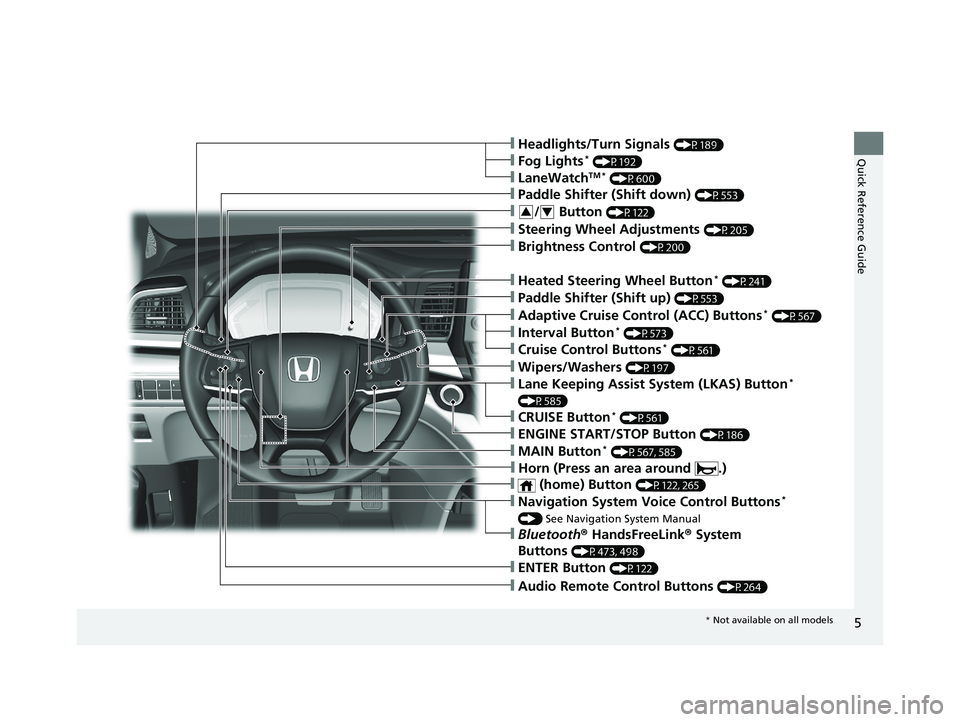
❙Navigation System Voice Control Buttons*
() See Navigation System Manual
❙Audio Remote Control Buttons (P264)
❙Steering Wheel Adjustments (P205)
❙Brightness Control (P200)
❙ENTER Button (P122)
❙/ Button (P122)34
❙Headlights/Turn Signals (P189)
❙LaneWatchTM * (P600)
❙Fog Lights* (P192)
❙Bluetooth ® HandsFreeLink ® System
Buttons
(P473, 498)
❙Paddle Shifter (Shift down) (P553)
❙Heated Steering Wheel Button* (P241)
❙Paddle Shifter (Shift up) (P553)
❙Adaptive Cruise Control (ACC) Buttons* (P567)
❙Interval Button* (P573)
❙Cruise Control Buttons* (P561)
❙ENGINE START/STOP Button (P186)
❙MAIN Button* (P567, 585)
❙Wipers/Washers (P197)
❙Lane Keeping Assist System (LKAS) Button*
(P585)
❙CRUISE Button* (P561)
❙ (home) Button (P122, 265)
❙Horn (Press an area around .)
* Not available on all models
19 ODYSSEY-31THR6120.book 5 ページ 2018年12月6日 木曜日 午後4時35分
Page 15 of 767
13
Quick Reference Guide
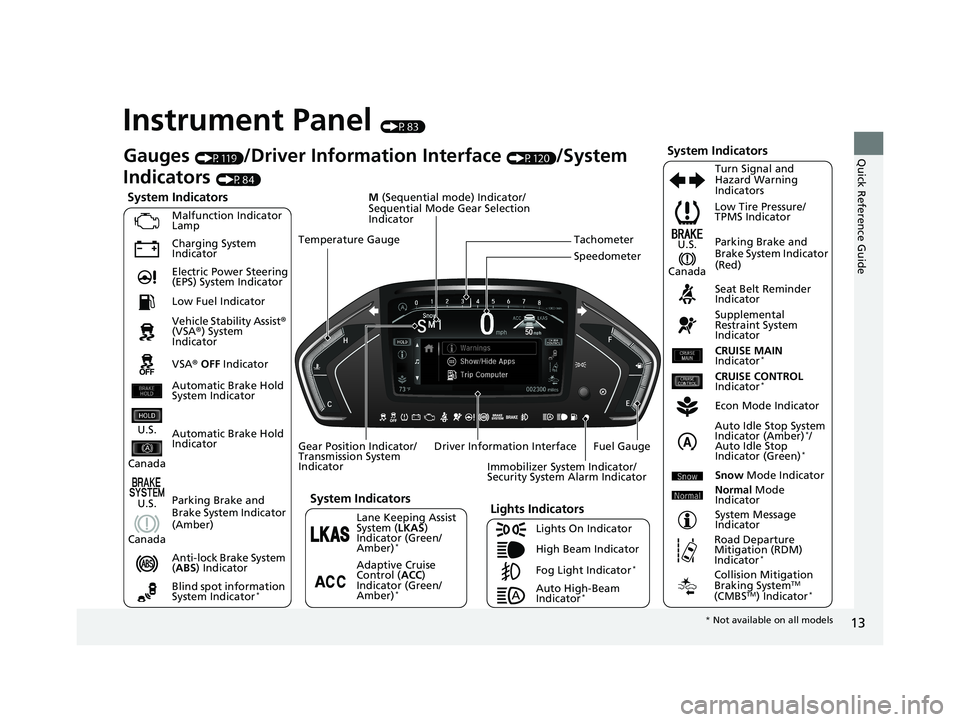
Instrument Panel (P83)
System Indicators
Malfunction Indicator
Lamp
Charging System
Indicator
Anti-lock Brake System
(ABS ) Indicator
Vehicle Stability Assist
®
(VSA ®) System
Indicator
VSA ® OFF Indicator Low Tire Pressure/
TPMS Indicator
Immobilizer System Indicator/
Security System Alarm Indicator
Lights Indicators
Lights On Indicator
High Beam Indicator
Fog Light Indicator
*
Lane Keeping Assist
System ( LKAS)
Indicator (Green/
Amber)
*
Seat Belt Reminder
Indicator
System Indicators
Econ Mode Indicator
System Message
Indicator Parking Brake and
Brake System Indicator
(Red)
Supplemental
Restraint System
Indicator
Driver Information Interface CRUISE MAIN
Indicator
*
Tachometer
M
(Sequential mode) Indicator/
Sequential Mode Gear Selection
Indicator
Speedometer
Fuel Gauge
Gear Position Indicator/
Transmission System
Indicator Auto Idle Stop System
Indicator (Amber)
*/
Auto Idle Stop
Indicator (Green)
*
Gauges (P119)/Driver Information Interface (P120)/System
Indicators
(P84)
Automatic Brake Hold
Indicator Adaptive Cruise
Control (ACC)
Indicator (Green/
Amber)
*
Turn Signal and
Hazard Warning
Indicators
Electric Power Steering
(EPS) System Indicator
Blind spot information
System Indicator
*
CRUISE CONTROL
Indicator*
Temperature Gauge
Parking Brake and
Brake System Indicator
(Amber)
U.S.
Canada
U.S.
Canada
System Indicators
U.S.
Canada
Low Fuel Indicator
Automatic Brake Hold
System Indicator
Auto High-Beam
Indicator*
Snow Mode Indicator
Normal Mode
Indicator
Road Departure
Mitigation (RDM)
Indicator
*
Collision Mitigation
Braking SystemTM
(CMBSTM) Indicator*
* Not available on all models
19 ODYSSEY-31THR6120.book 13 ページ 2018年12月6日 木曜日 午後4時35分
Page 29 of 767
27
Quick Reference Guide
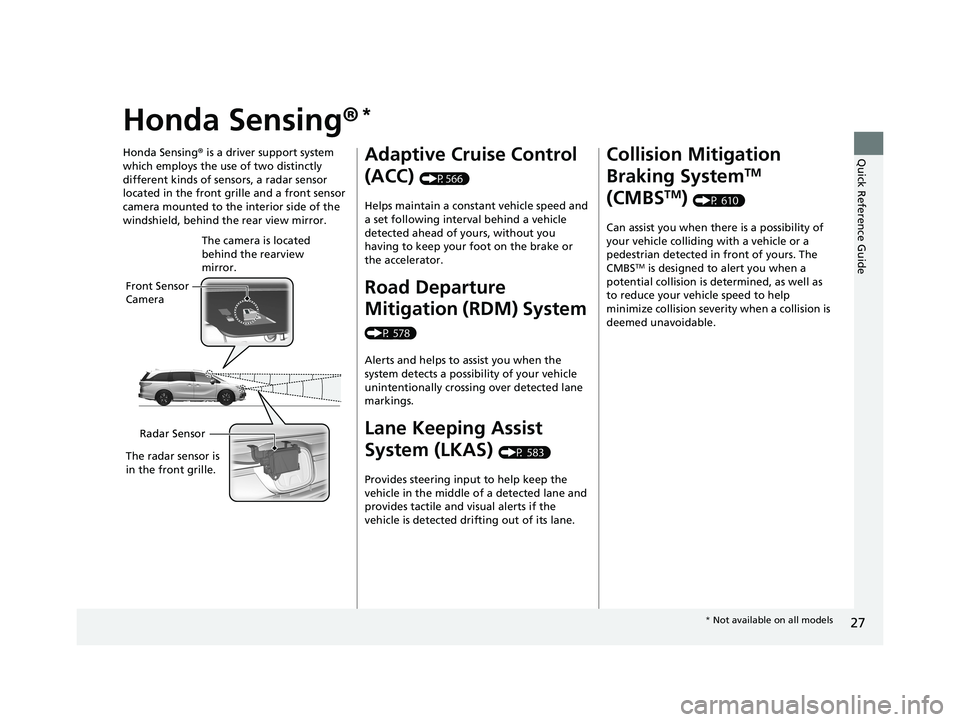
Honda Sensing®*
Honda Sensing® is a driver support system
which employs the use of two distinctly
different kinds of sensors, a radar sensor
located in the front grille and a front sensor
camera mounted to the interior side of the
windshield, behind the rear view mirror.
Front Sensor
Camera The camera is located
behind the rearview
mirror.
Radar Sensor
The radar sensor is
in the front grille.
Adaptive Cruise Control
(ACC)
(P566)
Helps maintain a constant vehicle speed and
a set following interval behind a vehicle
detected ahead of yours, without you
having to keep your foot on the brake or
the accelerator.
Road Departure
Mitigation (RDM) System
(P 578)
Alerts and helps to assist you when the
system detects a possibility of your vehicle
unintentionally crossing over detected lane
markings.
Lane Keeping Assist
System (LKAS)
(P 583)
Provides steering input to help keep the
vehicle in the middle of a detected lane and
provides tactile and visual alerts if the
vehicle is detected drifting out of its lane.
Collision Mitigation
Braking System
TM
(CMBS
TM) (P 610)
Can assist you when there is a possibility of
your vehicle colliding with a vehicle or a
pedestrian detected in front of yours. The
CMBS
TM is designed to alert you when a
potential collision is determined, as well as
to reduce your vehi cle speed to help
minimize collision severity when a collision is
deemed unavoidable.
* Not available on all models
19 ODYSSEY-31THR6120.book 27 ページ 2018年12月6日 木曜日 午後4時35分
Page 98 of 767
96
uuIndicators u
Instrument Panel
IndicatorNameOn/BlinkingExplanationMessage
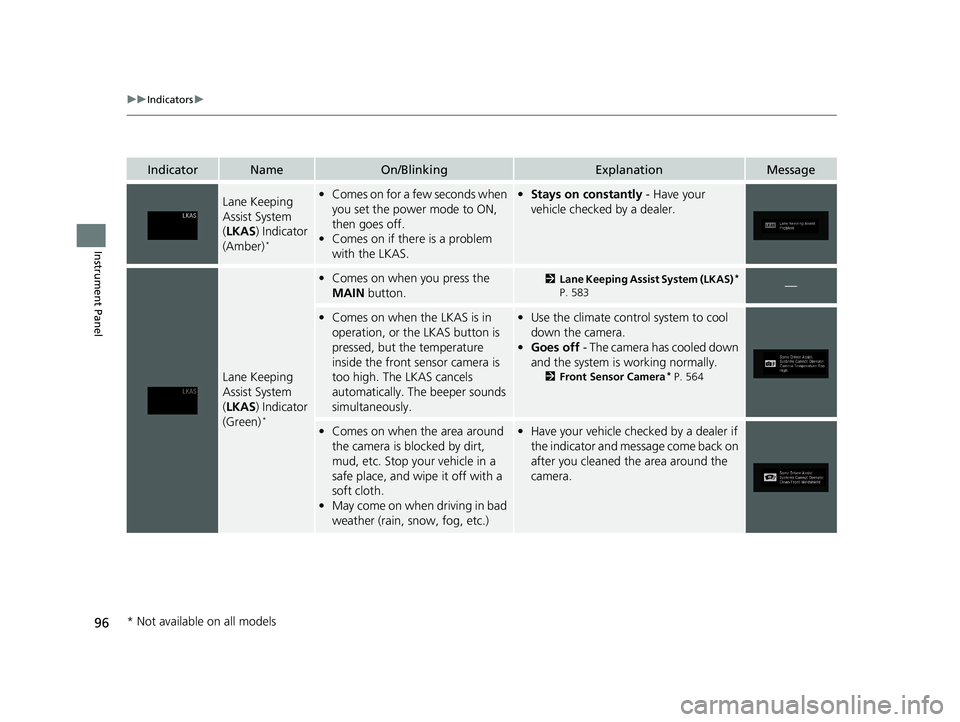
Lane Keeping
Assist System
(LKAS ) Indicator
(Amber)
*
• Comes on for a few seconds when
you set the power mode to ON,
then goes off.
• Comes on if there is a problem
with the LKAS.•Stays on constantly - Have your
vehicle checked by a dealer.
Lane Keeping
Assist System
( LKAS ) Indicator
(Green)
*
• Comes on when you press the
MAIN button.2Lane Keeping Assist System (LKAS)*
P. 583—
• Comes on when the LKAS is in
operation, or the LKAS button is
pressed, but the temperature
inside the front sensor camera is
too high. The LKAS cancels
automatically. Th e beeper sounds
simultaneously.• Use the climate contro l system to cool
down the camera.
• Goes off - The camera has cooled down
and the system is working normally.
2 Front Sensor Camera* P. 564
•Comes on when the area around
the camera is blocked by dirt,
mud, etc. Stop your vehicle in a
safe place, and wipe it off with a
soft cloth.
• May come on when driving in bad
weather (rain, snow, fog, etc.)•Have your vehicle checked by a dealer if
the indicator and message come back on
after you cleaned the area around the
camera.
* Not available on all models
19 ODYSSEY-31THR6120.book 96 ページ 2018年12月6日 木曜日 午後4時35分
Page 117 of 767
115
uuIndicators uDriver Information Interface Wa rning and Information Messages
Continued
Instrument Panel
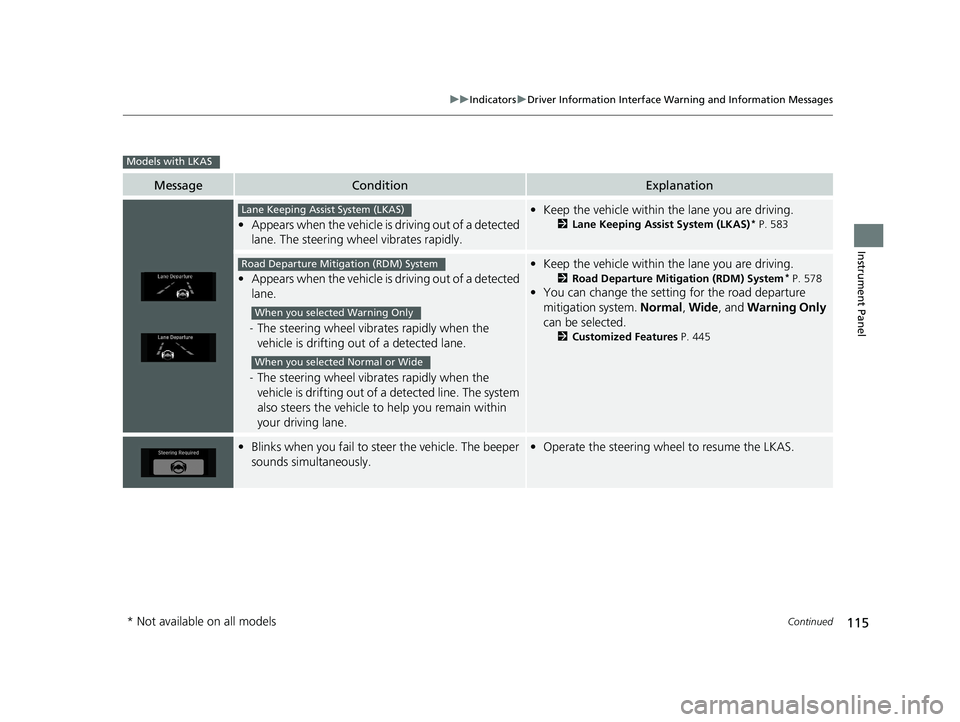
MessageConditionExplanation
•Appears when the vehicle is driving out of a detected
lane. The steering wheel vibrates rapidly.
• Keep the vehicle within the lane you are driving.
2Lane Keeping Assist System (LKAS)* P. 583
•Appears when the vehicle is driving out of a detected
lane.
- The steering wheel vibr ates rapidly when the
vehicle is drifting out of a detected lane.
- The steering wheel vibr ates rapidly when the
vehicle is drifting out of a detected line. The system
also steers the vehicle to help you remain within
your driving lane.
• Keep the vehicle within the lane you are driving.
2Road Departure Mitigation (RDM) System* P. 578
•You can change the setting for the road departure
mitigation system. Normal, Wide , and Warning Only
can be selected.
2 Customized Features P. 445
•Blinks when you fail to steer the vehicle. The beeper
sounds simultaneously.•Operate the steering wheel to resume the LKAS.
Models with LKAS
Lane Keeping Assist System (LKAS)
Road Departure Mitigation (RDM) System
When you selected Warning Only
When you selected Normal or Wide
* Not available on all models
19 ODYSSEY-31THR6120.book 115 ページ 2018年12月6日 木曜日 午後4時35分
Page 458 of 767
456
uuCustomized Features u
Features
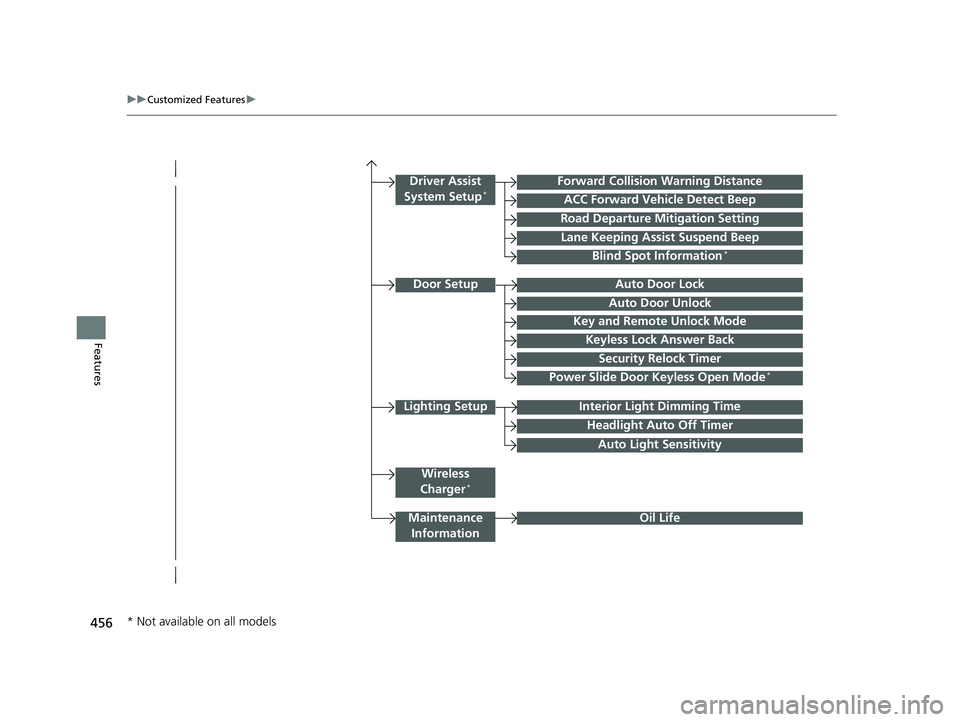
Lighting SetupInterior Light Dimming Time
Headlight Auto Off Timer
Forward Collision Warning Distance
ACC Forward Vehicle Detect Beep
Auto Light Sensitivity
Door SetupAuto Door Lock
Auto Door Unlock
Key and Remote Unlock Mode
Keyless Lock Answer Back
Security Relock Timer
Maintenance
Information
Driver Assist
System Setup*
Oil Life
Road Departure Mitigation Setting
Lane Keeping Assist Suspend Beep
Blind Spot Information*
Power Slide Door Keyless Open Mode*
Wireless
Charger*
* Not available on all models
19 ODYSSEY-31THR6120.book 456 ページ 2018年12月6日 木曜日 午後4時35分
Page 466 of 767
464
uuCustomized Features u
Features
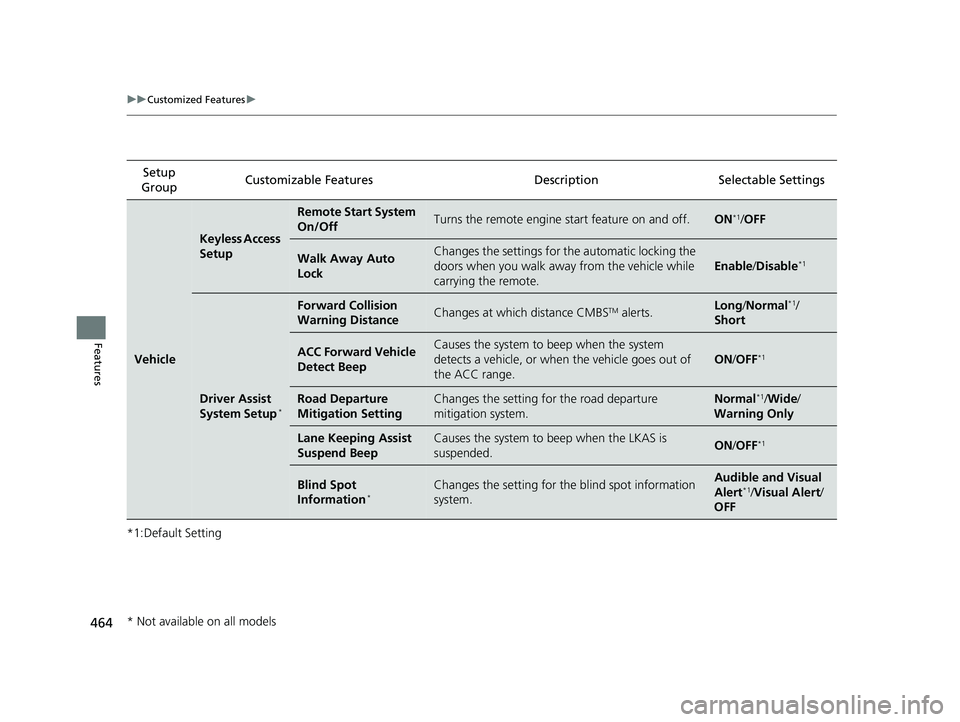
*1:Default SettingSetup
Group Customizable Features Description Selectable Settings
Vehicle
Keyless Access
Setup
Remote Start System
On/OffTurns the remote engine start feature on and off.ON*1/
OFF
Walk Away Auto
LockChanges the settings for the automatic locking the
doors when you walk away from the vehicle while
carrying the remote.
Enable /Disable*1
Driver Assist
System Setup*
Forward Collision
Warning DistanceChanges at which distance CMBSTM alerts.Long /Normal*1/
Short
ACC Forward Vehicle
Detect BeepCauses the system to beep when the system
detects a vehicle, or when the vehicle goes out of
the ACC range.
ON /OFF*1
Road Departure
Mitigation SettingChanges the setting for the road departure
mitigation system.Normal*1/ Wide /
Warning Only
Lane Keeping Assist
Suspend BeepCauses the system to b eep when the LKAS is
suspended.ON /OFF*1
Blind Spot
Information*Changes the setting for the blind spot information
system.Audible and Visual
Alert*1/ Visual Alert /
OFF
* Not available on all models
19 ODYSSEY-31THR6120.book 464 ページ 2018年12月6日 木曜日 午後4時35分
Page 527 of 767
525
Driving
This chapter discusses driving and refueling.
Before DrivingDriving Preparation .......................... 526
Maximum Load Limit........................ 529
Towing a Trailer Towing Preparation .......................... 532
Driving Safely with a Trailer .............. 536
Towing Your Vehicle ........................ 537
When Driving Starting the Engine .......................... 538
Precautions While Driving................. 544
Automatic Transmission ................... 545
Shifting ............................................ 546
Auto Idle Stop
*................................ 554
ECON Button ................................... 559 Intelligent Traction Management ..... 560
Cruise Control
*............................... 561
Front Sensor Camera*..................... 564
Adaptive Cruise Control (ACC)*....... 566Road Departure Mitigation (RDM) System*... 578Lane Keeping Assist System (LKAS)*.... 583
Vehicle Stability Assist® (VSA®), aka Electronic
Stability Control (ESC), System............. 591
Agile Handling Assist ....................... 593
Tire Pressure Monitoring System (TPMS) with Tire Fill Assist .......................... 594
Tire Pressure Monitoring System (TPMS) -
Required Federal Explanation ......... 596
Blind spot information System*........... 598LaneWatchTM*.................................. 600 Braking
Brake System ................................... 602
Anti-lock Brake System (ABS) ........... 608
Brake Assist System ......................... 609
Collision Mitigation Braking System
TM
(CMBSTM)*..................................... 610
Parking Your Vehicle When Stopped ................................ 619
Parking Sensor System
*................... 621
Cross Traffic Monitor*..................... 626
Multi-View Rear Camera .................. 630
Refueling
Fuel Information .............................. 632
How to Refuel ................................. 633
Fuel Economy and CO
2 Emissions .... 635
* Not available on all models
19 ODYSSEY-31THR6120.book 525 ページ 2018年12月6日 木曜日 午後4時35分
Page 570 of 767
uuWhen Driving uAdaptive Cruise Control (ACC)*
568
Driving
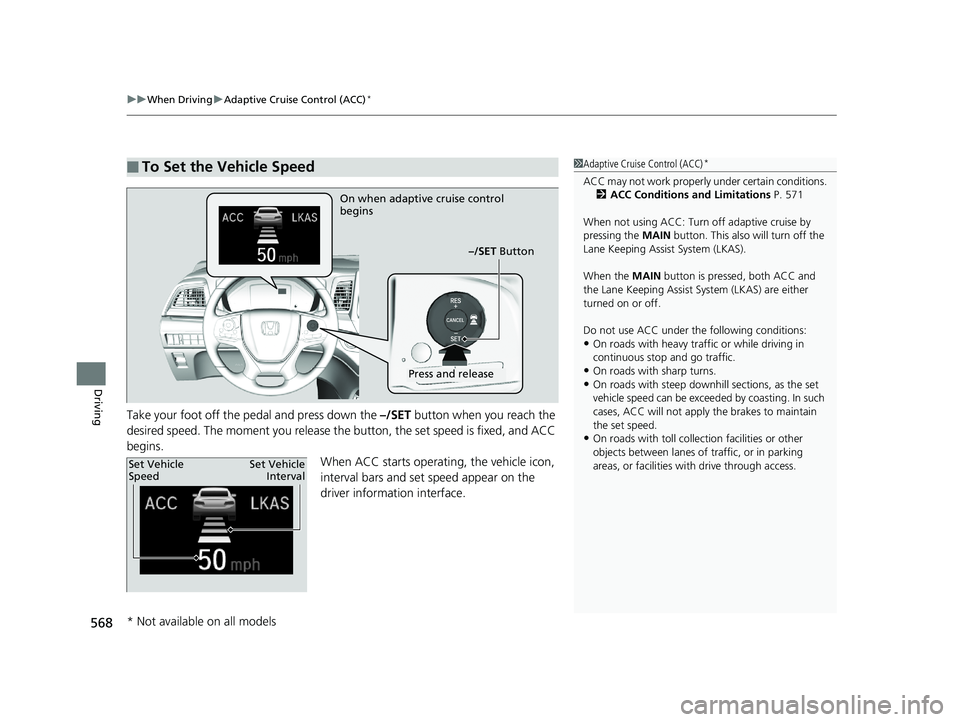
Take your foot off the pedal and press down the –/SET button when you reach the
desired speed. The moment you release the button, the set speed is fixed, and ACC
begins. When ACC starts operating, the vehicle icon,
interval bars and set speed appear on the
driver information interface.
■To Set the Vehicle Speed1 Adaptive Cruise Control (ACC)*
ACC may not work properly under certai n conditions.
2 ACC Conditions and Limitations P. 571
When not using ACC: Turn off adaptive cruise by
pressing the MAIN button. This also will turn off the
Lane Keeping Assist System (LKAS).
When the MAIN button is pressed, both ACC and
the Lane Keeping Assist System (LKAS) are either
turned on or off.
Do not use ACC under the following conditions:
•On roads with heavy traf fic or while driving in
continuous stop and go traffic.
•On roads with sharp turns.•On roads with steep downhill sections, as the set
vehicle speed can be exceeded by coasting. In such
cases, ACC will not apply the brakes to maintain
the set speed.
•On roads with toll collection facilities or other
objects between lanes of traffic, or in parking
areas, or faci lities with driv e through access.
On when adaptive cruise control
begins
–/SET Button
Press and release
Set Vehicle
SpeedSet Vehicle
Interval
* Not available on all models
19 ODYSSEY-31THR6120.book 568 ページ 2018年12月6日 木曜日 午後4時35分
Page 580 of 767
578
uuWhen Driving uRoad Departure Mitigation (RDM) System*
Driving
Road Departure Mitigation (RDM) System*
Alerts and helps to assist you when the system detects a possibility of your vehicle
unintentionally crossing over detected la ne markings and/or leaving the roadway
altogether.
The front camera behind the rearview mirror
monitors left and right lane markings (in white
or yellow). If your vehicle is getting too close
to detected lane markings without a turn
signal activated, the system, in addition to a
visual alert, applies steering torque and alerts
you with rapid vibrations on the steering
wheel, to help you remain within the detected
lane.
2 Customized Features P. 445
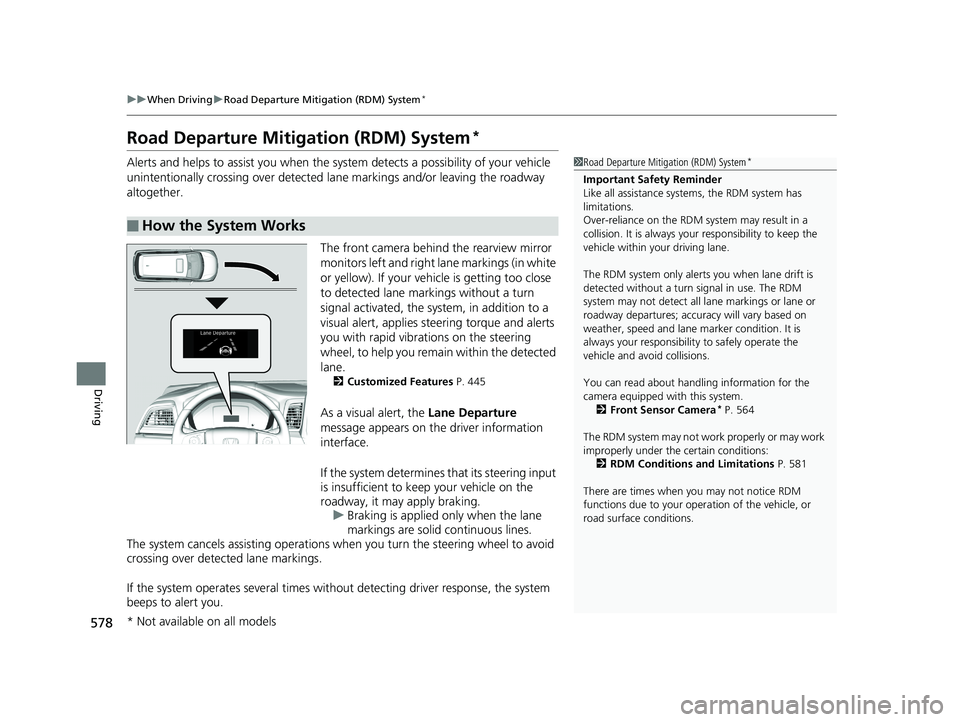
As a visual alert, the Lane Departure
message appears on the driver information
interface.
If the system determines that its steering input
is insufficient to keep your vehicle on the
roadway, it may apply braking. u Braking is applied only when the lane
markings are solid continuous lines.
The system cancels assisting operations when you turn th e steering wheel to avoid
crossing over detected lane markings.
If the system operates several times without detecting driver response, the system
beeps to alert you.
■How the System Works
1 Road Departure Mitigation (RDM) System*
Important Safety Reminder
Like all assistance systems, the RDM system has
limitations.
Over-reliance on the RDM system may result in a
collision. It is always your responsibility to keep the
vehicle within your driving lane.
The RDM system only alerts you when lane drift is
detected without a turn signal in use. The RDM
system may not detect all la ne markings or lane or
roadway departures; accu racy will vary based on
weather, speed and lane marker condition. It is
always your responsibilit y to safely operate the
vehicle and avoid collisions.
You can read about handling information for the
camera equipped with this system. 2 Front Sensor Camera
* P. 564
The RDM system may not wo rk properly or may work
improperly under the certain conditions:
2 RDM Conditions and Limitations P. 581
There are times when you may not notice RDM
functions due to your opera tion of the vehicle, or
road surface conditions.
* Not available on all models
19 ODYSSEY-31THR6120.book 578 ページ 2018年12月6日 木曜日 午後4時35分