power steering HONDA ODYSSEY 2019 Owner's Manual (in English)
[x] Cancel search | Manufacturer: HONDA, Model Year: 2019, Model line: ODYSSEY, Model: HONDA ODYSSEY 2019Pages: 767, PDF Size: 47.46 MB
Page 5 of 767
Contents
Child Safety P. 62Exhaust Gas Hazard P. 80Safety Labels P. 81
Opening and Closing the Tailgate P. 159 Opening and Closing the Sliding Doors P. 170
Opening and Closing the Moonroof* P. 185 Operating the Switches Around the Steering Wheel P. 186
Interior Lights/Interior Convenience Items P. 225 Climate Control System P. 248, 252
Audio Error Messages P. 367 General Information on the Audio System P. 372
Customized Features P. 445 HomeLink® Universal Transceiver* P. 470 Bluetooth ® HandsFreeLink ® P. 473, 498
When Driving P. 538 Braking P. 602Parking Your Vehicle P. 619
Fuel Economy and CO
2 Emissions P. 635
Maintenance Under the Hood P. 647 Replacing Light Bulbs P. 660
Checking and Maintaining Tires P. 675 Battery P. 684 Remote Transmitter Care P. 686
Climate Control System Maintenance P. 689 Cleaning P. 690 Accessories and Modifications P. 696
Engine Does Not Start P. 710 Jump Starting P. 713Overheating P. 715
Emergency Towing P. 731 When You Cannot Unlock the Fuel Fill Door P. 732
When You Cannot Close the Power Sliding Doors
* P. 735 Refueling P. 736
Devices that Emit Radio Waves P. 743 Reporting Safety Defects P. 745 Emissions Testing P. 746
Customer Service Information P. 751
Quick Reference GuideP. 4
Safe DrivingP. 33
Instrument PanelP. 83
ControlsP. 141
FeaturesP. 259
DrivingP. 525
MaintenanceP. 637
Handling the UnexpectedP. 699
InformationP. 739
IndexP. 752
19 ODYSSEY-31THR6120.book 3 ページ 2018年12月6日 木曜日 午後4時35分
Page 15 of 767
13
Quick Reference Guide
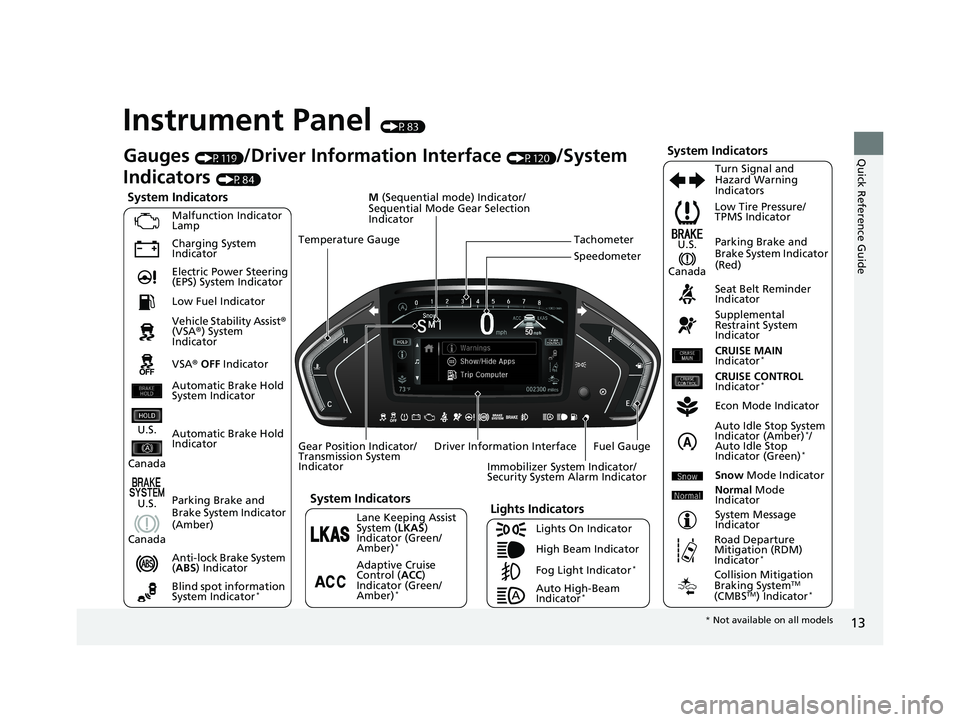
Instrument Panel (P83)
System Indicators
Malfunction Indicator
Lamp
Charging System
Indicator
Anti-lock Brake System
(ABS ) Indicator
Vehicle Stability Assist
®
(VSA ®) System
Indicator
VSA ® OFF Indicator Low Tire Pressure/
TPMS Indicator
Immobilizer System Indicator/
Security System Alarm Indicator
Lights Indicators
Lights On Indicator
High Beam Indicator
Fog Light Indicator
*
Lane Keeping Assist
System ( LKAS)
Indicator (Green/
Amber)
*
Seat Belt Reminder
Indicator
System Indicators
Econ Mode Indicator
System Message
Indicator Parking Brake and
Brake System Indicator
(Red)
Supplemental
Restraint System
Indicator
Driver Information Interface CRUISE MAIN
Indicator
*
Tachometer
M
(Sequential mode) Indicator/
Sequential Mode Gear Selection
Indicator
Speedometer
Fuel Gauge
Gear Position Indicator/
Transmission System
Indicator Auto Idle Stop System
Indicator (Amber)
*/
Auto Idle Stop
Indicator (Green)
*
Gauges (P119)/Driver Information Interface (P120)/System
Indicators
(P84)
Automatic Brake Hold
Indicator Adaptive Cruise
Control (ACC)
Indicator (Green/
Amber)
*
Turn Signal and
Hazard Warning
Indicators
Electric Power Steering
(EPS) System Indicator
Blind spot information
System Indicator
*
CRUISE CONTROL
Indicator*
Temperature Gauge
Parking Brake and
Brake System Indicator
(Amber)
U.S.
Canada
U.S.
Canada
System Indicators
U.S.
Canada
Low Fuel Indicator
Automatic Brake Hold
System Indicator
Auto High-Beam
Indicator*
Snow Mode Indicator
Normal Mode
Indicator
Road Departure
Mitigation (RDM)
Indicator
*
Collision Mitigation
Braking SystemTM
(CMBSTM) Indicator*
* Not available on all models
19 ODYSSEY-31THR6120.book 13 ページ 2018年12月6日 木曜日 午後4時35分
Page 32 of 767
30
Quick Reference Guide
What to Do If
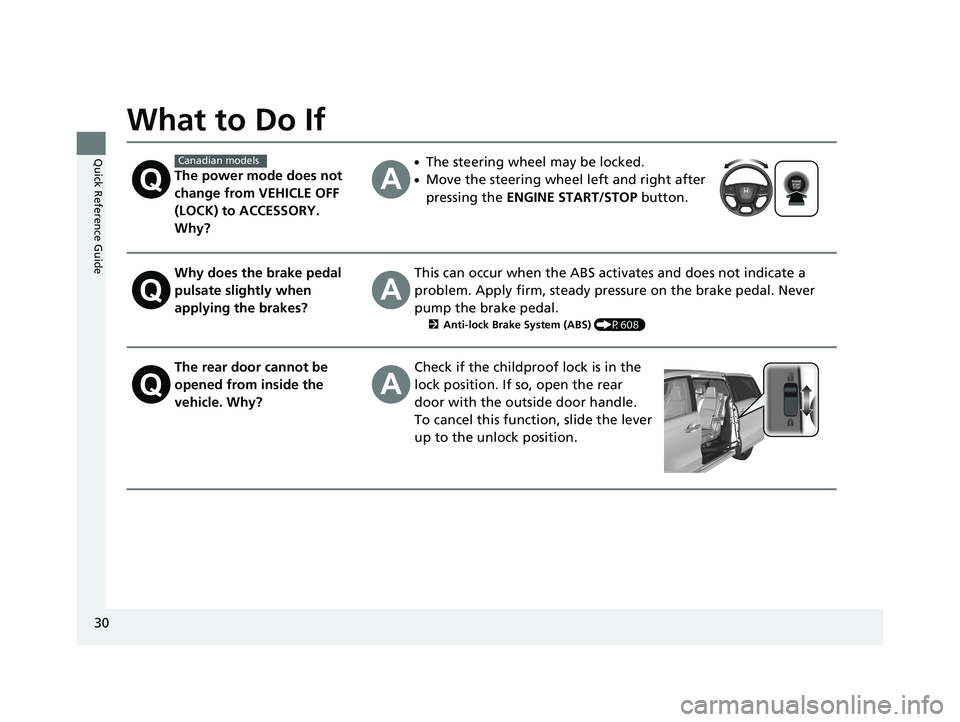
The power mode does not
change from VEHICLE OFF
(LOCK) to ACCESSORY.
Why?
●The steering wheel may be locked.
●Move the steering wheel left and right after
pressing the ENGINE START/STOP button.
Why does the brake pedal
pulsate slightly when
applying the brakes?This can occur when the ABS activates and does not indicate a
problem. Apply firm, steady pressure on the brake pedal. Never
pump the brake pedal.
2Anti-lock Brake System (ABS) (P608)
The rear door cannot be
opened from inside the
vehicle. Why?Check if the childproof lock is in the
lock position. If so, open the rear
door with the outside door handle.
To cancel this function, slide the lever
up to the unlock position.
Canadian models
19 ODYSSEY-31THR6120.book 30 ページ 2018年12月6日 木曜日 午後4時35分
Page 52 of 767
50
uuAirbags uTypes of Airbags
Safe Driving
Types of Airbags
Your vehicle is equipped with four types of airbags:
• Front airbags: Airbags in front of the driver ’s and front passenger’s seats.
• Front knee airbags: Airbags under the steerin g column and glove box.
• Side airbags: Airbags in the driver’s and front passenger’s seat-backs.
• Side curtain airbags: Airbags above the side windows.
Each is discussed in the following pages.
Front Airbags (SRS)
The front SRS airbags inflate in a moderate-to -severe frontal collision to help protect
the head and chest of the driver and/or front passenger.
SRS (Supplemental Restraint System) indicates that the airbags are designed to
supplement seat belts, not replace them. Seat belts are the occupant’s primary
restraint system.
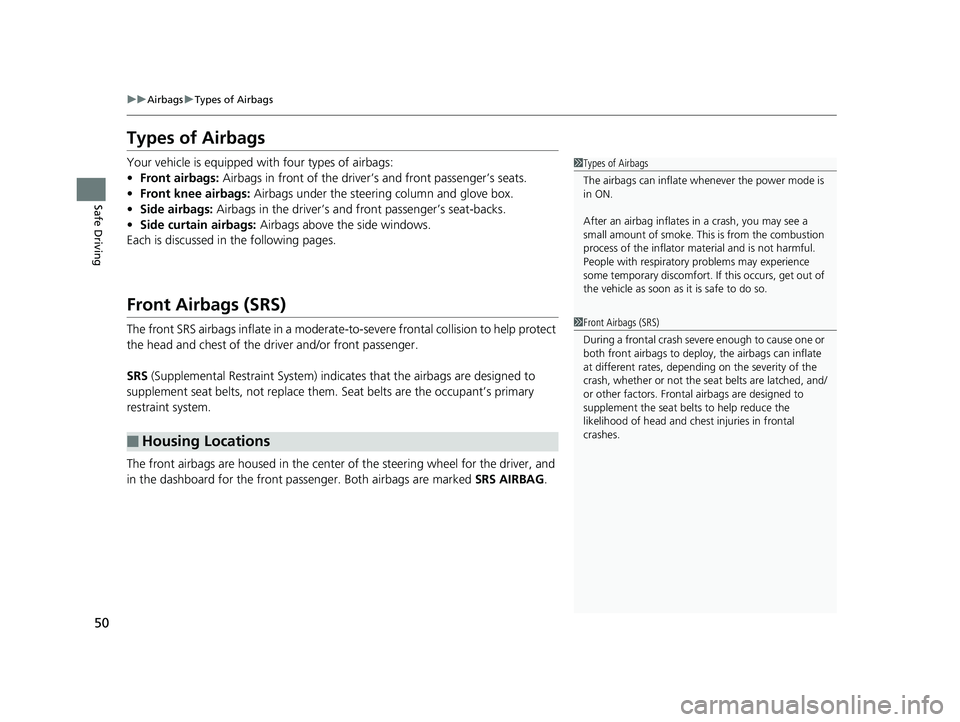
The front airbags are housed in the center of the steering wheel for the driver, and
in the dashboard for the front pass enger. Both airbags are marked SRS AIRBAG.
■Housing Locations
1Types of Airbags
The airbags can inflate whenever the power mode is
in ON.
After an airbag inflates in a crash, you may see a
small amount of smoke. This is from the combustion
process of the infl ator material and is not harmful.
People with respiratory pr oblems may experience
some temporary discomfort. If this occurs, get out of
the vehicle as soon as it is safe to do so.
1 Front Airbags (SRS)
During a frontal crash severe enough to cause one or
both front airbags to deploy, the airbags can inflate
at different rates, dependi ng on the severity of the
crash, whether or not the se at belts are latched, and/
or other factors. Frontal airbags are designed to
supplement the seat belts to help reduce the
likelihood of head and chest injuries in frontal
crashes.
19 ODYSSEY-31THR6120.book 50 ページ 2018年12月6日 木曜日 午後4時35分
Page 93 of 767
91
uuIndicators u
Continued
Instrument Panel
IndicatorNameOn/BlinkingExplanationMessage
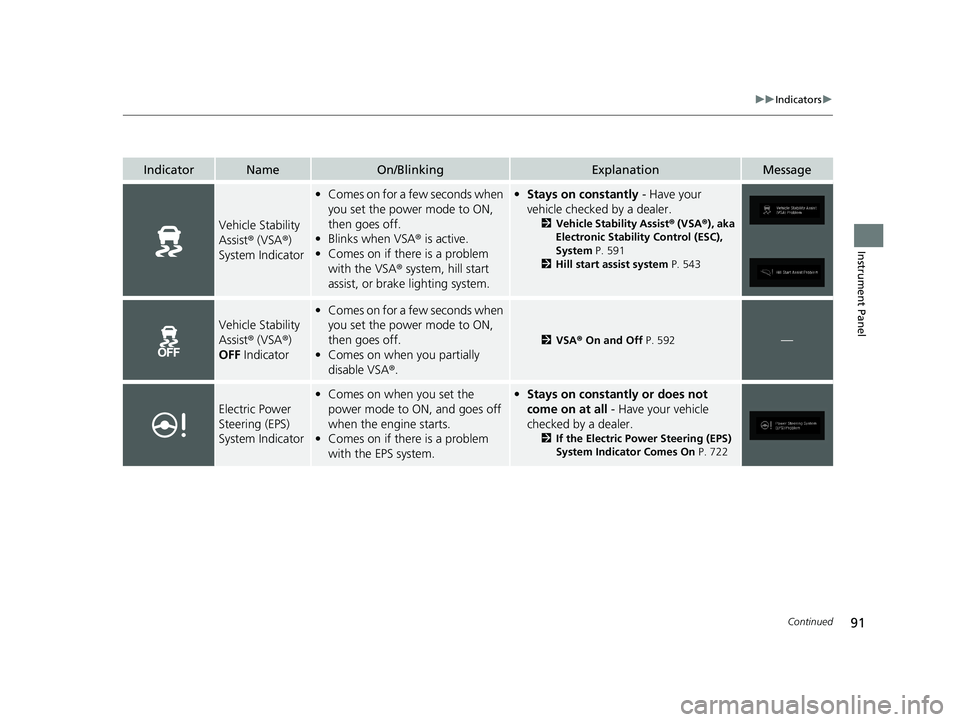
Vehicle Stability
Assist® (VSA ®)
System Indicator
• Comes on for a fe w seconds when
you set the power mode to ON,
then goes off.
• Blinks when VSA ® is active.
• Comes on if there is a problem
with the VSA ® system, hill start
assist, or brake lighting system.• Stays on constantly - Have your
vehicle checked by a dealer.
2 Vehicle Stability Assist ® (VSA ®), aka
Electronic Stability Control (ESC),
System P. 591
2 Hill start assist system P. 543
Vehicle Stability
Assist® (VSA ®)
OFF Indicator
•Comes on for a fe w seconds when
you set the power mode to ON,
then goes off.
• Comes on when you partially
disable VSA ®.
2VSA ® On and Off P. 592—
Electric Power
Steering (EPS)
System Indicator
•Comes on when you set the
power mode to ON, and goes off
when the engine starts.
• Comes on if there is a problem
with the EPS system.•Stays on constantly or does not
come on at all - Have your vehicle
checked by a dealer.
2 If the Electric Power Steering (EPS)
System Indicator Comes On P. 722
19 ODYSSEY-31THR6120.book 91 ページ 2018年12月6日 木曜日 午後4時35分
Page 108 of 767
106
uuIndicators uDriver Information Interface Wa rning and Information Messages
Instrument Panel
MessageConditionExplanation
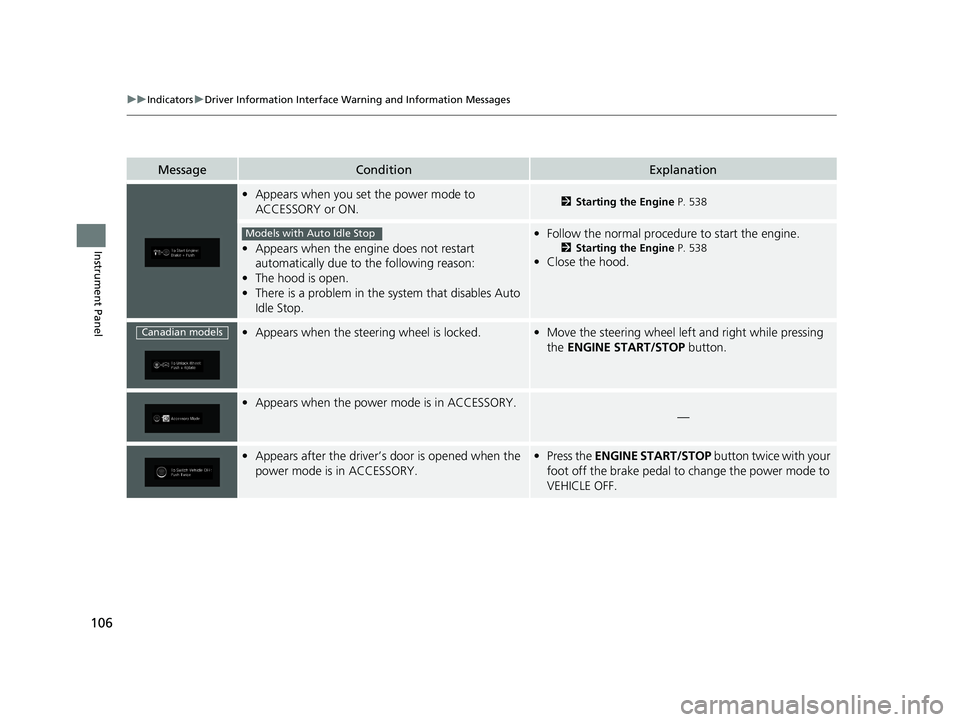
•Appears when you set the power mode to
ACCESSORY or ON.2 Starting the Engine P. 538
•Appears when the engine does not restart
automatically due to the following reason:
• The hood is open.
• There is a problem in the sy stem that disables Auto
Idle Stop.
• Follow the normal procedure to start the engine.
2 Starting the Engine P. 538
•Close the hood.
•Appears when the steering wheel is locked.•Move the steering wheel left and right while pressing
the ENGINE START/STOP button.
•Appears when the power mode is in ACCESSORY.
—
•Appears after the driver’s door is opened when the
power mode is in ACCESSORY.•Press the ENGINE START/STOP button twice with your
foot off the brake pedal to change the power mode to
VEHICLE OFF.
Models with Auto Idle Stop
Canadian models
19 ODYSSEY-31THR6120.book 106 ページ 2018年12月6日 木曜日 午後4時35分
Page 143 of 767
141
Controls
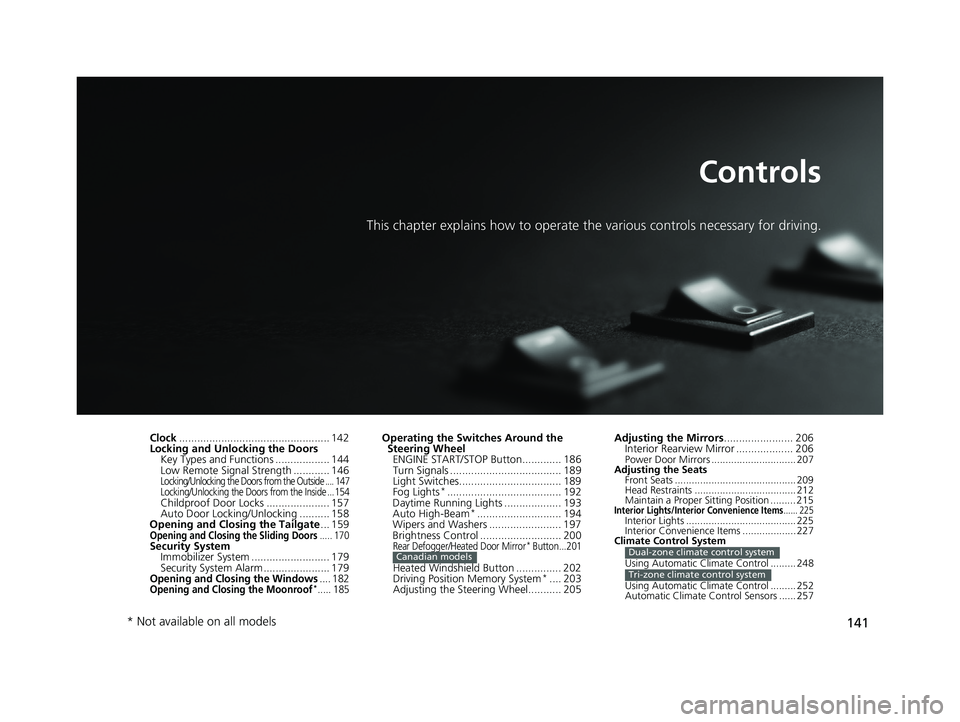
This chapter explains how to operate the various controls necessary for driving.
Clock.................................................. 142
Locking and Unlocking the Doors Key Types and Functions .................. 144
Low Remote Signal Strength ............ 146
Locking/Unlocking the Doors from the Outside .... 147
Locking/Unlocking the Doors from the Inside ...154
Childproof Door Locks ..................... 157
Auto Door Locking/Unlocking .......... 158
Opening and Closing the Tailgate ... 159
Opening and Closing the Sliding Doors..... 170Security System
Immobilizer System .......................... 179
Security System Alarm ...................... 179
Opening and Closing the Windows.... 182Opening and Closing the Moonroof*..... 185
Operating the Switches Around the Steering Wheel ENGINE START/STOP Button............. 186
Turn Signals ..................................... 189
Light Switches.................................. 189
Fog Lights
*...................................... 192
Daytime Running Lights ................... 193
Auto High-Beam
*............................ 194
Wipers and Washers ........................ 197
Brightness Control ........................... 200
Rear Defogger/Heated Door Mirror* Button...201
Heated Windshield Button ............... 202
Driving Position Memory System*.... 203
Adjusting the Steering Wheel........... 205
Canadian models
Adjusting the Mirrors ....................... 206
Interior Rearview Mirror ................... 206
Power Door Mirrors .............................. 207
Adjusting the Seats Front Seats ........................................... 209
Head Restraints .................................... 212
Maintain a Proper Sitting Position ......... 215
Interior Lights/Interior Convenience Items...... 225Interior Lights ....................................... 225
Interior Convenience Items ................... 227
Climate Control System
Using Automatic Climate Control ......... 248
Using Automatic Climate Control ......... 252
Automatic Climate Control Sensors ...... 257
Dual-zone climate control system
Tri-zone climate control system
* Not available on all models
19 ODYSSEY-31THR6120.book 141 ページ 2018年12月6日 木曜日 午後4時35分
Page 159 of 767
157
uuLocking and Unlocking the Doors uChildproof Door Locks
Controls
Childproof Door Locks
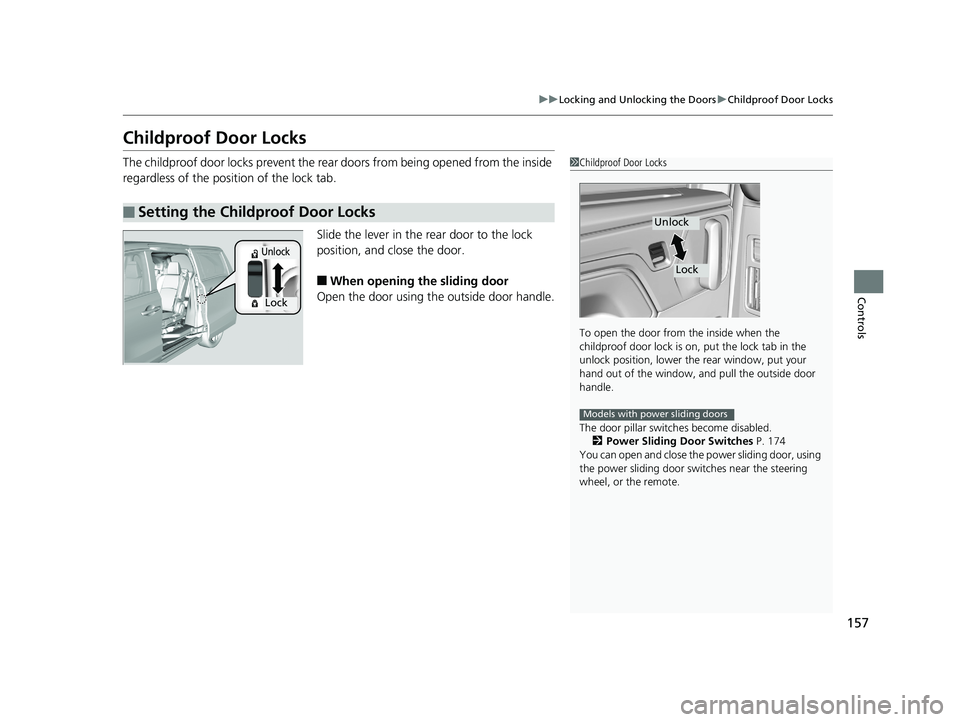
The childproof door locks prevent the rear doors from being opened from the inside
regardless of the position of the lock tab.
Slide the lever in the rear door to the lock
position, and close the door.
■When opening the sliding door
Open the door using the outside door handle.
■Setting the Childproof Door Locks
1 Childproof Door Locks
To open the door from the inside when the
childproof door lock is on, put the lock tab in the
unlock position, lower the rear window, put your
hand out of the window, and pull the outside door
handle.
The door pillar switch es become disabled.
2 Power Sliding Door Switches P. 174
You can open and close the power sliding door, using
the power sliding door swit ches near the steering
wheel, or the remote.
Unlock
Lock
Models with power sliding doors
Lock
Unlock
19 ODYSSEY-31THR6120.book 157 ページ 2018年12月6日 木曜日 午後4時35分
Page 188 of 767
186
Controls
Operating the Switches Around the Steering Wheel
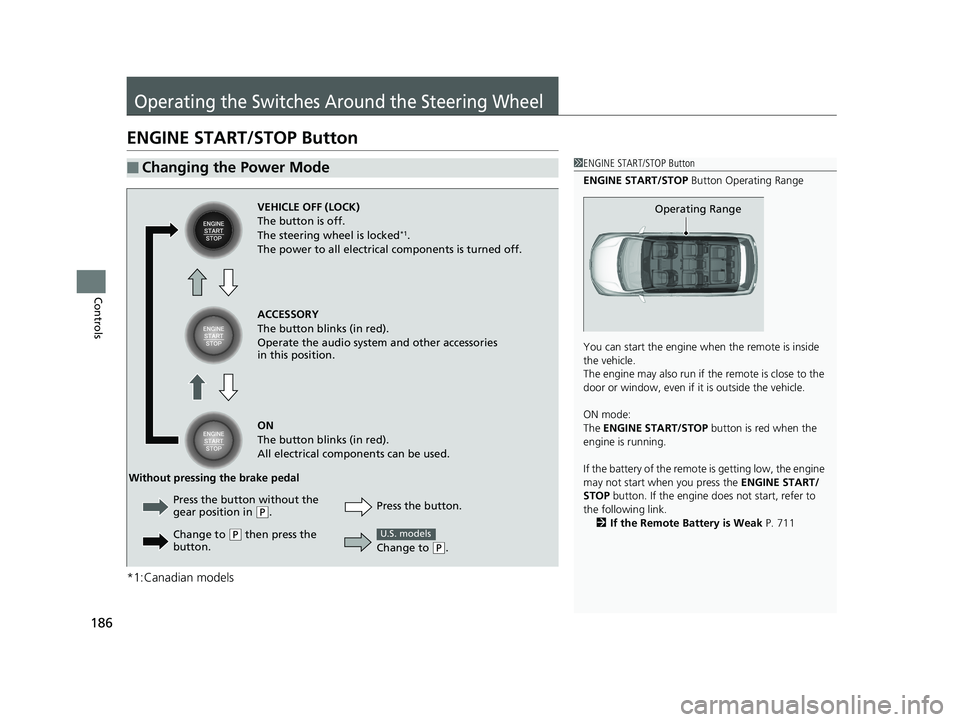
ENGINE START/STOP Button
*1:Canadian models
■Changing the Power Mode1ENGINE START/STOP Button
ENGINE START/STOP Button Operating Range
You can start the engine wh en the remote is inside
the vehicle.
The engine may also run if the remote is close to the
door or window, even if it is outside the vehicle.
ON mode:
The ENGINE START/STOP button is red when the
engine is running.
If the battery of the remote is getting low, the engine
may not start when you press the ENGINE START/
STOP button. If the engine do es not start, refer to
the following link. 2 If the Remote Battery is Weak P. 711
Operating RangeVEHICLE OFF (LOCK)
The button is off.
The steering wheel is locked
*1.
The power to all electrical components is turned off.
ACCESSORY
The button blinks (in red).
Operate the audio system and other accessories
in this position.
ON
The button blinks (in red).
All electrical components can be used.
Press the button.
Without pressing the brake pedal
Change to
(P.
U.S. models
Press the button without the
gear position in (P.
Change to
( P then press the
button.
19 ODYSSEY-31THR6120.book 186 ページ 2018年12月6日 木曜日 午後4時35分
Page 189 of 767
Continued187
uuOperating the Switches Around the Steering Wheel uENGINE START/STOP Button
Controls
If you leave the vehicle for 30 to 60 minutes with the transmission in (P and the
power mode in ACCESSORY, the vehicle automa tically goes into the mode similar to
VEHICLE OFF (LOCK) to avoid draining the battery.
When in this mode:
The steering wheel does not lock.
You cannot lock or unlock doors with th e remote transmitter or the smart entry
system.
Press the ENGINE START/STOP button to switch the mode to VEHICLE OFF (LOCK).
■Automatic Power Off1ENGINE START/STOP Button
If the power mode does not change from VEHICLE
OFF to ACCESSORY, press the ENGINE START/STOP
button while moving the st eering wheel left and
right. The steering wheel will unlock, allowing the
mode to change.
Do not leave the power mode in ACCESSORY or ON
when you get out.
Canadian models
Canadian models
19 ODYSSEY-31THR6120.book 187 ページ 2018年12月6日 木曜日 午後4時35分