rear entertainment player HONDA ODYSSEY 2019 Owner's Manual (in English)
[x] Cancel search | Manufacturer: HONDA, Model Year: 2019, Model line: ODYSSEY, Model: HONDA ODYSSEY 2019Pages: 767, PDF Size: 47.46 MB
Page 406 of 767
uuBlu-ray/DVD Rear Entertainment System*uPlaying a DVD/Blu-rayTM
404
Features
1. Press the MENU button on the remote to display the menu screen.
2. Select an item and then press the ENTER button on the remote.
The following items are available:
• DVD Menu/Blu-ray Menu : Displays the top menu of the DVD or Blu-ray
TM.
• Aspect Ratio : Selects an aspect ratio of the image.
2Setting the Aspect Ratio P. 404
•Brightness : Adjusts the screen’s brightness.
• Contrast : Adjusts the screen’s contrast.
• Root Menu
*1: Displays the disc menu fo r the current playing title.
• Pop-up Menu*2: Displays the menu of the Blu-rayTM.
• Player Options : Displays while a DVD or Blu-rayTM is playing and changes the
DVD or Blu-rayTM preferences.
2 Setting the Player Options P. 405
■Setting the Aspect Ratio
1. Press the MENU button on the remote to display the menu screen.
2. Select Aspect Ratio .
3. Select the setting you want.
u You can select the three opti ons; normal, full, or zoom.
*1: Appears only when you select the DVD source.
*2: Appears only when you select the Blu-rayTM source.
■Rear DVD or Blu-rayTM Menu1Rear DVD or Blu-rayTM Menu
During DVD or Blu-ray
TM operation, when the source
is changed or the audio syst em is turned off, DVD or
Blu-ray
TM operation stops.
Depending on the disc you insert, some items may
not be displayed.
19 ODYSSEY-31THR6120.book 404 ページ 2018年12月6日 木曜日 午後4時35分
Page 407 of 767
405
uuBlu-ray/DVD Rear Entertainment System*uPlaying a DVD/Blu-rayTM
Continued
Features
■Setting the Player Options
1. Press the MENU button on the remote to display the menu screen.
2. Select Player Options .
3. Select an item and then press the ENTER button on the remote.
The following items are available:
• Repeat :
Off : Repeat mode is off.
Title (only for DVD-V, AVCREC and B DAV): Repeats the current title.
Chapter (only for DVD-V, AVCREC and B DAV): Repeats the current chapter.
Program (only for DVD-VR): Repeats the curre nt program if the disc has the
correspondence list.
Playlist (only for DVD-VR): Repeats the cu rrent playlist if the disc has the
correspondence list.
Entry Point (only for DVD-VR): Repeats the curre nt entry point if the disc has the
correspondence list.
• Subtitles and Audio : Selects the language of the DVD subtitle and audio.
• Angle : Selects the angle of the scen e shot with multiple cameras.
• Search : Skips to a title or chapter.
2Searching a title/chapter/program/playlist P. 406
•Change Order (only for DVD-VR, AVCREC and BDAV): Changes the order of
the program or playlist.
• Default Language : Selects the language for the menus, audio, and subtitle of
the DVD or Blu-ray
TM.
• Sound Leveling : Adjusts the range of the loud and soft sound. Select Auto, On
or Off .
• Secondary Audio (only for BDMV): Turns on and o ff the function that plays the
available commentary or narrator audi o along with the main disc track.
• Onscreen Remote : Displays the on-screen buttons for the remote.
19 ODYSSEY-31THR6120.book 405 ページ 2018年12月6日 木曜日 午後4時35分
Page 408 of 767
406
uuBlu-ray/DVD Rear Entertainment System*uPlaying a DVD/Blu-rayTM
Features
■Searching a title/chapter/program/playlist
1. Press the MENU button on the remote to display the menu screen.
2. Select Player Options .
3. Select Search .
4. Enter a number of a title, chapter, prog ram or playlist to skip, and then select
enter .
The following items are available:
• Title : Skips to a title you specify.
• Chapter : Skips to a chapter you specify.
• Program (only for DVD-VR): Skips to a prog ram you specify while playing with
the program list.
• Playlist (only for DVD-VR): Skips to a playlist you specify while pl aying with the
playlist.
19 ODYSSEY-31THR6120.book 406 ページ 2018年12月6日 木曜日 午後4時35分
Page 413 of 767
411
uuBlu-ray/DVD Rear Entertainment System*uFront Control Panel Operation
Features
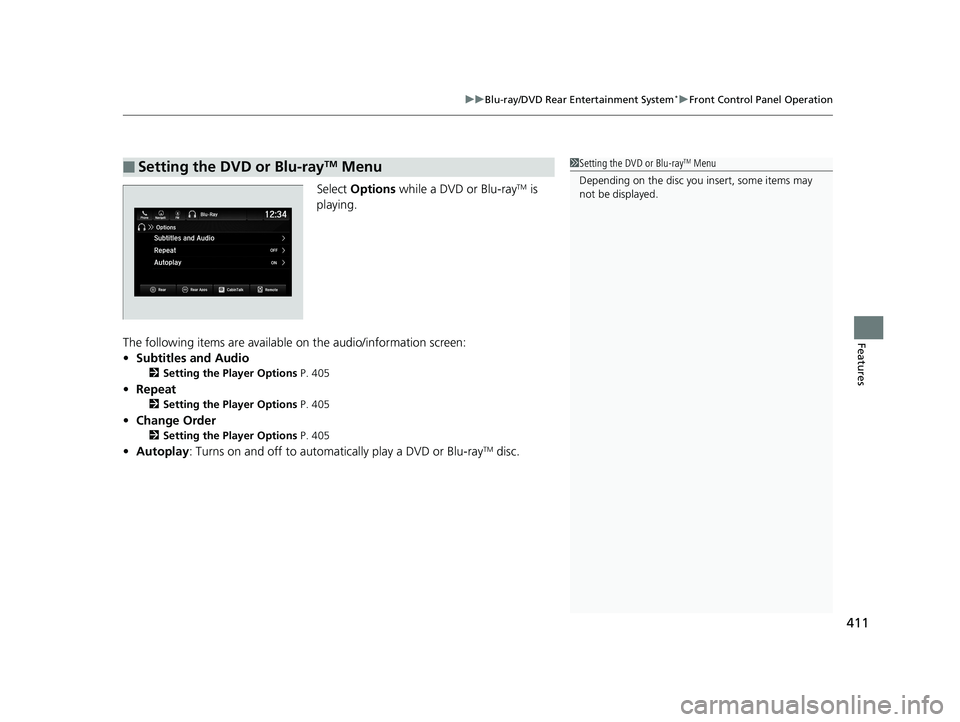
Select Options while a DVD or Blu-rayTM is
playing.
The following items are available on the audio/information screen:
• Subtitles and Audio
2 Setting the Player Options P. 405
•Repeat
2 Setting the Player Options P. 405
•Change Order
2 Setting the Player Options P. 405
•Autoplay: Turns on and off to automati cally play a DVD or Blu-rayTM disc.
■Setting the DVD or Blu-rayTM Menu1Setting the DVD or Blu-rayTM Menu
Depending on the disc you insert, some items may
not be displayed.
19 ODYSSEY-31THR6120.book 411 ページ 2018年12月6日 木曜日 午後4時35分
Page 443 of 767
441
uuBlu-ray/DVD Rear Entertainment System*uPlayable Discs
Features
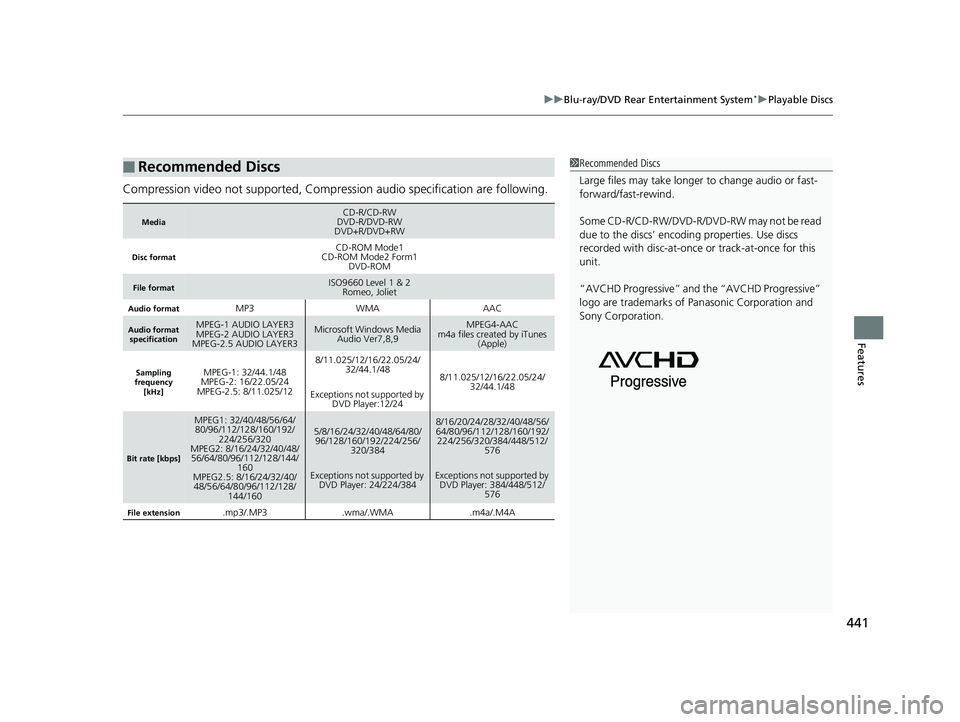
Compression video not supported, Compression audio specification are following.
■Recommended Discs
MediaCD-R/CD-RW
DVD-R/DVD-RW
DVD+R/DVD+RW
Disc formatCD-ROM Mode1
CD-ROM Mode2 Form1 DVD-ROM
File formatISO9660 Level 1 & 2Romeo, Joliet
Audio formatMP3WMAAAC
Audio format
specificationMPEG-1 AUDIO LAYER3
MPEG-2 AUDIO LAYER3
MPEG-2.5 AUDIO LAYER3Microsoft Windows Media Audio Ver7,8,9MPEG4-AAC
m4a files created by iTunes (Apple)
Sampling
frequency
[kHz]MPEG-1: 32/44.1/48
MPEG-2: 16/22.05/24
MPEG-2.5: 8/11.025/128/11.025/12/16/22.05/24/ 32/44.1/48
Exceptions not supported by DVD Player:12/24
8/11.025/12/16/22.05/24/
32/44.1/48
Bit rate [kbps]
MPEG1: 32/40/48/56/64/80/96/112/128/160/192/ 224/256/320
MPEG2: 8/16/24/32/40/48/
56/64/80/96/112/128/144/ 160
MPEG2.5: 8/16/24/32/40/
48/56/64/80/96/112/128/ 144/1605/8/16/24/32/40/48/64/80/96/128/160/192/224/256/
320/384
Exceptions not supported by DVD Player: 24/224/3848/16/20/24/28/32/40/48/56/
64/80/96/112/128/160/192/224/256/320/384/448/512/
576
Exceptions not supported by DVD Player: 384/448/512/ 576
File extension.mp3/.MP3.wma/.WMA.m4a/.M4A
1Recommended Discs
Large files may take longer to change audio or fast-
forward/fast-rewind.
Some CD-R/CD-RW/DVD-R/DVD -RW may not be read
due to the discs’ encoding properties. Use discs
recorded with disc-at-once or track-at-once for this
unit.
“AVCHD Progressive” and the “AVCHD Progressive”
logo are trademarks of Pa nasonic Corporation and
Sony Corporation.
19 ODYSSEY-31THR6120.book 441 ページ 2018年12月6日 木曜日 午後4時35分
Page 444 of 767
442
uuBlu-ray/DVD Rear Entertainment System*uDVD or Blu-rayTM Player Error Messages
Features
DVD or Blu-rayTM Player Error Messages
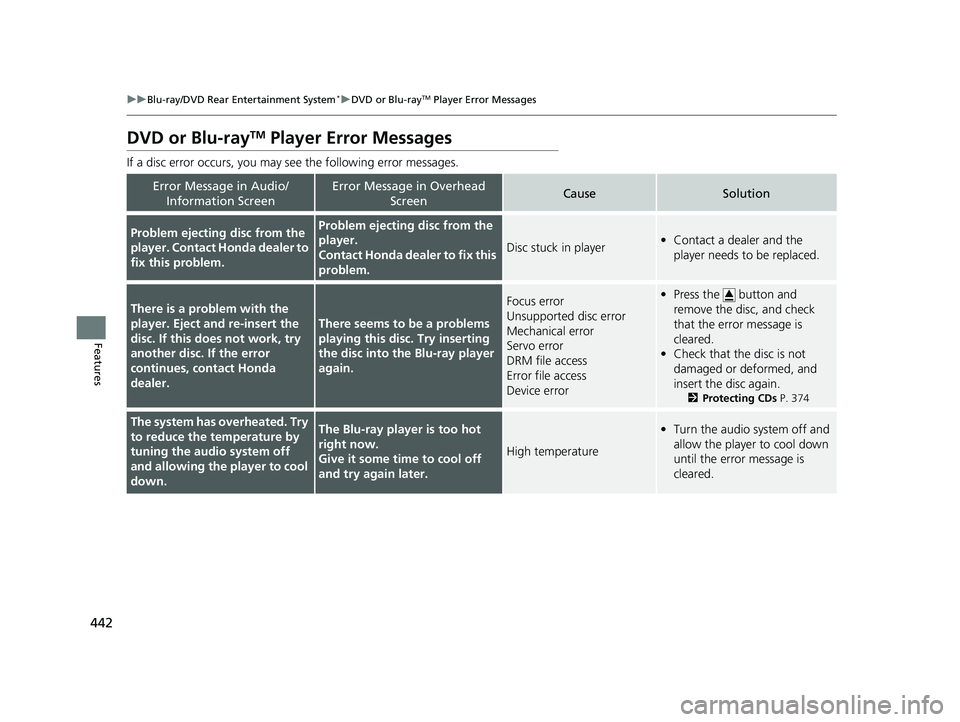
If a disc error occurs, you may see the following error messages.
Error Message in Audio/
Information ScreenError Message in Overhead ScreenCauseSolution
Problem ejecting disc from the
player. Contact Honda dealer to
fix this problem.Problem ejecting disc from the
player.
Contact Honda dealer to fix this
problem.
Disc stuck in player•Contact a dealer and the
player needs to be replaced.
There is a problem with the
player. Eject and re-insert the
disc. If this does not work, try
another disc. If the error
continues, contact Honda
dealer.
There seems to be a problems
playing this disc. Try inserting
the disc into the Blu-ray player
again.
Focus error
Unsupported disc error
Mechanical error
Servo error
DRM file access
Error file access
Device error•Press the button and
remove the disc, and check
that the error message is
cleared.
• Check that the disc is not
damaged or deformed, and
insert the disc again.
2 Protecting CDs P. 374
The system has overheated. Try
to reduce the temperature by
tuning the audio system off
and allowing the player to cool
down.The Blu-ray player is too hot
right now.
Give it some time to cool off
and try again later.
High temperature
•Turn the audio system off and
allow the player to cool down
until the error message is
cleared.
19 ODYSSEY-31THR6120.book 442 ページ 2018年12月6日 木曜日 午後4時35分
Page 445 of 767
443
uuBlu-ray/DVD Rear Entertainment System*uDVD or Blu-rayTM Player Error Messages
Continued
Features
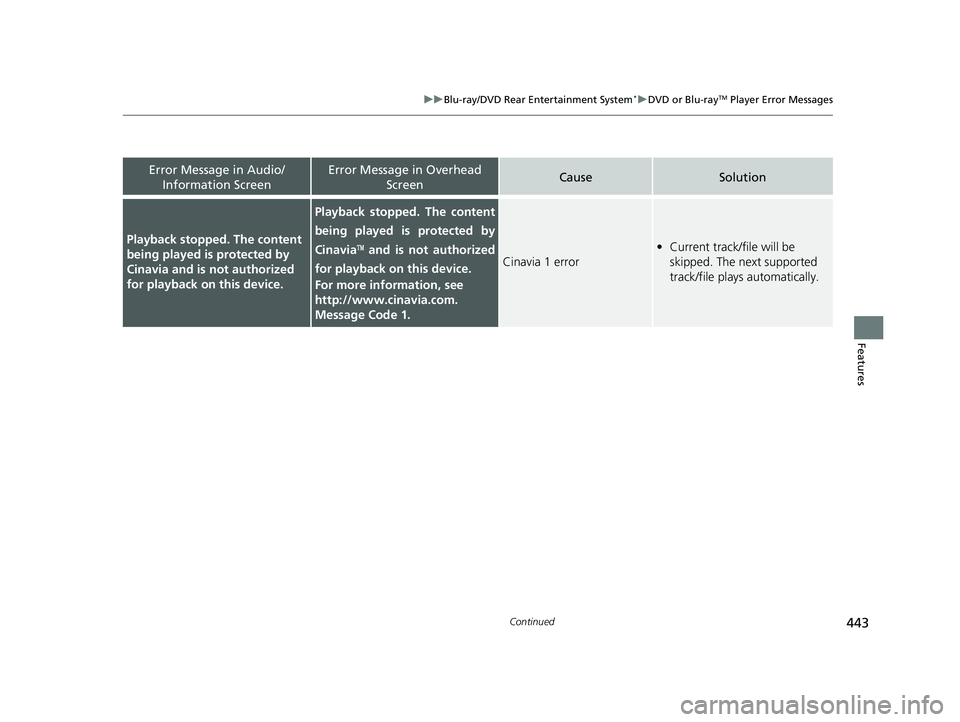
Playback stopped. The content
being played is protected by
Cinavia and is not authorized
for playback on this device.
Playback stopped. The content
being played is protected by
Cinavia
TM and is not authorized
for playback on this device.
For more information, see
http://www.cinavia.com.
Message Code 1.Cinavia 1 error
• Current track/file will be
skipped. The next supported
track/file plays automatically.
Error Message in Audio/
Information ScreenError Message in Overhead ScreenCauseSolution
19 ODYSSEY-31THR6120.book 443 ページ 2018年12月6日 木曜日 午後4時35分
Page 446 of 767
444
uuBlu-ray/DVD Rear Entertainment System*uDVD or Blu-rayTM Player Error Messages
Features
Error Message in Audio/
Information ScreenError Message in Overhead ScreenCauseSolution
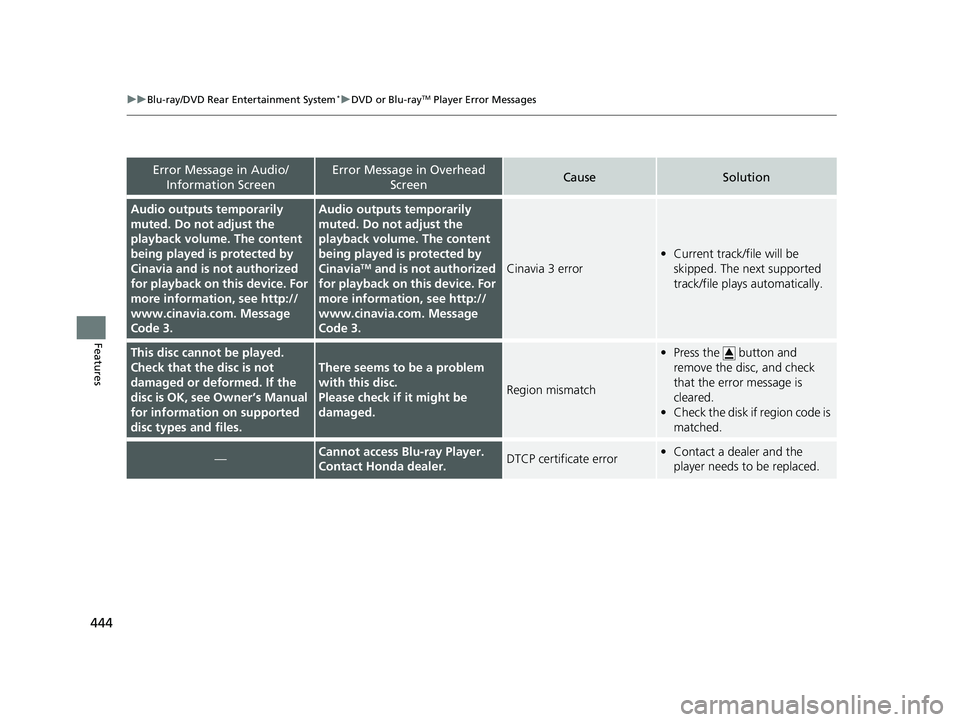
Audio outputs temporarily
muted. Do not adjust the
playback volume. The content
being played is protected by
Cinavia and is not authorized
for playback on this device. For
more information, see http://
www.cinavia.com. Message
Code 3.Audio outputs temporarily
muted. Do not adjust the
playback volume. The content
being played is protected by
Cinavia
TM and is not authorized
for playback on this device. For
more information, see http://
www.cinavia.com. Message
Code 3.Cinavia 3 error
• Current track/file will be
skipped. The next supported
track/file plays automatically.
This disc cannot be played.
Check that the disc is not
damaged or deformed. If the
disc is OK, see Owner’s Manual
for information on supported
disc types and files.
There seems to be a problem
with this disc.
Please check if it might be
damaged.
Region mismatch
• Press the button and
remove the disc, and check
that the error message is
cleared.
• Check the disk if region code is
matched.
—Cannot access Blu-ray Player.
Contact Honda dealer.DTCP certificate error•Contact a dealer and the
player needs to be replaced.
19 ODYSSEY-31THR6120.book 444 ページ 2018年12月6日 木曜日 午後4時35分
Page 755 of 767
753
Index
Automatic Brake Hold SystemIndicator ................................................... 86
Automatic Operation (automatic lighting control) ................................................... 190
Automatic Transmission .......................... 545
Creeping................................................. 545
Fluid ....................................................... 657
Kickdown ............................................... 545
Shift Operation ....................................... 548
Shifting ................................................... 546
Auxiliary Input Jack ................................. 262
Average Fuel Economy ............................ 125
B
Battery...................................................... 684
Charging System Indicator ................ 87, 718
Jump Starting ......................................... 713
Maintenance (Checking the Battery) ....... 684
Maintenance (Replacing) ................. 686, 687
Belts (Seat) .................................................. 38
Beverage Holders ..................................... 231
Blank ......................................................... 129
Blind spot information System ................ 598
Bluetooth ® Audio ............................. 282, 345
Bluetooth ® HandsFreeLink ®............ 473, 498
Blu-ray/DVD Rear Entertainment
System ..................................................... 396
Audio Sources for Front and Rear Seats... 417
Auxiliary Console Panels.......................... 398
DVD or Blu-ray
TM Player Error Messages... 442 Front Control Panel Operation ................. 409
HDMI
TM Port ............................................ 399
How Much Farther?TM.............................. 416
Media Servers .......................................... 416
Operating the System .............................. 400
Overhead Screen ..................................... 399
Playable Disc Region Codes ..................... 440
Playable Disc Types .................................. 440
Playable Discs .......................................... 418
Playing a Disc in the Rear ......................... 414
Playing a DVD/Blu-ray
TM........................... 403
Playing a Video Using the HDMITM........... 415
Playing an iPod and a USB Flash Drive in the Rear....................................................... 414
Playing Apps ............................................ 412
Rear DVD or Blu-ray
TM Menu .................... 404
Rear System Setup ................................... 410
Recommended Discs ................................ 441
Selecting the Audio Source using Front
Control Panel......................................... 409
Setting the DVD or Blu-ray
TM Menu .......... 411
System Controls .............................. 403, 413
System Settings ....................................... 407
Video Accessibility ................................... 401
Wireless Headphones .............................. 397
Booster Seats (For Children) ...................... 79
Brake System ............................................. 602
Anti-lock Brake System (ABS) ................... 608
Brake Assist System ................................. 609
Fluid ........................................................ 658
Foot Brake ............................................... 605 Indicator...................................... 84, 85, 720
Indicator (Red) ................................. 720, 721
Parking Brake .......................................... 602
Brightness Control (Instrument Panel) .... 200
Built-in Key ............................................... 145
Bulb Replacement .................................... 660
Back-Up Light/Taillights ........................... 669
Brake, Rear Turn Signal Light, and Rear Side
Marker/Taillights .................................... 667
Daytime Running Lights........................... 664
Fog Lights ............................................... 663
Front Side Marker Light Bulbs .................. 666
Front Turn Signal/Parking Lights .............. 665
Headlights ............................................... 660
High-Mount Brake Light .......................... 670
Parking/Daytime Running Lights .............. 664
Rear License Plate Light ........................... 670
Side Turn Signal/Emergency Indicator Lights .................................................... 666
Bulb Specifications ................................... 740
C
CabinTalkTM............................................... 524
CabinWatchTM........................................... 523
Car Wash Mode ........................................ 550
Carbon Monoxide Gas ............................... 80
Cargo Hooks ............................................. 239
Carrying Cargo ................................. 527, 529
CD Player ................................................... 332
Center Pocket ........................................... 230
19 ODYSSEY-31THR6120.book 753 ページ 2018年12月6日 木曜日 午後4時35分