clock HONDA ODYSSEY 2020 (in English) Owner's Guide
[x] Cancel search | Manufacturer: HONDA, Model Year: 2020, Model line: ODYSSEY, Model: HONDA ODYSSEY 2020Pages: 767, PDF Size: 43.89 MB
Page 293 of 767
291
uuAudio System Basic Operation uAudio/Information Screen
Continued
Features
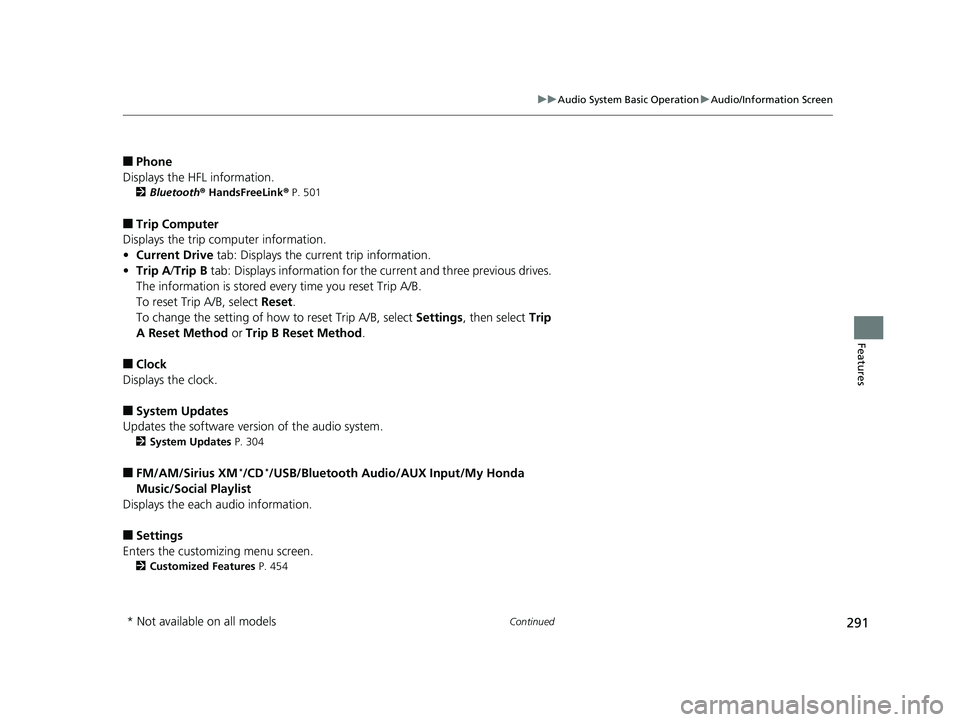
■Phone
Displays the HFL information.
2 Bluetooth ® HandsFreeLink ® P. 501
■Trip Computer
Displays the trip computer information.
• Current Drive tab: Displays the current trip information.
• Trip A /Trip B tab: Displays information for the current and three previous drives.
The information is stored every time you reset Trip A/B.
To reset Trip A/B, select Reset.
To change the setting of how to reset Trip A/B, select Settings, then select Trip
A Reset Method or Trip B Reset Method .
■Clock
Displays the clock.
■System Updates
Updates the software version of the audio system.
2 System Updates P. 304
■FM/AM/Sirius XM*/CD*/USB/Bluetooth Audi o/AUX Input/My Honda
Music/Social Playlist
Displays the each audio information.
■Settings
Enters the customizing menu screen.
2 Customized Features P. 454
* Not available on all models
20 US ODYSSEY-31THR6210.book 291 ページ 2020年2月28日 金曜日 午前7時26分
Page 296 of 767
uuAudio System Basic Operation uAudio/Information Screen
294
Features
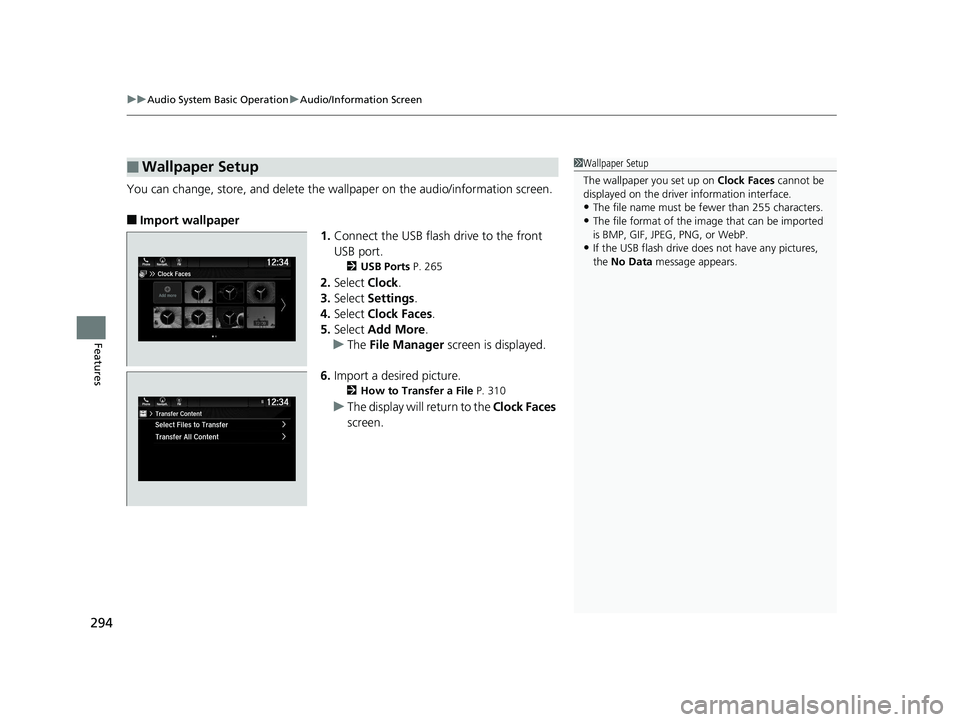
You can change, store, and delete the wa llpaper on the audio/information screen.
■Import wallpaper
1.Connect the USB flash drive to the front
USB port.
2 USB Ports P. 265
2.Select Clock.
3. Select Settings .
4. Select Clock Faces .
5. Select Add More .
u The File Manager screen is displayed.
6. Import a desired picture.
2 How to Transfer a File P. 310
uThe display will return to the Clock Faces
screen.
■Wallpaper Setup1 Wallpaper Setup
The wallpaper you set up on Clock Faces cannot be
displayed on the driver information interface.
•The file name must be fewer than 255 characters.
•The file format of the im age that can be imported
is BMP, GIF, JPEG, PNG, or WebP.
•If the USB flash drive doe s not have any pictures,
the No Data message appears.
20 US ODYSSEY-31THR6210.book 294 ページ 2020年2月28日 金曜日 午前7時26分
Page 297 of 767
295
uuAudio System Basic Operation uAudio/Information Screen
Continued
Features
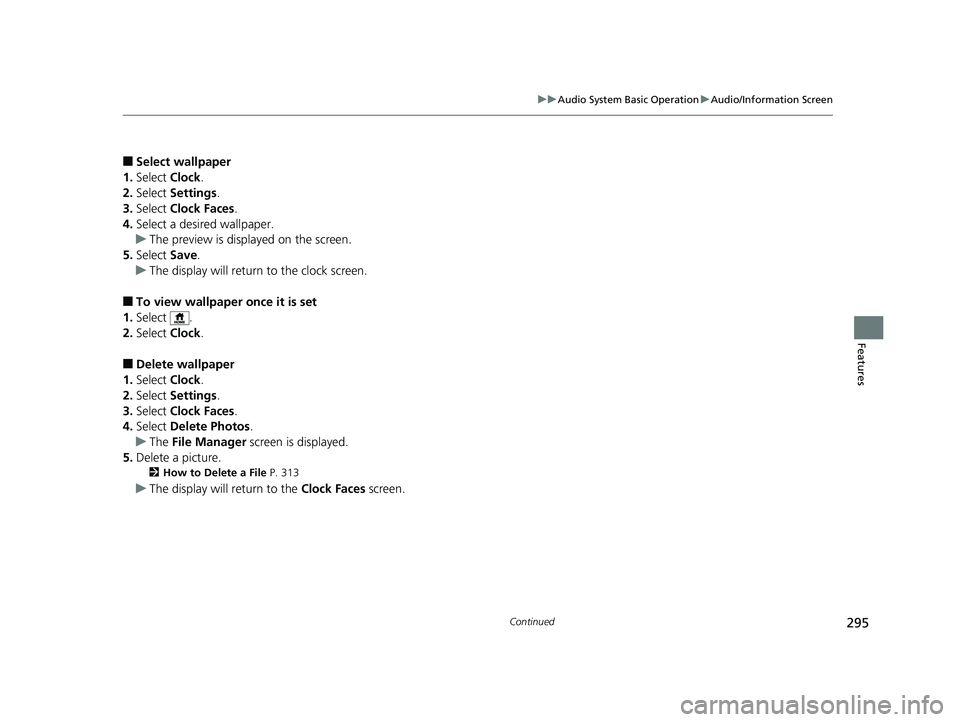
■Select wallpaper
1. Select Clock.
2. Select Settings .
3. Select Clock Faces.
4. Select a desired wallpaper.
u The preview is displayed on the screen.
5. Select Save.
u The display will return to the clock screen.
■To view wallpaper once it is set
1. Select .
2. Select Clock.
■Delete wallpaper
1. Select Clock.
2. Select Settings .
3. Select Clock Faces.
4. Select Delete Photos .
u The File Manager screen is displayed.
5. Delete a picture.
2 How to Delete a File P. 313
uThe display will return to the Clock Faces screen.
20 US ODYSSEY-31THR6210.book 295 ページ 2020年2月28日 金曜日 午前7時26分
Page 450 of 767
448
Features
Customized Features
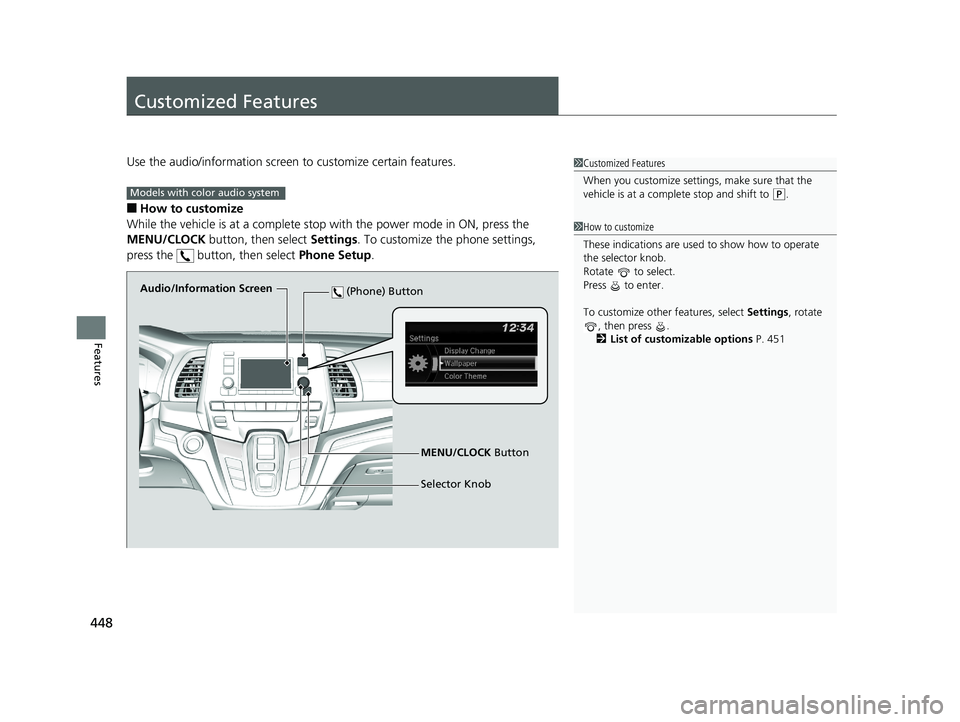
Use the audio/information screen to customize certain features.
■How to customize
While the vehicle is at a complete stop with the power mode in ON, press the
MENU/CLOCK button, then select Settings. To customize the phone settings,
press the button, then select Phone Setup.
1Customized Features
When you customize settings, make sure that the
vehicle is at a complete stop and shift to
(P.
1 How to customize
These indications are used to show how to operate
the selector knob.
Rotate to select.
Press to enter.
To customize other features, select Settings, rotate
, then press .
2 List of customizable options P. 451
Models with color audio system
Audio/Information Screen
MENU/CLOCK Button
Selector Knob
(Phone) Button
20 US ODYSSEY-31THR6210.book 448 ページ 2020年2月28日 金曜日 午前7時26分
Page 451 of 767
449
uuCustomized Features u
Continued
Features
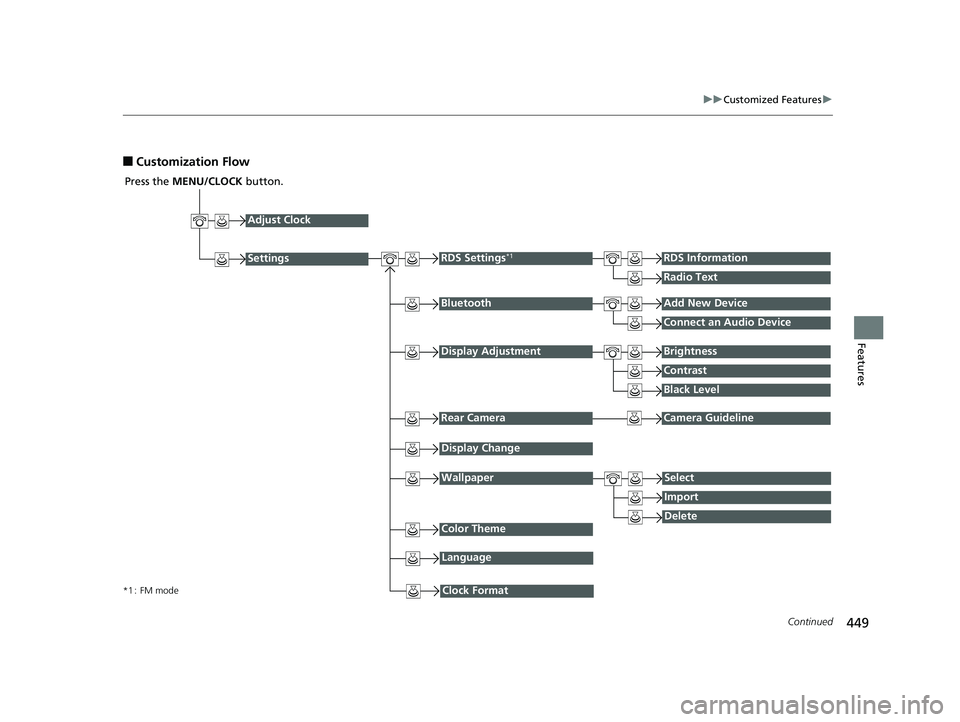
■Customization Flow
Press the MENU/CLOCK button.
Adjust Clock
BluetoothAdd New Device
Connect an Audio Device
Display AdjustmentBrightness
Contrast
Black Level
Rear CameraCamera Guideline
RDS Settings*1RDS Information
Radio Text
Display Change
WallpaperSelect
Import
DeleteColor Theme
Language
Clock Format*1 : FM mode
Settings
20 US ODYSSEY-31THR6210.book 449 ページ 2020年2月28日 金曜日 午前7時26分
Page 453 of 767
451
uuCustomized Features u
Continued
Features
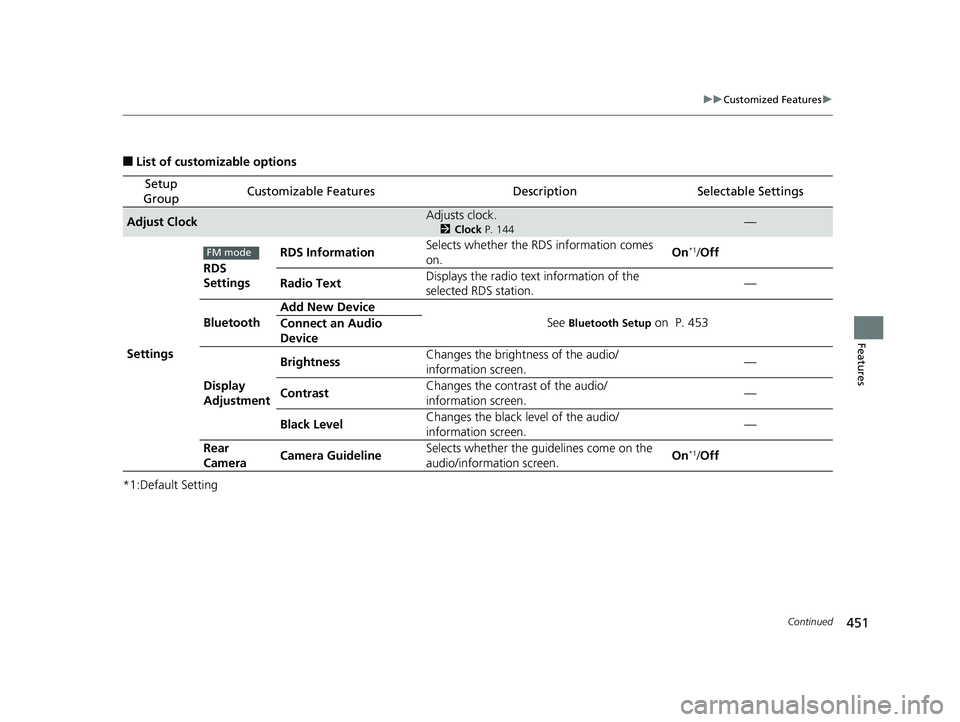
■List of customizable options
*1:Default Setting
Setup
GroupCustomizable FeaturesDescriptionSelectable Settings
Adjust ClockAdjusts clock.
2 Clock P. 144—
Settings RDS
Settings
RDS Information
Selects whether the RDS information comes
on. On
*1/
Off
Radio Text Displays the radio text
information of the
selected RDS station. —
Bluetooth Add New Device
See
Bluetooth Setup on P. 453
Connect an Audio
Device
Display
Adjustment Brightness
Changes the brightness of the audio/
information screen. —
Contrast Changes the contrast of the audio/
information screen. —
Black Level Changes the black level of the audio/
information screen.
—
Rear
Camera Camera Guideline Selects whether the guidelines come on the
audio/information screen. On
*1/
Off
FM mode
20 US ODYSSEY-31THR6210.book 451 ページ 2020年2月28日 金曜日 午前7時26分
Page 454 of 767
452
uuCustomized Features u
Features
*1:Default Setting
Setup
GroupCustomizable FeaturesDescriptionSelectable Settings
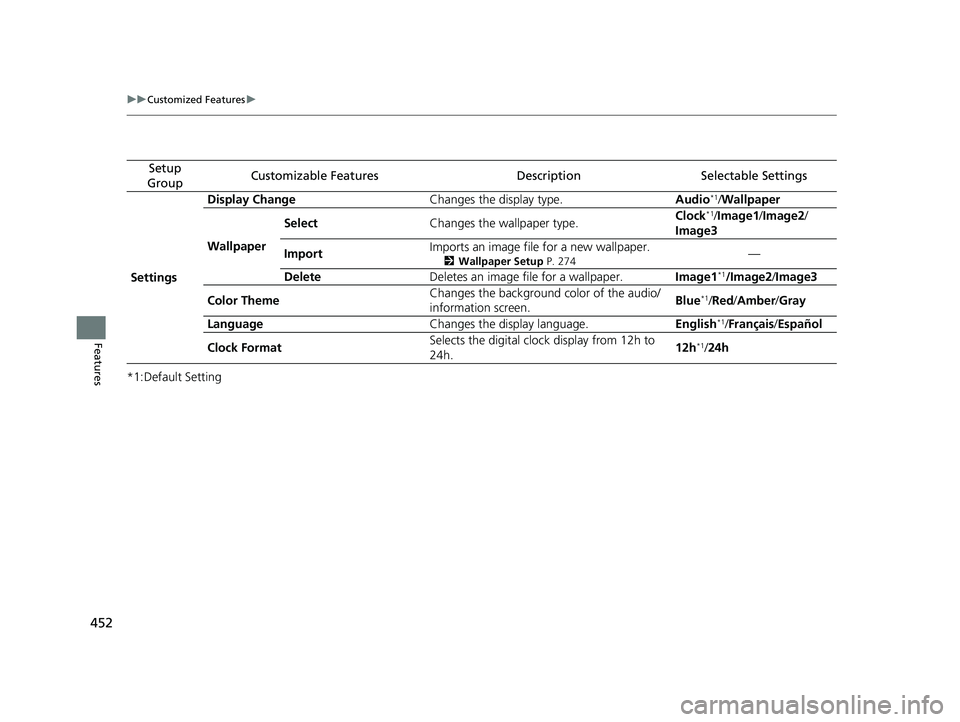
Settings Display Change
Changes the display type. Audio
*1/Wallpaper
Wallpaper Select
Changes the wallpaper type. Clock*1/
Image1/ Image2/
Image3
Import Imports an image file for a new wallpaper.
2
Wallpaper Setup P. 274—
Delete Deletes an image file for a wallpaper. Image1
*1/Image2/Image3
Color Theme Changes the background color of the audio/
information screen.
Blue
*1/
Red/ Amber /Gray
Language Changes the display language. English
*1/Français /Español
Clock Format Selects the digital clock display from 12h to
24h. 12h
*1/
24h
20 US ODYSSEY-31THR6210.book 452 ページ 2020年2月28日 金曜日 午前7時26分
Page 463 of 767
461
uuCustomized Features u
Continued
Features
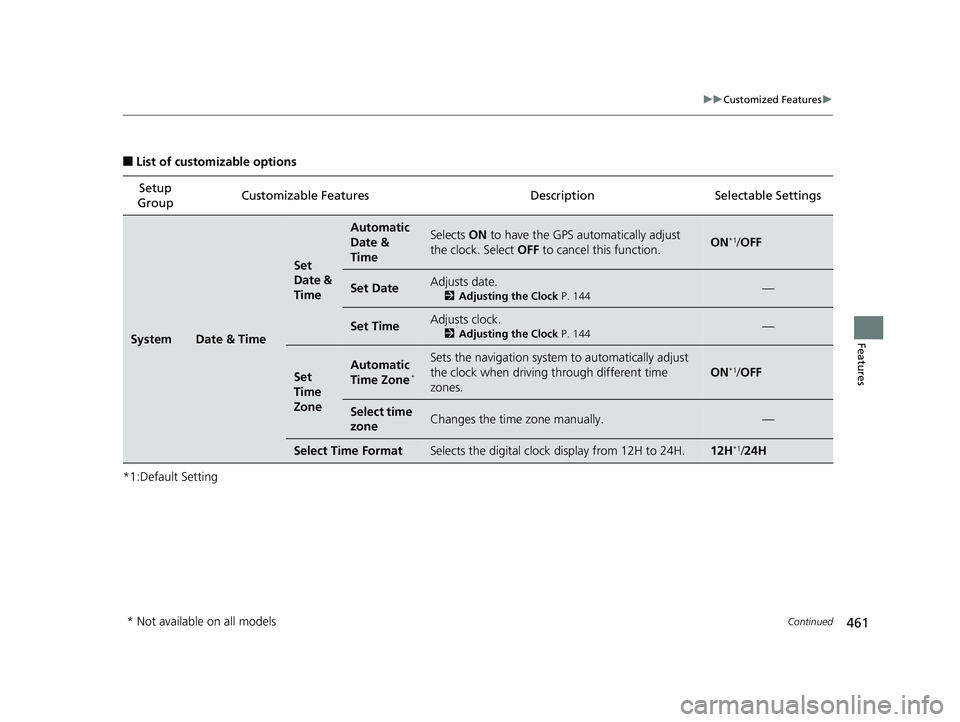
■List of customizable options
*1:Default Setting Setup
Group Customizable Features
DescriptionSelectable Settings
SystemDate & Time
Set
Date &
Time
Automatic
Date &
TimeSelects ON to have the GPS automatically adjust
the clock. Select OFF to cancel this function.ON*1/OFF
Set DateAdjusts date.
2 Adjusting the Clock P. 144—
Set TimeAdjusts clock.
2Adjusting the Clock P. 144—
Set
Time
ZoneAutomatic
Time Zone*
Sets the navigation system to automatically adjust
the clock when driving through different time
zones.
ON*1/OFF
Select time
zoneChanges the time zone manually.—
Select Time FormatSelects the digital clock display from 12H to 24H.12H*1/24H
* Not available on all models
20 US ODYSSEY-31THR6210.book 461 ページ 2020年2月28日 金曜日 午前7時26分
Page 662 of 767
uuMaintenance Under the Hood uEngine Coolant
660
Maintenance
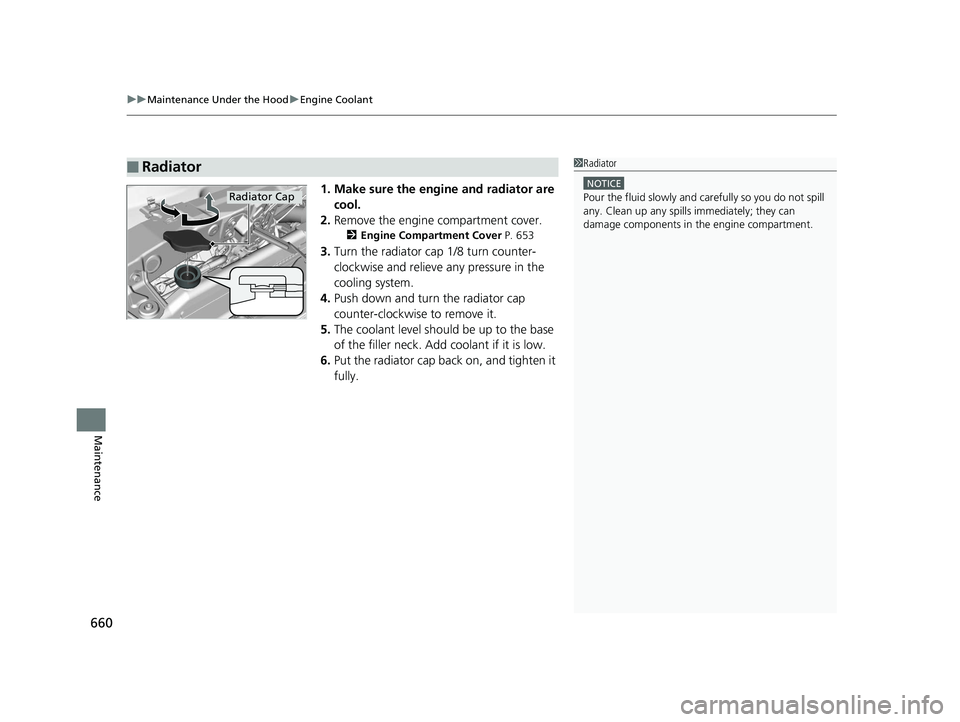
1. Make sure the engine and radiator are
cool.
2. Remove the engine compartment cover.
2 Engine Compartment Cover P. 653
3.Turn the radiator cap 1/8 turn counter-
clockwise and relieve any pressure in the
cooling system.
4. Push down and turn the radiator cap
counter-clockwise to remove it.
5. The coolant level should be up to the base
of the filler neck. Add coolant if it is low.
6. Put the radiator cap back on, and tighten it
fully.
■Radiator1Radiator
NOTICE
Pour the fluid slowly and ca refully so you do not spill
any. Clean up any spills immediately; they can
damage components in the engine compartment.Radiator Cap
20 US ODYSSEY-31THR6210.book 660 ページ 2020年2月28日 金曜日 午前7時26分
Page 667 of 767
Continued665
uuReplacing Light Bulbs uHeadlight Bulbs
Maintenance
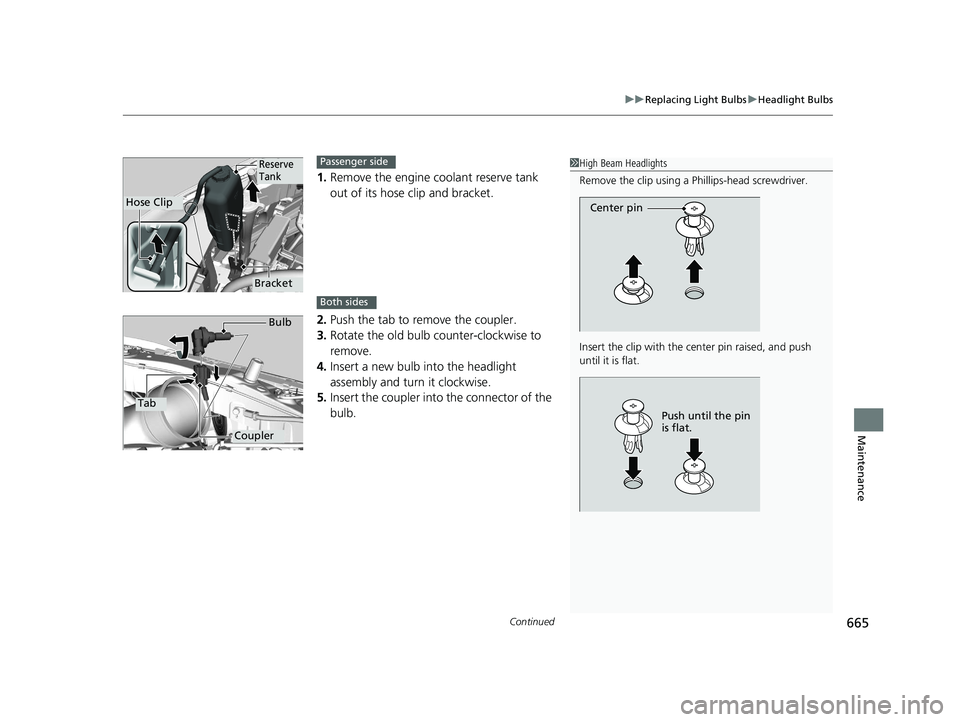
1. Remove the engine coolant reserve tank
out of its hose clip and bracket.
2. Push the tab to remove the coupler.
3. Rotate the old bulb counter-clockwise to
remove.
4. Insert a new bulb into the headlight
assembly and turn it clockwise.
5. Insert the coupler into the connector of the
bulb.
1 High Beam Headlights
Remove the clip using a Phillips-head screwdriver.
Insert the clip with the center pin raised, and push
until it is flat.
Center pin
Push until the pin
is flat.
Hose Clip
Reserve
Tank
Bracket
Passenger side
Both sides
Tab
Coupler Bulb
20 US ODYSSEY-31THR6210.book 665 ページ 2020年2月28日 金曜日 午前7時26分