window HONDA ODYSSEY 2020 (in English) Owner's Guide
[x] Cancel search | Manufacturer: HONDA, Model Year: 2020, Model line: ODYSSEY, Model: HONDA ODYSSEY 2020Pages: 767, PDF Size: 43.89 MB
Page 205 of 767
203
uuOperating the Switches Around the Steering Wheel uRear Defogger/Heated Door Mirror* Button
Controls
Rear Defogger/Heated Door Mirror* Button
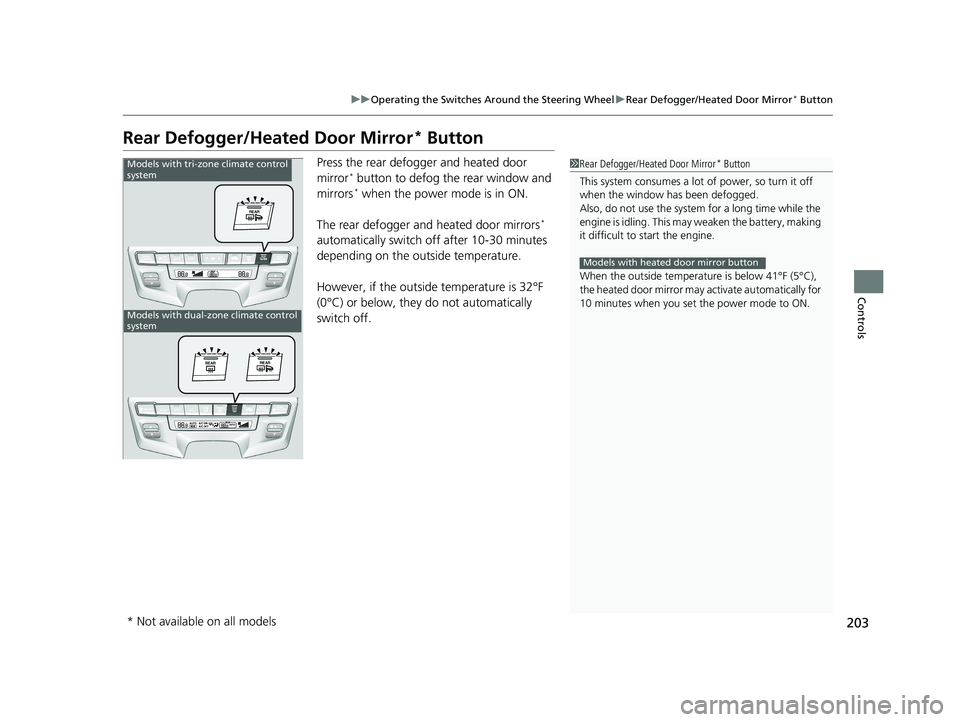
Press the rear defogger and heated door
mirror* button to defog the rear window and
mirrors* when the power mode is in ON.
The rear defogger and heated door mirrors
*
automatically switch of f after 10-30 minutes
depending on the outside temperature.
However, if the outside temperature is 32°F
(0°C) or below, they do not automatically
switch off.
1 Rear Defogger/Heated Door Mirror* Button
This system consumes a lot of power, so turn it off
when the window has been defogged.
Also, do not use the system for a long time while the
engine is idling. This may weaken the battery, making
it difficult to start the engine.
When the outside temperature is below 41°F (5°C),
the heated door mirror may activate automatically for
10 minutes when you set the power mode to ON.
Models with heated door mirror button
Models with tri-zone climate control
system
Models with dual-zone climate control
system
* Not available on all models
20 US ODYSSEY-31THR6210.book 203 ページ 2020年2月28日 金曜日 午前7時26分
Page 206 of 767
204
uuOperating the Switches Around the Steering Wheel uHeated Windshield Button
Controls
Heated Windshield Button
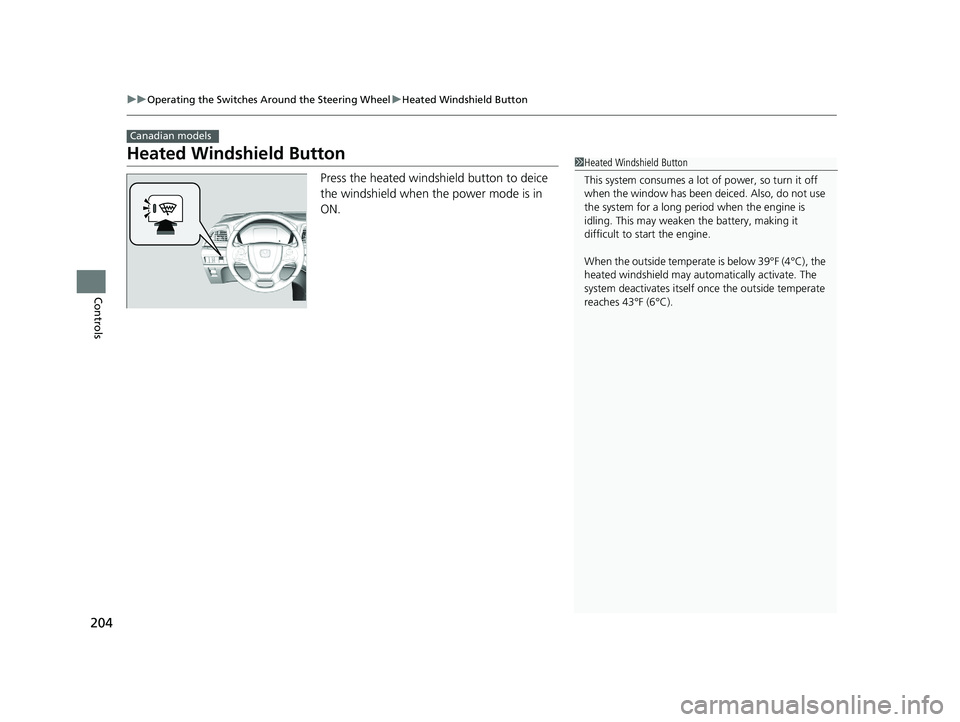
Press the heated windshield button to deice
the windshield when the power mode is in
ON.
Canadian models
1Heated Windshield Button
This system consumes a lot of power, so turn it off
when the window has been deiced. Also, do not use
the system for a long period when the engine is
idling. This may weaken the battery, making it
difficult to start the engine.
When the outside temperate is below 39°F (4°C), the
heated windshield may auto matically activate. The
system deactivates itself once the outside temperate
reaches 43°F (6°C).
20 US ODYSSEY-31THR6210.book 204 ページ 2020年2月28日 金曜日 午前7時26分
Page 243 of 767
Continued241
uuInterior Lights/Interior Convenience Items uInterior Convenience Items
Controls
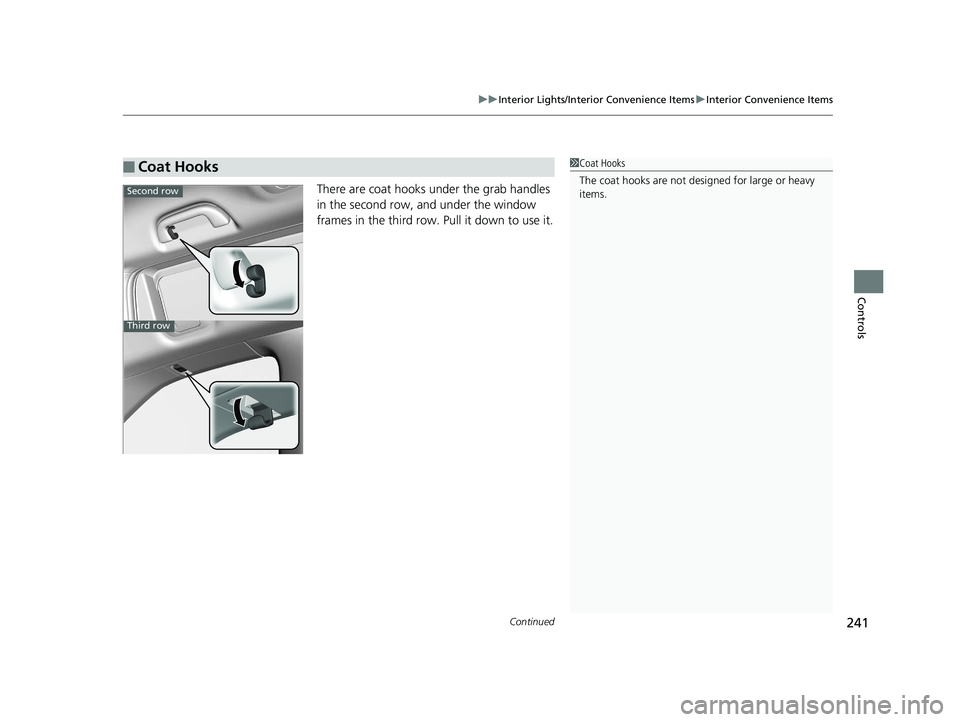
There are coat hooks under the grab handles
in the second row, and under the window
frames in the third row. Pull it down to use it.
■Coat Hooks1Coat Hooks
The coat hooks are not desi gned for large or heavy
items.
Second row
Third row
20 US ODYSSEY-31THR6210.book 241 ページ 2020年2月28日 金曜日 午前7時26分
Page 249 of 767
Continued247
uuInterior Lights/Interior Convenience Items uInterior Convenience Items
Controls
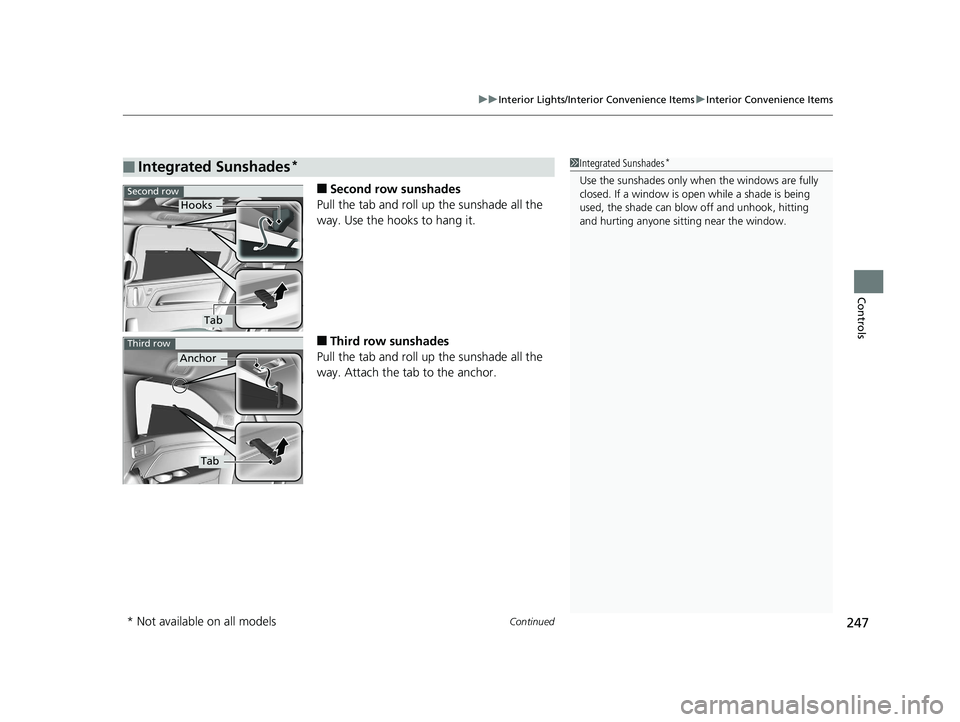
■Second row sunshades
Pull the tab and roll up the sunshade all the
way. Use the hooks to hang it.
■Third row sunshades
Pull the tab and roll up the sunshade all the
way. Attach the tab to the anchor.
■Integrated Sunshades*1 Integrated Sunshades*
Use the sunshades only when the windows are fully
closed. If a window is open while a shade is being
used, the shade can blow off and unhook, hitting
and hurting anyone sitting near the window.Second row
Hooks
Tab
Third row
Anchor
Tab
* Not available on all models
20 US ODYSSEY-31THR6210.book 247 ページ 2020年2月28日 金曜日 午前7時26分
Page 250 of 767
uuInterior Lights/Interior Convenience Items uInterior Convenience Items
248
Controls
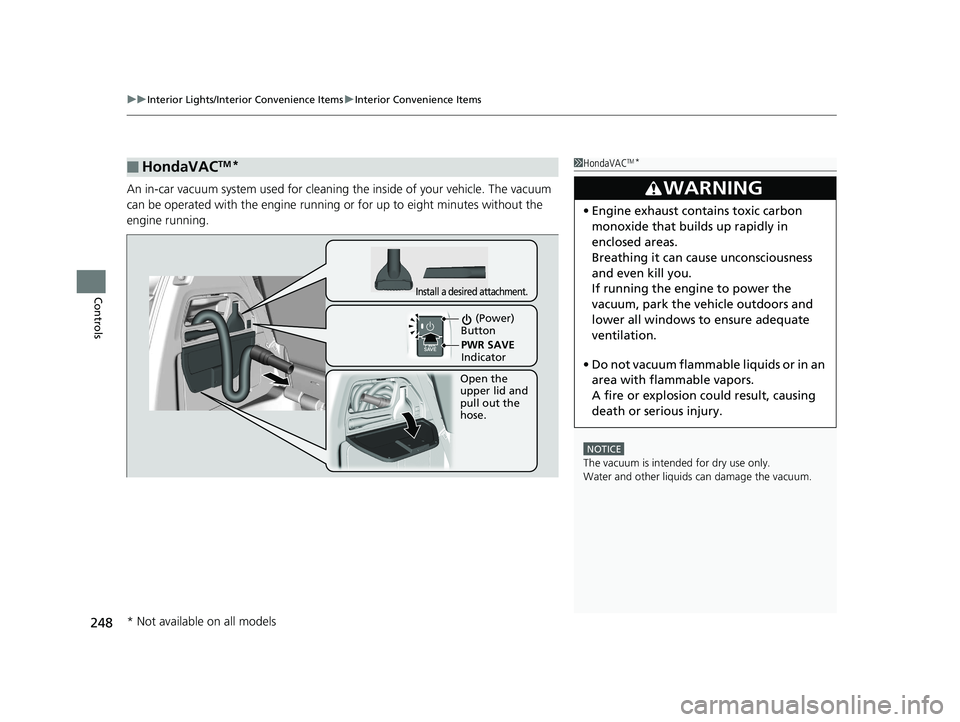
An in-car vacuum system used for cleaning the inside of your vehicle. The vacuum
can be operated with the engine runnin g or for up to eight minutes without the
engine running.
■HondaVACTM*1 HondaVACTM*
NOTICE
The vacuum is intended for dry use only.
Water and other liquids can damage the vacuum.
3WARNING
•Engine exhaust contains toxic carbon
monoxide that builds up rapidly in
enclosed areas.
Breathing it can cause unconsciousness
and even kill you.
If running the engine to power the
vacuum, park the vehicle outdoors and
lower all windows to ensure adequate
ventilation.
• Do not vacuum flammabl e liquids or in an
area with flammable vapors.
A fire or explosion could result, causing
death or serious injury.
Open the
upper lid and
pull out the
hose.
Install a desired attachment.
(Power)
Button
PWR SAVE
Indicator
* Not available on all models
20 US ODYSSEY-31THR6210.book 248 ページ 2020年2月28日 金曜日 午前7時26分
Page 253 of 767
251Continued
Controls
Climate Control System
Using Automatic Climate Control
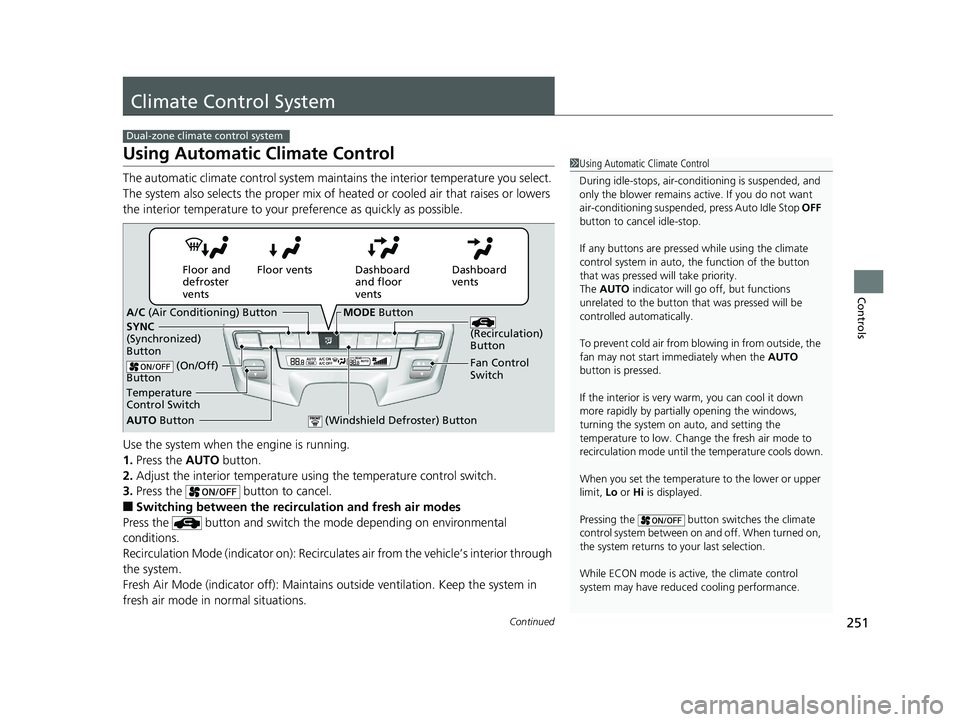
The automatic climate control system maintains the interior temperature you select.
The system also selects the proper mix of heat ed or cooled air that raises or lowers
the interior temperature to your pr eference as quickly as possible.
Use the system when the engine is running.
1. Press the AUTO button.
2. Adjust the interior temperature us ing the temperature control switch.
3. Press the button to cancel.
■Switching between the recirc ulation and fresh air modes
Press the button and switch the mode depending on environmental
conditions.
Recirculation Mode (indicator on): Recirculates air from the vehicle’s interior through
the system.
Fresh Air Mode (indicator off): Maintains outside ventilation. Keep the system in
fresh air mode in normal situations.
Dual-zone climate control system
1 Using Automatic Climate Control
During idle-stops, air-conditioning is suspended, and
only the blower remains ac tive. If you do not want
air-conditioning suspended, press Auto Idle Stop OFF
button to cancel idle-stop.
If any buttons are presse d while using the climate
control system in auto, the function of the button
that was pressed will take priority.
The AUTO indicator will go off, but functions
unrelated to the button th at was pressed will be
controlled automatically.
To prevent cold air from bl owing in from outside, the
fan may not start i mmediately when the AUTO
button is pressed.
If the interior is very warm, you can cool it down
more rapidly by partial ly opening the windows,
turning the system on auto, and setting the
temperature to low. Change the fresh air mode to
recirculation mode until the temperature cools down.
When you set the temperat ure to the lower or upper
limit, Lo or Hi is displayed.
Pressing the button switches the climate
control system between on and off. When turned on,
the system returns to your last selection.
While ECON mode is active, the climate control
system may have reduced cooling performance.
Dashboard
vents
Dashboard
and floor
vents
Floor vents
Floor and
defroster
vents
AUTO Button
Temperature
Control Switch A/C
(Air Conditioning) Button
Fan Control
Switch
(Recirculation)
Button
(On/Off)
Button
SYNC
(Synchronized)
Button
(Windshield Defroster) Button
MODE Button
20 US ODYSSEY-31THR6210.book 251 ページ 2020年2月28日 金曜日 午前7時26分
Page 254 of 767
uuClimate Control System uUsing Automatic Climate Control
252
Controls
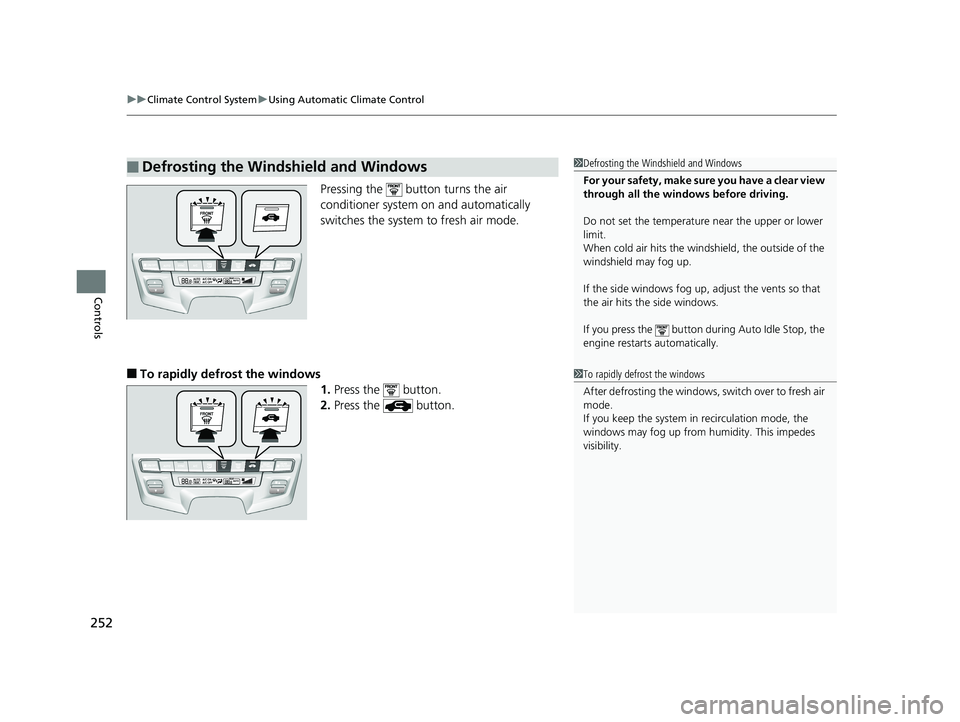
Pressing the button turns the air
conditioner system on and automatically
switches the system to fresh air mode.
■To rapidly defrost the windows
1.Press the button.
2. Press the button.
■Defrosting the Windshield and Windows1Defrosting the Windshield and Windows
For your safety, make sure you have a clear view
through all the windows before driving.
Do not set the temperatur e near the upper or lower
limit.
When cold air hits the windshield, the outside of the
windshield may fog up.
If the side windows fog up, adjust the vents so that
the air hits th e side windows.
If you press the button dur ing Auto Idle Stop, the
engine restarts automatically.
1 To rapidly defrost the windows
After defrosting the windows, switch over to fresh air
mode.
If you keep the system in recirculation mode, the
windows may fog up from humidity. This impedes
visibility.
20 US ODYSSEY-31THR6210.book 252 ページ 2020年2月28日 金曜日 午前7時26分
Page 258 of 767
256
Controls
Climate Control System
Using Automatic Climate Control
The automatic climate control system maintains the interior temperature you select.
The system also selects the proper mix of heated or cooled air that raises or lowers
the interior temperature to your pr eference as quickly as possible.
Tri-zone climate control system
1Using Automatic Climate Control
Press the FRONT CLIMATE button to display A/C,
MODE, fan control information on the audio/
information screen for several seconds. Select icon to
turn on or off A/C, change the vent mode, or change
the fan speed.
During idle-stops, air-conditioning is suspended, and
only the blower remains ac tive. If you do not want
air-conditioning suspended, press Auto Idle Stop OFF
button to cancel idle-stop.
If any buttons are presse d while using the climate
control system in auto, the function of the button
that was pressed will take priority.
The AUTO indicator will go off, but functions
unrelated to the button that were pressed will be
controlled automatically.
To prevent cold air from bl owing in from outside, the
fan may not start i mmediately when the AUTO
button is pressed.
If the interior is very warm, you can cool it down
more rapidly by partial ly opening the windows,
turning the system on AUTO, and setting the
temperature to low. Change the fresh mode to
recirculation mode until the temperature cools down.
When you set the temperat ure to the lower or upper
limit, Lo or Hi is displayed.
20 US ODYSSEY-31THR6210.book 256 ページ 2020年2月28日 金曜日 午前7時26分
Page 260 of 767

uuClimate Control System uUsing Automatic Climate Control
258
Controls
■Switching between the recirculation and fresh air modes
Press the button and switch the mode depending on environmental
conditions.
Recirculation Mode (indicator on): Recirculates air from the vehicle’s interior through
the system.
Fresh Air Mode (indicator off): Maintains outside ventilation. Keep the system in
fresh air mode in normal situations.
Pressing the button turns the air
conditioner system on and automatically
switches the system to fresh air mode.
■To rapidly defrost the windows
1.Press the button.
2. Press the button.
■Defrosting the Windshield and Windows1Defrosting the Windshield and Windows
For your safety, make sure you have a clear view
through all the windows before driving.
Do not set the temperatur e near the upper or lower
limit.
When cold air hits the winds hield, the outside of the
windshield may fog up.
If the side windows fog up, adjust the vents so that
the air hits th e side windows.
If you press the button dur ing Auto Idle Stop, the
engine restarts automatically.
1 To rapidly defrost the windows
After defrosting the windows, switch over to fresh air
mode.
If you keep the system in recirculation mode, the
windows may fog up from humidity. This impedes
visibility.
20 US ODYSSEY-31THR6210.book 258 ページ 2020年2月28日 金曜日 午前7時26分
Page 321 of 767
319
uuAudio System Basic Operation uVoice Control Operation
Continued
Features
Voice Control Operation
Your vehicle has a voice control syst em that allows hands-free operation.
The voice control system uses the (tal k) and (back) buttons on the steering
wheel and a microphone near the map lights on the ceiling.
To achieve optimum voice recognition when using the voice control system:
• Make sure the correct screen is displa yed for the voice command that you are
using.
The system recognizes only certain commands. Available voice commands.
2Voice Portal Screen P. 320
•Close the windows and moonroof*.
• Adjust the dashboard and side vents so air does not blow onto the microphone
on the ceiling.
• Speak clearly in a clear, natural speaking voice without pausing between words.
• Reduce any background noise if possibl e. The system may misinterpret your
command if more than one person is speaking at the same time.
■Voice Recognition
1Voice Control Operation
When you press the button, a helpful prompt asks
what you would like to do. Press and release the
button again to bypass th is prompt and give a
command.
1 Voice Recognition
The voice control system can only be used from the
driver’s seat because the microphone unit removes
noises from the front passenger’s side.
* Not available on all models
20 US ODYSSEY-31THR6210.book 319 ページ 2020年2月28日 金曜日 午前7時26分