turn signal HONDA ODYSSEY 2021 (in English) User Guide
[x] Cancel search | Manufacturer: HONDA, Model Year: 2021, Model line: ODYSSEY, Model: HONDA ODYSSEY 2021Pages: 787, PDF Size: 48.31 MB
Page 293 of 787
291
uuAudio System Basic Operation uPlaying AM/FM Radio
Continued
Features
Playing AM/FM Radio
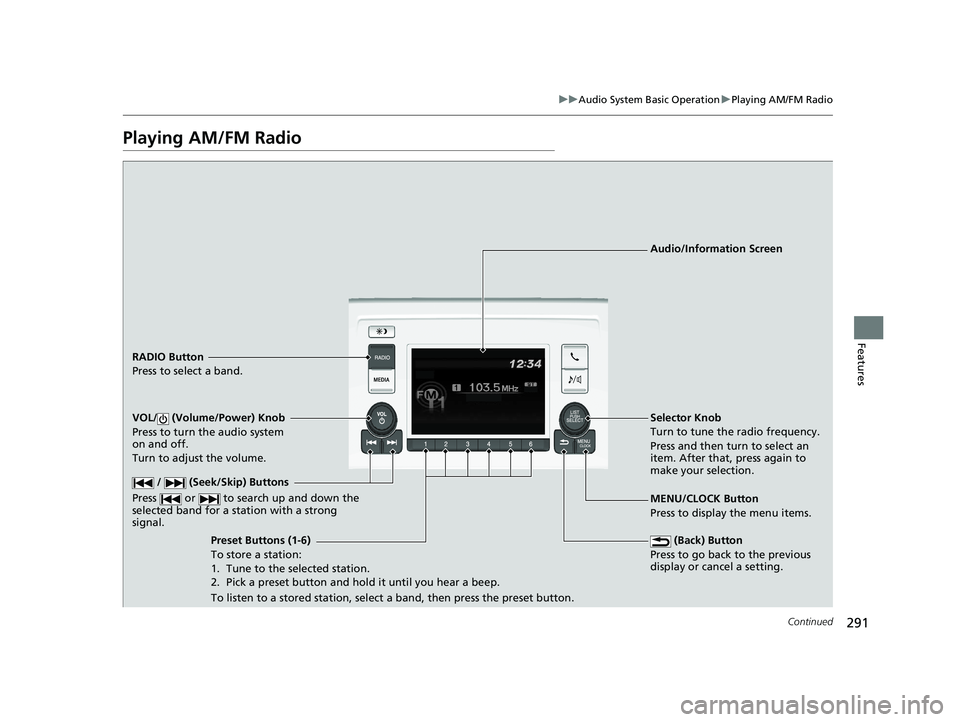
RADIO Button
Press to select a band.
(Back) Button
Press to go back to the previous
display or cancel a setting.
/ (Seek/Skip) Buttons
Press or to search up and down the
selected band for a st ation with a strong
signal.
VOL/ (Volume/Power) Knob
Press to turn the audio system
on and off.
Turn to adjust the volume.
Preset Buttons (1-6)
To store a station:
1. Tune to the selected station.
2. Pick a preset button and hold it until you hear a beep.
To listen to a stored station, select a band, then press the preset button. Selector Knob
Turn to tune the radio frequency.
Press and then turn to select an
item. After that, press again to
make your selection.
MENU/CLOCK Button
Press to display the menu items.
Audio/Information Screen
21 US ODYSSEY-31THR6310.book 291 ページ 2020年6月17日 水曜日 午後2時46分
Page 294 of 787
uuAudio System Basic Operation uPlaying AM/FM Radio
292
Features
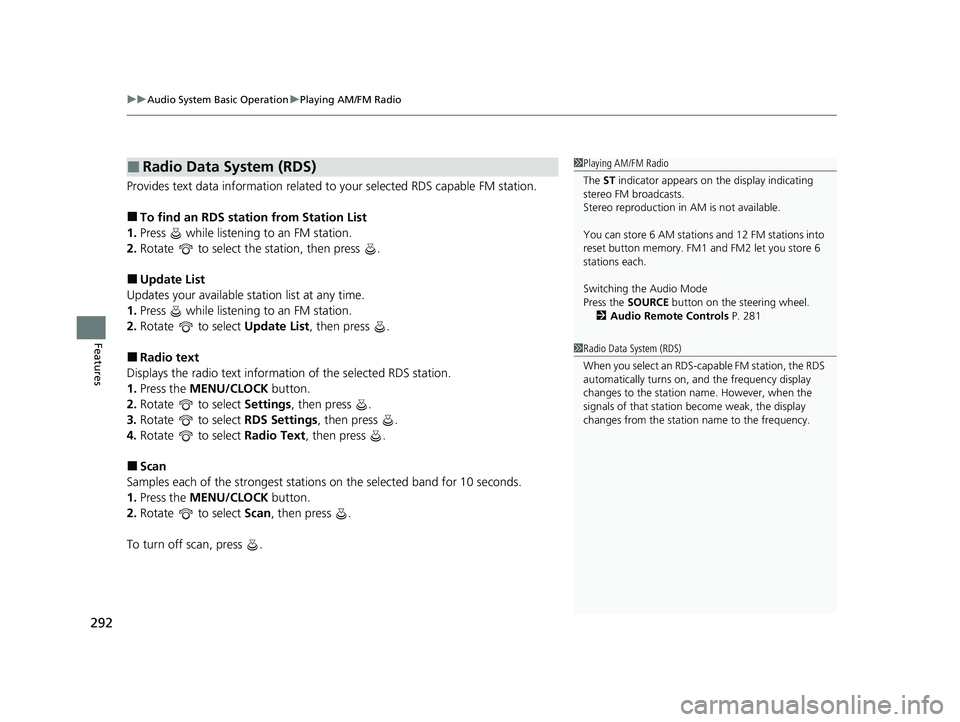
Provides text data information related to your selected RDS capable FM station.
■To find an RDS station from Station List
1. Press while listening to an FM station.
2. Rotate to select the station, then press .
■Update List
Updates your available station list at any time.
1. Press while listening to an FM station.
2. Rotate to select Update List, then press .
■Radio text
Displays the radio text informat ion of the selected RDS station.
1. Press the MENU/CLOCK button.
2. Rotate to select Settings, then press .
3. Rotate to select RDS Settings, then press .
4. Rotate to select Radio Text, then press .
■Scan
Samples each of the strongest stations on the selected band for 10 seconds.
1. Press the MENU/CLOCK button.
2. Rotate to select Scan, then press .
To turn off scan, press .
■Radio Data System (RDS)1 Playing AM/FM Radio
The ST indicator appears on the display indicating
stereo FM broadcasts.
Stereo reproduction in AM is not available.
You can store 6 AM stations and 12 FM stations into
reset button memory. FM1 and FM2 let you store 6
stations each.
Switching the Audio Mode
Press the SOURCE button on the steering wheel.
2 Audio Remote Controls P. 281
1Radio Data System (RDS)
When you select an RDS-capable FM station, the RDS
automatically turns on, and the frequency display
changes to the station name. However, when the
signals of that station become weak, the display
changes from the statio n name to the frequency.
21 US ODYSSEY-31THR6310.book 292 ページ 2020年6月17日 水曜日 午後2時46分
Page 337 of 787
335
uuAudio System Basic Operation uPlaying AM/FM Radio
Continued
Features
Playing AM/FM Radio
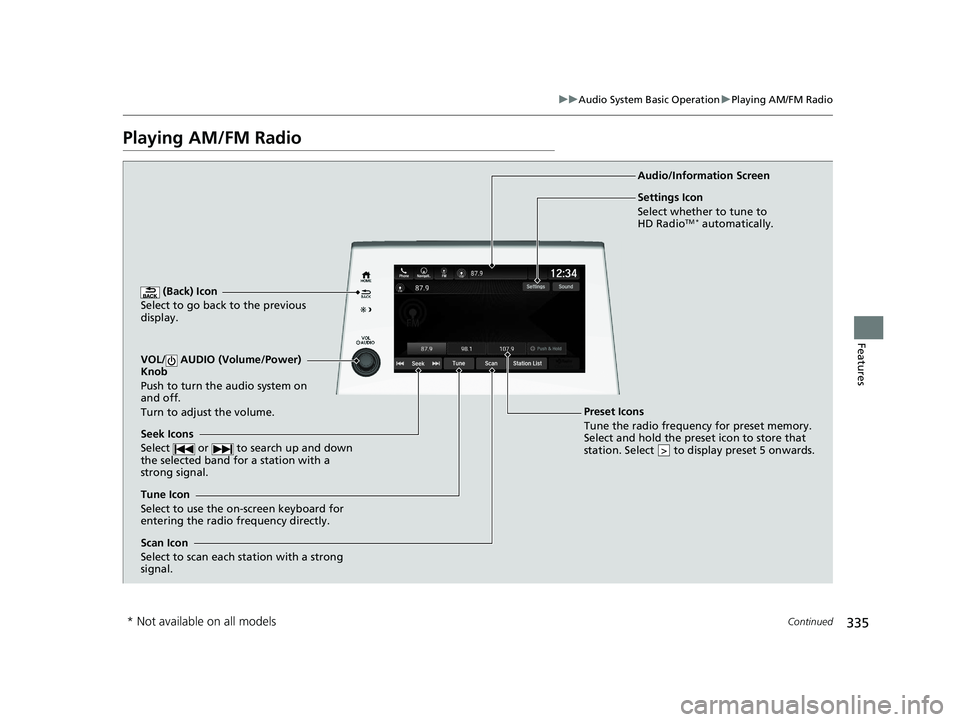
(Back) Icon
Select to go back to the previous
display.
Seek Icons
Select or to search up and down
the selected band for a station with a
strong signal.
VOL/ AUDIO (Volume/Power)
Knob
Push to turn the audio system on
and off.
Turn to adjust the volume.
Tune Icon
Select to use the on-screen keyboard for
entering the radio frequency directly. Audio/Information Screen
Scan Icon
Select to scan each station with a strong
signal.
Preset Icons
Tune the radio frequency for preset memory.
Select and hold the preset icon to store that
station. Select to display preset 5 onwards.
>
Settings Icon
Select whether to tune to
HD Radio
TM * automatically.
* Not available on all models
21 US ODYSSEY-31THR6310.book 335 ページ 2020年6月17日 水曜日 午後2時46分
Page 339 of 787
Continued337
uuAudio System Basic Operation uPlaying AM/FM Radio
Features
Samples each of the strongest stations on th e selected band for 10 seconds. To turn
off scan, select Stop or .
Provides text data information related to your selected RDS-capable FM station.
■To find an RDS station from Station List
1. Select Station List to display a list while listening to an FM station.
2. Select the station.
■Manual update
Updates your available st ation list at any time.
1. Select Station List to display a list while listening to an FM station.
2. Select Refresh .
■Scan
Samples each of the strongest stations on th e selected band for 10 seconds. To turn
off scan, select Stop or .
■Scan
■Radio Data System (RDS)1Radio Data System (RDS)
When you select an RDS-capable FM station, the RDS
automatically turns on, and the frequency display
changes to the station name. However, when the
signals of that station become weak, the display
changes from the statio n name to the frequency.
21 US ODYSSEY-31THR6310.book 337 ページ 2020年6月17日 水曜日 午後2時46分
Page 473 of 787
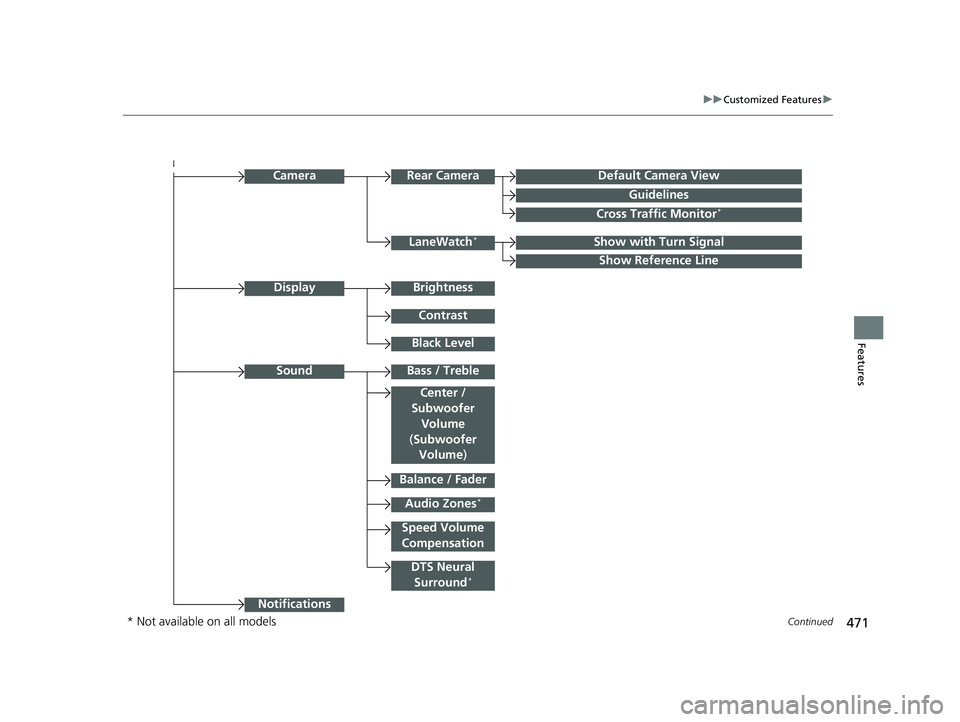
471
uuCustomized Features u
Continued
Features
Audio Zones*
Bass / Treble
Center /
Subwoofer Volume
Camera
Show with Turn Signal
Show Reference Line
Default Camera View
Guidelines
Cross Traffic Monitor*
Sound
Balance / Fader
Center /
Subwoofer
Volume
( Subwoofer
Volume )
DTS Neural
Surround*
Speed Volume
Compensation
Notifications
Brightness
Contrast
Black Level
Display
Rear Camera
LaneWatch*
* Not available on all models
21 US ODYSSEY-31THR6310.book 471 ページ 2020年6月17日 水曜日 午後2時46分
Page 478 of 787
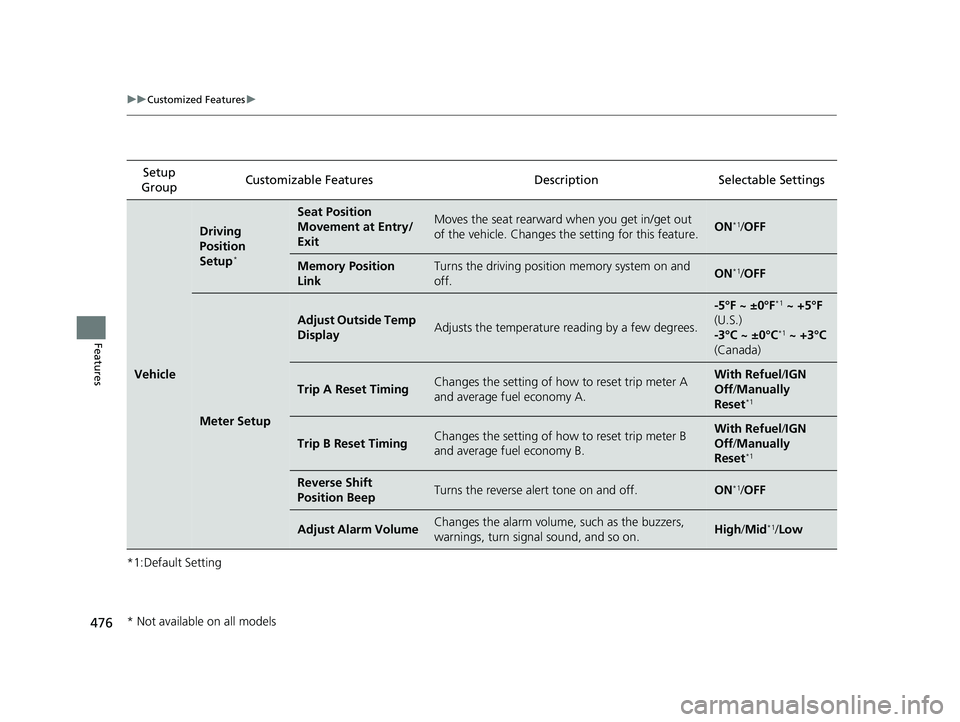
476
uuCustomized Features u
Features
*1:Default SettingSetup
Group Customizable Features Description Selectable Settings
Vehicle
Driving
Position
Setup
*
Seat Position
Movement at Entry/
ExitMoves the seat rearward when you get in/get out
of the vehicle. Changes the setting for this feature.ON*1/
OFF
Memory Position
LinkTurns the driving position memory system on and
off.ON*1/ OFF
Meter Setup
Adjust Outside Temp
DisplayAdjusts the temperature reading by a few degrees.
-5°F ~ ±0°F*1 ~ +5°F
(U.S.)
-3°C ~ ±0°C
*1 ~ +3°C
(Canada)
Trip A Reset TimingChanges the setting of how to reset trip meter A
and average fuel economy A.With Refuel /IGN
Off /Manually
Reset
*1
Trip B Reset TimingChanges the setting of how to reset trip meter B
and average fuel economy B.With Refuel /IGN
Off /Manually
Reset
*1
Reverse Shift
Position BeepTurns the reverse alert tone on and off.ON*1/ OFF
Adjust Alarm VolumeChanges the alarm volume, such as the buzzers,
warnings, turn signal sound, and so on.High /Mid*1/Low
* Not available on all models
21 US ODYSSEY-31THR6310.book 476 ページ 2020年6月17日 水曜日 午後2時46分
Page 483 of 787
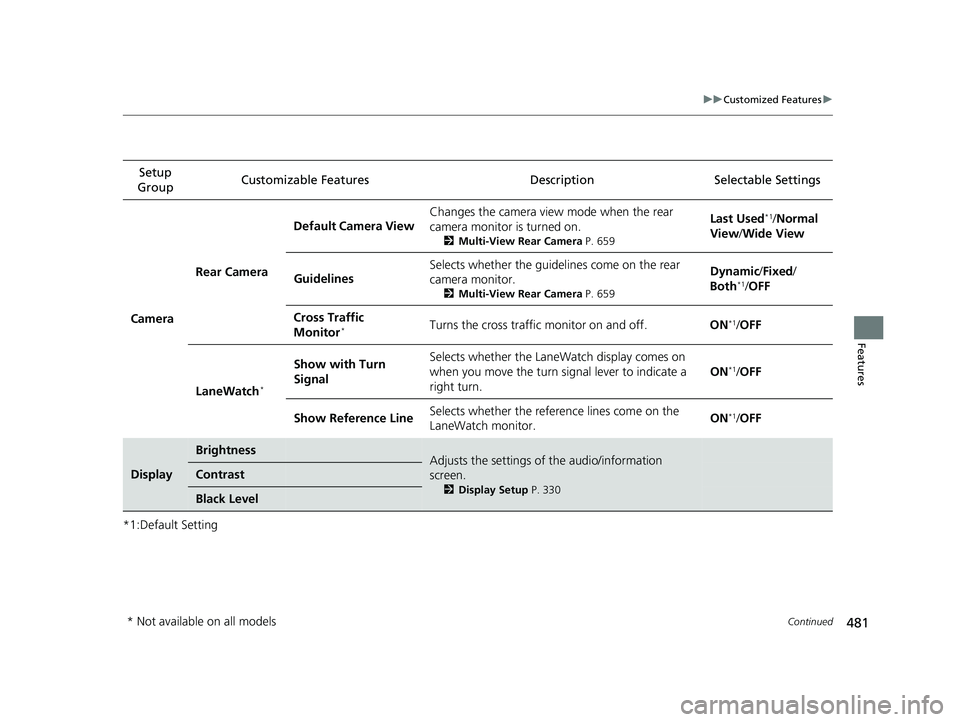
481
uuCustomized Features u
Continued
Features
*1:Default SettingSetup
Group Customizable Features Desc
ription Selectable Settings
Camera Rear Camera
Default Camera View
Changes the camera view mode when the rear
camera monitor is turned on.
2
Multi-View Rear Camera P. 659
Last Used*1/Normal
View/ Wide View
Guidelines Selects whether the guidelines come on the rear
camera monitor.
2
Multi-View Rear Camera P. 659
Dynamic/Fixed /
Both*1/ OFF
Cross Traffic
Monitor
*Turns the cross traffic monitor on and off. ON*1/OFF
LaneWatch
*
Show with Turn
Signal Selects whether the LaneWatch display comes on
when you move the turn signal lever to indicate a
right turn.
ON*1/
OFF
Show Reference Line Selects whether the reference lines come on the
LaneWatch monitor. ON
*1/
OFF
Display
BrightnessAdjusts the settings of the audio/information
screen.
2 Display Setup P. 330
Contrast
Black Level
* Not available on all models
21 US ODYSSEY-31THR6310.book 481 ページ 2020年6月17日 水曜日 午後2時46分
Page 550 of 787
uuTowing a Trailer uTowing Preparation
548
Driving
■Safety chains
Always use safety chains when you tow a trailer. Leave enough slack to allow the
trailer to turn corners easily, but do not allow the chains to drag on the ground.
■Trailer brakes
Recommended for any trailer with a total weight of 1,000 lbs (450 kg) or more:
There are two common types of trailer brake s: surge and electric. Surge brakes are
common for boat trailers, since the brakes will get wet. If you choose electric brakes,
be sure they are electronically actuated. Do not attempt to attach trailer brakes to
your vehicle’s hydraulic system, as it w ill lower braking effectiveness and create a
potential hazard.
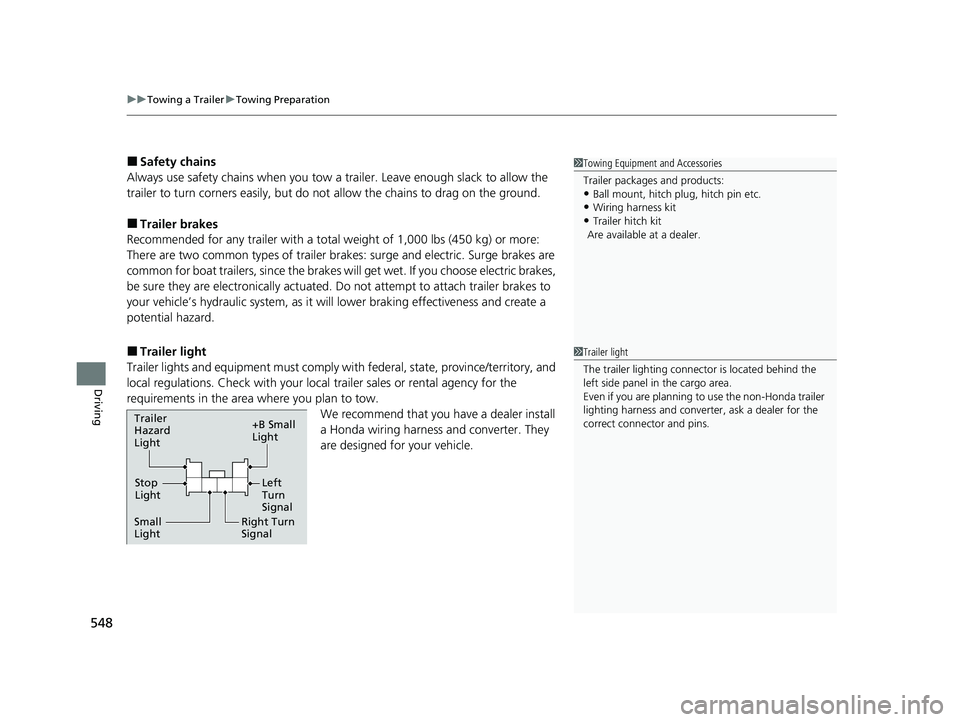
■Trailer light
Trailer lights and equipment must comply with federal, state, province/territory, and
local regulations. Check with your local trailer sales or rental agency for the
requirements in the area where you plan to tow.
We recommend that you have a dealer install
a Honda wiring harness and converter. They
are designed for your vehicle.
1 Towing Equipment and Accessories
Trailer packages and products:
•Ball mount, hitch plug, hitch pin etc.
•Wiring harness kit
•Trailer hitch kit
Are available at a dealer.
1 Trailer light
The trailer lighting connect or is located behind the
left side panel in the cargo area.
Even if you are planning to use the non-Honda trailer
lighting harness and converte r, ask a dealer for the
correct connector and pins.
Right Turn
Signal
Small
Light Stop
Light +B Small
Light
Trailer
Hazard
Light
Left
Turn
Signal
21 US ODYSSEY-31THR6310.book 548 ページ 2020年6月17日 水曜日 午後2時46分
Page 586 of 787
uuWhen Driving uBlind spot information System*
584
Driving
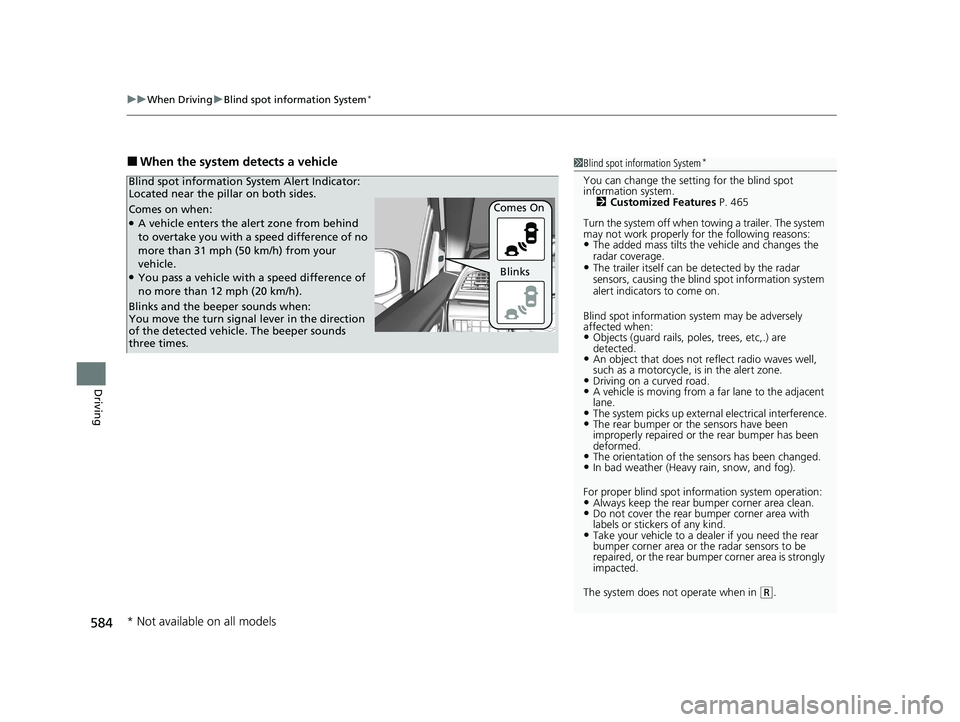
■When the system detects a vehicle1Blind spot information System*
You can change the setting for the blind spot
information system.
2 Customized Features P. 465
Turn the system off when to wing a trailer. The system
may not work properly fo r the following reasons:
•The added mass tilts the vehicle and changes the
radar coverage.
•The trailer itself can be detected by the radar
sensors, causing the blind spot information system
alert indicators to come on.
Blind spot information sy stem may be adversely
affected when:
•Objects (guard rails, poles, trees, etc,.) are
detected.
•An object that does not re flect radio waves well,
such as a motorcycle, is in the alert zone.
•Driving on a curved road.•A vehicle is moving from a far lane to the adjacent
lane.
•The system picks up external electrical interference.•The rear bumper or the sensors have been
improperly repaired or the rear bumper has been
deformed.
•The orientation of the sensors has been changed.•In bad weather (Heavy rain, snow, and fog).
For proper blind spot information system operation:
•Always keep the rear bumper corner area clean.•Do not cover the rear bumper corner area with
labels or sticke rs of any kind.
•Take your vehicle to a dealer if you need the rear
bumper corner area or the radar sensors to be
repaired, or the re ar bumper corner area is strongly
impacted.
The system does not operate when in
( R.
Comes on when:●A vehicle enters the alert zone from behind
to overtake you with a speed difference of no
more than 31 mph (50 km/h) from your
vehicle.
●You pass a vehicle with a speed difference of
no more than 12 mph (20 km/h). Comes On
Blind spot information System Alert Indicator:
Located near the pillar on both sides.
Blinks and the beeper sounds when:
You move the turn signal
lever in the direction
of the detected vehicle. The beeper sounds
three times. Blinks
* Not available on all models
21 US ODYSSEY-31THR6310.book 584 ページ 2020年6月17日 水曜日 午後2時46分
Page 588 of 787
586
uuWhen Driving uLaneWatchTM*
Driving
LaneWatchTM*
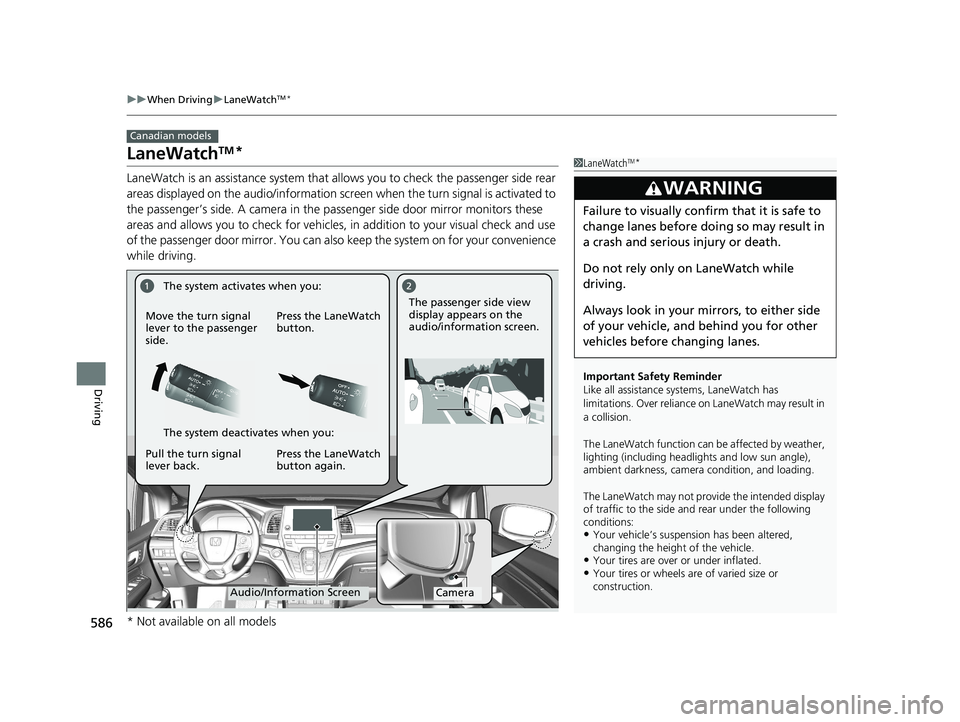
LaneWatch is an assistance system that allows you to check the passenger side rear
areas displayed on the audio/information screen when the turn signal is activated to
the passenger’s side. A camera in the pass enger side door mirror monitors these
areas and allows you to chec k for vehicles, in addition to your visual check and use
of the passenger door mirror. You can also keep the system on for your convenience
while driving.
Canadian models
1 LaneWatchTM*
Important Safety Reminder
Like all assistance systems, LaneWatch has
limitations. Over reliance on LaneWatch may result in
a collision.
The LaneWatch function can be affected by weather,
lighting (including headli ghts and low sun angle),
ambient darkness, camera condition, and loading.
The LaneWatch may not prov ide the intended display
of traffic to the side and rear under the following
conditions:
•Your vehicle’s suspensi on has been altered,
changing the height of the vehicle.
•Your tires are over or under inflated.•Your tires or wheels are of varied size or
construction.
3WARNING
Failure to visually confirm that it is safe to
change lanes before doing so may result in
a crash and serious injury or death.
Do not rely only on LaneWatch while
driving.
Always look in your mi rrors, to either side
of your vehicle, and behind you for other
vehicles before changing lanes.
CameraAudio/Information Screen
Move the turn signal
lever to the passenger
side.
Press the LaneWatch
button.
Pull the turn signal
lever back. Press the LaneWatch
button again. The passenger side view
display appears on the
audio/information screen.
The system activates when you:
The system deactivates when you:
* Not available on all models
21 US ODYSSEY-31THR6310.book 586 ページ 2020年6月17日 水曜日 午後2時46分