parking brake HONDA ODYSSEY 2021 (in English) Owner's Guide
[x] Cancel search | Manufacturer: HONDA, Model Year: 2021, Model line: ODYSSEY, Model: HONDA ODYSSEY 2021Pages: 787, PDF Size: 48.31 MB
Page 552 of 787
550
uuTowing a Trailer uDriving Safely with a Trailer
Driving
Driving Safely with a Trailer
• Have the trailer properly serviced and keep it in good condition.
• Make sure that all the weights and load in the vehicle and trailer are within limits.
2Towing Load Limits P. 546
•Securely attach the hitch, safety chains, and other necessary parts to the trailer.
• Securely store all the items in and on the tr ailer so that they do not shift while
driving.
• Check if the lights and brakes on the trailer are working properly.
• Check the pressure of the traile r tires, including the spare.
• Turn off the Auto Idle Stop syst em using the Auto Idle Stop OFF button. The
trailer weight can affect your vehicle’s br ake effectiveness if Auto Idle Stop is
activated on a hill while towing a trailer.
• Drive slower than normal.
• Obey posted speed limits for vehicles with trailers.
• Use the
(D position when towing a trailer on level roads.
• Turn more slowly and with a wider turning arc than normal.
• Allow more time and distance for braking.
• Do not brake or turn suddenly.
■Things You Need To Know Before Towing a Trailer
■Towing Speeds and Gears
■Turning and Braking
1Driving Safely with a Trailer
Operating speed when towing a trailer must not
exceed 62 mph (100 km/h).
Parking
In addition to the normal precautions, place wheel
chocks at each of the trailer’s tires.
Remember to unhitch the tra iler before changing a
flat tire. Ask the trailer sales or rental agency where
and how to store the trailer’s spare tire.
1 Towing Speeds and Gears
When towing a fixed-sided trailer (e.g., camper), do
not exceed 55 mph (88 km/h). At higher speeds, the
trailer may sway or af fect vehicle handling.
21 US ODYSSEY-31THR6310.book 550 ページ 2020年6月17日 水曜日 午後2時46分
Page 554 of 787
552
Driving
When Driving
Starting the Engine
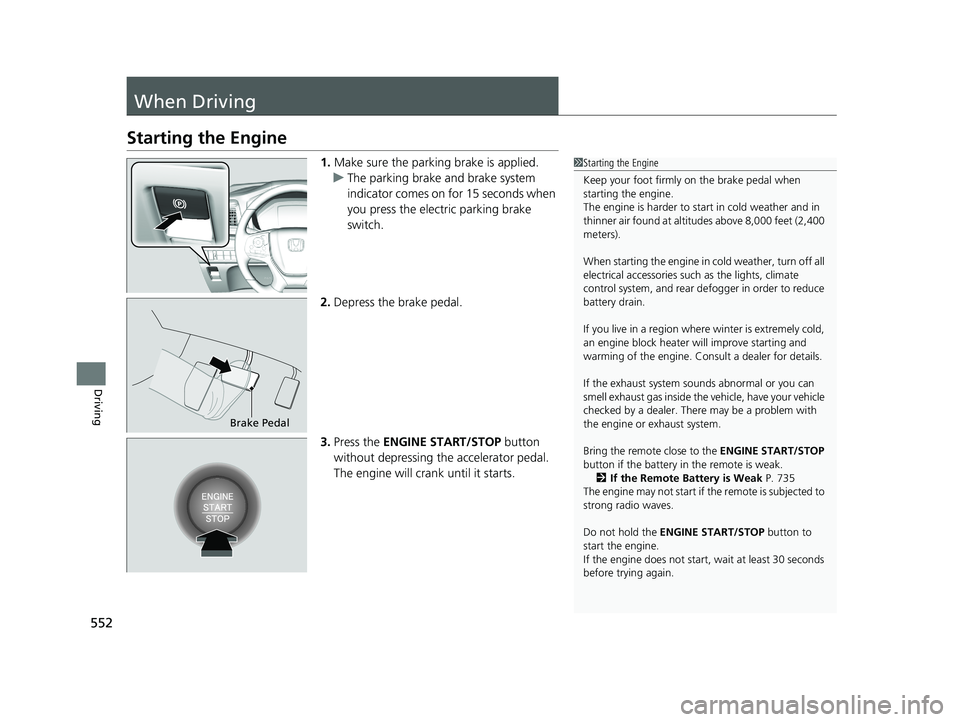
1.Make sure the parking brake is applied.
u The parking brake and brake system
indicator comes on for 15 seconds when
you press the electric parking brake
switch.
2. Depress the brake pedal.
3. Press the ENGINE START/STOP button
without depressing the accelerator pedal.
The engine will crank until it starts.1 Starting the Engine
Keep your foot firmly on the brake pedal when
starting the engine.
The engine is harder to st art in cold weather and in
thinner air found at altit udes above 8,000 feet (2,400
meters).
When starting the engine in cold weather, turn off all
electrical accessories such as the lights, climate
control system, and rear de fogger in order to reduce
battery drain.
If you live in a region where winter is extremely cold,
an engine block heater will improve starting and
warming of the engine. Cons ult a dealer for details.
If the exhaust system sounds abnormal or you can
smell exhaust gas inside the vehicle, have your vehicle
checked by a dealer. There may be a problem with
the engine or exhaust system.
Bring the remote close to the ENGINE START/STOP
button if the battery in the remote is weak. 2 If the Remote Battery is Weak P. 735
The engine may not start if the remote is subjected to
strong radio waves.
Do not hold the ENGINE START/STOP button to
start the engine.
If the engine does not start, wait at least 30 seconds
before trying again.
Brake Pedal
21 US ODYSSEY-31THR6310.book 552 ページ 2020年6月17日 水曜日 午後2時46分
Page 559 of 787
557
uuWhen Driving uStarting the Engine
Driving
1. Depress and hold the brake pedal, then press the ENGINE START/STOP button.
2. Keeping your right foot on the br ake pedal, press the button. Select
(R
when reversing.
3. With the parking brake applied, release the brake pedal and gently depress the
accelerator pedal.
u Make sure the parking brake and brake system indicator goes off.
2Parking Brake P. 640
2 If the Transmission System Indicator Blinks along with the Warning
Message P. 746
■Hill start assist system
Hill start assist keeps the brake engaged br iefly to help prevent the vehicle from
rolling on inclines as you move your foot from the brake pedal to the accelerator.
Change the gear position to
(D or (S when facing uphill, or (R when facing
downhill, then release the brake pedal.
■Starting to Drive1 Starting to Drive
The engine stops when the gear position is changed
from
( P before the ENGINE START/STOP button is
pressed. Follow the step 1 when starting to drive.
You can also release the parking brake by pulling the
electric parking brake sw itch while depressing the
brake pedal.
When facing downhill, you can start your vehicle
more smoothly by manually releasing it with the
electric parking brake switch than by releasing it with
the accelerator pedal.
When the engine was started using the button on
the remote*When the engine was started using the button on the remote*
When the engine was started in any case
D/S
1 Hill start assist system
Hill start assist may not prevent the vehicle from
rolling downhill on a very st eep or slippery slope, and
will not operate on small inclines.
Hill start assist is not a replacement for the parking
brake.
Hill start assist will operate even when VSA ® is
switched off.
* Not available on all models
21 US ODYSSEY-31THR6310.book 557 ページ 2020年6月17日 水曜日 午後2時46分
Page 562 of 787
560
uuWhen Driving uShifting
Driving
Shifting
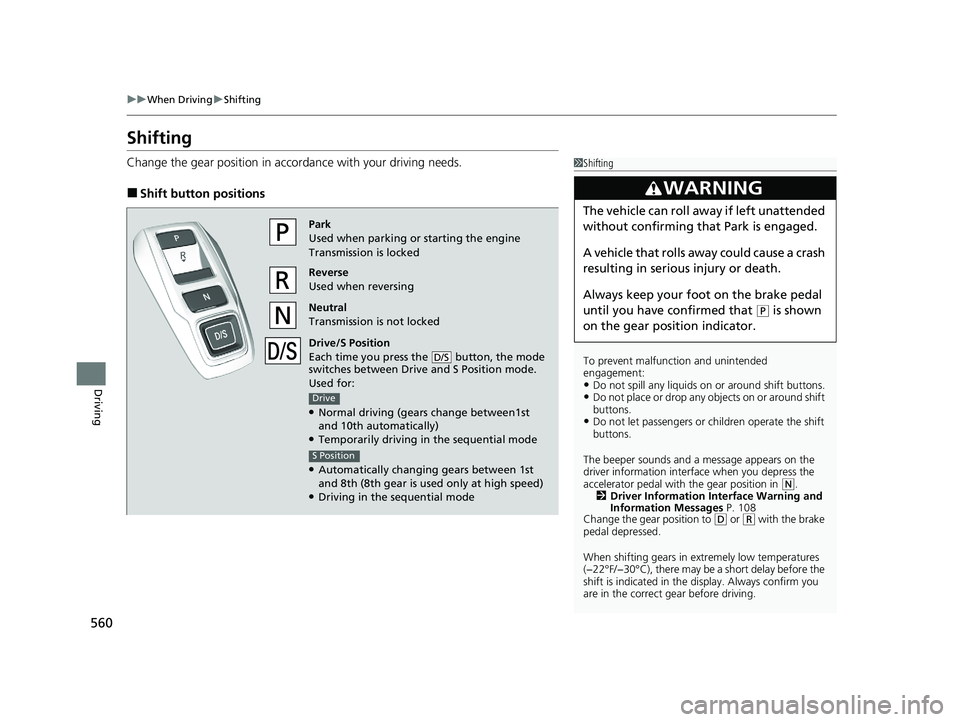
Change the gear position in acco rdance with your driving needs.
■Shift button positions
1Shifting
To prevent malfunc tion and unintended
engagement:
•Do not spill any liquids on or around shift buttons.•Do not place or drop any objects on or around shift
buttons.
•Do not let passengers or ch ildren operate the shift
buttons.
The beeper sounds and a message appears on the
driver information interf ace when you depress the
accelerator pedal with the gear position in
( N.
2 Driver Information Interface Warning and
Information Messages P. 108
Change the gear position to
( D or (R with the brake
pedal depressed.
When shifting gears in extremely low temperatures
(−22°F/−30°C), there may be a short delay before the
shift is indicated in the di splay. Always confirm you
are in the correct gear before driving.
3WARNING
The vehicle can roll aw ay if left unattended
without confirming that Park is engaged.
A vehicle that rolls away could cause a crash
resulting in seriou s injury or death.
Always keep your foot on the brake pedal
until you have confirmed that
( P is shown
on the gear position indicator.
Park
Used when parking or starting the engine
Transmission is locked
Reverse
Used when reversing
Neutral
Transmission is not locked
Drive/S Position
Each time you press the button, the mode
switches between Drive and S Position mode.
Used for:
●Normal driving (gears change between1st
and 10th automatically)
●Temporarily driving in the sequential mode
●Automatically changing gears between 1st
and 8th (8th gear is used only at high speed)
●Driving in the sequential mode
D/S
Drive
S Position
21 US ODYSSEY-31THR6310.book 560 ページ 2020年6月17日 水曜日 午後2時46分
Page 599 of 787
597
uuHonda Sensing ®u Collision Mitigation Braking SystemTM (CMBSTM)
Continued
Driving
■Vehicle conditions
• Headlight lenses are dirty or the h eadlights are not properly adjusted.
• The outside of the windshield is blocked by dirt, mud, leaves, wet snow, etc.
• The inside of the windshield is fogged.
• An abnormal tire or wheel condition (wrong sized, varied size or construction,
improperly inflated, co mpact spare tire, etc.).
• When tire chains are installed.
• The vehicle is tilted due to a heavy load or suspension modifications.
• The camera temperature gets too high.
• Driving with the parking brake applied.
• When the radar sensor in the front grille gets dirty.
• The vehicle is towing a trailer.
• Driving at night or in a dark place (e.g., a tunnel) with the headlights off.
21 US ODYSSEY-31THR6310.book 597 ページ 2020年6月17日 水曜日 午後2時46分
Page 606 of 787
uuHonda Sensing ®u Adaptive Cruise Control (ACC) with Low Speed Follow
604
Driving
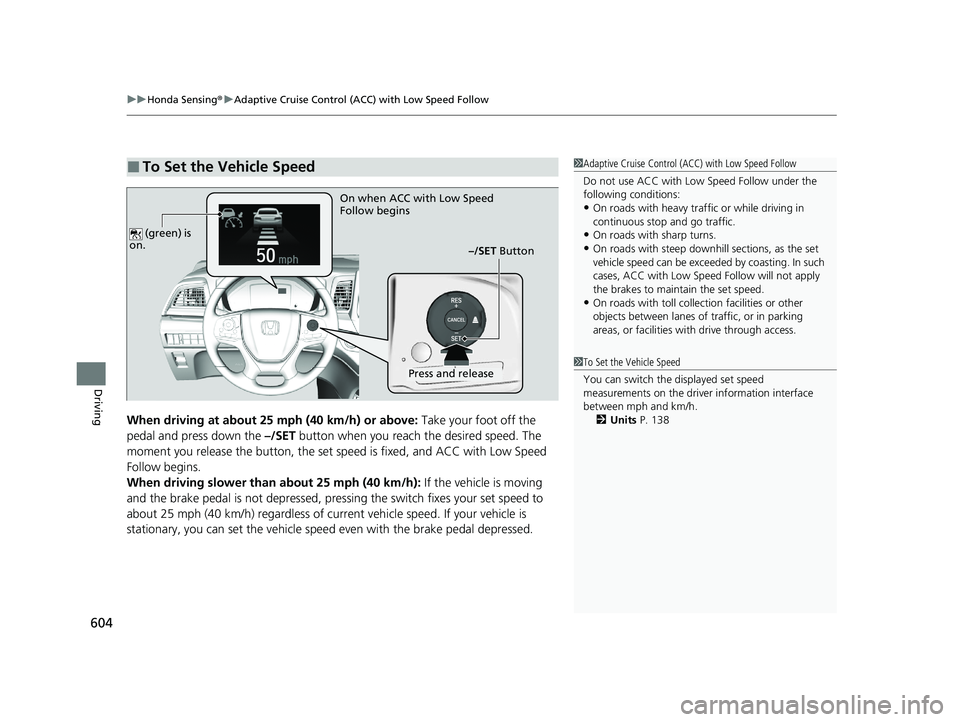
When driving at about 25 mph (40 km/h) or above: Take your foot off the
pedal and press down the –/SET button when you reach the desired speed. The
moment you release the butto n, the set speed is fixed, and ACC with Low Speed
Follow begins.
When driving slower than about 25 mph (40 km/h): If the vehicle is moving
and the brake pedal is not depressed, pressi ng the switch fixes your set speed to
about 25 mph (40 km/h) regardless of current vehicle speed. If your vehicle is
stationary, you can set the vehicle speed even with the brake pedal depressed.
■To Set the Vehicle Speed1 Adaptive Cruise Control (ACC) with Low Speed Follow
Do not use ACC with Low Speed Follow under the
following conditions:
•On roads with heavy traf fic or while driving in
continuous stop and go traffic.
•On roads with sharp turns.•On roads with steep downhill sections, as the set
vehicle speed can be exceeded by coasting. In such
cases, ACC with Low Speed Follow will not apply
the brakes to maintain the set speed.
•On roads with toll collection facilities or other
objects between lanes of traffic, or in parking
areas, or faci lities with driv e through access.
On when ACC with Low Speed
Follow begins
–/SET Button
Press and release
(green) is
on.1 To Set the Vehicle Speed
You can switch the displayed set speed
measurements on the driver information interface
between mph and km/h.
2 Units P. 138
21 US ODYSSEY-31THR6310.book 604 ページ 2020年6月17日 水曜日 午後2時46分
Page 611 of 787
Continued609
uu Honda Sensing ®u Adaptive Cruise Control (ACC) with Low Speed Follow
Driving
The system may automatically shut off and the indicator will come on under
certain conditions. Some examples of these conditions are listed below. Other
conditions may reduce some of the ACC functions.
2 Front Sensor Camera P. 637
2 Radar Sensor P. 639
■Environmental conditions
Driving in bad weather (r ain, fog, snow, etc.).
■Roadway conditions
Driving on a snowy or wet roadway (obscured lane marking, vehicle tracks, reflected
lights, road spra y, high contrast).
■Vehicle conditions
• The outside of the windshield is blocked by dirt, mud, leaves, wet snow, etc.
• An abnormal tire or wheel condition (wrong sized, varied size or construction,
improperly inflated, co mpact spare tire, etc.).
• The camera temperature gets too high.
• The parking brake is applied.
• The front grille is dirty.
• The vehicle is tilted due to a heavy load or suspension modifications.
• Tire chains are installed.
■ACC with Low Speed Follow Conditions and Limitations1ACC with Low Speed Follow Conditions and Limitations
If you need the radar sensor to be repaired, or
removed, or the radar se nsor cover is strongly
impacted, turn off the system by pressing the
button and take your vehicle to a dealer.
Have your vehicle checked by a dealer if you find any
unusual behavior of the system (e.g., the warning
message appears too frequently).
21 US ODYSSEY-31THR6310.book 609 ページ 2020年6月17日 水曜日 午後2時46分
Page 617 of 787
Continued615
uu Honda Sensing ®u Adaptive Cruise Control (ACC) with Low Speed Follow
Driving
■Automatic cancellation
The beeper sounds and a message appears on the driver information interface when
ACC with Low Speed Follow is automatically canceled. Any of these conditions may
cause the ACC with Low Speed Fo llow to automatically cancel:
• Bad weather (rain, fog, snow, etc.).
• When the radar sensor inside the front grille gets dirty.
• The vehicle ahead of yo u cannot be detected.
• An abnormal tire condition is detected, or the tires are skidding.
• Driving on a mountainous road, or driving off road for extended periods.
• Abrupt steering wheel movement.
• When the ABS or VSA ® or CMBS
TM is activated.
• When the ABS or VSA ® system indicator comes on.
• When the vehicle is stopped on a very steep slope.
• When you manually apply the parking brake.
• When the detected vehicle within the AC C with Low Speed Follow range is too
close to your vehicle.
• The camera behind the rearview mirror, or the area around the camera, including
the windshield, gets dirty.
• When the Maximum Load Limit is exceeded.
• When passing through an enclosed space, such as tunnel.
The ACC with Low Speed Follow automatic ca ncellation can be also triggered by the
following causes. In these cases, the parking brake will be automatically applied.
• The driver’s seat belt is unfastene d when the vehicle is stationary.
• The vehicle stops for more than 10 minutes.
• The power system is turned off.
In the following cases, a bu zzer sounds, ACC with Low Speed Follow is deactivated,
and the Cruise Cancelled: System Not Available message appears in the driver
information interface.
• The vehicle has repeatedly applied the brakes to maintain the set speed (for
example, you are descending a long slope).
1 Automatic cancellation
Even though ACC with Low Speed Follow has been
automatically canceled, you can still resume the prior
set speed. Wait until the condition that caused ACC
with Low Speed Follow to cancel improves, then
press the RES/+ button.
21 US ODYSSEY-31THR6310.book 615 ページ 2020年6月17日 水曜日 午後2時46分
Page 642 of 787
640
Driving
Braking
Brake System
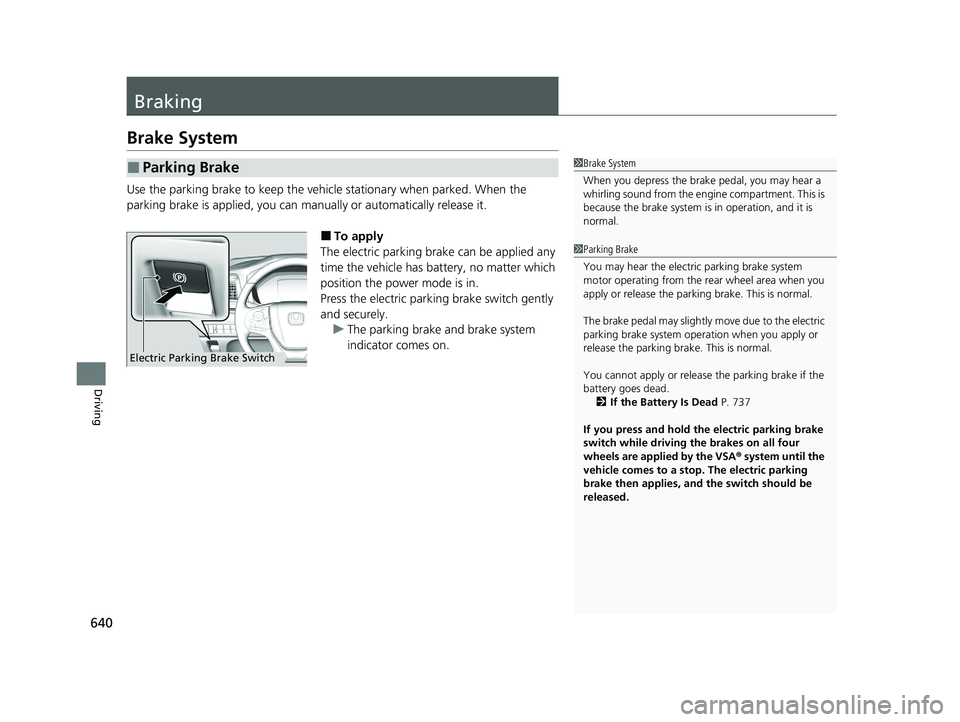
Use the parking brake to keep the vehicl e stationary when parked. When the
parking brake is applied, you can ma nually or automatically release it.
■To apply
The electric parking brake can be applied any
time the vehicle has battery, no matter which
position the power mode is in.
Press the electric parking brake switch gently
and securely. u The parking brake and brake system
indicator comes on.
■Parking Brake1Brake System
When you depress the brak e pedal, you may hear a
whirling sound from the engine compartment. This is
because the brake system is in operation, and it is
normal.
1 Parking Brake
You may hear the electric parking brake system
motor operating from the re ar wheel area when you
apply or release the parking brake. This is normal.
The brake pedal may slightly move due to the electric
parking brake system opera tion when you apply or
release the parking br ake. This is normal.
You cannot apply or release the parking brake if the
battery goes dead.
2 If the Battery Is Dead P. 737
If you press and hold the electric parking brake
switch while driving the brakes on all four
wheels are applied by the VSA ® system until the
vehicle comes to a stop. The electric parking
brake then applies, and the switch should be
released.
Electric Parking Brake Switch
21 US ODYSSEY-31THR6310.book 640 ページ 2020年6月17日 水曜日 午後2時46分
Page 643 of 787
Continued641
uu Braking uBrake System
Driving
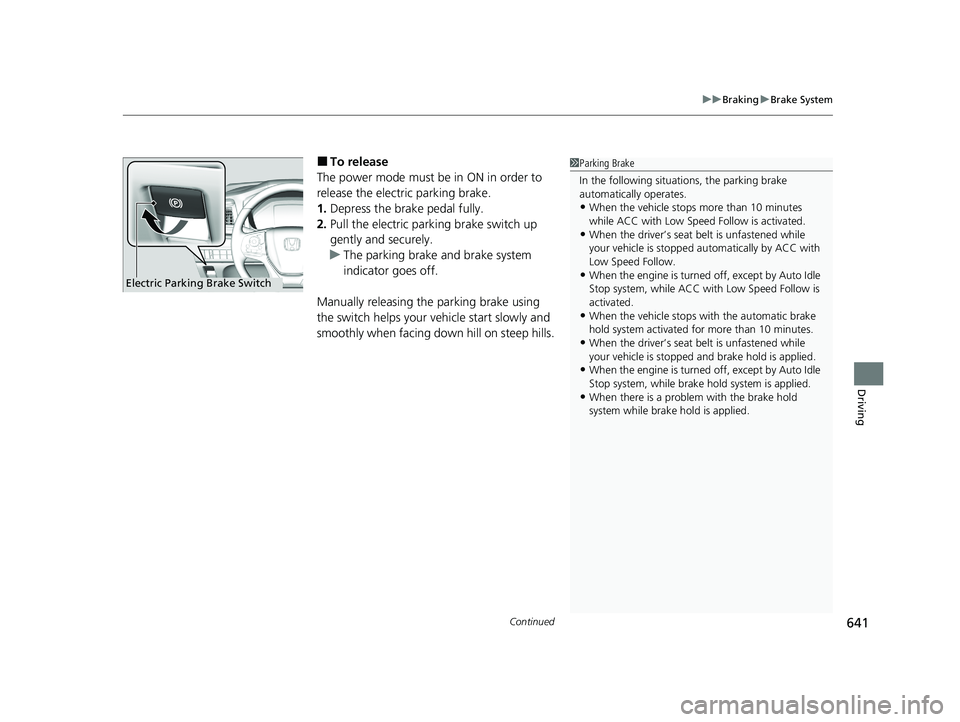
■To release
The power mode must be in ON in order to
release the electric parking brake.
1. Depress the brake pedal fully.
2. Pull the electric parking brake switch up
gently and securely.
u The parking brake and brake system
indicator goes off.
Manually releasing the parking brake using
the switch helps your vehicle start slowly and
smoothly when facing down hill on steep hills.1 Parking Brake
In the following situations, the parking brake
automatically operates.
•When the vehicle stops more than 10 minutes
while ACC with Low Speed Follow is activated.
•When the driver’s seat belt is unfastened while
your vehicle is stopped au tomatically by ACC with
Low Speed Follow.
•When the engine is turned off, except by Auto Idle
Stop system, while ACC with Low Speed Follow is
activated.
•When the vehicle stops with the automatic brake
hold system activated for more than 10 minutes.
•When the driver’s seat belt is unfastened while
your vehicle is stopped and brake hold is applied.
•When the engine is turned off, except by Auto Idle
Stop system, while brake hold system is applied.
•When there is a problem with the brake hold
system while brake hold is applied.
Electric Parking Brake Switch
21 US ODYSSEY-31THR6310.book 641 ページ 2020年6月17日 水曜日 午後2時46分