battery HONDA ODYSSEY 2021 (in English) Owner's Guide
[x] Cancel search | Manufacturer: HONDA, Model Year: 2021, Model line: ODYSSEY, Model: HONDA ODYSSEY 2021Pages: 787, PDF Size: 48.31 MB
Page 490 of 787
uuBluetooth ® HandsFreeLink ®u Using HFL
488
Features
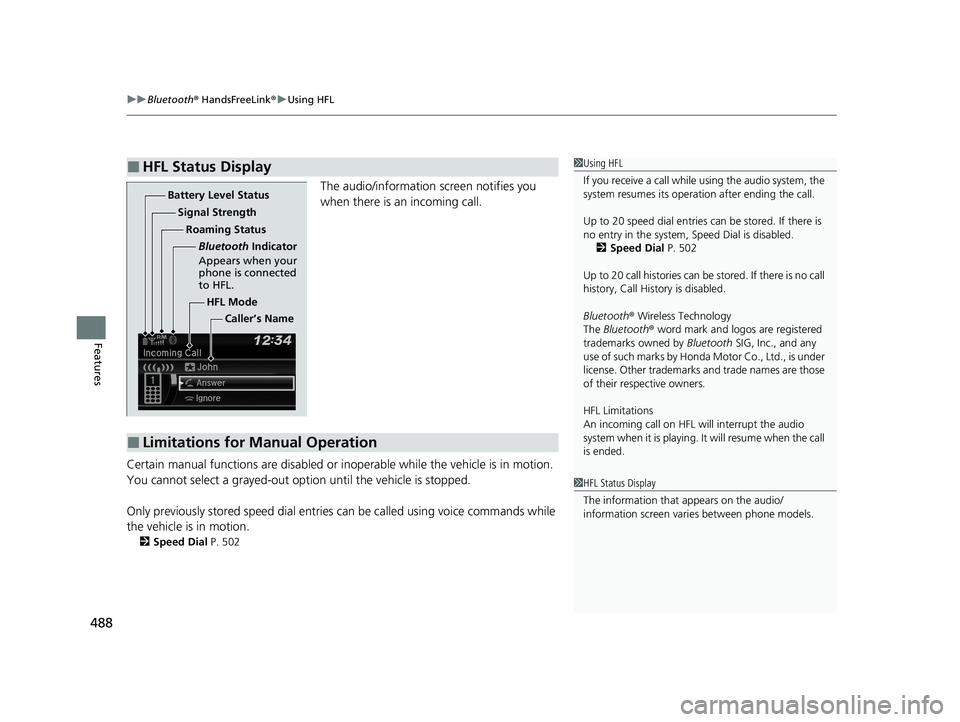
The audio/information screen notifies you
when there is an incoming call.
Certain manual functions are disabled or i noperable while the vehicle is in motion.
You cannot select a grayed-out option until the vehicle is stopped.
Only previously stored speed dial entries can be called using voice commands while
the vehicle is in motion.
2 Speed Dial P. 502
■HFL Status Display1Using HFL
If you receive a call while using the audio system, the
system resumes its operati on after ending the call.
Up to 20 speed dial entries can be stored. If there is
no entry in the system, Speed Dial is disabled. 2 Speed Dial P. 502
Up to 20 call histories can be stored. If there is no call
history, Call History is disabled.
Bluetooth ® Wireless Technology
The Bluetooth ® word mark and logos are registered
trademarks owned by Bluetooth SIG, Inc., and any
use of such marks by Honda Motor Co., Ltd., is under
license. Other trademarks and trade names are those
of their respective owners.
HFL Limitations
An incoming call on HFL will interrupt the audio
system when it is playing. It will resume when the call
is ended.
1 HFL Status Display
The information that appears on the audio/
information screen vari es between phone models.
HFL Mode
Battery Level Status
Signal Strength
Bluetooth Indicator
Appears when your
phone is connected
to HFL.
Roaming Status
Caller’s Name
■Limitations for Manual Operation
21 US ODYSSEY-31THR6310.book 488 ページ 2020年6月17日 水曜日 午後2時46分
Page 495 of 787
Continued493
uuBluetooth ® HandsFreeLink ®u HFL Menus
Features
■To pair a cell phone (when there is no
phone paired to the system)
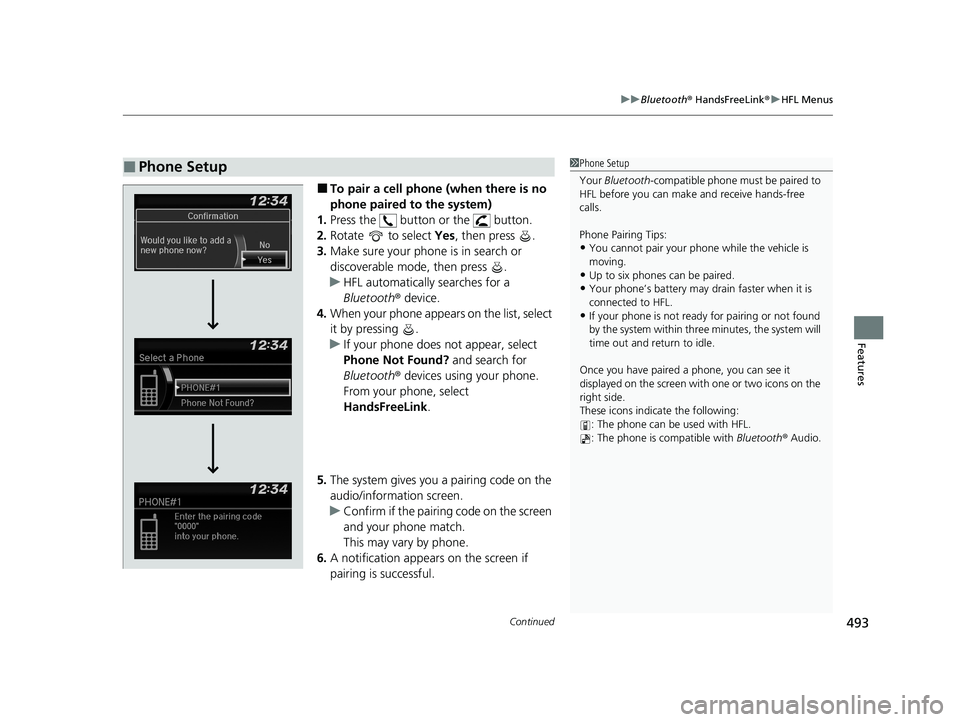
1. Press the button or the button.
2. Rotate to select Yes, then press .
3. Make sure your phone is in search or
discoverable mode, then press .
u HFL automatically searches for a
Bluetooth ® device.
4. When your phone appears on the list, select
it by pressing .
u If your phone does not appear, select
Phone Not Found? and search for
Bluetooth ® devices using your phone.
From your phone, select
HandsFreeLink .
5. The system gives you a pairing code on the
audio/information screen.
u Confirm if the pairing code on the screen
and your phone match.
This may vary by phone.
6. A notification appears on the screen if
pairing is successful.
■Phone Setup1Phone Setup
Your Bluetooth -compatible phone must be paired to
HFL before you can make and receive hands-free
calls.
Phone Pairing Tips:
•You cannot pair your phone while the vehicle is
moving.
•Up to six phones can be paired.
•Your phone’s battery may dr ain faster when it is
connected to HFL.
•If your phone is not ready for pairing or not found
by the system within three minutes, the system will
time out and return to idle.
Once you have paired a phone, you can see it
displayed on the screen with one or two icons on the
right side.
These icons indicate the following: : The phone can be used with HFL.
: The phone is compatible with Bluetooth® Audio.
21 US ODYSSEY-31THR6310.book 493 ページ 2020年6月17日 水曜日 午後2時46分
Page 516 of 787
uuBluetooth ® HandsFreeLink ®u Using HFL
514
Features
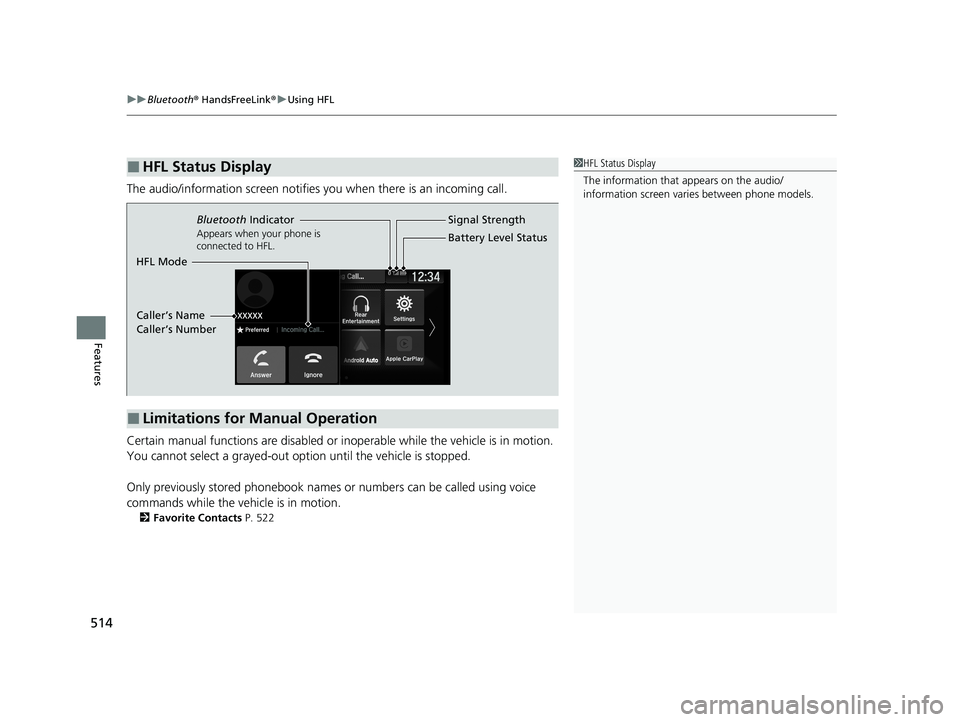
The audio/information screen notifies you when there is an incoming call.
Certain manual functions are disabled or i noperable while the vehicle is in motion.
You cannot select a grayed-out option until the vehicle is stopped.
Only previously stored phonebook names or numbers can be called using voice
commands while the vehicle is in motion.
2 Favorite Contacts P. 522
■HFL Status Display1HFL Status Display
The information that appears on the audio/
information screen vari es between phone models.
■Limitations for Manual Operation
Bluetooth Indicator
Appears when your phone is
connected to HFL.
Signal Strength
HFL Mode Battery Level Status
Caller’s Name
Caller’s Number
21 US ODYSSEY-31THR6310.book 514 ページ 2020年6月17日 水曜日 午後2時46分
Page 520 of 787
uuBluetooth ® HandsFreeLink ®u HFL Menus
518
Features
■To pair a cell phone (when there is no
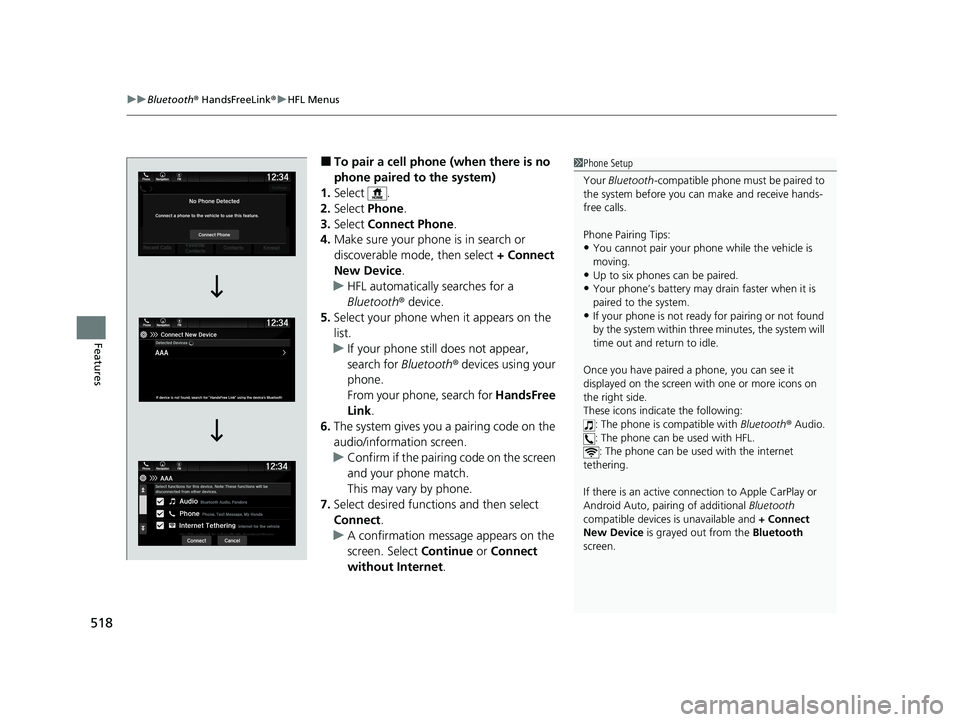
phone paired to the system)
1. Select .
2. Select Phone .
3. Select Connect Phone .
4. Make sure your phone is in search or
discoverable mode, then select + Connect
New Device .
u HFL automatically searches for a
Bluetooth ® device.
5. Select your phone when it appears on the
list.
u If your phone still does not appear,
search for Bluetooth® devices using your
phone.
From your phone, search for HandsFree
Link .
6. The system gives you a pairing code on the
audio/information screen.
u Confirm if the pairing code on the screen
and your phone match.
This may vary by phone.
7. Select desired functions and then select
Connect .
u A confirmation message appears on the
screen. Select Continue or Connect
without Internet .1Phone Setup
Your Bluetooth -compatible phone must be paired to
the system before you ca n make and receive hands-
free calls.
Phone Pairing Tips:
•You cannot pair your phone while the vehicle is
moving.
•Up to six phones can be paired.
•Your phone’s battery may dr ain faster when it is
paired to the system.
•If your phone is not ready for pairing or not found
by the system within three minutes, the system will
time out and return to idle.
Once you have paired a phone, you can see it
displayed on the screen with one or more icons on
the right side.
These icons indicate the following: : The phone is compatible with Bluetooth® Audio.
: The phone can be used with HFL. : The phone can be used with the internet
tethering.
If there is an active connection to Appl e CarPlay or
Android Auto, pairing of additional Bluetooth
compatible devices is unavailable and + Connect
New Device is grayed out from the Bluetooth
screen.
21 US ODYSSEY-31THR6310.book 518 ページ 2020年6月17日 水曜日 午後2時46分
Page 537 of 787
Continued535
uuBluetooth ® HandsFreeLink ®u HFL Menus
Features
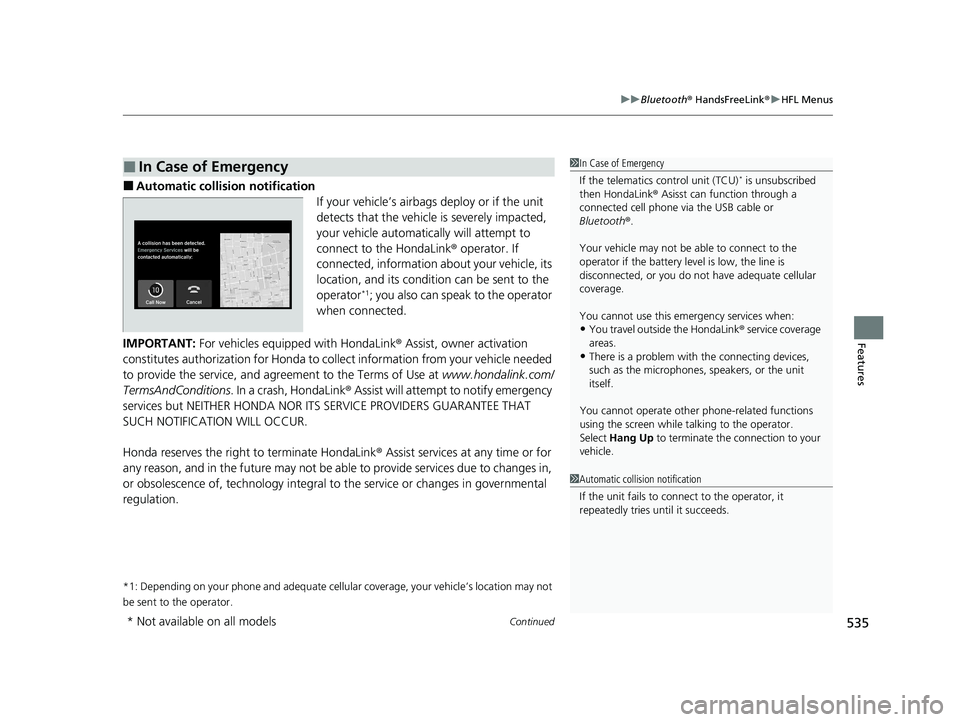
■Automatic collis ion notification
If your vehicle’s airbags deploy or if the unit
detects that the vehicle is severely impacted,
your vehicle automatically will attempt to
connect to the HondaLink ® operator. If
connected, information ab out your vehicle, its
location, and its condition can be sent to the
operator
*1; you also can speak to the operator
when connected.
IMPORTANT: For vehicles equipped with HondaLink ® Assist, owner activation
constitutes authorization for Honda to collect information from your vehicle needed
to provide the service, and agreement to the Terms of Use at www.hondalink.com/
TermsAndConditions . In a crash, HondaLink ® Assist will attempt to notify emergency
services but NEITHER HONDA NOR I TS SERVICE PROVIDERS GUARANTEE THAT
SUCH NOTIFICATION WILL OCCUR.
Honda reserves the right to terminate HondaLink ® Assist services at any time or for
any reason, and in the future may not be ab le to provide services due to changes in,
or obsolescence of, technology integral to the service or changes in governmental
regulation.
*1: Depending on your phone and adequate cellular coverage, your vehicle’s location may not
be sent to the operator.
■In Case of Emergency1 In Case of Emergency
If the telematics control unit (TCU)
* is unsubscribed
then HondaLink ® Asisst can function through a
connected cell phone via the USB cable or
Bluetooth ®.
Your vehicle may not be able to connect to the
operator if the battery level is low, the line is
disconnected, or you do not have adequate cellular
coverage.
You cannot use this emergency services when:
•You travel outside the HondaLink ® service coverage
areas.
•There is a problem with the connecting devices,
such as the microphones, speakers, or the unit
itself.
You cannot operate othe r phone-related functions
using the screen while talking to the operator.
Select Hang Up to terminate the connection to your
vehicle.
1 Automatic collision notification
If the unit fails to connect to the operator, it
repeatedly tries until it succeeds.
* Not available on all models
21 US ODYSSEY-31THR6310.book 535 ページ 2020年6月17日 水曜日 午後2時46分
Page 554 of 787
552
Driving
When Driving
Starting the Engine
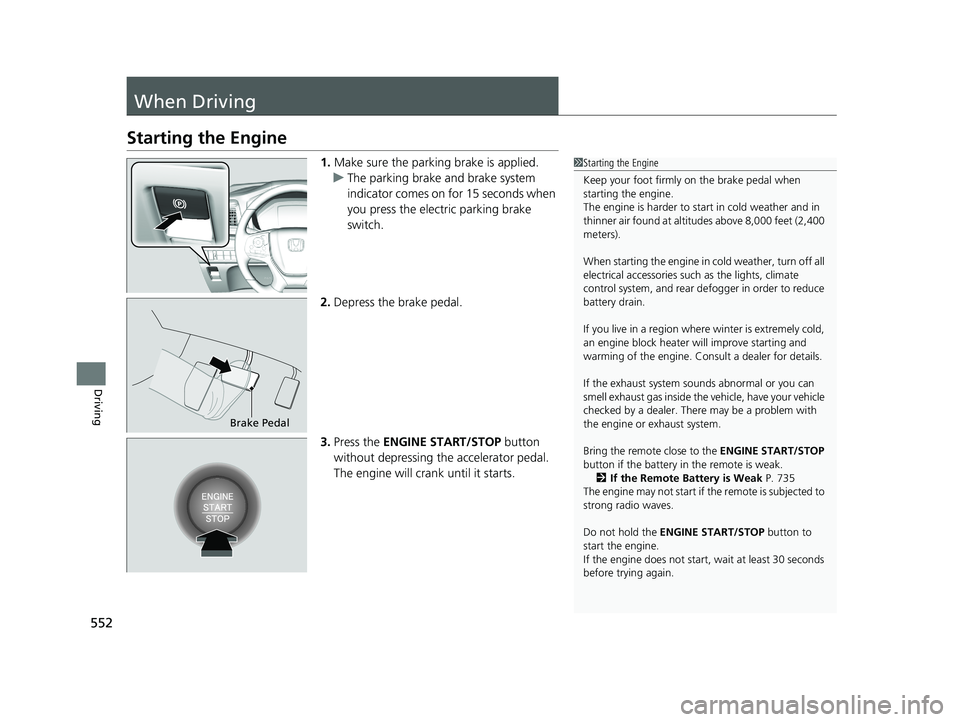
1.Make sure the parking brake is applied.
u The parking brake and brake system
indicator comes on for 15 seconds when
you press the electric parking brake
switch.
2. Depress the brake pedal.
3. Press the ENGINE START/STOP button
without depressing the accelerator pedal.
The engine will crank until it starts.1 Starting the Engine
Keep your foot firmly on the brake pedal when
starting the engine.
The engine is harder to st art in cold weather and in
thinner air found at altit udes above 8,000 feet (2,400
meters).
When starting the engine in cold weather, turn off all
electrical accessories such as the lights, climate
control system, and rear de fogger in order to reduce
battery drain.
If you live in a region where winter is extremely cold,
an engine block heater will improve starting and
warming of the engine. Cons ult a dealer for details.
If the exhaust system sounds abnormal or you can
smell exhaust gas inside the vehicle, have your vehicle
checked by a dealer. There may be a problem with
the engine or exhaust system.
Bring the remote close to the ENGINE START/STOP
button if the battery in the remote is weak. 2 If the Remote Battery is Weak P. 735
The engine may not start if the remote is subjected to
strong radio waves.
Do not hold the ENGINE START/STOP button to
start the engine.
If the engine does not start, wait at least 30 seconds
before trying again.
Brake Pedal
21 US ODYSSEY-31THR6310.book 552 ページ 2020年6月17日 水曜日 午後2時46分
Page 556 of 787
uuWhen Driving uStarting the Engine
554
Driving
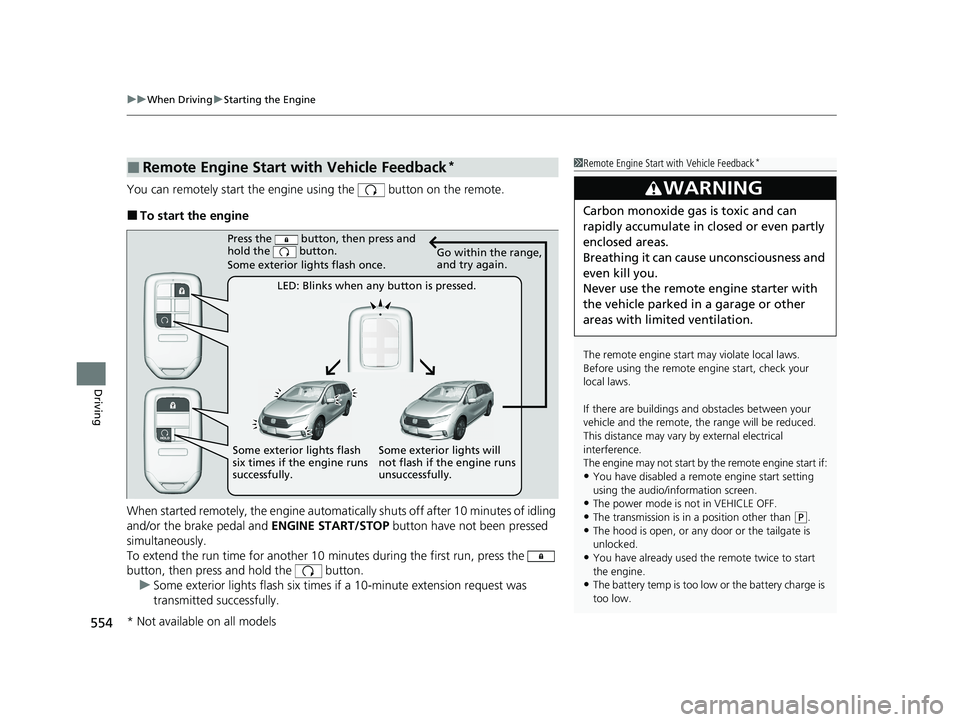
You can remotely start the engine using the button on the remote.
■To start the engine
When started remotely, the engine automati cally shuts off after 10 minutes of idling
and/or the brake pedal and ENGINE START/STOP button have not been pressed
simultaneously.
To extend the run time for another 10 minutes during the first run, press the
button, then press and hold the button.
u Some exterior lights flash six times if a 10-minute extension request was
transmitted successfully.
■Remote Engine Start with Vehicle Feedback*1Remote Engine Start with Vehicle Feedback*
The remote engine start may violate local laws.
Before using the remote e ngine start, check your
local laws.
If there are buildings an d obstacles between your
vehicle and the remote, th e range will be reduced.
This distance may vary by external electrical
interference.
The engine may not start by the remote engine start if:
•You have disabled a remote engine start setting
using the audio/information screen.
•The power mode is not in VEHICLE OFF.
•The transmission is in a position other than ( P.
•The hood is open, or any door or the tailgate is
unlocked.
•You have already used the remote twice to start
the engine.
•The battery temp is too low or the battery charge is
too low.
3WARNING
Carbon monoxide ga s is toxic and can
rapidly accumulate in closed or even partly
enclosed areas.
Breathing it can cause unconsciousness and
even kill you.
Never use the remote engine starter with
the vehicle parked in a garage or other
areas with limited ventilation.
Press the button, then press and
hold the button.
Some exterior lights flash once.
LED: Blinks when any button is pressed. Go within the range,
and try again.
Some exterior lights will
not flash if the engine runs
unsuccessfully.
Some exterior lights flash
six times if the engine runs
successfully.
* Not available on all models
21 US ODYSSEY-31THR6310.book 554 ページ 2020年6月17日 水曜日 午後2時46分
Page 557 of 787
Continued555
uuWhen Driving uStarting the Engine
Driving
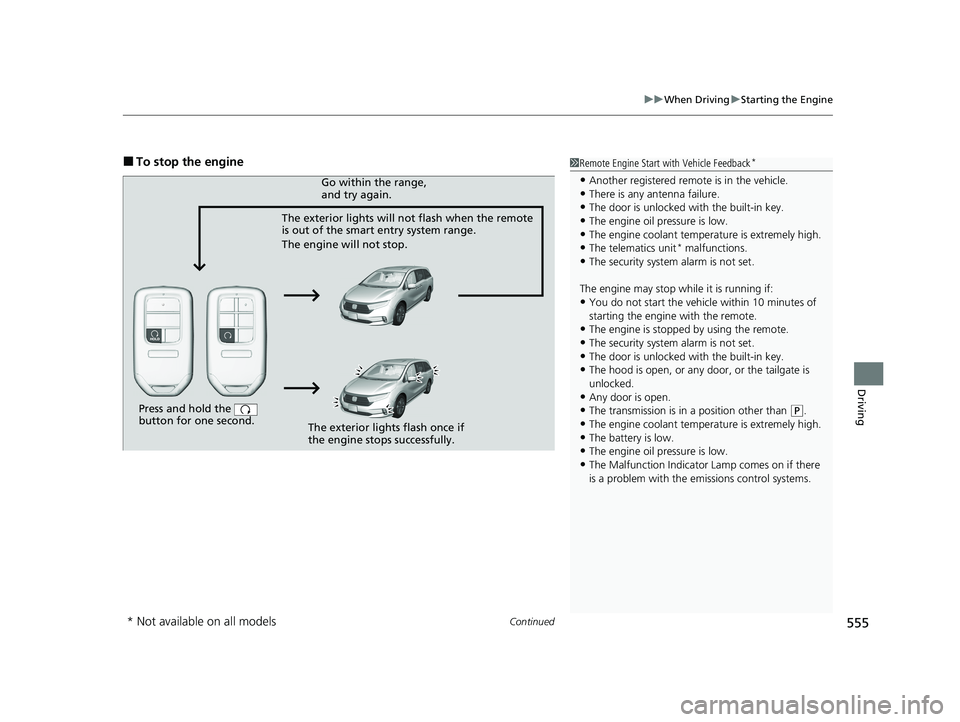
■To stop the engine1Remote Engine Start with Vehicle Feedback*
•Another registered remo te is in the vehicle.•There is any antenna failure.
•The door is unlocked with the built-in key.
•The engine oil pressure is low.•The engine coolant temper ature is extremely high.
•The telematics unit* malfunctions.
•The security system alarm is not set.
The engine may stop whil e it is running if:
•You do not start the vehicl e within 10 minutes of
starting the engine with the remote.
•The engine is stopped by using the remote.
•The security system alarm is not set.•The door is unlocked with the built-in key.
•The hood is open, or any door, or the tailgate is
unlocked.
•Any door is open.
•The transmission is in a position other than ( P.
•The engine coolant temper ature is extremely high.
•The battery is low.•The engine oil pressure is low.
•The Malfunction Indicator Lamp comes on if there
is a problem with the emissions control systems.
Press and hold the
button for one second.
The exterior lights will not flash when the remote
is out of the smart entry system range.
The engine will not stop.Go within the range,
and try again.
The exterior lights flash once if
the engine stops successfully.
* Not available on all models
21 US ODYSSEY-31THR6310.book 555 ページ 2020年6月17日 水曜日 午後2時46分
Page 570 of 787
568
uuWhen Driving uAuto Idle Stop
Driving
Auto Idle Stop
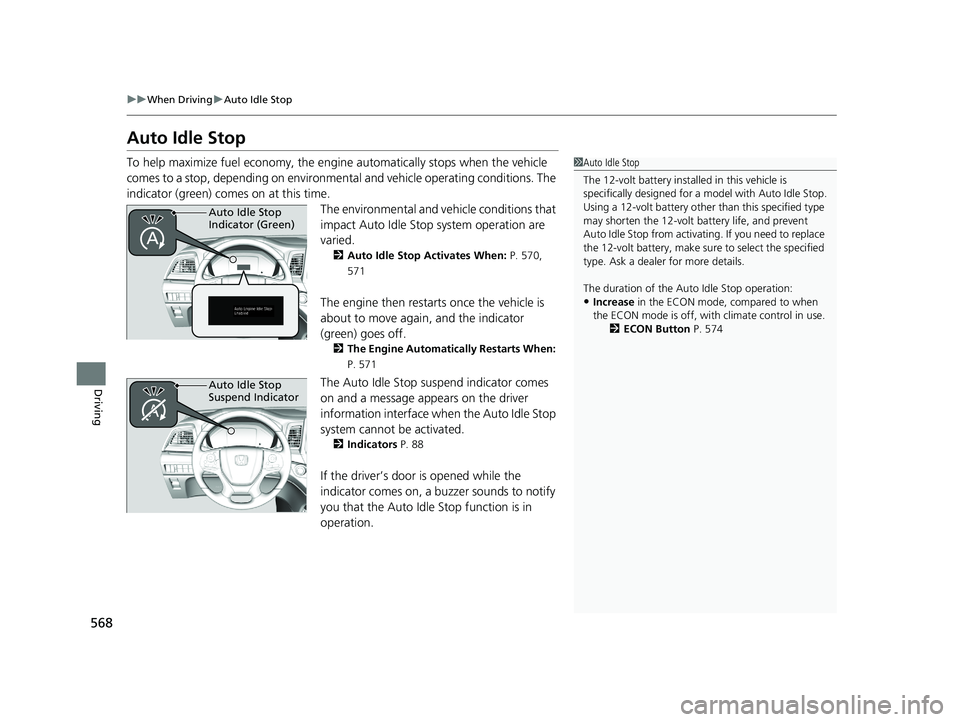
To help maximize fuel econ omy, the engine automatica lly stops when the vehicle
comes to a stop, depending on environmen tal and vehicle operating conditions. The
indicator (green) comes on at this time.
The environmental and vehicle conditions that
impact Auto Idle Stop system operation are
varied.
2Auto Idle Stop Activates When: P. 570,
571
The engine then restarts once the vehicle is
about to move again, and the indicator
(green) goes off.
2 The Engine Automatically Restarts When:
P. 571
The Auto Idle Stop suspend indicator comes
on and a message appears on the driver
information interface when the Auto Idle Stop
system cannot be activated.
2 Indicators P. 88
If the driver’s door is opened while the
indicator comes on, a buzzer sounds to notify
you that the Auto Idle Stop function is in
operation.
1Auto Idle Stop
The 12-volt battery insta lled in this vehicle is
specifically designed for a model with Auto Idle Stop.
Using a 12-volt battery other than this specified type
may shorten the 12-volt ba ttery life, and prevent
Auto Idle Stop from activati ng. If you need to replace
the 12-volt battery, make sure to select the specified
type. Ask a dealer for more details.
The duration of the Au to Idle Stop operation:
•Increase in the ECON mode, compared to when
the ECON mode is off, with climate control in use.
2ECON Button P. 574
Auto Idle Stop
Indicator (Green)
Auto Idle Stop
Suspend Indicator
21 US ODYSSEY-31THR6310.book 568 ページ 2020年6月17日 水曜日 午後2時46分
Page 572 of 787
uuWhen Driving uAuto Idle Stop
570
Driving
The vehicle stops with the gear position in (D and the brake pedal depressed.
When you put the transmission into
(P, the Auto Idle Stop continues to operate,
even if the brake pedal is released. u If you depress the brake pedal, the engine may automatically restart.
■Auto Idle Stop does not activate when:
• The Auto Idle Stop OFF button is pressed.
• The driver’s seat belt is not fastened.
• The engine coolant temperature is low or high.
• The transmission fluid temperature is low or high.
• The vehicle comes to a stop again before the vehicle speed reaches 3 mph (5 km/
h) after the engine starts.
• Stopped on a steep incline.
• The transmission is in a position other than
(D.
• The engine is started with the hood open.
u Turn off the engine. Close the hood before you restart the engine to activate
Auto Idle Stop.
• The battery charge is low.
• The internal temperature of the battery is 14°F (−10°C) or less.
• The climate control system is in use, an d the outside temperature is below −4°F
(−20°C) or over 104°F (40°C).
• The climate control system is in us e, and the temperature is set to Hi or Lo.
• is on (indicator on).
• The rear fan is set to maximum speed.
u Auto Idle Stop may not ac tivate under other conditions when the rear climate
control system is in use.
• When the Intelligent Traction Management is set to Snow.
■Auto Idle Stop Activates When:1Auto Idle Stop Activates When:
Do not open the hood while the Auto Idle Stop
function is activated. If the hood is opened, the
engine will not re start automatically.
In this case, restart the engine with the ENGINE
START/STOP button.
2 Starting the Engine P. 552
When ACC with Low Speed Follow is in operation,
the vehicle stops without de pressing the brake pedal
and Auto Idle Stop may activate.
In such cases, the engine may restart if you change
the shift position other than
( D.
Pressing the ENGINE START/STOP button causes
the engine to no longer rest art automatically. Follow
the standard procedure to start the engine.
2 Starting the Engine P. 552
21 US ODYSSEY-31THR6310.book 570 ページ 2020年6月17日 水曜日 午後2時46分