phone HONDA ODYSSEY 2022 Owners Manual
[x] Cancel search | Manufacturer: HONDA, Model Year: 2022, Model line: ODYSSEY, Model: HONDA ODYSSEY 2022Pages: 782, PDF Size: 27.17 MB
Page 530 of 782
Continued529
uuBluetooth ® HandsFreeLink ®u HFL Menus
Features
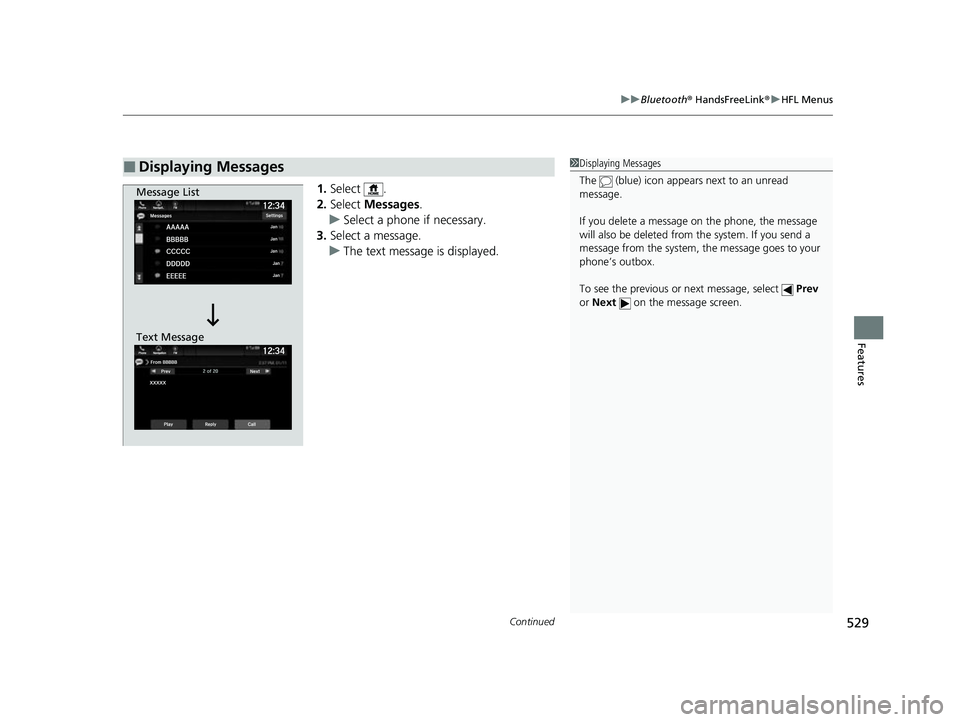
1. Select .
2. Select Messages.
u Select a phone if necessary.
3. Select a message.
u The text message is displayed.
■Displaying Messages1Displaying Messages
The (blue) icon appears next to an unread
message.
If you delete a message on the phone, the message
will also be dele ted from the system. If you send a
message from the system, the message goes to your
phone’s outbox.
To see the previous or next message, select Prev
or Next on the message screen.
Message List
Text Message
22 US ODYSSEY-31THR6400.book 529 ページ 2020年11月16日 月曜日 午後1時41分
Page 531 of 782
uuBluetooth ® HandsFreeLink ®u HFL Menus
530
Features
■Read or Stop reading a message
1. Go to the text message screen.
2. Select Play.
u The system starts reading the message
aloud.
3. Select Pause to stop reading.
Select Play again to start reading the
message.
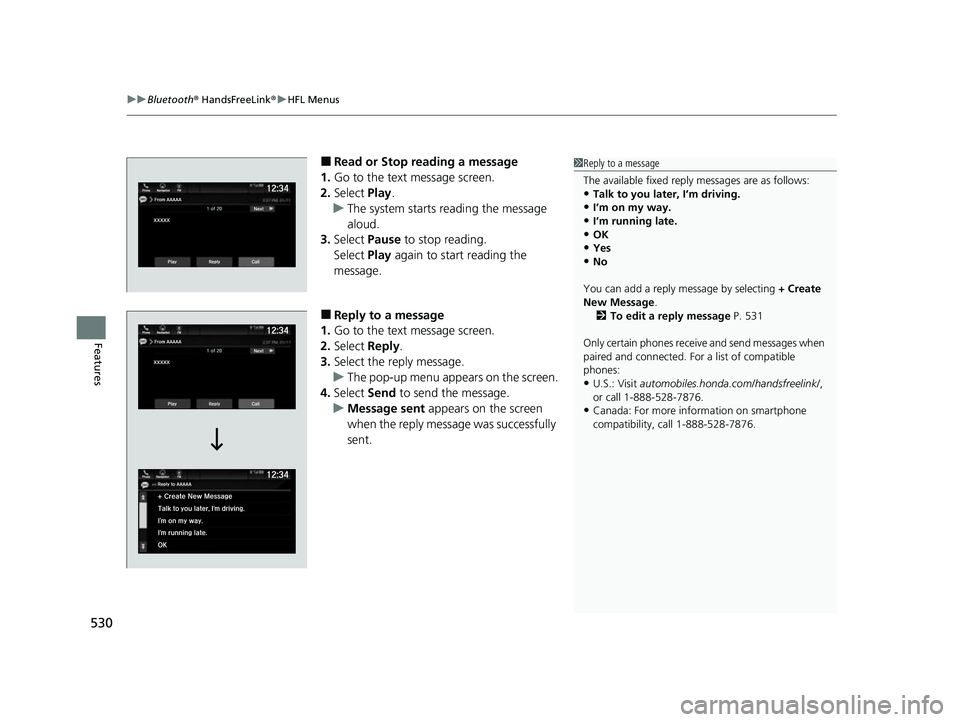
■Reply to a message
1. Go to the text message screen.
2. Select Reply.
3. Select the reply message.
u The pop-up menu appears on the screen.
4. Select Send to send the message.
u Message sent appears on the screen
when the reply messag e was successfully
sent.
1 Reply to a message
The available fixed reply messages are as follows:
•Talk to you later, I’m driving.
•I’m on my way.
•I’m running late.•OK
•Yes
•No
You can add a reply message by selecting + Create
New Message .
2 To edit a reply message P. 531
Only certain phones receive and send messages when
paired and connected. For a list of compatible
phones:
•U.S.: Visit automobiles.honda.com/handsfreelink/ ,
or call 1-888-528-7876.
•Canada: For more info rmation on smartphone
compatibility, call 1-888-528-7876.
22 US ODYSSEY-31THR6400.book 530 ページ 2020年11月16日 月曜日 午後1時41分
Page 534 of 782
Continued533
uuBluetooth ® HandsFreeLink ®u HFL Menus
Features
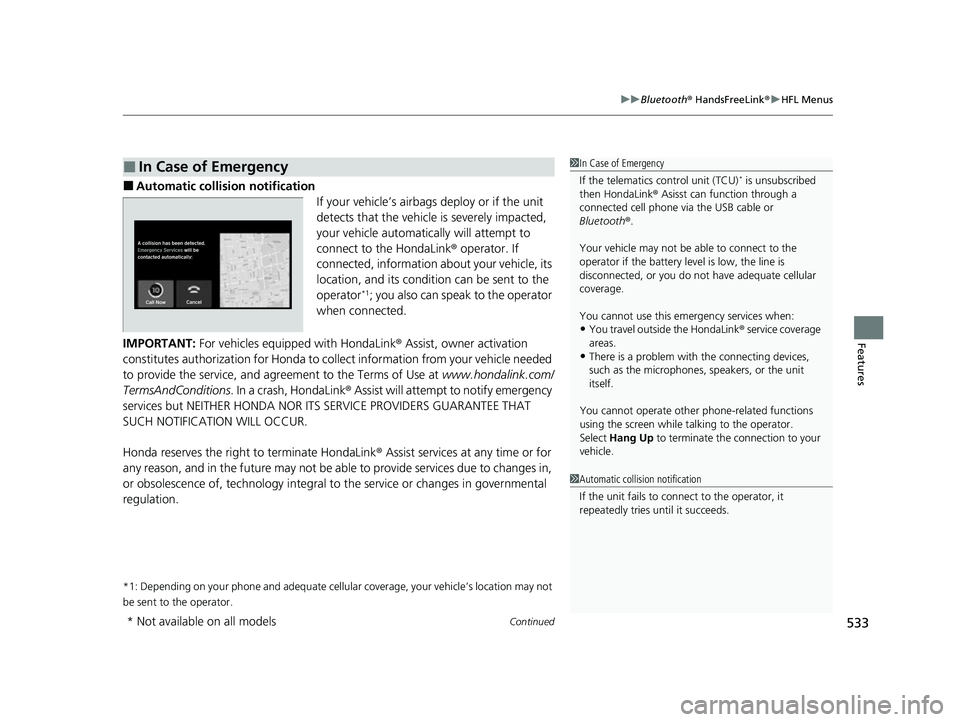
■Automatic collis ion notification
If your vehicle’s airbags deploy or if the unit
detects that the vehicle is severely impacted,
your vehicle automatically will attempt to
connect to the HondaLink ® operator. If
connected, information ab out your vehicle, its
location, and its condition can be sent to the
operator
*1; you also can speak to the operator
when connected.
IMPORTANT: For vehicles equipped with HondaLink ® Assist, owner activation
constitutes authorization for Honda to collect information from your vehicle needed
to provide the service, and agreement to the Terms of Use at www.hondalink.com/
TermsAndConditions . In a crash, HondaLink ® Assist will attempt to notify emergency
services but NEITHER HONDA NOR I TS SERVICE PROVIDERS GUARANTEE THAT
SUCH NOTIFICATION WILL OCCUR.
Honda reserves the right to terminate HondaLink ® Assist services at any time or for
any reason, and in the future may not be ab le to provide services due to changes in,
or obsolescence of, technology integral to the service or changes in governmental
regulation.
*1: Depending on your phone and adequate cellular coverage, your vehicle’s location may not
be sent to the operator.
■In Case of Emergency1 In Case of Emergency
If the telematics control unit (TCU)
* is unsubscribed
then HondaLink ® Asisst can function through a
connected cell phone via the USB cable or
Bluetooth ®.
Your vehicle may not be able to connect to the
operator if the battery level is low, the line is
disconnected, or you do not have adequate cellular
coverage.
You cannot use this emergency services when:
•You travel outside the HondaLink ® service coverage
areas.
•There is a problem with the connecting devices,
such as the microphones, speakers, or the unit
itself.
You cannot operate othe r phone-related functions
using the screen while talking to the operator.
Select Hang Up to terminate the connection to your
vehicle.
1 Automatic collision notification
If the unit fails to connect to the operator, it
repeatedly tries until it succeeds.
* Not available on all models
22 US ODYSSEY-31THR6400.book 533 ページ 2020年11月16日 月曜日 午後1時41分
Page 535 of 782
uuBluetooth ® HandsFreeLink ®u HFL Menus
534
Features
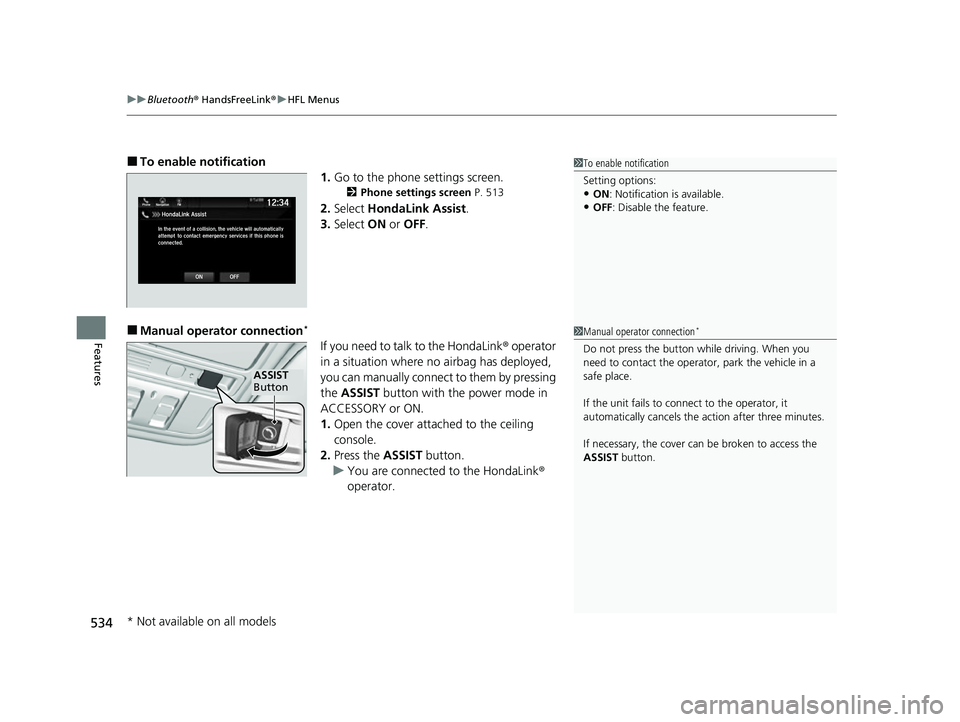
■To enable notification
1.Go to the phone settings screen.
2 Phone settings screen P. 513
2.Select HondaLink Assist .
3. Select ON or OFF .
■Manual operator connection*
If you need to talk to the HondaLink ® operator
in a situation where no airbag has deployed,
you can manually connect to them by pressing
the ASSIST button with the power mode in
ACCESSORY or ON.
1. Open the cover attached to the ceiling
console.
2. Press the ASSIST button.
u You are connected to the HondaLink ®
operator.
1 To enable notification
Setting options:
•ON : Notification is available.
•OFF: Disable the feature.
1Manual operator connection*
Do not press the button while driving. When you
need to contact the operato r, park the vehicle in a
safe place.
If the unit fails to connect to the operator, it
automatically cancels the action after three minutes.
If necessary, the cover can be broken to access the
ASSIST button.
ASSIST
Button
* Not available on all models
22 US ODYSSEY-31THR6400.book 534 ページ 2020年11月16日 月曜日 午後1時41分
Page 536 of 782
535
Features
CabinWatch®*
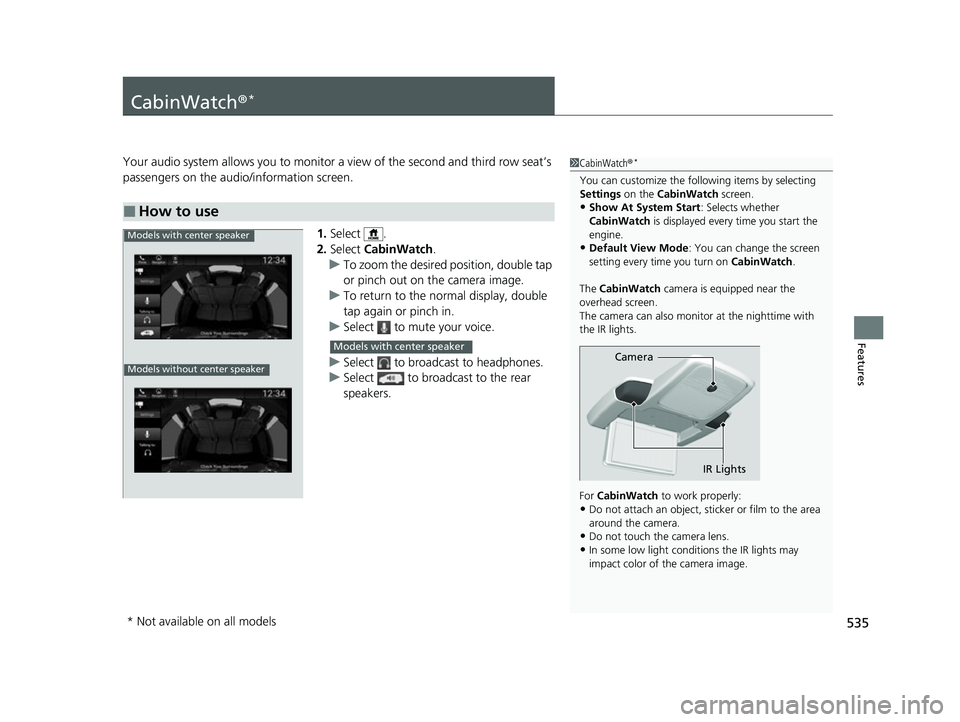
Your audio system allows you to monitor a view of the second and third row seat’s
passengers on the audio/information screen.
1.Select .
2. Select CabinWatch .
u To zoom the desired position, double tap
or pinch out on the camera image.
u To return to the normal display, double
tap again or pinch in.
u Select to mute your voice.
u Select to broadcast to headphones.
u Select to broadcast to the rear
speakers.
■How to use
1CabinWatch ®*
You can customize the foll owing items by selecting
Settings on the CabinWatch screen.
•Show At System Start : Selects whether
CabinWatch is displayed every time you start the
engine.
•Default View Mode : You can change the screen
setting every time you turn on CabinWatch.
The CabinWatch camera is equipped near the
overhead screen.
The camera can also monitor at the nighttime with
the IR lights.
For CabinWatch to work properly:
•Do not attach an object, sticker or film to the area
around the camera.
•Do not touch the camera lens.
•In some low light conditions the IR lights may
impact color of the camera image.
Camera
IR Lights
Models with center speaker
Models without center speaker
Models with center speaker
* Not available on all models
22 US ODYSSEY-31THR6400.book 535 ページ 2020年11月16日 月曜日 午後1時41分
Page 537 of 782
536
Features
CabinTalk®*
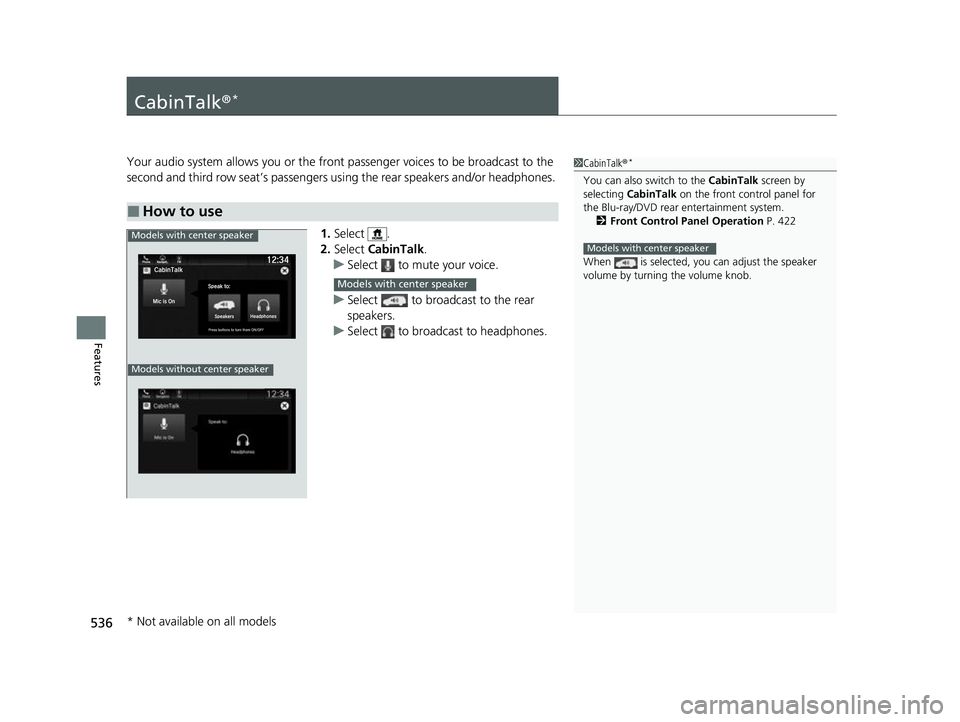
Your audio system allows you or the front passenger voices to be broadcast to the
second and third row seat’s passengers us ing the rear speakers and/or headphones.
1. Select .
2. Select CabinTalk .
u Select to mute your voice.
u Select to broadcast to the rear
speakers.
u Select to broadcast to headphones.
■How to use
1CabinTalk ®*
You can also switch to the CabinTalk screen by
selecting CabinTalk on the front control panel for
the Blu-ray/DVD rear entertainment system. 2 Front Control Panel Operation P. 422
When is selected, you can adjust the speaker
volume by turning the volume knob.
Models with center speakerModels with center speaker
Models without center speaker
Models with center speaker
* Not available on all models
22 US ODYSSEY-31THR6400.book 536 ページ 2020年11月16日 月曜日 午後1時41分
Page 664 of 782

663
Maintenance
This chapter discusses basic maintenance.
Before Performing MaintenanceInspection and Maintenance ............ 664
Safety When Performing Maintenance .... 665
Parts and Fluids Used in Maintenance Service ........................................... 666
Maintenance Minder
TM..................... 667
Maintenance Under the Hood
Maintenance Items Un der the Hood .... 673
Opening the Hood ........................... 674
Recommended Engine Oil ................ 676
Oil Check ......................................... 677
Adding Engine Oil ............................ 678
Changing the Engine Oil and Oil Filter ..... 679
Engine Coolant ................................ 681
Transmission Fluid ............................ 683
Brake Fluid ....................................... 684
Refilling Window Washer Fluid......... 685
Replacing Light Bulbs ....................... 686
Checking and Maintaining Wiper Blades.... 693Checking and Maintaining Tires
Checking Tires ................................. 697
Tire and Loading Information Label ..... 698Tire Labeling .................................... 698DOT Tire Quality Grading (U.S. Vehicles) ...... 700Wear Indicators................................ 702 Tire Service Life ................................ 702
Tire and Wheel Replacement ........... 703
Tire Rotation .................................... 704
Winter Tires ..................................... 705
Battery ............................................... 706
Remote Transmitter Care ................. 708
Remote Control and Wireless Headphone Care
*........................... 709Climate Control System Maintenance.... 711Cleaning Interior Care .................................... 712
Exterior Care.................................... 715
Accessories and Modifications ........ 718
* Not available on all models
22 US ODYSSEY-31THR6400.book 663 ページ 2020年11月16日 月曜日 午後1時41分
Page 710 of 782
709Continued
Maintenance
Remote Control and Wireless Headphone Care*
Replacing the Battery
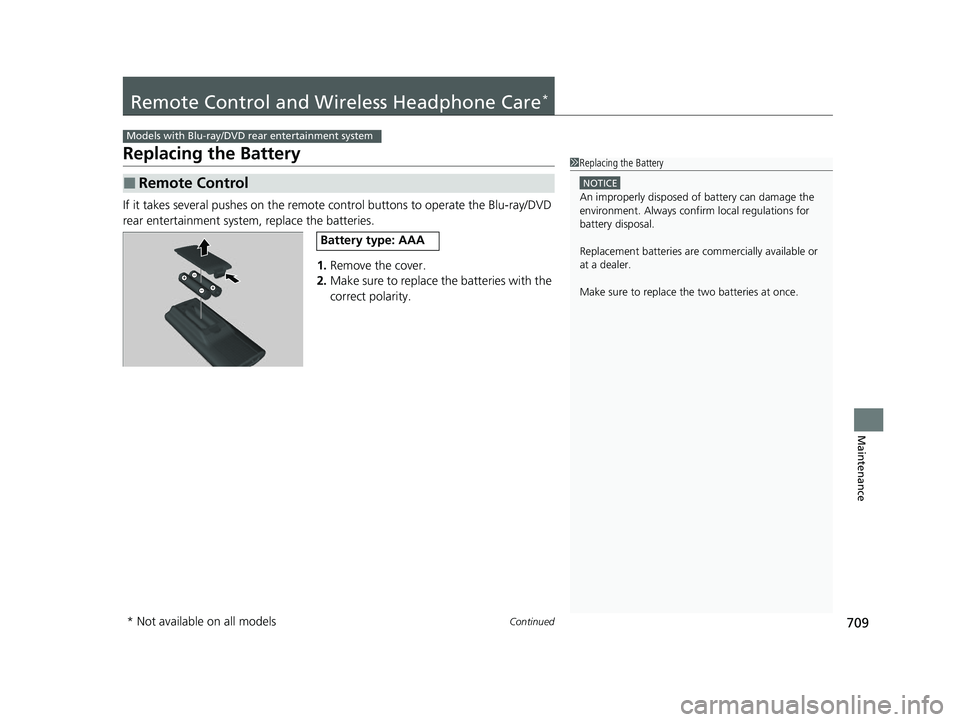
If it takes several pushes on the remote control buttons to operate the Blu-ray/DVD
rear entertainment system, replace the batteries.
1.Remove the cover.
2. Make sure to replace the batteries with the
correct polarity.
■Remote Control
Models with Blu-ray/DVD rear entertainment system
1Replacing the Battery
NOTICE
An improperly disposed of battery can damage the
environment. Always conf irm local regulations for
battery disposal.
Replacement batteries are commercially available or
at a dealer.
Make sure to replace the two batteries at once.
Battery type: AAA
* Not available on all models
22 US ODYSSEY-31THR6400.book 709 ページ 2020年11月16日 月曜日 午後1時41分
Page 711 of 782
710
uuRemote Control and Wireless Headphone Care*uReplacing the Battery
Maintenance
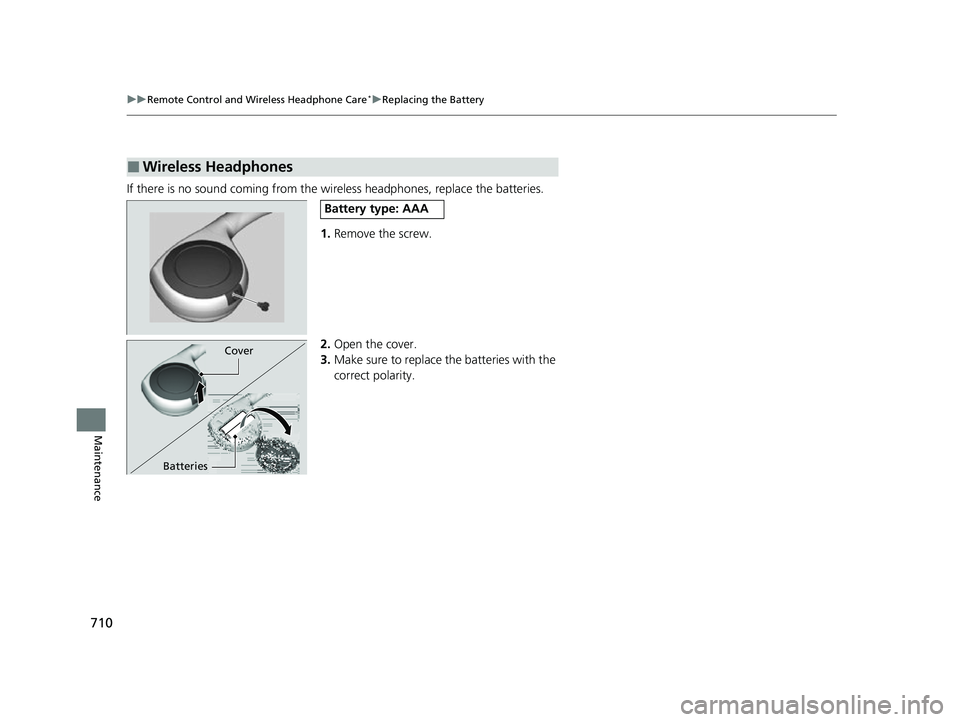
If there is no sound coming from the wireless headphones, replace the batteries.
1. Remove the screw.
2. Open the cover.
3. Make sure to replace the batteries with the
correct polarity.
■Wireless Headphones
Battery type: AAA
Cover
Batteries
22 US ODYSSEY-31THR6400.book 710 ページ 2020年11月16日 月曜日 午後1時41分
Page 771 of 782
770
Information
Authorized Manuals
■Service Express
For electronic copies of service publications, you can purchase a subscription to
Service Express. Visit www.techinfo.honda.com for pricing and options.
■For U.S. Owners
Manuals can be purchased from Helm Incorporated. You can order a manual by
phone at 1 (800) 782-4356 (credit ca rd orders only), or online at www.helminc.com.
■For Canadian Owners
Please contact a dealer to order any manuals that you may require.
22 US ODYSSEY-31THR6400.book 770 ページ 2020年11月16日 月曜日 午後1時41分