eco mode HONDA ODYSSEY 2022 Owners Manual
[x] Cancel search | Manufacturer: HONDA, Model Year: 2022, Model line: ODYSSEY, Model: HONDA ODYSSEY 2022Pages: 782, PDF Size: 27.17 MB
Page 362 of 782
361
uuAudio System Basic Operation uPlaying Bluetooth ® Audio
Features
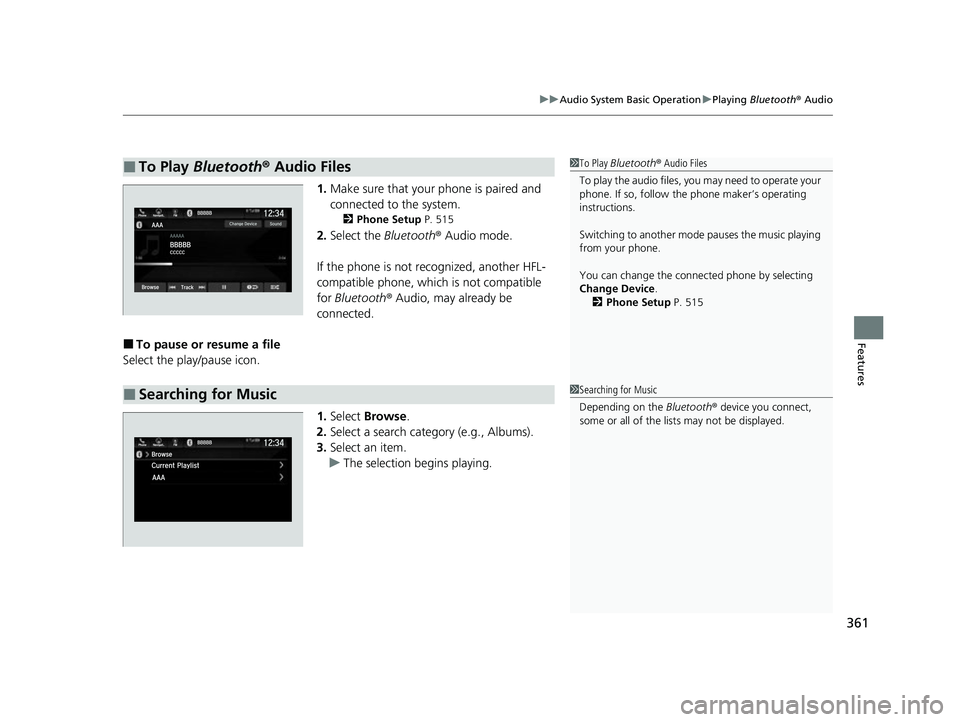
1. Make sure that your phone is paired and
connected to the system.
2 Phone Setup P. 515
2.Select the Bluetooth® Audio mode.
If the phone is not recognized, another HFL-
compatible phone, which is not compatible
for Bluetooth ® Audio, may already be
connected.
■To pause or resume a file
Select the play/pause icon.
1.Select Browse .
2. Select a search catego ry (e.g., Albums).
3. Select an item.
u The selection begins playing.
■To Play Bluetooth® Audio Files1To Play Bluetooth ® Audio Files
To play the audio files, y ou may need to operate your
phone. If so, follow the phone maker’s operating
instructions.
Switching to another mode pauses the music playing
from your phone.
You can change the connected phone by selecting
Change Device .
2 Phone Setup P. 515
■Searching for Music1Searching for Music
Depending on the Bluetooth® device you connect,
some or all of the list s may not be displayed.
22 US ODYSSEY-31THR6400.book 361 ページ 2020年11月16日 月曜日 午後1時41分
Page 383 of 782
382
uuAudio Error Messages uiPod/USB Flash Drive
Features
iPod/USB Flash Drive
If an error occurs while playing an iPod or USB flash drive, you may see the following
error messages. If you cannot clear the error message, contact a dealer.
*1:Models with color audio system
*2:Models with Display Audio
Error MessageSolution
USB Error*1
Problem reading connected device. See
Owner’s Manual for a list of compatible
devices. If device is compatible, try
reconnecting device.
If this error rema ins, contact Honda
dealer.
*2
Appears when there is a problem with th e audio system. Check if the device is
compatible with the audio system.
Bad USB Device*1
Problem reading connected device. See
Owner’s Manual for a list of compatible
devices. If device is compatible, try
reconnecting device.
If this error rema ins, contact Honda
dealer.
*2
Appears when an incompatible device is co nnected. Disconnect the device. Then, turn
the audio system off and turn it on again. Do not reconnect the device that caused the
error.
Unsupported Ver*1
Problem reading connected device. See
Owner’s Manual for a list of compatible
devices. If device is compatible, try
reconnecting device.
If this error rema ins, contact Honda
dealer.
*2
• Appears when an unsupported iPod is connected. If it appears when a supported
iPod is connected, update the iP od software to the newer version.
• Appears when an unsupported device is connected. If it appears when a supported
device is connected, reconnect the device.
22 US ODYSSEY-31THR6400.book 382 ページ 2020年11月16日 月曜日 午後1時41分
Page 384 of 782
383
uuAudio Error Messages uiPod/USB Flash Drive
Features
*1:Models with color audio system
*2:Models with Display Audio
Error MessageSolution
Problem reading connected device. See
Owner’s Manual for a list of compatible
devices. If device is compatible, try
reconnecting device.
If this error remains, contact Honda
dealer.
*2
Appears when the system does not acknowledge the iPod. Reconnect the iPod.
Unplayable File*1
The selected file cannot be played on this
system*2
Appears when the files in the USB flash driv e are DRM or an unsupported format. This
error message appears for about three seconds, then plays the next song.
No Data*1
The connected device does not contain any
files that can be played on this system. See
Owner’s Manual for a list of compatible file
types.
*2
Appears when the iPod is empty.
Appears when the USB flash drive is empty or there are no MP3, WMA, or AAC files in
the USB flash drive.
Check that compatible files are stored on the device.
iPod
USB flash drive
iPod and USB flash drive
22 US ODYSSEY-31THR6400.book 383 ページ 2020年11月16日 月曜日 午後1時41分
Page 387 of 782
386
uuGeneral Information on the Audio System uRecommended CDs*
Features
Recommended CDs*
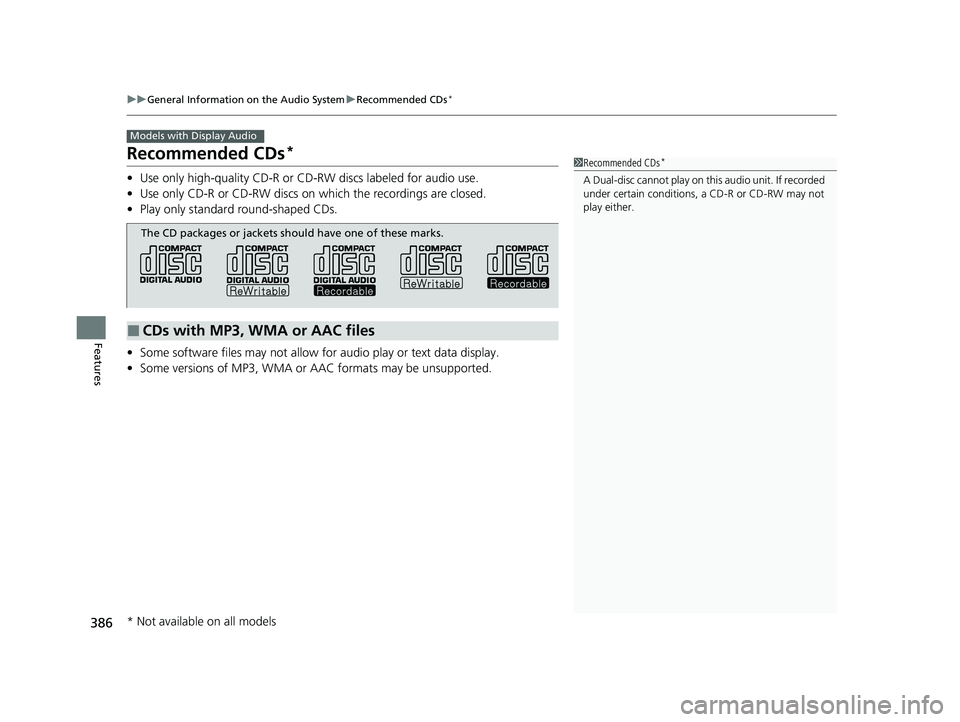
• Use only high-quality CD-R or CD-RW discs labeled for audio use.
• Use only CD-R or CD-RW discs on which the recordings are closed.
• Play only standard round-shaped CDs.
• Some software files may not allow for audio play or text data display.
• Some versions of MP3, WMA or AAC formats may be unsupported.
Models with Display Audio
1Recommended CDs*
A Dual-disc cannot play on this audio unit. If recorded
under certain conditions, a CD-R or CD-RW may not
play either.
■CDs with MP3, WMA or AAC files
The CD packages or jackets should have one of these marks.
* Not available on all models
22 US ODYSSEY-31THR6400.book 386 ページ 2020年11月16日 月曜日 午後1時41分
Page 389 of 782
388
uuGeneral Information on the Audio System uCompatible iPod, iPad, iPhone, and USB Flash Drives
Features
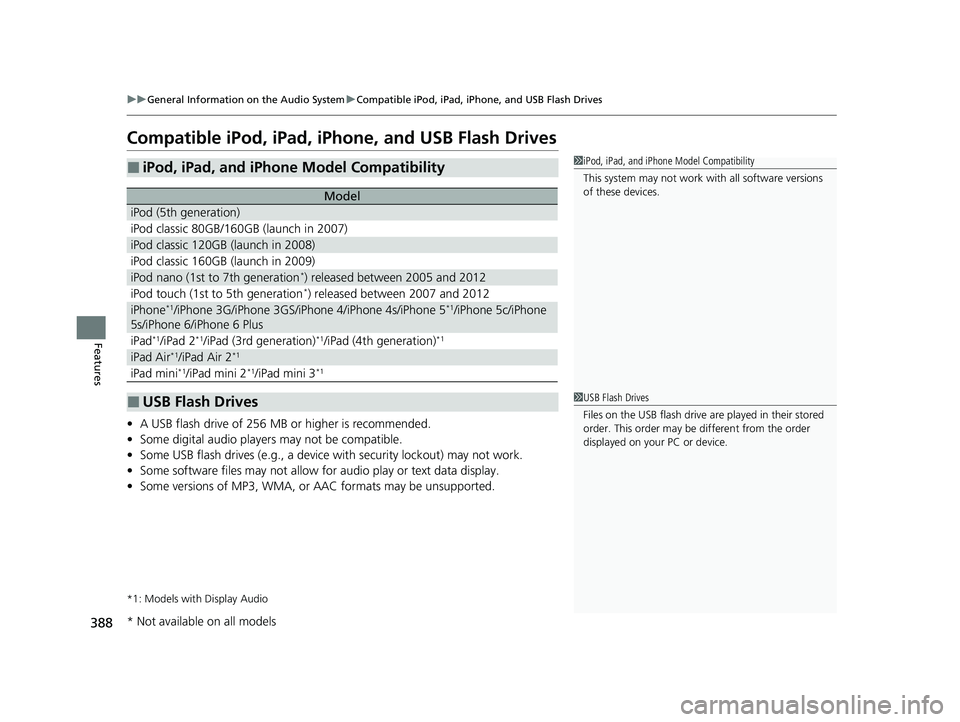
Compatible iPod, iPad, iPhone, and USB Flash Drives
• A USB flash drive of 256 MB or higher is recommended.
• Some digital audio players may not be compatible.
• Some USB flash drives (e.g., a device with security lockout) may not work.
• Some software files may not allow for audio play or text data display.
• Some versions of MP3, WMA, or AAC formats may be unsupported.
*1: Models with Display Audio
■iPod, iPad, and iPhone Model Compatibility
Model
iPod (5th generation)
iPod classic 80GB/160GB (launch in 2007)
iPod classic 120GB (launch in 2008)
iPod classic 160GB (launch in 2009)
iPod nano (1st to 7th generation*) released between 2005 and 2012
iPod touch (1st to 5th generation*) released between 2007 and 2012
iPhone*1/iPhone 3G/iPhone 3GS/iPhone 4/iPhone 4s/iPhone 5*1/iPhone 5c/iPhone
5s/iPhone 6/iPhone 6 Plus
iPad*1/iPad 2*1/iPad (3rd generation)*1/iPad (4th generation)*1
iPad Air*1/iPad Air 2*1
iPad mini*1/iPad mini 2*1/iPad mini 3*1
■USB Flash Drives
1 iPod, iPad, and iPhone Model Compatibility
This system may not work with all software versions
of these devices.
1 USB Flash Drives
Files on the USB flash drive are played in their stored
order. This order may be different from the order
displayed on your PC or device.
* Not available on all models
22 US ODYSSEY-31THR6400.book 388 ページ 2020年11月16日 月曜日 午後1時41分
Page 419 of 782
418
uuBlu-ray/DVD Rear Entertainment System*uPlaying a DVD/Blu-rayTM
Features
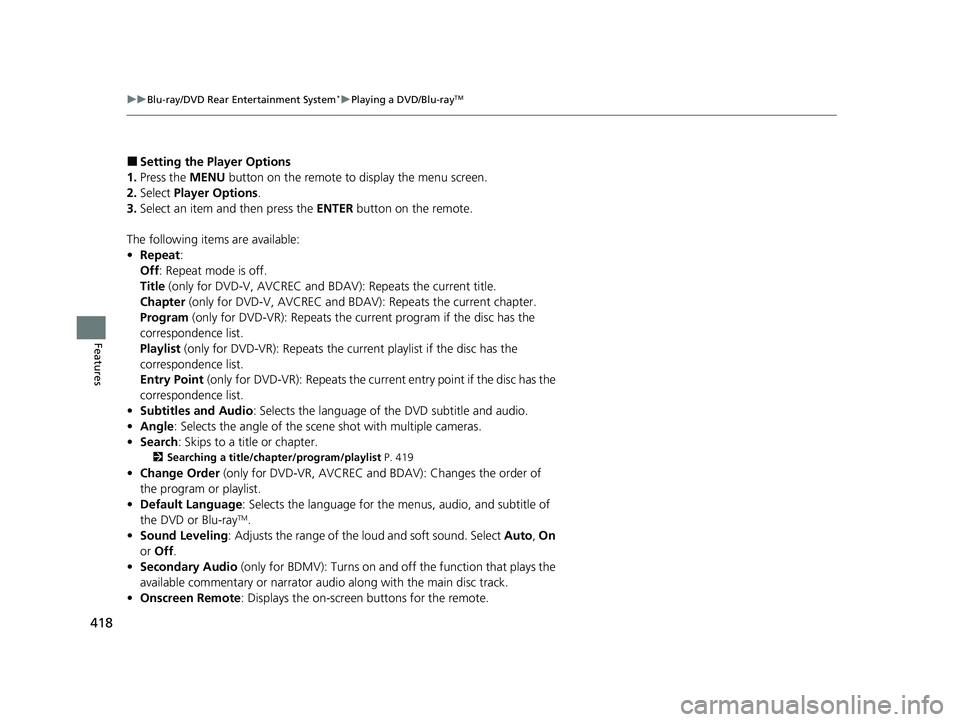
■Setting the Player Options
1. Press the MENU button on the remote to display the menu screen.
2. Select Player Options .
3. Select an item and then press the ENTER button on the remote.
The following items are available:
• Repeat:
Off : Repeat mode is off.
Title (only for DVD-V, AVCREC and BDAV): Repeats the current title.
Chapter (only for DVD-V, AVCR EC and BDAV): Repeats the current chapter.
Program (only for DVD-VR): Repeats the current program if the disc has the
correspondence list.
Playlist (only for DVD-VR): Repeats the cu rrent playlist if the disc has the
correspondence list.
Entry Point (only for DVD-VR): Repeats the curre nt entry point if the disc has the
correspondence list.
• Subtitles and Audio: Selects the language of the DVD subtitle and audio.
• Angle : Selects the angle of the scen e shot with multiple cameras.
• Search : Skips to a title or chapter.
2Searching a title/chapter/program/playlist P. 419
•Change Order (only for DVD-VR, AV CREC and BDAV): Changes the order of
the program or playlist.
• Default Language : Selects the language for the menus, audio, and subtitle of
the DVD or Blu-ray
TM.
• Sound Leveling : Adjusts the range of the loud and soft sound. Select Auto, On
or Off .
• Secondary Audio (only for BDMV): Turns on and off the function that plays the
available commentary or narrator audio along with the main disc track.
• Onscreen Remote : Displays the on-screen buttons for the remote.
22 US ODYSSEY-31THR6400.book 418 ページ 2020年11月16日 月曜日 午後1時41分
Page 455 of 782
uuBlu-ray/DVD Rear Entertainment System*uPlayable Discs
454
Features
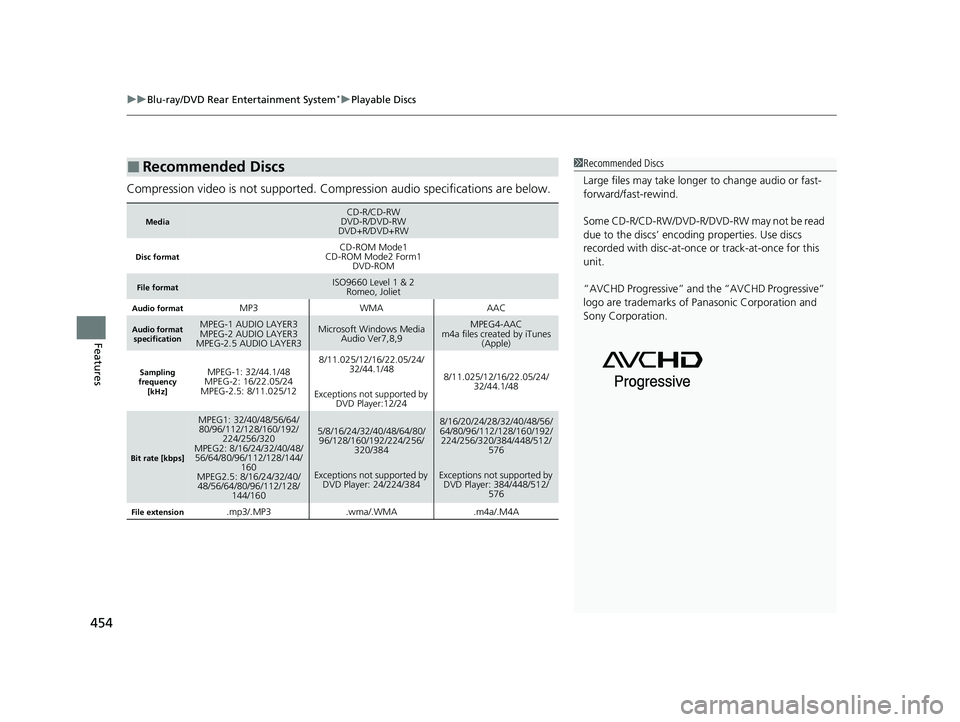
Compression video is not supported. Compression audio specifications are below.
■Recommended Discs
MediaCD-R/CD-RW
DVD-R/DVD-RW
DVD+R/DVD+RW
Disc formatCD-ROM Mode1
CD-ROM Mode2 Form1 DVD-ROM
File formatISO9660 Level 1 & 2
Romeo, Joliet
Audio formatMP3WMAAAC
Audio format
specificationMPEG-1 AUDIO LAYER3
MPEG-2 AUDIO LAYER3
MPEG-2.5 AUDIO LAYER3Microsoft Windows Media
Audio Ver7,8,9MPEG4-AAC
m4a files created by iTunes (Apple)
Sampling
frequency
[kHz]MPEG-1: 32/44.1/48
MPEG-2: 16/22.05/24
MPEG-2.5: 8/11.025/128/11.025/12/16/22.05/24/ 32/44.1/48
Exceptions not supported by DVD Player:12/24
8/11.025/12/16/22.05/24/ 32/44.1/48
Bit rate [kbps]
MPEG1: 32/40/48/56/64/80/96/112/128/160/192/ 224/256/320
MPEG2: 8/16/24/32/40/48/ 56/64/80/96/112/128/144/ 160
MPEG2.5: 8/16/24/32/40/ 48/56/64/80/96/112/128/ 144/1605/8/16/24/32/40/48/64/80/96/128/160/192/224/256/
320/384
Exceptions not supported by DVD Player: 24/224/3848/16/20/24/28/32/40/48/56/
64/80/96/112/128/160/192/224/256/320/384/448/512/
576
Exceptions not supported by DVD Player: 384/448/512/ 576
File extension.mp3/.MP3.wma/.WMA.m4a/.M4A
1Recommended Discs
Large files may take longer to change audio or fast-
forward/fast-rewind.
Some CD-R/CD-RW/DVD-R/DVD -RW may not be read
due to the discs’ encoding properties. Use discs
recorded with disc-at-once or track-at-once for this
unit.
“AVCHD Progressive” and the “AVCHD Progressive”
logo are trademarks of Pa nasonic Corporation and
Sony Corporation.
22 US ODYSSEY-31THR6400.book 454 ページ 2020年11月16日 月曜日 午後1時41分
Page 459 of 782
458
uuCustomized Features u
Features
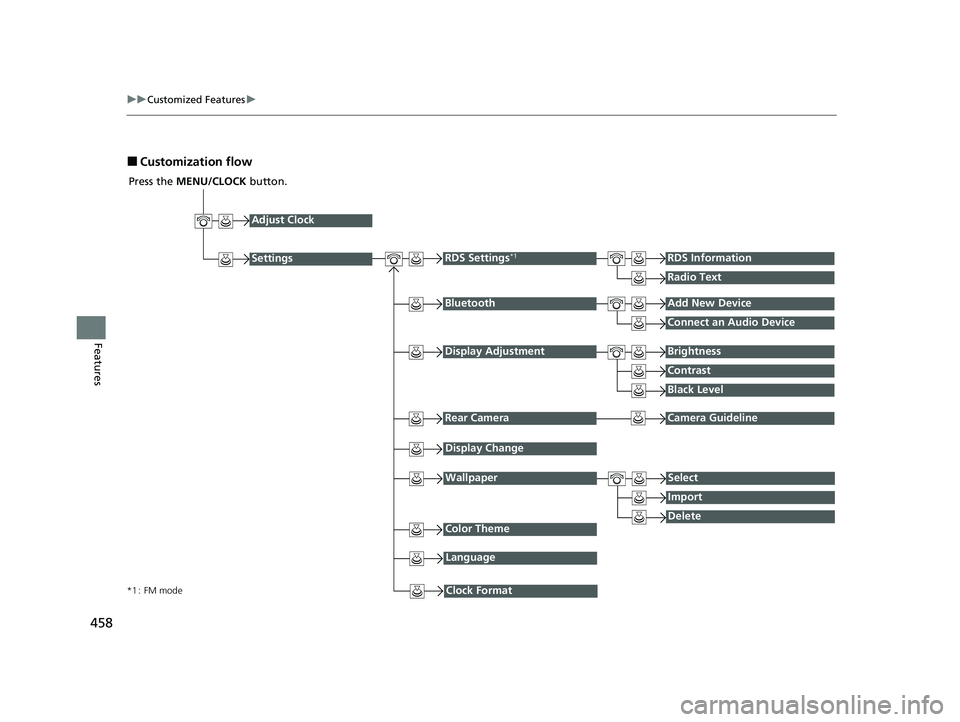
■Customization flow
Press the MENU/CLOCK button.
Adjust Clock
BluetoothAdd New Device
Connect an Audio Device
Display AdjustmentBrightness
Contrast
Black Level
Rear CameraCamera Guideline
RDS Settings*1RDS Information
Radio Text
Display Change
WallpaperSelect
Import
DeleteColor Theme
Language
Clock Format*1 : FM mode
Settings
22 US ODYSSEY-31THR6400.book 458 ページ 2020年11月16日 月曜日 午後1時41分
Page 469 of 782
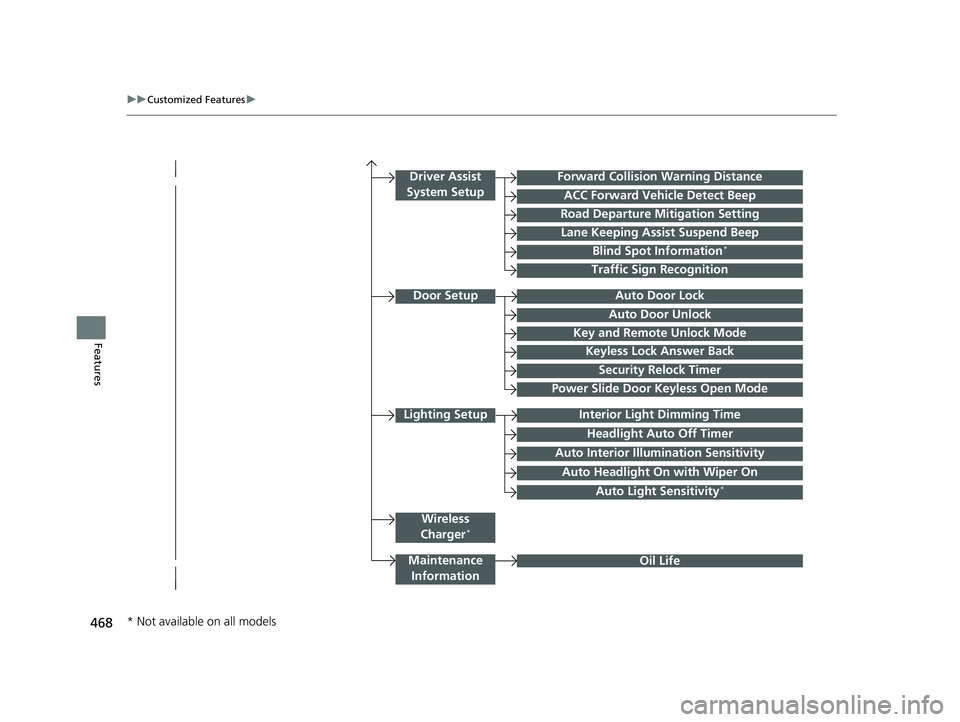
468
uuCustomized Features u
Features
Lighting SetupInterior Light Dimming Time
Headlight Auto Off Timer
Forward Collision Warning Distance
ACC Forward Vehicle Detect Beep
Auto Interior Illu mination Sensitivity
Door SetupAuto Door Lock
Auto Door Unlock
Key and Remote Unlock Mode
Keyless Lock Answer Back
Security Relock Timer
Driver Assist
System Setup
Oil Life
Road Departure Mitigation Setting
Lane Keeping Assist Suspend Beep
Blind Spot Information*
Power Slide Door Keyless Open Mode
Wireless
Charger*
Traffic Sign Recognition
Maintenance Information
Auto Headlight On with Wiper On
Auto Light Sensitivity*
* Not available on all models
22 US ODYSSEY-31THR6400.book 468 ページ 2020年11月16日 月曜日 午後1時41分
Page 475 of 782
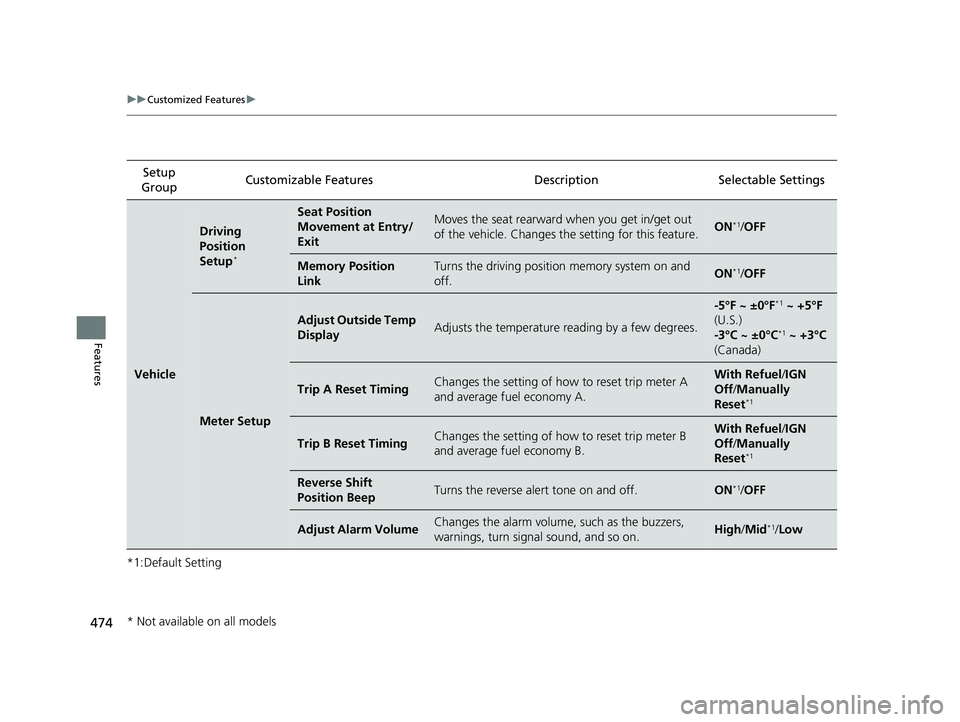
474
uuCustomized Features u
Features
*1:Default SettingSetup
Group Customizable Features Description Selectable Settings
Vehicle
Driving
Position
Setup
*
Seat Position
Movement at Entry/
ExitMoves the seat rearward when you get in/get out
of the vehicle. Changes the setting for this feature.ON*1/
OFF
Memory Position
LinkTurns the driving position memory system on and
off.ON*1/ OFF
Meter Setup
Adjust Outside Temp
DisplayAdjusts the temperature reading by a few degrees.
-5°F ~ ±0°F*1 ~ +5°F
(U.S.)
-3°C ~ ±0°C
*1 ~ +3°C
(Canada)
Trip A Reset TimingChanges the setting of how to reset trip meter A
and average fuel economy A.With Refuel /IGN
Off /Manually
Reset
*1
Trip B Reset TimingChanges the setting of how to reset trip meter B
and average fuel economy B.With Refuel /IGN
Off /Manually
Reset
*1
Reverse Shift
Position BeepTurns the reverse alert tone on and off.ON*1/ OFF
Adjust Alarm VolumeChanges the alarm volume, such as the buzzers,
warnings, turn signal sound, and so on.High /Mid*1/Low
* Not available on all models
22 US ODYSSEY-31THR6400.book 474 ページ 2020年11月16日 月曜日 午後1時41分