radio HONDA ODYSSEY 2022 User Guide
[x] Cancel search | Manufacturer: HONDA, Model Year: 2022, Model line: ODYSSEY, Model: HONDA ODYSSEY 2022Pages: 782, PDF Size: 27.17 MB
Page 282 of 782
281
uuAudio System uAudio Remote Controls
Features
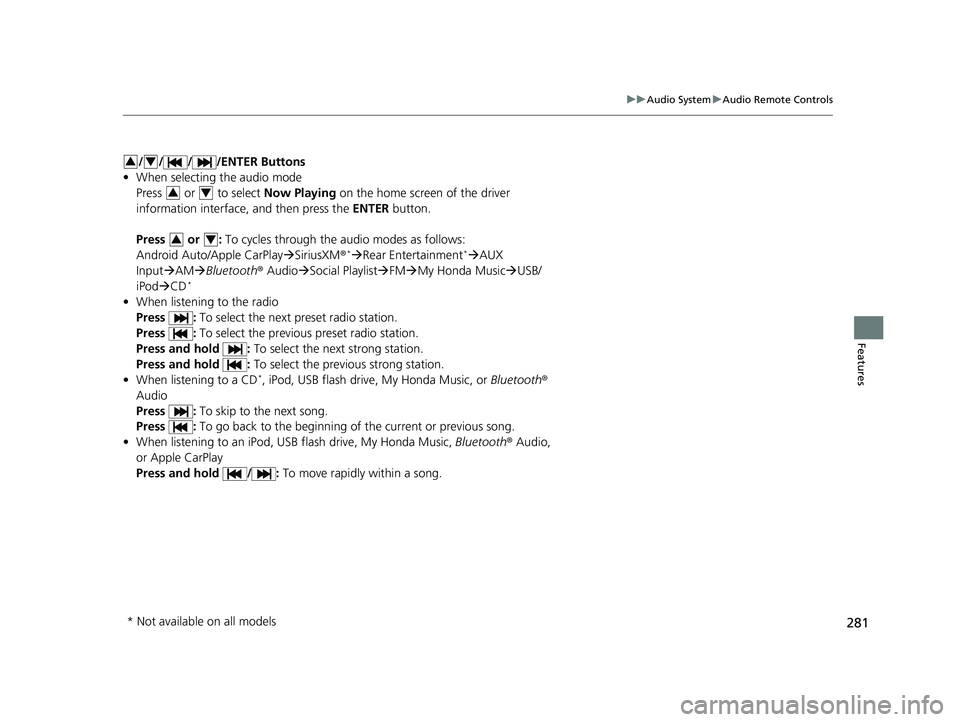
/ / / /ENTER Buttons
• When selecting the audio mode
Press or to select Now Playing on the home screen of the driver
information interface, and then press the ENTER button.
Press or : To cycles through the audio modes as follows:
Android Auto/Apple CarPlay SiriusXM ®
*Rear Entertainment* AUX
Input AM Bluetooth ® AudioSocial Playlist FMMy Honda Music USB/
iPod CD
*
• When listening to the radio
Press : To select the next preset radio station.
Press : To select the previous preset radio station.
Press and hold : To select the next strong station.
Press and hold : To select the previous strong station.
• When listening to a CD
*, iPod, USB flash drive, My Honda Music, or Bluetooth®
Audio
Press : To skip to the next song.
Press : To go back to the beginning of the current or previous song.
• When listening to an iPod, USB flash drive, My Honda Music, Bluetooth® Audio,
or Apple CarPlay
Press and hold / : To move rapidly within a song.
34
34
34
* Not available on all models
22 US ODYSSEY-31THR6400.book 281 ページ 2020年11月16日 月曜日 午後1時41分
Page 290 of 782
289
uuAudio System Basic Operation uPlaying AM/FM Radio
Continued
Features
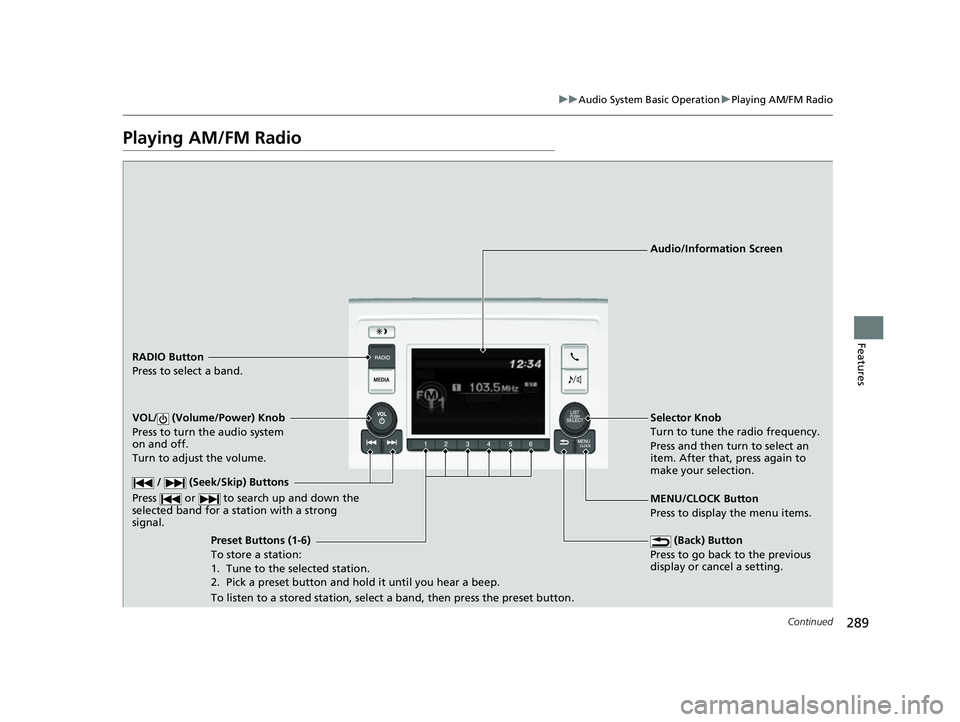
Playing AM/FM Radio
RADIO Button
Press to select a band.
(Back) Button
Press to go back to the previous
display or cancel a setting.
/ (Seek/Skip) Buttons
Press or to search up and down the
selected band for a st ation with a strong
signal.
VOL/ (Volume/Power) Knob
Press to turn the audio system
on and off.
Turn to adjust the volume.
Preset Buttons (1-6)
To store a station:
1. Tune to the selected station.
2. Pick a preset button and hold it until you hear a beep.
To listen to a stored station, select a band, then press the preset button. Selector Knob
Turn to tune the radio frequency.
Press and then turn to select an
item. After that, press again to
make your selection.
MENU/CLOCK Button
Press to display the menu items. Audio/Information Screen
22 US ODYSSEY-31THR6400.book 289 ページ 2020年11月16日 月曜日 午後1時41分
Page 291 of 782
uuAudio System Basic Operation uPlaying AM/FM Radio
290
Features
Provides text data information related to your selected RDS capable FM station.
■To find an RDS station from Station List
1. Press while listening to an FM station.
2. Rotate to select the station, then press .
■Update List
Updates your available station list at any time.
1. Press while listening to an FM station.
2. Rotate to select Update List, then press .
■Radio text
Displays the radio text informat ion of the selected RDS station.
1. Press the MENU/CLOCK button.
2. Rotate to select Settings, then press .
3. Rotate to select RDS Settings, then press .
4. Rotate to select Radio Text, then press .
■Scan
Samples each of the strongest stations on the selected band for 10 seconds.
1. Press the MENU/CLOCK button.
2. Rotate to select Scan, then press .
To turn off scan, press .
■Radio Data System (RDS)1 Playing AM/FM Radio
The ST indicator appears on the display indicating
stereo FM broadcasts.
Stereo reproduction in AM is not available.
You can store 6 AM stations and 12 FM stations into
reset button memory. FM1 and FM2 let you store 6
stations each.
Switching the Audio Mode
Press the SOURCE button on the steering wheel.
2 Audio Remote Controls P. 279
1Radio Data System (RDS)
When you select an RDS-capable FM station, the RDS
automatically turns on, and the frequency display
changes to the station name. However, when the
signals of that station become weak, the display
changes from the statio n name to the frequency.
22 US ODYSSEY-31THR6400.book 290 ページ 2020年11月16日 月曜日 午後1時41分
Page 334 of 782
333
uuAudio System Basic Operation uPlaying AM/FM Radio
Continued
Features
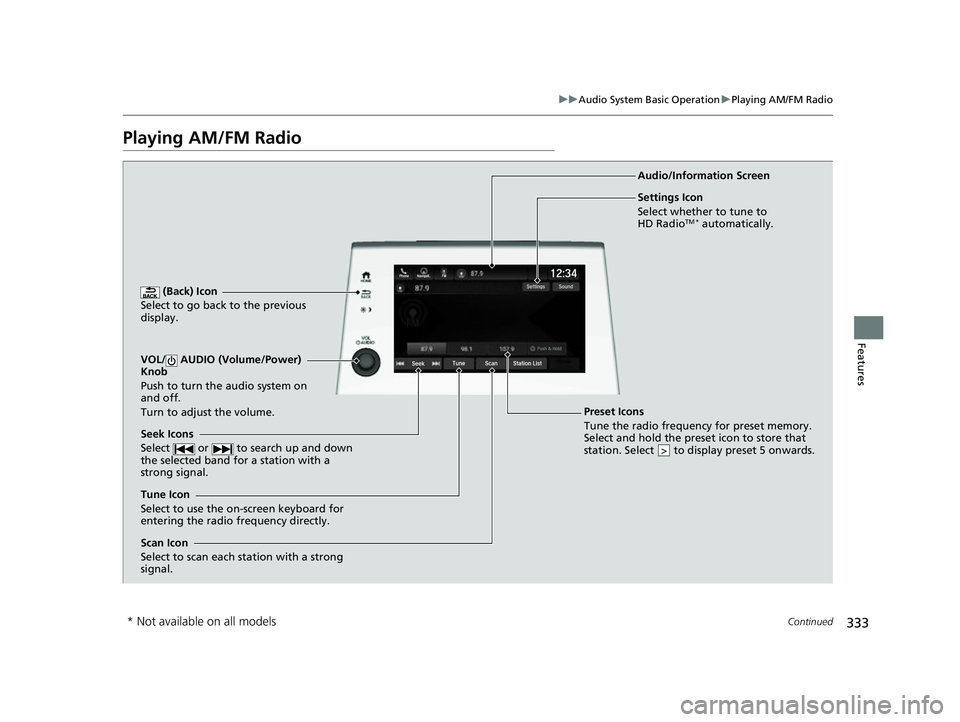
Playing AM/FM Radio
(Back) Icon
Select to go back to the previous
display.
Seek Icons
Select or to search up and down
the selected band for a station with a
strong signal.
VOL/ AUDIO (Volume/Power)
Knob
Push to turn the audio system on
and off.
Turn to adjust the volume.
Tune Icon
Select to use the on-screen keyboard for
entering the radio frequency directly. Audio/Information Screen
Scan Icon
Select to scan each station with a strong
signal.
Preset Icons
Tune the radio frequency for preset memory.
Select and hold the preset icon to store that
station. Select to display preset 5 onwards.
>
Settings Icon
Select whether to tune to
HD Radio
TM * automatically.
* Not available on all models
22 US ODYSSEY-31THR6400.book 333 ページ 2020年11月16日 月曜日 午後1時41分
Page 335 of 782
uuAudio System Basic Operation uPlaying AM/FM Radio
334
Features
To store a station:
1. Tune to the selected station.
2. Select and hold the preset number fo r the station you want to store.
Lists the strongest stations on the selected band.
1. Select Station List to display a list.
2. Select the station.
■Manual update
Updates your available station list at any time.
1. Select Station List to display a list.
2. Select Refresh .
■Preset Memory
■Station List
1Preset Memory
The ST indicator appears on the display indicating
stereo FM broadcasts.
Stereo reproduction in AM is not available.
Switching the Audio Mode
Press the or button on the steering wheel or
select the audio source icon on the screen. 2 Audio Remote Controls P. 279
You can store 12 AM/FM st ations into preset
memory.
HD Radio Technology manufactured under license
from iBiquity Digi tal Corporation. U.S. and Foreign
Patents. HD Radio
TM and the HD, HD Radio, and
“Arc” logos are proprietary trademarks of iBiquity
Digital Corp.
34
Models with HD RadioTM feature
22 US ODYSSEY-31THR6400.book 334 ページ 2020年11月16日 月曜日 午後1時41分
Page 336 of 782
Continued335
uuAudio System Basic Operation uPlaying AM/FM Radio
Features
Samples each of the strongest stations on th e selected band for 10 seconds. To turn
off scan, select Stop or .
Provides text data information related to your selected RDS-capable FM station.
■To find an RDS station from Station List
1. Select Station List to display a list while listening to an FM station.
2. Select the station.
■Manual update
Updates your available st ation list at any time.
1. Select Station List to display a list while listening to an FM station.
2. Select Refresh .
■Scan
Samples each of the strongest stations on th e selected band for 10 seconds. To turn
off scan, select Stop or .
■Scan
■Radio Data System (RDS)1Radio Data System (RDS)
When you select an RDS-capable FM station, the RDS
automatically turns on, and the frequency display
changes to the station name. However, when the
signals of that station become weak, the display
changes from the statio n name to the frequency.
22 US ODYSSEY-31THR6400.book 335 ページ 2020年11月16日 月曜日 午後1時41分
Page 337 of 782
336
uuAudio System Basic Operation uPlaying AM/FM Radio
Features
Displays the subchannel list when an HD RadioTM station is selected while listening to
an FM station.
1. Select HD Radio Channels .
2. Select the channel number.
■HD Subchannel
Models with HD RadioTM feature
22 US ODYSSEY-31THR6400.book 336 ページ 2020年11月16日 月曜日 午後1時41分
Page 338 of 782
337
uuAudio System Basic Operation uPlaying SiriusXM ® Radio*
Continued
Features
Playing SiriusXM® Radio*
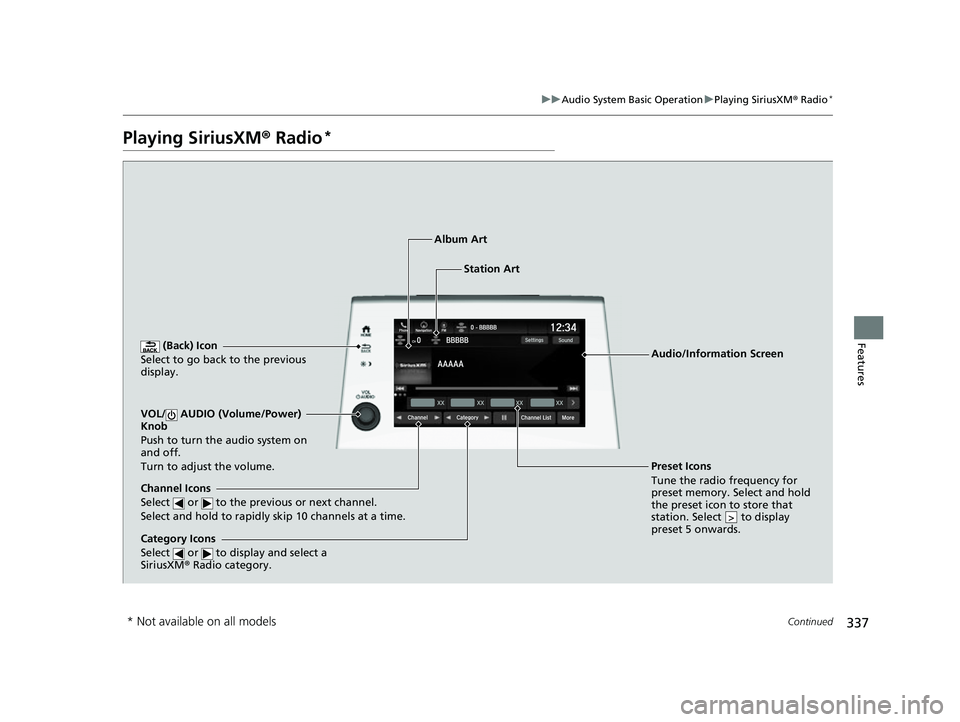
(Back) Icon
Select to go back to the previous
display.
Channel Icons
Select or to the previous or next channel.
Select and hold to rapidly skip 10 channels at a time.
VOL/ AUDIO (Volume/Power)
Knob
Push to turn the audio system on
and off.
Turn to adjust the volume.
Category Icons
Select or to display and select a
SiriusXM ® Radio category.
Audio/Information Screen
Preset Icons
Tune the radio fr equency for
p r
eset memory. Select and hold
the preset icon to store that
station. Select to display
preset 5 onwards.
>
Album Art
Station Art
* Not available on all models
22 US ODYSSEY-31THR6400.book 337 ページ 2020年11月16日 月曜日 午後1時41分
Page 339 of 782
uuAudio System Basic Operation uPlaying SiriusXM ® Radio*
338
Features
1. Select Settings .
2. Select Tune Mode .
3. Select All Channels or Within Category .
■To Change the Tune Mode1Playing SiriusXM ® Radio*
In the channel mode, all available channels are
selectable. In the categor y mode, you can select a
channel within a ca tegory (Jazz, Rock, Classical, etc.).
There may be instances when SiriusXM ® Radio does
not broadcast all the data fi elds (artist name, title).
This does not indicate a problem with your audio
system.
SiriusXM ® Radio stations load in ascending order,
which can take about a minute. Once they have
loaded you will be able to scroll up or down to make
your selections.
Switching the Audio Mode
Press the or button on the steering wheel or
select the audio source icon on the screen.
2 Audio Remote Controls P. 279
Tune Start:
When you change to a preset channel, a song being
played on that channel restarts from the beginning
with this function. This can be turned on or off by the
following procedure.
1. Select Settings .
2. Select Tune Start .
3. Select ON or OFF .
To change a category, select Category icons, or
select More and then select Category List.
34
* Not available on all models
22 US ODYSSEY-31THR6400.book 338 ページ 2020年11月16日 月曜日 午後1時41分
Page 340 of 782
Continued339
uuAudio System Basic Operation uPlaying SiriusXM ® Radio*
Features
To store a channel:
1. Tune to the selected channel.
2. Select and hold the preset number for the station you want to store.
■Multi-channel preset (for music channels only)
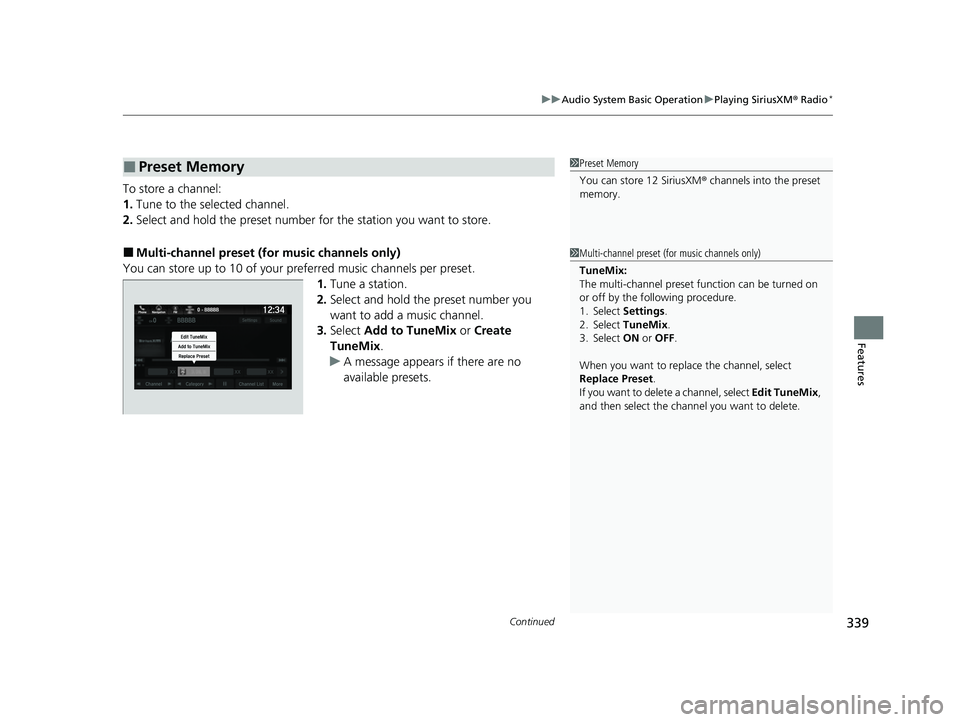
You can store up to 10 of your preferred music channels per preset. 1.Tune a station.
2. Select and hold the preset number you
want to add a music channel.
3. Select Add to TuneMix or Create
TuneMix .
u A message appears if there are no
available presets.
■Preset Memory1Preset Memory
You can store 12 SiriusXM ® channels into the preset
memory.
1 Multi-channel preset (for music channels only)
TuneMix:
The multi-channel preset function can be turned on
or off by the following procedure.
1. Select Settings .
2. Select TuneMix.
3. Select ON or OFF .
When you want to replac e the channel, select
Replace Preset .
If you want to delete a channel, select Edit TuneMix ,
and then select the channel you want to delete.
22 US ODYSSEY-31THR6400.book 339 ページ 2020年11月16日 月曜日 午後1時41分