change wheel HONDA ODYSSEY 2022 Owner's Manual
[x] Cancel search | Manufacturer: HONDA, Model Year: 2022, Model line: ODYSSEY, Model: HONDA ODYSSEY 2022Pages: 782, PDF Size: 27.17 MB
Page 611 of 782
uuHonda Sensing ®u Adaptive Cruise Control (ACC) with Low Speed Follow
610
Driving
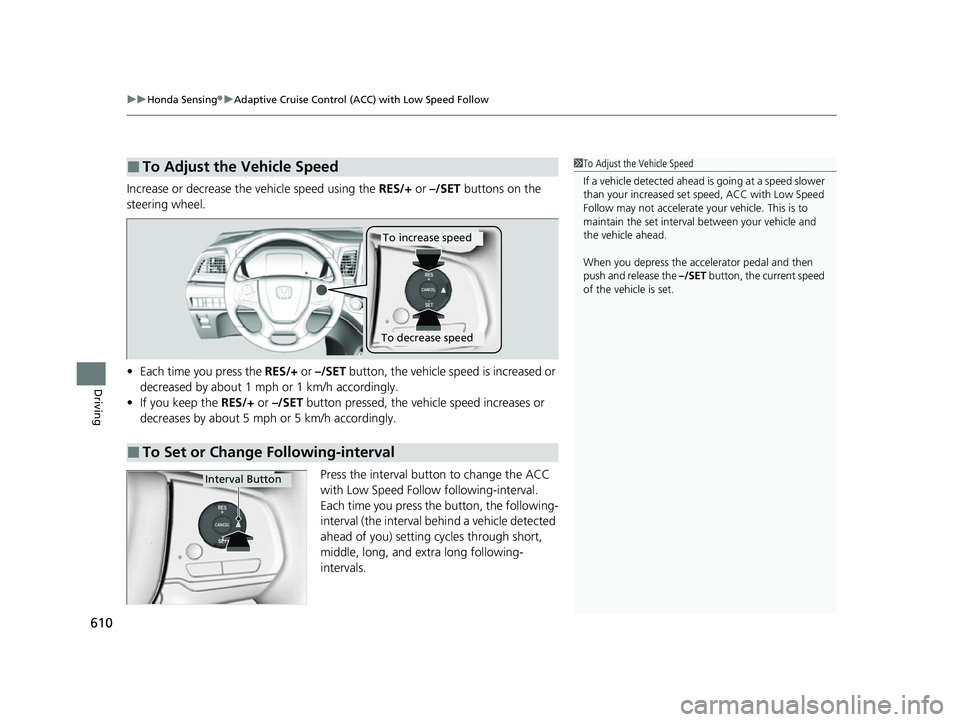
Increase or decrease the vehicle speed using the RES/+ or –/SET buttons on the
steering wheel.
• Each time you press the RES/+ or –/SET button, the vehicle speed is increased or
decreased by about 1 mph or 1 km/h accordingly.
• If you keep the RES/+ or –/SET button pressed, the vehicle speed increases or
decreases by about 5 mph or 5 km/h accordingly.
Press the interval button to change the ACC
with Low Speed Follow following-interval.
Each time you press the button, the following-
interval (the interval behind a vehicle detected
ahead of you) setting cycles through short,
middle, long, and extra long following-
intervals.
■To Adjust the Vehicle Speed1 To Adjust the Vehicle Speed
If a vehicle detected ahead is going at a speed slower
than your increased set speed, ACC with Low Speed
Follow may not accelerate y our vehicle. This is to
maintain the set interval between your vehicle and
the vehicle ahead.
When you depress the accelerator pedal and then
push and release the –/SET button, the current speed
of the vehicle is set.
■To Set or Change Following-interval
To increase speed
To decrease speed
Interval Button
22 US ODYSSEY-31THR6400.book 610 ページ 2020年11月16日 月曜日 午後1時41分
Page 617 of 782
616
uuHonda Sensing ®u Lane Keeping Assist System (LKAS)
Driving
Lane Keeping Assist System (LKAS)
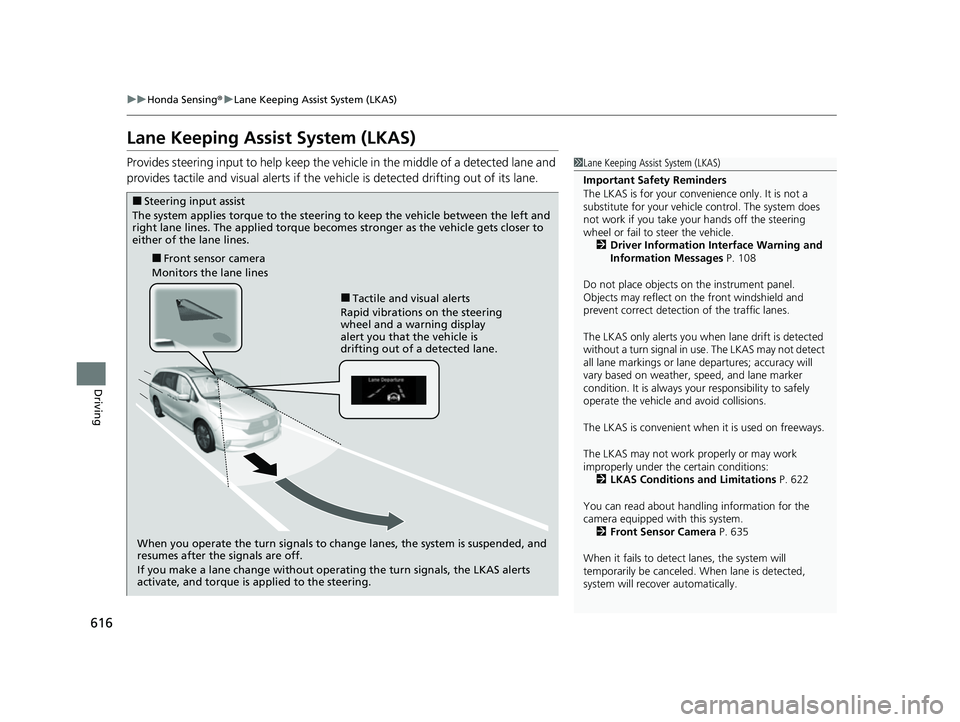
Provides steering input to help keep the vehicle in the middle of a detected lane and
provides tactile and visual alerts if the ve hicle is detected drifting out of its lane.1Lane Keeping Assist System (LKAS)
Important Safety Reminders
The LKAS is for your convenience only. It is not a
substitute for your vehicle control. The system does
not work if you take y our hands off the steering
wheel or fail to steer the vehicle. 2 Driver Information Interface Warning and
Information Messages P. 108
Do not place objects on the instrument panel.
Objects may reflect on th e front windshield and
prevent correct detectio n of the traffic lanes.
The LKAS only alerts you when lane drift is detected
without a turn signal in use. The LKAS may not detect
all lane markings or lane departures; accuracy will
vary based on weather, speed, and lane marker
condition. It is always your responsibility to safely
operate the vehicle an d avoid collisions.
The LKAS is convenient when it is used on freeways.
The LKAS may not work properly or may work
improperly under the certain conditions:
2 LKAS Conditions and Limitations P. 622
You can read about handling information for the
camera equipped with this system. 2 Front Sensor Camera P. 635
When it fails to detect lanes, the system will
temporarily be canceled. When lane is detected,
system will recover automatically.
■Tactile and visual alerts
Rapid vibrations on the steering
wheel and a warning display
alert you that the vehicle is
drifting out of a detected lane.
■Front sensor camera
Monitors the lane lines
■Steering input assist
The system applies torque to the steering to keep the vehicle between the left and
right lane lines. The applied torque becomes stronger as the vehicle gets closer to
either of the lane lines.
When you operate the turn signals to change lanes, the system is suspended, and
resumes after the signals are off.
If you make a lane change without operating the turn signals, the LKAS alerts
activate, and torque is applied to the steering.
22 US ODYSSEY-31THR6400.book 616 ページ 2020年11月16日 月曜日 午後1時41分
Page 628 of 782
Continued627
uuHonda Sensing ®u Road Departure Mitigation (RDM) System
Driving
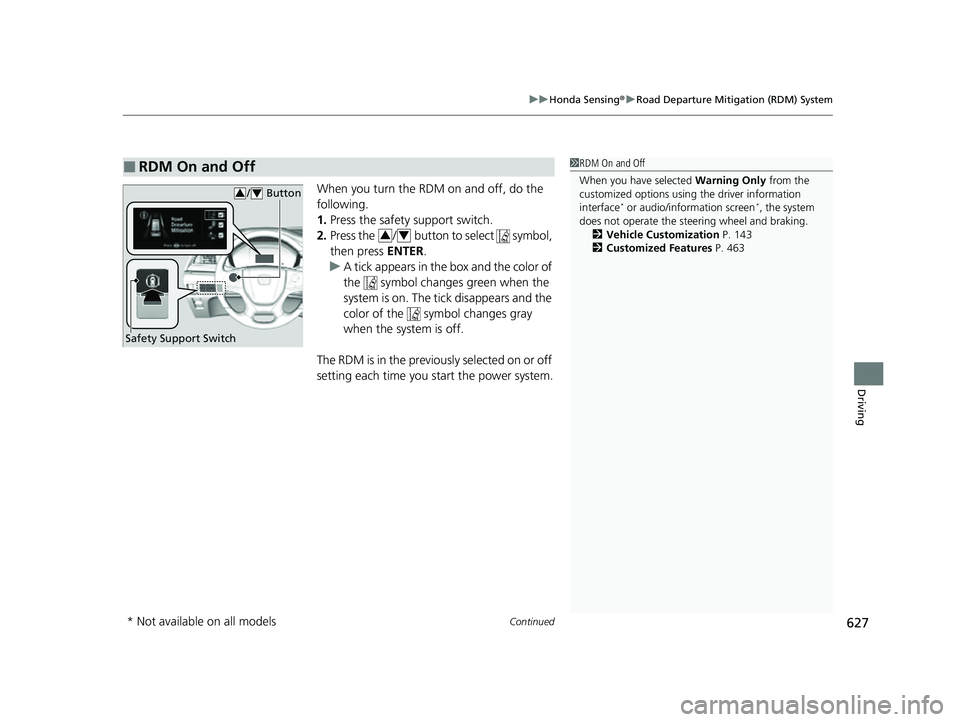
When you turn the RDM on and off, do the
following.
1. Press the safety support switch.
2. Press the / button to select symbol,
then press ENTER.
u A tick appears in the box and the color of
the symbol changes green when the
system is on. The tick disappears and the
color of the symbol changes gray
when the system is off.
The RDM is in the previous l y s e l e c t e d o n o r o f f
setting each time you start the power system.
■RDM On and Off1 RDM On and Off
When you have selected Warning Only from the
customized options using the driver information
interface
* or audio/information screen*, the system
does not operate the steering wheel and braking. 2 Vehicle Customization P. 143
2 Customized Features P. 463
Safety Support Switch
/ Button34
34
* Not available on all models
22 US ODYSSEY-31THR6400.book 627 ページ 2020年11月16日 月曜日 午後1時41分
Page 632 of 782
Continued631
uuHonda Sensing ®u Traffic Sign Recognition System
Driving
The traffic sign recognition system may not be able to recognize a traffic sign in the
following cases.
■Vehicle conditions
• Headlight lenses are dirty or the h eadlights are not properly adjusted.
• The outside of the windshield is blocked by dirt, mud, leaves, wet snow, etc.
• The inside of the windshield is fogged.
• There are portions remaining to be wiped.
• An abnormal tire or wheel condition (wrong size, varied size or construction,
improperly inflated, co mpact spare tire, etc.).
• The vehicle is tilted due to a heavy load or suspension modifications.
■Environmental conditions
• Driving into low sunlight (e.g., at dawn or dusk).
• Strong light is reflec ted onto the roadway.
• Sudden changes between light and dark, such as an entrance or exit of a tunnel.
• When you drive in the shad ows of trees, buildings, etc.
• Driving at night, in dark areas such as long tunnels.
• Driving in bad weather (rain, fog, snow, etc.).
• A vehicle in front of you is kicking up spray or snow.
■Traffic Sign Recognition System Conditions and Limitations1Traffic Sign Recognition System Conditions and Limitations
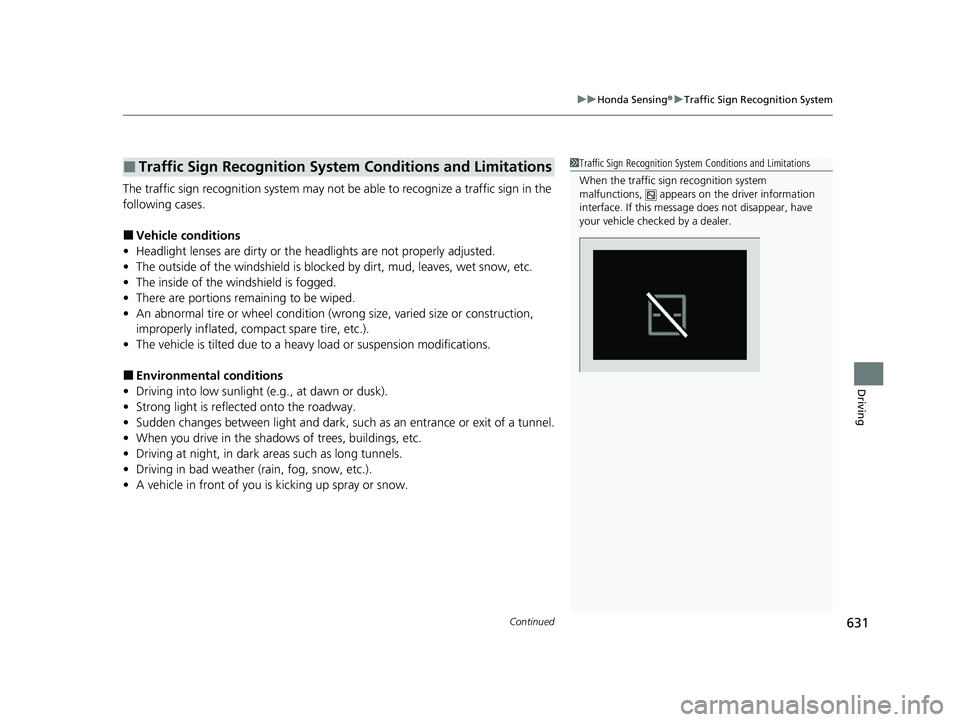
When the traffic sign recognition system
malfunctions, appears on the driver information
interface. If this message does not disappear, have
your vehicle checked by a dealer.
22 US ODYSSEY-31THR6400.book 631 ページ 2020年11月16日 月曜日 午後1時41分
Page 647 of 782
646
Driving
Parking Your Vehicle
When Stopped
1.Depress the brake pedal firmly.
2. With the brake pedal depressed, press the electric parking brake switch slowly,
but fully.
3. Change the gear position to
(P.
4. Turn off the engine.
u The parking brake and brake system indicator (red) goes off in about 15
seconds.
1Parking Your Vehicle
Do not park your vehicle near flammable objects,
such as dry grass, oil, or timber.
Heat from the exhaust can cause a fire.
1 When Stopped
NOTICE
The following can dama ge the transmission:
•Depressing the accelerator and brake pedals
simultaneously.
•Holding the vehicle in place when facing uphill by
depressing the accelerator pedal.
•Changing into ( P before the vehicle stops
completely.
In extremely cold temperatures, the parking brake
may freeze up if applied. If such temperatures are
expected, do not apply the parking brake but, if
parking on a slope, either turn the front wheels so
they will contact the curb if the vehicle rolls down the
slope or block the wheels to keep the vehicle from
moving. If you do not take either precaution, the
vehicle may roll unexpect edly, leading to a crash.
22 US ODYSSEY-31THR6400.book 646 ページ 2020年11月16日 月曜日 午後1時41分
Page 658 of 782
657Continued
Driving
Multi-View Rear Camera
About Your Multi-View Rear Camera
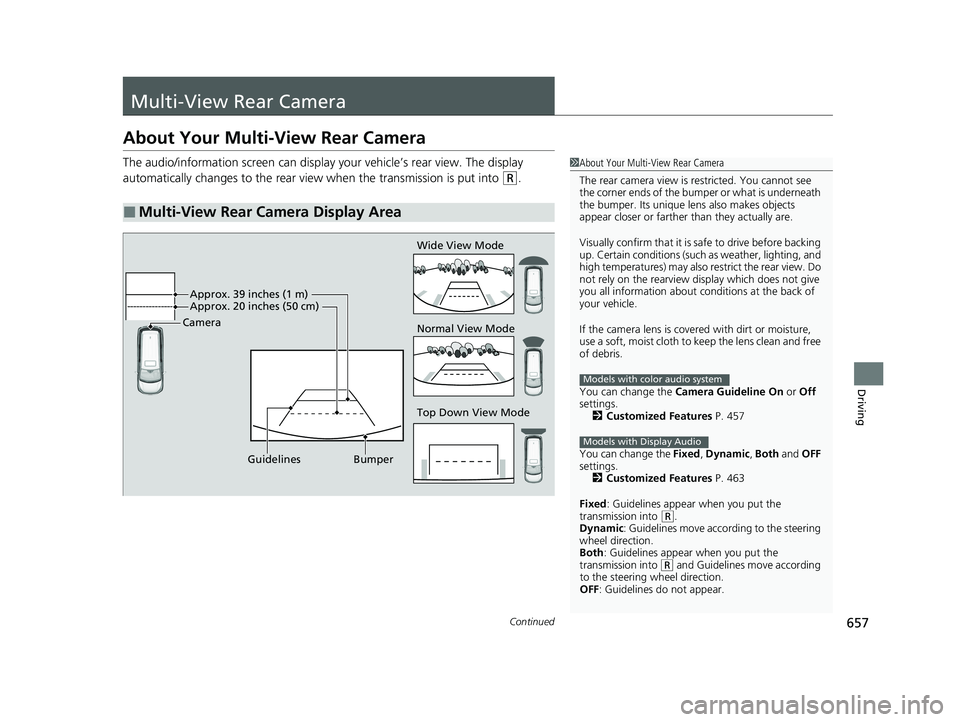
The audio/information screen can display your vehicle’s rear view. The display
automatically changes to the rear view when the transmission is put into
(R.
■Multi-View Rear Camera Display Area
1About Your Multi-View Rear Camera
The rear camera view is restricted. You cannot see
the corner ends of the bumper or what is underneath
the bumper. Its unique le ns also makes objects
appear closer or farther than they actually are.
Visually confirm that it is safe to drive before backing
up. Certain conditions (such as weather, lighting, and
high temperatures) may also restrict the rear view. Do
not rely on the rearview display which does not give
you all information about conditions at the back of
your vehicle.
If the camera lens is cove red with dirt or moisture,
use a soft, moist cloth to keep the lens clean and free
of debris.
You can change the Camera Guideline On or Off
settings. 2 Customized Features P. 457
You can change the Fixed, Dynamic , Both and OFF
settings. 2 Customized Features P. 463
Fixed: Guidelines appear when you put the
transmission into
( R.
Dynamic: Guidelines move according to the steering
wheel direction.
Both : Guidelines appear when you put the
transmission into
( R and Guidelines move according
to the steering wheel direction.
OFF: Guidelines do not appear.
Models with color audio system
Models with Display Audio
Top Down View Mode Normal View Mode Wide View Mode
Guidelines Bumper
Camera
Approx. 39 inches (1 m)
Approx. 20 inches (50 cm)
22 US ODYSSEY-31THR6400.book 657 ページ 2020年11月16日 月曜日 午後1時41分
Page 727 of 782
uuIf a Tire Goes Flat uChanging a Flat Tire
726
Handling the Unexpected
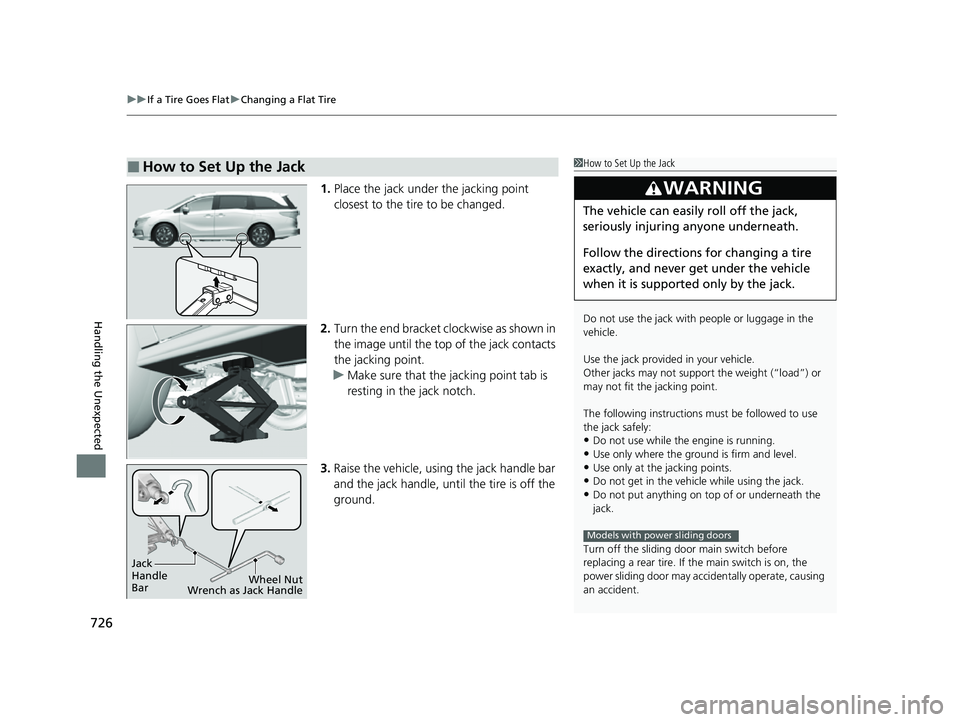
1. Place the jack under the jacking point
closest to the tire to be changed.
2. Turn the end bracket cl ockwise as shown in
the image until the top of the jack contacts
the jacking point.
u Make sure that the jacking point tab is
resting in the jack notch.
3. Raise the vehicle, using the jack handle bar
and the jack handle, until the tire is off the
ground.
■How to Set Up the Jack1How to Set Up the Jack
Do not use the jack with people or luggage in the
vehicle.
Use the jack provided in your vehicle.
Other jacks may not support the weight (“load”) or
may not fit the jacking point.
The following instructions must be followed to use
the jack safely:
•Do not use while the engine is running.
•Use only where the ground is firm and level.
•Use only at the jacking points.•Do not get in the vehicl e while using the jack.
•Do not put anything on top of or underneath the
jack.
Turn off the sliding door main switch before
replacing a rear tire. If the main switch is on, the
power sliding door may acci dentally operate, causing
an accident.
3WARNING
The vehicle can easily roll off the jack,
seriously injuring anyone underneath.
Follow the directions for changing a tire
exactly, and never get under the vehicle
when it is supported only by the jack.
Models with power sliding doors
Jack
Handle
Bar Wheel Nut
Wrench as Jack Handle
22 US ODYSSEY-31THR6400.book 726 ページ 2020年11月16日 月曜日 午後1時41分
Page 735 of 782
734
uuEngine Does Not Start uEmergency Engine Stop
Handling the Unexpected
Emergency Engine Stop
The ENGINE START/STOP button may be used to stop the engine due to an
emergency situation even while driving. If you must stop the engine, do either of the
following operations:
• Press and hold the ENGINE START/STOP button for about two seconds.
• Firmly press the ENGINE START/STOP button three times.
The steering wheel will not lock. However, because turning off the engine disables
the power assist the engine provides to the steering and braking systems, it will
require significantly more physical effort an d time to steer and slow the vehicle. Use
both feet on the brake pedal to slow down the vehicle and stop immediately in a
safe place.
The gear position automatically changes to
(P after the vehicle comes to a complete
stop.
Then, the power mode changes to VEHICLE OFF.
Then, press the ENGINE START/STOP button twice without depressing the brake
pedal to change the mode to VEHICLE OFF.
1 Emergency Engine Stop
Do not press the ENGINE START/STOP button while
driving unless it is absolute ly necessary for the engine
to be turned off.
If you press the ENGINE START/STOP button while
driving, the beeper sounds.
U.S. models
Canadian models
22 US ODYSSEY-31THR6400.book 734 ページ 2020年11月16日 月曜日 午後1時41分
Page 762 of 782
761
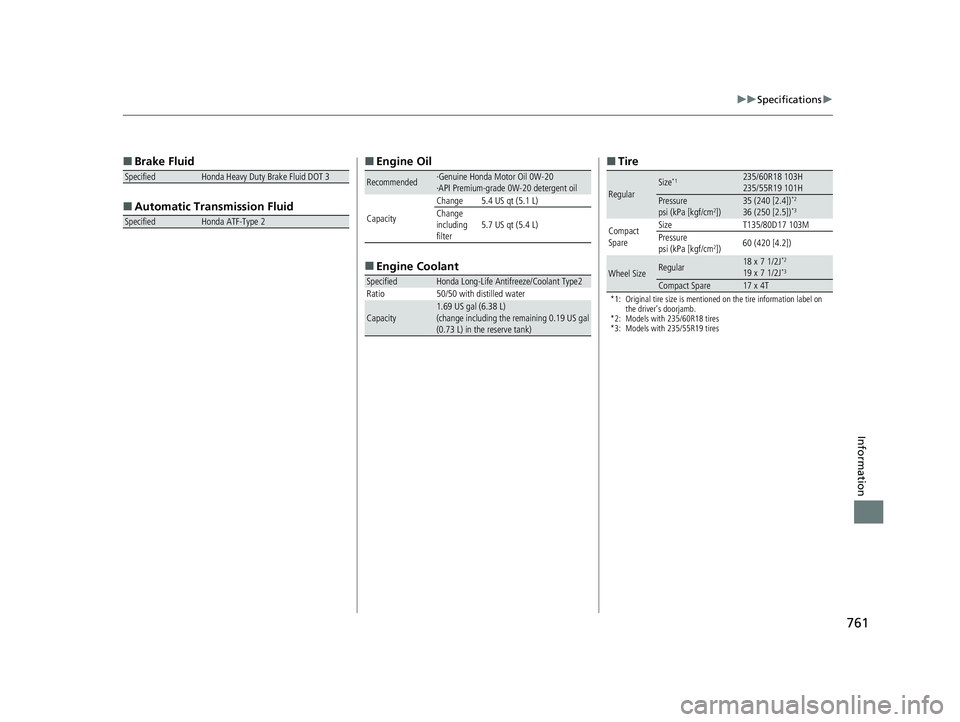
uuSpecifications u
Information
■
Brake Fluid
■ Automatic Tran smission Fluid
SpecifiedHonda Heavy Duty Brake Fluid DOT 3
SpecifiedHonda ATF-Type 2
■
Engine Oil
■ Engine Coolant
Recommended·Genuine Honda Motor Oil 0W-20
·API Premium-grade 0W-20 detergent oil
Capacity Change 5.4 US qt (5.1 L)
Change
including
filter
5.7 US qt (5.4 L)
SpecifiedHonda Long-Life Antifreeze/Coolant Type2
Ratio 50/50 with distilled water
Capacity1.69 US gal (6.38 L)
(change including the remaining 0.19 US gal
(0.73 L) in the reserve tank)
■ Tire
*1: Original tire size is mentioned on the tire information label on
the driver’s doorjamb.
*2: Models with 235/60R18 tires
*3: Models with 235/55R19 tires
RegularSize*1235/60R18 103H
235/55R19 101H
Pressure
psi (kPa [kgf/cm2])35 (240 [2.4])*2
36 (250 [2.5])*3
Compact
Spare Size
T135/80D17 103M
Pressure
psi (kPa [kgf/cm
2]) 60 (420 [4.2])
Wheel SizeRegular18 x 7 1/2J*2
19 x 7 1/2J*3
Compact Spare17 x 4T
22 US ODYSSEY-31THR6400.book 761 ページ 2020年11月16日 月曜日 午後1時41分