change HONDA ODYSSEY 2022 Manual Online
[x] Cancel search | Manufacturer: HONDA, Model Year: 2022, Model line: ODYSSEY, Model: HONDA ODYSSEY 2022Pages: 782, PDF Size: 27.17 MB
Page 370 of 782
369
uuAudio System Basic Operation uWi-Fi Connection
Continued
Features
Wi-Fi Connection
You can connect the audio system to the Internet using Wi-Fi and browse websites
or use online services on the audio/information screen. If your phone has cell
hotspot capabilities, the system can be tethered to the phone. Use the following
steps to setup.
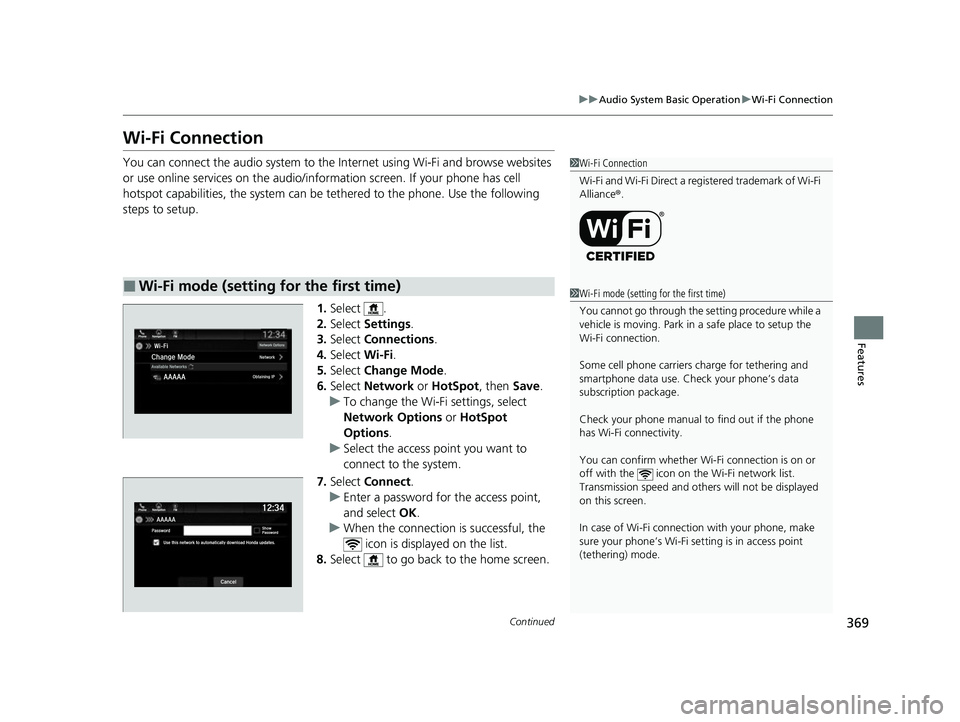
1.Select .
2. Select Settings .
3. Select Connections .
4. Select Wi-Fi.
5. Select Change Mode .
6. Select Network or HotSpot , then Save.
u To change the Wi-Fi settings, select
Network Options or HotSpot
Options.
u Select the access point you want to
connect to the system.
7. Select Connect .
u Enter a password for the access point,
and select OK.
u When the connection is successful, the
icon is displayed on the list.
8. Select to go back to the home screen.
■Wi-Fi mode (setting for the first time)
1Wi-Fi Connection
Wi-Fi and Wi-Fi Direct a registered trademark of Wi-Fi
Alliance® .
1Wi-Fi mode (setting for the first time)
You cannot go through the setting procedure while a
vehicle is moving. Park in a safe place to setup the
Wi-Fi connection.
Some cell phone carriers charge for tethering and
smartphone data use. Check your phone’s data
subscription package.
Check your phone manual to find out if the phone
has Wi-Fi connectivity.
You can confirm whether Wi -Fi connection is on or
off with the icon on the Wi-Fi network list.
Transmission speed and others will not be displayed
on this screen.
In case of Wi-Fi connect ion with your phone, make
sure your phone’s Wi-Fi se tting is in access point
(tethering) mode.
22 US ODYSSEY-31THR6400.book 369 ページ 2020年11月16日 月曜日 午後1時41分
Page 372 of 782
371
uuAudio System Basic Operation uAT&T Hotspot*
Features
AT&T Hotspot*
If you have subscribed to AT&T hotspot services, your vehicle will provide data to
connect your mobile devices to the Internet. You can use the AT&T Hotspot app to
turn on/off vehicle data and monitor da ta usage left on your subscription.
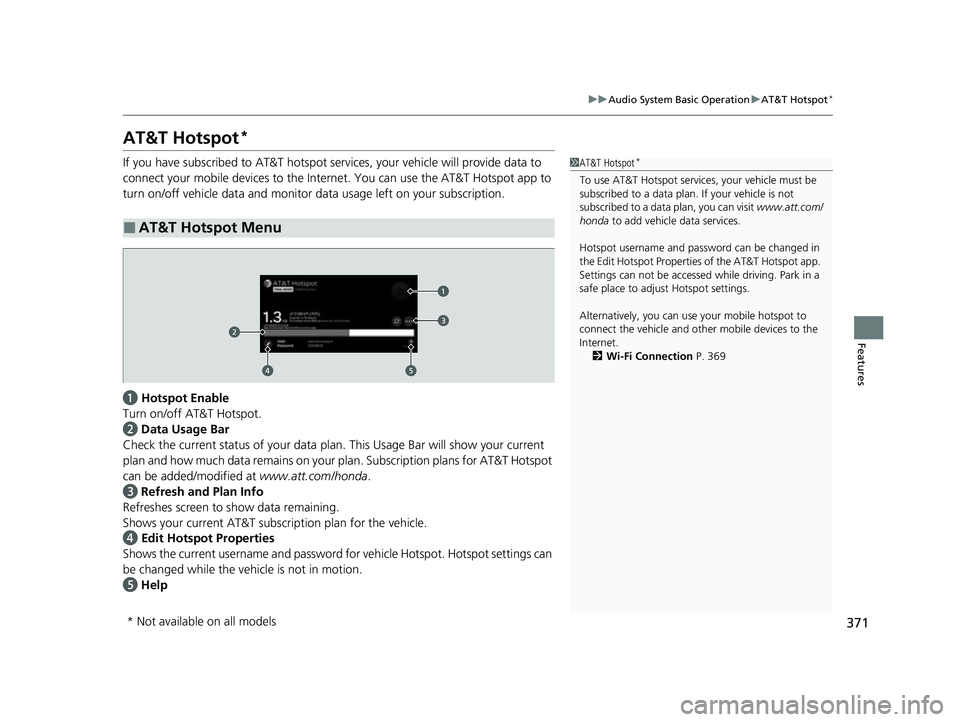
a Hotspot Enable
Turn on/off AT&T Hotspot.
b Data Usage Bar
Check the current status of your data pl an. This Usage Bar will show your current
plan and how much data remains on your plan. Subscription plans for AT&T Hotspot
can be added/modified at www.att.com/honda.
c Refresh and Plan Info
Refreshes screen to show data remaining.
Shows your current AT&T subscription plan for the vehicle.
d Edit Hotspot Properties
Shows the current username and password fo r vehicle Hotspot. Hotspot settings can
be changed while the vehicle is not in motion.
e Help
■AT&T Hotspot Menu
1AT&T Hotspot*
To use AT&T Hotspot servic es, your vehicle must be
subscribed to a data plan . If your vehicle is not
subscribed to a data plan, you can visit www.att.com/
honda to add vehicle data services.
Hotspot username and pass word can be changed in
the Edit Hotspot Properties of the AT&T Hotspot app.
Settings can not be accessed while driving. Park in a
safe place to adjust Hotspot settings.
Alternatively, you can use your mobile hotspot to
connect the vehicle and other mobile devices to the
Internet. 2 Wi-Fi Connection P. 369
* Not available on all models
22 US ODYSSEY-31THR6400.book 371 ページ 2020年11月16日 月曜日 午後1時41分
Page 373 of 782
372
uuAudio System Basic Operation uSiri Eyes Free
Features
Siri Eyes Free
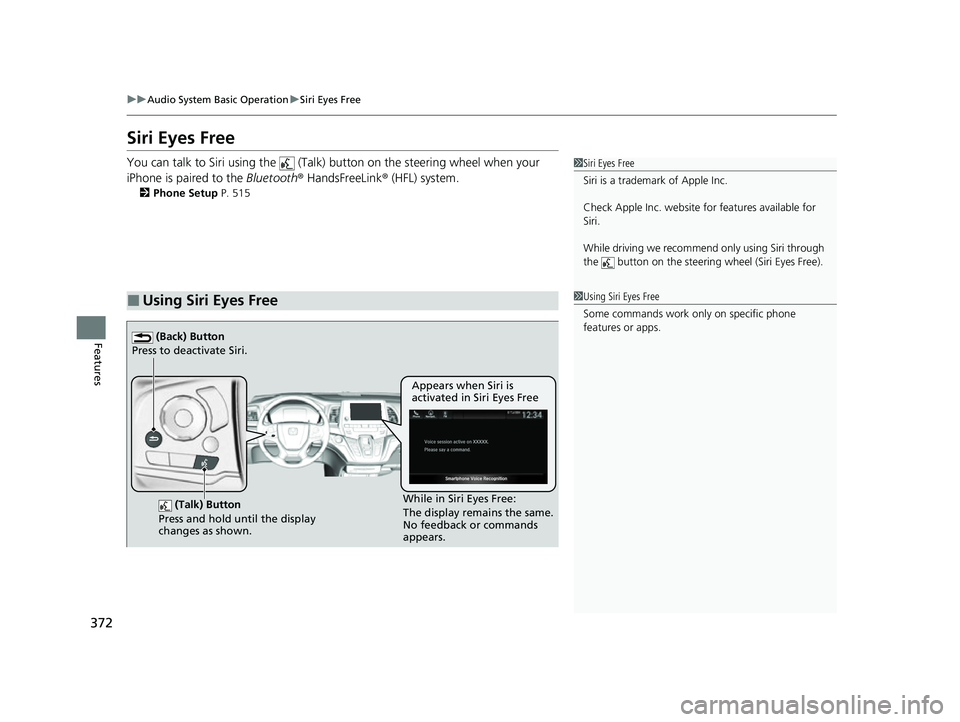
You can talk to Siri using the (Talk) button on the steering wheel when your
iPhone is paired to the Bluetooth® HandsFreeLink ® (HFL) system.
2Phone Setup P. 515
■Using Siri Eyes Free
1Siri Eyes Free
Siri is a trademark of Apple Inc.
Check Apple Inc. website for features available for
Siri.
While driving we recomme nd only using Siri through
the button on the steering wheel (Siri Eyes Free).
1Using Siri Eyes Free
Some commands work only on specific phone
features or apps.
(Talk) Button
Press and hold until the display
changes as shown.
(Back) Button
Press to deactivate Siri.
While in Siri Eyes Free:
The display remains the same.
No feedback or commands
appears. Appears when Siri is
activated in Siri Eyes Free
22 US ODYSSEY-31THR6400.book 372 ページ 2020年11月16日 月曜日 午後1時41分
Page 375 of 782
uuAudio System Basic Operation uApple CarPlay
374
Features
■Maps
Display Apple Maps and use the navigation function just as you would on your
iPhone.
Only one navigation system (pre-installed navigation or Apple CarPlay) can give
directions at a time. When you are using one system, directions to any prior
destination set on the other system will be canceled, and the system you are
currently using will direct you to your destination.
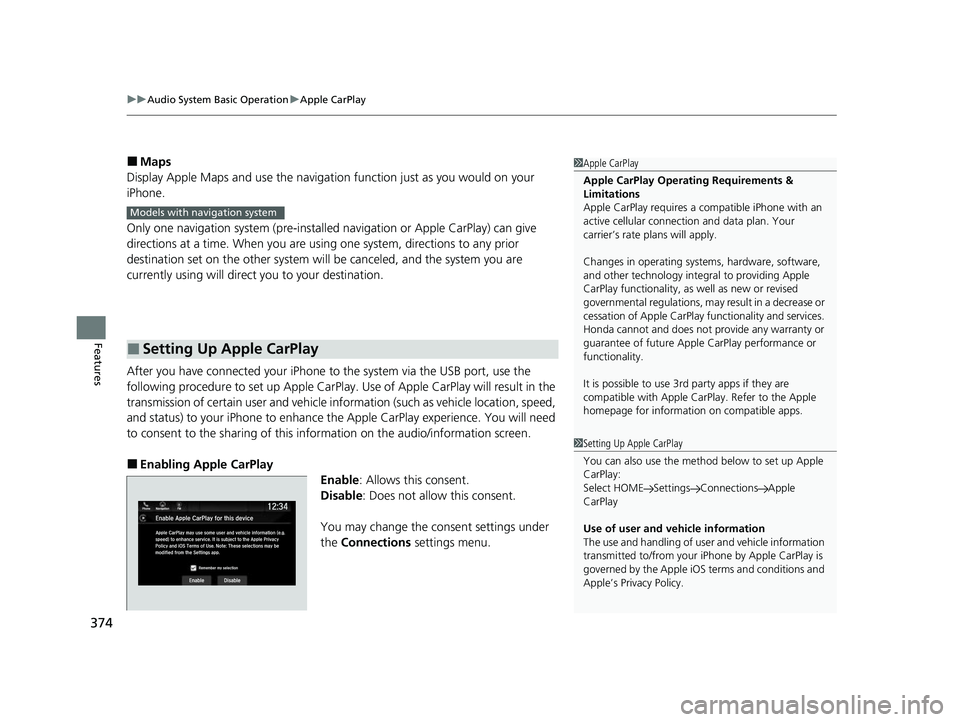
After you have connected your iPhone to the system via the USB port, use the
following procedure to set up Apple CarPlay. Use of Apple CarPlay will result in the
transmission of certain user and vehicle information (such as vehicle location, speed,
and status) to your iPhone to enhance th e Apple CarPlay experience. You will need
to consent to the sharing of this information on the audio/information screen.
■Enabling Apple CarPlay
Enable: Allows this consent.
Disable : Does not allo w this consent.
You may change the consent settings under
the Connections settings menu.
■Setting Up Apple CarPlay
1Apple CarPlay
Apple CarPlay Operating Requirements &
Limitations
Apple CarPlay requi res a compatible iPhone with an
active cellular connecti on and data plan. Your
carrier’s rate plans will apply.
Changes in operating systems, hardware, software,
and other technology integral to providing Apple
CarPlay functionality, as well as new or revised
governmental regulations, may result in a decrease or
cessation of Apple CarPlay functionality and services.
Honda cannot and does not pr ovide any warranty or
guarantee of future Appl e CarPlay performance or
functionality.
It is possible to use 3r d party apps if they are
compatible with Apple CarPlay. Refer to the Apple
homepage for information on compatible apps.
Models with navigation system
1 Setting Up Apple CarPlay
You can also use the method below to set up Apple
CarPlay:
Select HOME Settings Connections Apple
CarPlay
Use of user and vehicle information
The use and handling of user and vehicle information
transmitted to/from your iP hone by Apple CarPlay is
governed by the Apple iOS terms and conditions and
Apple’s Privacy Policy.
22 US ODYSSEY-31THR6400.book 374 ページ 2020年11月16日 月曜日 午後1時41分
Page 378 of 782
Continued377
uuAudio System Basic Operation uAndroid Auto
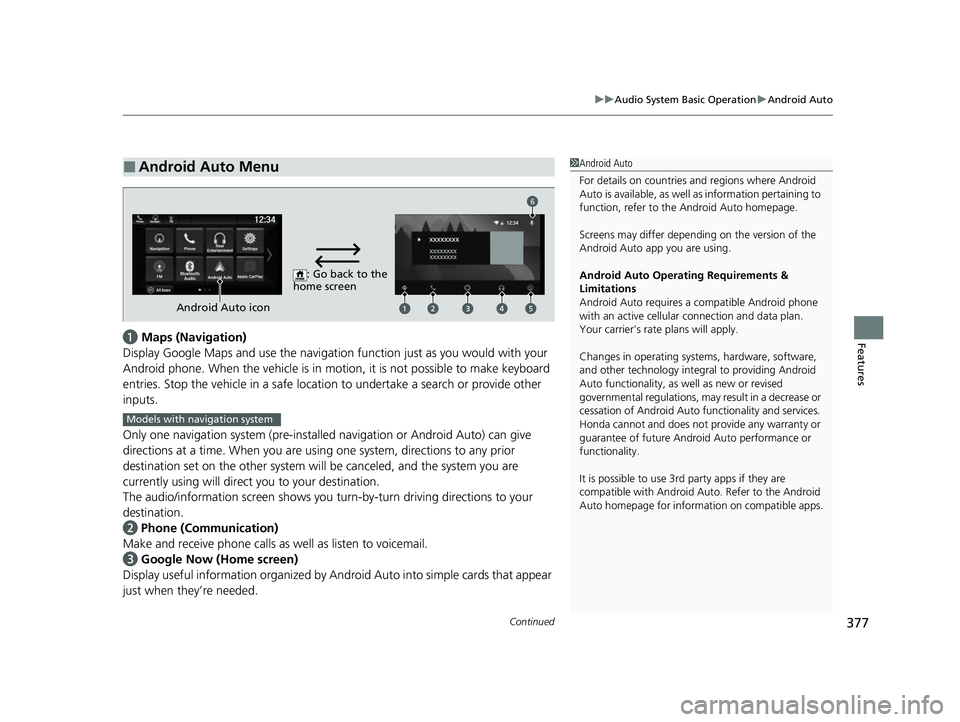
Featuresa Maps (Navigation)
Display Google Maps and use the navigation function just as you would with your
Android phone. When the vehicle is in motion, it is not possible to make keyboard
entries. Stop the vehicle in a safe locati on to undertake a search or provide other
inputs.
Only one navigation system (pre-installed navigation or Android Auto) can give
directions at a time. When you are using one system, directions to any prior
destination set on the other system will be canceled, and the system you are
currently using will direct you to your destination.
The audio/information screen shows you turn-by-turn dr iving directions to your
destination.
b Phone (Communication)
Make and receive phone calls as well as listen to voicemail.
c Google Now (Home screen)
Display useful information organized by Android Auto into simple cards that appear
just when they’re needed.
■Android Auto Menu1 Android Auto
For details on c ountries and regions where Android
Auto is available, as well as information pertaining to
function, refer to the Android Auto homepage.
Screens may differ depending on the version of the
Android Auto app you are using.
Android Auto Operating Requirements &
Limitations
Android Auto requires a compatible Android phone
with an active cellular connection and data plan.
Your carrier’s rate plans will apply.
Changes in operating systems, hardware, software,
and other technology integral to providing Android
Auto functionality, as well as new or revised
governmental regulations, may result in a decrease or
cessation of Android Auto functionality and services.
Honda cannot and does not pr ovide any warranty or
guarantee of future Android Auto performance or
functionality.
It is possible to use 3r d party apps if they are
compatible with Android Auto. Refer to the Android
Auto homepage for informat ion on compatible apps.
: Go back to the
home screen
Android Auto icon
6
Models with navigation system
22 US ODYSSEY-31THR6400.book 377 ページ 2020年11月16日 月曜日 午後1時41分
Page 379 of 782
uuAudio System Basic Operation uAndroid Auto
378
Features
d Music and audio
Play Google Play Music and music apps that are compatible with Android Auto.
To switch between music apps, press this icon.
e Go back to the Home Screen.
f Voice
Operate Android Auto with your voice.
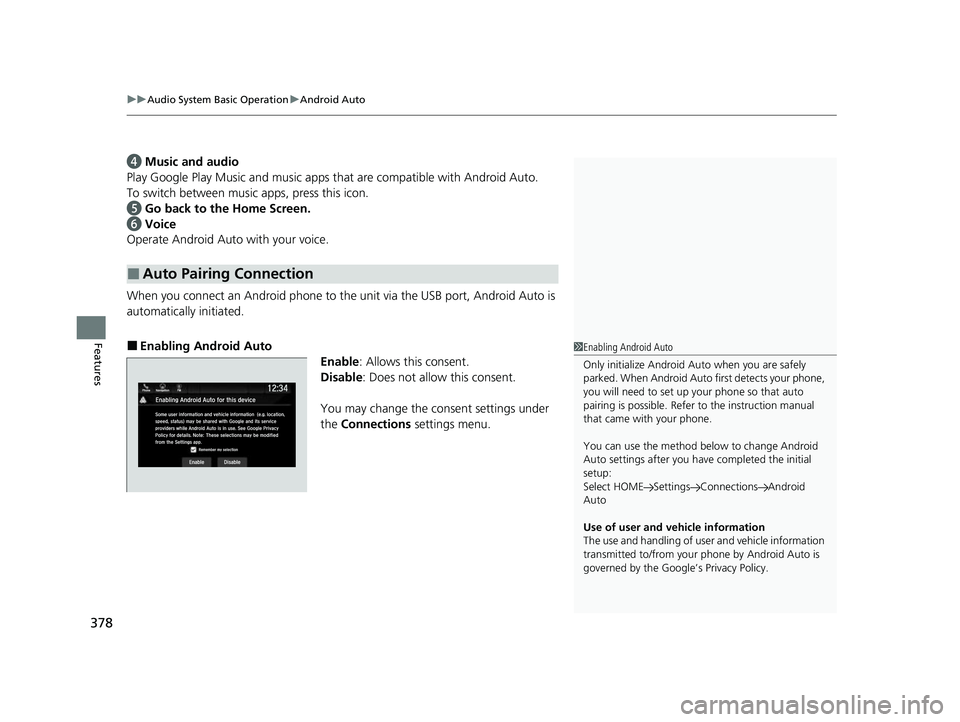
When you connect an Android phone to the unit via the USB port, Android Auto is
automatically initiated.
■Enabling Android Auto Enable: Allows this consent.
Disable : Does not allo w this consent.
You may change the consent settings under
the Connections settings menu.
■Auto Pairing Connection
1Enabling Android Auto
Only initialize Android Auto when you are safely
parked. When Android Auto first detects your phone,
you will need to set up your phone so that auto
pairing is possibl e. Refer to the instruction manual
that came with your phone.
You can use the method below to change Android
Auto settings after you ha ve completed the initial
setup:
Select HOME Settings Connections Android
Auto
Use of user and vehicle information
The use and handling of user and vehicle information
transmitted to/from your phone by Android Auto is
governed by the Google’s Privacy Policy.
22 US ODYSSEY-31THR6400.book 378 ページ 2020年11月16日 月曜日 午後1時41分
Page 385 of 782
384
uuAudio Error Messages uAndroid/Apps
Features
Android/Apps
If an error occurs while using the audio system or apps, you may see the following
error messages. If you cannot clear the error message, contact a dealer.
*1:****part is variable characters, and will change depending upon where an error occurs.
Error MessageSolution
Unfortunately, **** has
stopped.*1Error has occurred within app, select OK on the screen to close the app.
**** is not responding.
Would you like to close
it?
*1
App is not responding.
Select Wait if you can wait for a response from app a littl e longer. If it does not respond even if you keep
waiting, select OK to close the app and start it up. If the error message continues, perform Factory Data
Reset .
2Defaulting All the Settings P. 481
Models with Display Audio
22 US ODYSSEY-31THR6400.book 384 ページ 2020年11月16日 月曜日 午後1時41分
Page 395 of 782
394
uuGeneral Information on the Audio System uHonda App License Agreement
Features
2. Potential Map Inaccuracy and Route Safety. Maps used by this system may be inaccurate because of changes in roads, traffic controls,
routing, or driving conditions. Always use good judgment and co mmon sense when following suggested routes. Do not follow the ro ute
suggestions if doing so would result in an un safe or illegal driving maneuver, if you would be placed in an unsafe situation, o r if you would
be directed into an area that you consider unsafe. Do not rely on any navigation feat ures included in the system to route you to emergency
services. Not all emergency services such as police, fire stations, hospitals, or clinics are likely to be contained in the map database for such
navigation features. Ask local authorities or an emergency services operator for such locations and routes. The driver is ultimately
responsible for the safe operation of the ve hicle and therefore, must evaluate whether it is safe to follow the suggested directions. Any
navigation features are provided only as an aid. Make your driving decisions based on your observations of local conditions and existing
traffic regulations. Navigation features are not a substitute for your personal judgmen t. Any route suggestions made by the SOFTWARE or
SERVICES should never replace any local traffic regulations or yo ur personal judgment or knowledge of safe driving practices.
3. Speech Recognition:
You acknowledge and understand that HONDA and PROVIDERS may reco rd, retain, and use voices commands
when you use the speech recognition components of the SOFTWARE or SERVICES. You and all VEHICLE operators and passengers (a)
consent to the recording and retention of voice commands in su pport of providing speech recognition components and (b) release HONDA
and PROVIDERS from all claims, liabilities, and losses that may result from any use of such recorded voice commands. Recognitio n errors
are inherent in speech recognition. It is your responsibility to monitor any speech recognition functions included in the syste m and address
any errors. Neither HONDA nor PROVIDERS will be liable for any damages arising out of errors in the speech recognition process.
4. Distraction Hazards.
Navigation features may require manua l (non-verbal) input or setup. Attempting to perform such set-up or insert
data while driving can seriously distract your attention and could cause a crash or other serious consequences; the ability to undertake such
interactions may also be limited by state or local law, which la ws you are responsible to know and follow. Even occasional shor t scans of
the screen may be hazardous if your attention has been diverted away from your driving at a crit ical time. Pull over and stop the vehicle in
a safe and legal manner before attempting to access a function of the system requiring prolonged attention. Do not raise the vo lume
excessively. Keep the volume at a level wh ere you can still hear outside traffic and em ergency signals while driving. Driving while unable
to hear these sounds could result in a crash.
22 US ODYSSEY-31THR6400.book 394 ページ 2020年11月16日 月曜日 午後1時41分
Page 400 of 782
399
uuGeneral Information on the Audio System uHonda App License Agreement
Continued
Features
L. Changes to the SOFTWARE or SERVICES. WE may change, modify, or update the SOFT WARE or SERVICES from time to time. Unless
explicitly stated otherwise, any new featur es or services that augment or enhance the SOFTWARE or SERVICES in the future shall
respectively be considered part of the SOFTWARE or SERVICES and s ubject to this AGREEMENT. WE reserve the right at any time and from
time to time to interrupt, res trict, modify, suspend, discontinue, temporarily or permanently, the SOFTWARE or SERVICES (or any portion
thereof), with or without notice to you, and you agree that HONDA shall not be li able to you or to any third party for any modification,
suspension or discontinuance of the SOFTWARE or SERVICES.
M. ARBITRATION:
PLEASE READ THIS ARBITRATION PROVISION CAREFULLY TO UNDER STAND YOUR RIGHTS. YOU AGREE THAT ANY CLAIM THAT YOU
MAY HAVE IN THE FUTURE MUST BE RESOLVED THROUGH BIND ING ARBITRATION. YOU WAIVE THE RIGHT TO HAVE YOUR DISPUTE
HEARD IN COURT AND WAIVE THE RIGHT TO BRING CLASS CLAIMS. YOU UNDERSTAND THAT DISCOVERY AND APPEAL RIGHTS ARE
MORE LIMITED IN ARBITRATION.
Arbitration is a method of resolving a clai m, dispute or controversy without filing a lawsuit. By agreeing to arbitrate, the right to go to
court is waived and instead claims, disputes or controversies ar e submitted to binding arbitration. This provision sets forth the terms and
conditions of our agreement. YOU and HONDA agree and acknowle dge that this Agreement affects interstate commerce and the
Federal Arbitration Act (“FAA”) applies. By using the Software, Vehicle, or Services, YO U elect to have disputes resolved by arbitration.
YOU, HONDA or any involved third party may pursue a Claim. “Claim” means any dispute between YOU, HONDA, or any involved third
party relating to your use of the Software , the Vehicle, or the Services, this Agreement, or our relationship, including any
representations, omissions or warranties. “Claim” does not include personal injury or wrongful death claims. YOU or HONDA may s eek
remedies in small claims court or provisional judicial remedi es without arbitrating. In addition, notwithstanding anything here in to the
contrary, YOU or HONDA may seek equitable re lief in a court of competent jurisdiction.
YOU or HONDA may select arbitration with American Arbitration Asso ciation, JAMS or National Arbitration and Mediation. Contact
these sponsors for their rules. The hearing will be in the federa l district where YOU reside. If agreed, it may be by telephone or written
submissions. Filing and arbitrator fees to be paid per the sponsor rules. You may contact the sponsor for a fee waiver. If no fee waivers,
HONDA will pay filing and arbitrator fees up to $5,000, unless law requires more. Each party is responsible for other fees. Arbitrator
may award costs or fees to prevailing party, if permitted by law. HONDA will not seek fees, unless the claims are frivolous.
22 US ODYSSEY-31THR6400.book 399 ページ 2020年11月16日 月曜日 午後1時41分
Page 401 of 782
400
uuGeneral Information on the Audio System uHonda App License Agreement
Features
N. Miscellaneous: You may not assign this AGREEMENT without HONDA’s pr ior written consent. This AGREEMENT and any additional
HONDA TERMS and PROVIDER TERMS represents the entire agreement between you and US. HONDA may amend the terms of this
AGREEMENT by providing you with notices of such updated terms. If you do not consent to be bound by the updated terms, your sol e
remedy will be to cease using the SOFTWARE and SERVICES. If any part of this AGREEMENT is found invalid, void, or unenforceable, the
balance of the AGREEMENT will remain valid and enforceable accord ing to its terms. To the fullest extent permitted by law, and except as
explicitly provided otherwise, this AGREEMEN T and any disputes arising out of or relating to it will be governed by the laws of the State of
California, except that California laws concerning choice of la w or conflicts shall not apply if they would cause the substanti ve law of
another jurisdiction to apply. Notwithstand ing the foregoing, Section M shall be governed by the Federal Arbitration Act and the laws of
the State of California, as applicable, as set forth therein. The failure to enforce any term of this AGREEMENT on one occasion shall not
prevent enforcement on any other occasion or the enforcement of an y other term. Headings and captions shall not be considered included
for purposes of interpretation or applicat ion hereof, but are for convenience only.
Arbitrator shall be an attorney or current
or retired judge familiar with automotive or consumer software. The arbitrator shall follow
substantive law, statute of limitations and decide all issues relating to the interpretation, construction, enforceability and applicability of
this provision. The arbitrator may order relie f permitted by law. This provision is governed and enforceable by the FAA. An awa rd shall
include a written opinion and be final, subject to appeal by the FAA.
This provision survives termination of this Agreement or relationship, bankruptcy, assignment or transfer. If part of this prov ision is
unenforceable, the remainder remains in effe ct. If unenforceability allows arbitration as a class action, then this provision is entirely
unenforceable. YOU may opt out within 30 days of your initial use of the Software by sending a signed, written notice to HONDA at
Honda Financial Services, P.O. Box 165007, Irving, TX 75016. HO NDA reserves the right to make changes to this provision after
providing written notice and an opportunity to opt out.
22 US ODYSSEY-31THR6400.book 400 ページ 2020年11月16日 月曜日 午後1時41分