change HONDA ODYSSEY 2022 Service Manual
[x] Cancel search | Manufacturer: HONDA, Model Year: 2022, Model line: ODYSSEY, Model: HONDA ODYSSEY 2022Pages: 782, PDF Size: 27.17 MB
Page 213 of 782
212
uuOperating the Switches Around the Steering Wheel uWipers and Washers
Controls
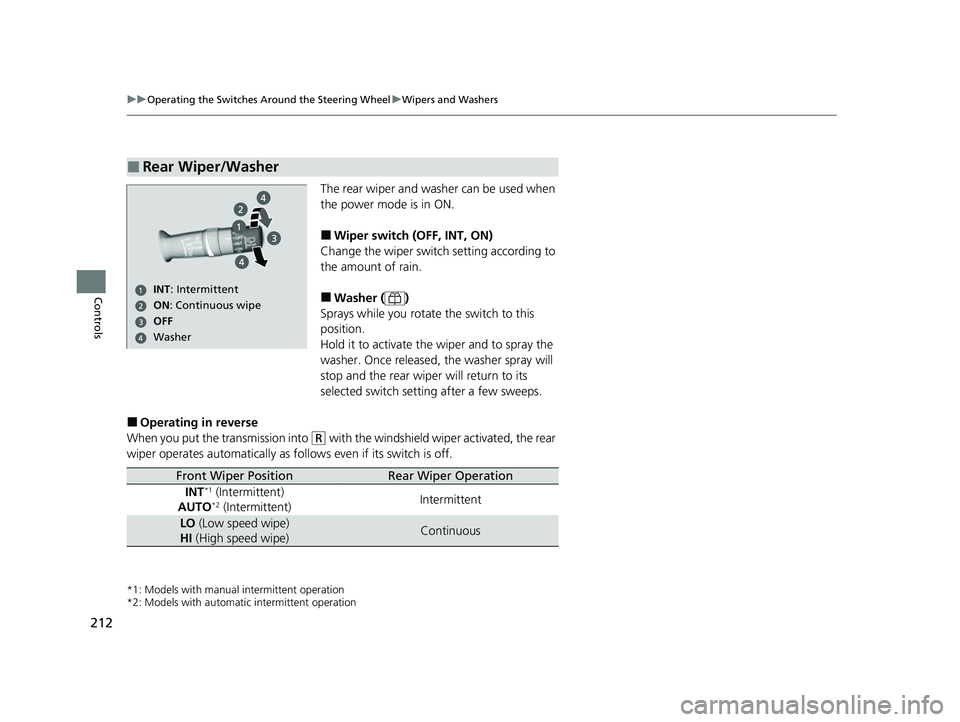
The rear wiper and washer can be used when
the power mode is in ON.
■Wiper switch (OFF, INT, ON)
Change the wiper switch setting according to
the amount of rain.
■Washer ( )
Sprays while you rotate the switch to this
position.
Hold it to activate the wiper and to spray the
washer. Once released, the washer spray will
stop and the rear wiper will return to its
selected switch setting after a few sweeps.
■Operating in reverse
When you put the transmission into
(R with the windshield wiper activated, the rear
wiper operates automatically as fo llows even if its switch is off.
*1: Models with manual intermittent operation
*2: Models with automati c intermittent operation
■Rear Wiper/Washer
ON: Continuous wipe
Washer OFF
INT : Intermittent
Front Wiper PositionRear Wiper Operation
INT*1 (Intermittent)
AUTO*2 (Intermittent) Intermittent
LO
(Low speed wipe)
HI (High speed wipe)Continuous
22 US ODYSSEY-31THR6400.book 212 ページ 2020年11月16日 月曜日 午後1時41分
Page 226 of 782
225
uuSeats uSecond Row Seats
Continued
Controls
Second Row Seats
■Adjusting the Seat Positions1Second Row Seats
3WARNING
An unsecured seat or seat-back can move
out of position or collapse without warning
if there is sudden acce leration or stop or in
a crash.
A seat or seat-back that suddenly moves or
collapses can result in severe injury or
death.
Always make sure all seats and seat-backs
are securely locked in to position before
driving.
1 Adjusting the Seat Positions
Once the desired seat posit ion and seat-back angles
are made, rock the seat-back and forth to make sure
they are locked into position.
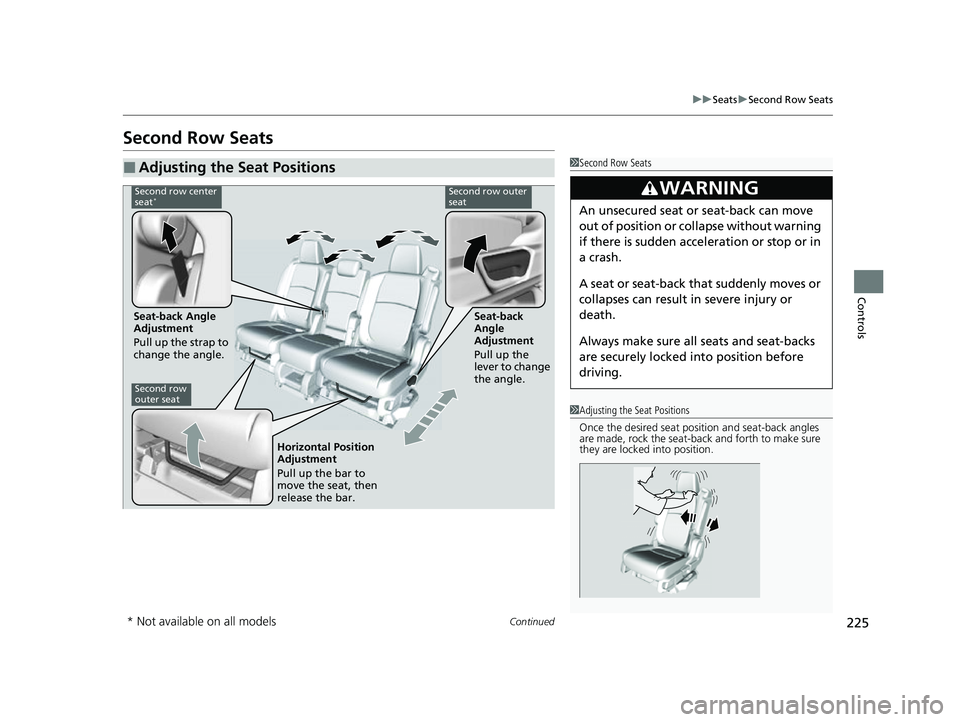
Second row center
seat*Second row outer
seat
Seat-back Angle
Adjustment
Pull up the strap to
change the angle. Seat-back
Angle
Adjustment
Pull up the
lever to change
the angle.
Second row
outer seat
Horizontal Position
Adjustment
Pull up the bar to
move the seat, then
release the bar.
* Not available on all models
22 US ODYSSEY-31THR6400.book 225 ページ 2020年11月16日 月曜日 午後1時41分
Page 231 of 782
230
uuSeats uThird Row Seats
Controls
Third Row Seats
■Adjusting the Seat Positions1Adjusting the Seat Positions
Once a seat is adjusted co rrectly, rock it back and
forth to make sure it is locked in position.
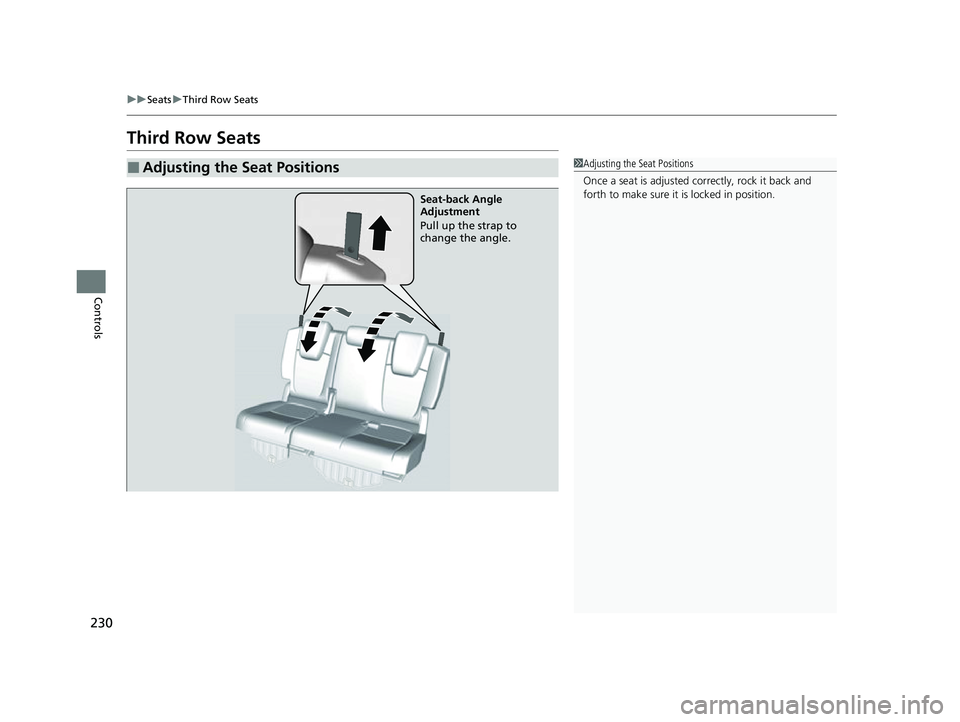
Seat-back Angle
Adjustment
Pull up the strap to
change the angle.
22 US ODYSSEY-31THR6400.book 230 ページ 2020年11月16日 月曜日 午後1時41分
Page 240 of 782
239Continued
Controls
Interior Convenience Items
Interior Lights
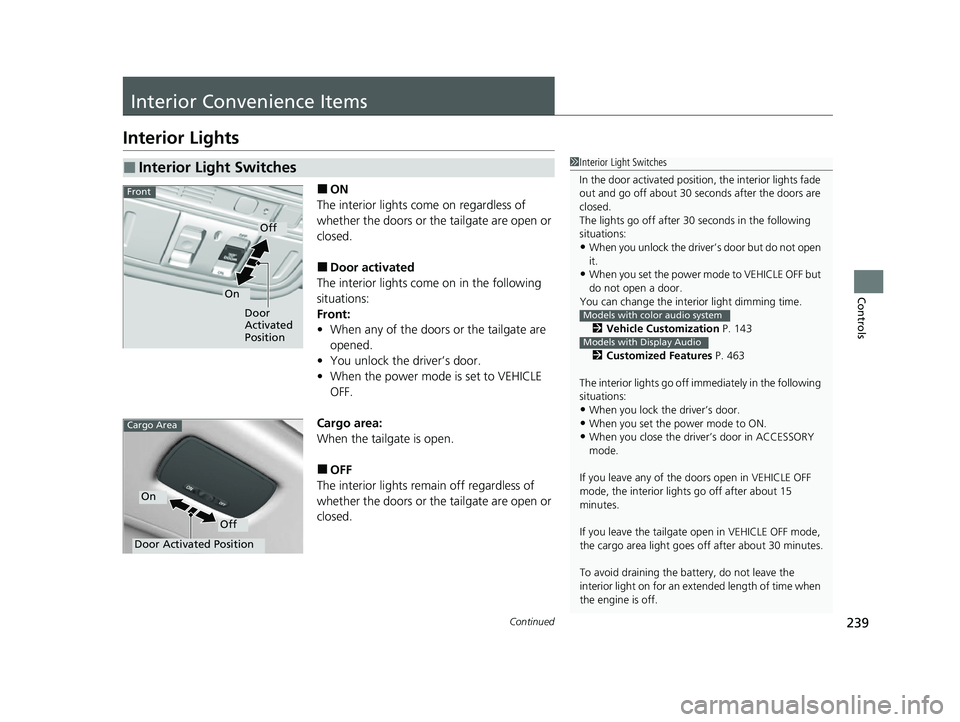
■ON
The interior lights come on regardless of
whether the doors or the tailgate are open or
closed.
■Door activated
The interior lights come on in the following
situations:
Front:
• When any of the doors or the tailgate are
opened.
• You unlock the driver’s door.
• When the power mode is set to VEHICLE
OFF.
Cargo area:
When the tailgate is open.
■OFF
The interior lights remain off regardless of
whether the doors or the tailgate are open or
closed.
■Interior Light Switches1 Interior Light Switches
In the door activated position, the interior lights fade
out and go off about 30 seconds after the doors are
closed.
The lights go off after 30 seconds in the following
situations:
•When you unlock the driver’s door but do not open
it.
•When you set the power mode to VEHICLE OFF but
do not open a door.
You can change the inte rior light dimming time.
2 Vehicle Customization P. 143
2 Customized Features P. 463
The interior lights go off im mediately in the following
situations:
•When you lock the driver’s door.
•When you set the power mode to ON.•When you close the driver’s door in ACCESSORY
mode.
If you leave any of the doors open in VEHICLE OFF
mode, the interior light s go off after about 15
minutes.
If you leave the tailgate open in VEHICLE OFF mode,
the cargo area light goes of f after about 30 minutes.
To avoid draining the ba ttery, do not leave the
interior light on for an extended length of time when
the engine is off.
Models with color audio system
Models with Display Audio
Door
Activated
Position
Off
On
Front
Door Activated Position
Off
On
Cargo Area
22 US ODYSSEY-31THR6400.book 239 ページ 2020年11月16日 月曜日 午後1時41分
Page 261 of 782
260
Controls
Climate Control System
Using Automatic Climate Control
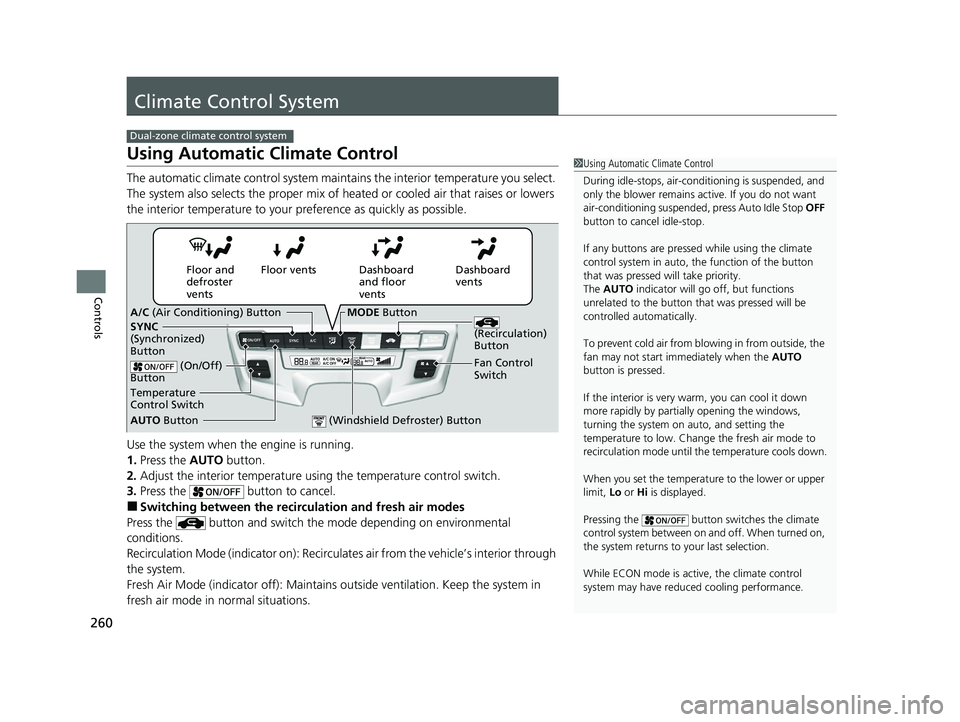
The automatic climate control system maintains the interior temperature you select.
The system also selects the proper mix of heated or cooled air that raises or lowers
the interior temperature to your preference as quickly as possible.
Use the system when the engine is running.
1. Press the AUTO button.
2. Adjust the interior temperature us ing the temperature control switch.
3. Press the button to cancel.
■Switching between the recirc ulation and fresh air modes
Press the button and switch the mode depending on environmental
conditions.
Recirculation Mode (indicator on): Recirculat es air from the vehicle’s interior through
the system.
Fresh Air Mode (indicator off): Maintains outside ventilation. Keep the system in
fresh air mode in normal situations.
Dual-zone climate control system
1 Using Automatic Climate Control
During idle-stops, air-conditioning is suspended, and
only the blower remains ac tive. If you do not want
air-conditioning suspended, press Auto Idle Stop OFF
button to cancel idle-stop.
If any buttons are presse d while using the climate
control system in auto, the function of the button
that was pressed will take priority.
The AUTO indicator will go off, but functions
unrelated to the button th at was pressed will be
controlled automatically.
To prevent cold air from bl owing in from outside, the
fan may not start i mmediately when the AUTO
button is pressed.
If the interior is very warm, you can cool it down
more rapidly by partial ly opening the windows,
turning the system on auto, and setting the
temperature to low. Change the fresh air mode to
recirculation mode until the temperature cools down.
When you set the temperat ure to the lower or upper
limit, Lo or Hi is displayed.
Pressing the button switches the climate
control system between on and off. When turned on,
the system returns to your last selection.
While ECON mode is active, the climate control
system may have reduced cooling performance.
Dashboard
vents
Dashboard
and floor
vents
Floor vents
Floor and
defroster
vents
AUTO Button
Temperature
Control Switch A/C
(Air Conditioning) Button
Fan Control
Switch
(Recirculation)
Button
(On/Off)
Button
SYNC
(Synchronized)
Button
(Windshield Defroster) Button
MODE Button
22 US ODYSSEY-31THR6400.book 260 ページ 2020年11月16日 月曜日 午後1時41分
Page 264 of 782
263
uuClimate Control System uRear Climate Control System
Controls
Rear Climate Control System
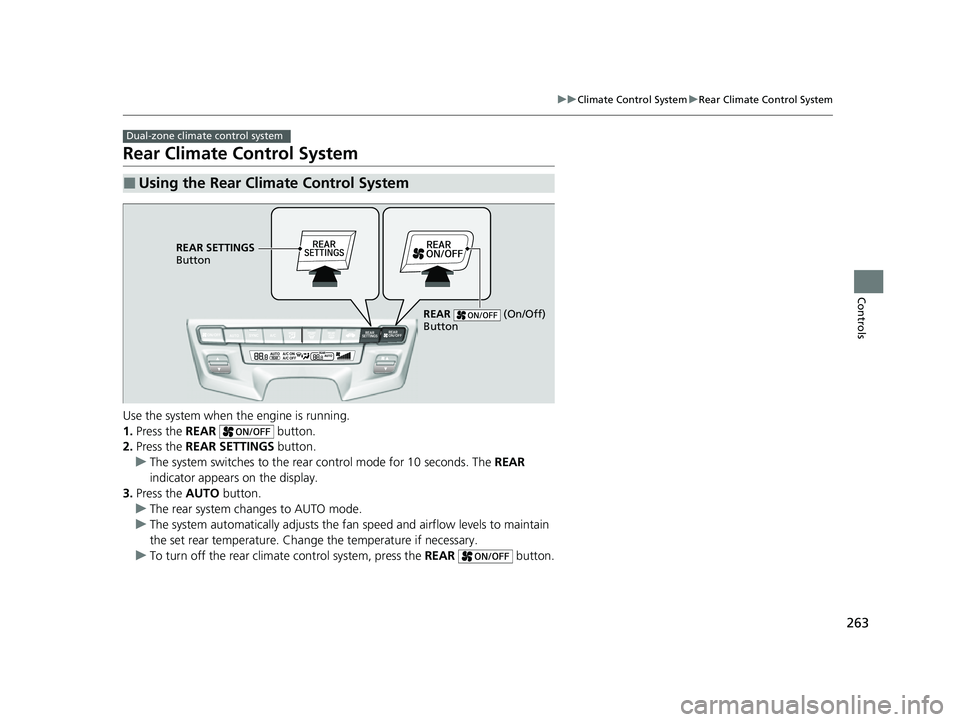
Use the system when the engine is running.
1. Press the REAR button.
2. Press the REAR SETTINGS button.
u The system switches to the rear control mode for 10 seconds. The REAR
indicator appears on the display.
3. Press the AUTO button.
u The rear system changes to AUTO mode.
u The system automatically adjusts the fan speed and airfl ow levels to maintain
the set rear temperature. Change the temperature if necessary.
u To turn off the rear climat e control system, press the REAR button.
■Using the Rear Climate Control System
Dual-zone climate control system
REAR SETTINGS
Button
REAR (On/Off)
Button
22 US ODYSSEY-31THR6400.book 263 ページ 2020年11月16日 月曜日 午後1時41分
Page 266 of 782
265Continued
Controls
Climate Control System
Using Automatic Climate Control
The automatic climate control system maintains the interior temperature you select.
The system also selects the proper mix of heat ed or cooled air that raises or lowers
the interior temperature to your pr eference as quickly as possible.
Tri-zone climate control system
1Using Automatic Climate Control
Press the FRONT CLIMATE button to display A/C,
MODE, and fan control information on the audio/
information screen for several seconds. Select icon to
turn on or off A/C, change the vent mode, or change
the fan speed.
During idle-stops, air-conditioning is suspended, and
only the blower remains ac tive. If you do not want
air-conditioning suspended, press Auto Idle Stop OFF
button to cancel idle-stop.
If any buttons are presse d while using the climate
control system in auto, the function of the button
that was pressed will take priority.
The AUTO indicator will go off, but functions
unrelated to the button that were pressed will be
controlled automatically.
To prevent cold air from bl owing in from outside, the
fan may not start i mmediately when the AUTO
button is pressed.
If the interior is very warm, you can cool it down
more rapidly by partial ly opening the windows,
turning the system on AUTO, and setting the
temperature to low. Change the fresh mode to
recirculation mode until the temperature cools down.
When you set the temperat ure to the lower or upper
limit, Lo or Hi is displayed.
22 US ODYSSEY-31THR6400.book 265 ページ 2020年11月16日 月曜日 午後1時41分
Page 270 of 782
269
uuClimate Control System uRear Climate Control System
Continued
Controls
Rear Climate Control System
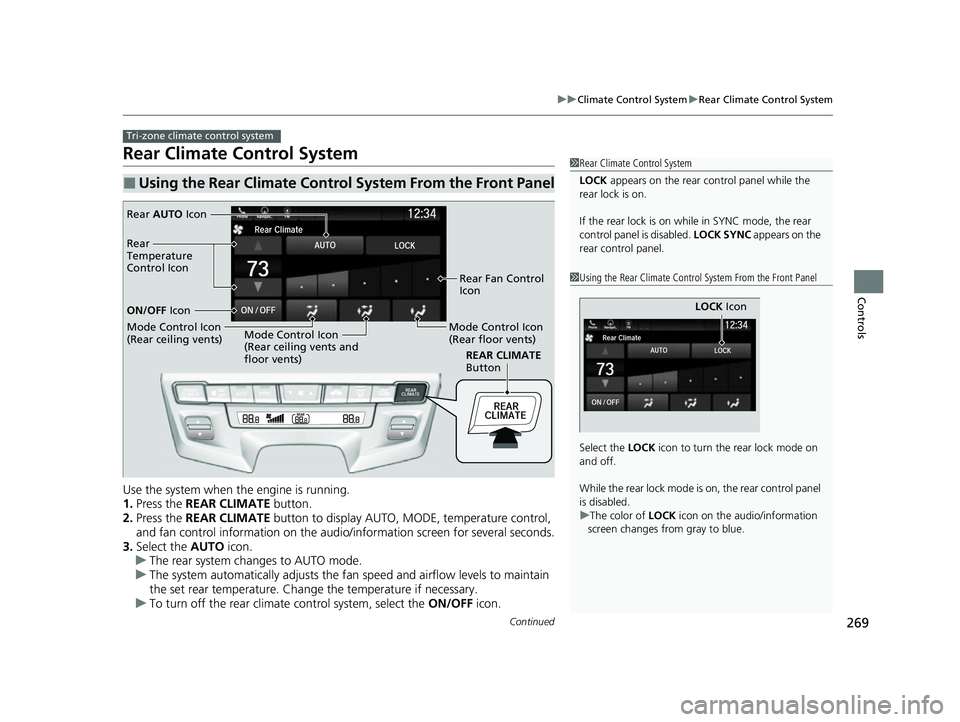
Use the system when the engine is running.
1. Press the REAR CLIMATE button.
2. Press the REAR CLIMATE button to display AUTO, MODE, temperature control,
and fan control information on the audio/information screen for several seconds.
3. Select the AUTO icon.
u The rear system changes to AUTO mode.
u The system automatically adjusts the fan speed and airfl ow levels to maintain
the set rear temperature. Change the temperature if necessary.
u To turn off the rear climat e control system, select the ON/OFF icon.
■Using the Rear Climate Control System From the Front Panel
Tri-zone climate control system
1Rear Climate Control System
LOCK appears on the rear control panel while the
rear lock is on.
If the rear lock is on while in SYNC mode, the rear
control panel is disabled. LOCK SYNC appears on the
rear control panel.
1 Using the Rear Climate Control System From the Front Panel
Select the LOCK icon to turn the rear lock mode on
and off.
While the rear lock mode is on, the rear control panel
is disabled.
u The color of LOCK icon on the audio/information
screen changes from gray to blue.
LOCK Icon
REAR CLIMATE
Button
Rear AUTO Icon
Rear Fan Control
Icon
Mode Control Icon
(Rear floor vents)
Mode Control Icon
(Rear ceiling vents and
floor vents)
Mode Control Icon
(Rear ceiling vents) ON/OFF
Icon
Rear
Temperature
Control Icon
22 US ODYSSEY-31THR6400.book 269 ページ 2020年11月16日 月曜日 午後1時41分
Page 281 of 782

uuAudio System uAudio Remote Controls
280
Features
Allow you to operate the audio system wh ile driving. The information is shown on
the driver information interface.
(+/(- (Volume) Bar
Press
(+: To increase the volume.
Press
(-: To decrease the volume.
1 Audio Remote Controls
Some modes appear only when an appropriate
device or medium is used.
Depending on the Bluetooth® device you connect,
some functions ma y not be operated.
Press the (back) button to go back to the
previous screen or cancel a command.
Press the (home) button to go back to the home
screen of the driver information interface.
You can show or hide the audio mode icons, or
change the order of the icons. 2 Show/Hide Apps P. 140
2 Arrange Apps P. 141Models with Display Audio
ENTER Button
(+/(-
Bar///
Buttons34
22 US ODYSSEY-31THR6400.book 280 ページ 2020年11月16日 月曜日 午後1時41分
Page 283 of 782

282
Features
Audio System Basic Operation
To use the audio system, the power mode must be in ACCESSORY or ON.Use the selector knob or MENU/CLOCK
button to access some audio functions.
Selector knob: Rotate left or right to scroll
through the available choices. Press to set
your selection.
MENU/CLOCK button: Press to select any
mode.
The available modes include the wallpaper,
display, clock, langu age setup, and play
modes. Play modes can be also selected from
scan, random, repeat, and so on.
(Back) button: Press to go back to the previous display.
(Sound) button: Press to select the sound setting mode.
(Day/Night) button: Press to change the audio/information screen brightness.
Press , then adjust th e brightness using .
u Each time you press , the mode switches between the daytime mode,
nighttime mode and off mode.
Models with color audio system1Audio System Basic Operation
These indications are used to show how to operate
the selector knob.
Rotate to select.
Press to enter.
Menu Items
2 Adjusting the Clock P. 154
2 Wallpaper Setup P. 285
2 Display Setup P. 288
2 Scan P. 290, 296
2 Play Mode P. 293, 296
2 RDS Settings P. 290
2 Bluetooth P. 297
One of the operating system s used in this unit is
eCos.
For software license terms and condition, visit their
website (eCos license URL:
http://ecos.sourceware.org/license-overview.html )
For source code disclo sure and other details
regarding eCos, visit:
http://www.hondaopensource2.com
Press the SOURCE,
(+, (-, or button on
the steering wheel to change any audio setting.
2 Audio Remote Controls P. 279
(Back)
Button
Selector
Knob
MENU/
CLOCK
Button
(Day/Night)
Button
(Sound)
Button
Menu Display
22 US ODYSSEY-31THR6400.book 282 ページ 2020年11月16日 月曜日 午後1時41分