manual HONDA ODYSSEY 2022 Owners Manual
[x] Cancel search | Manufacturer: HONDA, Model Year: 2022, Model line: ODYSSEY, Model: HONDA ODYSSEY 2022Pages: 782, PDF Size: 27.17 MB
Page 1 of 782
2022 ODYSSEY
Owner’s Manual
Page 3 of 782
The data belongs to the vehicle owner and may not be accessed by
anyone else except as legally required or with the permission of the
vehicle owner.
Service Diagnostic Recorders
This vehicle is equipped with se rvice-related devices that record
information about powertrain perfo rmance. The data can be used
to verify emissions law requirements and/or help technicians
diagnose and solve service problems. It may also be combined with
data from other sources for research purposes, but it remains
confidential. Some diagnostic and maintenance information is
uploaded to Honda upon vehicle start up.
California Perchlorate Contamination Prevention Act
The airbags, seat belt tensioners , and CR type batteries in this
vehicle may contain perchlorate materials - special handling may
apply. See www.dtsc.ca.gov/hazardou swaste/perchlorate/
As you read this manual , you will find information that is preceded
by a symbol. This information is intended to help you avoid
damage to your vehicle, other property, or the environment.
Software End User License Agreement
Your vehicle comes equipped with software, which is governed by
the End User License Agreement in Owner’s Manual, and which
contains a binding arbitration clau se. Please refer to the End User
License Agreement for the terms and conditions governing your
use of the installed software, as well as the applications, services,
functions, and content provided through the software. Your use of
the installed software will serve as your consent to the terms and
conditions of the End User License Agreement.
NOTICE
You may opt out within 30 days of your initial use of the Software
by sending a signed, written notic e to HONDA at American Honda
Motor Co., Inc., Honda Automobile Customer Services Mail Stop
CHI-5, 1919 Torrance Blvd., Torrance, CA 90501-2746.
Privacy Notice
This vehicle may share location and usage information. To manage
this setting, visit www.hondalink.com/vehicle-data-choices .
To learn more about how we collect and use Personal
Information, please read our Privacy Policy, accessible
at www.honda.com.
22 US ODYSSEY-31THR6400.book 2 ページ 2020年11月16日 月曜日 午後1時41分
Page 4 of 782
A Few Words About Safety
Your safety, and the safety of others, is very important. And
operating this vehicle safely is an important responsibility.
To help you make informed decisions about safety, we have
provided operating procedures and other information on labels and
in this manual. This information al erts you to potential hazards that
could hurt you or others.
Of course, it is not practical or possible to warn you about all the
hazards associated with operating or maintaining your vehicle. You
must use your own good judgment.
You will find this important safety information in a variety of forms,
including:
●Safety Labels - on the vehicle.
●Safety Messages - preceded by a sa fety alert symbol 3 and
one of three signal words: DANGER, WARNING, or CAUTION.
These signal words mean:
●Safety Headings - such as Important Safety Precautions.
●Safety Section - such as Safe Driving.
●Instructions - how to use this vehi cle correctly and safely.
This entire book is filled with important safety information - please
read it carefully.
3 DANGERYou WILL be KILLED or SERIOUSLY HURT if
you don’t follow instructions.
3 WARNINGYou CAN be KILLED or SERIOUSLY HURT if
you don’t follow instructions.
3CAUTIONYou CAN be HURT if you don’t follow
instructions.
22 US ODYSSEY-31THR6400.book 3 ページ 2020年11月16日 月曜日 午後1時41分
Page 5 of 782
Contents
This owner’s manual should be considered a permanent part of the
vehicle and should remain with the vehicle when it is sold.
The Navigation Manual is available online at owners.honda.com
(U.S.) or honda.ca (Canada). If you are the first registered owner
of your vehicle, you may request a complimentary printed
copy of the Navigation Manual within the first six months of
vehicle purchase. To request a copy, visit owners.honda.com. In
Canada, please request a copy from your Honda dealer.
This owner’s manual covers all models of your vehicle. You may find
descriptions of equipment and features that are not on your
particular model.
Images throughout this owner’s ma nual (including the front cover)
represent features and equipment that are available on some, but
not all, models. Your particular mo del may not have some of these
features.
This owner’s manual is for vehicles sold in the United States and
Canada.
The information and specifications in cluded in this publication were
in effect at the time of approval for printing. Honda Motor Co., Ltd.
reserves the right, however, to discontinue or change specifications
or design at any time without notice and without incurring any
obligation.2 Safe Driving P. 35
For Safe Driving P. 36 Seat Belts P. 40 Airbags P. 49
2Instrument Panel P. 87
Indicators P. 88 Gauges and Driver Information Interface P. 127
2Controls P. 153
Clock P. 154 Locking and Unlocking the Doors P. 156
Security System P. 191 Windows P. 194
Mirrors P. 219 Seats P. 222
2Features P. 273
Audio System P. 274 Audio System Basic Operation P. 282, 300
Blu-ray/DVD Rear Entertainment System* P. 409
CabinWatch ®* P. 535 CabinTalk®* P. 536
2Driving P. 537
Before Driving P. 538 Towing a Trailer P. 544
Parking Your Vehicle P. 646 Multi-View Rear Camera P. 657
2Maintenance P. 663
Before Performing Maintenance P. 664 Maintenance MinderTM P. 667
Checking and Maintaining Wiper Blades P. 693
Remote Control and Wireless Headphone Care
* P. 709
2 Handling the Unexpected P. 721
Tools P. 722 If a Tire Goes Flat P. 723
Indicator, Coming On/Blinking P. 739 Fuses P. 745
If You Cannot Open the Tailgate P. 754
2Information P. 759
Specifications P. 760 Identification Numbers P. 762
Warranty Coverages P. 767 Authorized Manuals P. 770
22 US ODYSSEY-31THR6400.book 4 ページ 2020年11月16日 月曜日 午後1時41分
Page 7 of 782
6
Quick Reference Guide
Quick Reference Guide
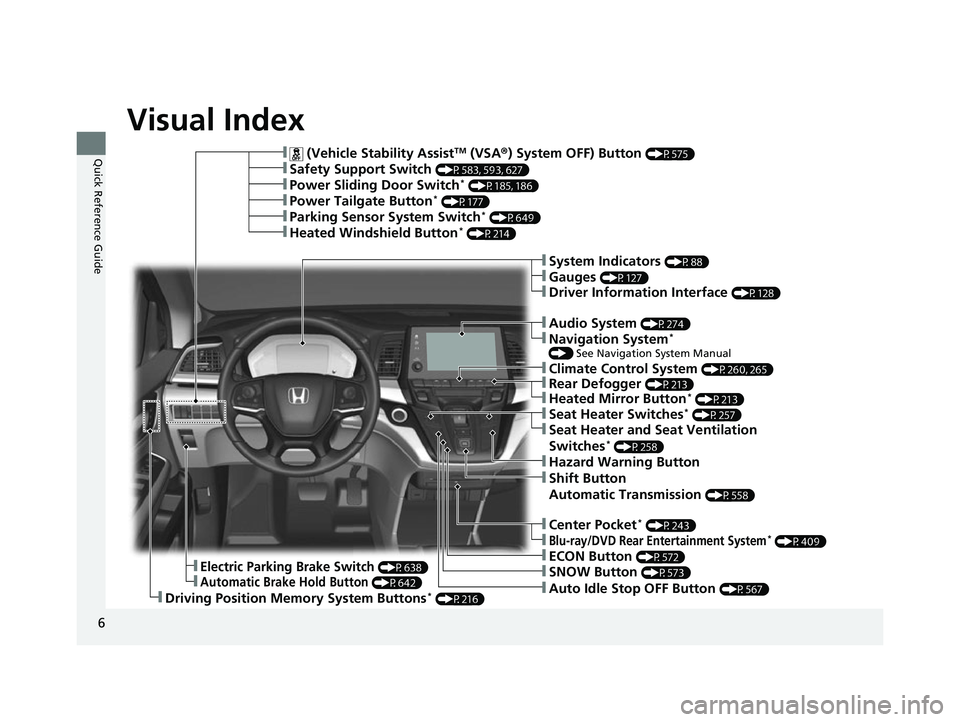
Visual Index
❚ (Vehicle Stability AssistTM (VSA®) System OFF) Button (P575)
❚Power Sliding Door Switch* (P185, 186)
❚Power Tailgate Button* (P177)
❚Climate Control System (P260, 265)
❚Driving Position Memory System Buttons* (P216)
❚Parking Sensor System Switch* (P649)
❚Heated Windshield Button* (P214)
❚Safety Support Switch (P583, 593, 627)
❚Electric Parking Brake Switch (P638)
❚Automatic Brake Hold Button (P642)
❚Shift Button
Automatic Transmission
(P558)
❚ECON Button (P572)
❚SNOW Button (P573)
❚Auto Idle Stop OFF Button (P567)
❚Hazard Warning Button
❚System Indicators (P88)
❚Gauges (P127)
❚Driver Information Interface (P128)
❚Audio System (P274)
❚Navigation System*
() See Navigation System Manual
❚Rear Defogger (P213)
❚Heated Mirror Button* (P213)
❚Seat Heater Switches* (P257)
❚Seat Heater and Seat Ventilation
Switches* (P258)
❚Center Pocket* (P243)
❚Blu-ray/DVD Rear Entertainment System* (P409)
22 US ODYSSEY-31THR6400.book 6 ページ 2020年11月16日 月曜日 午後1時41分
Page 8 of 782
7
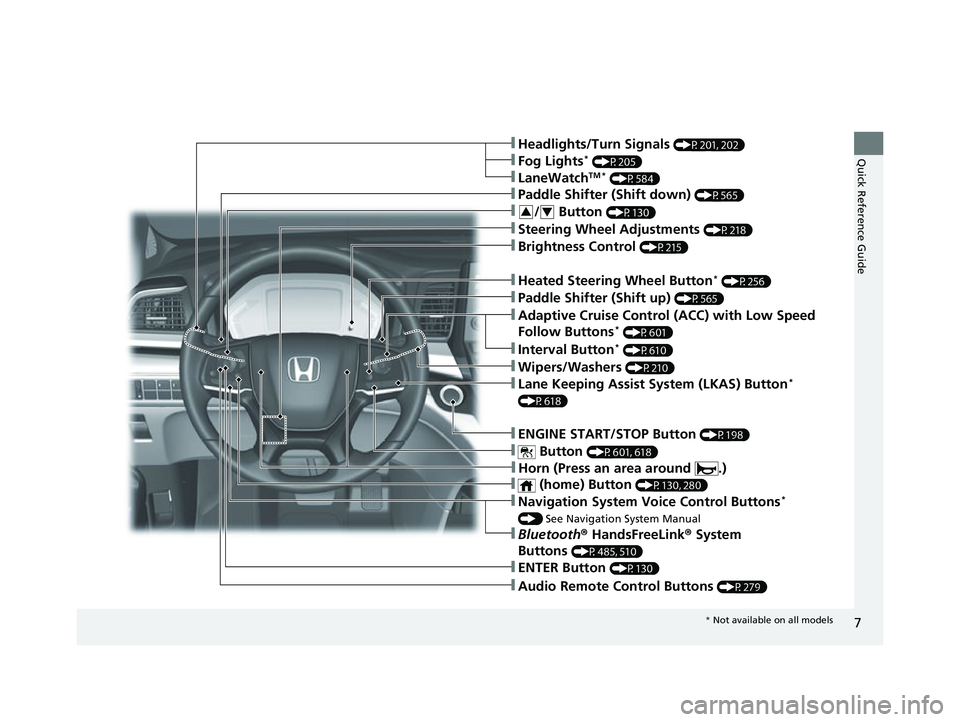
Quick Reference Guide
❚Navigation System Voice Control Buttons*
() See Navigation System Manual
❚Audio Remote Control Buttons (P279)
❚Steering Wheel Adjustments (P218)
❚Brightness Control (P215)
❚ENTER Button (P130)
❚/ Button (P130)34
❚Headlights/Turn Signals (P201, 202)
❚LaneWatchTM * (P584)
❚Fog Lights* (P205)
❚Bluetooth ® HandsFreeLink ® System
Buttons
(P485, 510)
❚Paddle Shifter (Shift down) (P565)
❚Heated Steering Wheel Button* (P256)
❚Paddle Shifter (Shift up) (P565)
❚Adaptive Cruise Control (ACC) with Low Speed
Follow Buttons* (P601)
❚Interval Button* (P610)
❚ENGINE START/STOP Button (P198)
❚ Button (P601, 618)
❚Wipers/Washers (P210)
❚Lane Keeping Assist System (LKAS) Button*
(P618)
❚ (home) Button (P130, 280)
❚Horn (Press an area around .)
* Not available on all models
22 US ODYSSEY-31THR6400.book 7 ページ 2020年11月16日 月曜日 午後1時41分
Page 24 of 782
23
Quick Reference Guide
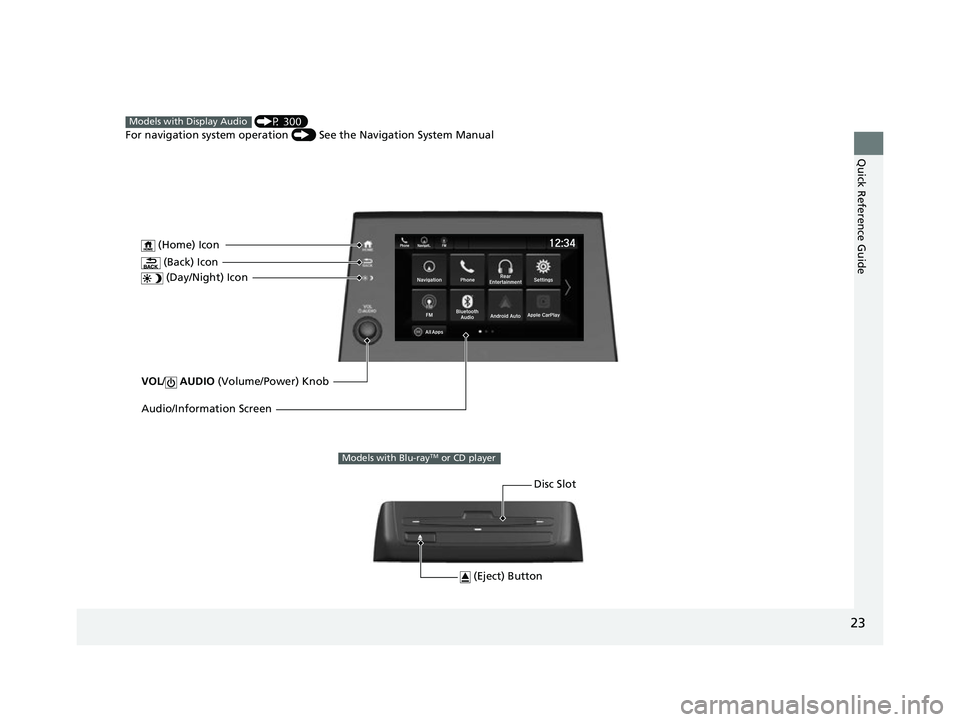
VOL/ AUDIO (Volume/Power) Knob
(Home) Icon
(Back) Icon
(Day/Night) Icon
Audio/Information Screen
(P 300)
For navigation system operation () See the Navigation System ManualModels with Display Audio
(Eject) Button
Disc Slot
Models with Blu-rayTM or CD player
22 US ODYSSEY-31THR6400.book 23 ページ 2020年11月16日 月曜日 午後1時41分
Page 28 of 782
27
Quick Reference Guide
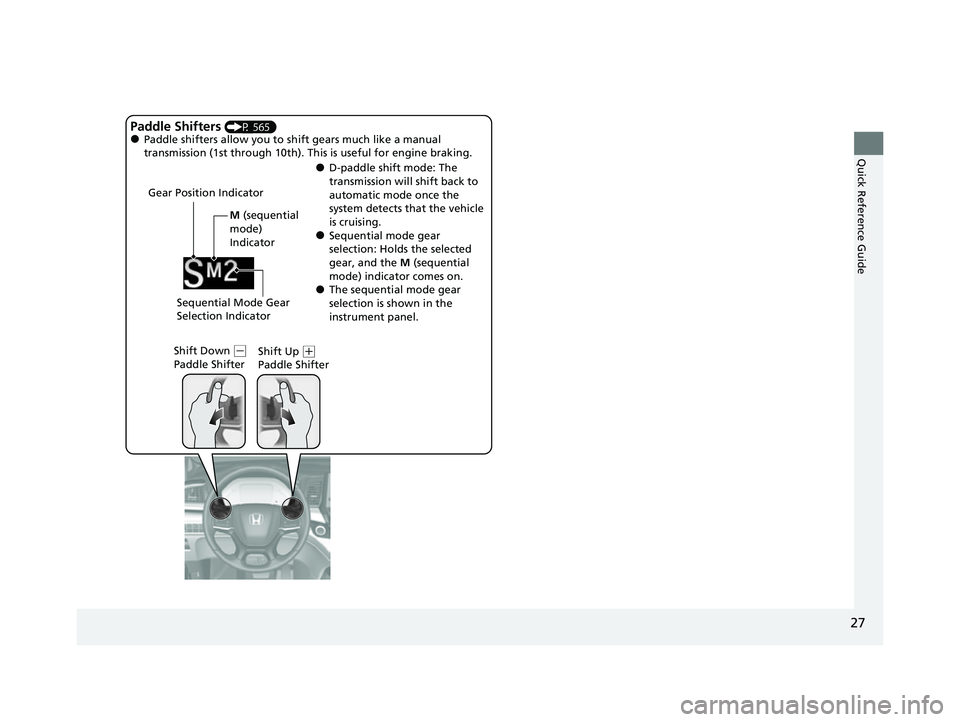
M (sequential
mode)
Indicator
Gear Position Indicator
Shift Down (
-
Paddle Shifter Shift Up (
+
Paddle Shifter
Paddle Shifters (P 565)●Paddle shifters allow you to sh ift gears much like a manual
transmission (1st through 10th). This is useful for engine braking.
●D-paddle shift mode: The
transmission will shift back to
automatic mode once the
system detects that the vehicle
is cruising.
●Sequential mode gear
selection: Holds the selected
gear, and the M (sequential
mode) indicator comes on.
●The sequential mode gear
selection is shown in the
instrument panel.
Sequential Mode Gear
Selection Indicator
22 US ODYSSEY-31THR6400.book 27 ページ 2020年11月16日 月曜日 午後1時41分
Page 32 of 782
Quick Reference Guide
31
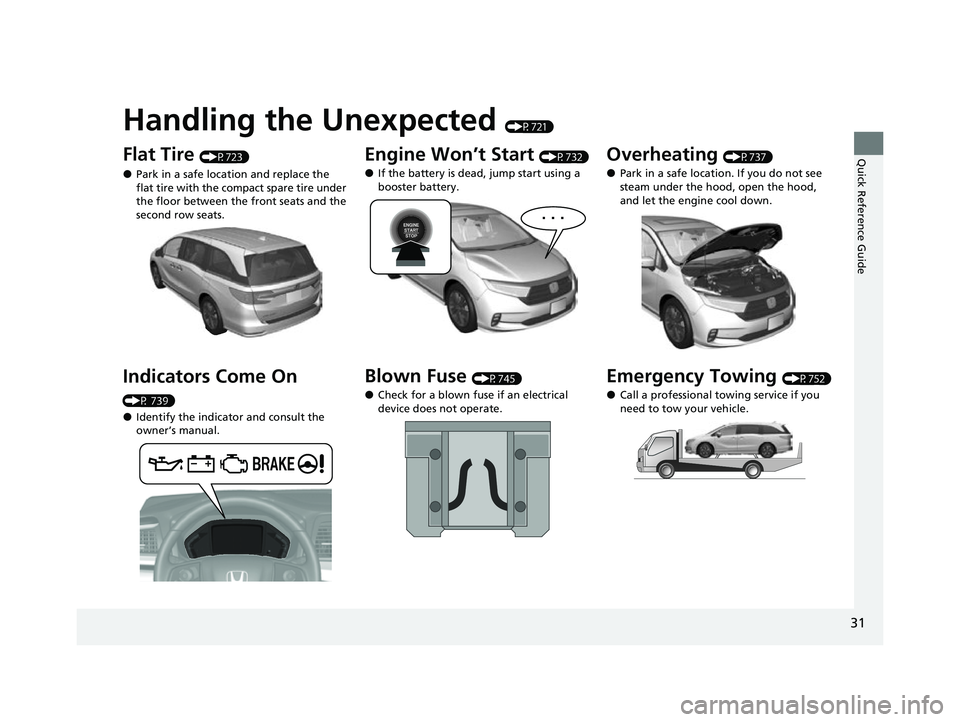
Handling the Unexpected (P721)
Flat Tire (P723)
●Park in a safe location and replace the
flat tire with the compact spare tire under
the floor between the front seats and the
second row seats.
Indicators Come On
(P 739)
●Identify the indicator and consult the
owner’s manual.
Engine Won’t Start (P732)
●If the battery is dead, jump start using a
booster battery.
Blown Fuse (P745)
●Check for a blown fuse if an electrical
device does not operate.
Overheating (P737)
●Park in a safe location. If you do not see
steam under the hood, open the hood,
and let the engine cool down.
Emergency Towing (P752)
●Call a professional towing service if you
need to tow your vehicle.
22 US ODYSSEY-31THR6400.book 31 ページ 2020年11月16日 月曜日 午後1時41分
Page 35 of 782
34
Quick Reference Guide
Pulling the electric parking
brake switch does not
release the parking brake.
Why?Pull the electric parking brake switch with the brake pedal
depressed.
Depressing the accelerator
pedal does not release the
parking brake
automatically. Why?●Fasten the driver’s seat belt.
●Check if the transmission is in (P or (N. If so, select any other
position.
Why does the gear position
automatically change to
(P
when I open the driver’s
door to check for parking
space lines when
reversing?
●Fasten the driver’s seat belt.
●Close the driver’s door and manually change the gear
position.
2 When opening the driver’s door (P561)
I’m seeing an amber
indicator of a tire with an
exclamation point. What is
that?The Tire Pressure Monitoring System (TPMS) needs attention.
Check tire pressure.
2 Tire Pressure Monitoring System (TPMS) with Tire Fill Assist (P577, 743)
22 US ODYSSEY-31THR6400.book 34 ページ 2020年11月16日 月曜日 午後1時41分