display HONDA ODYSSEY 2023 Owners Manual
[x] Cancel search | Manufacturer: HONDA, Model Year: 2023, Model line: ODYSSEY, Model: HONDA ODYSSEY 2023Pages: 707, PDF Size: 23.9 MB
Page 456 of 707
uuBluetooth ® HandsFreeLink ®u HFL Menus
454
Features
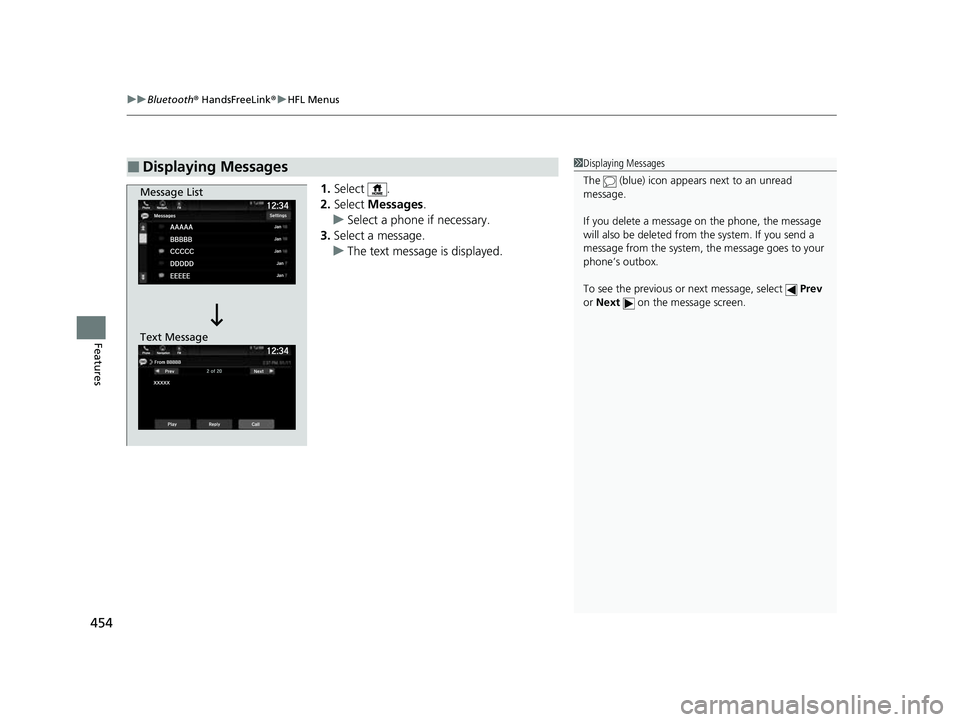
1. Select .
2. Select Messages.
u Select a phone if necessary.
3. Select a message.
u The text message is displayed.
■Displaying Messages1Displaying Messages
The (blue) icon appears next to an unread
message.
If you delete a message on the phone, the message
will also be dele ted from the system. If you send a
message from the system, the message goes to your
phone’s outbox.
To see the previous or next message, select Prev
or Next on the message screen.
Message List
Text Message
23 US ODYSSEY-31THR6500.book 454 ページ 2022年1月24日 月曜日 午前11時35分
Page 458 of 707
uuBluetooth ® HandsFreeLink ®u HFL Menus
456
Features
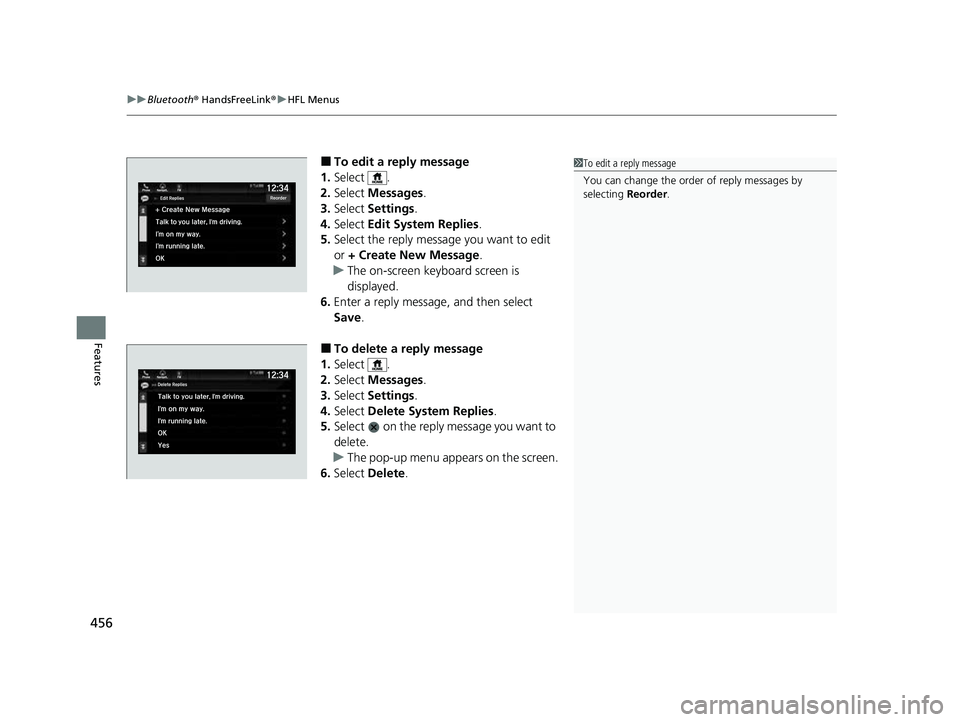
■To edit a reply message
1. Select .
2. Select Messages.
3. Select Settings .
4. Select Edit System Replies .
5. Select the reply message you want to edit
or + Create New Message .
u The on-screen keyboard screen is
displayed.
6. Enter a reply message, and then select
Save.
■To delete a reply message
1. Select .
2. Select Messages.
3. Select Settings .
4. Select Delete System Replies .
5. Select on the reply message you want to
delete.
u The pop-up menu appears on the screen.
6. Select Delete.
1To edit a reply message
You can change the order of reply messages by
selecting Reorder.
23 US ODYSSEY-31THR6500.book 456 ページ 2022年1月24日 月曜日 午前11時35分
Page 462 of 707
460
Features
CabinWatch®*
Your audio system allows you to monitor a view of the second and third row seat’s
passengers on the audio/information screen.
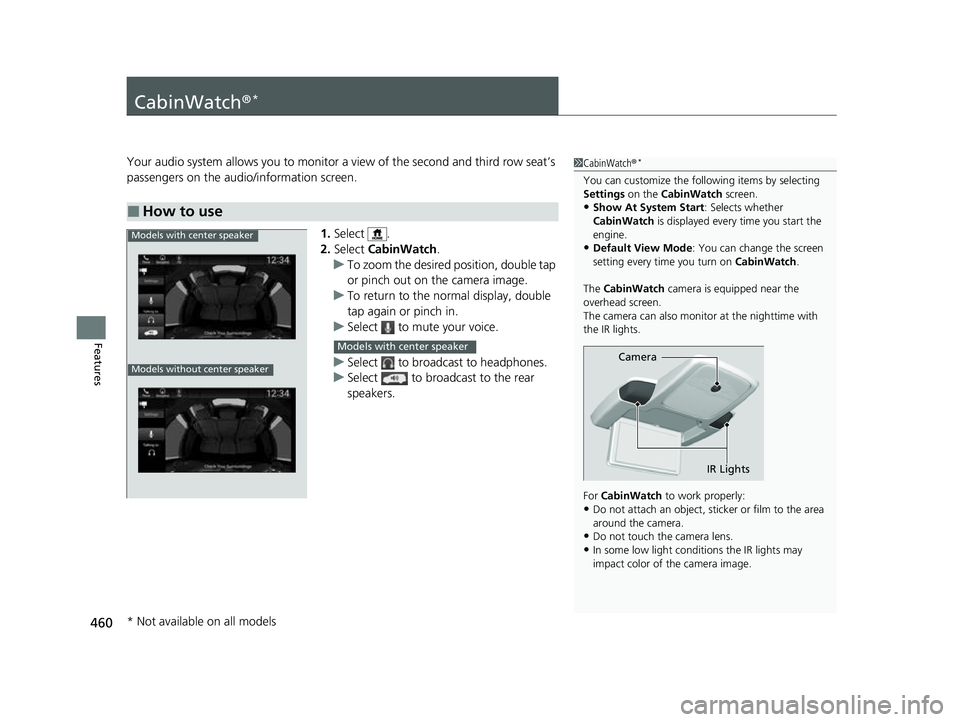
1.Select .
2. Select CabinWatch .
u To zoom the desired position, double tap
or pinch out on the camera image.
u To return to the normal display, double
tap again or pinch in.
u Select to mute your voice.
u Select to broadcast to headphones.
u Select to broadcast to the rear
speakers.
■How to use
1CabinWatch ®*
You can customize the foll owing items by selecting
Settings on the CabinWatch screen.
•Show At System Start : Selects whether
CabinWatch is displayed every time you start the
engine.
•Default View Mode : You can change the screen
setting every time you turn on CabinWatch.
The CabinWatch camera is equipped near the
overhead screen.
The camera can also monitor at the nighttime with
the IR lights.
For CabinWatch to work properly:
•Do not attach an object, sticker or film to the area
around the camera.
•Do not touch the camera lens.
•In some low light conditions the IR lights may
impact color of the camera image.
Camera
IR Lights
Models with center speaker
Models without center speaker
Models with center speaker
* Not available on all models
23 US ODYSSEY-31THR6500.book 460 ページ 2022年1月24日 月曜日 午前11時35分
Page 490 of 707
![HONDA ODYSSEY 2023 Owners Manual uuWhen Driving uShifting
488
Driving
■If you want to keep the transmission in (N position [car wash mode]
With the engine running:
1. Press and hold the brake pedal.
2. Select
(N, then release the](/img/13/58873/w960_58873-489.png "HONDA ODYSSEY 2023 Owners Manual uuWhen Driving uShifting
488
Driving
■If you want to keep the transmission in (N position [car wash mode]
With the engine running:
1. Press and hold the brake pedal.
2. Select
(N, then release the")
uuWhen Driving uShifting
488
Driving
■If you want to keep the transmission in (N position [car wash mode]
With the engine running:
1. Press and hold the brake pedal.
2. Select
(N, then release the button to display (Neutral) (N hold mode on the driver
information interface.
3. Press and hold
(N again for two seconds.
u This puts the vehicle in car wash mode which must be used when your vehicle
is pulled through a conveyor type automatic car wash where you or an
attendant do not remain in the vehicle.
If the ENGINE STOP/START button is pressed
after car wash mode has been activated, the
power mode will change to ACCESSORY and
a message will be displayed on the driver
information interface. u For 15 minutes the gear position remains
in
(N with the power mode in
ACCESSORY. After that, the position
automatically changes to
(P and the
power mode changes to OFF.
u Manually changing to
(P cancels
ACCESSORY mode. The
(P indicator
comes on and the power mode changes
to OFF. You must always shift to
(P
when car wash mode is no longer
needed.
1 If you want to keep the transmission in (N position [car wash
mode]
NOTICE
When transmission is too hot, carwash mode may
not be available. Let the engine idle and cool down
transmission.
The transmission may not stay in
(N position while
the following indicator is on:
•Transmission system indicator.
•Malfunction indicator lamp.•Charging system indicator.
23 US ODYSSEY-31THR6500.book 488 ページ 2022年1月24日 月曜日 午前11時35分
Page 505 of 707
503
uuWhen Driving uTire Pressure Monitoring System (TPMS) with Tire Fill Assist
Driving
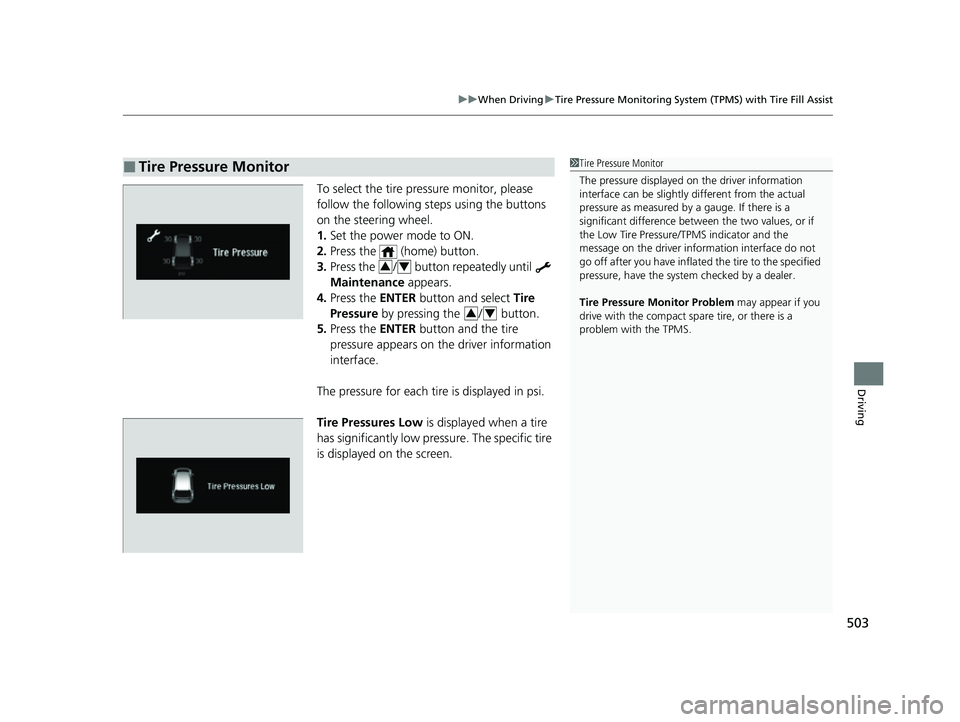
To select the tire pressure monitor, please
follow the following st eps using the buttons
on the steering wheel.
1. Set the power mode to ON.
2. Press the (home) button.
3. Press the / button repeatedly until
Maintenance appears.
4. Press the ENTER button and select Tire
Pressure by pressing the / button.
5. Press the ENTER button and the tire
pressure appears on th e driver information
interface.
The pressure for each tire is displayed in psi.
Tire Pressures Low is displayed when a tire
has significantly low pressure. The specific tire
is displayed on the screen.
■Tire Pressure Monitor1 Tire Pressure Monitor
The pressure displayed on the driver information
interface can be slightly different from the actual
pressure as measured by a gauge. If there is a
significant di fference between the two values, or if
the Low Tire Pressure/TPMS indicator and the
message on the driver info rmation interface do not
go off after you have inflated the tire to the specified
pressure, have the system checked by a dealer.
Tire Pressure Monitor Problem may appear if you
drive with the compact spare tire, or there is a
problem with the TPMS.
34
34
23 US ODYSSEY-31THR6500.book 503 ページ 2022年1月24日 月曜日 午前11時35分
Page 527 of 707
Continued525
uuHonda Sensing ®u Adaptive Cruise Control (ACC) with Low Speed Follow
Driving
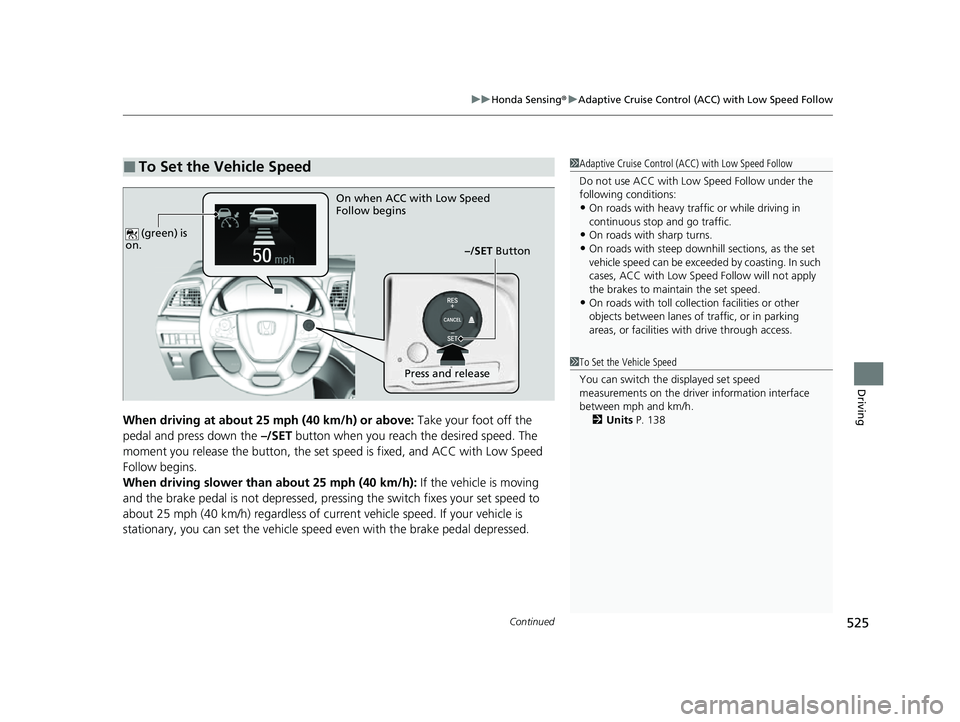
When driving at about 25 mph (40 km/h) or above: Take your foot off the
pedal and press down the –/SET button when you reach the desired speed. The
moment you release the button, the set sp eed is fixed, and ACC with Low Speed
Follow begins.
When driving slower than about 25 mph (40 km/h): If the vehicle is moving
and the brake pedal is not depressed, pressing the switch fixes your set speed to
about 25 mph (40 km/h) regardless of current vehicle speed. If your vehicle is
stationary, you can set the vehicle speed even with the brake pedal depressed.
■To Set the Vehicle Speed1 Adaptive Cruise Control (ACC) with Low Speed Follow
Do not use ACC with Low Speed Follow under the
following conditions:
•On roads with heavy traf fic or while driving in
continuous stop and go traffic.
•On roads with sharp turns.•On roads with steep downhill sections, as the set
vehicle speed can be exceeded by coasting. In such
cases, ACC with Low Speed Follow will not apply
the brakes to maintain the set speed.
•On roads with toll collection facilities or other
objects between lanes of traffic, or in parking
areas, or faci lities with driv e through access.
On when ACC with Low Speed
Follow begins
–/SET Button
Press and release
(green) is
on.1 To Set the Vehicle Speed
You can switch the displayed set speed
measurements on the driver information interface
between mph and km/h.
2 Units P. 138
23 US ODYSSEY-31THR6500.book 525 ページ 2022年1月24日 月曜日 午前11時35分
Page 537 of 707
Continued535
uuHonda Sensing ®u Adaptive Cruise Control (ACC) with Low Speed Follow
Driving
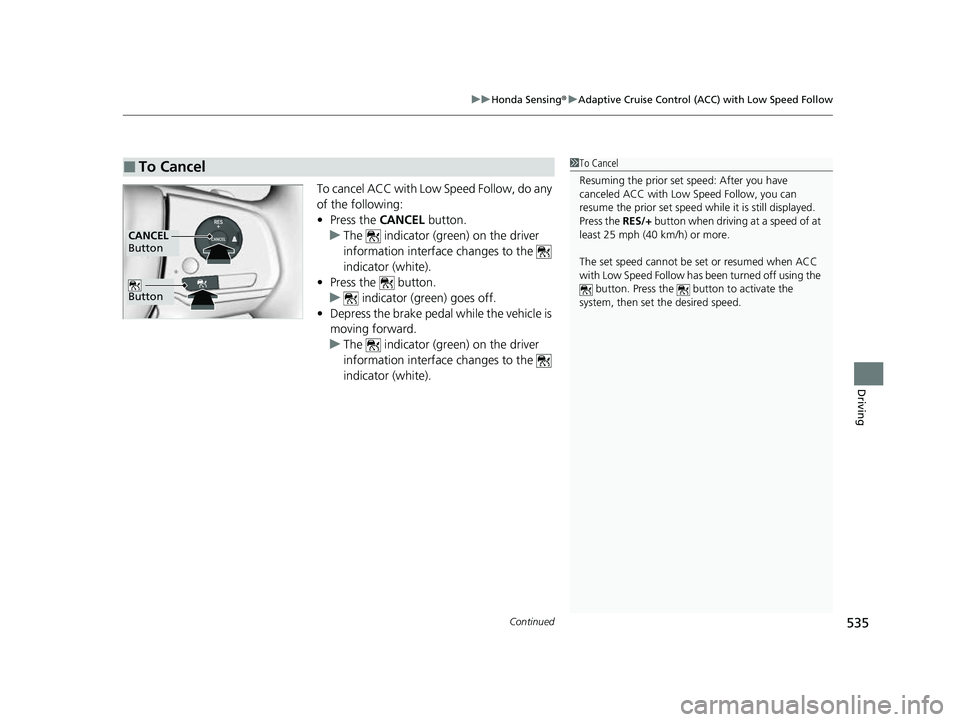
To cancel ACC with Low Speed Follow, do any
of the following:
• Press the CANCEL button.
u The indicator (green) on the driver
information interface changes to the
indicator (white).
• Press the button.
u indicator (green) goes off.
• Depress the brake pedal while the vehicle is
moving forward.
u The indicator (green) on the driver
information interface changes to the
indicator (white).
■To Cancel1To Cancel
Resuming the prior set speed: After you have
canceled ACC with Low Speed Follow, you can
resume the prior set speed while it is still displayed.
Press the RES/+ button when driving at a speed of at
least 25 mph (40 km/h) or more.
The set speed cannot be set or resumed when ACC
with Low Speed Follow has been turned off using the
button. Press the button to activate the
system, then set the desired speed.
Button
CANCEL
Button
23 US ODYSSEY-31THR6500.book 535 ページ 2022年1月24日 月曜日 午前11時35分
Page 539 of 707
Continued537
uuHonda Sensing ®u Adaptive Cruise Control (ACC) with Low Speed Follow
Driving
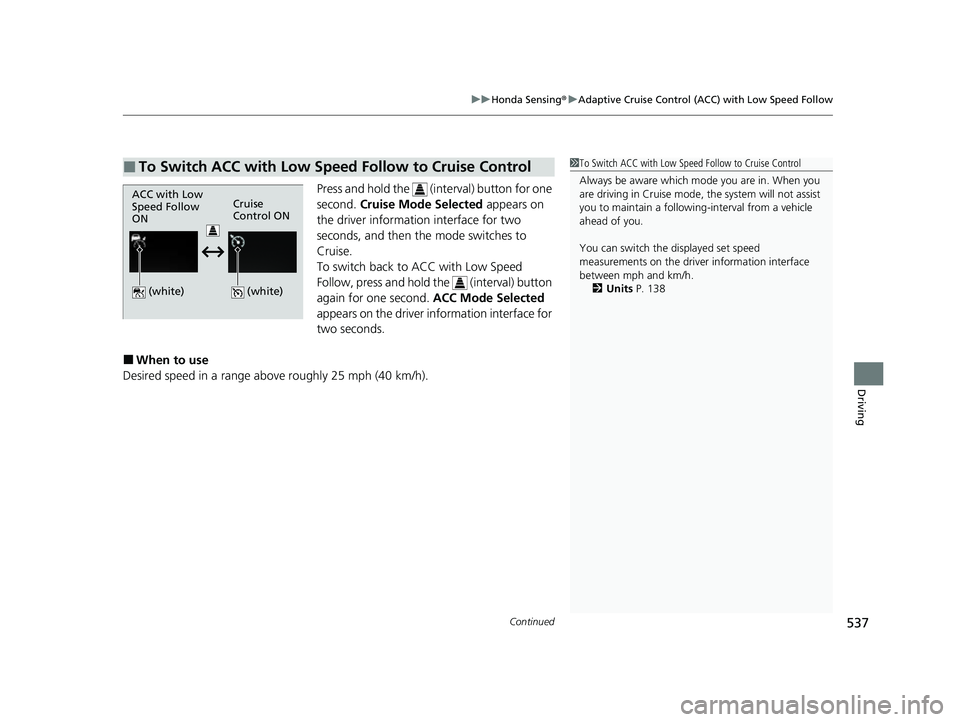
Press and hold the (int erval) button for one
second. Cruise Mode Selected appears on
the driver information interface for two
seconds, and then the mode switches to
Cruise.
To switch back to ACC with Low Speed
Follow, press and hold the (interval) button
again for one second. ACC Mode Selected
appears on the driver information interface for
two seconds.
■When to use
Desired speed in a range above roughly 25 mph (40 km/h).
■To Switch ACC with Low Speed Follow to Cruise Control1 To Switch ACC with Low Speed Follow to Cruise Control
Always be aware which mode you are in. When you
are driving in Cruise mode, the system will not assist
you to maintain a following-interval from a vehicle
ahead of you.
You can switch the displayed set speed
measurements on the driver information interface
between mph and km/h.
2 Units P. 138
ACC with Low
Speed Follow
ONCruise
Control ON
(white)
(white)
23 US ODYSSEY-31THR6500.book 537 ページ 2022年1月24日 月曜日 午前11時35分
Page 541 of 707
539
uuHonda Sensing ®u Lane Keeping Assist System (LKAS)
Continued
Driving
Lane Keeping Assist System (LKAS)
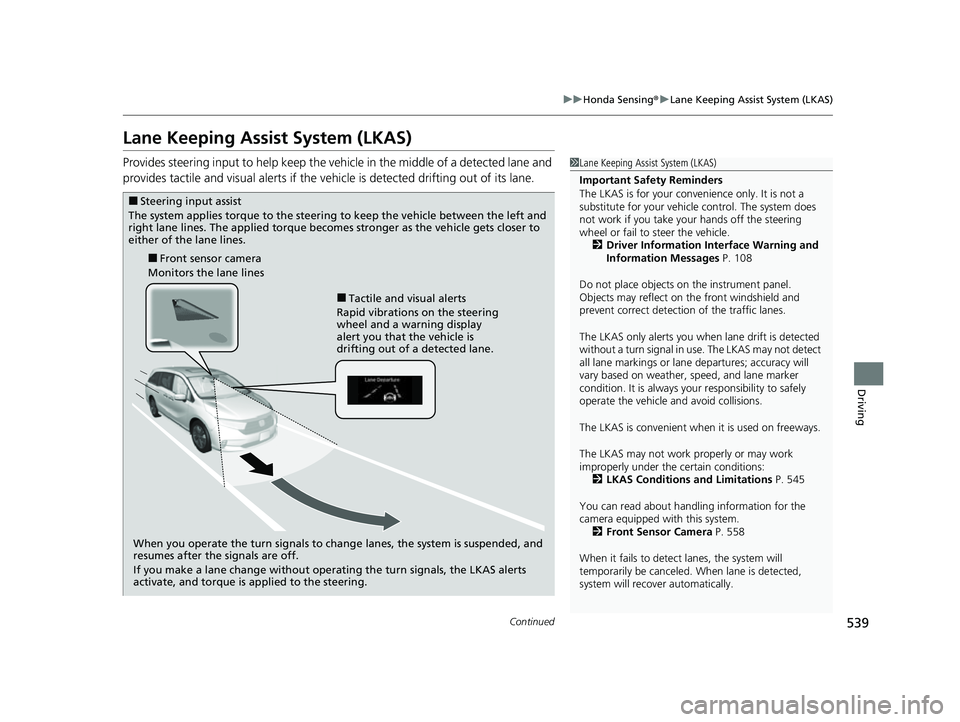
Provides steering input to help keep the vehicle in the middle of a detected lane and
provides tactile and visual al erts if the vehicle is detected drifting out of its lane.1Lane Keeping Assist System (LKAS)
Important Safety Reminders
The LKAS is for your convenience only. It is not a
substitute for your vehicle control. The system does
not work if you take y our hands off the steering
wheel or fail to steer the vehicle. 2 Driver Information Interface Warning and
Information Messages P. 108
Do not place objects on the instrument panel.
Objects may reflect on th e front windshield and
prevent correct detectio n of the traffic lanes.
The LKAS only alerts you when lane drift is detected
without a turn signal in use. The LKAS may not detect
all lane markings or lane departures; accuracy will
vary based on weather, speed, and lane marker
condition. It is always your responsibility to safely
operate the vehicle an d avoid collisions.
The LKAS is convenient when it is used on freeways.
The LKAS may not work properly or may work
improperly under the certain conditions:
2 LKAS Conditions and Limitations P. 545
You can read about handling information for the
camera equipped with this system. 2 Front Sensor Camera P. 558
When it fails to detect lanes, the system will
temporarily be canceled. When lane is detected,
system will recover automatically.
■Tactile and visual alerts
Rapid vibrations on the steering
wheel and a warning display
alert you that the vehicle is
drifting out of a detected lane.
■Front sensor camera
Monitors the lane lines
■Steering input assist
The system applies torque to the steering to keep the vehicle between the left and
right lane lines. The applied torque becomes stronger as the vehicle gets closer to
either of the lane lines.
When you operate the turn signals to change lanes, the system is suspended, and
resumes after the signals are off.
If you make a lane change without operating the turn signals, the LKAS alerts
activate, and torque is applied to the steering.
23 US ODYSSEY-31THR6500.book 539 ページ 2022年1月24日 月曜日 午前11時35分
Page 542 of 707
uuHonda Sensing ®u Lane Keeping Assist System (LKAS)
540
Driving
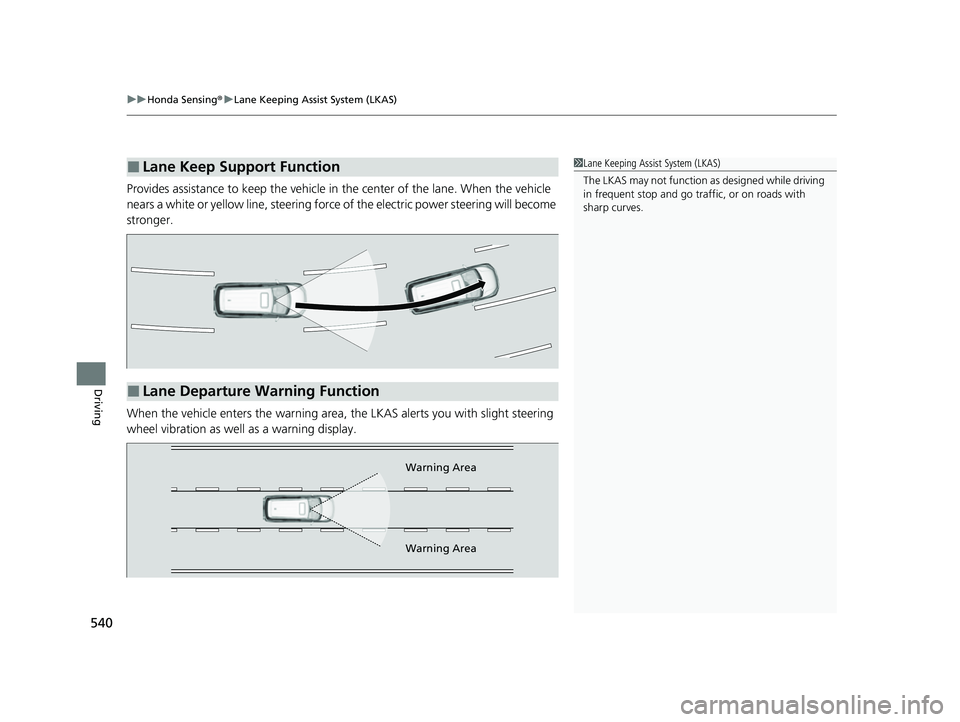
Provides assistance to keep the vehicle in the center of the lane. When the vehicle
nears a white or yellow line, steering force of the electric power steering will become
stronger.
When the vehicle enters the warning area, the LKAS alerts you with slight steering
wheel vibration as well as a warning display.
■Lane Keep Support Function1 Lane Keeping Assist System (LKAS)
The LKAS may not function as designed while driving
in frequent stop and go traf fic, or on roads with
sharp curves.
■Lane Departure Warning Function
Warning Area
Warning Area
23 US ODYSSEY-31THR6500.book 540 ページ 2022年1月24日 月曜日 午前11時35分