lights HONDA ODYSSEY 2023 User Guide
[x] Cancel search | Manufacturer: HONDA, Model Year: 2023, Model line: ODYSSEY, Model: HONDA ODYSSEY 2023Pages: 707, PDF Size: 23.9 MB
Page 104 of 707
102
uuIndicators u
Instrument Panel
IndicatorNameOn/BlinkingExplanationMessage
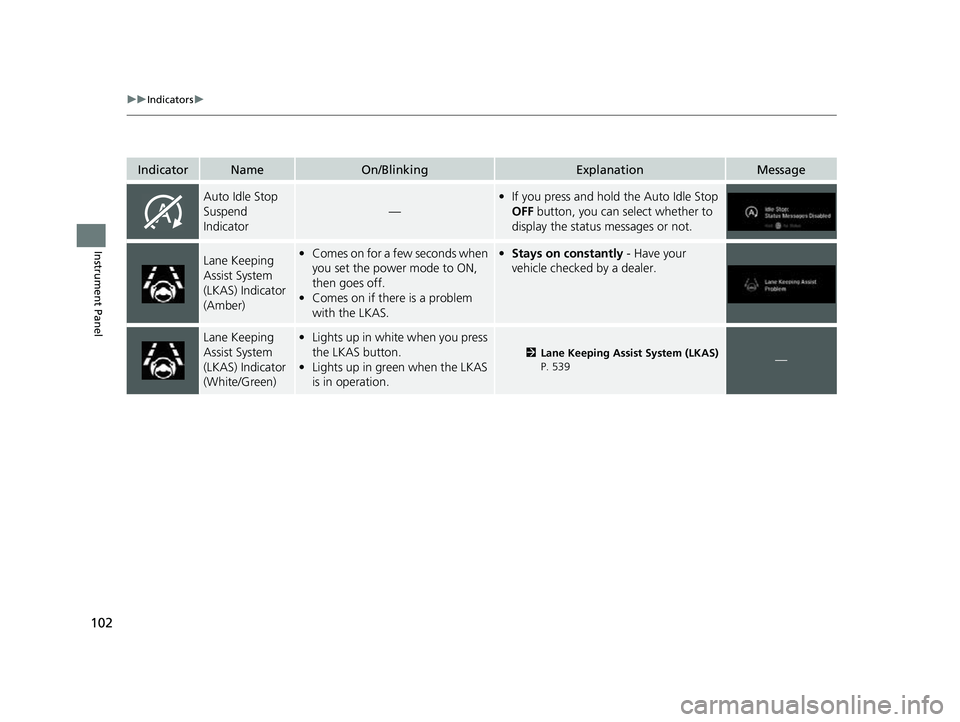
Auto Idle Stop
Suspend
Indicator
—
•If you press and hold the Auto Idle Stop
OFF button, you can select whether to
display the status messages or not.
Lane Keeping
Assist System
(LKAS) Indicator
(Amber)• Comes on for a few seconds when
you set the power mode to ON,
then goes off.
• Comes on if there is a problem
with the LKAS.•Stays on constantly - Have your
vehicle checked by a dealer.
Lane Keeping
Assist System
(LKAS) Indicator
(White/Green)• Lights up in white when you press
the LKAS button.
• Lights up in green when the LKAS
is in operation.
2 Lane Keeping Assist System (LKAS)
P. 539—
23 US ODYSSEY-31THR6500.book 102 ページ 2022年1月24日 月曜日 午前11時35分
Page 105 of 707
103
uuIndicators u
Continued
Instrument Panel
IndicatorNameOn/BlinkingExplanationMessage
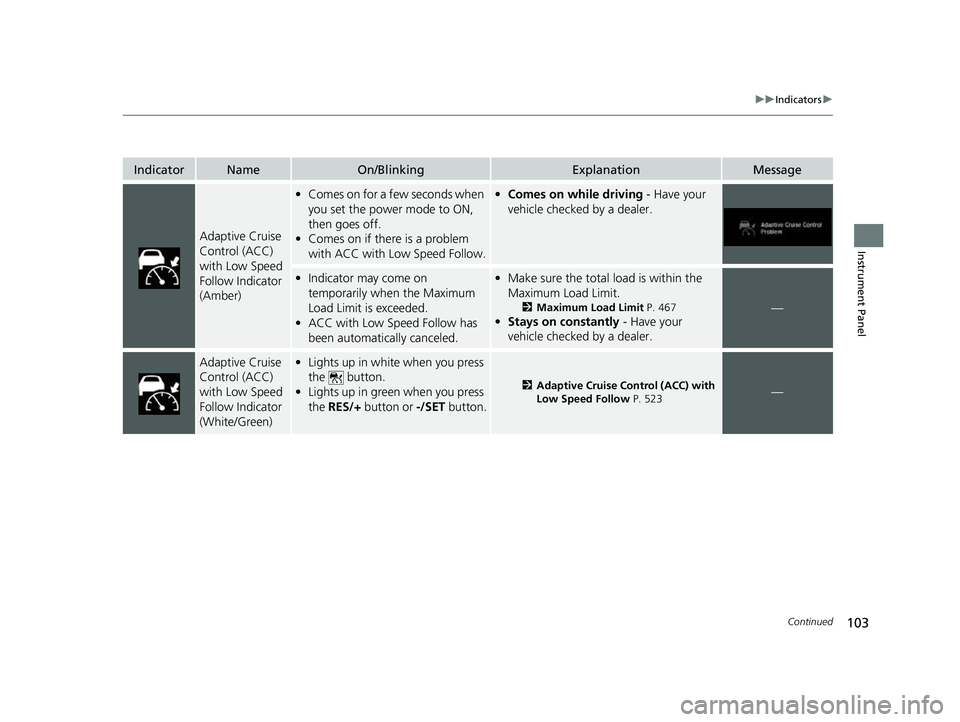
Adaptive Cruise
Control (ACC)
with Low Speed
Follow Indicator
(Amber)
•Comes on for a few seconds when
you set the power mode to ON,
then goes off.
• Comes on if there is a problem
with ACC with Low Speed Follow.•Comes on while driving - Have your
vehicle checked by a dealer.
• Indicator may come on
temporarily when the Maximum
Load Limit is exceeded.
• ACC with Low Speed Follow has
been automatically canceled.•Make sure the total load is within the
Maximum Load Limit.
2 Maximum Load Limit P. 467
•Stays on constantly - Have your
vehicle checked by a dealer.
—
Adaptive Cruise
Control (ACC)
with Low Speed
Follow Indicator
(White/Green)• Lights up in white when you press
the button.
• Lights up in green when you press
the RES/+ button or -/SET button.
2Adaptive Cruise Control (ACC) with
Low Speed Follow P. 523—
23 US ODYSSEY-31THR6500.book 103 ページ 2022年1月24日 月曜日 午前11時35分
Page 106 of 707
104
uuIndicators u
Instrument Panel
IndicatorNameOn/BlinkingExplanationMessage
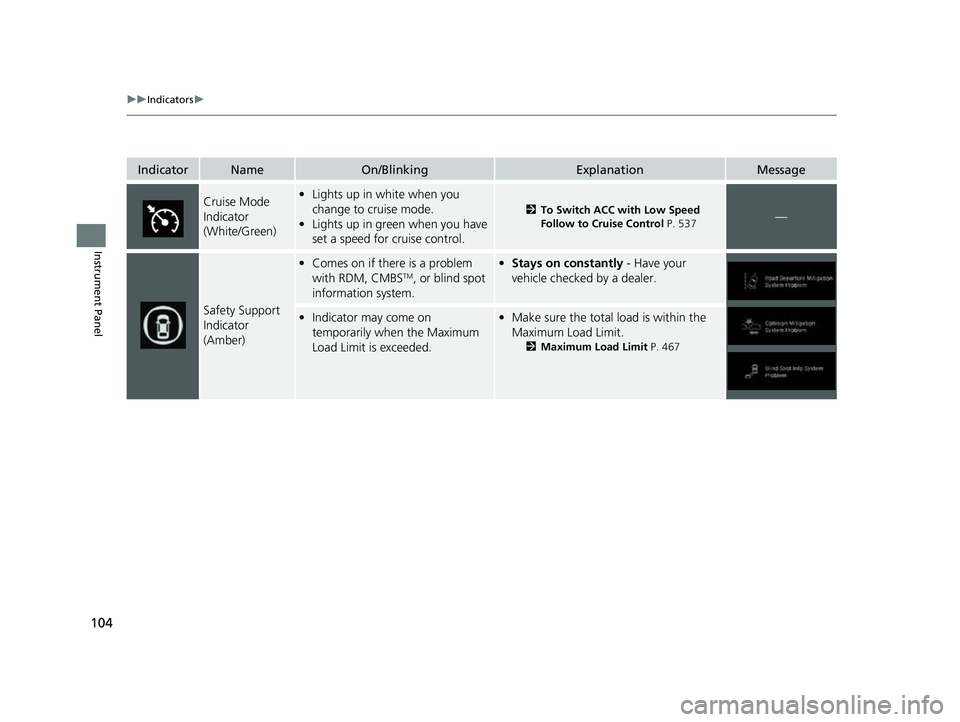
Cruise Mode
Indicator
(White/Green)•Lights up in white when you
change to cruise mode.
• Lights up in green when you have
set a speed for cruise control.
2 To Switch ACC with Low Speed
Follow to Cruise Control P. 537—
Safety Support
Indicator
(Amber)
•Comes on if there is a problem
with RDM, CMBSTM, or blind spot
information system.
• Stays on constantly - Have your
vehicle checked by a dealer.
• Indicator may come on
temporarily when the Maximum
Load Limit is exceeded.•Make sure the total lo ad is within the
Maximum Load Limit.
2 Maximum Load Limit P. 467
23 US ODYSSEY-31THR6500.book 104 ページ 2022年1月24日 月曜日 午前11時35分
Page 109 of 707
107
uuIndicators u
Instrument Panel
IndicatorNameOn/BlinkingExplanationMessage
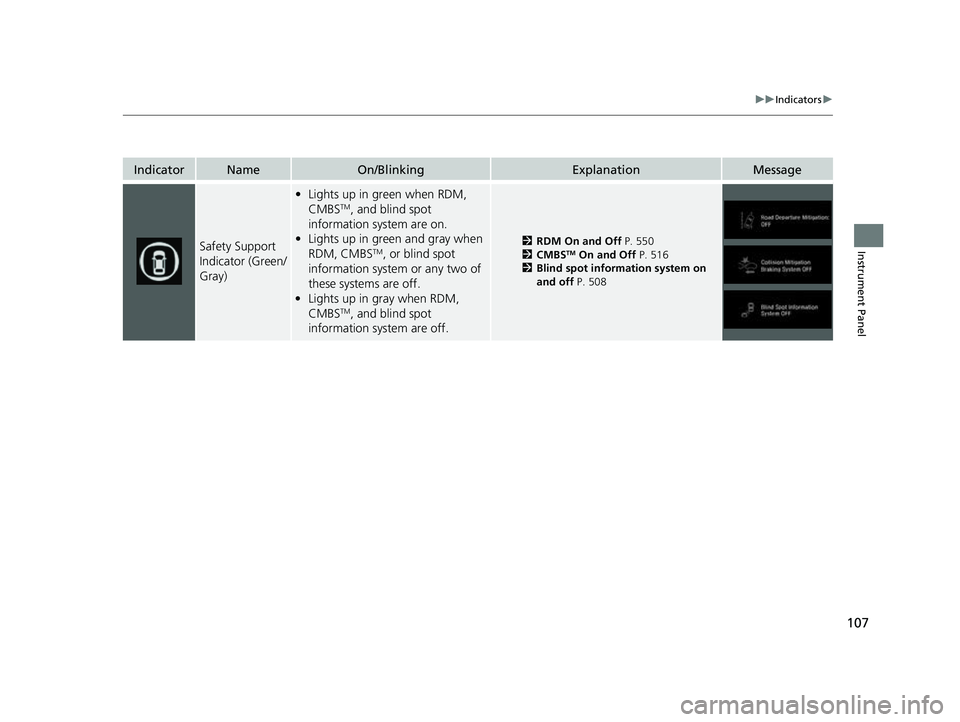
Safety Support
Indicator (Green/
Gray)
•Lights up in green when RDM,
CMBSTM, and blind spot
information system are on.
• Lights up in green and gray when
RDM, CMBS
TM, or blind spot
information system or any two of
these systems are off.
• Lights up in gray when RDM,
CMBS
TM, and blind spot
information system are off.
2 RDM On and Off P. 550
2 CMBSTM On and Off P. 516
2 Blind spot information system on
and off P. 508
23 US ODYSSEY-31THR6500.book 107 ページ 2022年1月24日 月曜日 午前11時35分
Page 118 of 707
116
uuIndicators uDriver Information Interface Wa rning and Information Messages
Instrument Panel
MessageConditionExplanation
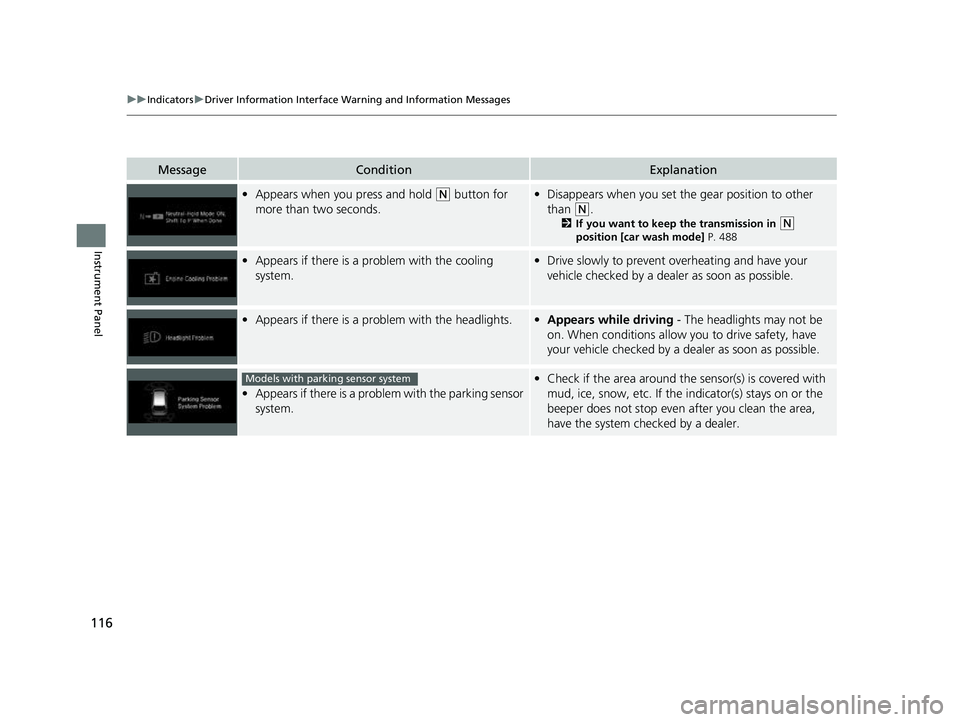
•Appears when you press and hold (N button for
more than two seconds.• Disappears when you set the gear position to other
than
(N.
2 If you want to keep the transmission in (N
position [car wash mode] P. 488
•Appears if there is a problem with the cooling
system.•Drive slowly to prevent overheating and have your
vehicle checked by a deal er as soon as possible.
•Appears if there is a problem with the headlights.•Appears while driving - The headlights may not be
on. When conditions allow you to drive safety, have
your vehicle checked by a dealer as soon as possible.
•Appears if there is a problem with the parking sensor
system.
•Check if the area around the sensor(s) is covered with
mud, ice, snow, etc. If the indicator(s) stays on or the
beeper does not stop even after you clean the area,
have the system checked by a dealer.Models with parking sensor system
23 US ODYSSEY-31THR6500.book 116 ページ 2022年1月24日 月曜日 午前11時35分
Page 120 of 707
118
uuIndicators uDriver Information Interface Wa rning and Information Messages
Instrument Panel
MessageConditionExplanation
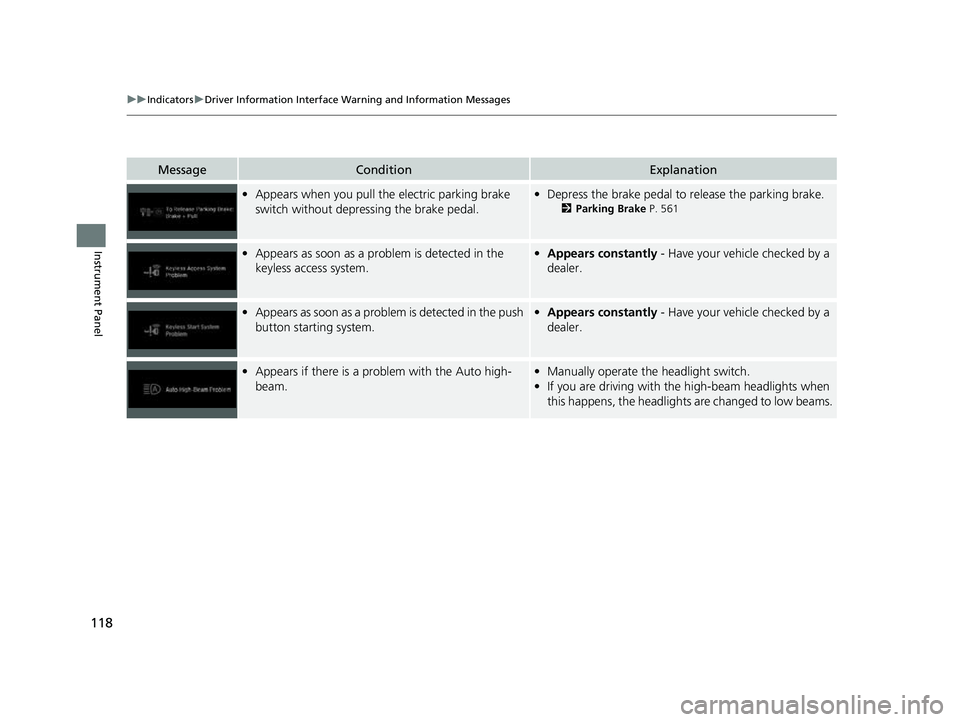
•Appears when you pull the electric parking brake
switch without depressing the brake pedal.•Depress the brake pedal to release the parking brake.
2 Parking Brake P. 561
•Appears as soon as a problem is detected in the
keyless access system.•Appears constantly - Have your vehicle checked by a
dealer.
• Appears as soon as a problem is detected in the push
button starting system.•Appears constantly - Have your vehicle checked by a
dealer.
• Appears if there is a prob lem with the Auto high-
beam.• Manually operate the headlight switch.
• If you are driving with th e high-beam headlights when
this happens, the headlights are changed to low beams.
23 US ODYSSEY-31THR6500.book 118 ページ 2022年1月24日 月曜日 午前11時35分
Page 145 of 707
143
Controls
This chapter explains how to operate the various controls necessary for driving.
Clock.................................................. 144
Locking and Unlocking the Doors
Key .................................................. 146
Low Keyless Remote Signal Strength 148
Locking/Unlocking the Doors from the
Outside .......................................... 149
Locking/Unlocking the Doors from the Inside ............................................. 156
Childproof Door Locks ..................... 159
Auto Door Locking/Unlocking .......... 160
Tailgate .............................................. 161
Sliding Doors ......................................... 172
Security System
Immobilizer System .............................. 181 Security System Alarm ......................... 181
Windows ............................................... 184
Moonroof
*............................................. 187Operating the Switches Around the Steering Wheel
ENGINE START/STOP Button............. 188
Turn Signals ..................................... 191
Light Switches.................................. 192
Fog Lights ........................................ 195
Daytime Running Lights ................... 196
Auto High-Beam .............................. 197
Wipers and Washers ............................ 200Rear Defogger/Heated Door Mirror Button ....203
Heated Windshield Button ................... 204Canadian models
Brightness Control ................................ 205
Driving Position Memory System*......... 206
Adjusting the Steering Wheel ............... 208
Mirrors Interior Rearview Mirror ........................ 209
Power Door Mirrors .............................. 210
Seats
Front Seats ................................................212
Maintain a Proper Sitting Position ..............224
Head Restraints .........................................225
Interior Convenience Items ........................229
Climate Control System Using Automatic Climate Control ..............250
Automatic Climate Control Sensors ...........256
* Not available on all models
23 US ODYSSEY-31THR6500.book 143 ページ 2022年1月24日 月曜日 午前11時35分
Page 151 of 707
149
uuLocking and Unlocking the Doors uLocking/Unlocking the Doors from the Outside
Continued
Controls
Locking/Unlocking the Doors from the Outside
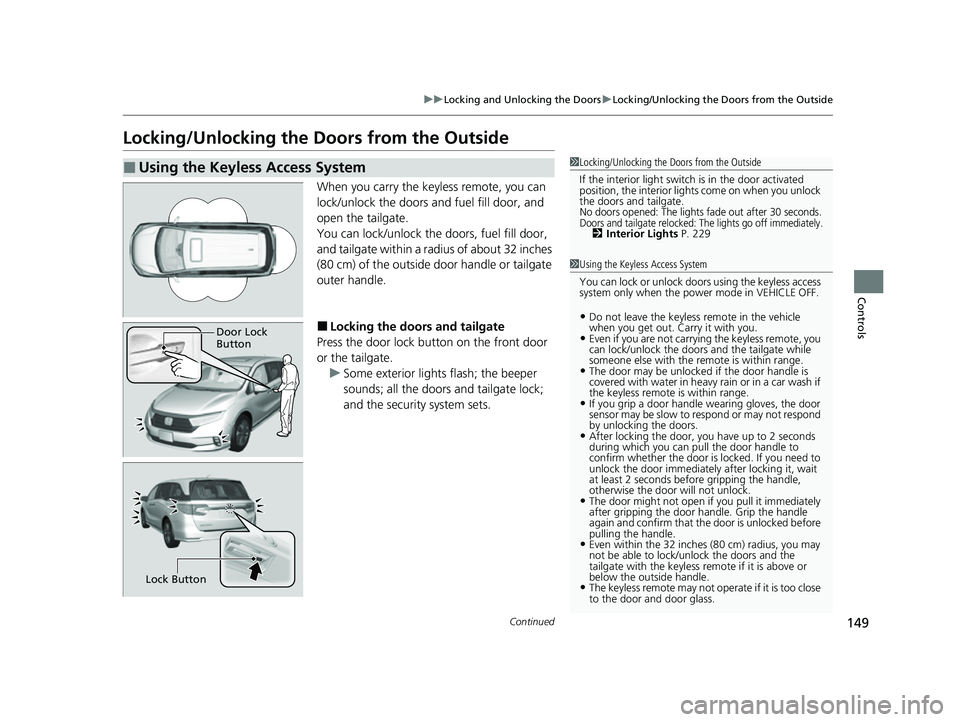
When you carry the keyless remote, you can
lock/unlock the doors and fuel fill door, and
open the tailgate.
You can lock/unlock the doors, fuel fill door,
and tailgate within a radius of about 32 inches
(80 cm) of the outside door handle or tailgate
outer handle.
■Locking the doors and tailgate
Press the door lock button on the front door
or the tailgate. u Some exterior lights flash; the beeper
sounds; all the doors and tailgate lock;
and the security system sets.
■Using the Keyless Access System1Locking/Unlocking the Doors from the Outside
If the interior light switch is in the door activated
position, the interior light s come on when you unlock
the doors and tailgate.
No doors opened: The lights fade out after 30 seconds.Doors and tailgate relocked: The lights go off immediately.2 Interior Lights P. 229
1Using the Keyless Access System
You can lock or unlock doors using the keyless access
system only when the power mode in VEHICLE OFF.
•Do not leave the keyless remote in the vehicle
when you get out. Carry it with you.
•Even if you are not carrying the keyless remote, you
can lock/unlock the doors and the tailgate while
someone else with the remote is within range.
•The door may be unlocked if the door handle is
covered with water in heavy rain or in a car wash if
the keyless remote is within range.
•If you grip a door handle wearing gloves, the door
sensor may be slow to respond or may not respond
by unlocking the doors.
•After locking the door, you have up to 2 seconds
during which you can pull the door handle to
confirm whether the door is locked. If you need to
unlock the door immediately after locking it, wait
at least 2 seconds befo re gripping the handle,
otherwise the door will not unlock.
•The door might not open if you pull it immediately
after gripping the door handle. Grip the handle
again and confirm that th e door is unlocked before
pulling the handle.
•Even within the 32 inches (80 cm) radius, you may
not be able to lock/unlock the doors and the
tailgate with the keyless remote if it is above or
below the outside handle.
•The keyless remote may not operate if it is too close
to the door and door glass.
Door Lock
Button
Lock Button
23 US ODYSSEY-31THR6500.book 149 ページ 2022年1月24日 月曜日 午前11時35分
Page 152 of 707
uuLocking and Unlocking the Doors uLocking/Unlocking the Doors from the Outside
150
Controls
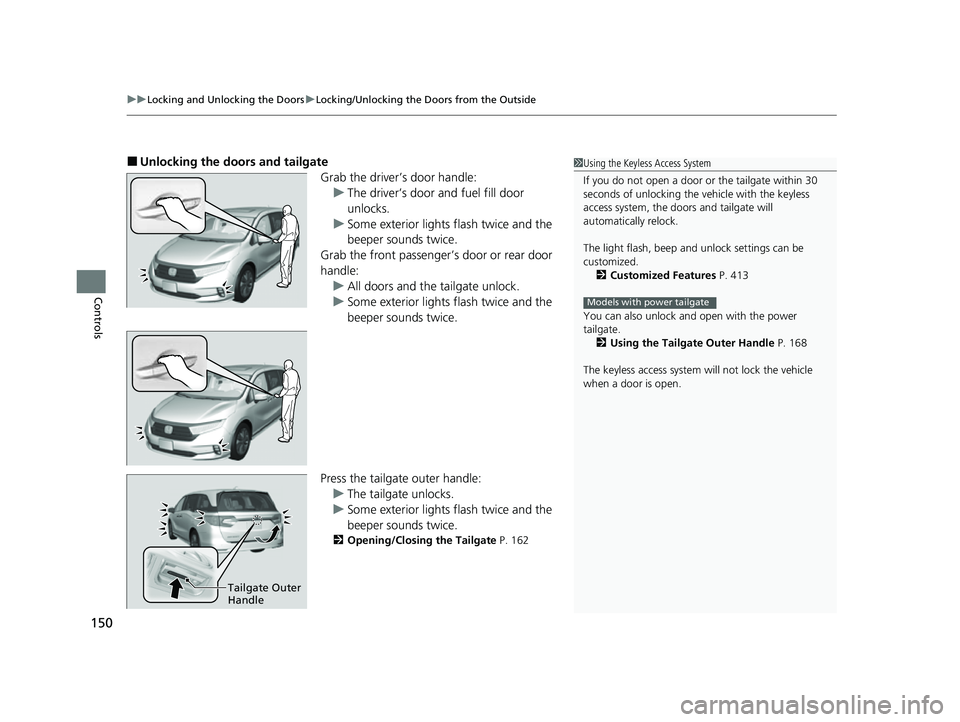
■Unlocking the doors and tailgate
Grab the driver’s door handle:u The driver’s door and fuel fill door
unlocks.
u Some exterior lights flash twice and the
beeper sounds twice.
Grab the front passenger’s door or rear door
handle: u All doors and the tailgate unlock.
u Some exterior lights flash twice and the
beeper sounds twice.
Press the tailgate outer handle: u The tailgate unlocks.
u Some exterior lights flash twice and the
beeper sounds twice.
2 Opening/Closing the Tailgate P. 162
1Using the Keyless Access System
If you do not open a door or the tailgate within 30
seconds of unlocking the vehicle with the keyless
access system, the doors and tailgate will
automatically relock.
The light flash, beep a nd unlock settings can be
customized. 2 Customized Features P. 413
You can also unlock and open with the power
tailgate. 2 Using the Tailgate Outer Handle P. 168
The keyless access system will not lock the vehicle
when a door is open.
Models with power tailgate
Tailgate Outer
Handle
23 US ODYSSEY-31THR6500.book 150 ページ 2022年1月24日 月曜日 午前11時35分
Page 153 of 707
Continued151
uuLocking and Unlocking the Doors uLocking/Unlocking the Doors from the Outside
Controls
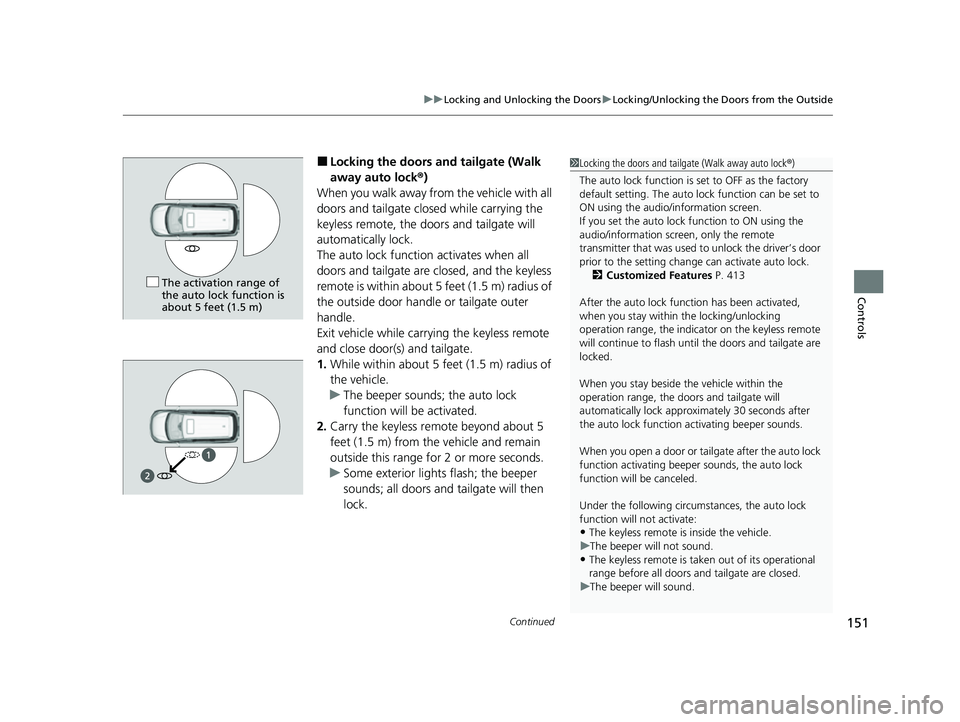
■Locking the doors and tailgate (Walk
away auto lock ®)
When you walk away fro m the vehicle with all
doors and tailgate closed while carrying the
keyless remote, the doors and tailgate will
automatically lock.
The auto lock function activates when all
doors and tailgate are closed, and the keyless
remote is within about 5 feet (1.5 m) radius of
the outside door handle or tailgate outer
handle.
Exit vehicle while carrying the keyless remote
and close door(s) and tailgate.
1. While within about 5 feet (1.5 m) radius of
the vehicle.
u The beeper sounds; the auto lock
function will be activated.
2. Carry the keyless remote beyond about 5
feet (1.5 m) from the vehicle and remain
outside this range for 2 or more seconds.
u Some exterior lights flash; the beeper
sounds; all doors and tailgate will then
lock.1Locking the doors and tailg ate (Walk away auto lock®)
The auto lock function is set to OFF as the factory
default setting. The auto lo ck function can be set to
ON using the audio/information screen.
If you set the auto lock function to ON using the
audio/information screen, only the remote
transmitter that was used to unlock the driver’s door
prior to the setting change can activate auto lock. 2 Customized Features P. 413
After the auto lock function has been activated,
when you stay within the locking/unlocking
operation range, the indicato r on the keyless remote
will continue to flash until the doors and tailgate are
locked.
When you stay beside the vehicle within the
operation range, the door s and tailgate will
automatically lock approx imately 30 seconds after
the auto lock function activating beeper sounds.
When you open a door or tailgate after the auto lock
function activating beeper sounds, the auto lock
function will be canceled.
Under the following circumstances, the auto lock
function will not activate:
•The keyless remote is inside the vehicle.
u The beeper will not sound.
•The keyless remote is taken out of its operational
range before all doors a nd tailgate are closed.
u The beeper will sound.
The activation range of
the auto lock function is
about 5 feet (1.5 m)
23 US ODYSSEY-31THR6500.book 151 ページ 2022年1月24日 月曜日 午前11時35分