reset HONDA ODYSSEY 2023 Owner's Manual
[x] Cancel search | Manufacturer: HONDA, Model Year: 2023, Model line: ODYSSEY, Model: HONDA ODYSSEY 2023Pages: 707, PDF Size: 23.9 MB
Page 342 of 707
340
uuAudio Error Messages uAndroid/Apps
Features
Android/Apps
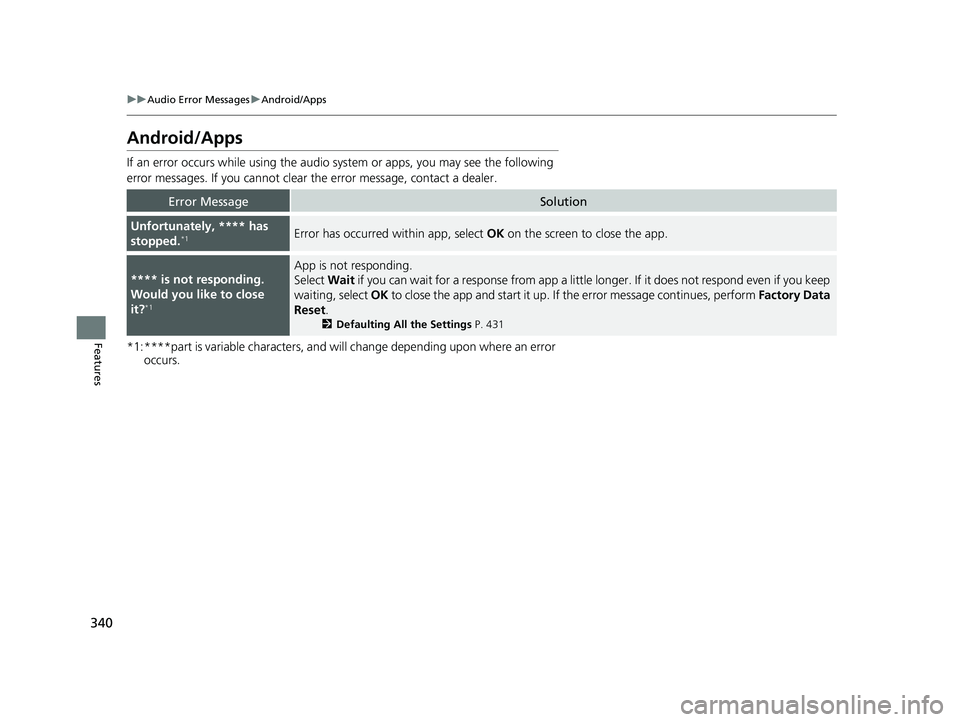
If an error occurs while using the audio system or apps, you may see the following
error messages. If you cannot clear the error message, contact a dealer.
*1:****part is variable characters, and will change depending upon where an error occurs.
Error MessageSolution
Unfortunately, **** has
stopped.*1Error has occurred within app, select OK on the screen to close the app.
**** is not responding.
Would you like to close
it?
*1
App is not responding.
Select Wait if you can wait for a response from app a littl e longer. If it does not respond even if you keep
waiting, select OK to close the app and start it up. If the error message continues, perform Factory Data
Reset .
2Defaulting All the Settings P. 431
23 US ODYSSEY-31THR6500.book 340 ページ 2022年1月24日 月曜日 午前11時35分
Page 378 of 707
376
uuBlu-ray/DVD Rear Entertainment System*uPlaying a DVD/Blu-rayTM
Features
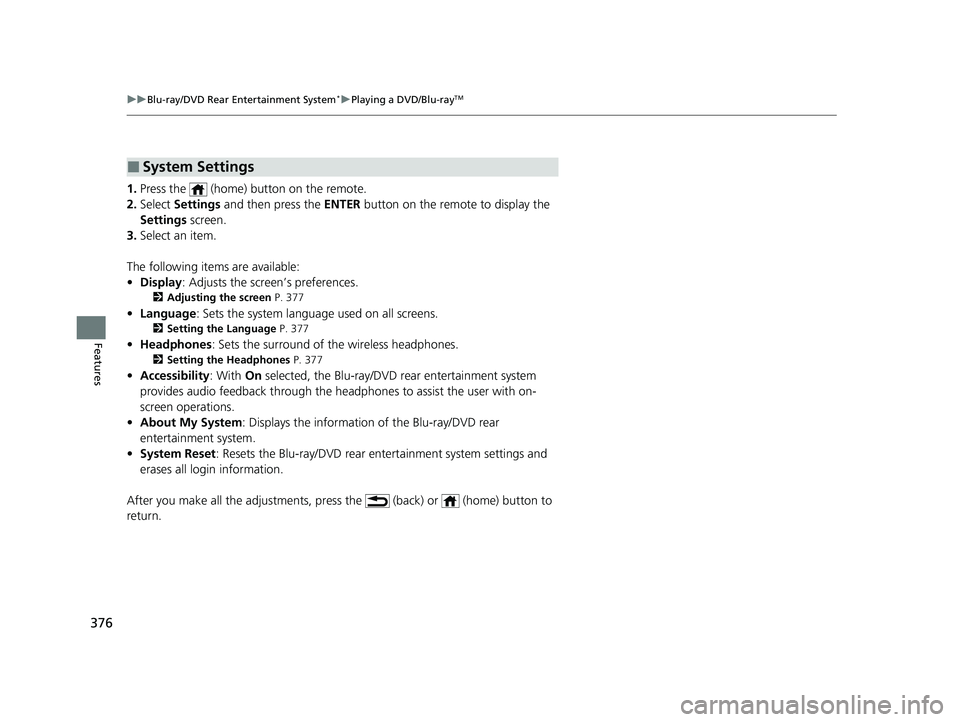
1. Press the (home) button on the remote.
2. Select Settings and then press the ENTER button on the remote to display the
Settings screen.
3. Select an item.
The following items are available:
• Display : Adjusts the screen’s preferences.
2Adjusting the screen P. 377
•Language : Sets the system language used on all screens.
2Setting the Language P. 377
•Headphones : Sets the surround of the wireless headphones.
2Setting the Headphones P. 377
•Accessibility : With On selected, the Blu-ray/DVD rear entertainment system
provides audio feedback through the headphones to assist the user with on-
screen operations.
• About My System : Displays the information of the Blu-ray/DVD rear
entertainment system.
• System Reset : Resets the Blu-ray/DVD rear en tertainment system settings and
erases all login information.
After you make all the adjustments, pres s the (back) or (home) button to
return.
■System Settings
23 US ODYSSEY-31THR6500.book 376 ページ 2022年1月24日 月曜日 午前11時35分
Page 416 of 707
414
uuCustomized Features u
Features
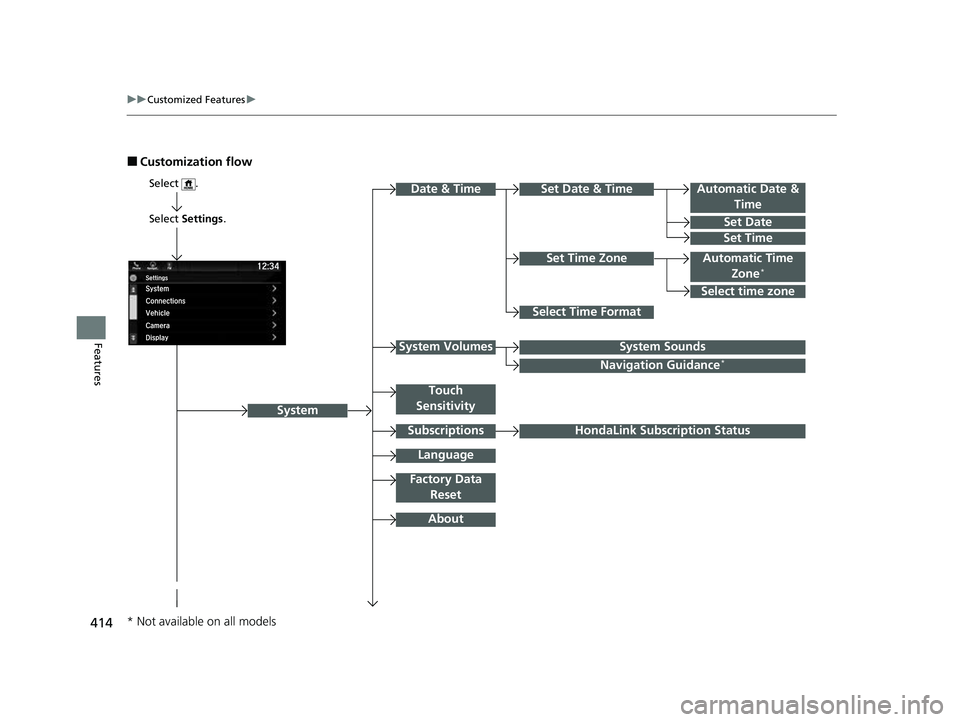
■Customization flow
Select Settings .
Automatic Date &
Time
Set Date
Set Time
System
Select .
Automatic Time Zone*
Select Time Format
HondaLink Subscription Status
Set Time Zone
Set Date & Time
Touch
Sensitivity
Subscriptions
Language
Factory Data Reset
About
Date & Time
Select time zone
System SoundsSystem Volumes
Navigation Guidance*
* Not available on all models
23 US ODYSSEY-31THR6500.book 414 ページ 2022年1月24日 月曜日 午前11時35分
Page 419 of 707
417
uuCustomized Features u
Continued
Features
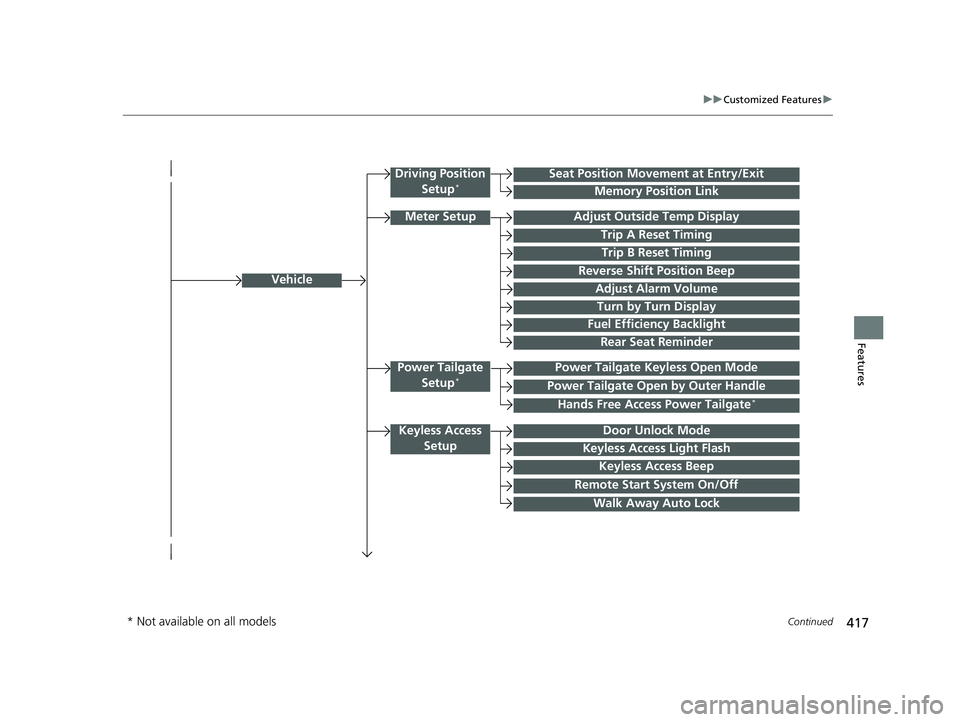
Vehicle
Driving Position
Setup*Seat Position Movem ent at Entry/Exit
Memory Position Link
Meter SetupAdjust Outside Temp Display
Trip A Reset Timing
Trip B Reset Timing
Reverse Shift Position Beep
Adjust Alarm Volume
Turn by Turn Display
Power Tailgate
Setup*Power Tailgate Keyless Open Mode
Power Tailgate Open by Outer Handle
Keyless Access SetupDoor Unlock Mode
Keyless Access Light Flash
Keyless Access Beep
Remote Start System On/Off
Walk Away Auto Lock
Fuel Efficiency Backlight
Hands Free Access Power Tailgate*
Rear Seat Reminder
* Not available on all models
23 US ODYSSEY-31THR6500.book 417 ページ 2022年1月24日 月曜日 午前11時35分
Page 423 of 707
421
uuCustomized Features u
Continued
Features
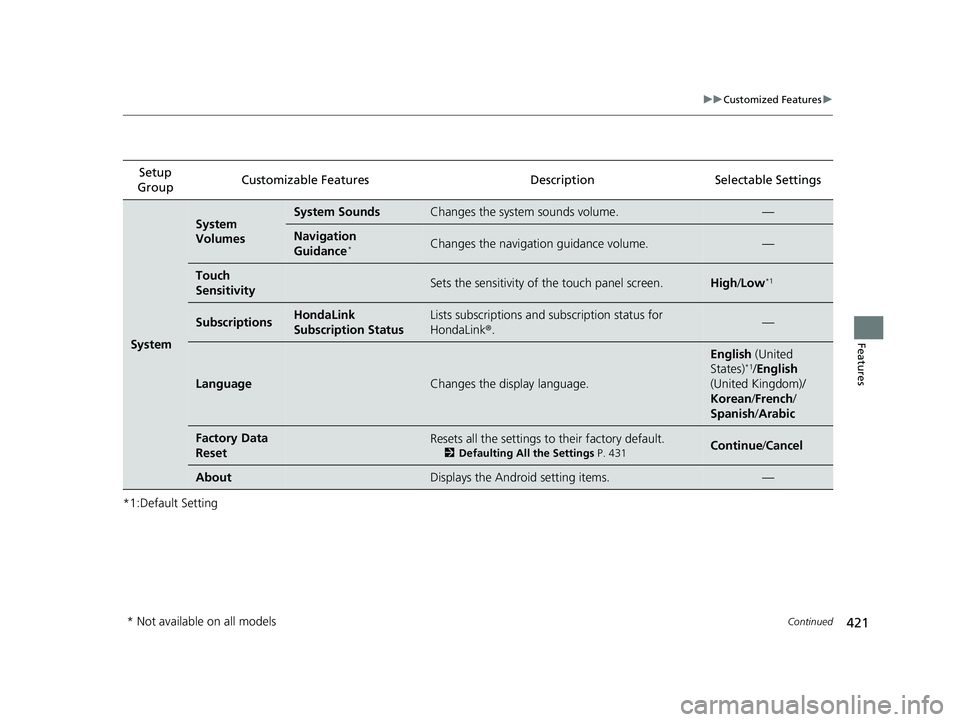
*1:Default SettingSetup
Group Customizable Features Description Selectable Settings
System
System
VolumesSystem SoundsChanges the system sounds volume.—
Navigation
Guidance*Changes the navigation guidance volume.—
Touch
SensitivitySets the sensitivity of the touch panel screen.High
/Low*1
SubscriptionsHondaLink
Subscription StatusLists subscriptions and subscription status for
HondaLink®.—
LanguageChanges the display language.
English (United
States)*1/ English
(United Kingdom)/
Korean /French /
Spanish/ Arabic
Factory Data
ResetResets all the settings to their factory default.
2Defaulting All the Settings P. 431Continue /Cancel
AboutDisplays the Android setting items.—
* Not available on all models
23 US ODYSSEY-31THR6500.book 421 ページ 2022年1月24日 月曜日 午前11時35分
Page 426 of 707
424
uuCustomized Features u
Features
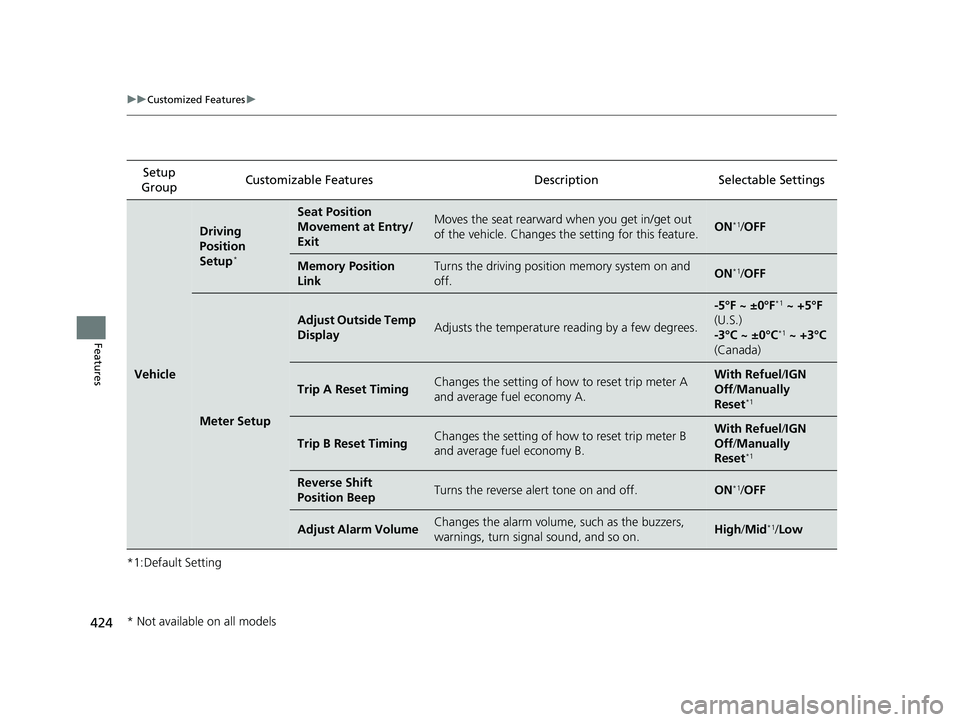
*1:Default SettingSetup
Group Customizable Features Description Selectable Settings
Vehicle
Driving
Position
Setup
*
Seat Position
Movement at Entry/
ExitMoves the seat rearward when you get in/get out
of the vehicle. Changes the setting for this feature.ON*1/
OFF
Memory Position
LinkTurns the driving position memory system on and
off.ON*1/ OFF
Meter Setup
Adjust Outside Temp
DisplayAdjusts the temperature reading by a few degrees.
-5°F ~ ±0°F*1 ~ +5°F
(U.S.)
-3°C ~ ±0°C
*1 ~ +3°C
(Canada)
Trip A Reset TimingChanges the setting of how to reset trip meter A
and average fuel economy A.With Refuel /IGN
Off /Manually
Reset
*1
Trip B Reset TimingChanges the setting of how to reset trip meter B
and average fuel economy B.With Refuel /IGN
Off /Manually
Reset
*1
Reverse Shift
Position BeepTurns the reverse alert tone on and off.ON*1/ OFF
Adjust Alarm VolumeChanges the alarm volume, such as the buzzers,
warnings, turn signal sound, and so on.High /Mid*1/Low
* Not available on all models
23 US ODYSSEY-31THR6500.book 424 ページ 2022年1月24日 月曜日 午前11時35分
Page 430 of 707
428
uuCustomized Features u
Features
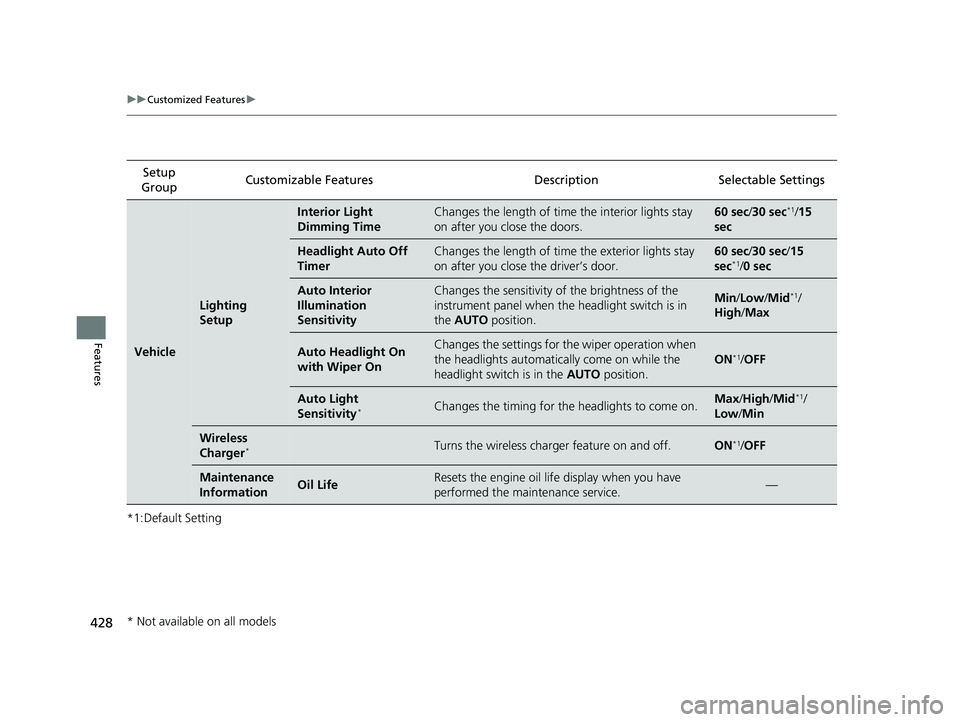
*1:Default SettingSetup
Group Customizable Features Description Selectable Settings
Vehicle
Lighting
Setup
Interior Light
Dimming TimeChanges the length of time the interior lights stay
on after you close the doors.60 sec/
30 sec*1/15
sec
Headlight Auto Off
TimerChanges the length of time the exterior lights stay
on after you close the driver’s door.60 sec/ 30 sec/ 15
sec*1/ 0 sec
Auto Interior
Illumination
SensitivityChanges the sensitivity of the brightness of the
instrument panel when the headlight switch is in
the AUTO position.Min/Low/Mid*1/
High /Max
Auto Headlight On
with Wiper OnChanges the settings for th e wiper operation when
the headlights automati cally come on while the
headlight switch is in the AUTO position.
ON*1/OFF
Auto Light
Sensitivity*Changes the timing for the headlights to come on.Max /High /Mid*1/
Low /Min
Wireless
Charger*Turns the wireless charger feature on and off.ON*1/OFF
Maintenance
InformationOil LifeResets the engine oil life display when you have
performed the maintenance service.—
* Not available on all models
23 US ODYSSEY-31THR6500.book 428 ページ 2022年1月24日 月曜日 午前11時35分
Page 433 of 707
431
uuCustomized Features uDefaulting All the Settings
Features
Defaulting All the Settings
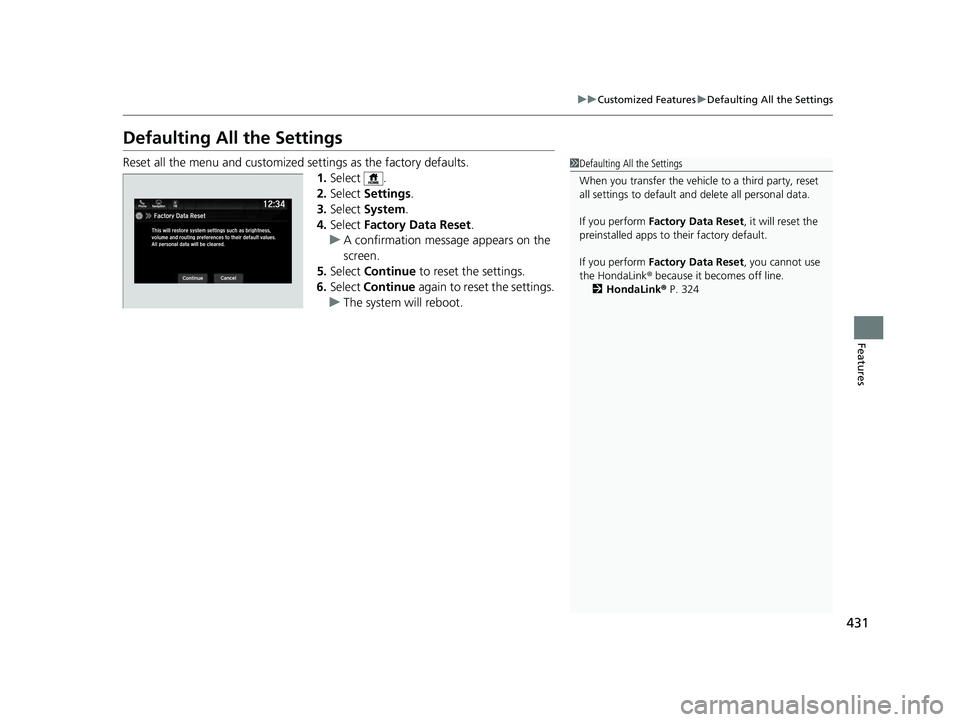
Reset all the menu and customized settings as the factory defaults.
1.Select .
2. Select Settings .
3. Select System.
4. Select Factory Data Reset .
u A confirmation message appears on the
screen.
5. Select Continue to reset the settings.
6. Select Continue again to reset the settings.
u The system w ill reboot.1Defaulting All the Settings
When you transfer the vehicle to a third party, reset
all settings to default a nd delete all personal data.
If you perform Factory Data Reset , it will reset the
preinstalled apps to their factory default.
If you perform Factory Data Reset , you cannot use
the HondaLink ® because it becomes off line.
2 HondaLink® P. 324
23 US ODYSSEY-31THR6500.book 431 ページ 2022年1月24日 月曜日 午前11時35分
Page 596 of 707
594
uuMaintenance MinderTMuTo Use Maintenance MinderTM
Maintenance
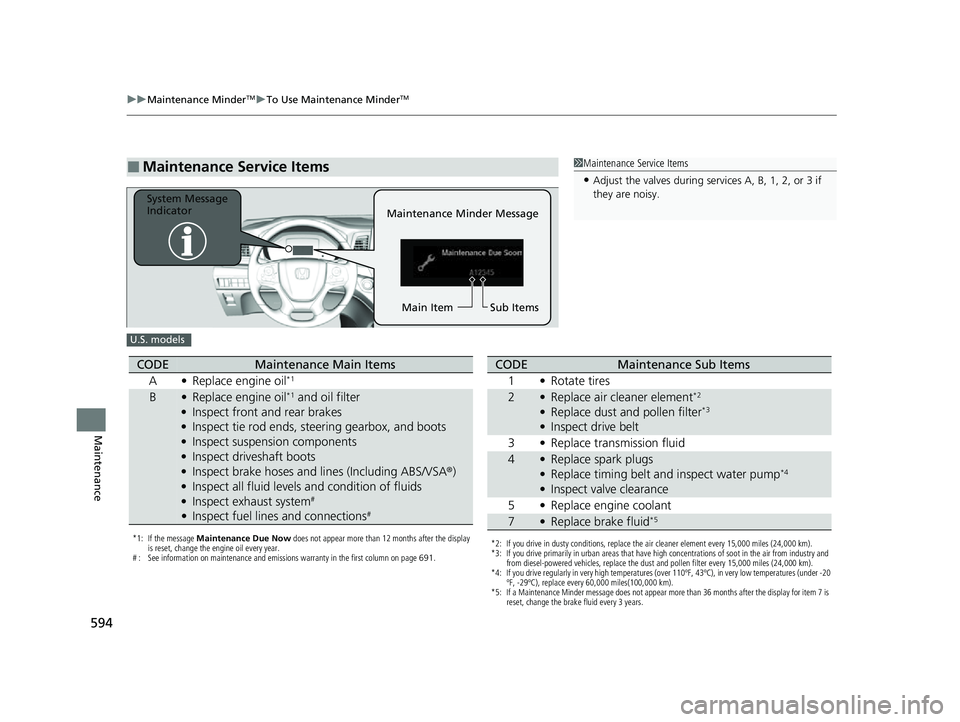
■Maintenance Service Items1Maintenance Service Items
•Adjust the valves during services A, B, 1, 2, or 3 if
they are noisy.
Maintenance Minder Message
System Message
Indicator
Sub Items
Main Item
U.S. models
*1: If the message Maintenance Due Now does not appear more than 12 months after the display
is reset, change the engine oil every year.
# : See information on maintenance and emissions warranty in the first column on page 691.
CODEMaintenance Main Items
A •Replace engine oil*1
B•Replace engine oil*1 and oil filter
• Inspect front and rear brakes
• Inspect tie rod ends, steering gearbox, and boots
• Inspect suspension components
• Inspect driveshaft boots
• Inspect brake hoses and li nes (Including ABS/VSA®)
• Inspect all fluid levels and condition of fluids
• Inspect exhaust system
#
•Inspect fuel lines and connections#
*2: If you drive in dusty conditions, replace the air cleaner element every 15,000 miles (24,000 km).
*3: If you drive primarily in urban areas that have high concentrations of soot in the air from industry and
from diesel-powered vehicles, replace the dust and pollen filter every 15,000 miles (24,000 km).
*4: If you drive regularly in very high temperatures (over 110ºF, 43ºC), in very low temperatures (under -20 ºF, -29ºC), replace every 60,000 miles(100,000 km).
*5: If a Maintenance Minder message does not appear more than 36 months after the display for item 7 is reset, change the brake fluid every 3 years.
CODEMaintenance Sub Items
1 •Rotate tires
2•Replace air cleaner element*2
•Replace dust and pollen filter*3
•Inspect drive belt
3 •Replace transmission fluid
4•Replace spark plugs
• Replace timing belt and inspect water pump*4
•Inspect valve clearance
5 •Replace engine coolant
7•Replace brake fluid*5
23 US ODYSSEY-31THR6500.book 594 ページ 2022年1月24日 月曜日 午前11時35分
Page 597 of 707
595
uuMaintenance MinderTMuTo Use Maintenance MinderTM
Continued
Maintenance
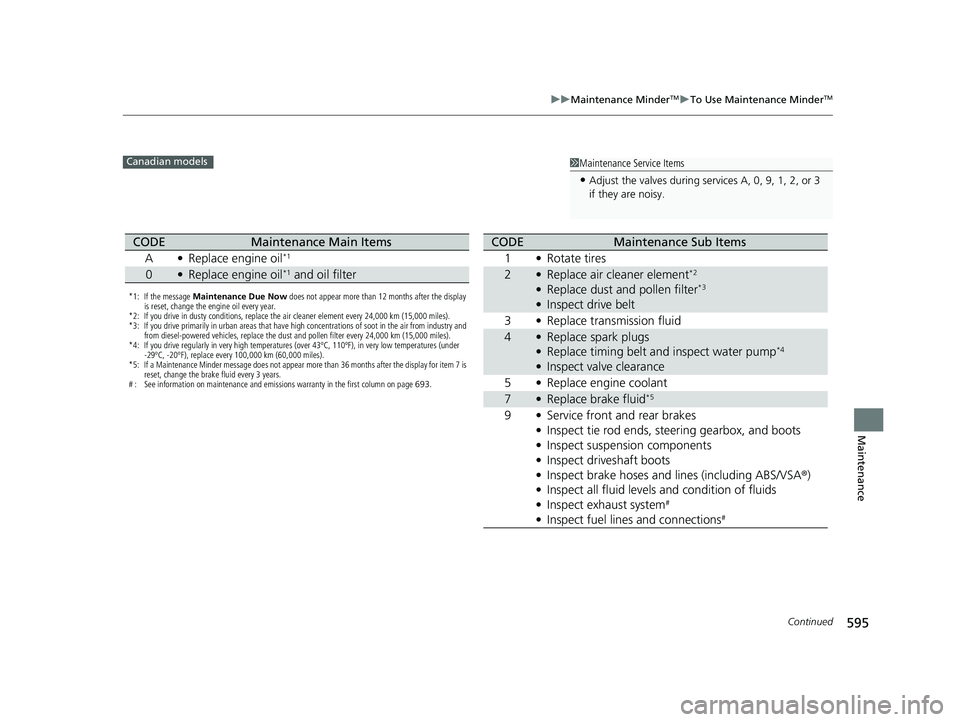
1Maintenance Service Items
•Adjust the valves during services A, 0, 9, 1, 2, or 3
if they are noisy.
Canadian models
*1: If the message Maintenance Due Now does not appear more than 12 months after the display
is reset, change the engine oil every year.
*2: If you drive in dusty conditions, replace the air cleaner element every 24,000 km (15,000 miles).
*3: If you drive primarily in urban areas that have high concentrations of soot in the air from industry and from diesel-powered vehicles, replace the dust and pollen filter every 24,000 km (15,000 miles).
*4: If you drive regularly in very high temperatures (over 43ºC, 110ºF), in very low temperatures (under -29ºC, -20ºF), replace every 100,000 km (60,000 miles).
*5: If a Maintenance Minder message does not appear more than 36 months after the display for item 7 is reset, change the brake fluid every 3 years.
# : See information on maintenance and emissions warranty in the first column on page 693.
CODEMaintenance Main Items
A •Replace engine oil*1
0•Replace engine oil*1 and oil filter
CODEMaintenance Sub Items
1 •Rotate tires
2•Replace air cleaner element*2
•Replace dust and pollen filter*3
•Inspect drive belt
3 •Replace transmission fluid
4•Replace spark plugs
• Replace timing belt and inspect water pump*4
•Inspect valve clearance
5 •Replace engine coolant
7•Replace brake fluid*5
9 •Service front and rear brakes
• Inspect tie rod ends, steering gearbox, and boots
• Inspect suspension components
• Inspect driveshaft boots
• Inspect brake hoses and lines (including ABS/VSA ®)
• Inspect all fluid levels and condition of fluids
• Inspect exhaust system
#
•Inspect fuel lines and connections#
23 US ODYSSEY-31THR6500.book 595 ページ 2022年1月24日 月曜日 午前11時35分