bluetooth HONDA ODYSSEY 2023 Service Manual
[x] Cancel search | Manufacturer: HONDA, Model Year: 2023, Model line: ODYSSEY, Model: HONDA ODYSSEY 2023Pages: 707, PDF Size: 23.9 MB
Page 456 of 707
uuBluetooth ® HandsFreeLink ®u HFL Menus
454
Features
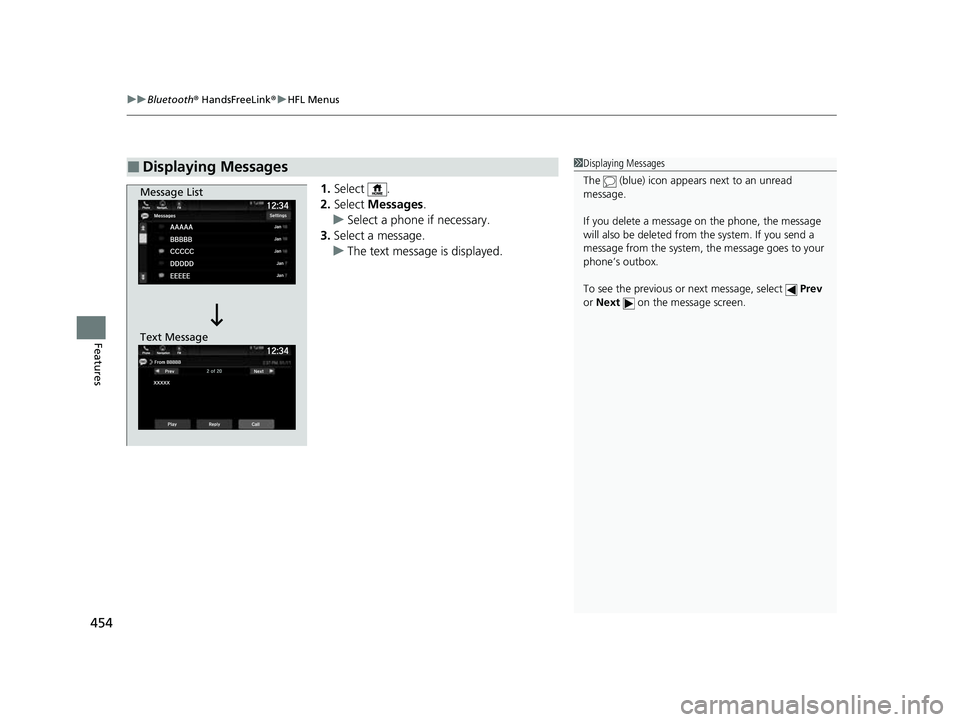
1. Select .
2. Select Messages.
u Select a phone if necessary.
3. Select a message.
u The text message is displayed.
■Displaying Messages1Displaying Messages
The (blue) icon appears next to an unread
message.
If you delete a message on the phone, the message
will also be dele ted from the system. If you send a
message from the system, the message goes to your
phone’s outbox.
To see the previous or next message, select Prev
or Next on the message screen.
Message List
Text Message
23 US ODYSSEY-31THR6500.book 454 ページ 2022年1月24日 月曜日 午前11時35分
Page 457 of 707
Continued455
uuBluetooth ® HandsFreeLink ®u HFL Menus
Features
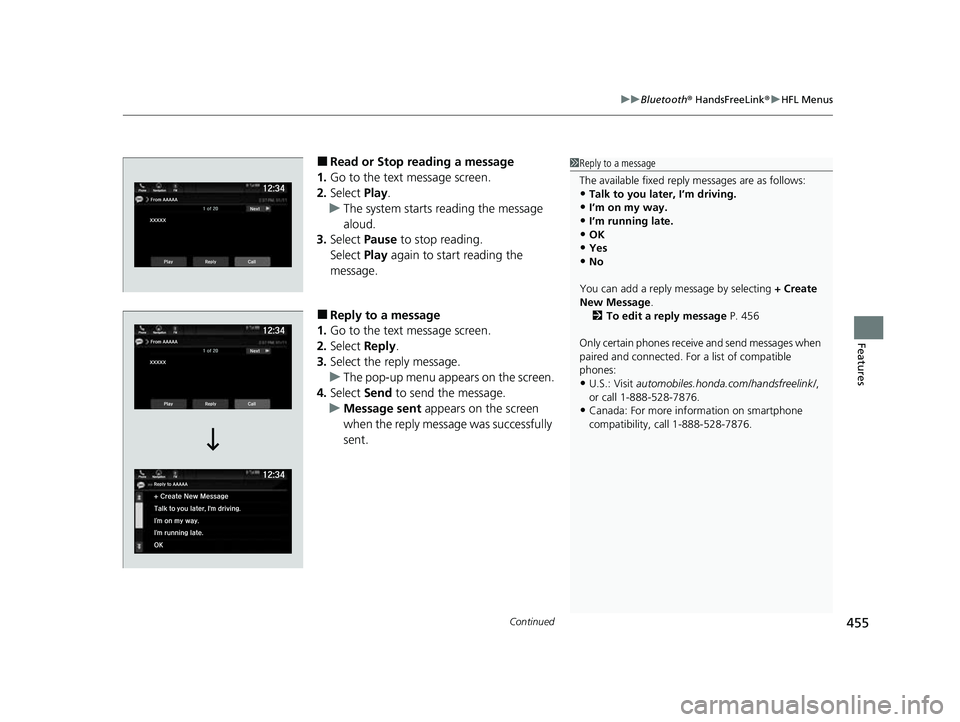
■Read or Stop reading a message
1. Go to the text message screen.
2. Select Play.
u The system starts reading the message
aloud.
3. Select Pause to stop reading.
Select Play again to start reading the
message.
■Reply to a message
1. Go to the text message screen.
2. Select Reply.
3. Select the reply message.
u The pop-up menu appears on the screen.
4. Select Send to send the message.
u Message sent appears on the screen
when the reply message was successfully
sent.
1 Reply to a message
The available fixed reply messages are as follows:
•Talk to you later, I’m driving.
•I’m on my way.
•I’m running late.•OK
•Yes
•No
You can add a reply message by selecting + Create
New Message .
2 To edit a reply message P. 456
Only certain phones receive and send messages when
paired and connected. For a list of compatible
phones:
•U.S.: Visit automobiles.honda.com/handsfreelink/ ,
or call 1-888-528-7876.
•Canada: For more info rmation on smartphone
compatibility, call 1-888-528-7876.
23 US ODYSSEY-31THR6500.book 455 ページ 2022年1月24日 月曜日 午前11時35分
Page 458 of 707
uuBluetooth ® HandsFreeLink ®u HFL Menus
456
Features
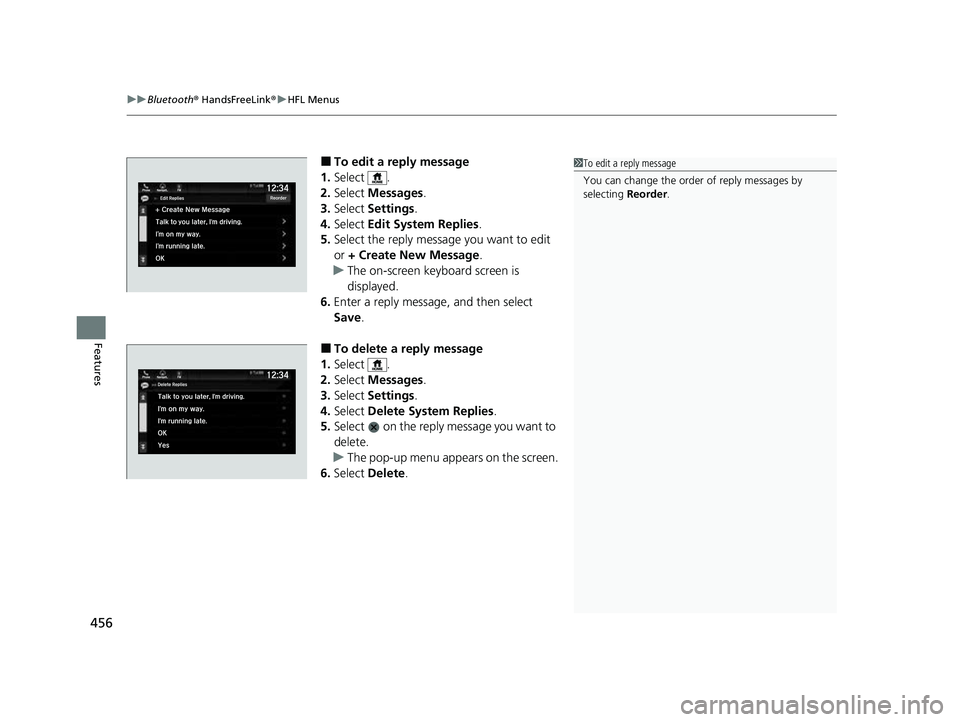
■To edit a reply message
1. Select .
2. Select Messages.
3. Select Settings .
4. Select Edit System Replies .
5. Select the reply message you want to edit
or + Create New Message .
u The on-screen keyboard screen is
displayed.
6. Enter a reply message, and then select
Save.
■To delete a reply message
1. Select .
2. Select Messages.
3. Select Settings .
4. Select Delete System Replies .
5. Select on the reply message you want to
delete.
u The pop-up menu appears on the screen.
6. Select Delete.
1To edit a reply message
You can change the order of reply messages by
selecting Reorder.
23 US ODYSSEY-31THR6500.book 456 ページ 2022年1月24日 月曜日 午前11時35分
Page 459 of 707
457
uuBluetooth ® HandsFreeLink ®u HFL Menus
Continued
Features
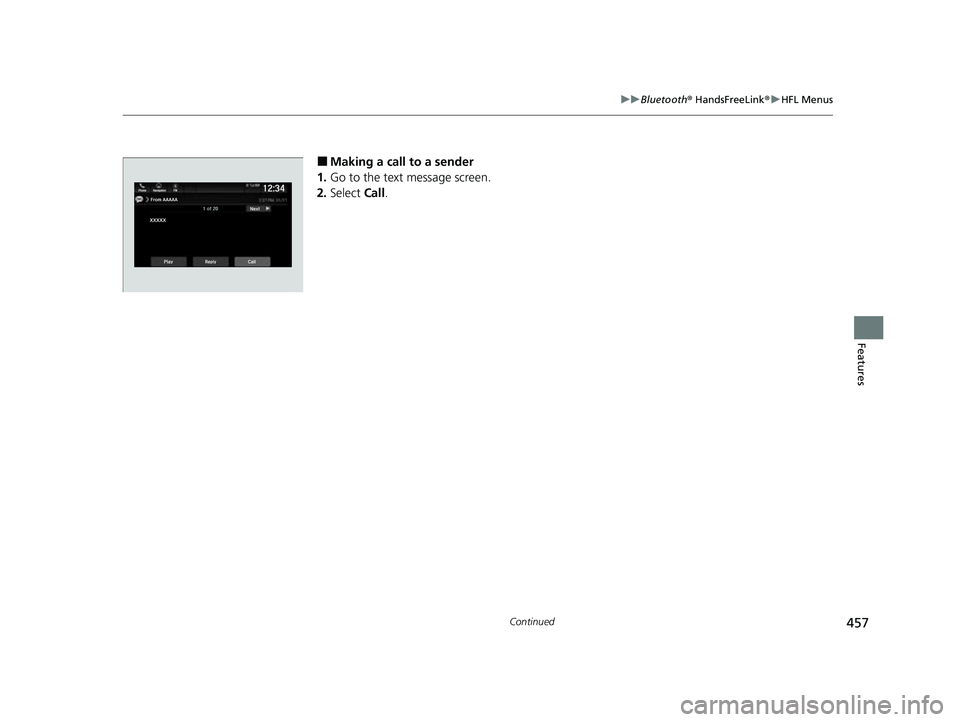
■Making a call to a sender
1. Go to the text message screen.
2. Select Call.
23 US ODYSSEY-31THR6500.book 457 ページ 2022年1月24日 月曜日 午前11時35分
Page 460 of 707
uuBluetooth ® HandsFreeLink ®u HFL Menus
458
Features
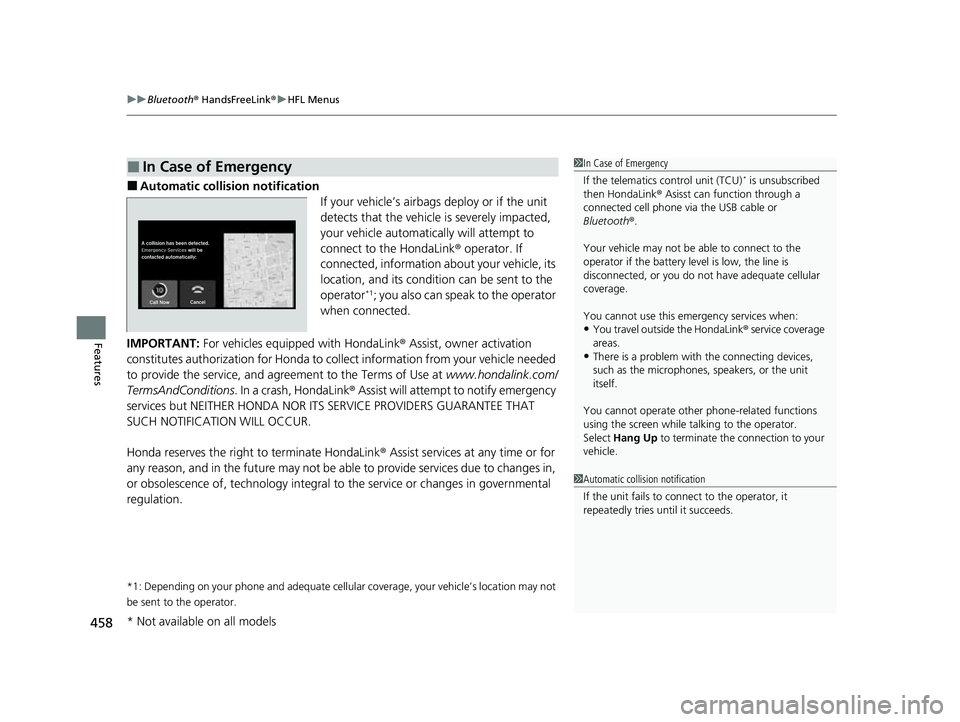
■Automatic collision notification
If your vehicle’s airbags deploy or if the unit
detects that the vehicle is severely impacted,
your vehicle automatically will attempt to
connect to the HondaLink® operator. If
connected, information about your vehicle, its
location, and its condition can be sent to the
operator
*1; you also can speak to the operator
when connected.
IMPORTANT: For vehicles equipp ed with HondaLink® Assist, owner activation
constitutes authorization for Honda to co llect information from your vehicle needed
to provide the service, and agr eement to the Terms of Use at www.hondalink.com/
TermsAndConditions . In a crash, HondaLink ® Assist will attempt to notify emergency
services but NEITHER HONDA NOR ITS SERVICE PROVIDERS GUARANTEE THAT
SUCH NOTIFICATION WILL OCCUR.
Honda reserves the right to terminate HondaLink ® Assist services at any time or for
any reason, and in the future may not be ab le to provide services due to changes in,
or obsolescence of, technology integral to the service or changes in governmental
regulation.
*1: Depending on your phone and ad equate cellular coverage, your vehicle’s location may not
be sent to the operator.
■In Case of Emergency1 In Case of Emergency
If the telematics control unit (TCU)
* is unsubscribed
then HondaLink ® Asisst can function through a
connected cell phone via the USB cable or
Bluetooth ®.
Your vehicle may not be able to connect to the
operator if the battery level is low, the line is
disconnected, or you do not have adequate cellular
coverage.
You cannot use this emergency services when:
•You travel outside the HondaLink ® service coverage
areas.
•There is a problem with the connecting devices,
such as the microphones, speakers, or the unit
itself.
You cannot operate othe r phone-related functions
using the screen while talking to the operator.
Select Hang Up to terminate the connection to your
vehicle.
1 Automatic collision notification
If the unit fails to connect to the operator, it
repeatedly tries until it succeeds.
* Not available on all models
23 US ODYSSEY-31THR6500.book 458 ページ 2022年1月24日 月曜日 午前11時35分
Page 461 of 707
459
uuBluetooth ® HandsFreeLink ®u HFL Menus
Features
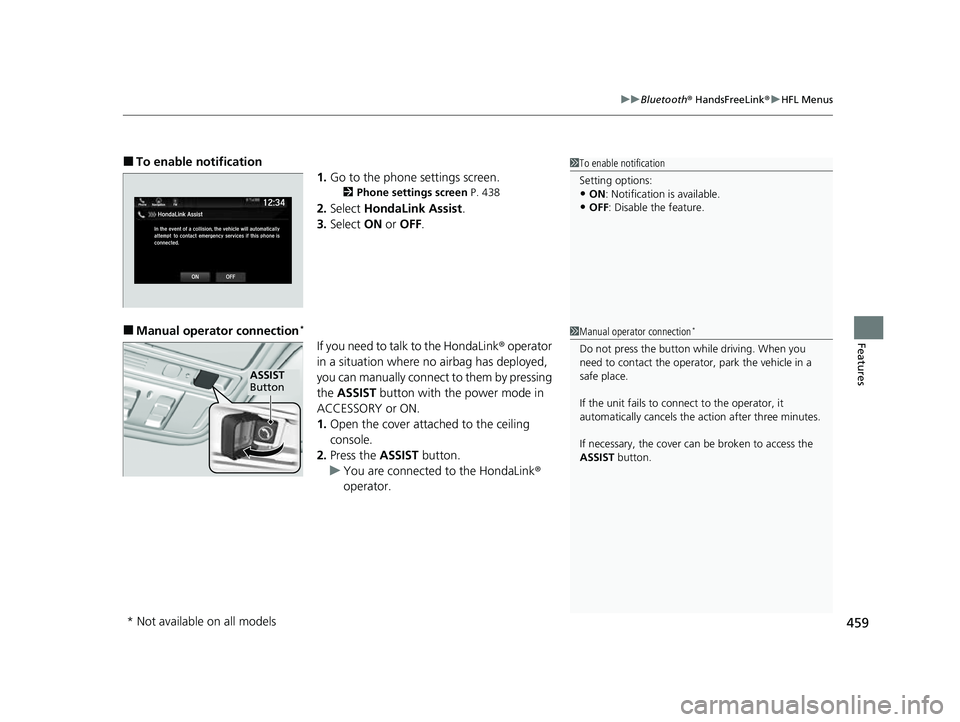
■To enable notification
1.Go to the phone settings screen.
2 Phone settings screen P. 438
2.Select HondaLink Assist .
3. Select ON or OFF .
■Manual operator connection*
If you need to talk to the HondaLink ® operator
in a situation where no airbag has deployed,
you can manually connect to them by pressing
the ASSIST button with the power mode in
ACCESSORY or ON.
1. Open the cover attached to the ceiling
console.
2. Press the ASSIST button.
u You are connected to the HondaLink ®
operator.
1 To enable notification
Setting options:
•ON : Notification is available.
•OFF: Disable the feature.
1Manual operator connection*
Do not press the button while driving. When you
need to contact the operato r, park the vehicle in a
safe place.
If the unit fails to connect to the operator, it
automatically cancels the action after three minutes.
If necessary, the cover can be broken to access the
ASSIST button.
ASSIST
Button
* Not available on all models
23 US ODYSSEY-31THR6500.book 459 ページ 2022年1月24日 月曜日 午前11時35分
Page 699 of 707
697
Index
Automatic Operation (automatic lighting control) ................................................... 193
Automatic Transmission .......................... 483
Creeping......................................... 481, 483
Fluid ....................................................... 607
Kickdown ............................................... 483
Shift Operation ....................................... 486
Shifting ................................................... 484
Auxiliary Input Jack ................................. 261
Average Fuel Economy ............................ 133
B
Battery...................................................... 630
Charging System Indicator ................ 92, 664
If the Battery Is Dead............................... 659
Maintenance (Checking the Battery) ....... 630
Maintenance (Replacing) ................. 632, 633
Belts (Seat) .................................................. 40
Beverage Holders ..................................... 234
Blank ......................................................... 139
Blind spot information System ................ 506
Bluetooth ® Audio ..................................... 320
Bluetooth ® HandsFreeLink ®................... 435
Blu-ray/DVD Rear Entertainment System ..................................................... 365
Audio Sources for Front and Rear Seats... 386
Auxiliary Console Panels.......................... 367
DVD or Blu-ray
TM Player Error Messages... 411
Front Control Panel Operation ................ 378
HDMI
TM Port............................................ 368 How Much Farther?
TM.............................. 385
Media Servers .......................................... 385
Operating the System .............................. 369
Overhead Screen ..................................... 368
Playable Disc Region Codes ..................... 409
Playable Disc Types .................................. 409
Playable Discs .......................................... 387
Playing a Disc in the Rear ......................... 383
Playing a DVD/Blu-ray
TM........................... 372
Playing a Video Using the HDMITM........... 384
Playing an iPod and a USB Flash Drive in the
Rear....................................................... 383
Playing Apps ............................................ 381
Rear DVD or Blu-ray
TM Menu .................... 373
Rear System Setup ................................... 379
Recommended Discs ................................ 410
Selecting the Audio Source using Front
Control Panel......................................... 378
Setting the DVD or Blu-ray
TM Menu .......... 380
System Controls .............................. 372, 382
System Settings ....................................... 376
Video Accessibility ................................... 370
Wireless Headphones .............................. 366
Booster Seats (For Children) ...................... 84
Brake System ............................................. 561
Anti-lock Brake System (ABS) ................... 567
Brake Assist System ................................. 568
Fluid ........................................................ 608
Foot Brake ............................................... 564
Indicator (Amber) ........................ 89, 90, 666
Indicator (Red) ........................... 88, 665, 666 Parking Brake .......................................... 561
Brightness Control (Instrument Panel) .... 205
Built-in Key ............................................... 147
Bulb Replacement .................................... 610
Back-Up Lights/Taillights .......................... 615
Brake, Rear Turn Signal Lights, and Rear Side Marker/Taillights .................................... 613
Front Side Marker Lights.......................... 612
Front Turn Signal Lights ........................... 611
High-Mount Brake Light .......................... 616
Parking/Daytime Running Lights .............. 610
Rear License Plate Light ........................... 616
Side Turn Signal/Emergency Indicator Lights .................................................... 612
Bulb Specifications ................................... 684
C
CabinTalk®.............................................. 461
CabinWatch ®........................................... 460
Car Wash Mode ........................................ 488
Carbon Monoxide Gas ............................... 85
Cargo Hooks ............................................. 237
Carrying Cargo ................................. 465, 467
Center Pocket ........................................... 233
Certification Label .................................... 686
Changing Bulbs ........................................ 610
Charging System Indicator ................. 92, 664
Child Safety ................................................. 67
Childproof Door Locks............................. 159
23 US ODYSSEY-31THR6500.book 697 ページ 2022年1月24日 月曜日 午前11時35分
Page 704 of 707
702
Index
Displaying Maintenance Minder
Information............................................ 592
Engine Oil Low Warning .......................... 663
Oil Life ..................................................... 137
Recommended Engine Oil ........................ 600
Viscosity .................................................. 600
One-Motion 60/40 Split 3rd-Row Magic Seat ®...................................................... 221
Open Source Licenses ............................... 359
Opening/Closing Hood ....................................................... 598
Moonroof ................................................ 187
Power Windows ...................................... 184
Sliding Doors ........................................... 172
Tailgate ................................................... 161
Outside Temperature Display .................. 129
Overheating .............................................. 661
P
Panic Mode............................................... 183
Parking ...................................................... 569
Parking Brake ............................................ 561
Parking Brake and Brake System Indicator
(Amber) ....................................... 89, 90, 666
Parking Brake and Brake System Indicator (Red) .......................................... 88, 665, 666
Parking Sensor System .............................. 571
Passenger Airbag Off Indicator ................. 64
Passing Indicators ..................................... 192
Phone ........................................................ 138 Playing
Bluetooth ® Audio ........................ 320
Power Sliding Doors ................................. 174
Unable to Close....................................... 680
Power Tailgate ......................................... 164
Unable to Open....................................... 678
Power Windows ....................................... 184
Precautions While Driving Rain ........................................................ 482
Pregnant Women ....................................... 47
Puncture (Tire) .......................................... 647
R
Radiator.................................................... 606
Radio (FM/AM) ......................................... 297
Radio (SiriusXM ®) ..................................... 300
Radio Data System (RDS) ......................... 299
Range ........................................................ 133
RDS (Radio Data System) ......................... 299
Readiness Codes (Emissions Testing) ....... 689
Rear Defogger/Heated Door Mirror
Button ..................................................... 203
Rear Entertainment System ..................... 365
Rear Seat Reminder .................................. 223
Rear Seats (Folding Down) .............. 216, 221
Rearview Mirror ....................................... 209
Refueling .................................................. 582
Fuel Gauge.............................................. 127
Gasoline .......................................... 582, 684
Low Fuel Indicator ..................................... 94
Regulations ............................... 504, 624, 687 Remote Transmitter
................................. 153
Removing a Second Row Outer Seat ...... 218
Removing the Second Row Center Seat ......................................................... 217
Replacement
Battery ............................................ 632, 633
Bulbs ...................................................... 610
Front Wiper Blade Rubber ....................... 617
Fuses ...................................... 669, 671, 674
Tires........................................................ 627
Reporting Safety Defects ......................... 688S
Safe Driving................................................ 35
Safety Check ............................................... 39
Safety Labels .............................................. 86
Safety Message ............................................ 3
Seat Belts .................................................... 40
Adjusting the Shoulder Anchor ................. 44
Automatic Seat Belt Tensioners ................. 42
Checking .................................................. 48
Detachable Anchor ................................... 45
Fastening .................................................. 43
Installing a Child Seat with a Lap/Shoulder
Seat Belt ................................................. 77
Pregnant Women...................................... 47
Reminder .................................................. 41
Warning Indicator ............................... 41, 94
Seat Heaters ..................................... 247, 248
23 US ODYSSEY-31THR6500.book 702 ページ 2022年1月24日 月曜日 午前11時35分