AUX HONDA ODYSSEY 2023 Owners Manual
[x] Cancel search | Manufacturer: HONDA, Model Year: 2023, Model line: ODYSSEY, Model: HONDA ODYSSEY 2023Pages: 707, PDF Size: 23.9 MB
Page 10 of 707
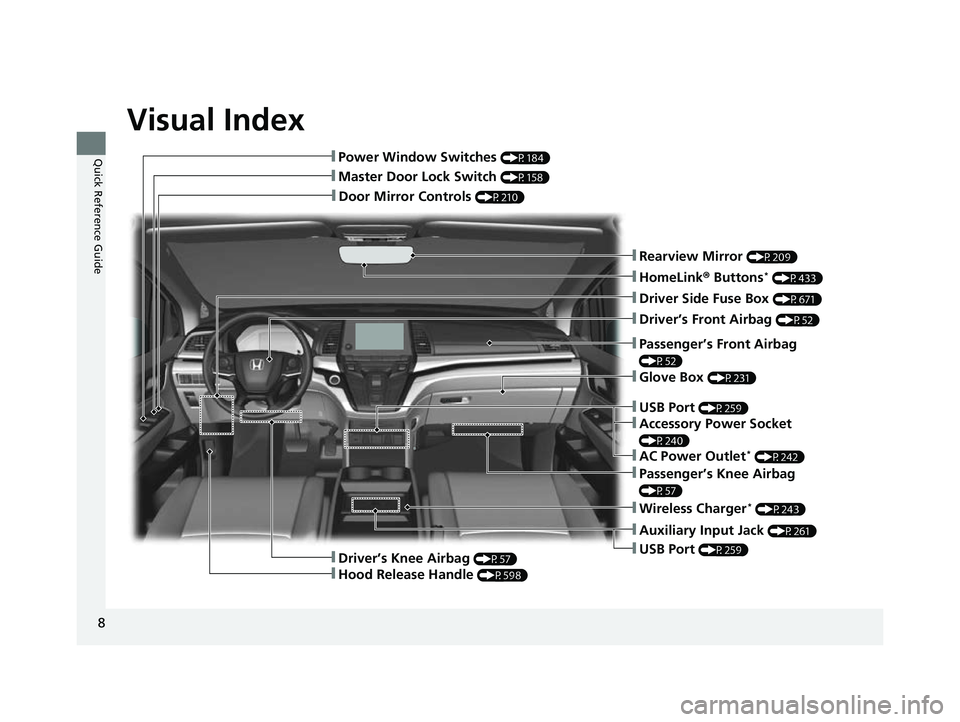
Visual Index
8
Quick Reference Guide
❚Door Mirror Controls (P210)
❚Master Door Lock Switch (P158)
❚Power Window Switches (P184)
❚Rearview Mirror (P209)
❚Driver Side Fuse Box (P671)
❚Glove Box (P231)
❚Driver’s Front Airbag (P52)
❚Passenger’s Knee Airbag
(P57)
❚Auxiliary Input Jack (P261)
❚USB Port (P259)
❚Passenger’s Front Airbag
(P52)
❚HomeLink® Buttons* (P433)
❚Wireless Charger* (P243)
❚Driver’s Knee Airbag (P57)
❚Hood Release Handle (P598)
❚USB Port (P259)
❚Accessory Power Socket
(P240)
❚AC Power Outlet* (P242)
23 US ODYSSEY-31THR6500.book 8 ページ 2022年1月24日 月曜日 午前11時35分
Page 25 of 707
23
Quick Reference Guide
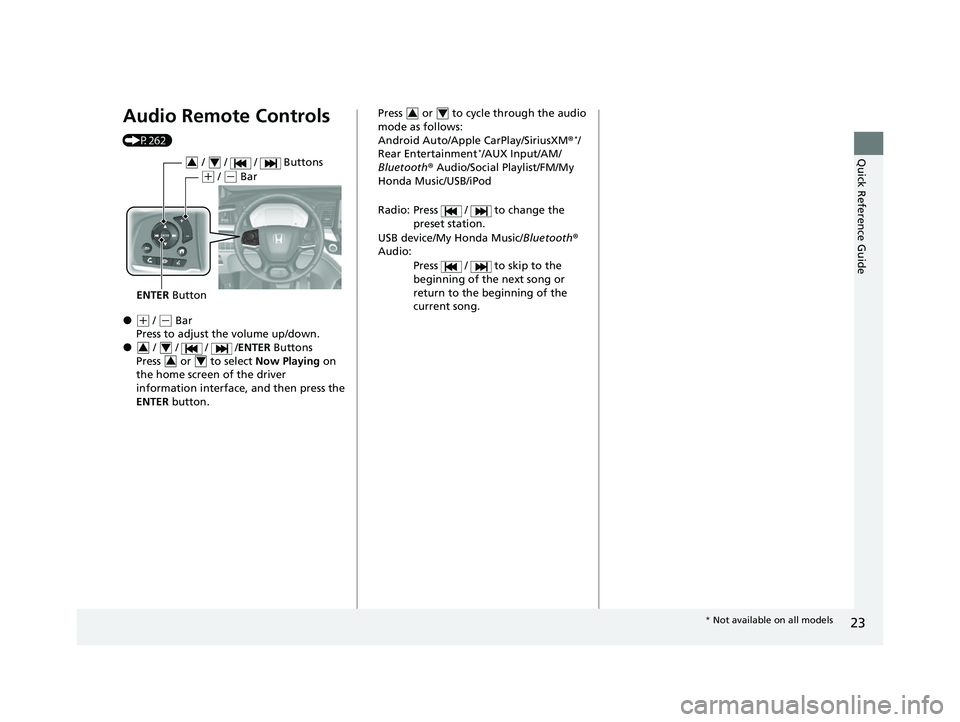
Audio Remote Controls
(P262)
●(+ / (- Bar
Press to adjust the volume up/down.
● / / / /ENTER Buttons
Press or to select Now Playing on
the home screen of the driver
information interface, and then press the
ENTER button.
ENTER Button
/ / / Buttons34
(+ / (- Bar
3434
Press or to cycle through the audio
mode as follows:
Android Auto/Apple CarPlay/SiriusXM ®
*/
Rear Entertainment*/AUX Input/AM/
Bluetooth ® Audio/Social Playlist/FM/My
Honda Music/USB/iPod
Radio: Press / to change the preset station.
USB device/My Honda Music/ Bluetooth®
Audio:
Press / to skip to the
beginning of the next song or
return to the beginning of the
current song.
34
* Not available on all models
23 US ODYSSEY-31THR6500.book 23 ページ 2022年1月24日 月曜日 午前11時35分
Page 142 of 707
uuGauges and Driver Information Interface uDriver Information Interface
140
Instrument Panel
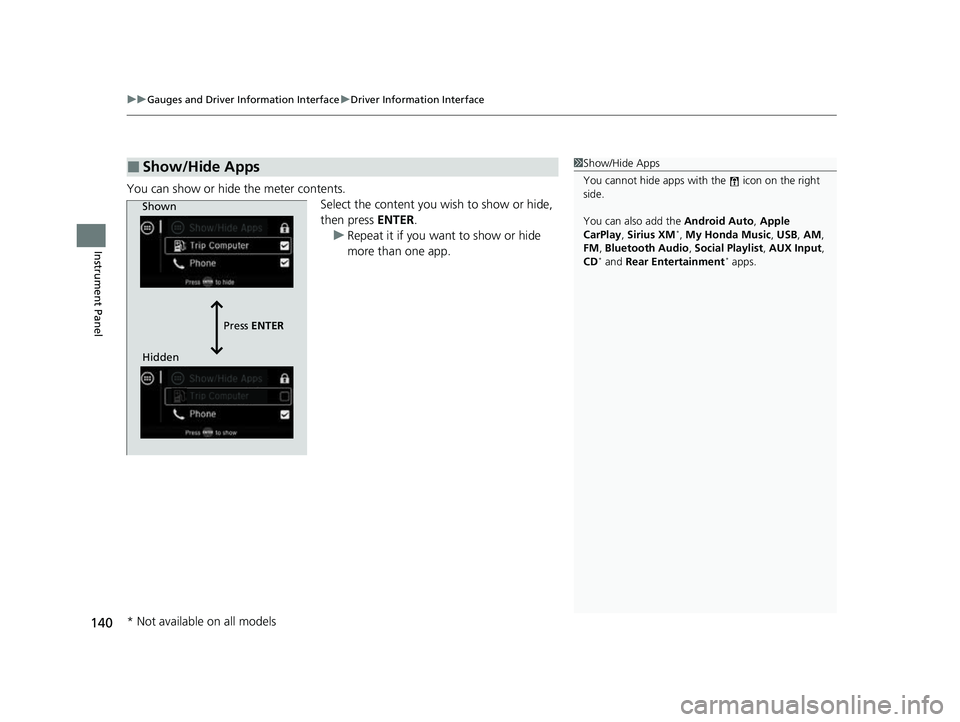
You can show or hide the meter contents.
Select the content you wish to show or hide,
then press ENTER.
u Repeat it if you want to show or hide
more than one app.
■Show/Hide Apps1Show/Hide Apps
You cannot hide apps with the icon on the right
side.
You can also add the Android Auto, Apple
CarPlay , Sirius XM
*, My Honda Music , USB, AM,
FM , Bluetooth Audio , Social Playlist , AUX Input ,
CD
* and Rear Entertainment* apps.
Shown
Press ENTER
Hidden
* Not available on all models
23 US ODYSSEY-31THR6500.book 140 ページ 2022年1月24日 月曜日 午前11時35分
Page 259 of 707
257
Features
This chapter describes how to operate technology features.
Audio System
About Your Audio System ................ 258
USB Ports ......................................... 259
Auxiliary Input Jack .......................... 261
Audio System Theft Protection ......... 261
Audio Remote Controls .................... 262
Audio System Basic Operation ........ 264
Audio/Information Screen ................ 265
System Updates ............................... 279
File Manager .................................... 285
Adjusting the Sound ........................ 291
Display Setup ................................... 292
Voice Control Operation .................. 294 Playing AM/FM Radio ....................... 297
Playing SiriusXM
® Radio*................. 300
Playing an iPod ................................ 310
Playing a USB Flash Drive ................. 313
Playing My Honda Music .................. 316
Playing Bluetooth ® Audio................. 320
Playing Social Playlist ........................ 322
HondaLink ®..................................... 324
Wi-Fi Connection ............................. 329
AT&T Hotspot
*................................ 330
Siri Eyes Free .................................... 331
Apple CarPlay .................................. 332
Android Auto
TM................................ 335 Audio Error Messages
...................... 339
General Information on the Audio System.. 341Blu-ray/DVD Rear Entertainment System*... 365Customized Features........................ 413
HomeLink ® Universal Transceiver*.. 432
Bluetooth® HandsFreeLink® ............. 435
CabinWatch ®
*................................... 460
CabinTalk ®*....................................... 461
* Not available on all models
23 US ODYSSEY-31THR6500.book 257 ページ 2022年1月24日 月曜日 午前11時35分
Page 263 of 707
261
uuAudio System uAuxiliary Input Jack
Features
Auxiliary Input Jack
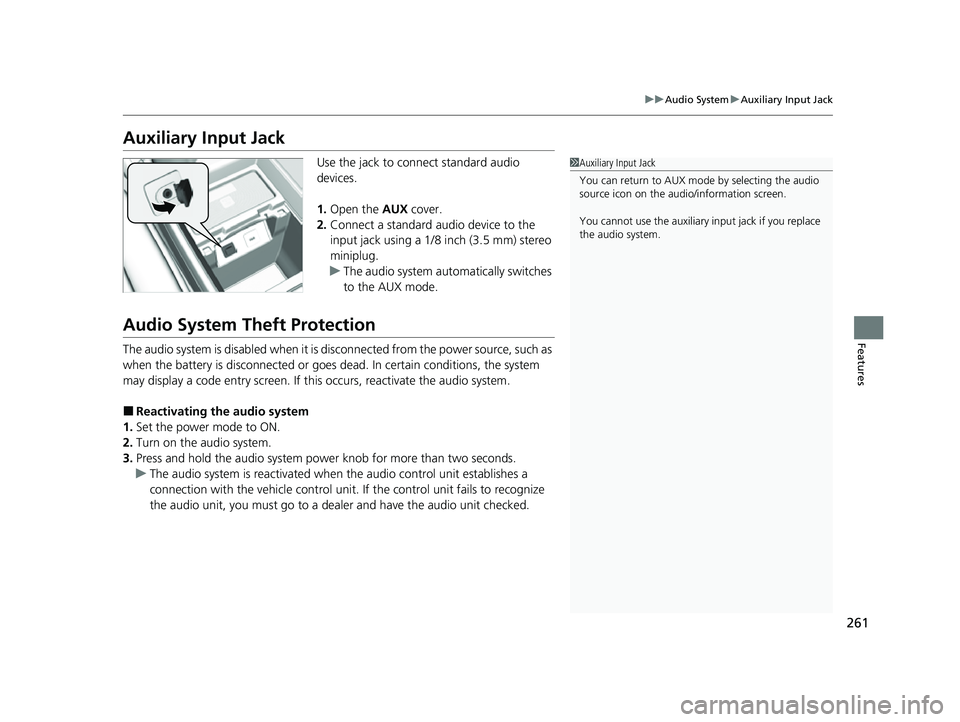
Use the jack to connect standard audio
devices.
1. Open the AUX cover.
2. Connect a standard audio device to the
input jack using a 1/8 inch (3.5 mm) stereo
miniplug.
u The audio system auto matically switches
to the AUX mode.
Audio System Theft Protection
The audio system is disabled when it is disconnected from the power source, such as
when the battery is disconnected or goes dead. In certain conditions, the system
may display a code entry screen. If this occurs, reactivate the audio system.
■Reactivating the audio system
1. Set the power mode to ON.
2. Turn on the audio system.
3. Press and hold the audio system power knob for more than two seconds.
u The audio system is reac tivated when the audio co ntrol unit establishes a
connection with the vehicl e control unit. If the control unit fails to recognize
the audio unit, you must go to a dealer and have the audio unit checked.
1 Auxiliary Input Jack
You can return to AUX mode by selecting the audio
source icon on the audio/information screen.
You cannot use the auxiliary input jack if you replace
the audio system.
23 US ODYSSEY-31THR6500.book 261 ページ 2022年1月24日 月曜日 午前11時35分
Page 265 of 707
263
uuAudio System uAudio Remote Controls
Features
/ / / /ENTER Buttons
• When selecting the audio mode
Press or to select Now Playing on the home screen of the driver
information interface, and then press the ENTER button.
Press or : To cycles through the audio modes as follows:
Android Auto/Apple CarPlay SiriusXM ®
*Rear Entertainment* AUX
Input AM Bluetooth ® AudioSocial Playlist FMMy Honda Music USB/
iPod
• When listening to the radio
Press : To select the next preset radio station.
Press : To select the previous preset radio station.
Press and hold : To select the next strong station.
Press and hold : To select the previous strong station.
• When listening to an iPod, USB flash drive, My Honda Music, or Bluetooth® Audio
Press : To skip to the next song.
Press : To go back to the beginning of the current or previous song.
• When listening to an iPod, USB flash drive, My Honda Music, Bluetooth® Audio,
or Apple CarPlay
Press and hold / : To move rapidly within a song.
34
34
34
* Not available on all models
23 US ODYSSEY-31THR6500.book 263 ページ 2022年1月24日 月曜日 午前11時35分
Page 268 of 707
266
uuAudio System Basic Operation uAudio/Information Screen
Features
■Phone
Displays the HFL information.
2 Bluetooth ® HandsFreeLink ® P. 435
■Trip Computer
Displays the trip computer information.
• Current Drive tab: Displays the current trip information.
• Trip A /Trip B tab: Displays information for the current and three previous drives.
The information is stored every time you reset Trip A/B.
To reset Trip A/B, select Reset.
To change the setting of how to reset Trip A/B, select Settings, then select Trip
A Reset Method or Trip B Reset Method .
■Clock
Displays the clock.
■System Updates
Updates the software versi on of the audio system.
2System Updates P. 279
■FM/AM/Sirius XM*/USB/Bluetooth Audio/AUX Input/My Honda Music/
Social Playlist
Displays the each audio information.
■Settings
Enters the customiz ing menu screen.
2Customized Features P. 413
* Not available on all models
23 US ODYSSEY-31THR6500.book 266 ページ 2022年1月24日 月曜日 午前11時35分
Page 369 of 707
367
uuBlu-ray/DVD Rear Entertainment System*uAuxiliary Console Panels
Features
Auxiliary Console Panels
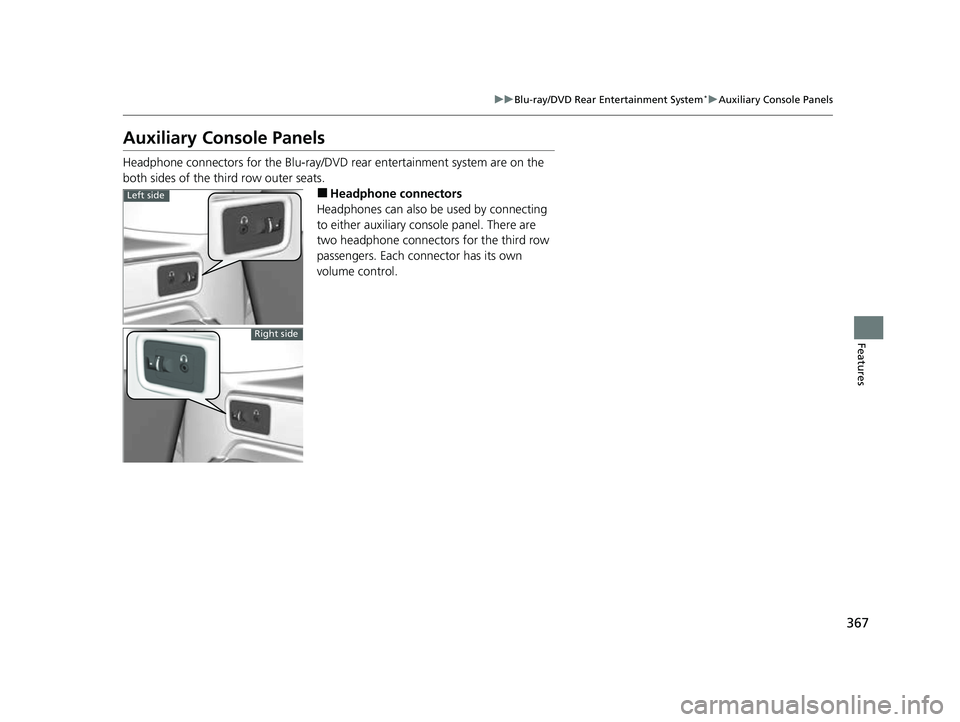
Headphone connectors for the Blu-ray/DV D rear entertainment system are on the
both sides of the third row outer seats.
■Headphone connectors
Headphones can also be used by connecting
to either auxiliary console panel. There are
two headphone connectors for the third row
passengers. Each connector has its own
volume control.Left side
Right side
23 US ODYSSEY-31THR6500.book 367 ページ 2022年1月24日 月曜日 午前11時35分
Page 698 of 707
Index
696
Index
Index
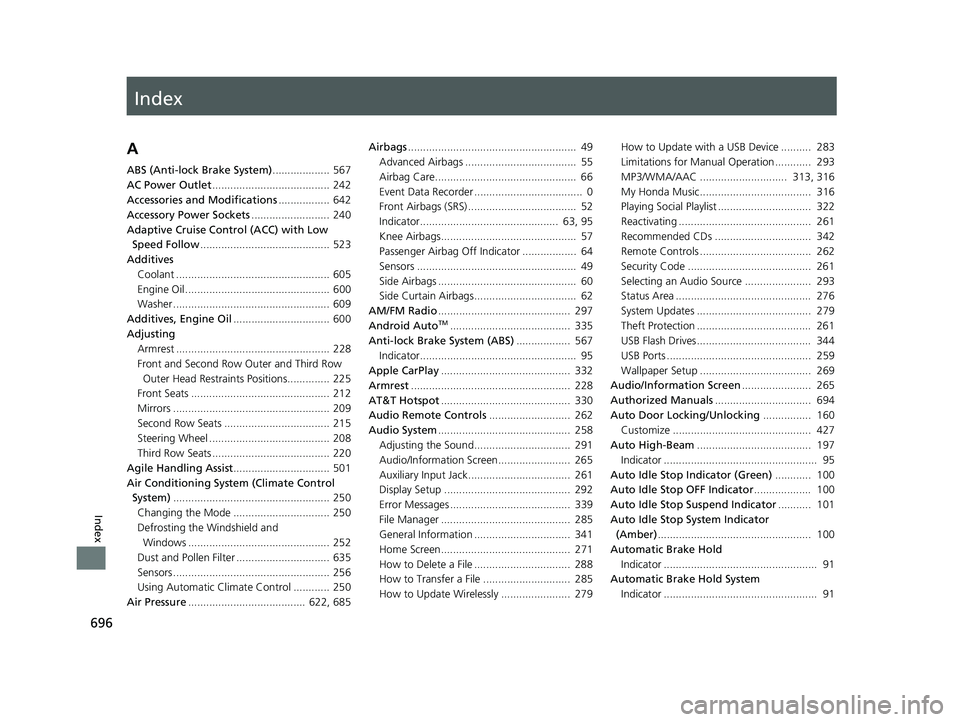
A
ABS (Anti-lock Brake System)................... 567
AC Power Outlet ....................................... 242
Accessories and Modifications ................. 642
Accessory Power Sockets .......................... 240
Adaptive Cruise Control (ACC) with Low Speed Follow ........................................... 523
Additives
Coolant ................................................... 605
Engine Oil ................................................ 600
Washer .................................................... 609
Additives, Engine Oil ................................ 600
Adjusting Armrest ................................................... 228
Front and Second Row Outer and Third Row Outer Head Restraints Positions.............. 225
Front Seats .............................................. 212
Mirrors .................................................... 209
Second Row Seats ................................... 215
Steering Wheel ........................................ 208
Third Row Seats ....................................... 220
Agile Handling Assist ................................ 501
Air Conditioning System (Climate Control System) .................................................... 250
Changing the Mode ................................ 250
Defrosting the Windshield and Windows ............................................... 252
Dust and Pollen Filter ............................... 635
Sensors .................................................... 256
Using Automatic Climate Control ............ 250
Air Pressure ....................................... 622, 685 Airbags
........................................................ 49
Advanced Airbags ..................................... 55
Airbag Care............................................... 66
Event Data Recorder .................................... 0
Front Airbags (SRS) .................................... 52
Indicator.............................................. 63, 95
Knee Airbags............................................. 57
Passenger Airbag Off Indicator .................. 64
Sensors ..................................................... 49
Side Airbags .............................................. 60
Side Curtain Airbags.................................. 62
AM/FM Radio ............................................ 297
Android Auto
TM........................................ 335
Anti-lock Brake System (ABS) .................. 567
Indicator.................................................... 95
Apple CarPlay ........................................... 332
Armrest ..................................................... 228
AT&T Hotspot ........................................... 330
Audio Remote Controls ........................... 262
Audio System ............................................ 258
Adjusting the Sound................................ 291
Audio/Information Screen........................ 265
Auxiliary Input Jack.................................. 261
Display Setup .......................................... 292
Error Messages ........................................ 339
File Manager ........................................... 285
General Information ................................ 341
Home Screen........................................... 271
How to Delete a File ................................ 288
How to Transfer a File ............................. 285
How to Update Wirelessly ....................... 279 How to Update with a USB Device .......... 283
Limitations for Manual Operation ............ 293
MP3/WMA/AAC ............................. 313, 316
My Honda Music..................................... 316
Playing Social Playlist ............................... 322
Reactivating ............................................ 261
Recommended CDs ................................ 342
Remote Controls ..................................... 262
Security Code ......................................... 261
Selecting an Audio Source ...................... 293
Status Area ............................................. 276
System Updates ...................................... 279
Theft Protection ...................................... 261
USB Flash Drives...................................... 344
USB Ports ................................................ 259
Wallpaper Setup ..................................... 269
Audio/Information Screen ....................... 265
Authorized Manuals ................................ 694
Auto Door Locking/Unlocking ................ 160
Customize .............................................. 427
Auto High-Beam ...................................... 197
Indicator ................................................... 95
Auto Idle Stop Indicator (Green) ............ 100
Auto Idle Stop OFF Indicator ................... 100
Auto Idle Stop Suspend Indicator ........... 101
Auto Idle Stop System Indicator (Amber) ................................................... 100
Automatic Brake Hold
Indicator ................................................... 91
Automatic Brake Hold System Indicator ................................................... 91
23 US ODYSSEY-31THR6500.book 696 ページ 2022年1月24日 月曜日 午前11時35分
Page 699 of 707
697
Index
Automatic Operation (automatic lighting control) ................................................... 193
Automatic Transmission .......................... 483
Creeping......................................... 481, 483
Fluid ....................................................... 607
Kickdown ............................................... 483
Shift Operation ....................................... 486
Shifting ................................................... 484
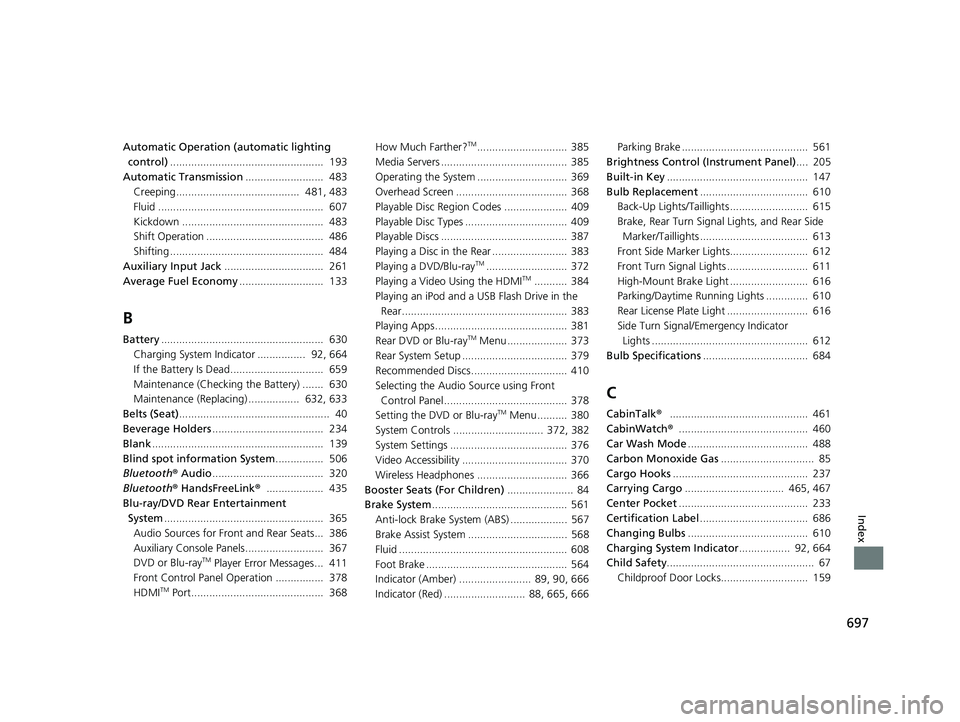
Auxiliary Input Jack ................................. 261
Average Fuel Economy ............................ 133
B
Battery...................................................... 630
Charging System Indicator ................ 92, 664
If the Battery Is Dead............................... 659
Maintenance (Checking the Battery) ....... 630
Maintenance (Replacing) ................. 632, 633
Belts (Seat) .................................................. 40
Beverage Holders ..................................... 234
Blank ......................................................... 139
Blind spot information System ................ 506
Bluetooth ® Audio ..................................... 320
Bluetooth ® HandsFreeLink ®................... 435
Blu-ray/DVD Rear Entertainment System ..................................................... 365
Audio Sources for Front and Rear Seats... 386
Auxiliary Console Panels.......................... 367
DVD or Blu-ray
TM Player Error Messages... 411
Front Control Panel Operation ................ 378
HDMI
TM Port............................................ 368 How Much Farther?
TM.............................. 385
Media Servers .......................................... 385
Operating the System .............................. 369
Overhead Screen ..................................... 368
Playable Disc Region Codes ..................... 409
Playable Disc Types .................................. 409
Playable Discs .......................................... 387
Playing a Disc in the Rear ......................... 383
Playing a DVD/Blu-ray
TM........................... 372
Playing a Video Using the HDMITM........... 384
Playing an iPod and a USB Flash Drive in the
Rear....................................................... 383
Playing Apps ............................................ 381
Rear DVD or Blu-ray
TM Menu .................... 373
Rear System Setup ................................... 379
Recommended Discs ................................ 410
Selecting the Audio Source using Front
Control Panel......................................... 378
Setting the DVD or Blu-ray
TM Menu .......... 380
System Controls .............................. 372, 382
System Settings ....................................... 376
Video Accessibility ................................... 370
Wireless Headphones .............................. 366
Booster Seats (For Children) ...................... 84
Brake System ............................................. 561
Anti-lock Brake System (ABS) ................... 567
Brake Assist System ................................. 568
Fluid ........................................................ 608
Foot Brake ............................................... 564
Indicator (Amber) ........................ 89, 90, 666
Indicator (Red) ........................... 88, 665, 666 Parking Brake .......................................... 561
Brightness Control (Instrument Panel) .... 205
Built-in Key ............................................... 147
Bulb Replacement .................................... 610
Back-Up Lights/Taillights .......................... 615
Brake, Rear Turn Signal Lights, and Rear Side Marker/Taillights .................................... 613
Front Side Marker Lights.......................... 612
Front Turn Signal Lights ........................... 611
High-Mount Brake Light .......................... 616
Parking/Daytime Running Lights .............. 610
Rear License Plate Light ........................... 616
Side Turn Signal/Emergency Indicator Lights .................................................... 612
Bulb Specifications ................................... 684
C
CabinTalk®.............................................. 461
CabinWatch ®........................................... 460
Car Wash Mode ........................................ 488
Carbon Monoxide Gas ............................... 85
Cargo Hooks ............................................. 237
Carrying Cargo ................................. 465, 467
Center Pocket ........................................... 233
Certification Label .................................... 686
Changing Bulbs ........................................ 610
Charging System Indicator ................. 92, 664
Child Safety ................................................. 67
Childproof Door Locks............................. 159
23 US ODYSSEY-31THR6500.book 697 ページ 2022年1月24日 月曜日 午前11時35分